| 🔢 Numeric ID (`facebookId`) |
🏷️ Object type (`type`) |
🏢 Classic Page ID (`pageId`) |
| 👤 Profile ID (`profileId`) |
👥 Group ID (`groupId`) |
📝 Post ID + story ID (`postId`, `storyId`) |
| 🎬 Video / reel ID (`videoId`) |
🖼️ Photo + album ID (`photoId`, `albumId`) |
📅 Event / hashtag ID (`eventId`, `hashtagId`) |
| 🙋 Owner ID, name, username |
🔤 Username (vanity) |
📛 Name |
| ✅ Verified badge (`isVerified`) |
📄 Page or person (`isPage`) |
🗂️ Category |
| 📈 Followers, talking about, were here |
🖼️ Profile picture + cover photo |
📢 Active ads in the Ad Library (add-on) |
| 🔗 Canonical URL + link by ID (`idUrl`) |
↪️ Where a share link or old username led (`resolvedUrl`) |
🧾 Status + reason for every input |
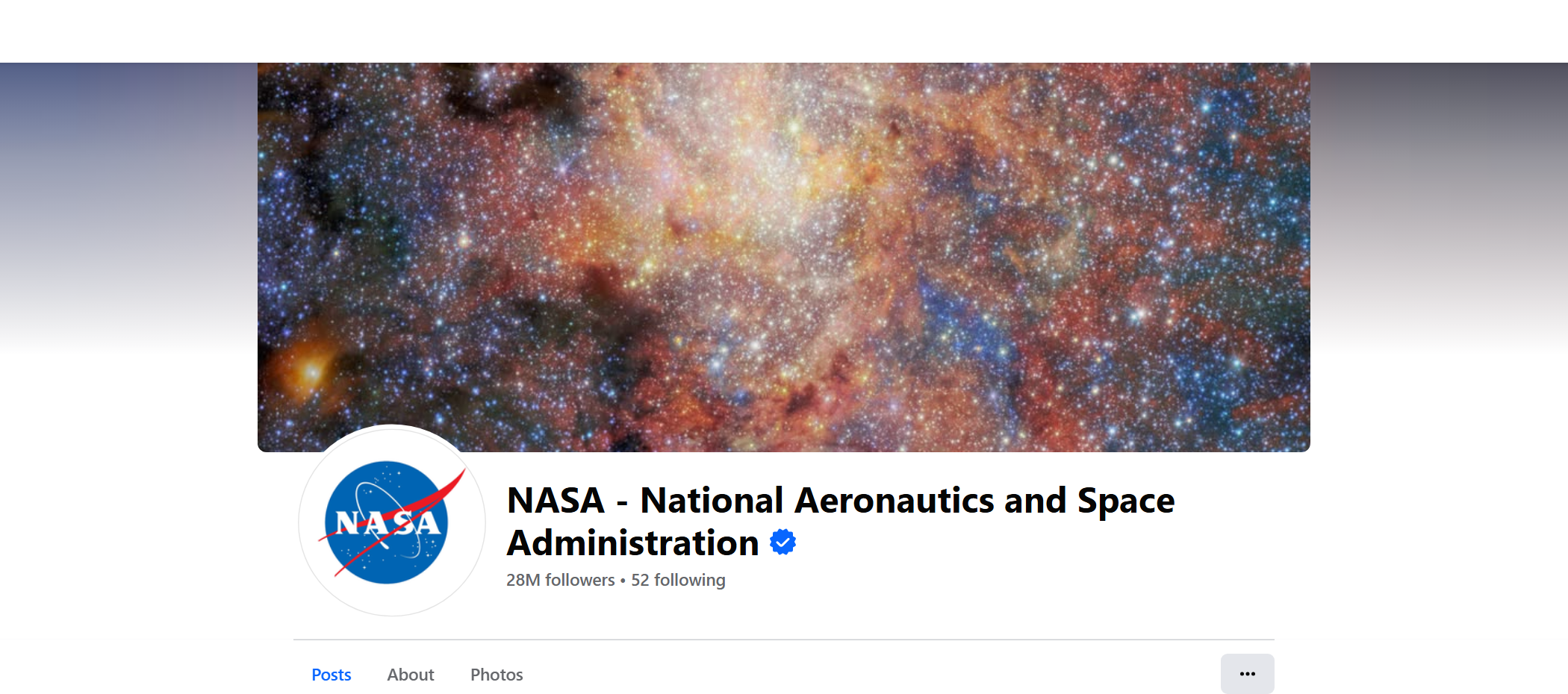
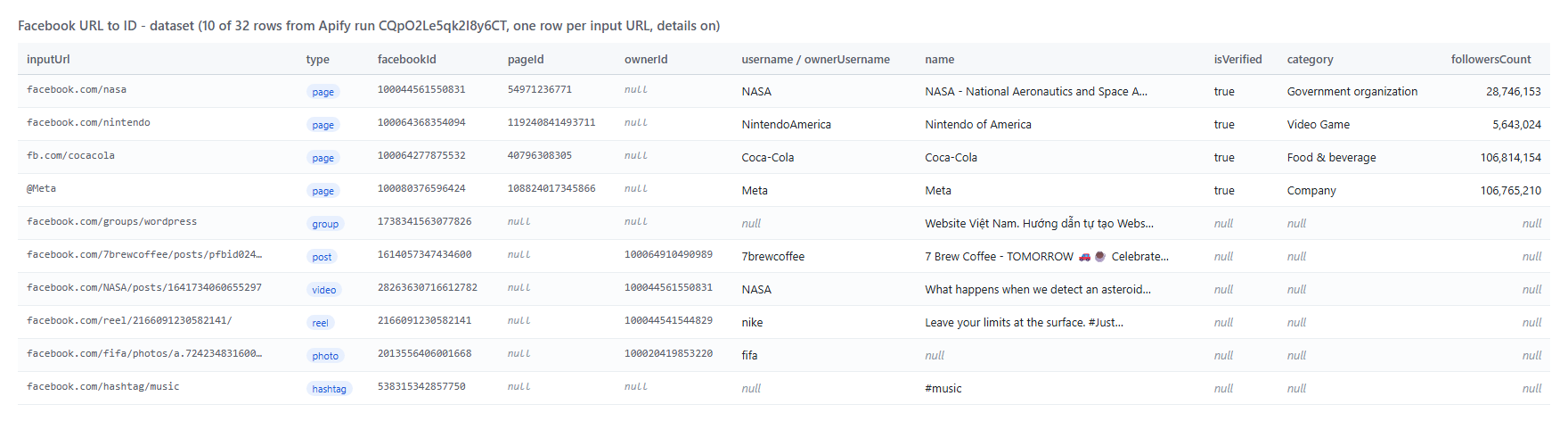
On a test run of 32 inputs of every kind (run `CQpO2Le5qk2I8y6CT`), 29 resolved in 5.8 seconds: every row had its numeric ID and type, every Page and profile its classic Page ID, verified badge, category and follower count, and every post, video, reel and photo its owner ID and owner name.
### How to scrape Facebook IDs with Facebook URL to ID
1. [Create a free Apify account](https://console.apify.com/sign-up). It includes $5 of monthly credit and needs no card.
2. Open [Facebook URL to ID](https://apify.com/TopApi/facebook-url-to-id) and click **Try for free**.
3. Paste your links into **Facebook URLs** (or a link to a text/CSV file of them), and names, @handles or numeric IDs into **Vanity names, @handles or numeric ids**.
4. Click **Start**. Rows appear in the dataset as each batch resolves.
5. Open the **Storage** tab and **Export** as JSON, CSV or Excel, or let a schedule run it for you.
### ⬇️ Input
| Parameter | Type | Description |
|---|---|---|
| **🔍 What to resolve** | | |
| `fbUrls` | List | Facebook URLs, one per line, or a remote text/CSV file of them. The same field name as Apify's own Facebook URL to ID, so saved API calls keep working. `startUrls` and `urls` are accepted too. |
| `ids` | List | Vanity names (`cocacola`), @handles (`@Meta`) or numeric IDs (`100044561550831`). |
| **🎯 What to look up** | | |
| `fetchDetails` | Boolean | Names, usernames, classic Page ID, Page or person, verified badge, followers, owners. Default `true`. Off: IDs printed in the URL are read without a request (the cheaper rate). |
| `resolveFromUrlOnly` | Boolean | Never contact Facebook; only IDs printed in the URL. Default `false`. |
| `includeCategory` | Boolean | Also read the Page category. Default `true`. |
| **✂️ Refine results** | | |
| `types` | Select (multi) | Keep only these types: Pages, personal profiles, groups, group posts, posts, videos, reels, photos, albums, events, hashtags. |
| `verifiedOnly` | Boolean | Pages and profiles with the verified badge only. |
| `minFollowers` | Integer | Pages and profiles with at least this many followers. |
| `dedupeById` | Boolean | One row per Facebook object when several inputs lead to the same one. |
| **➕ Extra data** | | |
| `checkAdsLibrary` | Boolean | Pages: whether the Page runs ads now and how many, from the Meta Ad Library. Charged as **ad-library-check** ($0.001) per Page row that gets a count. |
| **🔁 Monitoring** | | |
| `monitorMode` | Boolean | Only inputs that are new or changed since the last run. Pair it with a daily schedule. |
| `monitorStoreName` | String | One name per list you watch. Default `facebook-url-to-id-monitor`. |
| **📦 Output** | | |
| `maxItems` | Integer | Stop after this many delivered IDs. `0` = every input. |
| `includeFailedRows` | Boolean | Write a free row for inputs without an ID (status + reason). Default `true`. |
| `compact` | Boolean | Nine core fields only, sized for AI agents and MCP. |
| **⚙️ Advanced** | | |
| `proxyConfiguration` | Proxy | Default: Apify's own connection first, the Apify proxy if Facebook refuses it, then RESIDENTIAL with a per-run cap. |
| `maxConcurrency` | Integer | Page reads in parallel (1-20, default 8). Lookups always go 15 URLs per Facebook request. |
#### Input JSON
```json
{
"fbUrls": [
{ "url": "https://www.facebook.com/nasa" },
{ "url": "https://www.facebook.com/NintendoAmerica/posts/pfbid02JESEPSvyiLGjvewuFYhviAwQjTdxZW1ZfnWTeCzxVWgZLT3xgoLHVDwvuenVRyKKl" },
{ "url": "https://www.facebook.com/share/r/17SLmK3Z9c/" }
],
"ids": ["@Meta", "2013556406001668"],
"fetchDetails": true
}
```
#### Paste whole URLs, names or IDs, in any mix
Tracking parameters (`?ref=`, `mibextid`, `rdid`, `__cft__`) are removed and mobile hosts are moved to www, so the same Page pasted three ways is looked up once. **Do:** `https://m.facebook.com/natgeo?ref=bookmarks`, `natgeo` or `@natgeo` · **Don't:** a Google or Instagram link (written as an `invalid` row, free).
#### Turn details off when your URLs already carry the ID
`profile.php?id=4`, `/groups/359370103235663/`, `/reel/2166091230582141/` or `/photo/?fbid=…` already contain their ID. With **Fetch details** off they are read without asking Facebook and charged at the cheaper **id-from-url** rate. Vanity names, `pfbid` posts and share links always need a lookup.
#### Use pageId for the Ad Library, facebookId for everything else
Since Facebook's new Pages layout every Page has two IDs. `facebookId` (= `profileId`) is the one `profile.php?id=` opens and most tools key on. `pageId` is the classic Page ID that the Ad Library, Business Manager and older integrations ask for. You get both, and `adLibraryUrl` links straight to the Page's ads.
### ⬆️ Output
Every input becomes one dataset item. Here is the table view of run `CQpO2Le5qk2I8y6CT`:
 A Page row as JSON (from the same run; the intro, picture and cover URLs are left out for length):
```json
{
"inputUrl": "https://www.facebook.com/nintendo",
"url": "https://www.facebook.com/nintendo",
"status": "ok",
"type": "page",
"facebookId": "100064368354094",
"profileId": "100064368354094",
"pageId": "119240841493711",
"username": "NintendoAmerica",
"name": "Nintendo of America",
"isPage": true,
"isVerified": true,
"category": "Video Game",
"followersCount": 5643024,
"talkingAboutCount": 72130,
"canonicalUrl": "https://www.facebook.com/NintendoAmerica/",
"resolvedUrl": "https://www.facebook.com/NintendoAmerica",
"idUrl": "https://www.facebook.com/profile.php?id=100064368354094",
"adLibraryUrl": "https://www.facebook.com/ads/library/?active_status=all&ad_type=all&country=ALL&view_all_page_id=119240841493711",
"resolvedBy": "route"
}
```
A post row: `"type": "post", "facebookId": "1614057347434600", "postId": "1614057347434600", "ownerId": "100064910490989", "ownerName": "7 Brew Coffee", "ownerUsername": "7brewcoffee"`. A missing handle: `"status": "notFound", "error": "Facebook: \"This content isn't available right now\" (removed, private or never existed)"`.
#### Fields
| Field | What it is | Fill on test runs |
|---|---|---|
| `facebookId`, `type`, `status` | The object's numeric ID, its type, ok / notFound / invalid / needsLookup / unreachable | 100% of ok rows (3 runs) |
| `pageId` | Classic Page ID (Pages and professional profiles) | 100% (10 of 10 accounts, 32-input run); 89% of 79 accounts on the 100-input run |
| `isVerified` | Verified badge | same as `pageId` |
| `followersCount`, `talkingAboutCount` | From the public Page | 100% (both runs) |
| `isPage`, `category`, `coverPhotoUrl` | From the full profile page | 100% on the 32-input run; 3% on the 100-input run (see Limits) |
| `username` | Vanity name (null when the account has none) | 80-97% |
| `description`, `imageUrl` | Intro and profile picture | 100% |
| `ownerId`, `ownerName` | Owner of posts, videos, reels, photos, albums | 100% (14 of 14) |
| `ownerUsername` | Owner's vanity name | 86% (owners without a vanity are null) |
| `groupId` | Groups and group posts | 100% of group rows |
| `postId`, `storyId` | Posts (pfbid resolved) | 100% / 80% |
| `canonicalUrl`, `idUrl`, `adLibraryUrl` | Links | 100% of Pages; `idUrl` 97% of all rows (hashtags have none) |
| `hasActiveAds`, `activeAdsCount` | Ad Library add-on | 10 of 10 Pages (run `ZxDbzfOeEzh428iWz`) |
| `monitorStatus`, `changedFields`, `previous` | Monitor mode only | on new / changed rows |
### How can I use Facebook ID data?
- 📢 **Ad and audience teams:** turn a list of competitor Page links into classic Page IDs for the Ad Library and Business Manager, and see who runs ads right now.
- 🗂️ **CRM and lead-list owners:** store the numeric ID next to each Facebook link so a renamed Page still matches.
- 🔁 **Data teams:** dedupe `/nintendo`, `m.facebook.com/NintendoAmerica` and `profile.php?id=100064368354094` into one ID.
- 🔎 **Social listening and research:** feed post, group and video IDs into other Facebook scrapers and APIs; expand share links to the real post and author.
- 🤖 **AI agents:** ask "what is the Facebook ID of …" through MCP and get a compact row back.
- 📈 **Brand monitoring:** schedule a list and get a row only when a Page is renamed, deleted or changes owner.
### How much does it cost to scrape Facebook IDs?
Facebook URL to ID is pay-per-result, with no start fee:
- **$2.60 per 1,000 IDs looked up** (`id-lookup`): any row Facebook was asked about (a username, pfbid post, share link, group name, numeric ID) or any row with details.
- **$0.45 per 1,000 IDs read from the URL** (`id-from-url`): Fetch details off and the ID already printed in the link.
- **$1.00 per 1,000 Ad Library checks** (`ad-library-check`), only when you turn it on and a count comes back.
Not found, private, invalid and filtered inputs are free.
| IDs looked up | Cost |
|---:|---:|
| 10 | $0.026 |
| 100 | $0.26 |
| 1,000 | $2.60 |
| 10,000 | $26.00 |
There is nothing else to pay: Apify platform usage is included in these prices. Measured: 100 inputs in 8.4 seconds and 981 inputs in 7 minutes on the default 256 MB.
### Integrations, API, scheduling & MCP
- **Schedules:** run Facebook URL to ID daily or weekly from the **Schedules** tab. With **Only new or changed rows** on, an unchanged list delivers nothing and costs nothing in events.
- **Webhooks:** fire a URL when a run finishes and push the IDs to your CRM, Slack or a sheet.
- **No-code:** Make, Zapier, n8n, Google Sheets, Airtable and Slack via [Apify integrations](https://docs.apify.com/integrations).
- **API:** call it from Node.js or Python with `apify-client`. Code is on the [API tab](https://apify.com/TopApi/facebook-url-to-id/api/python); see the [Apify API reference](https://docs.apify.com/api/v2).
- **MCP / AI agents:** connect Claude, Cursor or any MCP client through the [MCP tab](https://apify.com/TopApi/facebook-url-to-id/api/mcp).
### More Facebook scrapers
A Page row as JSON (from the same run; the intro, picture and cover URLs are left out for length):
```json
{
"inputUrl": "https://www.facebook.com/nintendo",
"url": "https://www.facebook.com/nintendo",
"status": "ok",
"type": "page",
"facebookId": "100064368354094",
"profileId": "100064368354094",
"pageId": "119240841493711",
"username": "NintendoAmerica",
"name": "Nintendo of America",
"isPage": true,
"isVerified": true,
"category": "Video Game",
"followersCount": 5643024,
"talkingAboutCount": 72130,
"canonicalUrl": "https://www.facebook.com/NintendoAmerica/",
"resolvedUrl": "https://www.facebook.com/NintendoAmerica",
"idUrl": "https://www.facebook.com/profile.php?id=100064368354094",
"adLibraryUrl": "https://www.facebook.com/ads/library/?active_status=all&ad_type=all&country=ALL&view_all_page_id=119240841493711",
"resolvedBy": "route"
}
```
A post row: `"type": "post", "facebookId": "1614057347434600", "postId": "1614057347434600", "ownerId": "100064910490989", "ownerName": "7 Brew Coffee", "ownerUsername": "7brewcoffee"`. A missing handle: `"status": "notFound", "error": "Facebook: \"This content isn't available right now\" (removed, private or never existed)"`.
#### Fields
| Field | What it is | Fill on test runs |
|---|---|---|
| `facebookId`, `type`, `status` | The object's numeric ID, its type, ok / notFound / invalid / needsLookup / unreachable | 100% of ok rows (3 runs) |
| `pageId` | Classic Page ID (Pages and professional profiles) | 100% (10 of 10 accounts, 32-input run); 89% of 79 accounts on the 100-input run |
| `isVerified` | Verified badge | same as `pageId` |
| `followersCount`, `talkingAboutCount` | From the public Page | 100% (both runs) |
| `isPage`, `category`, `coverPhotoUrl` | From the full profile page | 100% on the 32-input run; 3% on the 100-input run (see Limits) |
| `username` | Vanity name (null when the account has none) | 80-97% |
| `description`, `imageUrl` | Intro and profile picture | 100% |
| `ownerId`, `ownerName` | Owner of posts, videos, reels, photos, albums | 100% (14 of 14) |
| `ownerUsername` | Owner's vanity name | 86% (owners without a vanity are null) |
| `groupId` | Groups and group posts | 100% of group rows |
| `postId`, `storyId` | Posts (pfbid resolved) | 100% / 80% |
| `canonicalUrl`, `idUrl`, `adLibraryUrl` | Links | 100% of Pages; `idUrl` 97% of all rows (hashtags have none) |
| `hasActiveAds`, `activeAdsCount` | Ad Library add-on | 10 of 10 Pages (run `ZxDbzfOeEzh428iWz`) |
| `monitorStatus`, `changedFields`, `previous` | Monitor mode only | on new / changed rows |
### How can I use Facebook ID data?
- 📢 **Ad and audience teams:** turn a list of competitor Page links into classic Page IDs for the Ad Library and Business Manager, and see who runs ads right now.
- 🗂️ **CRM and lead-list owners:** store the numeric ID next to each Facebook link so a renamed Page still matches.
- 🔁 **Data teams:** dedupe `/nintendo`, `m.facebook.com/NintendoAmerica` and `profile.php?id=100064368354094` into one ID.
- 🔎 **Social listening and research:** feed post, group and video IDs into other Facebook scrapers and APIs; expand share links to the real post and author.
- 🤖 **AI agents:** ask "what is the Facebook ID of …" through MCP and get a compact row back.
- 📈 **Brand monitoring:** schedule a list and get a row only when a Page is renamed, deleted or changes owner.
### How much does it cost to scrape Facebook IDs?
Facebook URL to ID is pay-per-result, with no start fee:
- **$2.60 per 1,000 IDs looked up** (`id-lookup`): any row Facebook was asked about (a username, pfbid post, share link, group name, numeric ID) or any row with details.
- **$0.45 per 1,000 IDs read from the URL** (`id-from-url`): Fetch details off and the ID already printed in the link.
- **$1.00 per 1,000 Ad Library checks** (`ad-library-check`), only when you turn it on and a count comes back.
Not found, private, invalid and filtered inputs are free.
| IDs looked up | Cost |
|---:|---:|
| 10 | $0.026 |
| 100 | $0.26 |
| 1,000 | $2.60 |
| 10,000 | $26.00 |
There is nothing else to pay: Apify platform usage is included in these prices. Measured: 100 inputs in 8.4 seconds and 981 inputs in 7 minutes on the default 256 MB.
### Integrations, API, scheduling & MCP
- **Schedules:** run Facebook URL to ID daily or weekly from the **Schedules** tab. With **Only new or changed rows** on, an unchanged list delivers nothing and costs nothing in events.
- **Webhooks:** fire a URL when a run finishes and push the IDs to your CRM, Slack or a sheet.
- **No-code:** Make, Zapier, n8n, Google Sheets, Airtable and Slack via [Apify integrations](https://docs.apify.com/integrations).
- **API:** call it from Node.js or Python with `apify-client`. Code is on the [API tab](https://apify.com/TopApi/facebook-url-to-id/api/python); see the [Apify API reference](https://docs.apify.com/api/v2).
- **MCP / AI agents:** connect Claude, Cursor or any MCP client through the [MCP tab](https://apify.com/TopApi/facebook-url-to-id/api/mcp).
### More Facebook scrapers