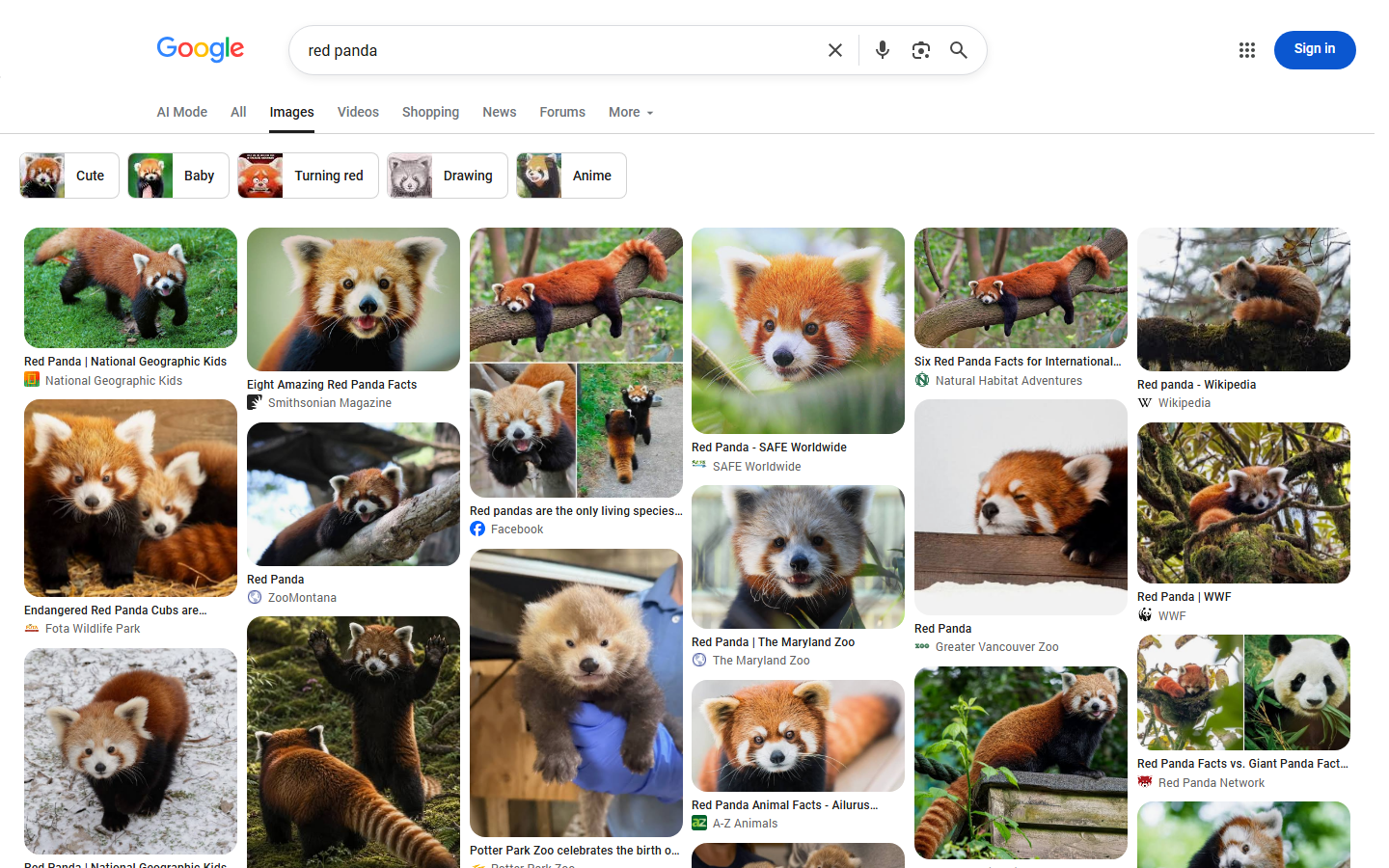
 - 🖼️ **Image URLs and sizes:** the image file Google links to, its width and height, plus Google's thumbnail and its size.
- 🔗 **Where each image lives:** source page URL, page title, site name and domain, Google's image id and a Google viewer link.
- 🎯 **Every Google filter:** size (incl. "larger than" and exact size), colour, type, file type, time, custom date range, usage rights, SafeSearch, site, country and language.
- ✂️ **Checks Google skips:** aspect ratio, exact size, minimum width/height and crawler-only links are checked on every image before it is delivered.
- 🛍️ **Shopping and licence data:** product name, seller, price, currency, rating and Shopping link on product images; licence provider, terms, credit and "get this image" link on licensable images.
- 🔁 **Monitor mode:** scheduled runs deliver only images earlier runs did not deliver.
- 🔌 **No login, no API key, no cookies.** Export to JSON, CSV or Excel, or use the API and MCP.
Also searched as: Google image search scraper, Google Images API, Google image downloader (links), image SERP scraper.
### What data can you get from Google Images?
| | | |
|---|---|---|
| 🖼️ Full-size image URL `imageUrl` | 📐 Width and height `imageWidth`, `imageHeight` | 🔍 Thumbnail URL and size |
| 📰 Page title `title` | 🔗 Source page `link` | 🏷️ Site name `source` |
| 🌐 Domain `domain` | 🆔 Google image id `imageId` | 🔢 Position and page |
| 💾 File size `fileSize` | 🎨 Dominant colour `dominantColor` | 🗂️ Format (from the URL) `format` |
| ℹ️ "About this image" link | 👁️ Google viewer link `googleUrl` | 🚫 Crawler-only flag |
| 🛍️ Product title, seller, description | 💲 Product price and currency | ⭐ Product rating |
| 🛒 Google Shopping link | 📜 Licence provider and terms link | ✍️ Licence credit, creators, copyright |
| ✅ Image link check (add-on) | 🧾 Content type and bytes (add-on) | 🗓️ Search, country, language, filters |
### How to scrape Google Images with Google Images Scraper
1. [Create a free Apify account](https://console.apify.com/sign-up) — $5 of monthly credit, no card needed.
2. Open [Google Images Scraper](https://apify.com/TopApi/google-images-scraper) and click **Try for free**.
3. Type your searches into **Search terms**, one per line (e.g. `red panda`, `modern kitchen`), or paste Google Images links.
4. Pick filters if you need them (size, colour, usage rights, country…) and set **Max images per search**.
5. Click **Start** and watch the images arrive in the dataset.
6. Export as JSON, CSV, Excel or HTML, or read the dataset through the API.
### ⬇️ Input
| Parameter | Type | Description |
|---|---|---|
| **🔍 What to scrape** | | |
| `queries` | list of strings | Searches, one per line. A Google Images link also works here. Empty = the sample search `red panda`. |
| `searchUrls` | list of strings | Pasted Google Images links; each keeps its own term, `tbs` filters, country, language and SafeSearch. |
| **🎯 Google filters** | | |
| `country` | select, default `us` | Google domain, `gl` and proxy country — 51 countries. |
| `language` | select, default `en` | Interface and result language (`hl`). |
| `imageSize` | select, default `any` | Large, medium, icon, "larger than" 400×300 … 70 MP, or exact size. |
| `exactWidth`, `exactHeight` | integer | Pixels for Size = Exactly. |
| `imageColor` | select | Full colour, black and white, transparent, or one of 12 colours. |
| `imageType` | select | Photo, face, clip art, line drawing, GIF / animated. |
| `fileType` | select | JPG, PNG, GIF, BMP, SVG, WEBP, ICO, RAW. |
| `timeRange` | select | Past hour, 24 hours, week, month, year. |
| `dateFrom`, `dateTo` | date | Custom date range (wins over `timeRange`). |
| `usageRights` | select | Creative Commons, or commercial & other licenses. |
| `safeSearch` | select, default `off` | Off, Google default, or filter explicit results. |
| `site` | string | Only images from one website, e.g. `wikipedia.org`. |
| **✂️ Refine results** | | |
| `aspectRatio` | select | Tall, square, wide, panoramic — checked on each image's size. |
| `minWidth`, `minHeight` | integer, default 0 | Drop smaller images. |
| `skipCrawlerOnlyImages` | boolean | Drop Facebook/Instagram crawler-only image links. |
| `removeDuplicatesAcrossQueries` | boolean | Deliver each image once per run. |
| **➕ Extra data** | | |
| `checkImages` | boolean | Check each image link (paid add-on, see pricing). |
| `expandWithRelatedSearches` | boolean | Also search Google's related-search chips when a search runs out. |
| `maxRelatedSearches` | integer, default 5 | Related searches per search (1-30). |
| `relatedSearchesExclude` | list | Skip related searches containing these words. |
| `includeRelatedQueries` | boolean | One free row per search with Google's related searches. |
| **🔁 Monitoring** | | |
| `monitorMode` | boolean | Deliver only images earlier runs did not deliver (first results page per search). |
| `monitorStoreName` | string | Named store that remembers delivered images. |
| **📦 Output** | | |
| `maxResultsPerQuery` | integer, default 100 | Images per search (1-1,000). |
| `maxResults` | integer, default 0 | Cap for the whole run; 0 = none. |
| `compact` | boolean | Core fields only, for AI / MCP pipelines. |
| **⚙️ Advanced** | | |
| `maxConcurrency` | integer, default 4 | Google requests in flight. |
| `tbs` | string | Extra Google `tbs` codes, e.g. `isz:l,ic:trans`. |
No field is required. Other Google Images actors' input names are accepted too (`query`, `q`, `keywords`, `maxImagesPerQuery`, `gl`, `hl`, `color`, `timePeriod`, `startUrls`, `onlyNew`, `monitorName`).
#### Input JSON
```json
{
"queries": ["red panda", "modern kitchen"],
"maxResultsPerQuery": 100,
"country": "us",
"imageSize": "large",
"usageRights": "creativeCommons",
"aspectRatio": "wide"
}
```
#### Put one search per line
Each line is one Google Images search, like typing it into images.google.com. `red panda, snow leopard` is one search for both words together; put `red panda` and `snow leopard` on separate lines to get two result sets.
#### Paste a link to keep Google's own filters
If you already filtered results in Google Images, copy the address bar and paste it into **Google Images links**. The term, `tbs` filters, country (`gl` or the Google domain), language and SafeSearch of that link are used as they are.
#### Some filters are checked here, not by Google
Google ignores its aspect-ratio filter (measured: the same 94 of 100 images with and without it) and applies exact size loosely (54% exact on a 1920×1080 test). So aspect ratio, exact size, "larger than" sizes and the minimum width/height are checked on each image's own width and height. Images that fail are not delivered and not charged.
### ⬆️ Output
- 🖼️ **Image URLs and sizes:** the image file Google links to, its width and height, plus Google's thumbnail and its size.
- 🔗 **Where each image lives:** source page URL, page title, site name and domain, Google's image id and a Google viewer link.
- 🎯 **Every Google filter:** size (incl. "larger than" and exact size), colour, type, file type, time, custom date range, usage rights, SafeSearch, site, country and language.
- ✂️ **Checks Google skips:** aspect ratio, exact size, minimum width/height and crawler-only links are checked on every image before it is delivered.
- 🛍️ **Shopping and licence data:** product name, seller, price, currency, rating and Shopping link on product images; licence provider, terms, credit and "get this image" link on licensable images.
- 🔁 **Monitor mode:** scheduled runs deliver only images earlier runs did not deliver.
- 🔌 **No login, no API key, no cookies.** Export to JSON, CSV or Excel, or use the API and MCP.
Also searched as: Google image search scraper, Google Images API, Google image downloader (links), image SERP scraper.
### What data can you get from Google Images?
| | | |
|---|---|---|
| 🖼️ Full-size image URL `imageUrl` | 📐 Width and height `imageWidth`, `imageHeight` | 🔍 Thumbnail URL and size |
| 📰 Page title `title` | 🔗 Source page `link` | 🏷️ Site name `source` |
| 🌐 Domain `domain` | 🆔 Google image id `imageId` | 🔢 Position and page |
| 💾 File size `fileSize` | 🎨 Dominant colour `dominantColor` | 🗂️ Format (from the URL) `format` |
| ℹ️ "About this image" link | 👁️ Google viewer link `googleUrl` | 🚫 Crawler-only flag |
| 🛍️ Product title, seller, description | 💲 Product price and currency | ⭐ Product rating |
| 🛒 Google Shopping link | 📜 Licence provider and terms link | ✍️ Licence credit, creators, copyright |
| ✅ Image link check (add-on) | 🧾 Content type and bytes (add-on) | 🗓️ Search, country, language, filters |
### How to scrape Google Images with Google Images Scraper
1. [Create a free Apify account](https://console.apify.com/sign-up) — $5 of monthly credit, no card needed.
2. Open [Google Images Scraper](https://apify.com/TopApi/google-images-scraper) and click **Try for free**.
3. Type your searches into **Search terms**, one per line (e.g. `red panda`, `modern kitchen`), or paste Google Images links.
4. Pick filters if you need them (size, colour, usage rights, country…) and set **Max images per search**.
5. Click **Start** and watch the images arrive in the dataset.
6. Export as JSON, CSV, Excel or HTML, or read the dataset through the API.
### ⬇️ Input
| Parameter | Type | Description |
|---|---|---|
| **🔍 What to scrape** | | |
| `queries` | list of strings | Searches, one per line. A Google Images link also works here. Empty = the sample search `red panda`. |
| `searchUrls` | list of strings | Pasted Google Images links; each keeps its own term, `tbs` filters, country, language and SafeSearch. |
| **🎯 Google filters** | | |
| `country` | select, default `us` | Google domain, `gl` and proxy country — 51 countries. |
| `language` | select, default `en` | Interface and result language (`hl`). |
| `imageSize` | select, default `any` | Large, medium, icon, "larger than" 400×300 … 70 MP, or exact size. |
| `exactWidth`, `exactHeight` | integer | Pixels for Size = Exactly. |
| `imageColor` | select | Full colour, black and white, transparent, or one of 12 colours. |
| `imageType` | select | Photo, face, clip art, line drawing, GIF / animated. |
| `fileType` | select | JPG, PNG, GIF, BMP, SVG, WEBP, ICO, RAW. |
| `timeRange` | select | Past hour, 24 hours, week, month, year. |
| `dateFrom`, `dateTo` | date | Custom date range (wins over `timeRange`). |
| `usageRights` | select | Creative Commons, or commercial & other licenses. |
| `safeSearch` | select, default `off` | Off, Google default, or filter explicit results. |
| `site` | string | Only images from one website, e.g. `wikipedia.org`. |
| **✂️ Refine results** | | |
| `aspectRatio` | select | Tall, square, wide, panoramic — checked on each image's size. |
| `minWidth`, `minHeight` | integer, default 0 | Drop smaller images. |
| `skipCrawlerOnlyImages` | boolean | Drop Facebook/Instagram crawler-only image links. |
| `removeDuplicatesAcrossQueries` | boolean | Deliver each image once per run. |
| **➕ Extra data** | | |
| `checkImages` | boolean | Check each image link (paid add-on, see pricing). |
| `expandWithRelatedSearches` | boolean | Also search Google's related-search chips when a search runs out. |
| `maxRelatedSearches` | integer, default 5 | Related searches per search (1-30). |
| `relatedSearchesExclude` | list | Skip related searches containing these words. |
| `includeRelatedQueries` | boolean | One free row per search with Google's related searches. |
| **🔁 Monitoring** | | |
| `monitorMode` | boolean | Deliver only images earlier runs did not deliver (first results page per search). |
| `monitorStoreName` | string | Named store that remembers delivered images. |
| **📦 Output** | | |
| `maxResultsPerQuery` | integer, default 100 | Images per search (1-1,000). |
| `maxResults` | integer, default 0 | Cap for the whole run; 0 = none. |
| `compact` | boolean | Core fields only, for AI / MCP pipelines. |
| **⚙️ Advanced** | | |
| `maxConcurrency` | integer, default 4 | Google requests in flight. |
| `tbs` | string | Extra Google `tbs` codes, e.g. `isz:l,ic:trans`. |
No field is required. Other Google Images actors' input names are accepted too (`query`, `q`, `keywords`, `maxImagesPerQuery`, `gl`, `hl`, `color`, `timePeriod`, `startUrls`, `onlyNew`, `monitorName`).
#### Input JSON
```json
{
"queries": ["red panda", "modern kitchen"],
"maxResultsPerQuery": 100,
"country": "us",
"imageSize": "large",
"usageRights": "creativeCommons",
"aspectRatio": "wide"
}
```
#### Put one search per line
Each line is one Google Images search, like typing it into images.google.com. `red panda, snow leopard` is one search for both words together; put `red panda` and `snow leopard` on separate lines to get two result sets.
#### Paste a link to keep Google's own filters
If you already filtered results in Google Images, copy the address bar and paste it into **Google Images links**. The term, `tbs` filters, country (`gl` or the Google domain), language and SafeSearch of that link are used as they are.
#### Some filters are checked here, not by Google
Google ignores its aspect-ratio filter (measured: the same 94 of 100 images with and without it) and applies exact size loosely (54% exact on a 1920×1080 test). So aspect ratio, exact size, "larger than" sizes and the minimum width/height are checked on each image's own width and height. Images that fail are not delivered and not charged.
### ⬆️ Output
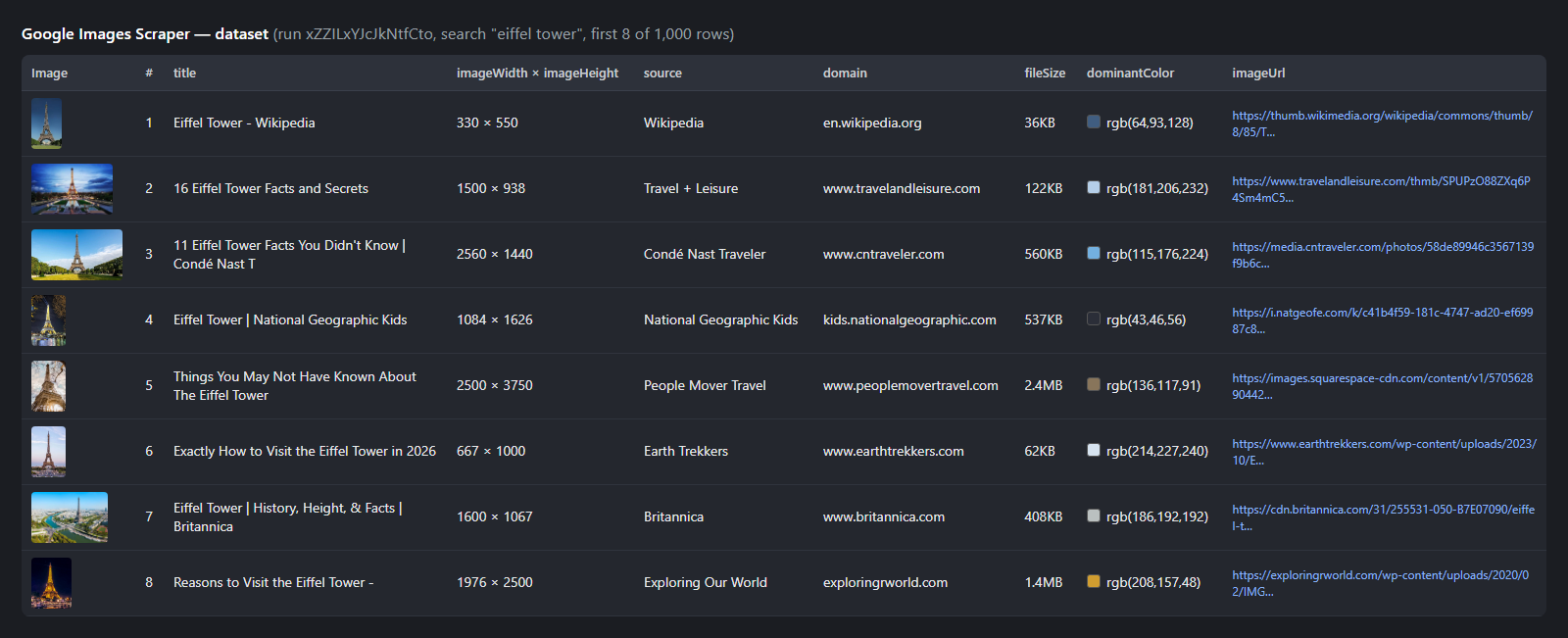 A real row (run `xZZILxYJcJkNtfCto`, search "eiffel tower"; product and licence fields are null on this image):
```json
{
"type": "image",
"query": "eiffel tower",
"position": 1,
"page": 1,
"title": "Eiffel Tower - Wikipedia",
"imageUrl": "https://thumb.wikimedia.org/wikipedia/commons/thumb/8/85/Tour_Eiffel_Wikimedia_Commons_%28cropped%29.jpg/330px-Tour_Eiffel_Wikimedia_Commons_%28cropped%29.jpg?utm_source=en.wikipedia.org&utm_campaign=parser&utm_content=thumbnail",
"imageWidth": 330,
"imageHeight": 550,
"thumbnailUrl": "https://encrypted-tbn0.gstatic.com/images?q=tbn:ANd9GcR7GJBXlQ3OF8bY82wTFblEORSQwA2Bvq5zTlMA8Q2Jxg&s",
"thumbnailWidth": 174,
"thumbnailHeight": 290,
"source": "Wikipedia",
"domain": "en.wikipedia.org",
"link": "https://en.wikipedia.org/wiki/Eiffel_Tower",
"imageId": "G2qeinFlUcWkQM",
"fileSize": "36KB",
"dominantColor": "rgb(64,93,128)",
"format": "jpeg",
"isProduct": false,
"isLicensable": false,
"country": "us",
"language": "en",
"scrapedAt": "2026-10-21T00:14:09.362Z"
}
```
On a licensable stock image the licence fields read, for example, `"licenseName": "iStock"`, `"licenseCredit": "©iStock, credit: K_Thalhofer"`, `"licenseCopyright": "©iStock"`, `"licenseUrl": "https://www.istockphoto.com/legal/license-agreement"`. On a product image: `"productTitle": "Cute Golden Retriever Puppy"`, `"productSeller": "Posterlounge"`, `"productPrice": 7.95`, `"productCurrency": "EUR"`.
#### Fields
Fill measured on run `xZZILxYJcJkNtfCto` (10 searches, 1,000 images, 604 different domains).
| Field | Type | Meaning | Filled |
|---|---|---|---|
| `imageUrl`, `imageWidth`, `imageHeight` | string, int | The image file Google links to and its size (median width 1,100 px) | 100% |
| `thumbnailUrl`, `thumbnailWidth`, `thumbnailHeight` | string, int | Google's thumbnail | 100% |
| `title`, `link` | string | Source page title and URL | 100% |
| `source`, `domain` | string | Site name and domain | 100% |
| `imageId`, `googleUrl`, `position`, `page` | string, int | Google's image id (stable across days), viewer link, rank, results page | 100% |
| `fileSize`, `dominantColor` | string | Google's size label ("36KB") and colour ("rgb(64,93,128)") | 100% |
| `aboutThisImageUrl` | string | Google's "About this image" page | 100% |
| `format` | string | From the URL's extension (null when the URL has none) | 91% |
| `imageUrlCrawlerOnly` | boolean | Facebook/Instagram crawler-only link | 100% (true on 1.5%) |
| `isProduct` + `productTitle`, `productSeller`, `productDescription`, `productPrice`, `productCurrency`, `productRating`, `productId`, `googleShoppingUrl` | mixed | Shopping data, only on product images | 3% of these searches; 12 of 100 on "nike air max 90" |
| `isLicensable` + `licenseName`, `licenseUrl`, `licenseAcquireUrl`, `licenseCreators`, `licenseCreatorsText`, `licenseCredit`, `licenseCopyright` | mixed | Licence data, only on licensable images | 8.5% of these searches; 99 of 100 on a stock-photo search |
| `imageAvailable`, `imageHttpStatus`, `imageContentType`, `imageBytes` | mixed | Image link check (add-on only) | 34 of 40 links served an image |
| `query`, `sourceQuery`, `country`, `language`, `filters`, `safeSearch`, `searchUrl`, `scrapedAt` | string | The search the row came from | 100% |
Product prices are in the seller's own currency (a US search mixes USD and EUR sellers).
### How can I use Google Images data?
- 🤖 **AI and ML datasets:** collect image URLs with sizes, titles and licences to build training or evaluation sets.
- 🔎 **Image SEO:** track which pages rank for your keywords in Google Images, at which position, with what file size.
- 🏷️ **Brand and product monitoring:** schedule monitor mode on your brand or product names and get new images as they appear.
- 🛍️ **E-commerce research:** see which sellers and prices Google shows on product images for a search.
- ⚖️ **Licensing and rights research:** find licensable stock images with their provider, credit and licence link, or filter to Creative Commons.
- 🎨 **Design and content research:** filter by colour, size, type and aspect ratio to shortlist visuals with their source pages.
### How much does it cost to scrape Google Images?
Google Images Scraper uses pay per event, with **no start fee and no per-search fee**:
| Event | Charged when | Price |
|---|---|---|
| `image` | once per image delivered to your dataset | $0.00022 ($0.22 per 1,000) |
| `image-check` | once per image whose link was checked and served an image (only with **Check image links**) | $0.001 |
| Run | Images (events) | Cost |
|---|---|---|
| 1 search × 50 images | 50 `image` | $0.011 |
| 10 searches × 100 images | 1,000 `image` | $0.22 |
| 1 search × 300 images | ~280-300 `image` (Google's own depth for the search) | ~$0.06-0.066 |
| 1 search × 40 images + image check | 40 `image` + up to 40 `image-check` | up to $0.049 |
Images that fail your filters, images an earlier monitor run already delivered, duplicates, related-search rows and searches that return nothing are not charged. Apify's free plan includes $5 of monthly credit.
### Integrations, API, scheduling & MCP
- **Schedules:** run daily or hourly from **Schedules** in Apify Console; with **Monitor mode** each run returns only new images.
- **Webhooks:** call your endpoint when a run finishes.
- **No-code:** Make, Zapier, n8n, Google Sheets, Airtable and Slack via [Apify integrations](https://docs.apify.com/integrations).
- **API:** start runs and read datasets from Node.js or Python with `apify-client` — code on the [API tab](https://apify.com/TopApi/google-images-scraper/api/python).
- **MCP / AI agents:** connect Claude, Cursor or any MCP client through the [MCP tab](https://apify.com/TopApi/google-images-scraper/api/mcp).
### More search and media scrapers
A real row (run `xZZILxYJcJkNtfCto`, search "eiffel tower"; product and licence fields are null on this image):
```json
{
"type": "image",
"query": "eiffel tower",
"position": 1,
"page": 1,
"title": "Eiffel Tower - Wikipedia",
"imageUrl": "https://thumb.wikimedia.org/wikipedia/commons/thumb/8/85/Tour_Eiffel_Wikimedia_Commons_%28cropped%29.jpg/330px-Tour_Eiffel_Wikimedia_Commons_%28cropped%29.jpg?utm_source=en.wikipedia.org&utm_campaign=parser&utm_content=thumbnail",
"imageWidth": 330,
"imageHeight": 550,
"thumbnailUrl": "https://encrypted-tbn0.gstatic.com/images?q=tbn:ANd9GcR7GJBXlQ3OF8bY82wTFblEORSQwA2Bvq5zTlMA8Q2Jxg&s",
"thumbnailWidth": 174,
"thumbnailHeight": 290,
"source": "Wikipedia",
"domain": "en.wikipedia.org",
"link": "https://en.wikipedia.org/wiki/Eiffel_Tower",
"imageId": "G2qeinFlUcWkQM",
"fileSize": "36KB",
"dominantColor": "rgb(64,93,128)",
"format": "jpeg",
"isProduct": false,
"isLicensable": false,
"country": "us",
"language": "en",
"scrapedAt": "2026-10-21T00:14:09.362Z"
}
```
On a licensable stock image the licence fields read, for example, `"licenseName": "iStock"`, `"licenseCredit": "©iStock, credit: K_Thalhofer"`, `"licenseCopyright": "©iStock"`, `"licenseUrl": "https://www.istockphoto.com/legal/license-agreement"`. On a product image: `"productTitle": "Cute Golden Retriever Puppy"`, `"productSeller": "Posterlounge"`, `"productPrice": 7.95`, `"productCurrency": "EUR"`.
#### Fields
Fill measured on run `xZZILxYJcJkNtfCto` (10 searches, 1,000 images, 604 different domains).
| Field | Type | Meaning | Filled |
|---|---|---|---|
| `imageUrl`, `imageWidth`, `imageHeight` | string, int | The image file Google links to and its size (median width 1,100 px) | 100% |
| `thumbnailUrl`, `thumbnailWidth`, `thumbnailHeight` | string, int | Google's thumbnail | 100% |
| `title`, `link` | string | Source page title and URL | 100% |
| `source`, `domain` | string | Site name and domain | 100% |
| `imageId`, `googleUrl`, `position`, `page` | string, int | Google's image id (stable across days), viewer link, rank, results page | 100% |
| `fileSize`, `dominantColor` | string | Google's size label ("36KB") and colour ("rgb(64,93,128)") | 100% |
| `aboutThisImageUrl` | string | Google's "About this image" page | 100% |
| `format` | string | From the URL's extension (null when the URL has none) | 91% |
| `imageUrlCrawlerOnly` | boolean | Facebook/Instagram crawler-only link | 100% (true on 1.5%) |
| `isProduct` + `productTitle`, `productSeller`, `productDescription`, `productPrice`, `productCurrency`, `productRating`, `productId`, `googleShoppingUrl` | mixed | Shopping data, only on product images | 3% of these searches; 12 of 100 on "nike air max 90" |
| `isLicensable` + `licenseName`, `licenseUrl`, `licenseAcquireUrl`, `licenseCreators`, `licenseCreatorsText`, `licenseCredit`, `licenseCopyright` | mixed | Licence data, only on licensable images | 8.5% of these searches; 99 of 100 on a stock-photo search |
| `imageAvailable`, `imageHttpStatus`, `imageContentType`, `imageBytes` | mixed | Image link check (add-on only) | 34 of 40 links served an image |
| `query`, `sourceQuery`, `country`, `language`, `filters`, `safeSearch`, `searchUrl`, `scrapedAt` | string | The search the row came from | 100% |
Product prices are in the seller's own currency (a US search mixes USD and EUR sellers).
### How can I use Google Images data?
- 🤖 **AI and ML datasets:** collect image URLs with sizes, titles and licences to build training or evaluation sets.
- 🔎 **Image SEO:** track which pages rank for your keywords in Google Images, at which position, with what file size.
- 🏷️ **Brand and product monitoring:** schedule monitor mode on your brand or product names and get new images as they appear.
- 🛍️ **E-commerce research:** see which sellers and prices Google shows on product images for a search.
- ⚖️ **Licensing and rights research:** find licensable stock images with their provider, credit and licence link, or filter to Creative Commons.
- 🎨 **Design and content research:** filter by colour, size, type and aspect ratio to shortlist visuals with their source pages.
### How much does it cost to scrape Google Images?
Google Images Scraper uses pay per event, with **no start fee and no per-search fee**:
| Event | Charged when | Price |
|---|---|---|
| `image` | once per image delivered to your dataset | $0.00022 ($0.22 per 1,000) |
| `image-check` | once per image whose link was checked and served an image (only with **Check image links**) | $0.001 |
| Run | Images (events) | Cost |
|---|---|---|
| 1 search × 50 images | 50 `image` | $0.011 |
| 10 searches × 100 images | 1,000 `image` | $0.22 |
| 1 search × 300 images | ~280-300 `image` (Google's own depth for the search) | ~$0.06-0.066 |
| 1 search × 40 images + image check | 40 `image` + up to 40 `image-check` | up to $0.049 |
Images that fail your filters, images an earlier monitor run already delivered, duplicates, related-search rows and searches that return nothing are not charged. Apify's free plan includes $5 of monthly credit.
### Integrations, API, scheduling & MCP
- **Schedules:** run daily or hourly from **Schedules** in Apify Console; with **Monitor mode** each run returns only new images.
- **Webhooks:** call your endpoint when a run finishes.
- **No-code:** Make, Zapier, n8n, Google Sheets, Airtable and Slack via [Apify integrations](https://docs.apify.com/integrations).
- **API:** start runs and read datasets from Node.js or Python with `apify-client` — code on the [API tab](https://apify.com/TopApi/google-images-scraper/api/python).
- **MCP / AI agents:** connect Claude, Cursor or any MCP client through the [MCP tab](https://apify.com/TopApi/google-images-scraper/api/mcp).
### More search and media scrapers
| 🔎 Bing Search Scraper — Bing web, news, images and videos | 🏨 Google Hotels Scraper — prices and booking sites | ⭐ Google Maps Reviews Scraper |
| 📍 Google Geocoding Scraper | 📸 Instagram Scraper — posts and reels | 🎵 TikTok Scraper |
| 🌐 Website Content Crawler — page text for RAG | 🗺️ Apple Maps Scraper | 👤 All TopApi Actors |