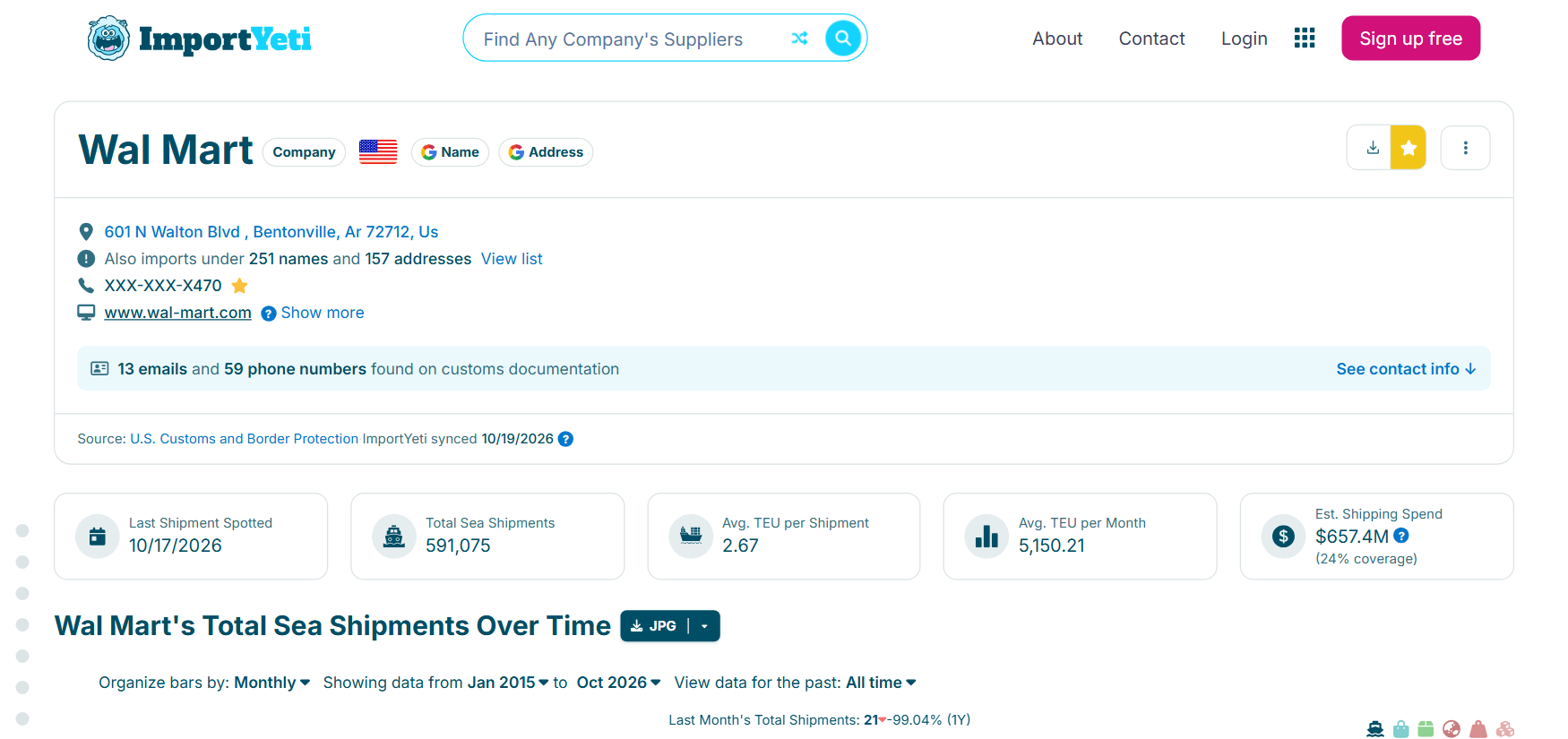
| 🏢 Name, type, aliases (`alsoKnownAs`) | 📍 Address, city, state, coordinates | 🌐 Website, other websites |
| 📦 Total and 12-month shipments | 📅 First and last shipment | 📈 Quarterly growth, monthly series |
| 🤝 Trading partners (`topTradingPartners`) | 🧾 Bills of lading (`recentBols`, `cifBols`) | 💲 CIF value, est. freight cost |
| 🏷️ HS chapters, headings, HTS codes | 🚢 Carriers (SCAC), container types | ⚓ Port-to-port routes (`portRoutes`) |
| 🔔 Notify parties | 🇨🇳 China shipments, UFLPA flag | ⭐ Lead score 0-100 |
On a 100-profile test run (search "lighting"), every row had a name, address, country, shipment totals, trading partners, bills of lading, HS codes, carriers and port routes; 96% had a city, 51% a website and 81% trademarks.
### How to scrape ImportYeti with ImportYeti Scraper
1. [Create a free Apify account](https://console.apify.com/sign-up) — $5 of monthly credit, no card needed.
2. Open [ImportYeti Scraper](https://apify.com/TopApi/importyeti-scraper) and click **Try for free**.
3. Type company, brand or product names into **Search terms**, or paste ImportYeti links, and set **Max profiles**.
4. Click **Start**. Profiles stream into the dataset as they are read.
5. Open the **Storage** tab and **Export** as JSON, CSV or Excel — or let a schedule run it for you.
### ⬇️ Input
| Parameter | Type | Description |
|---|---|---|
| **🔍 What to scrape** | | |
| `searchTerms` | List | Company, brand, supplier or product names, e.g. `porsche`, `hon hai`, `yoga mat` |
| `startUrls` / `urlsFromFile` | List / Text | ImportYeti company, supplier, notify-party, HS-code, tag, location, carrier, port, vessel or search links (or a .txt/.csv/Google Sheet with them) |
| `companies` / `suppliers` | List | Company or supplier slugs, e.g. `apple`, `foxconn-interconnect-technology` |
| `productKeywords` | List | Product words; each opens ImportYeti's product tag page |
| `hsCodes` | List | 2-, 4- or 6-digit HS codes, e.g. `84`, `8471`, `847130` |
| `addressSearch` | List | Address or industrial-zone text, e.g. `shenzhen longhua` |
| `locations` + `locationType` | List + Select | Country slugs (`vietnam`) for the supplier or the US-importer directory |
| `enrichProfiles` | Boolean | On (default): open each match as a full profile. Off: search rows only |
| **🎯 Filters** (applied by ImportYeti) | | |
| `entityType` | Select | Importers and suppliers (default), US importers only, or overseas suppliers only |
| `includeRelatedCompanies` | Boolean | Also match companies through their trademarks. Default `false` |
| `hsCountry` | Text | For HS-code pages: shipments from one origin country, e.g. `china` |
| **✂️ Refine results** (applied before anything is charged) | | |
| `mostRecentShipment` | Select | Last shipment within 1, 3, 6, 12 or 24 months. Default: any time |
| `minShipments` | Integer | Skip companies with fewer US sea shipments |
| `countries` | List | Two-letter country codes of the company or supplier |
| `withWebsiteOnly` | Boolean | Keep only profiles that list a website |
| `includeUnnamedPartners` | Boolean | Keep "Missing in source document" counterparties. Default `false` |
| **➕ Extra data** | | |
| `includeSummary` | Boolean | The profile row itself. Default `true` |
| `includeBols` / `includeTopPartners` / `includeRoutes` / `includeHsCodeRows` | Boolean | Flat rows, each charged as one **record** |
| `crawlPartners` | Boolean | Also open each named trading partner's profile (one level) |
| `includeContacts` | Boolean | Contact blocks as ImportYeti shows them (masked). Default `true` |
| `maxPartnersPerProfile` / `maxShipmentsPerProfile` | Integer | Defaults 50 / 100 |
| **🔁 Monitoring** | | |
| `monitorMode` + `monitorStoreName` | Boolean + Text | Return only new entities, entities with new shipments, and new bills of lading |
| `shipmentsSince` | Date | Only bills of lading on or after this day |
| **📦 Output** | | |
| `maxResults` | Integer | Profiles, explorer pages or search rows per run. Default `10`; `0` = as many as the run reaches |
| `maxResultsPerSearch` | Integer | Matches per search term. Empty = `maxResults` |
| `maxItems` | Integer | Cap on all charged rows. Default `1000` |
| `compact` | Boolean | Core profile fields only, for AI agents and MCP |
| `resumeCursor` | Text | Continue a run that stopped early |
| **⚙️ Advanced** | | |
| `proxyConfiguration`, `residentialFallback`, `maxConcurrency`, `requestTimeoutSecs` | | Defaults work; see the form |
#### Input JSON
```json
{
"searchTerms": ["lithium battery"],
"entityType": "company",
"mostRecentShipment": "6mo",
"minShipments": 50,
"maxResults": 100,
"includeBols": true
}
```
#### Search for what a company is called, not what it sells
ImportYeti's name search matches company names. **Do:** `"hubbell"`, `"porsche"`. For a product, use `productKeywords` (`"yoga mat"`), which opens ImportYeti's product tag page with its top importers and suppliers, or `hsCodes` (`"940360"`). A product word in `searchTerms` finds companies with that word in their name, e.g. "Lithium Battery" of Tampa.
#### Read 280 matches from one name
ImportYeti serves 140 matches per name and type. Leave `entityType` on both and set `maxResultsPerSearch` above 140: the importers and the suppliers are read separately, up to 280. Address search goes up to 10,000 matches.
### ⬆️ Output
Every company or supplier becomes one dataset item (`recordType: "profile"`). Here is the Profiles view of a 100-profile run:
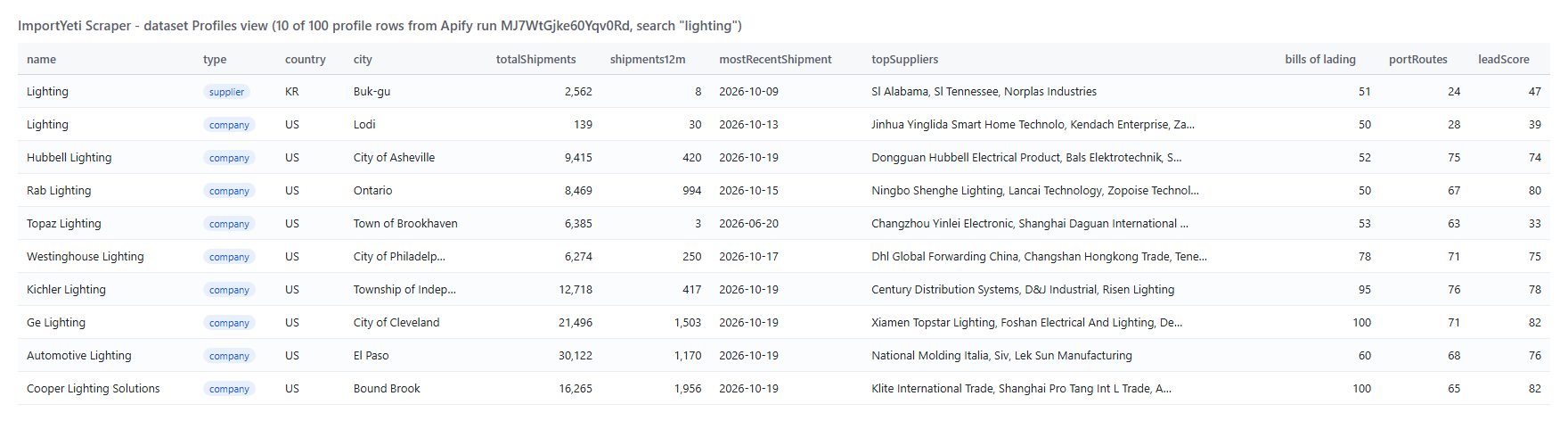 A profile row, shortened (arrays cut to one item):
```json
{
"recordType": "profile",
"name": "Rab Lighting",
"type": "company",
"countryCode": "US",
"address": "5678 E Ontario Mills Pkwy Ca91764, Ontario, Ca 91764, Us",
"city": "Ontario",
"state": "California",
"totalShipments": 8469,
"shipments12m": 994,
"mostRecentShipment": "2026-10-15",
"website": "rabweb.com",
"phone": "XXX-XXX-X600",
"topSuppliers": ["Ningbo Shenghe Lighting", "Lancai Technology"],
"topTradingPartners": [{ "name": "Ningbo Shenghe Lighting", "country": "China", "totalShipments": 705, "hsCodes": ["9405.19", "9405.42"] }],
"recentBols": [{ "date": "2026-10-15", "bolNumber": "DWCHSBKKS0026639", "counterparty": "Haisen Technology Thailand Co Lt", "product": "Smart Led Driver Series", "weight": 140 }],
"portRoutes": [{ "exitPort": "Yantian", "entryPort": "Newark, Nj", "shipments": 1475 }],
"leadScore": 80,
"detailUrl": "https://www.importyeti.com/company/rab-lighting"
}
```
A flat bill-of-lading row (`includeBols`):
```json
{
"recordType": "shipment", "targetName": "Hope Sofa", "arrivalDate": "2026-02-26",
"billOfLading": "GXPSSZX5SE27061", "masterBol": "ZIMUSHH32021054", "carrierScac": "ZIMU",
"counterpartyName": "2109971 Ontario Inc", "counterpartyCountry": "United States of America",
"productDescription": "Bed Bar Table Bar Table Top Barstool", "weightKg": 10053,
"quantity": "250", "quantityUnit": "CTN", "containerCount": 1,
"shippingRoute": "Asia,Pacific", "estFreightCostUsd": 2425.28
}
```
#### Fields
| Field | What it is | Fill (100 profiles) |
|---|---|---|
| `name`, `type`, `countryCode`, `address` | Company or supplier identity | 100% |
| `city` / `state` / `latitude` | Place from ImportYeti's location tree | 96% / 95% / 99% |
| `totalShipments`, `shipments12m`, `mostRecentShipment`, `quarterlyGrowth`, `timeSeries` | Volume and trend | 100% |
| `website` | Company website | 51% |
| `phone` | As ImportYeti shows it (masked) | 98% |
| `alsoKnownAs`, `otherAddresses`, `trademarks` | Aliases, other addresses, trademarks | 100%, 100%, 81% |
| `topTradingPartners` | Suppliers (or US customers), each with country, shipments, weight, TEU, HS codes, products, their other customers | 100% (median 45 per profile) |
| `recentBols` / `cifBols` | Bills of lading: newest 50 / 50 more with CIF value | 100% / 49% |
| `hsCodeSummary`, `htsCodes` | HS tree with shipments, weight, TEU; HTS lines with a sample BOL | 100%, 92% |
| `topCarriers`, `portRoutes`, `containers`, `containerLoad` | Shipping lines, port pairs (median 41), containers, FCL/LCL | 100% |
| `notifyPartyTable` | Customs brokers and forwarders notified | 100% |
| `manifestConfidentiality` | Periods the company had its manifests withheld | 75% |
| `chinaShipments12m`, `uflpa` | China exposure, UFLPA flag | 100% |
| `leadScore` | 0-100 from 12-month volume (50), last shipment within 90 days (20), growth (15), a website (15) | 100% |
Bill-of-lading rows (206 rows): date, BOL number, product, weight, quantity 100%; master BOL, carrier, counterparty 97-99%; containers and route 74%; freight estimate 70%; CIF value 26% (the CIF set only).
### How can I use ImportYeti data?
- 🎯 **Sales teams selling to importers** — list every US company importing a product, ranked by `shipments12m` and `leadScore`
- 🏭 **Sourcing managers** — see which factories a competitor buys from (`topTradingPartners`), then open each factory's other US customers
- 🔎 **Competitive intelligence** — track a rival's suppliers, volume and ports month by month with monitor mode
- 🚢 **Freight forwarders and customs brokers** — find shippers by route, carrier and notify party
- ⚖️ **Compliance teams** — screen suppliers for China exposure and the UFLPA flag
- 🤖 **AI agents** — call it through MCP with `compact` on for short rows
### How much does it cost to scrape ImportYeti?
ImportYeti Scraper is pay-per-result with no start fee:
| What you get | Price |
|---|---:|
| Company or supplier profile | **$0.90 per 1,000** |
| Search row (`enrichProfiles` off) | $0.54 per 1,000 |
| Flat row (bill of lading, partner, route, HS code) | $0.72 per 1,000 |
| Explorer page (HS code, tag, location, carrier, port, vessel) | $2.70 per 1,000 |
| Example | Cost |
|---|---:|
| 10 profiles | $0.009 |
| 100 profiles | $0.09 |
| 1,000 profiles | $0.90 |
| 10 profiles + their 500 bills of lading | $0.369 |
There is nothing else to pay: Apify platform usage is included in these prices. Filtered matches, duplicates, unchanged monitored companies, missing pages and pages that could not be read cost nothing. A 100-profile run took 87 seconds on the default 256 MB.
### Integrations, API, scheduling & MCP
- **Schedules:** run ImportYeti Scraper daily or weekly from the **Schedules** tab with `monitorMode` on to get only new shipments.
- **Webhooks:** fire a URL when a run finishes and push rows to your CRM, Slack or a sheet.
- **No-code:** Make, Zapier, n8n, Google Sheets, Airtable, Slack via [Apify integrations](https://docs.apify.com/integrations).
- **API:** call it from Node.js or Python with `apify-client` — code on the [API tab](https://apify.com/TopApi/importyeti-scraper/api/python).
- **MCP / AI agents:** connect Claude, Cursor or any MCP client through the [MCP tab](https://apify.com/TopApi/importyeti-scraper/api/mcp).
### More B2B and trade scrapers
A profile row, shortened (arrays cut to one item):
```json
{
"recordType": "profile",
"name": "Rab Lighting",
"type": "company",
"countryCode": "US",
"address": "5678 E Ontario Mills Pkwy Ca91764, Ontario, Ca 91764, Us",
"city": "Ontario",
"state": "California",
"totalShipments": 8469,
"shipments12m": 994,
"mostRecentShipment": "2026-10-15",
"website": "rabweb.com",
"phone": "XXX-XXX-X600",
"topSuppliers": ["Ningbo Shenghe Lighting", "Lancai Technology"],
"topTradingPartners": [{ "name": "Ningbo Shenghe Lighting", "country": "China", "totalShipments": 705, "hsCodes": ["9405.19", "9405.42"] }],
"recentBols": [{ "date": "2026-10-15", "bolNumber": "DWCHSBKKS0026639", "counterparty": "Haisen Technology Thailand Co Lt", "product": "Smart Led Driver Series", "weight": 140 }],
"portRoutes": [{ "exitPort": "Yantian", "entryPort": "Newark, Nj", "shipments": 1475 }],
"leadScore": 80,
"detailUrl": "https://www.importyeti.com/company/rab-lighting"
}
```
A flat bill-of-lading row (`includeBols`):
```json
{
"recordType": "shipment", "targetName": "Hope Sofa", "arrivalDate": "2026-02-26",
"billOfLading": "GXPSSZX5SE27061", "masterBol": "ZIMUSHH32021054", "carrierScac": "ZIMU",
"counterpartyName": "2109971 Ontario Inc", "counterpartyCountry": "United States of America",
"productDescription": "Bed Bar Table Bar Table Top Barstool", "weightKg": 10053,
"quantity": "250", "quantityUnit": "CTN", "containerCount": 1,
"shippingRoute": "Asia,Pacific", "estFreightCostUsd": 2425.28
}
```
#### Fields
| Field | What it is | Fill (100 profiles) |
|---|---|---|
| `name`, `type`, `countryCode`, `address` | Company or supplier identity | 100% |
| `city` / `state` / `latitude` | Place from ImportYeti's location tree | 96% / 95% / 99% |
| `totalShipments`, `shipments12m`, `mostRecentShipment`, `quarterlyGrowth`, `timeSeries` | Volume and trend | 100% |
| `website` | Company website | 51% |
| `phone` | As ImportYeti shows it (masked) | 98% |
| `alsoKnownAs`, `otherAddresses`, `trademarks` | Aliases, other addresses, trademarks | 100%, 100%, 81% |
| `topTradingPartners` | Suppliers (or US customers), each with country, shipments, weight, TEU, HS codes, products, their other customers | 100% (median 45 per profile) |
| `recentBols` / `cifBols` | Bills of lading: newest 50 / 50 more with CIF value | 100% / 49% |
| `hsCodeSummary`, `htsCodes` | HS tree with shipments, weight, TEU; HTS lines with a sample BOL | 100%, 92% |
| `topCarriers`, `portRoutes`, `containers`, `containerLoad` | Shipping lines, port pairs (median 41), containers, FCL/LCL | 100% |
| `notifyPartyTable` | Customs brokers and forwarders notified | 100% |
| `manifestConfidentiality` | Periods the company had its manifests withheld | 75% |
| `chinaShipments12m`, `uflpa` | China exposure, UFLPA flag | 100% |
| `leadScore` | 0-100 from 12-month volume (50), last shipment within 90 days (20), growth (15), a website (15) | 100% |
Bill-of-lading rows (206 rows): date, BOL number, product, weight, quantity 100%; master BOL, carrier, counterparty 97-99%; containers and route 74%; freight estimate 70%; CIF value 26% (the CIF set only).
### How can I use ImportYeti data?
- 🎯 **Sales teams selling to importers** — list every US company importing a product, ranked by `shipments12m` and `leadScore`
- 🏭 **Sourcing managers** — see which factories a competitor buys from (`topTradingPartners`), then open each factory's other US customers
- 🔎 **Competitive intelligence** — track a rival's suppliers, volume and ports month by month with monitor mode
- 🚢 **Freight forwarders and customs brokers** — find shippers by route, carrier and notify party
- ⚖️ **Compliance teams** — screen suppliers for China exposure and the UFLPA flag
- 🤖 **AI agents** — call it through MCP with `compact` on for short rows
### How much does it cost to scrape ImportYeti?
ImportYeti Scraper is pay-per-result with no start fee:
| What you get | Price |
|---|---:|
| Company or supplier profile | **$0.90 per 1,000** |
| Search row (`enrichProfiles` off) | $0.54 per 1,000 |
| Flat row (bill of lading, partner, route, HS code) | $0.72 per 1,000 |
| Explorer page (HS code, tag, location, carrier, port, vessel) | $2.70 per 1,000 |
| Example | Cost |
|---|---:|
| 10 profiles | $0.009 |
| 100 profiles | $0.09 |
| 1,000 profiles | $0.90 |
| 10 profiles + their 500 bills of lading | $0.369 |
There is nothing else to pay: Apify platform usage is included in these prices. Filtered matches, duplicates, unchanged monitored companies, missing pages and pages that could not be read cost nothing. A 100-profile run took 87 seconds on the default 256 MB.
### Integrations, API, scheduling & MCP
- **Schedules:** run ImportYeti Scraper daily or weekly from the **Schedules** tab with `monitorMode` on to get only new shipments.
- **Webhooks:** fire a URL when a run finishes and push rows to your CRM, Slack or a sheet.
- **No-code:** Make, Zapier, n8n, Google Sheets, Airtable, Slack via [Apify integrations](https://docs.apify.com/integrations).
- **API:** call it from Node.js or Python with `apify-client` — code on the [API tab](https://apify.com/TopApi/importyeti-scraper/api/python).
- **MCP / AI agents:** connect Claude, Cursor or any MCP client through the [MCP tab](https://apify.com/TopApi/importyeti-scraper/api/mcp).
### More B2B and trade scrapers