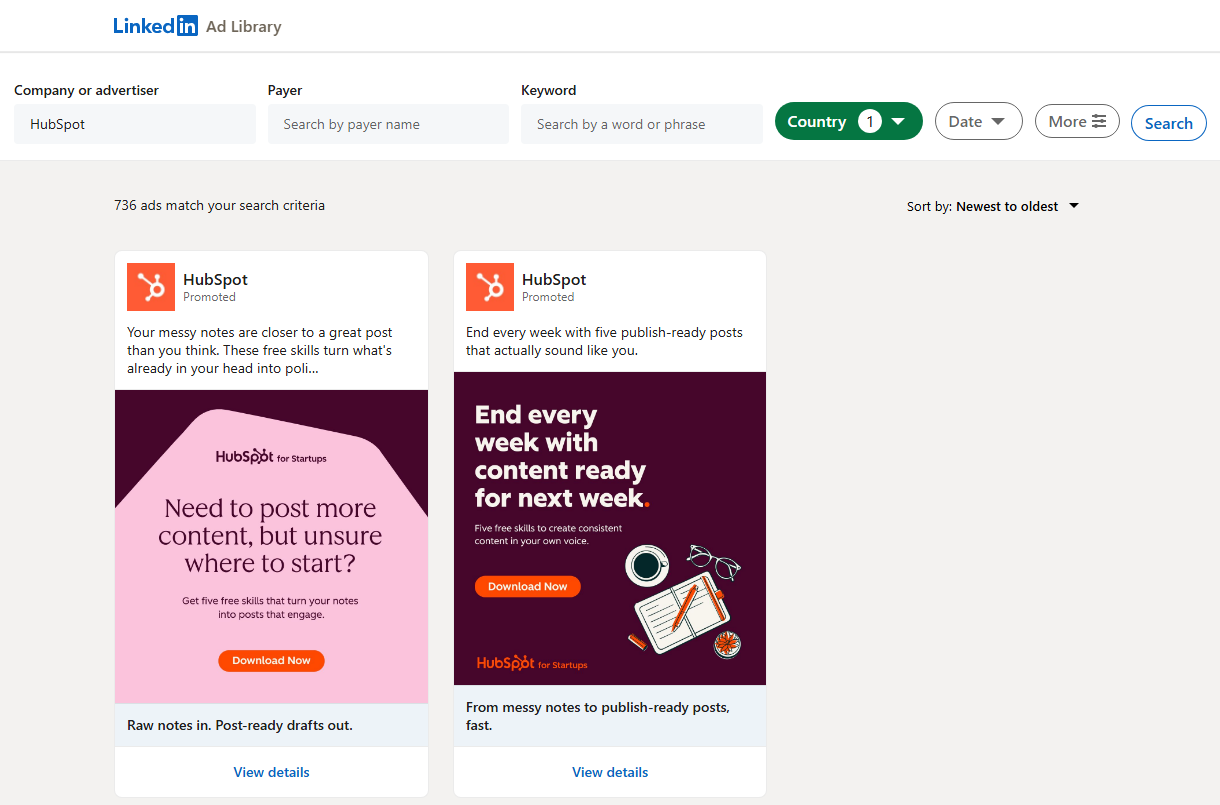
 - **Every ad format:** single image, video, carousel, document, event, message / InMail, text, article, job and follow-company ads, each tagged with a `format` value; thought-leader ads (a member's post run as an ad) carry `isThoughtLeaderAd: true`
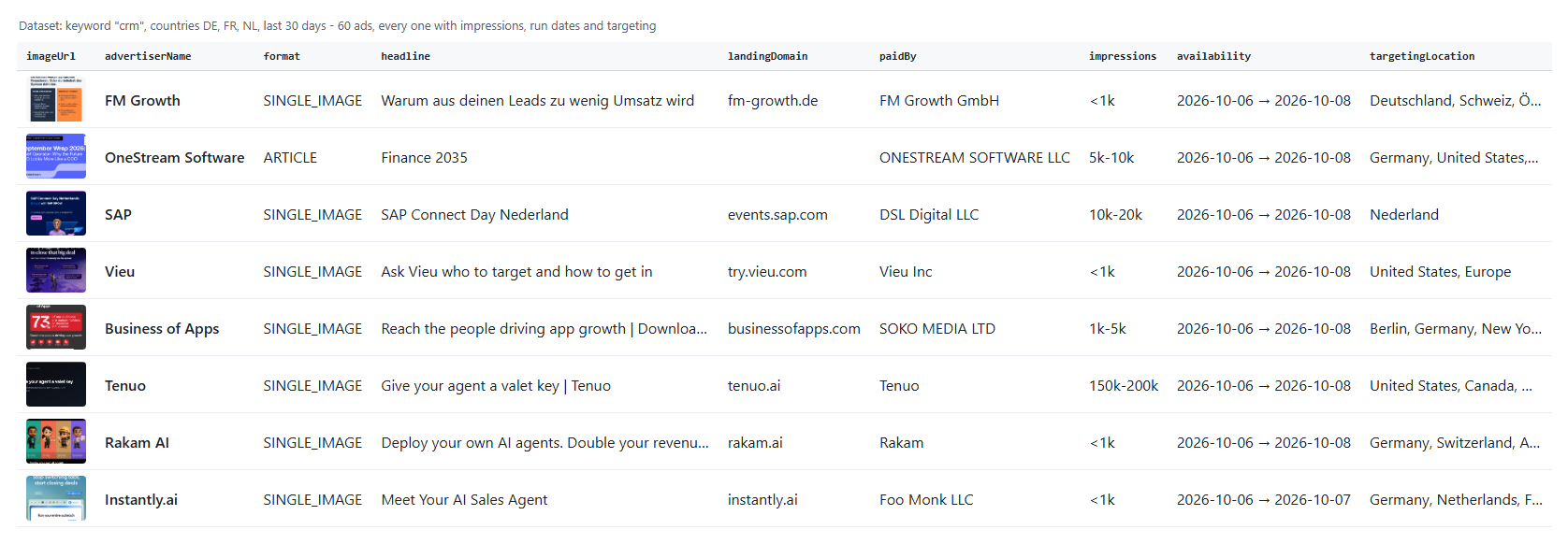
- **Impressions and targeting:** total impressions range (`50k-100k`) with numeric bounds, impressions by country, run dates, languages, locations and the six targeting parameters, for ads shown in the EU
- **Landing URLs outside the EU too:** LinkedIn shows the CTA link only on ads shown in the EU; for other ads `landingUrl` comes from the links in the ad copy, with lnkd.in, bit.ly, hubs.la and other short links followed to the page they open (`landingUrlSource` says which)
- **All of LinkedIn's filters:** country, date range, impressions range, targeting categories and sort order, plus many searches in one run
- **No login, cookies or LinkedIn account:** the actor reads the public Ad Library
- **Monitoring:** only new ads since the last run; with Ad details on, optionally the known ads whose impressions or end date changed
- **Export anywhere:** JSON, CSV, Excel, XML; schedules, webhooks, Make, Zapier, n8n, Google Sheets, Slack
- **Works with AI agents:** call it through the Apify API or the MCP server; `compact` output keeps rows small
### What data can you get from the LinkedIn Ad Library?
- **Every ad format:** single image, video, carousel, document, event, message / InMail, text, article, job and follow-company ads, each tagged with a `format` value; thought-leader ads (a member's post run as an ad) carry `isThoughtLeaderAd: true`
- **Impressions and targeting:** total impressions range (`50k-100k`) with numeric bounds, impressions by country, run dates, languages, locations and the six targeting parameters, for ads shown in the EU
- **Landing URLs outside the EU too:** LinkedIn shows the CTA link only on ads shown in the EU; for other ads `landingUrl` comes from the links in the ad copy, with lnkd.in, bit.ly, hubs.la and other short links followed to the page they open (`landingUrlSource` says which)
- **All of LinkedIn's filters:** country, date range, impressions range, targeting categories and sort order, plus many searches in one run
- **No login, cookies or LinkedIn account:** the actor reads the public Ad Library
- **Monitoring:** only new ads since the last run; with Ad details on, optionally the known ads whose impressions or end date changed
- **Export anywhere:** JSON, CSV, Excel, XML; schedules, webhooks, Make, Zapier, n8n, Google Sheets, Slack
- **Works with AI agents:** call it through the Apify API or the MCP server; `compact` output keeps rows small
### What data can you get from the LinkedIn Ad Library?
| 🆔 Ad id and Ad Library URL | 🏢 Advertiser, logo, company id | 💳 Paid for by (`paidBy`) |
| 🖼️ Format and creative type | 📝 Headline and full ad copy | 🔘 CTA labels (`ctas`) |
| 🔗 Landing URL with UTM tags (`landingUrl`) | 🌐 Landing domain | 🎞️ Image, video MP4, carousel cards |
| 📄 Document title and page count | 📅 Event name, time, location | ✉️ Message sender and buttons |
| 📆 Run dates and days running | 👁️ Total impressions (`impressions`) | 🌍 Impressions by country |
| 🗣️ Targeted languages and locations | 🎯 Targeting matrix (Audience, Company, Job ...) | 👤 Thought-leader poster and "Promoted by" |
 A real row from an ad shown in the EU (trimmed):
```json
{
"adId": "1577245703",
"adLibraryUrl": "https://www.linkedin.com/ad-library/detail/1577245703",
"format": "SINGLE_IMAGE",
"advertiserName": "Scania Deutschland",
"advertiserUrl": "https://www.linkedin.com/company/10953382",
"paidBy": "Scania Deutschland",
"headline": "Versichern Sie jetzt Ihren Lkw zu unseren attraktiven Sonderkonditionen!",
"body": "Schutz für Ihren Leistungsträger – Jetzt zu den Versicherungsexperten von Scania wechseln ...",
"ctas": ["View Quote"],
"clickUrl": "https://www.scania.com/de/de/home/services/finance-and-insurance/insurance/scania-versicherungswechsel-2026.html?cid=de_0926_tc_sop_li_6599",
"landingUrl": "https://www.scania.com/de/de/home/services/finance-and-insurance/insurance/scania-versicherungswechsel-2026.html?cid=de_0926_tc_sop_li_6599",
"landingUrlSource": "cta",
"landingDomain": "scania.com",
"availability": { "start": "2026-10-08", "end": "2026-10-09" },
"daysRunning": 2,
"adStatus": "ACTIVE",
"impressions": "1k-5k",
"impressionsMin": 1000,
"impressionsMax": 5000,
"targetingLanguage": ["English"],
"targetingLocation": ["Germany"],
"targetingMatrix": [{ "parameter": "Company", "facet": "COMPANY", "targeted": true, "excluded": true }],
"detailsFetched": true
}
```
An ad shown only in the United States: no CTA link on LinkedIn's page, so the landing URL comes from the short link in its copy (trimmed):
```json
{
"adId": "1637885506",
"format": "VIDEO",
"advertiserName": "Munich Re Specialty - North America",
"paidBy": "Munich Reinsurance America, Inc.",
"ctas": ["Learn more"],
"clickUrl": null,
"externalLinksInText": ["https://ow.ly/PRXs50ZVTSW"],
"copyLinkTargets": [{ "link": "https://ow.ly/PRXs50ZVTSW", "url": "https://www.munichre.com/specialty/north-america/en/solutions/binding-authorities/in-house-underwriting/dealers-open-lot.html?utm_source=linkedin..." }],
"landingUrl": "https://www.munichre.com/specialty/north-america/en/solutions/binding-authorities/in-house-underwriting/dealers-open-lot.html?utm_source=linkedin...",
"landingUrlSource": "adCopy",
"landingDomain": "munichre.com",
"hasEuTransparency": false
}
```
#### Fields
Fill measured on two runs with Ad details on: EU = 100 ads (`insurance`, Germany); US = 100 ads (`insurance`, United States only; 8 of them were also shown in the EU).
| Field | What it is | EU | US |
|---|---|---|---|
| `adId`, `adLibraryUrl`, `format`, `creativeType` | Ad identity and format | 100% | 100% |
| `advertiserName`, `advertiserLogo` | Advertiser as LinkedIn shows it | 100% | 100% |
| `advertiserUrl` | Advertiser's LinkedIn page | 99% | 99% |
| `paidBy` | "Paid for by" entity | 100% | 100% |
| `body` | Ad copy (full text with details) | 100% | 100% |
| `headline` | Headline / title | 76% | 72% |
| `ctas` | Call-to-action labels | 38% | 61% |
| `clickUrl` | The ad's CTA link (LinkedIn prints it only on ads shown in the EU) | 55% | 8% |
| `landingUrl`, `landingUrlSource` | Landing URL: the CTA link (`cta`), else the first link in the ad copy with short links followed (`adCopy`) | 67% (55 `cta`, 12 `adCopy`) | 32% (8 `cta`, 24 `adCopy`) |
| `landingDomain` | Domain of `landingUrl` (empty when it is a LinkedIn page) | 62% | 31% |
| `externalLinksInText` | Links written in the ad copy, as written | 32% | 25% |
| `copyLinkTargets` | Where the first two copy links lead, `{link, url}` (ads without a CTA link) | 12% | 24% |
| `imageUrl` / `videoUrl` | Main image / video MP4 | 82% / 16% | 88% / 9% |
| `availability`, `daysRunning`, `adStatus` | Run dates (EU-shown ads only) | 100% | 8% |
| `impressions`, `impressionsMin`, `impressionsMax` | Total impressions range | 100% | 8% |
| `impressionsPerCountry` | Share per country (see Limits) | 1% | 0% |
| `targetingLanguage`, `targetingLocation`, `targetingMatrix` | Targeting | 100% | 8% |
| `isThoughtLeaderAd` (true), `posterName` | Thought-leader ad: a member's own post run as an ad | 15% | 19% |
| `promotedBy` | Company that promoted the member's post (empty when the member promoted it) | 6% | 2% |
| `variantsCount` | Number of creative variants | 100% | 100% |
| `variants` | Every variant's creative (only on ads with more than one) | 0% | 0% |
| `carouselCards`, `documentTitle`, `eventName`, `senderName`, `sponsoredMessageButtons` | Per-format fields | when the format has them | |
| `searchType`, `searchValue`, `startUrl`, `totalAdsInSearch`, `position` | Which search found the ad | 100% | 100% |
| `detailsFetched`, `scrapedAt` | Row status | 100% | 100% |
| `changeType`, `previousImpressions`, `previousEndDate` | `new` or `changed`, with the earlier values (`monitorMode` runs only) | monitor runs | monitor runs |
### How can I use LinkedIn ads data?
- 🎯 **Competitive intelligence** - track every ad a competitor runs, with run dates and impression ranges per market
- 📣 **Performance marketers** - collect winning hooks, headlines, CTAs and landing pages across a category
- 🏢 **Agencies** - audit a prospect's LinkedIn advertising before the pitch
- 🔎 **Sales teams** - find companies actively spending on LinkedIn ads (`advertiserName`, `paidBy`, `landingDomain`)
- 🧭 **Market research** - measure advertising pressure by country with `impressionsPerCountry` and targeting
- 🤖 **AI and research teams** - feed ad copy and targeting to an LLM; `compact` keeps rows small
- 📈 **Monitoring** - run it daily with `monitorMode` and get only the new ads
### How much does it cost to scrape the LinkedIn Ad Library?
LinkedIn Ad Library Scraper is pay-per-result: **$0.47 per 1,000 ads** (event `ad`), plus **$0.38 per 1,000 ads with Ad details** (event `ad-details`), so $0.85 per 1,000 fully detailed ads. No start fee. `countOnly` rows are free.
| Ads | Without details | With details |
|---:|---:|---:|
| 10 | $0.0047 | $0.0085 |
| 100 | $0.047 | $0.085 |
| 1,000 | $0.47 | $0.85 |
| 10,000 | $4.70 | $8.50 |
There is nothing else to pay: Apify platform usage is included in these prices. Measured on 256 MB: 100 ads with details in 86-97 s (Germany and United States runs); 1,000 ads without details in 170 s.
### Integrations, API, scheduling & MCP
- **Schedules:** run LinkedIn Ad Library Scraper daily or weekly from the **Schedules** tab; with `monitorMode` each run returns only new ads.
- **Webhooks:** fire a URL when a run finishes - push new ads to Slack, a CRM or a sheet.
- **No-code:** Make, Zapier, n8n, Google Sheets, Airtable, Slack via [Apify integrations](https://docs.apify.com/integrations).
- **API:** call it from Node.js or Python with `apify-client` - code on the [API tab](https://apify.com/TopApi/linkedin-ad-library-scraper/api/python) and the [Apify API reference](https://docs.apify.com/api/v2).
- **MCP / AI agents:** connect Claude, Cursor or any MCP client through the [MCP tab](https://apify.com/TopApi/linkedin-ad-library-scraper/api/mcp) and ask for a company's LinkedIn ads in plain language.
### More scrapers from TopApi
A real row from an ad shown in the EU (trimmed):
```json
{
"adId": "1577245703",
"adLibraryUrl": "https://www.linkedin.com/ad-library/detail/1577245703",
"format": "SINGLE_IMAGE",
"advertiserName": "Scania Deutschland",
"advertiserUrl": "https://www.linkedin.com/company/10953382",
"paidBy": "Scania Deutschland",
"headline": "Versichern Sie jetzt Ihren Lkw zu unseren attraktiven Sonderkonditionen!",
"body": "Schutz für Ihren Leistungsträger – Jetzt zu den Versicherungsexperten von Scania wechseln ...",
"ctas": ["View Quote"],
"clickUrl": "https://www.scania.com/de/de/home/services/finance-and-insurance/insurance/scania-versicherungswechsel-2026.html?cid=de_0926_tc_sop_li_6599",
"landingUrl": "https://www.scania.com/de/de/home/services/finance-and-insurance/insurance/scania-versicherungswechsel-2026.html?cid=de_0926_tc_sop_li_6599",
"landingUrlSource": "cta",
"landingDomain": "scania.com",
"availability": { "start": "2026-10-08", "end": "2026-10-09" },
"daysRunning": 2,
"adStatus": "ACTIVE",
"impressions": "1k-5k",
"impressionsMin": 1000,
"impressionsMax": 5000,
"targetingLanguage": ["English"],
"targetingLocation": ["Germany"],
"targetingMatrix": [{ "parameter": "Company", "facet": "COMPANY", "targeted": true, "excluded": true }],
"detailsFetched": true
}
```
An ad shown only in the United States: no CTA link on LinkedIn's page, so the landing URL comes from the short link in its copy (trimmed):
```json
{
"adId": "1637885506",
"format": "VIDEO",
"advertiserName": "Munich Re Specialty - North America",
"paidBy": "Munich Reinsurance America, Inc.",
"ctas": ["Learn more"],
"clickUrl": null,
"externalLinksInText": ["https://ow.ly/PRXs50ZVTSW"],
"copyLinkTargets": [{ "link": "https://ow.ly/PRXs50ZVTSW", "url": "https://www.munichre.com/specialty/north-america/en/solutions/binding-authorities/in-house-underwriting/dealers-open-lot.html?utm_source=linkedin..." }],
"landingUrl": "https://www.munichre.com/specialty/north-america/en/solutions/binding-authorities/in-house-underwriting/dealers-open-lot.html?utm_source=linkedin...",
"landingUrlSource": "adCopy",
"landingDomain": "munichre.com",
"hasEuTransparency": false
}
```
#### Fields
Fill measured on two runs with Ad details on: EU = 100 ads (`insurance`, Germany); US = 100 ads (`insurance`, United States only; 8 of them were also shown in the EU).
| Field | What it is | EU | US |
|---|---|---|---|
| `adId`, `adLibraryUrl`, `format`, `creativeType` | Ad identity and format | 100% | 100% |
| `advertiserName`, `advertiserLogo` | Advertiser as LinkedIn shows it | 100% | 100% |
| `advertiserUrl` | Advertiser's LinkedIn page | 99% | 99% |
| `paidBy` | "Paid for by" entity | 100% | 100% |
| `body` | Ad copy (full text with details) | 100% | 100% |
| `headline` | Headline / title | 76% | 72% |
| `ctas` | Call-to-action labels | 38% | 61% |
| `clickUrl` | The ad's CTA link (LinkedIn prints it only on ads shown in the EU) | 55% | 8% |
| `landingUrl`, `landingUrlSource` | Landing URL: the CTA link (`cta`), else the first link in the ad copy with short links followed (`adCopy`) | 67% (55 `cta`, 12 `adCopy`) | 32% (8 `cta`, 24 `adCopy`) |
| `landingDomain` | Domain of `landingUrl` (empty when it is a LinkedIn page) | 62% | 31% |
| `externalLinksInText` | Links written in the ad copy, as written | 32% | 25% |
| `copyLinkTargets` | Where the first two copy links lead, `{link, url}` (ads without a CTA link) | 12% | 24% |
| `imageUrl` / `videoUrl` | Main image / video MP4 | 82% / 16% | 88% / 9% |
| `availability`, `daysRunning`, `adStatus` | Run dates (EU-shown ads only) | 100% | 8% |
| `impressions`, `impressionsMin`, `impressionsMax` | Total impressions range | 100% | 8% |
| `impressionsPerCountry` | Share per country (see Limits) | 1% | 0% |
| `targetingLanguage`, `targetingLocation`, `targetingMatrix` | Targeting | 100% | 8% |
| `isThoughtLeaderAd` (true), `posterName` | Thought-leader ad: a member's own post run as an ad | 15% | 19% |
| `promotedBy` | Company that promoted the member's post (empty when the member promoted it) | 6% | 2% |
| `variantsCount` | Number of creative variants | 100% | 100% |
| `variants` | Every variant's creative (only on ads with more than one) | 0% | 0% |
| `carouselCards`, `documentTitle`, `eventName`, `senderName`, `sponsoredMessageButtons` | Per-format fields | when the format has them | |
| `searchType`, `searchValue`, `startUrl`, `totalAdsInSearch`, `position` | Which search found the ad | 100% | 100% |
| `detailsFetched`, `scrapedAt` | Row status | 100% | 100% |
| `changeType`, `previousImpressions`, `previousEndDate` | `new` or `changed`, with the earlier values (`monitorMode` runs only) | monitor runs | monitor runs |
### How can I use LinkedIn ads data?
- 🎯 **Competitive intelligence** - track every ad a competitor runs, with run dates and impression ranges per market
- 📣 **Performance marketers** - collect winning hooks, headlines, CTAs and landing pages across a category
- 🏢 **Agencies** - audit a prospect's LinkedIn advertising before the pitch
- 🔎 **Sales teams** - find companies actively spending on LinkedIn ads (`advertiserName`, `paidBy`, `landingDomain`)
- 🧭 **Market research** - measure advertising pressure by country with `impressionsPerCountry` and targeting
- 🤖 **AI and research teams** - feed ad copy and targeting to an LLM; `compact` keeps rows small
- 📈 **Monitoring** - run it daily with `monitorMode` and get only the new ads
### How much does it cost to scrape the LinkedIn Ad Library?
LinkedIn Ad Library Scraper is pay-per-result: **$0.47 per 1,000 ads** (event `ad`), plus **$0.38 per 1,000 ads with Ad details** (event `ad-details`), so $0.85 per 1,000 fully detailed ads. No start fee. `countOnly` rows are free.
| Ads | Without details | With details |
|---:|---:|---:|
| 10 | $0.0047 | $0.0085 |
| 100 | $0.047 | $0.085 |
| 1,000 | $0.47 | $0.85 |
| 10,000 | $4.70 | $8.50 |
There is nothing else to pay: Apify platform usage is included in these prices. Measured on 256 MB: 100 ads with details in 86-97 s (Germany and United States runs); 1,000 ads without details in 170 s.
### Integrations, API, scheduling & MCP
- **Schedules:** run LinkedIn Ad Library Scraper daily or weekly from the **Schedules** tab; with `monitorMode` each run returns only new ads.
- **Webhooks:** fire a URL when a run finishes - push new ads to Slack, a CRM or a sheet.
- **No-code:** Make, Zapier, n8n, Google Sheets, Airtable, Slack via [Apify integrations](https://docs.apify.com/integrations).
- **API:** call it from Node.js or Python with `apify-client` - code on the [API tab](https://apify.com/TopApi/linkedin-ad-library-scraper/api/python) and the [Apify API reference](https://docs.apify.com/api/v2).
- **MCP / AI agents:** connect Claude, Cursor or any MCP client through the [MCP tab](https://apify.com/TopApi/linkedin-ad-library-scraper/api/mcp) and ask for a company's LinkedIn ads in plain language.
### More scrapers from TopApi
| 📢 Facebook Search Posts Scraper | 🎵 TikTok Scraper | ▶️ YouTube Shorts Scraper |
| 💼 Indeed Jobs Scraper - which advertisers are hiring | 🎬 TikTok Video Scraper | ™️ USPTO Trademark Scraper |
| ⭐ Google Maps Reviews Scraper | 💬 Facebook Comments Scraper | 🧭 All TopApi actors |