# Naver Shopping Scraper - Prices, Stock, Sellers & Reviews (`topapi/naver-shopping-scraper`) Actor

Scrape Naver Shopping (네이버쇼핑) by keyword, category, catalogue or product link from $0.90 per 1,000 products: price, discount, stock, store, rating, reviews, delivery, categories. Add Smart Store and Brand Store records, every seller's offer, review stats and reviews. Monitor new products. No login.

- **URL**: https://apify.com/topapi/naver-shopping-scraper.md
- **Developed by:** [Top Api](https://apify.com/topapi) (community)
- **Categories:** E-commerce, Lead generation, Automation
- **Stats:** 2 total users, 1 monthly users, 100.0% runs succeeded, 0 bookmarks
- **User rating**: No ratings yet

## Pricing

from $0.90 / 1,000 products

This Actor is paid per event. You are not charged for the Apify platform usage, but only a fixed price for specific events.

Learn more: https://docs.apify.com/actors/running/actors-in-store.md#pay-per-event

## What's an Apify Actor?

An Actor is a serverless cloud program that runs on the Apify platform. It has two run modes.
In Batch mode, an Actor accepts a well-defined JSON input, performs an action which can take anything from a few seconds to a few hours,
and optionally produces a well-defined JSON output, datasets with results, or files in key-value store.
In Standby mode, an Actor provides a web server which can be used as a website, API, or an MCP server.

Apify vocabulary and the platform model are defined once, in the agent quickstart at https://apify.com/agents.md.

## How to integrate an Actor?

If asked about integration, you help developers integrate Actors into their projects.
You adapt to their stack and deliver integrations that are safe, well-documented, and production-ready.

Do not guess an integration path. Every one of them is in the agent quickstart at https://apify.com/agents.md: the Apify MCP server, Agent Skills with the Apify CLI, the JavaScript and Python clients, the REST API, and the account-free path for an agent with no human to sign in. It also carries the rule on stating cost before the first paid run.

For examples already wired to this Actor's own input schema, see the [API](#api) section below.

Each client library has reference documentation the quickstart does not restate: [JavaScript/TypeScript](https://docs.apify.com/api/client/js/docs.md) (`npm install apify-client`) and [Python](https://docs.apify.com/api/client/python/docs.md) (`pip install apify-client`).

# README

### What does Naver Shopping Scraper do?

**Naver Shopping Scraper** extracts products from [Naver Shopping](https://shopping.naver.com) (네이버쇼핑, the Naver Plus Store product list), Korea's largest shopping search. Give it Korean or English keywords, Naver Shopping search or category links, catalogue ids, store product links or nvMids, and get one row per product: price and discount, stock, store, rating, review count, delivery, category ids and price-comparison data. Extras add the store's own product record and company details, every seller's offer for price-comparison products, review stats and buyer reviews. Built for brands, sellers, agencies and analysts who track Korean prices, competitors and ranks.

Naver Shopping scraper · 네이버쇼핑 크롤러 · Naver Plus Store scraper · Smart Store scraper · Naver product API

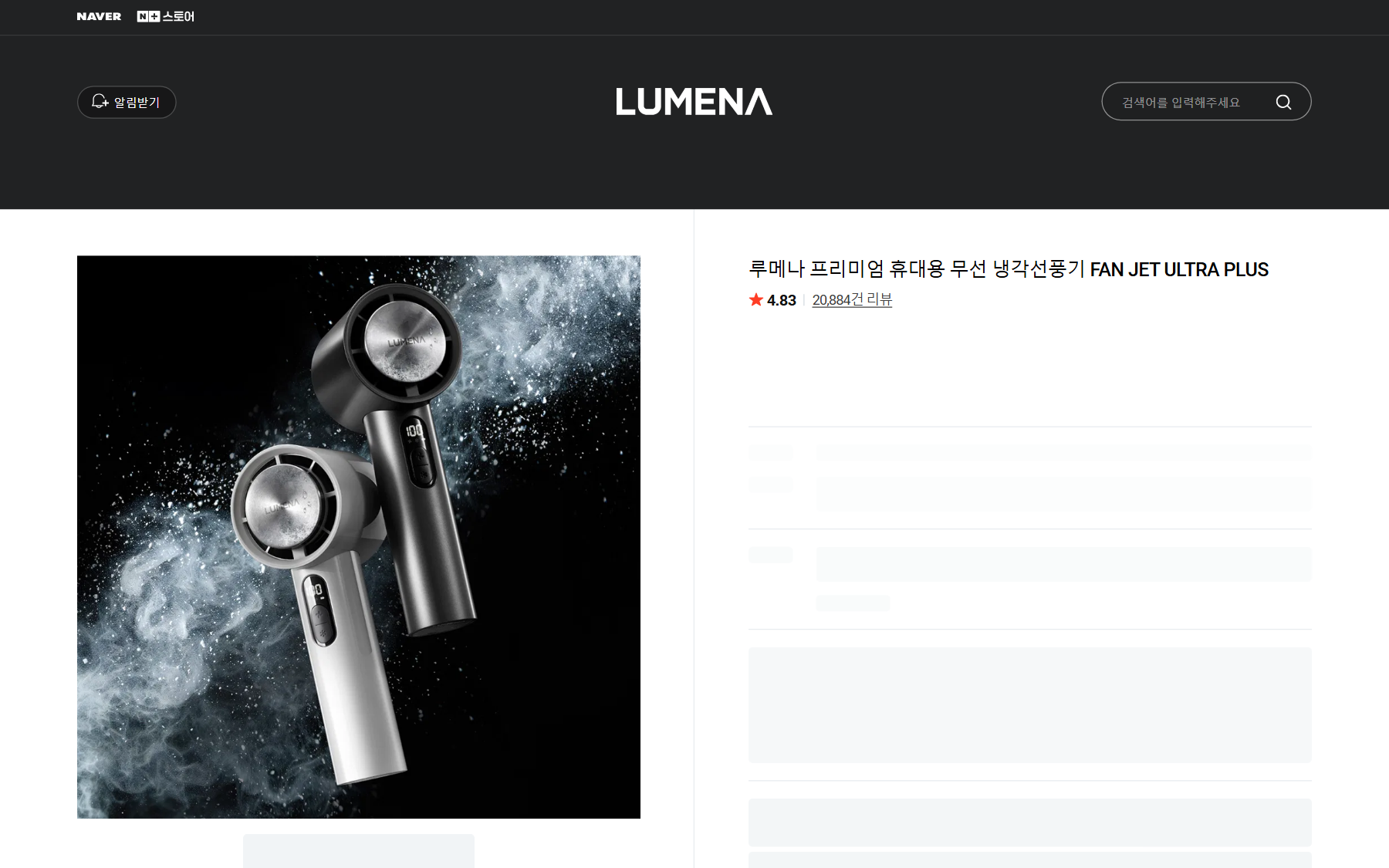
<a href="https://console.apify.com/actors/g0DIy7jhI0dLfdKoo"><img src="https://api.apify.com/v2/key-value-stores/qNQ9zP0xaj2yxGeMY/records/naver-shopping-scraper-source.png" alt="Naver Shopping Scraper reads Naver Brand Store and Smart Store products like this one" style="width:70%"></a>

- **Naver's own product list as data:** up to 10,000 products per keyword and sort order, 100 per request, in Naver's order (`searchRank`), with 79 fields per product.
- **Six sort orders and category browse:** Naver ranking, most purchased, most reviews, low/high price, newest; any category id; past 10,000 the run continues with the other sort orders, skipping repeats.
- **Store record (add-on):** the Smart Store or Brand Store's own record of the product (category names, brand, maker, model, stock, seller and Naver discounts, delivery company, seller tags, the disclosure table 상품정보제공고시) plus the store's company, CEO, business type, grade and sales count.
- **Every seller's offer (add-on):** for price-comparison products, each seller's price, delivery fee, total, rating and link, cheapest first, and the lowest price.
- **Review stats and reviews:** star breakdown, photo/video counts and topic votes; buyer reviews as their own rows with text, score, date, option bought and photos.
- **Monitor mode and rank tracking:** only new products (or price/stock changes) per scheduled run, plus free rank rows for your own products and stores.
- **No login, cookies or Naver API key:** keywords, links or ids are all you pass. Export JSON, CSV or Excel; schedules, webhooks, the Apify API and MCP.

### What data can you get from Naver Shopping?

<table>
<tr><td>🆔 Product ids (<code>nvMid</code>, <code>channelProductId</code>)</td><td>📝 Product name and link</td><td>🖼️ Image</td></tr>
<tr><td>💰 Price, list price, discount %</td><td>📦 Stock (<code>stockQuantity</code>)</td><td>⭐ Rating and review count (also last 6 months)</td></tr>
<tr><td>🏪 Store name, id, grade, store URL</td><td>🏷️ Brand Store / official store flags</td><td>🚚 Delivery fee, free / fast delivery, ship-from</td></tr>
<tr><td>🗂️ Category ids (4 levels)</td><td>🔎 Keyword, sort and rank</td><td>🧾 Catalogue id, name, listing count</td></tr>
<tr><td>💸 Lowest price + every seller's offer</td><td>🏢 Store company, CEO, business type, sales count</td><td>🏭 Brand, maker, model, category names</td></tr>
<tr><td>📋 Disclosure table (상품정보제공고시)</td><td>📊 Star breakdown, photo/video review counts</td><td>💬 Reviews: text, score, date, option, photos</td></tr>
</table>

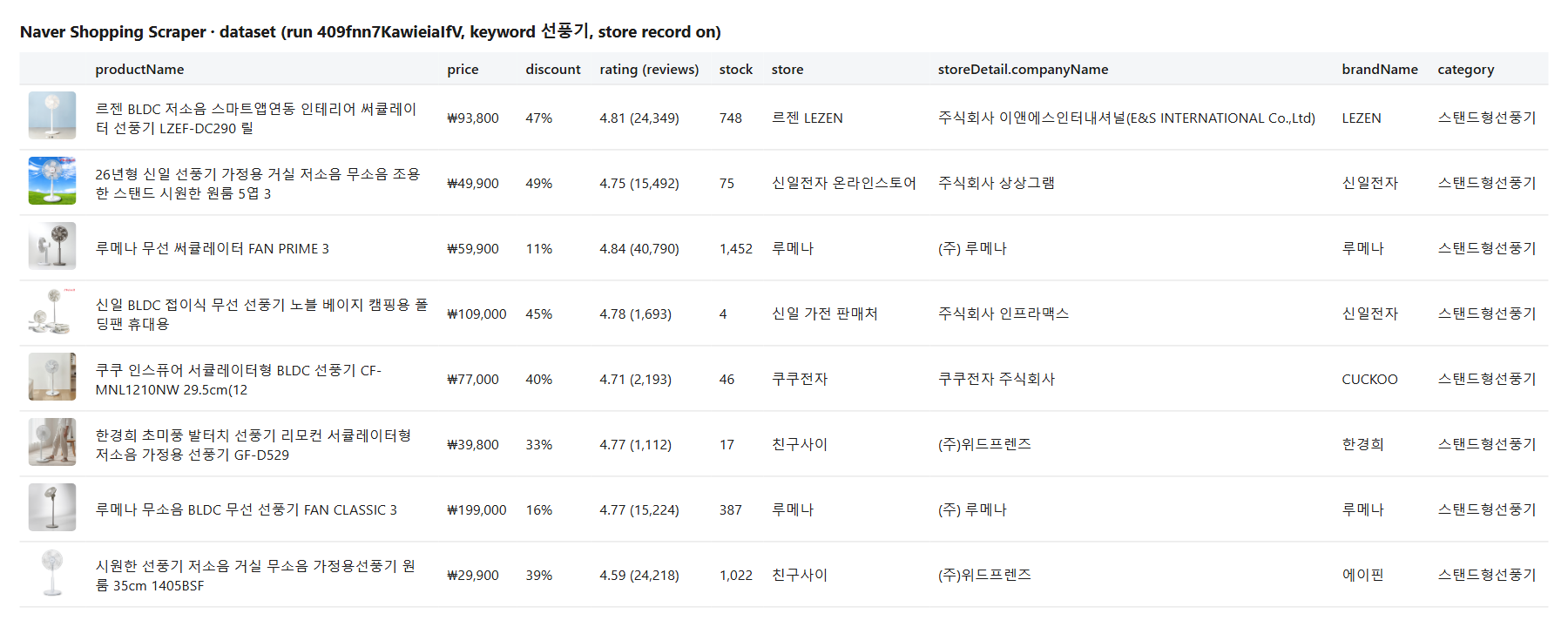
Measured on a 1,000-product run (`노트북`): name, prices, discount, rating, review counts, stock, store, grade, delivery fee, category ids and rank on 100% of rows, ship-from address 95%, catalogue data 36% (only products in Naver's price comparison have it). On a 100-product run (`선풍기`) with the store record on: category names, company, CEO, business type, sales count and disclosure table 100%, brand 94%, maker 93%, model 55% (only when the seller files one).

### How to scrape Naver Shopping with Naver Shopping Scraper

1. [Create a free Apify account](https://console.apify.com/sign-up): $5 of monthly credit, no card needed.
2. Open [Naver Shopping Scraper](https://apify.com/TopApi/naver-shopping-scraper) and click **Try for free**.
3. Type **Keywords** (e.g. `무선 이어폰`, `캠핑의자`) or paste links / ids, and set **Max products per search**.
4. Optional: pick a sort order and filters, and turn on **Store record**, **Every seller's offer**, **Review stats** or **Include reviews**.
5. Click **Start**. Products are written to the dataset page by page.
6. Open **Storage** and **Export** as JSON, CSV or Excel, or schedule the run.

### ⬇️ Input

| Parameter | Type | Description |
|---|---|---|
| `keywords` | array | Search terms, Korean or English (`무선 이어폰`, `airpods`). Each keyword is its own search. |
| `productUrls` | array | Search links (sort kept), category links, catalogue links (`…/catalog/<id>`), store product links (`smartstore.naver.com/<store>/products/<id>`, `brand.naver.com/<store>/products/<id>`) or bare nvMid / catalogue ids. |
| `categoryIds` | array | Browse a category instead of searching, e.g. `50000151` (laptops). |
| `sort` | select | `REL` (Naver ranking, default), `PURCHASE`, `REVIEW`, `LOW_PRICE`, `HIGH_PRICE`, `RECENT`. |
| `minPrice` / `maxPrice` | integer | Price band in KRW on the selling price. |
| `minRating` / `minReviews` | number | Quality floor. |
| `freeShippingOnly`, `fastDeliveryOnly`, `officialStoresOnly`, `brandStoresOnly`, `inStockOnly`, `excludeOverseas` | boolean | Delivery, store and stock filters. |
| `brandName` / `excludeKeywords` | string / array | Keep products whose name contains the text; drop names with these words. |
| `includeDetail` | boolean | Store record ($0.0013 add-on, see pricing). |
| `includeSellers` / `maxSellersPerProduct` | boolean / integer | Every seller's offer for catalogue products (1-100, default 30). |
| `includeReviewStats` | boolean | Star breakdown, media counts, recent count and score, topic votes. |
| `includeReviews` / `maxReviewsPerProduct` / `reviewSort` / `reviewStars` / `reviewsWithMediaOnly` / `reviewsSince` | | Review rows and their filters. |
| `monitorMode` / `monitorStoreName` / `emitChanges` | | Only new products (and price/stock changes) since the last run. |
| `trackProducts` / `trackStores` | array | Free rank rows for your products and stores (record `RANK_SUMMARY`). |
| `maxProductsPerKeyword` | integer | Default 100, up to 60,000 (10,000 per sort order). In monitor mode: how many top ranks to watch. |
| `maxItems` / `compact` | integer / boolean | Run total cap; core fields only. |

<a href="https://console.apify.com/actors/g0DIy7jhI0dLfdKoo"><img src="https://api.apify.com/v2/key-value-stores/qNQ9zP0xaj2yxGeMY/records/naver-shopping-scraper-output.png" alt="Naver Shopping Scraper output table with prices, ratings, stock, stores and store records" style="width:70%"></a>

#### Input JSON

```json
{
  "keywords": ["무선 이어폰", "캠핑의자"],
  "sort": "REL",
  "maxProductsPerKeyword": 200,
  "minRating": 4.5,
  "includeDetail": true,
  "includeSellers": true
}
```

#### Search in Korean for the full list

Naver indexes Korean titles. `무선 이어폰` returned 224,102 products, `wireless earbuds` 47,864. Brand and model names (`airpods`, `LG gram`) work in either language.

#### Go past 10,000 products

Naver lists 10,000 products per keyword and sort order. Set **Max products per search** above 10,000 and the run continues with the other five sort orders, skipping products it already delivered.

#### Paste store product links, not `/main/` links

`smartstore.naver.com/<store>/products/<id>` and `brand.naver.com/<store>/products/<id>` are read. A `smartstore.naver.com/main/products/<id>` link does not name its store; paste the store's own link or the product's nvMid instead.

### ⬆️ Output

```json
{
  "type": "product",
  "nvMid": 90876558969,
  "channelProductId": "13332048637",
  "productName": "한경희 초미풍 발터치 선풍기 리모컨 서큘레이터형 저소음 가정용 선풍기 GF-D529",
  "productPageUrl": "https://smartstore.naver.com/main/products/13332048637",
  "salePrice": 59900, "discountedSalePrice": 39800, "discountedRatio": 33,
  "averageReviewScore": 4.77, "totalReviewCount": 1112, "stockQuantity": 17,
  "mallName": "친구사이", "storeUrl": "https://smartstore.naver.com/7942", "deliveryFee": 0,
  "lCatId": "50000003", "mCatId": "50000212", "sCatId": "50001420",
  "catalogId": 60549679721, "sellerCount": 1, "lowestPrice": 39800,
  "keyword": "선풍기", "sort": "REL", "searchRank": 6,
  "detailBlocks": ["storeRecord", "sellers"],
  "categoryPath": "디지털/가전>계절가전>선풍기>스탠드형선풍기",
  "brandName": "한경희", "makerName": "한경희생활과학", "modelName": "발터치 선풍기",
  "storeDetail": { "companyName": "(주)위드프렌즈", "representativeName": "문영철", "businessType": "CORPORATION", "saleCount": 1476 }
}
```

(A row from run `409fnn7KawieiaIfV`, store record and seller offers on; `sellers`, `productDisclosure` and the other fields are left out of this excerpt.)

A review row (`type: "review"`) carries `reviewId`, `reviewScore`, `reviewContent`, `createDate`, `productOptionContent`, `reviewType`, `repurchase`, `photoUrls`, `videos`, `maskedWriterId` and the product's `nvMid`, `channelProductId` and name. Measured on 200 reviews: id, score, text, date and option 100%, photos 63%.

#### Fields

| Field | Meaning | Fill (measured) |
|---|---|---|
| `nvMid`, `channelProductId`, `productName`, `productPageUrl`, `imageUrl` | Product ids, name, link, image | 100% |
| `salePrice`, `discountedSalePrice`, `discountedRatio` | List price, selling price (KRW), discount % | 100% |
| `averageReviewScore`, `totalReviewCount` (+ `6Month`) | Rating and reviews | 100% |
| `stockQuantity` | Stock the seller declares | 100% |
| `mallName`, `mallGradeType`, `storeUrl`, `isBrandStore` | Store | 100% |
| `deliveryFee`, `freeDelivery`, `fastDeliveryType`, `shipFromAddress` | Delivery | 100% / 95% ship-from |
| `lCatId` … `ssCatId`, `categoryId` | Category ids (depth depends on the category) | 100% top two levels |
| `catalogId`, `catalogName`, `sellerCount`, `catalogWinnerCandidates` | Price comparison | products in price comparison (36% of `노트북`) |
| `keyword`, `sort`, `searchRank`, `keywordTotalResults` | Where the row came from | 100% |
| `categoryPath`, `brandName`, `makerName`, `modelName` | Store record | 100% / 94% / 93% / 55% |
| `storeDetail` (company, CEO, business type, grade, sales count) | Store record | 100% |
| `productDisclosure` | Disclosure table | 100% |
| `sellers`, `lowestPrice`, `lowestPriceWithFee` | Every seller's offer | 100% of catalogue products |
| `reviewCountByScore`, `reviewsWithPhotos`, `recentReviewCount`, `reviewEvaluationStats` | Review stats | 100% (topic votes only where Naver shows them) |
| `changeType`, `previousPrice`, `priceChangePct` | Monitor mode | rows that changed |

### Use cases

- 🏷️ **Price monitoring:** a brand watches its products and resellers by keyword every day, with price drops flagged.
- 📈 **Rank tracking:** a Smart Store seller logs its rank per keyword and sort order, free rows next to the products.
- 🧭 **Market entry:** a foreign brand sizes a Korean category: price bands, top stores, review volumes.
- 🏢 **Seller research:** an agency lists the companies, CEOs and sales counts behind the top stores of a keyword.
- 💸 **Price comparison:** every seller's offer and the lowest price for price-comparison products.
- 💬 **Review analysis:** reviews with option bought and photos for sentiment and product feedback.
- 🤖 **AI agents:** compact rows for LLM pipelines through the Apify MCP server.

### How much does it cost to scrape Naver Shopping?

Pay per result, no start fee:

| Event | Price |
|---|---|
| Product row | $0.0009 ($0.90 per 1,000) |
| Extra data on a product (store record, seller offers or review stats; charged once per product that receives at least one) | $0.0013 |
| Review row | $0.00045 ($0.45 per 1,000) |

| Run | Charge |
|---|---|
| 100 products | $0.09 |
| 1,000 products | $0.90 |
| 100 products with the store record and seller offers | $0.22 |
| 1,000 reviews | $0.45 |

Measured: 20 products in 4 s, 1,000 products in 13 s, 100 products with store records in about 3 minutes, 200 reviews in 18 s. Products your filters drop and monitor-mode products you already have are not charged. Apify's free plan includes $5 of monthly credit.

### Integrations, API, scheduling & MCP

Schedule the actor (daily or hourly) with monitor mode to receive only new products. Send results to Google Sheets, Slack, Make, Zapier or n8n with the integrations tab, or a webhook. Call it from code with the [Apify API](https://apify.com/TopApi/naver-shopping-scraper/api/python) (Python, JavaScript, HTTP). AI agents can use it through the [Apify MCP server](https://apify.com/TopApi/naver-shopping-scraper/api/mcp).

### More shopping scrapers

<table>
<tr><td>🏭 <a href="https://apify.com/TopApi/alibaba-1688-scraper">1688.com Wholesale Scraper</a><br>Factory prices, MOQ and suppliers on 1688.</td><td>👗 <a href="https://apify.com/TopApi/shein-product-scraper">SHEIN Product Scraper</a><br>SHEIN prices, discounts, ratings and fit.</td><td>📍 <a href="https://apify.com/TopApi/google-maps-reviews-scraper">Google Maps Reviews Scraper</a><br>Ratings, owner replies and dates.</td></tr>
</table>

All our actors: [apify.com/TopApi](https://apify.com/TopApi).

### Limits & empty runs

- 10,000 products per keyword and sort order (Naver's own list); up to 60,000 per keyword across the six sort orders.
- The store record covers Smart Store and Brand Store products; the per-option stock table is not included (Naver answers its option call with a rate-limit page), and whole-store product lists are not read.
- Sponsored (ad) placements are not included: the product list read is Naver's organic Plus Store list.
- Price history and catalogue specification tables are not included.
- `smartstore.naver.com/main/products/…` links are listed as not readable (no store in the link) and never charged.
- A run that finds nothing, or nothing new in monitor mode, charges nothing; `RUN_SUMMARY` lists filtered products and unreadable links.

### FAQ

#### How much does Naver Shopping Scraper cost?

$0.0009 per product, $0.0013 per product with extra data, $0.00045 per review, no start fee. 100 products cost $0.09.

#### How many products can Naver Shopping Scraper return per keyword?

Up to 10,000 per sort order, which is Naver's own limit, and up to 60,000 per keyword when the run continues through all six sort orders.

#### Can I schedule Naver Shopping Scraper to watch prices?

Yes. Turn on monitor mode, set a store name, and schedule the run. Each run delivers only new products among the top ranks you watch; with price and stock changes on, it also delivers products whose price dropped or rose or that sold out.

#### Can Naver Shopping Scraper track my product's rank?

Yes. Add your nvMid or Smart Store product number to **Track my products' rank** (or your store to **Track my stores' rank**). Free rank rows land in the `RANK_SUMMARY` record for each keyword and sort order.

#### Can I use Naver Shopping Scraper with the Apify API or Python?

Yes. Start runs and read the dataset with the Apify API or the `apify-client` package for Python and JavaScript.

#### Can I use Naver Shopping Scraper through an MCP server?

Yes. Connect the Apify MCP server to Claude, Cursor or another MCP client and call the actor as a tool.

#### Do I need a Naver account or a Naver API key for Naver Shopping Scraper?

No. The actor reads public Naver Shopping data. No login, cookies or developer key.

#### Does Naver Shopping Scraper return reviews?

Yes. Turn on **Include reviews**: each review is its own row with score, text, date, option bought and photos, for Smart Store and Brand Store products. Filter by stars, photos/videos or a start date.

#### Why did Naver Shopping Scraper return fewer products than I asked for?

Your filters dropped some, the keyword has fewer products than the cap, or (in monitor mode) the rest were already delivered. `RUN_SUMMARY` gives the count per reason. Nothing that was not delivered is charged.

#### Your feedback

Found a bug or need a field? Open an issue on the [Issues tab](https://apify.com/TopApi/naver-shopping-scraper/issues/open). We read every one.

# Actor input Schema

## `keywords` (type: `array`):

Search terms as a Korean shopper types them, e.g. "무선 이어폰", "캠핑의자", "airpods". Korean terms match far more products: Naver titles are Korean.

## `productUrls` (type: `array`):

Search links (search.shopping.naver.com/ns/search?query=…, sort kept), category links, catalogue links (…/catalog/<id>), store product links (smartstore.naver.com/<store>/products/<id>, brand.naver.com/<store>/products/<id>), or bare nvMid / catalogue ids.

## `categoryIds` (type: `array`):

Browse a Naver Shopping category instead of searching, e.g. "50000151" (laptops). Any level works; every row carries lCatId, mCatId, sCatId and ssCatId.

## `sort` (type: `string`):

The order Naver lists products in (네이버 랭킹순 / 구매많은순 / 리뷰많은순 / 낮은 가격순 / 높은 가격순 / 등록일순). Newest reaches only recently listed products.

## `minPrice` (type: `integer`):

Only products selling at or above this price after the seller's discount, e.g. 30000.

## `maxPrice` (type: `integer`):

Only products selling at or below this price after the seller's discount, e.g. 100000. With 'Price: low to high' the search stops once prices pass it.

## `minRating` (type: `number`):

Only products with at least this average review score (0-5), e.g. 4.5.

## `minReviews` (type: `integer`):

Only products with at least this many reviews, e.g. 100.

## `freeShippingOnly` (type: `boolean`):

Only products Naver marks as free delivery (무료배송).

## `fastDeliveryOnly` (type: `boolean`):

Only products with a today / tomorrow arrival promise (오늘출발, 도착보장).

## `officialStoresOnly` (type: `boolean`):

Only Brand Stores and stores Naver certifies as official (공식인증).

## `brandStoresOnly` (type: `boolean`):

Only products sold by a Naver Brand Store (브랜드스토어).

## `inStockOnly` (type: `boolean`):

Leave out products whose stock is 0.

## `excludeOverseas` (type: `boolean`):

Leave out products shipped from abroad (해외직구).

## `brandName` (type: `string`):

Only products whose name or catalogue name contains this text, e.g. "삼성" or "LG".

## `excludeKeywords` (type: `array`):

Leave out products whose name contains any of these words, e.g. "중고" (used), "리퍼" (refurbished).

## `includeDetail` (type: `boolean`):

The store's own record of the product (Smart Store and Brand Store): category names, brand, maker, model, stock, seller/Naver discount split, delivery company, seller tags, the disclosure table (상품정보제공고시), and the store's company, CEO, business type, grade and sales count.

## `includeSellers` (type: `boolean`):

For price-comparison (catalogue) products: every seller's offer, cheapest first, with price, delivery fee, total, rating, reviews and link; plus the lowest price.

## `maxSellersPerProduct` (type: `integer`):

How many seller offers to keep per catalogue product, cheapest first (1-100).

## `includeReviewStats` (type: `boolean`):

Star breakdown (1-5), photo / video / text / best review counts, the last six months' count and score, and the topic votes Naver shows (e.g. 성능: 좋아요 89%).

## `includeReviews` (type: `boolean`):

Buyer reviews of each product as their own rows (type "review"): score, text, date, option bought, photos, videos, repurchase flag. $0.00045 per review.

## `maxReviewsPerProduct` (type: `integer`):

How many reviews to collect for each product (1-5000).

## `reviewSort` (type: `string`):

Which reviews come first. Lowest score first is the fastest way to complaints.

## `reviewStars` (type: `string`):

Only reviews with exactly this score.

## `reviewsWithMediaOnly` (type: `boolean`):

Only reviews that carry photos or videos (포토/동영상 리뷰).

## `reviewsSince` (type: `string`):

Only reviews written on or after this date (YYYY-MM-DD). Pairs with Newest first and a schedule.

## `monitorMode` (type: `boolean`):

Deliver only products not delivered by an earlier run with the same monitor store, among the top ranks set by 'Max products per search'. Pairs with a daily schedule; a run with nothing new charges nothing.

## `monitorStoreName` (type: `string`):

Named key-value store that remembers delivered products, e.g. "earbuds-daily". Use one name per watch list.

## `emitChanges` (type: `boolean`):

In monitor mode, also deliver known products whose price changed or that sold out / came back, with changeType, previousPrice and priceChangePct.

## `trackProducts` (type: `array`):

Your products (nvMid, Smart Store product number or catalogue id). Free rank rows per keyword and sort in the RANK_SUMMARY record: rank, price and gap to #1.

## `trackStores` (type: `array`):

Store names or Smart Store ids, e.g. "필립스 오디오 공식몰" or "philipsav_official". Free rows: best rank, products in the list and their ranks.

## `maxProductsPerKeyword` (type: `integer`):

Products to deliver per keyword, link or category (in monitor mode: how many top ranks to watch). Naver lists 10,000 per sort order; above that the run continues with the other sort orders (up to 60,000), skipping repeats.

## `maxItems` (type: `integer`):

Stop after this many products across all searches. 0 = no total cap.

## `compact` (type: `boolean`):

Core fields only (name, prices, rating, reviews, stock, store, delivery, categories, link): smaller rows for spreadsheets, AI agents and MCP.

## `proxyConfiguration` (type: `object`):

Keep the default: the actor tries the cheapest route first and uses Korean residential IPs only where Naver needs them. A proxy of your own is used for every call.

## `maxConcurrency` (type: `integer`):

Detail and review requests in flight at once (1-16).

## Actor input object example

```json
{
  "keywords": [
    "무선 이어폰"
  ],
  "sort": "REL",
  "maxSellersPerProduct": 30,
  "maxReviewsPerProduct": 20,
  "reviewSort": "RANKING",
  "reviewStars": "all",
  "maxProductsPerKeyword": 20,
  "maxItems": 0,
  "proxyConfiguration": {
    "useApifyProxy": true,
    "apifyProxyGroups": [
      "RESIDENTIAL"
    ],
    "apifyProxyCountry": "KR"
  },
  "maxConcurrency": 6
}
```

# Actor output Schema

## `results` (type: `string`):

One item per Naver Shopping product (type "product": price, discount, stock, store, rating, delivery, categories, with the extra-data blocks when asked) and one per review (type "review").

## `summary` (type: `string`):

Per search: products Naver reports, pages and sort orders read, delivered, filtered and known products; links not readable (not charged); calls per route.

## `ranks` (type: `string`):

With tracked products or stores: their rank per keyword and sort, price and gap to #1 (free).

# API

You can run this Actor programmatically using our API. Below are code examples in JavaScript, Python, and CLI, as well as the OpenAPI specification and MCP server setup.

## JavaScript example

```javascript
import { ApifyClient } from 'apify-client';

// Initialize the ApifyClient with your Apify API token
// Replace the '<YOUR_API_TOKEN>' with your token
const client = new ApifyClient({
    token: '<YOUR_API_TOKEN>',
});

// Prepare Actor input
const input = {
    "keywords": [
        "무선 이어폰"
    ],
    "maxProductsPerKeyword": 20
};

// Run the Actor and wait for it to finish
const run = await client.actor("topapi/naver-shopping-scraper").call(input);

// Fetch and print Actor results from the run's dataset (if any)
console.log('Results from dataset');
console.log(`💾 Check your data here: https://console.apify.com/storage/datasets/${run.defaultDatasetId}`);
const { items } = await client.dataset(run.defaultDatasetId).listItems();
items.forEach((item) => {
    console.dir(item);
});

// 📚 Want to learn more 📖? Go to → https://docs.apify.com/api/client/js/docs

```

## Python example

```python
from apify_client import ApifyClient

# Initialize the ApifyClient with your Apify API token
# Replace '<YOUR_API_TOKEN>' with your token.
client = ApifyClient("<YOUR_API_TOKEN>")

# Prepare the Actor input
run_input = {
    "keywords": ["무선 이어폰"],
    "maxProductsPerKeyword": 20,
}

# Run the Actor and wait for it to finish
run = client.actor("topapi/naver-shopping-scraper").call(run_input=run_input)

# Fetch and print Actor results from the run's dataset (if there are any)
print(f"💾 Check your data here: https://console.apify.com/storage/datasets/{run.default_dataset_id}")
for item in client.dataset(run.default_dataset_id).iterate_items():
    print(item)

# 📚 Want to learn more 📖? Go to → https://docs.apify.com/api/client/python/docs/quick-start

```

## CLI example

```bash
echo '{
  "keywords": [
    "무선 이어폰"
  ],
  "maxProductsPerKeyword": 20
}' |
apify call topapi/naver-shopping-scraper --silent --output-dataset

```

## MCP server setup

```json
{
    "mcpServers": {
        "apify": {
            "type": "http",
            "url": "https://mcp.apify.com/?tools=fetch-actor-details,topapi/naver-shopping-scraper"
        }
    }
}
```

The hosted server signs you in with OAuth on first connect, so no API token belongs in this config. Clients without OAuth support can send an `Authorization: Bearer <APIFY_API_TOKEN>` header instead, using a token from API & Integrations in Apify Console (https://console.apify.com/settings/integrations).

## OpenAPI specification

Download the OpenAPI definition: https://api.apify.com/v2/actors/g0DIy7jhI0dLfdKoo/builds/55szyDUSjEBUenriT/openapi.json