🎵 Track play count (playCount, streamCount) |
👥 Monthly listeners (monthlyListeners) |
❤️ Followers / playlist saves (followers) |
🌍 World rank (worldRank) |
🏙️ Top 5 cities with listeners (topCities) |
✅ Verified artist (verified) |
| 💿 Album label and copyright |
📅 Release date and precision |
🔢 Track and disc number, duration |
| 📋 Album and playlist track lists with play counts |
➕ Total album / playlist plays (totalPlayCount) |
🥁 BPM, key and Camelot key of playlist tracks |
🎧 30-second preview URL (previewUrl) |
✍️ Songwriter and producer credits (credits) |
🎤 Upcoming concerts: date, city and line-up |
| 📖 Artist biography and social links |
🔗 Related artists, discovered-on and appears-on |
💽 Full discography, latest and upcoming release |
| 📧 Playlist curator emails, handles and links |
🎙️ Podcast publisher, rating, topics, episodes |
🏆 Chart rank, previous and peak rank |
On a 100-track test run every row had a play count, duration, album, release date and preview URL. On 400 artists found by search, 100% had followers, 81% monthly listeners (Spotify sends none for artists without listeners this month) and 28% a world rank (Spotify ranks its top 500 only).
### How to scrape Spotify with Spotify Scraper
1. [Create a free Apify account](https://console.apify.com/sign-up) — $5 of monthly credit, no card needed.
2. Open [Spotify Scraper](https://apify.com/TopApi/spotify-scraper) and click **Try for free**.
3. Paste Spotify links into **Spotify URLs, URIs or IDs**, or type keywords into **Search terms** and pick what to **Search for**.
4. Click **Start**. Rows stream into the dataset as they are found.
5. Open the **Storage** tab and **Export** as JSON, CSV or Excel — or let a schedule run it for you.
### ⬇️ Input
| Parameter | Type | Description |
|---|---|---|
| **🔍 What to scrape** | | |
| `urls` | List | Track, album, artist, playlist, show, episode or audiobook links, `spotify:` URIs, short links or bare ids. Mix them freely. |
| `searchTerms` | List | Keywords to search, e.g. `lofi beats`, `Taylor Swift`. |
| `searchType` | Select | `tracks`, `artists`, `albums`, `playlists`, `podcasts`, `episodes`, `audiobooks` or `users`. Default: songs (`tracks`). |
| `searchTypes` | Multi-select | Several result types at once, added to `searchType`. |
| `charts` | Boolean | Add the current Spotify Charts (global Weekly Top Songs, Albums, Artists; 50 each). Default `false` |
| `trackRows` | Boolean | One row per track instead of one row per album / playlist / artist. Default `false` |
| `idType` | Select | What a bare id is (`auto` detects it). Default `auto` |
| **🎯 Filters** (applied by Spotify) | | |
| `language` | Select | Language of search results and genre names, e.g. `en`, `es`, `de`. Default `en` |
| `searchLanguages` | Multi-select | Run each search again in these languages, on top of `language`, for more results. |
| `market` | Text | Two-letter country code, applied when the run uses an Apify proxy. |
| **✂️ Refine results** | | |
| `minPlayCount` | Integer | Keep only tracks with at least this many plays. |
| `minMonthlyListeners` | Integer | Keep only artists with at least this many monthly listeners. |
| `minFollowers` (`minSaves`) | Integer | Keep only artists and playlists with at least this many followers / saves. |
| `excludeSpotifyOwned` | Boolean | Skip Spotify's own editorial and algorithmic playlists. |
| `excludePlaylistIds` | List | Playlists you already have; they are skipped. |
| **➕ Extra data** | | |
| `includeTracks` | Boolean | Albums and playlists carry their tracks with play counts; podcasts their episodes. Default `true` |
| `maxTracksPerItem` | Integer | Tracks kept per album / playlist / podcast. Default `100`, `0` = all |
| `includeDiscography` | Boolean | Artist rows carry every release, not only the latest 10 of each kind. |
| `followAlbums`, `followSingles`, `followPopularReleases` | Boolean | Also return each of an artist's albums / singles / popular releases as its own album row, for artist links, artists found by search and chart artists. These rows carry `followedFrom` (the artist's link) and count toward `maxResults`, not `maxResultsPerQuery`. |
| `includeCredits` | Boolean | Songwriting and production credits on every track row, including the rows of `trackRows` (one small extra request per track). Not added to the track lists inside album and playlist rows. |
| `scrapePreviewUrls` | Boolean | 30-second preview links on tracks. Default `true` |
| `includeConcerts` | Boolean | Upcoming concerts on artist rows: date, city and line-up — charged as **concerts** ($0.001 per artist row with concerts). |
| `enrichConcertDetails`, `concertDetailsLimit` | Boolean, Integer | Add venue, country, coordinates, genres and ticket sellers with links and availability (doors-open time when Spotify lists it) to the first N concerts per artist (default `20`). No extra charge. |
| `maxAlbumsPerArtist`, `includeSingles` | Integer, Boolean | With `trackRows`: how many of an artist's newest releases become track rows. Defaults `3`, `true` |
| **🔁 Monitoring** | | |
| `monitorMode` | Boolean | Return only new rows and rows whose numbers changed since the last run. Pair with a daily schedule. |
| `monitorStoreName` | Text | Memory for monitor mode; one name per schedule. |
| **📦 Output** | | |
| `maxResults` | Integer | Most rows per run. Default `100`; `0` = no limit. |
| `maxResultsPerQuery` | Integer | Most results per search term and type. Default `50`; Spotify serves about 1,000 per search. |
| `compact` | Boolean | Core fields only, sized for AI agents and MCP. Add-ons you turn on (`concerts`, `credits`, `discography`, `raw`) stay on the row. |
| `includeRaw` | Boolean | Attach Spotify's full answer under `raw`. With `trackRows`, each track row gets Spotify's item for that track (its entry in the album or playlist; a track link gets the full track answer). |
| **⚙️ Advanced** | | |
| `proxyConfiguration` | Proxy | Not needed. Default: no proxy. |
| `maxConcurrency` | Integer | Requests in flight. Default `6`. |
#### Input JSON
```json
{
"urls": [
"https://open.spotify.com/artist/0TnOYISbd1XYRBk9myaseg",
"https://open.spotify.com/album/4m2880jivSbbyEGAKfITCa",
"https://open.spotify.com/playlist/37i9dQZF1DXcBWIGoYBM5M"
],
"maxResults": 50
}
```
#### Paste links for known items, search for new ones
A link always returns exactly that item. Search returns Spotify's own ranking for the keyword, and every result gets its full row with `searchTerm` and `searchRank` (profiles carry the name, username and picture the search shows). **Do:** `urls: ["https://open.spotify.com/track/4uLU6hMCjMI75M1A2tKUQC"]` · **Don't:** search for a song title when you already have its link (search can return covers and remixes first).
#### Use one row per track for play-count reports
With `trackRows: true`, an album, a playlist or an artist becomes one row per track with its play count, position, album and source. A 10,000-track playlist delivered 1,000 track rows in 8.3 seconds in testing. Leave it off when you want one row per album or playlist with the tracks inside.
#### Find playlist curators with filters
Search `playlists` with `minFollowers: 200` and `excludeSpotifyOwned: true` to keep playlists run by people and brands; `contactEmails`, `contactHandles` and `contactLinks` come from the playlist description. Add `searchLanguages` to find more playlists for the same keyword.
### ⬆️ Output
Every Spotify item becomes one dataset item. Here is a table view of a 100-track run:
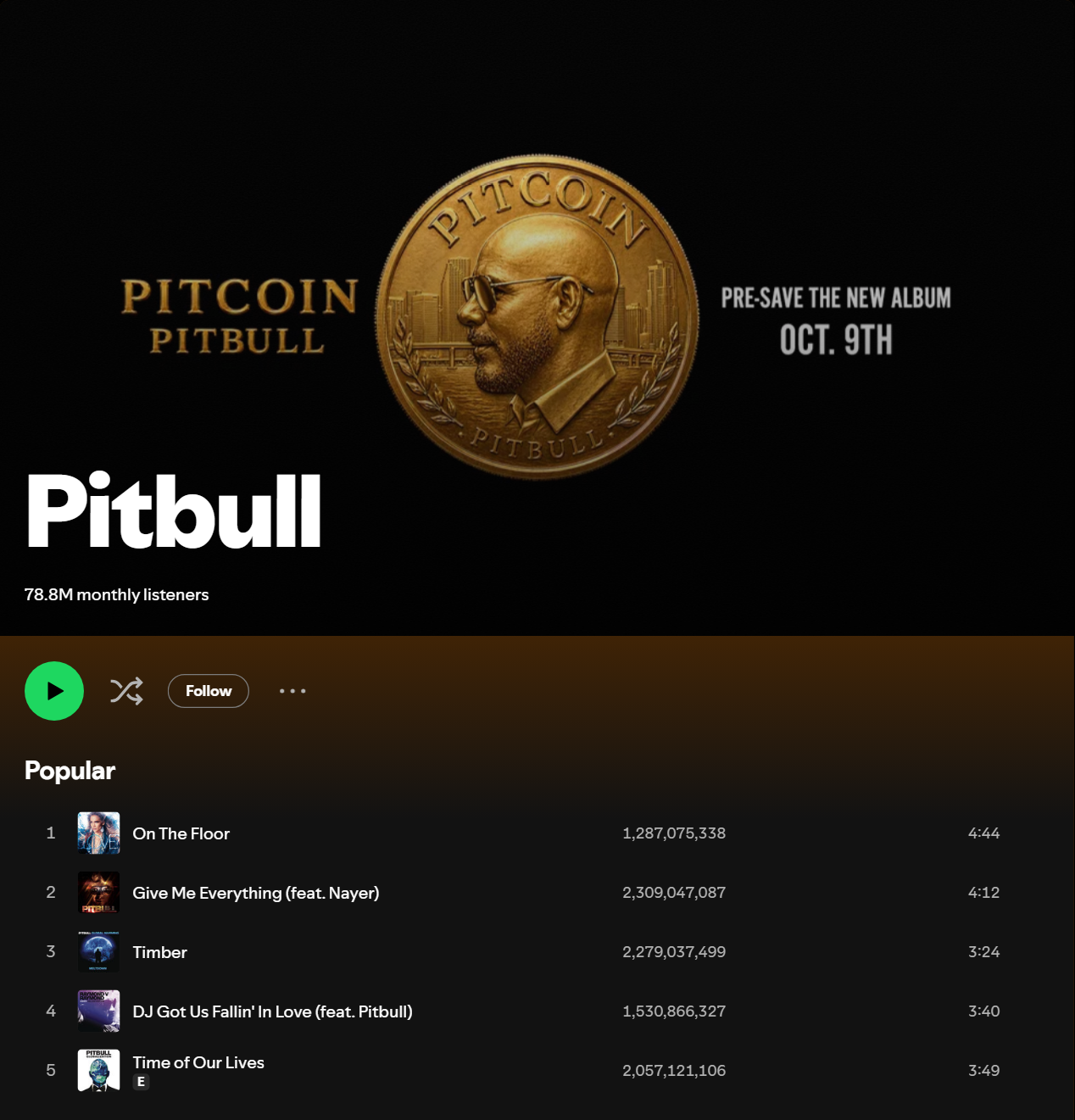
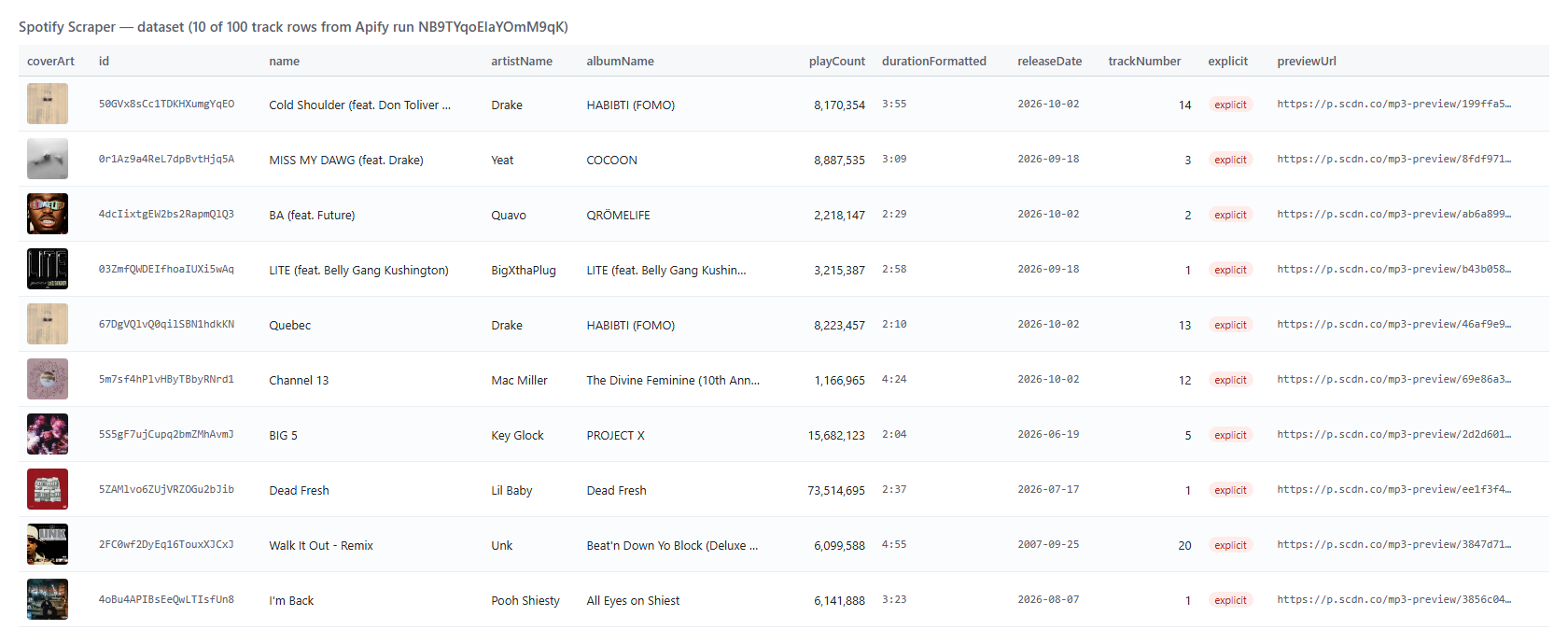 An artist row (shortened):
```json
{
"type": "artist",
"id": "0TnOYISbd1XYRBk9myaseg",
"url": "https://open.spotify.com/artist/0TnOYISbd1XYRBk9myaseg",
"name": "Pitbull",
"verified": true,
"followers": 13489461,
"monthlyListeners": 78824416,
"worldRank": 17,
"topCities": [{ "city": "Mexico City", "country": "MX", "region": "CMX", "numberOfListeners": 1276357 }],
"topTracks": [{ "name": "On The Floor", "playCount": 1287075338, "durationMs": 284866, "previewUrl": "https://p.scdn.co/mp3-preview/a4069c..." }],
"albumCount": 20,
"singleCount": 181,
"concertCount": 11,
"upcomingRelease": { "name": "PITCOIN", "type": "album", "releaseDate": "2026-10-09" }
}
```
A playlist track inside a playlist row:
```json
{
"name": "Patient Zero",
"playCount": 73769731,
"durationMs": 225868,
"addedAt": "2026-09-25T04:02:48.872Z",
"bpm": 91.99,
"key": "G",
"mode": "major",
"camelotKey": "9B",
"artists": [{ "name": "Taylor Swift", "url": "https://open.spotify.com/artist/06HL4z0CvFAxyc27GXpf02" }]
}
```
Each run also saves `play_counts.csv` in the run's key-value store: one line per track seen (artist, album, track, play count, source), ready for a spreadsheet.
#### Fields
| Field | Rows | What it is | Fill on test runs |
|---|---|---|---|
| `playCount` / `streamCount` | track | Total plays as Spotify shows them; `playCountText` keeps Spotify's raw string | 100% (100 tracks) |
| `tracks[].playCount` | album, playlist | Play count of every track in the list | 13/13 album, 50/50 playlist |
| `totalPlayCount` | album, playlist | Sum over every track, when every track was read | album 3,108,388,224 |
| `monthlyListeners` | artist | Monthly listeners | 81% of 400 searched artists |
| `followers` | artist, playlist | Followers / saves | 100% |
| `worldRank` | artist | Rank among the top 500 on Spotify, null otherwise | 28% |
| `topCities` | artist | Top 5 cities with listener counts | 73% |
| `releaseDate` | track, album | Release date and `releaseDatePrecision` | 100% of tracks and albums |
| `label`, `copyright` | album | Record label and copyright lines. Rows from a track link carry the copyright under `album.copyright`; `trackRows` rows expanded from an album or artist carry `label` | 100% of albums |
| `bpm`, `key`, `mode`, `camelotKey` | playlist tracks | Tempo and musical key | 100% / 99.8% of 1,000 |
| `previewUrl` | tracks | 30-second MP3 preview | 100% of 100 track links |
| `credits` | every track row (`includeCredits`) | Writers, composers, producers, engineers, performers | 6-42 per track |
| `authors`, `narrators`, `genres`, `rating`, `price` | audiobook | Authors, narrators, publisher, genres, rating and rating count, price and currency | 3/3 test audiobooks |
| `concerts` | artist (add-on) | Date, city, line-up | artists with shows (Pitbull 11/11) |
| `concerts[].venue`, `country`, `latitude`, `tickets` | artist (`enrichConcertDetails`) | Venue, country, coordinates, ticket sellers with links and availability | first N concerts (3/3 with N = 3) |
| `chart` | chart rows | Chart name, rank, previous and peak rank | 150 chart entries |
| `isNew`, `changed`, `previous*`, `delta*` | monitor mode | What changed since the last run (kept with `compact` too) | monitor runs |
| `tracksAdded`, `tracksRemoved` | playlist (monitor mode, `includeTracks` on) | Tracks added to or removed from the playlist since the last run, compared over the whole playlist (up to 10,000 tracks) whatever `maxTracksPerItem` is | monitor runs |
### How can I use Spotify data?
- 🎯 **Music marketers** — track a release's play counts day by day and report growth per track
- 📊 **Labels and A\&R scouts** — compare artists by monthly listeners, followers, world rank and top cities before signing
- 📬 **Playlist pitching** — find curator playlists by keyword and follower count, with the contact details in their descriptions
- 🎧 **Playlist analysts** — see which tracks a playlist added or removed, with play counts, BPM and key
- 🎤 **Promoters** — list an artist's upcoming concerts by date, city and line-up; turn on `enrichConcertDetails` for venues and ticket links
- 🤖 **AI and research teams** — feed compact rows into an LLM or a dataset of artists, tracks and charts
### How much does it cost to scrape Spotify?
Spotify Scraper is pay-per-result: **$2.80 per 1,000 rows** ($0.0028 per track, album, artist, playlist, podcast, episode, audiobook or profile row), no start fee. One row per track mode is **$0.074 per 1,000 track rows**. The concerts add-on is $0.001 per artist row that carries concerts. Inputs that return nothing are not charged.
| Rows | Entity rows | Track rows (`trackRows`) |
|---:|---:|---:|
| 10 | $0.028 | $0.00074 |
| 100 | $0.28 | $0.0074 |
| 1,000 | $2.80 | $0.074 |
| 10,000 | $28.00 | $0.74 |
There is nothing else to pay: Apify platform usage is included in these prices. Measured on 256 MB: 100 track links in 9.7 s, 100 artists from a search in 14 s, 1,000 track rows from one playlist in 8.3 s.
### Integrations, API, scheduling & MCP
- **Schedules:** run Spotify Scraper hourly, daily or weekly from the **Schedules** tab; turn on `monitorMode` to get only new or changed rows.
- **Webhooks:** fire a URL when a run finishes — push rows to your CRM, Slack or a sheet.
- **No-code:** Make, Zapier, n8n, Google Sheets, Airtable, Slack via [Apify integrations](https://docs.apify.com/integrations).
- **API:** call it from Node.js or Python with `apify-client` — code on the [API tab](https://apify.com/TopApi/spotify-scraper/api/python) and the [Apify API reference](https://docs.apify.com/api/v2).
- **MCP / AI agents:** connect Claude, Cursor or any MCP client through the [MCP tab](https://apify.com/TopApi/spotify-scraper/api/mcp) and ask for Spotify play counts in plain language.
### More scrapers from TopApi
An artist row (shortened):
```json
{
"type": "artist",
"id": "0TnOYISbd1XYRBk9myaseg",
"url": "https://open.spotify.com/artist/0TnOYISbd1XYRBk9myaseg",
"name": "Pitbull",
"verified": true,
"followers": 13489461,
"monthlyListeners": 78824416,
"worldRank": 17,
"topCities": [{ "city": "Mexico City", "country": "MX", "region": "CMX", "numberOfListeners": 1276357 }],
"topTracks": [{ "name": "On The Floor", "playCount": 1287075338, "durationMs": 284866, "previewUrl": "https://p.scdn.co/mp3-preview/a4069c..." }],
"albumCount": 20,
"singleCount": 181,
"concertCount": 11,
"upcomingRelease": { "name": "PITCOIN", "type": "album", "releaseDate": "2026-10-09" }
}
```
A playlist track inside a playlist row:
```json
{
"name": "Patient Zero",
"playCount": 73769731,
"durationMs": 225868,
"addedAt": "2026-09-25T04:02:48.872Z",
"bpm": 91.99,
"key": "G",
"mode": "major",
"camelotKey": "9B",
"artists": [{ "name": "Taylor Swift", "url": "https://open.spotify.com/artist/06HL4z0CvFAxyc27GXpf02" }]
}
```
Each run also saves `play_counts.csv` in the run's key-value store: one line per track seen (artist, album, track, play count, source), ready for a spreadsheet.
#### Fields
| Field | Rows | What it is | Fill on test runs |
|---|---|---|---|
| `playCount` / `streamCount` | track | Total plays as Spotify shows them; `playCountText` keeps Spotify's raw string | 100% (100 tracks) |
| `tracks[].playCount` | album, playlist | Play count of every track in the list | 13/13 album, 50/50 playlist |
| `totalPlayCount` | album, playlist | Sum over every track, when every track was read | album 3,108,388,224 |
| `monthlyListeners` | artist | Monthly listeners | 81% of 400 searched artists |
| `followers` | artist, playlist | Followers / saves | 100% |
| `worldRank` | artist | Rank among the top 500 on Spotify, null otherwise | 28% |
| `topCities` | artist | Top 5 cities with listener counts | 73% |
| `releaseDate` | track, album | Release date and `releaseDatePrecision` | 100% of tracks and albums |
| `label`, `copyright` | album | Record label and copyright lines. Rows from a track link carry the copyright under `album.copyright`; `trackRows` rows expanded from an album or artist carry `label` | 100% of albums |
| `bpm`, `key`, `mode`, `camelotKey` | playlist tracks | Tempo and musical key | 100% / 99.8% of 1,000 |
| `previewUrl` | tracks | 30-second MP3 preview | 100% of 100 track links |
| `credits` | every track row (`includeCredits`) | Writers, composers, producers, engineers, performers | 6-42 per track |
| `authors`, `narrators`, `genres`, `rating`, `price` | audiobook | Authors, narrators, publisher, genres, rating and rating count, price and currency | 3/3 test audiobooks |
| `concerts` | artist (add-on) | Date, city, line-up | artists with shows (Pitbull 11/11) |
| `concerts[].venue`, `country`, `latitude`, `tickets` | artist (`enrichConcertDetails`) | Venue, country, coordinates, ticket sellers with links and availability | first N concerts (3/3 with N = 3) |
| `chart` | chart rows | Chart name, rank, previous and peak rank | 150 chart entries |
| `isNew`, `changed`, `previous*`, `delta*` | monitor mode | What changed since the last run (kept with `compact` too) | monitor runs |
| `tracksAdded`, `tracksRemoved` | playlist (monitor mode, `includeTracks` on) | Tracks added to or removed from the playlist since the last run, compared over the whole playlist (up to 10,000 tracks) whatever `maxTracksPerItem` is | monitor runs |
### How can I use Spotify data?
- 🎯 **Music marketers** — track a release's play counts day by day and report growth per track
- 📊 **Labels and A\&R scouts** — compare artists by monthly listeners, followers, world rank and top cities before signing
- 📬 **Playlist pitching** — find curator playlists by keyword and follower count, with the contact details in their descriptions
- 🎧 **Playlist analysts** — see which tracks a playlist added or removed, with play counts, BPM and key
- 🎤 **Promoters** — list an artist's upcoming concerts by date, city and line-up; turn on `enrichConcertDetails` for venues and ticket links
- 🤖 **AI and research teams** — feed compact rows into an LLM or a dataset of artists, tracks and charts
### How much does it cost to scrape Spotify?
Spotify Scraper is pay-per-result: **$2.80 per 1,000 rows** ($0.0028 per track, album, artist, playlist, podcast, episode, audiobook or profile row), no start fee. One row per track mode is **$0.074 per 1,000 track rows**. The concerts add-on is $0.001 per artist row that carries concerts. Inputs that return nothing are not charged.
| Rows | Entity rows | Track rows (`trackRows`) |
|---:|---:|---:|
| 10 | $0.028 | $0.00074 |
| 100 | $0.28 | $0.0074 |
| 1,000 | $2.80 | $0.074 |
| 10,000 | $28.00 | $0.74 |
There is nothing else to pay: Apify platform usage is included in these prices. Measured on 256 MB: 100 track links in 9.7 s, 100 artists from a search in 14 s, 1,000 track rows from one playlist in 8.3 s.
### Integrations, API, scheduling & MCP
- **Schedules:** run Spotify Scraper hourly, daily or weekly from the **Schedules** tab; turn on `monitorMode` to get only new or changed rows.
- **Webhooks:** fire a URL when a run finishes — push rows to your CRM, Slack or a sheet.
- **No-code:** Make, Zapier, n8n, Google Sheets, Airtable, Slack via [Apify integrations](https://docs.apify.com/integrations).
- **API:** call it from Node.js or Python with `apify-client` — code on the [API tab](https://apify.com/TopApi/spotify-scraper/api/python) and the [Apify API reference](https://docs.apify.com/api/v2).
- **MCP / AI agents:** connect Claude, Cursor or any MCP client through the [MCP tab](https://apify.com/TopApi/spotify-scraper/api/mcp) and ask for Spotify play counts in plain language.
### More scrapers from TopApi