| 🆔 Review id and link (`reviewId`, `reviewUrl`) |
⭐ Star rating (`rating`) |
📝 Title and full text |
| 📅 Published, experience and updated dates |
✅ Verified flag, level and source |
👍 Likes (useful votes) |
| 👤 Reviewer name, id and profile link |
🌍 Reviewer country (`country`) |
🔢 Reviewer's review count |
| 💬 Company reply and reply date |
🗣️ Review language |
🏷️ Collection source (organic, invited) |
| 🏢 Company name, domain, Trustpilot id |
📈 TrustScore, stars, total reviews |
🗂️ Categories, claimed flag, website |
| 📊 Star and language breakdown* |
🤖 AI summary and topic summaries* |
🔍 Transparency report and reply rate* |
\* in the optional company-details row. On a 400-review test run (Wise and Halfords) every review row had its id, link, rating, title, text, language, dates, reviewer, country, verification and company fields; 84% carried a company reply.
### How to scrape Trustpilot reviews with Trustpilot Reviews Scraper
1. [Create a free Apify account](https://console.apify.com/sign-up) - it comes with monthly free credit, no card needed.
2. Open [Trustpilot Reviews Scraper](https://apify.com/TopApi/trustpilot-reviews-scraper) and click **Try for free**.
3. Paste company domains or Trustpilot review URLs into **Companies** (or names into **Company names**) and set **Max reviews per company**.
4. Pick filters if you want them: star ratings, languages, date range, keyword, verified only.
5. Click **Start**. Reviews stream into the dataset as they are read.
6. Open the **Storage** tab and **Export** as JSON, CSV or Excel - or let a schedule run it for you.
### ⬇️ Input
| Parameter | Type | Description |
|---|---|---|
| **🔍 What to scrape** | | |
| `companyUrls` | List | Domains (`www.amazon.com`), Trustpilot review URLs on any country host (`https://de.trustpilot.com/review/zalando.de`) or company website URLs. Filters written into a pasted review URL are kept. |
| `searchTerms` | List | Company names looked up with Trustpilot's own search, e.g. `Revolut`. Up to 100 names per run. |
| `maxCompaniesPerSearch` | Integer | Search matches scraped per name, best first, up to 20. Default `1`. |
| **🎯 Filters** (applied by Trustpilot) | | |
| `stars` | List | Only these star ratings, e.g. `["1","2"]`. Default: all. |
| `languages` | List | Only these languages, e.g. `["en","de"]`. Default: every language. |
| `date` | Select | `last30days`, `last3months`, `last6months`, `last12months`. Default: any time. |
| `topics` | List | Trustpilot topic ids, e.g. `customer_service`, `delivery_service`, `refund`. |
| `verified` | Boolean | Verified reviews only. Default `false`. |
| `withReplies` | Boolean | Only reviews the company answered. Default `false`. |
| `search` | Text | Only reviews containing a word, e.g. `refund`. |
| `sort` | Select | `recency` (newest first, default) or `relevance`. |
| **✂️ Refine results** | | |
| `publishedAfter` | Text | Only reviews published strictly after this date-time, e.g. `2026-09-01`. |
| `lookbackDays` | Integer | Only reviews from the last N days. `0` = no limit. |
| `countryOfReviewer` | Text | Only reviewers from this country, e.g. `US`. |
| **➕ Extra data** | | |
| `includeCompanyInfo` | Boolean | Company name, domain, TrustScore, stars, review count, categories, claimed flag, website on every review. Free. Default `true`. |
| `includeCompanyDetails` | Boolean | One extra row per company (star and language breakdown, reply stats, AI summary, topic summaries, similar companies, verification flags), charged as **company-details** at $0.001. Default `false`. |
| `includeTransparency` | Boolean | Adds Trustpilot's transparency report to the company row. Same $0.001 company-details charge. Default `false`. |
| **🔁 Monitoring** | | |
| `monitorMode` | Boolean | Return only reviews no earlier run with the same companies and filters delivered. If a run stops early (for example at `maxReviewsPerCompany` or your maximum charge), later runs also deliver the older reviews it did not reach. With the company-details row on, that row comes (and is charged) on every run. Pair with a schedule. |
| `monitorStoreName` | Text | Key-value store that remembers delivered reviews. Default `trustpilot-reviews-monitor`. |
| **📦 Output** | | |
| `maxReviewsPerCompany` | Integer | Default `100`; `0` = every review the web pages reach. |
| `maxItems` | Integer | Stop the whole run after this many reviews. `0` = no run limit. |
| `compact` | Boolean | Core fields only (plus `input`), sized for AI agents and MCP. Applies to review rows; the company-details row always comes whole. |
| `fields` | List | Return only these fields; `rowType`, `reviewId` and `input` always stay. Applies to review rows; the company-details row always comes whole. |
| `textMaxLength` | Integer | Cut review text to N characters. `0` = full text. |
| `excludeEmptyFields` | Boolean | Leave out empty fields. |
| **⚙️ Advanced** | | |
| `proxyConfiguration` | Proxy | Used when the direct connection fails, or from the start if you pick proxy groups or your own proxies. Datacenter by default. |
| `maxConcurrency` | Integer | Pages read at the same time. Default `4`. |
#### Input JSON
```json
{
"companyUrls": ["https://www.trustpilot.com/review/www.amazon.com", "wise.com"],
"maxReviewsPerCompany": 200,
"stars": ["1", "2"],
"date": "last3months",
"includeCompanyDetails": true
}
```
#### Paste the domain Trustpilot uses
Trustpilot lists a company under its website domain. **Do:** `wise.com`, `www.booking.com` or the review page URL `https://www.trustpilot.com/review/www.amazon.com` · **Don't:** `Wise` in Companies (that is a name - put it in **Company names** so Trustpilot's search finds the domain). `booking.com` and `www.booking.com` both work: Trustpilot forwards to its own spelling.
#### Leave languages empty to get every language
A company's Trustpilot page shows one language by default (on www.trustpilot.com, English). Amazon's page lists 30,657 English reviews; with languages left empty the actor reads from all 46,653 reviews in 39 languages, not only the English list (counts read on 2026-10-08). Trustpilot's 200-per-list limit still applies, so on a company that size you get the newest reviews in full and a share of older ones (see **Limits & empty runs**). Set `languages` only when you want fewer.
#### Use Newest first with a date cutoff for recurring runs
With `sort: "recency"` and `publishedAfter` or `lookbackDays`, reading stops as soon as it passes your cutoff, so a daily run of a busy company reads one or two pages. For a hands-off schedule, use `monitorMode` instead.
### ⬆️ Output
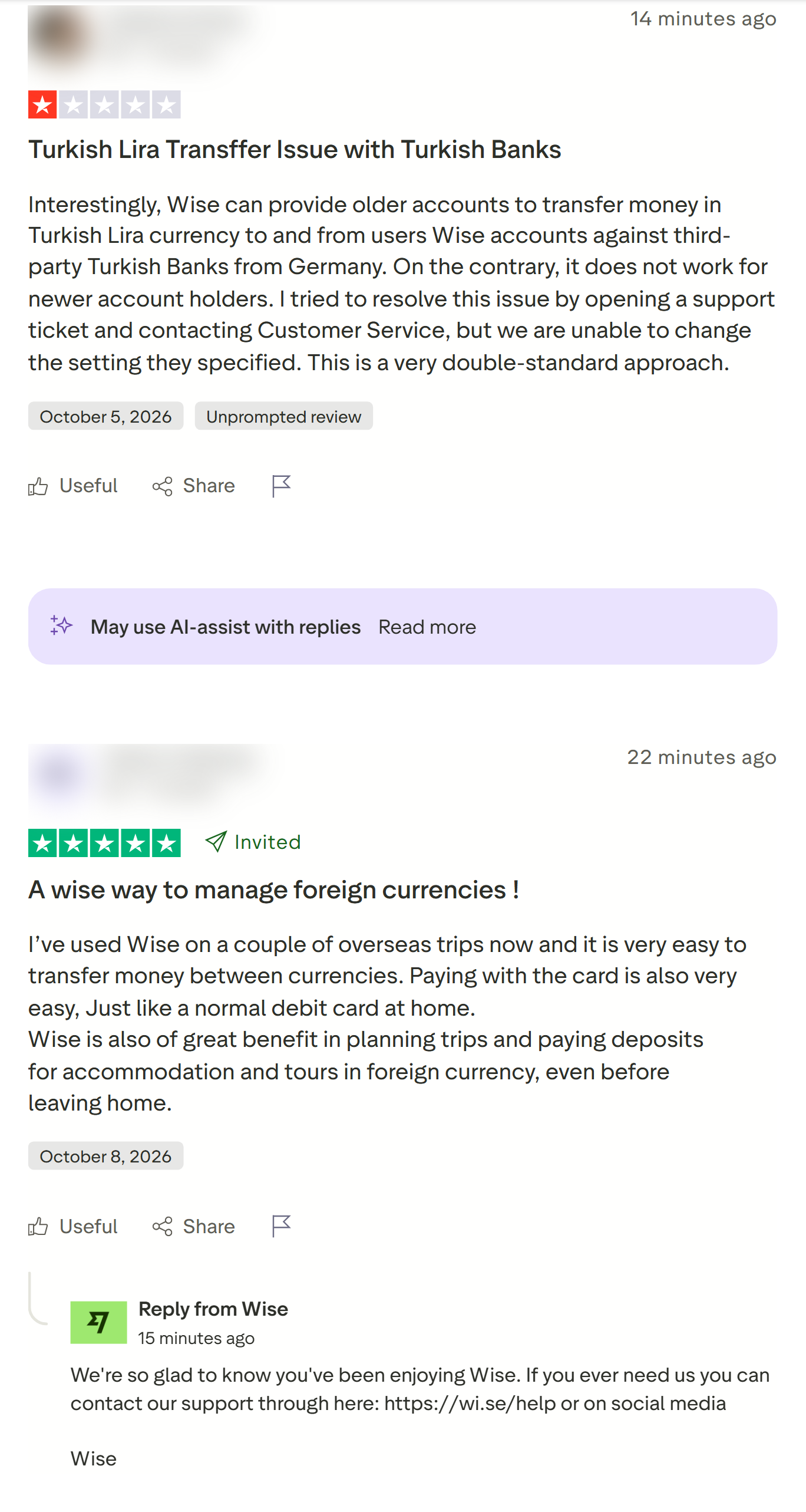
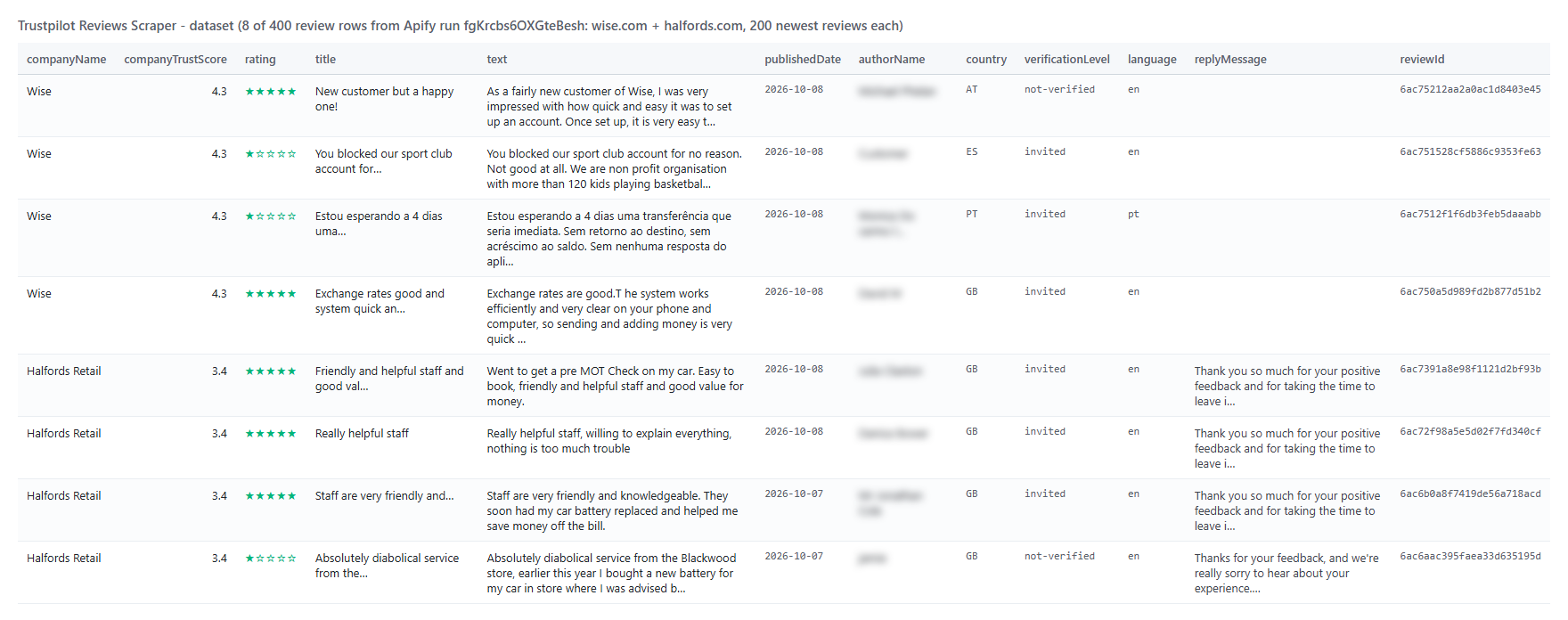
Every review becomes one dataset item. Here is the table view of run `fgKrcbs6OXGteBesh` (wise.com and halfords.com, 200 newest reviews each, reviewer names blurred):
 And one row from that run as JSON (company fields shortened):
```json
{
"rowType": "review",
"reviewId": "6ac6f045ce6f282d874cb1b3",
"reviewUrl": "https://www.trustpilot.com/reviews/6ac6f045ce6f282d874cb1b3",
"rating": 5,
"title": "Super easy and convenient to use",
"text": "Super easy and convenient to use. A life saver!",
"language": "en",
"publishedDate": "2026-10-08T03:22:13.000Z",
"experienceDate": "2026-09-30T00:00:00.000Z",
"isVerified": true,
"verificationLevel": "invited",
"source": "BusinessGeneratedLink",
"authorName": "Kent",
"authorProfileUrl": "https://www.trustpilot.com/users/6ac6f044bec42f1f454a412b",
"authorReviewCount": 1,
"country": "HK",
"hasCompanyReply": true,
"replyMessage": "Hey Kent, Not all heroes wear capes... some just make really good financial software 😉 ...",
"replyPublishedDate": "2026-10-08T03:37:51.000Z",
"companyName": "Wise",
"companyTrustScore": 4.3,
"companyTotalReviews": 302454
}
```
With **Company details row** on, each company adds one item with `rowType: "company"`: `companyReviewsLast12Months`, `replyRate` (Wise: 79%), `averageDaysToReply`, `ratingDistribution`, `reviewsByLanguage`, `aiSummary`, `topicSummaries`, `similarCompanies`, verification flags, claimed date, category path and description; with **Transparency report** on, also `transparency` (12-month totals, organic vs invited counts - Wise: 34.2% organic - monthly counts per star, reports and reviews taken offline).
#### Fields
| Field | Type | What it is | Fill (400 recent / 2,309 all-time) |
|---|---|---|---|
| `reviewId`, `reviewUrl` | string | Trustpilot's review id and link | 100% / 100% |
| `rating` | number | Stars, 1-5 | 100% / 100% |
| `title`, `text` | string | Review title and full text | 100% / 100% |
| `language` | string | Review language | 100% / 100% |
| `publishedDate` | string | Published (ISO 8601) | 100% / 100% |
| `experienceDate` | string | Date of experience | 100% / 51% |
| `updatedDate` | string | Edited on, if ever | 2% / 12% |
| `likes` | number | Useful votes | 100% / 100% |
| `isVerified`, `verificationLevel` | bool, string | Verified label; verified / invited / redirected / not-verified | 100% / 72% |
| `verificationSource`, `reviewSourceName`, `source` | string | How the review was collected | 100% / 100% |
| `authorName`, `authorId`, `authorProfileUrl` | string | Reviewer | 100% / 100% |
| `authorImage` | string | Reviewer avatar (when they set one) | 20% / 20% |
| `authorReviewCount`, `reviewsOnSameDomain` | number | Reviews written, in total and about this company | 100% / 100% |
| `country` | string | Reviewer country | 100% / 100% |
| `replyMessage`, `replyPublishedDate` | string | Company reply | 84% / 55% |
| `company*` | mixed | Company name, domain, id, TrustScore, stars, total reviews, categories, claimed, website, country, Trustpilot URL | 100% / 100% |
Older reviews carry fewer labels on Trustpilot itself (no experience date or verification level before Trustpilot added them), so the all-time column is lower.
### How can I use Trustpilot reviews data?
- 🛡️ **Reputation managers** - pull every new 1- and 2-star review each morning and route it to the team that answers
- 📊 **Customer-experience teams** - track ratings, reply rate and topics month over month and against competitors
- 🔎 **Market researchers** - compare competitors' TrustScores, complaint themes and review volumes across countries and languages
- 🧭 **Agencies** - audit a prospect's Trustpilot profile (reply rate, organic vs invited share, review trend) before a pitch
- 🤖 **AI and analytics teams** - feed review text to sentiment, topic or LLM pipelines (`compact` output, `fields` picker)
- 📈 **Product teams** - search reviews for a feature or problem word (`search: "app"`, `search: "refund"`) and read what customers say
### How much does it cost to scrape Trustpilot reviews?
Trustpilot Reviews Scraper is pay-per-result: **$0.23 per 1,000 reviews** ($0.00023 per review), no start fee. The optional company-details row is $0.001 per company.
| Reviews | Cost |
|---:|---:|
| 100 | $0.023 |
| 1,000 | $0.23 |
| 10,000 | $2.30 |
| 100,000 | $23.00 |
Apify platform usage is included in the price. Measured at the default 512 MB: 200 reviews of one company in 7.9 s, 1,000 in 24 s, 10,000 in 5.1 min, and a full-depth run of a 2,761-review company (2,309 reviews) in 4.1 min.
### Integrations, API, scheduling & MCP
- **Schedules:** run Trustpilot Reviews Scraper hourly, daily or weekly from the **Schedules** tab; turn on `monitorMode` to get only reviews no earlier run delivered.
- **Webhooks:** fire a URL when a run finishes - push new reviews to a help desk, Slack or a sheet.
- **No-code:** Make, Zapier, n8n, Google Sheets, Airtable, Slack via [Apify integrations](https://docs.apify.com/integrations).
- **API:** call it from Node.js or Python with `apify-client` - code on the [API tab](https://apify.com/TopApi/trustpilot-reviews-scraper/api/python) and the [Apify API reference](https://docs.apify.com/api/v2).
- **MCP / AI agents:** connect Claude, Cursor or any MCP client through the [MCP tab](https://apify.com/TopApi/trustpilot-reviews-scraper/api/mcp) and ask for Trustpilot reviews in plain language.
### More review and company research scrapers
And one row from that run as JSON (company fields shortened):
```json
{
"rowType": "review",
"reviewId": "6ac6f045ce6f282d874cb1b3",
"reviewUrl": "https://www.trustpilot.com/reviews/6ac6f045ce6f282d874cb1b3",
"rating": 5,
"title": "Super easy and convenient to use",
"text": "Super easy and convenient to use. A life saver!",
"language": "en",
"publishedDate": "2026-10-08T03:22:13.000Z",
"experienceDate": "2026-09-30T00:00:00.000Z",
"isVerified": true,
"verificationLevel": "invited",
"source": "BusinessGeneratedLink",
"authorName": "Kent",
"authorProfileUrl": "https://www.trustpilot.com/users/6ac6f044bec42f1f454a412b",
"authorReviewCount": 1,
"country": "HK",
"hasCompanyReply": true,
"replyMessage": "Hey Kent, Not all heroes wear capes... some just make really good financial software 😉 ...",
"replyPublishedDate": "2026-10-08T03:37:51.000Z",
"companyName": "Wise",
"companyTrustScore": 4.3,
"companyTotalReviews": 302454
}
```
With **Company details row** on, each company adds one item with `rowType: "company"`: `companyReviewsLast12Months`, `replyRate` (Wise: 79%), `averageDaysToReply`, `ratingDistribution`, `reviewsByLanguage`, `aiSummary`, `topicSummaries`, `similarCompanies`, verification flags, claimed date, category path and description; with **Transparency report** on, also `transparency` (12-month totals, organic vs invited counts - Wise: 34.2% organic - monthly counts per star, reports and reviews taken offline).
#### Fields
| Field | Type | What it is | Fill (400 recent / 2,309 all-time) |
|---|---|---|---|
| `reviewId`, `reviewUrl` | string | Trustpilot's review id and link | 100% / 100% |
| `rating` | number | Stars, 1-5 | 100% / 100% |
| `title`, `text` | string | Review title and full text | 100% / 100% |
| `language` | string | Review language | 100% / 100% |
| `publishedDate` | string | Published (ISO 8601) | 100% / 100% |
| `experienceDate` | string | Date of experience | 100% / 51% |
| `updatedDate` | string | Edited on, if ever | 2% / 12% |
| `likes` | number | Useful votes | 100% / 100% |
| `isVerified`, `verificationLevel` | bool, string | Verified label; verified / invited / redirected / not-verified | 100% / 72% |
| `verificationSource`, `reviewSourceName`, `source` | string | How the review was collected | 100% / 100% |
| `authorName`, `authorId`, `authorProfileUrl` | string | Reviewer | 100% / 100% |
| `authorImage` | string | Reviewer avatar (when they set one) | 20% / 20% |
| `authorReviewCount`, `reviewsOnSameDomain` | number | Reviews written, in total and about this company | 100% / 100% |
| `country` | string | Reviewer country | 100% / 100% |
| `replyMessage`, `replyPublishedDate` | string | Company reply | 84% / 55% |
| `company*` | mixed | Company name, domain, id, TrustScore, stars, total reviews, categories, claimed, website, country, Trustpilot URL | 100% / 100% |
Older reviews carry fewer labels on Trustpilot itself (no experience date or verification level before Trustpilot added them), so the all-time column is lower.
### How can I use Trustpilot reviews data?
- 🛡️ **Reputation managers** - pull every new 1- and 2-star review each morning and route it to the team that answers
- 📊 **Customer-experience teams** - track ratings, reply rate and topics month over month and against competitors
- 🔎 **Market researchers** - compare competitors' TrustScores, complaint themes and review volumes across countries and languages
- 🧭 **Agencies** - audit a prospect's Trustpilot profile (reply rate, organic vs invited share, review trend) before a pitch
- 🤖 **AI and analytics teams** - feed review text to sentiment, topic or LLM pipelines (`compact` output, `fields` picker)
- 📈 **Product teams** - search reviews for a feature or problem word (`search: "app"`, `search: "refund"`) and read what customers say
### How much does it cost to scrape Trustpilot reviews?
Trustpilot Reviews Scraper is pay-per-result: **$0.23 per 1,000 reviews** ($0.00023 per review), no start fee. The optional company-details row is $0.001 per company.
| Reviews | Cost |
|---:|---:|
| 100 | $0.023 |
| 1,000 | $0.23 |
| 10,000 | $2.30 |
| 100,000 | $23.00 |
Apify platform usage is included in the price. Measured at the default 512 MB: 200 reviews of one company in 7.9 s, 1,000 in 24 s, 10,000 in 5.1 min, and a full-depth run of a 2,761-review company (2,309 reviews) in 4.1 min.
### Integrations, API, scheduling & MCP
- **Schedules:** run Trustpilot Reviews Scraper hourly, daily or weekly from the **Schedules** tab; turn on `monitorMode` to get only reviews no earlier run delivered.
- **Webhooks:** fire a URL when a run finishes - push new reviews to a help desk, Slack or a sheet.
- **No-code:** Make, Zapier, n8n, Google Sheets, Airtable, Slack via [Apify integrations](https://docs.apify.com/integrations).
- **API:** call it from Node.js or Python with `apify-client` - code on the [API tab](https://apify.com/TopApi/trustpilot-reviews-scraper/api/python) and the [Apify API reference](https://docs.apify.com/api/v2).
- **MCP / AI agents:** connect Claude, Cursor or any MCP client through the [MCP tab](https://apify.com/TopApi/trustpilot-reviews-scraper/api/mcp) and ask for Trustpilot reviews in plain language.
### More review and company research scrapers