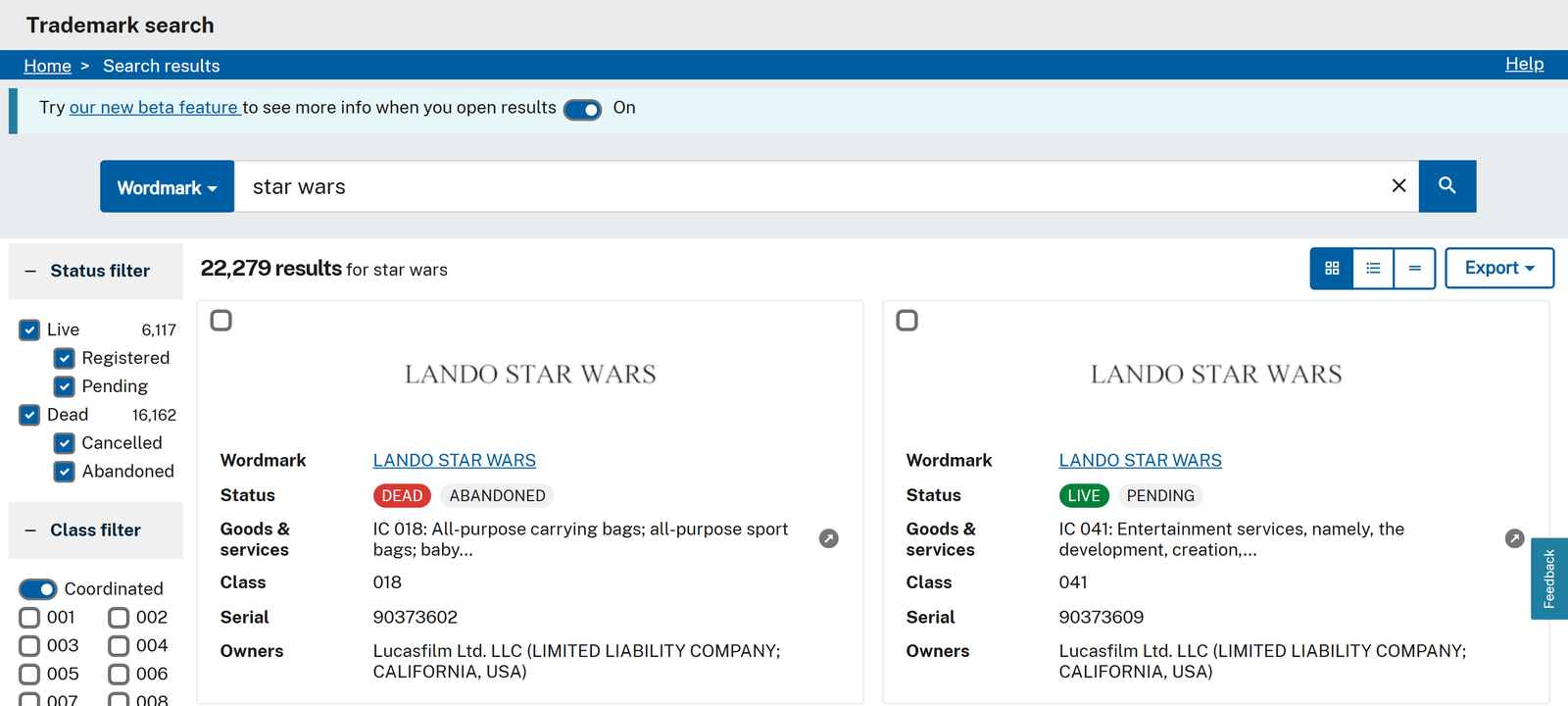
 - **Search the way USPTO does:** wordmark (contains or exact), sounds-like (phonetic), owner name, goods & services text or any text, filtered by live / pending / registered / dead status, Nice class and filing date
- **Bulk in one run:** 25 phrases in 4 seconds, 14,397 records of one search in 4 minutes (measured on the platform)
- **Exact lookups:** serial numbers, registration numbers or TSDR links, 100 per request
- **Owner and attorney on every row:** owner name, entity type, address, attorney of record; add the TSDR record for attorney and correspondent e-mail, prosecution history, assignments and the renewal window
- **Monitor mode:** a scheduled run returns only new filings and marks whose USPTO status changed
- **No login, cookies or USPTO API key**
- **Export anywhere:** JSON, CSV, Excel, XML; schedules, webhooks, Make, Zapier, n8n, Google Sheets, API and MCP
### What data can you get from USPTO trademarks?
- **Search the way USPTO does:** wordmark (contains or exact), sounds-like (phonetic), owner name, goods & services text or any text, filtered by live / pending / registered / dead status, Nice class and filing date
- **Bulk in one run:** 25 phrases in 4 seconds, 14,397 records of one search in 4 minutes (measured on the platform)
- **Exact lookups:** serial numbers, registration numbers or TSDR links, 100 per request
- **Owner and attorney on every row:** owner name, entity type, address, attorney of record; add the TSDR record for attorney and correspondent e-mail, prosecution history, assignments and the renewal window
- **Monitor mode:** a scheduled run returns only new filings and marks whose USPTO status changed
- **No login, cookies or USPTO API key**
- **Export anywhere:** JSON, CSV, Excel, XML; schedules, webhooks, Make, Zapier, n8n, Google Sheets, API and MCP
### What data can you get from USPTO trademarks?
🔢 Serial number serialNumber | 📜 Registration number | ™️ Wordmark |
| 🔊 Pseudo mark (phonetic spelling) | 🚦 Status: LIVE / DEAD + statusCategory | 📝 USPTO status code and description |
| 📅 Filing date | 📅 Registration date | 📅 Published for opposition, abandoned, cancelled |
🏷️ Nice classes internationalClasses | 🇺🇸 US classes | 📦 Goods & services text |
| 🏢 Owner name + entity type | 📍 Owner address, city, state | 🌐 Owner citizenship / organized in |
| ⚖️ Attorney of record | 📧 Attorney + correspondent e-mail (TSDR) | 🗂️ Docket number (TSDR) |
| 🖼️ Mark image URL | 🎨 Design codes + descriptions | ✍️ Disclaimer, description, transliteration |
| 📚 Prosecution history (TSDR) | 🔁 Assignments + TTAB cases (TSDR) | ⏰ Renewal window + grace deadline (TSDR) |
| 🔗 TSDR and Trademark Search links | 🎯 Similarity score to your phrase | 🆕 Change type in monitor mode |
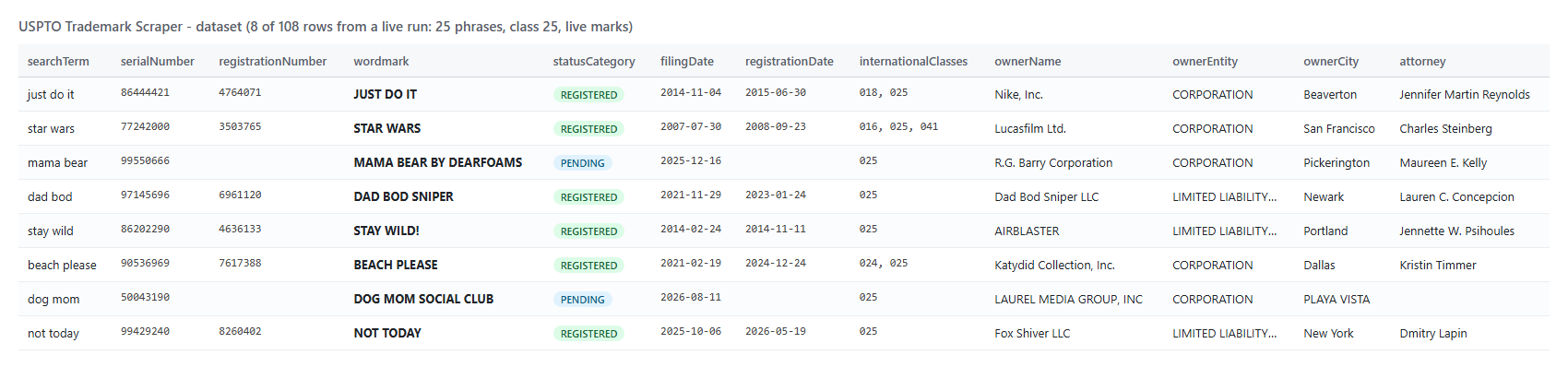 One row per USPTO trademark (a real row from the 25-phrase class-25 run, shortened):
```json
{
"searchTerm": "just do it",
"serialNumber": "86444421",
"registrationNumber": "4764071",
"wordmark": "JUST DO IT",
"statusCategory": "REGISTERED",
"statusDescription": "REGISTERED AND RENEWED",
"filingDate": "2014-11-04",
"registrationDate": "2015-06-30",
"internationalClasses": ["018", "025"],
"goodsAndServices": ["IC 018: All purpose sport bags; Backpacks.", "IC 025: Footwear; Headbands; ..."],
"ownerName": "Nike, Inc.",
"ownerEntity": "CORPORATION",
"ownerAddress": "One Bowerman Drive, Beaverton, OREGON 970056453, UNITED STATES",
"attorney": "Jennifer Martin Reynolds",
"markImageUrl": "https://tmcms-docs.uspto.gov/cases/86444421/mark/large.png",
"tsdrUrl": "https://tsdr.uspto.gov/#caseNumber=86444421&caseSearchType=US_APPLICATION&caseType=DEFAULT&searchType=statusSearch",
"similarityScore": 100,
"matchCountForQuery": 4
}
```
With `includeDetails` on, the same row also carries the TSDR record (a real row from the details run):
```json
{
"serialNumber": "50081566",
"wordmark": "COFFEE RUSH",
"attorneyEmail": "docketing@khpatent.com",
"correspondentEmail": "docketing@khpatent.com",
"correspondentAddress": "Owen W. Dukelow, Kolisch Hartwell, P.C., 900 SW 5th Ave., Ste. 2300, Portland, Oregon 97204, United States",
"docketNumber": "YST401",
"tm5Status": "LIVE/APPLICATION/Awaiting Examination",
"prosecutionHistory": [{ "date": "2026-09-04", "description": "NEW APPLICATION ENTERED" }],
"detailsStatus": "ok"
}
```
#### USPTO trademark fields
Fill measured on a live run of 14,397 records ("coffee" in class 30, every status) and, for TSDR fields, a 150-record details run of new coffee filings.
| Field | Meaning | Filled |
|---|---|---:|
| `serialNumber`, `wordmark`, `status`, `statusCategory`, `statusDescription` | Identity and current USPTO status | 100% (wordmark 99.9%: design-only marks have none) |
| `filingDate` / `registrationDate` | Filed / registered | 99.7% / 50.9% (registered marks) |
| `internationalClasses`, `usClasses`, `goodsAndServices` | Classes and goods & services as filed | 100% |
| `ownerName`, `ownerEntity`, `ownerAddress`, `ownerCitizenship` | Owner of record | 100% |
| `attorney` | Attorney of record | 64.3% |
| `markImageUrl` | Mark drawing (none for pre-2003 typed drawings) | 93.1% |
| `disclaimer`, `designCodes`, `markDescription` | Mark details | 73.8% / 38.3% / 35.8% |
| `firstUseAnyDate`, `firstUseCommerceDate` | First use dates | 64.8% |
| `correspondentEmail`, `correspondentAddress` (TSDR) | Who receives USPTO mail | 100% |
| `attorneyEmail` (TSDR) | Attorney's e-mail | 48.7% (= rows with an attorney) |
| `prosecutionHistory` (TSDR) | Every docket event, with document links | 100% |
| `maintenanceWindowOpens`, `maintenanceDueBy`, `maintenanceGraceDeadline` (TSDR) | Next Section 8/9 filing window | registered marks only |
### How can I use USPTO trademark data?
- 👕 **Print-on-demand and Merch sellers:** check slogans against live marks in class 25 before listing.
- ⚖️ **IP law firms:** pull new filings with the attorney and correspondent e-mail to offer prosecution, opposition or renewal work.
- 🛡️ **Brand-protection teams:** watch for new applications that contain or sound like your brand.
- 🏢 **Competitive intelligence:** map a competitor's portfolio by owner name, classes and filing dates.
- 🔁 **Renewal and docketing services:** find registrations whose Section 8/9 window opens soon.
- 🤖 **Legal-tech and AI agents:** feed structured USPTO records into clearance tools and LLM pipelines.
### How much does it cost to scrape USPTO trademarks?
USPTO Trademark Scraper is pay-per-result: **$2.80 per 1,000 USPTO trademarks**, no start fee. The TSDR details add-on costs **$1.90 per 1,000 trademarks** that receive them. You only pay for trademarks written to your dataset.
| Trademarks | Records only | With TSDR details |
|---:|---:|---:|
| 100 | $0.28 | $0.47 |
| 1,000 | $2.80 | $4.70 |
| 10,000 | $28.00 | $47.00 |
Apify platform usage is included in the price. Measured on the platform: 10 trademarks in 3 seconds, 108 trademarks for 25 phrases in 4 seconds, 150 trademarks with TSDR details in 74 seconds, all on 256 MB with a memory peak under 85 MB.
### USPTO trademarks in your tools: integrations, API, scheduling & MCP
- **Schedule it:** a daily or weekly [Apify schedule](https://docs.apify.com/platform/schedules) with `monitorMode` turns a search into a new-filings feed.
- **Webhooks:** get a call when the run finishes and pull the new rows into your CRM or docketing system.
- **Make, Zapier, n8n, Google Sheets, Slack:** send USPTO trademarks wherever your team works.
- **API:** run it from code with [Python](https://console.apify.com/actors/h459cz0dcRu6UkqEG/api/python) or [JavaScript](https://console.apify.com/actors/h459cz0dcRu6UkqEG/api/javascript); rival input names such as `terms` + `classes` are accepted too.
- **MCP:** connect AI assistants through the [Apify MCP server](https://mcp.apify.com) and ask for "live class 25 marks containing 'mama bear'".
### More scrapers by TopApi
- [Similarweb Scraper](https://apify.com/topapi/similarweb-scraper) - use it when you need the traffic behind a brand's website.
- [Instagram Contact Scraper](https://apify.com/topapi/instagram-contact-scraper) - use it to reach a brand owner through its Instagram account.
- [Google Maps Reviews Scraper](https://apify.com/topapi/google-maps-reviews-scraper) - use it to watch what customers say about a brand's locations.
- [Facebook Page Posts Scraper](https://apify.com/topapi/facebook-page-posts-scraper) - use it to follow a brand's own posts.
- [X Profile Scraper](https://apify.com/topapi/x-profile-scraper) - use it to check whether a brand name is taken on X.
- [Google Geocoding Scraper](https://apify.com/topapi/google-geocoding-scraper) - use it to put owner addresses on a map.
All TopApi actors: [apify.com/topapi](https://apify.com/topapi).
### Limits & empty runs
- **Source:** the USPTO trademark search index; it is reloaded daily, and new applications usually appear one to two days after filing.
- **Rate limit:** USPTO allows each IP about 100-150 requests in 5 minutes. A search page carries up to 500 trademarks, so searches rarely reach it; TSDR details are one request each, and a large details run moves to fresh Apify proxy IPs (measured: 150 details, one refusal, finished on the proxy).
- **Depth:** the index pages any search to the end; 14,397 of 14,397 records of one search were delivered in a test run.
- **TSDR details** are slower (1-4 seconds each); a TSDR record that does not answer leaves the row without details and the add-on is not charged.
- **Empty run:** no matching marks, or every match already delivered in monitor mode. Nothing is charged; `RUN_SUMMARY` in the key-value store lists the USPTO count per search.
### FAQ
#### How many trademarks can USPTO Trademark Scraper return?
Every match of a search: set `maxResultsPerSearch` and `maxResults` to `0`. A test run returned all 14,397 trademarks USPTO counts for "coffee" in class 30.
#### Can USPTO Trademark Scraper check if a brand name is available?
It returns the live and dead US marks that contain, match or sound like your name in the classes you choose. Whether a name is available is a legal judgment; use the rows as research.
#### Can I monitor new USPTO trademark filings with USPTO Trademark Scraper?
Yes. Turn on `monitorMode`, add a `filedAfter` window and schedule the run. Each run delivers only new marks and status changes.
#### Does USPTO Trademark Scraper give the attorney's e-mail?
Yes, with `includeDetails`: `attorneyEmail` and `correspondentEmail` come from the public TSDR case record, with the correspondent's postal address and docket number.
#### Can I look up trademarks by serial or registration number with USPTO Trademark Scraper?
Yes. Paste serial numbers, registration numbers or TSDR links into `serialNumbers`; 100 numbers go to USPTO in one request, and unknown numbers are listed in `RUN_SUMMARY`.
#### Do I need a USPTO account or API key for USPTO Trademark Scraper?
No. It reads the same public search index and TSDR records as USPTO's Trademark Search website, with no login, cookies or key.
#### Can I use USPTO Trademark Scraper with the Apify API or MCP?
Yes. Start runs from the API in any language and read the dataset, or call it from an AI assistant through the Apify MCP server.
#### Why did my USPTO Trademark Scraper run return no trademarks?
USPTO found no mark for that phrase, status and class, or monitor mode had already delivered every match. Check `matchCountForQuery` and `RUN_SUMMARY`; nothing is charged for an empty search.
#### Is USPTO Trademark Scraper affiliated with the USPTO, and is it legal advice?
No. It is an independent tool that reads public USPTO records, and its output is not legal advice.
#### Your feedback
We keep improving USPTO Trademark Scraper. Found a bug or missing a field? Open an issue on the [Issues tab](https://apify.com/topapi/uspto-trademark-scraper/issues/open).
# Actor input Schema
## `searchTerms` (type: `array`):
Words or phrases to search, one per line, e.g. "star wars", "just do it". Where they are matched is set by Search in. Field tags work too: "WM:coffee AND IC:030".
## `searchField` (type: `string`):
Where the search terms are matched. Wordmark (contains) finds the phrase inside a mark, so "star wars" also returns "LANDO STAR WARS".
## `serialNumbers` (type: `array`):
Exact lookups, one per line: 8-digit serials (97509558), registration numbers (2239077 or RN 2239077), or TSDR / Trademark Search URLs. Filters below do not apply.
## `statusFilter` (type: `string`):
Live = pending + registered. Dead = abandoned, cancelled or expired. Empty = all statuses.
## `niceClasses` (type: `array`):
International (Nice) classes 1-45, A, B or 200, e.g. "25" (clothing), "9" (software). A mark in any listed class matches. Empty = all classes.
## `filedAfter` (type: `string`):
Only applications filed on or after this date, e.g. 2026-09-01 or "30 days". Pairs with monitor mode for a new-filings watch.
## `filedBefore` (type: `string`):
Only applications filed on or before this date, e.g. 2026-09-30. Empty = up to today.
## `sortBy` (type: `string`):
Order of the results; matters when a cap stops the search early.
## `excludeKeywords` (type: `array`):
Drop marks whose wordmark contains any of these words, e.g. "LANDO". Case-insensitive.
## `withAttorneyOnly` (type: `boolean`):
Keep only filings that name an attorney (law-firm and IP-service lead lists).
## `includeDetails` (type: `boolean`):
Adds attorney and correspondent e-mail, correspondent address, docket number, prosecution history, assignments, TTAB cases and the renewal window. Billed per trademark that gets them.
## `monitorMode` (type: `boolean`):
Deliver only marks not delivered by earlier runs, plus marks whose USPTO status changed since then (changeType). Pairs with a daily schedule.
## `monitorStoreName` (type: `string`):
Named key-value store that remembers what earlier runs delivered. Use one name per watch, e.g. "acme-brand-watch".
## `maxResultsPerSearch` (type: `integer`):
Most trademarks per search term. 0 = every match (USPTO counts 285 marks for "star wars", 23,837 for "coffee").
## `maxResults` (type: `integer`):
Most trademarks for the whole run, across all searches. 0 = no limit.
## `compact` (type: `boolean`):
Core fields only (mark, serial, status, dates, classes, owner, attorney, link): smaller rows for AI agents, MCP and spreadsheets.
## `proxyConfiguration` (type: `object`):
USPTO allows each IP ~100 requests in 5 minutes. With the Apify proxy (default) the run starts direct and moves to a fresh proxy IP whenever USPTO refuses one.
## `maxConcurrency` (type: `integer`):
Requests in flight at once. 4 is fast and gentle; raise it for large TSDR-detail runs.
## Actor input object example
```json
{
"searchTerms": [
"star wars"
],
"searchField": "wordmark",
"statusFilter": "live",
"sortBy": "relevance",
"withAttorneyOnly": false,
"includeDetails": false,
"monitorMode": false,
"monitorStoreName": "uspto-trademark-monitor",
"maxResultsPerSearch": 10,
"maxResults": 50,
"compact": false,
"proxyConfiguration": {
"useApifyProxy": true
},
"maxConcurrency": 4
}
```
# Actor output Schema
## `results` (type: `string`):
One item per US trademark application or registration: mark, status, dates, classes, goods & services, owner, attorney, links.
## `summary` (type: `string`):
Per search: USPTO match count, fetched, delivered, filtered and duplicate records; numbers not found; requests and egress used.
# API
You can run this Actor programmatically using our API. Below are code examples in JavaScript, Python, and CLI, as well as the OpenAPI specification and MCP server setup.
## JavaScript example
```javascript
import { ApifyClient } from 'apify-client';
// Initialize the ApifyClient with your Apify API token
// Replace the '
One row per USPTO trademark (a real row from the 25-phrase class-25 run, shortened):
```json
{
"searchTerm": "just do it",
"serialNumber": "86444421",
"registrationNumber": "4764071",
"wordmark": "JUST DO IT",
"statusCategory": "REGISTERED",
"statusDescription": "REGISTERED AND RENEWED",
"filingDate": "2014-11-04",
"registrationDate": "2015-06-30",
"internationalClasses": ["018", "025"],
"goodsAndServices": ["IC 018: All purpose sport bags; Backpacks.", "IC 025: Footwear; Headbands; ..."],
"ownerName": "Nike, Inc.",
"ownerEntity": "CORPORATION",
"ownerAddress": "One Bowerman Drive, Beaverton, OREGON 970056453, UNITED STATES",
"attorney": "Jennifer Martin Reynolds",
"markImageUrl": "https://tmcms-docs.uspto.gov/cases/86444421/mark/large.png",
"tsdrUrl": "https://tsdr.uspto.gov/#caseNumber=86444421&caseSearchType=US_APPLICATION&caseType=DEFAULT&searchType=statusSearch",
"similarityScore": 100,
"matchCountForQuery": 4
}
```
With `includeDetails` on, the same row also carries the TSDR record (a real row from the details run):
```json
{
"serialNumber": "50081566",
"wordmark": "COFFEE RUSH",
"attorneyEmail": "docketing@khpatent.com",
"correspondentEmail": "docketing@khpatent.com",
"correspondentAddress": "Owen W. Dukelow, Kolisch Hartwell, P.C., 900 SW 5th Ave., Ste. 2300, Portland, Oregon 97204, United States",
"docketNumber": "YST401",
"tm5Status": "LIVE/APPLICATION/Awaiting Examination",
"prosecutionHistory": [{ "date": "2026-09-04", "description": "NEW APPLICATION ENTERED" }],
"detailsStatus": "ok"
}
```
#### USPTO trademark fields
Fill measured on a live run of 14,397 records ("coffee" in class 30, every status) and, for TSDR fields, a 150-record details run of new coffee filings.
| Field | Meaning | Filled |
|---|---|---:|
| `serialNumber`, `wordmark`, `status`, `statusCategory`, `statusDescription` | Identity and current USPTO status | 100% (wordmark 99.9%: design-only marks have none) |
| `filingDate` / `registrationDate` | Filed / registered | 99.7% / 50.9% (registered marks) |
| `internationalClasses`, `usClasses`, `goodsAndServices` | Classes and goods & services as filed | 100% |
| `ownerName`, `ownerEntity`, `ownerAddress`, `ownerCitizenship` | Owner of record | 100% |
| `attorney` | Attorney of record | 64.3% |
| `markImageUrl` | Mark drawing (none for pre-2003 typed drawings) | 93.1% |
| `disclaimer`, `designCodes`, `markDescription` | Mark details | 73.8% / 38.3% / 35.8% |
| `firstUseAnyDate`, `firstUseCommerceDate` | First use dates | 64.8% |
| `correspondentEmail`, `correspondentAddress` (TSDR) | Who receives USPTO mail | 100% |
| `attorneyEmail` (TSDR) | Attorney's e-mail | 48.7% (= rows with an attorney) |
| `prosecutionHistory` (TSDR) | Every docket event, with document links | 100% |
| `maintenanceWindowOpens`, `maintenanceDueBy`, `maintenanceGraceDeadline` (TSDR) | Next Section 8/9 filing window | registered marks only |
### How can I use USPTO trademark data?
- 👕 **Print-on-demand and Merch sellers:** check slogans against live marks in class 25 before listing.
- ⚖️ **IP law firms:** pull new filings with the attorney and correspondent e-mail to offer prosecution, opposition or renewal work.
- 🛡️ **Brand-protection teams:** watch for new applications that contain or sound like your brand.
- 🏢 **Competitive intelligence:** map a competitor's portfolio by owner name, classes and filing dates.
- 🔁 **Renewal and docketing services:** find registrations whose Section 8/9 window opens soon.
- 🤖 **Legal-tech and AI agents:** feed structured USPTO records into clearance tools and LLM pipelines.
### How much does it cost to scrape USPTO trademarks?
USPTO Trademark Scraper is pay-per-result: **$2.80 per 1,000 USPTO trademarks**, no start fee. The TSDR details add-on costs **$1.90 per 1,000 trademarks** that receive them. You only pay for trademarks written to your dataset.
| Trademarks | Records only | With TSDR details |
|---:|---:|---:|
| 100 | $0.28 | $0.47 |
| 1,000 | $2.80 | $4.70 |
| 10,000 | $28.00 | $47.00 |
Apify platform usage is included in the price. Measured on the platform: 10 trademarks in 3 seconds, 108 trademarks for 25 phrases in 4 seconds, 150 trademarks with TSDR details in 74 seconds, all on 256 MB with a memory peak under 85 MB.
### USPTO trademarks in your tools: integrations, API, scheduling & MCP
- **Schedule it:** a daily or weekly [Apify schedule](https://docs.apify.com/platform/schedules) with `monitorMode` turns a search into a new-filings feed.
- **Webhooks:** get a call when the run finishes and pull the new rows into your CRM or docketing system.
- **Make, Zapier, n8n, Google Sheets, Slack:** send USPTO trademarks wherever your team works.
- **API:** run it from code with [Python](https://console.apify.com/actors/h459cz0dcRu6UkqEG/api/python) or [JavaScript](https://console.apify.com/actors/h459cz0dcRu6UkqEG/api/javascript); rival input names such as `terms` + `classes` are accepted too.
- **MCP:** connect AI assistants through the [Apify MCP server](https://mcp.apify.com) and ask for "live class 25 marks containing 'mama bear'".
### More scrapers by TopApi
- [Similarweb Scraper](https://apify.com/topapi/similarweb-scraper) - use it when you need the traffic behind a brand's website.
- [Instagram Contact Scraper](https://apify.com/topapi/instagram-contact-scraper) - use it to reach a brand owner through its Instagram account.
- [Google Maps Reviews Scraper](https://apify.com/topapi/google-maps-reviews-scraper) - use it to watch what customers say about a brand's locations.
- [Facebook Page Posts Scraper](https://apify.com/topapi/facebook-page-posts-scraper) - use it to follow a brand's own posts.
- [X Profile Scraper](https://apify.com/topapi/x-profile-scraper) - use it to check whether a brand name is taken on X.
- [Google Geocoding Scraper](https://apify.com/topapi/google-geocoding-scraper) - use it to put owner addresses on a map.
All TopApi actors: [apify.com/topapi](https://apify.com/topapi).
### Limits & empty runs
- **Source:** the USPTO trademark search index; it is reloaded daily, and new applications usually appear one to two days after filing.
- **Rate limit:** USPTO allows each IP about 100-150 requests in 5 minutes. A search page carries up to 500 trademarks, so searches rarely reach it; TSDR details are one request each, and a large details run moves to fresh Apify proxy IPs (measured: 150 details, one refusal, finished on the proxy).
- **Depth:** the index pages any search to the end; 14,397 of 14,397 records of one search were delivered in a test run.
- **TSDR details** are slower (1-4 seconds each); a TSDR record that does not answer leaves the row without details and the add-on is not charged.
- **Empty run:** no matching marks, or every match already delivered in monitor mode. Nothing is charged; `RUN_SUMMARY` in the key-value store lists the USPTO count per search.
### FAQ
#### How many trademarks can USPTO Trademark Scraper return?
Every match of a search: set `maxResultsPerSearch` and `maxResults` to `0`. A test run returned all 14,397 trademarks USPTO counts for "coffee" in class 30.
#### Can USPTO Trademark Scraper check if a brand name is available?
It returns the live and dead US marks that contain, match or sound like your name in the classes you choose. Whether a name is available is a legal judgment; use the rows as research.
#### Can I monitor new USPTO trademark filings with USPTO Trademark Scraper?
Yes. Turn on `monitorMode`, add a `filedAfter` window and schedule the run. Each run delivers only new marks and status changes.
#### Does USPTO Trademark Scraper give the attorney's e-mail?
Yes, with `includeDetails`: `attorneyEmail` and `correspondentEmail` come from the public TSDR case record, with the correspondent's postal address and docket number.
#### Can I look up trademarks by serial or registration number with USPTO Trademark Scraper?
Yes. Paste serial numbers, registration numbers or TSDR links into `serialNumbers`; 100 numbers go to USPTO in one request, and unknown numbers are listed in `RUN_SUMMARY`.
#### Do I need a USPTO account or API key for USPTO Trademark Scraper?
No. It reads the same public search index and TSDR records as USPTO's Trademark Search website, with no login, cookies or key.
#### Can I use USPTO Trademark Scraper with the Apify API or MCP?
Yes. Start runs from the API in any language and read the dataset, or call it from an AI assistant through the Apify MCP server.
#### Why did my USPTO Trademark Scraper run return no trademarks?
USPTO found no mark for that phrase, status and class, or monitor mode had already delivered every match. Check `matchCountForQuery` and `RUN_SUMMARY`; nothing is charged for an empty search.
#### Is USPTO Trademark Scraper affiliated with the USPTO, and is it legal advice?
No. It is an independent tool that reads public USPTO records, and its output is not legal advice.
#### Your feedback
We keep improving USPTO Trademark Scraper. Found a bug or missing a field? Open an issue on the [Issues tab](https://apify.com/topapi/uspto-trademark-scraper/issues/open).
# Actor input Schema
## `searchTerms` (type: `array`):
Words or phrases to search, one per line, e.g. "star wars", "just do it". Where they are matched is set by Search in. Field tags work too: "WM:coffee AND IC:030".
## `searchField` (type: `string`):
Where the search terms are matched. Wordmark (contains) finds the phrase inside a mark, so "star wars" also returns "LANDO STAR WARS".
## `serialNumbers` (type: `array`):
Exact lookups, one per line: 8-digit serials (97509558), registration numbers (2239077 or RN 2239077), or TSDR / Trademark Search URLs. Filters below do not apply.
## `statusFilter` (type: `string`):
Live = pending + registered. Dead = abandoned, cancelled or expired. Empty = all statuses.
## `niceClasses` (type: `array`):
International (Nice) classes 1-45, A, B or 200, e.g. "25" (clothing), "9" (software). A mark in any listed class matches. Empty = all classes.
## `filedAfter` (type: `string`):
Only applications filed on or after this date, e.g. 2026-09-01 or "30 days". Pairs with monitor mode for a new-filings watch.
## `filedBefore` (type: `string`):
Only applications filed on or before this date, e.g. 2026-09-30. Empty = up to today.
## `sortBy` (type: `string`):
Order of the results; matters when a cap stops the search early.
## `excludeKeywords` (type: `array`):
Drop marks whose wordmark contains any of these words, e.g. "LANDO". Case-insensitive.
## `withAttorneyOnly` (type: `boolean`):
Keep only filings that name an attorney (law-firm and IP-service lead lists).
## `includeDetails` (type: `boolean`):
Adds attorney and correspondent e-mail, correspondent address, docket number, prosecution history, assignments, TTAB cases and the renewal window. Billed per trademark that gets them.
## `monitorMode` (type: `boolean`):
Deliver only marks not delivered by earlier runs, plus marks whose USPTO status changed since then (changeType). Pairs with a daily schedule.
## `monitorStoreName` (type: `string`):
Named key-value store that remembers what earlier runs delivered. Use one name per watch, e.g. "acme-brand-watch".
## `maxResultsPerSearch` (type: `integer`):
Most trademarks per search term. 0 = every match (USPTO counts 285 marks for "star wars", 23,837 for "coffee").
## `maxResults` (type: `integer`):
Most trademarks for the whole run, across all searches. 0 = no limit.
## `compact` (type: `boolean`):
Core fields only (mark, serial, status, dates, classes, owner, attorney, link): smaller rows for AI agents, MCP and spreadsheets.
## `proxyConfiguration` (type: `object`):
USPTO allows each IP ~100 requests in 5 minutes. With the Apify proxy (default) the run starts direct and moves to a fresh proxy IP whenever USPTO refuses one.
## `maxConcurrency` (type: `integer`):
Requests in flight at once. 4 is fast and gentle; raise it for large TSDR-detail runs.
## Actor input object example
```json
{
"searchTerms": [
"star wars"
],
"searchField": "wordmark",
"statusFilter": "live",
"sortBy": "relevance",
"withAttorneyOnly": false,
"includeDetails": false,
"monitorMode": false,
"monitorStoreName": "uspto-trademark-monitor",
"maxResultsPerSearch": 10,
"maxResults": 50,
"compact": false,
"proxyConfiguration": {
"useApifyProxy": true
},
"maxConcurrency": 4
}
```
# Actor output Schema
## `results` (type: `string`):
One item per US trademark application or registration: mark, status, dates, classes, goods & services, owner, attorney, links.
## `summary` (type: `string`):
Per search: USPTO match count, fetched, delivered, filtered and duplicate records; numbers not found; requests and egress used.
# API
You can run this Actor programmatically using our API. Below are code examples in JavaScript, Python, and CLI, as well as the OpenAPI specification and MCP server setup.
## JavaScript example
```javascript
import { ApifyClient } from 'apify-client';
// Initialize the ApifyClient with your Apify API token
// Replace the '