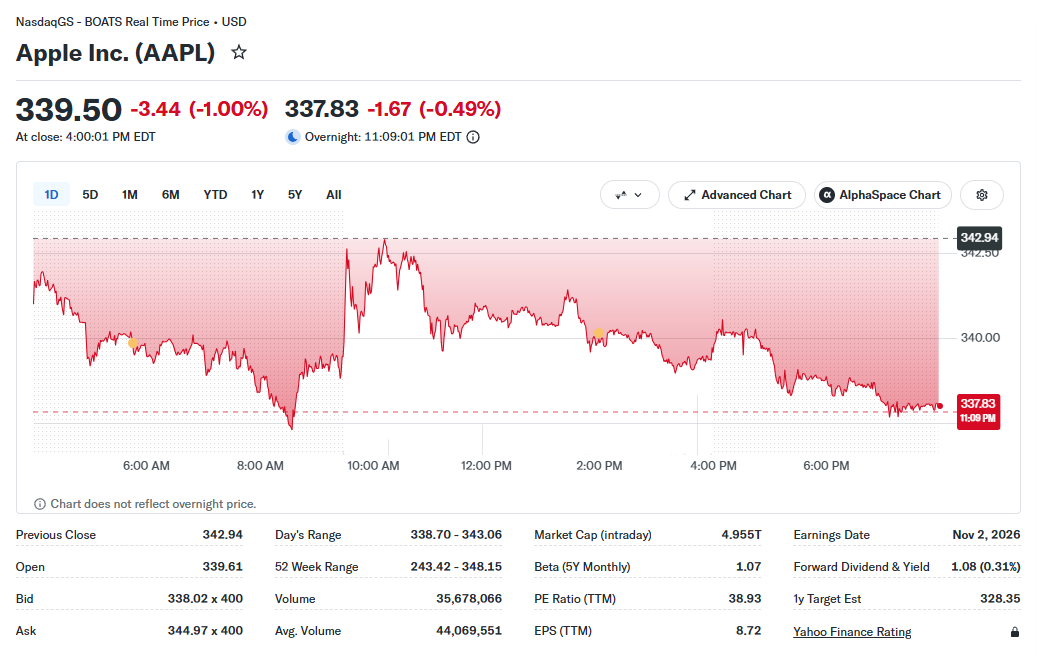
 - **One row per ticker, everything you pick inside it:** quote (90 Yahoo fields: price, change, volume, market cap, P/E, EPS, dividend, 52-week range, pre/post market), profile, statistics, statements, earnings, analysts, holders, insiders, SEC filings, transcripts, insights, similar symbols, news, options, history, dividends and technical indicators.
- **Every financial-statement line item:** income statement, balance sheet and cash flow from Yahoo's fundamentals series, annual (about 4 years), quarterly (5 quarters) and trailing 12 months: 160 annual line items for Apple on our test run.
- **Bulk and discovery:** 1,000 tickers per run is routine (Yahoo's quote endpoint answers 1,000 symbols in one call); 29 Yahoo screeners, trending tickers by country, the market summary, symbol search up to 1,000 matches, company names and ISINs resolved to tickers.
- **Rows when you need them:** price bars, option contracts, headlines and section records (statement periods, holders, insider trades, rating changes, filings, transcripts) can each come as rows of their own for spreadsheets and backtests.
- **Monitor mode:** every scheduled run returns each ticker's change since the last run, and only the headlines, filings, rating changes, insider trades and transcripts that are new; alert-only mode delivers just the movers; webhook and Telegram notifications.
- **yfinance layout:** one switch reshapes each row into the `stock_info`, `price_info`, `history`, `financials`, `dividends`, `splits`, `news`, `recommendations`, `holders`, `options` and `earnings` blocks yfinance-based tools expect.
- **No login, no cookies, no Yahoo API key.** Pay only for delivered rows: no start fee.
- **Export anywhere:** JSON, CSV, Excel, XML, RSS; Apify API, schedules, webhooks, Make, Zapier, n8n, Google Sheets; callable from AI agents through Apify's MCP server.
### What data can you get from Yahoo Finance?
- **One row per ticker, everything you pick inside it:** quote (90 Yahoo fields: price, change, volume, market cap, P/E, EPS, dividend, 52-week range, pre/post market), profile, statistics, statements, earnings, analysts, holders, insiders, SEC filings, transcripts, insights, similar symbols, news, options, history, dividends and technical indicators.
- **Every financial-statement line item:** income statement, balance sheet and cash flow from Yahoo's fundamentals series, annual (about 4 years), quarterly (5 quarters) and trailing 12 months: 160 annual line items for Apple on our test run.
- **Bulk and discovery:** 1,000 tickers per run is routine (Yahoo's quote endpoint answers 1,000 symbols in one call); 29 Yahoo screeners, trending tickers by country, the market summary, symbol search up to 1,000 matches, company names and ISINs resolved to tickers.
- **Rows when you need them:** price bars, option contracts, headlines and section records (statement periods, holders, insider trades, rating changes, filings, transcripts) can each come as rows of their own for spreadsheets and backtests.
- **Monitor mode:** every scheduled run returns each ticker's change since the last run, and only the headlines, filings, rating changes, insider trades and transcripts that are new; alert-only mode delivers just the movers; webhook and Telegram notifications.
- **yfinance layout:** one switch reshapes each row into the `stock_info`, `price_info`, `history`, `financials`, `dividends`, `splits`, `news`, `recommendations`, `holders`, `options` and `earnings` blocks yfinance-based tools expect.
- **No login, no cookies, no Yahoo API key.** Pay only for delivered rows: no start fee.
- **Export anywhere:** JSON, CSV, Excel, XML, RSS; Apify API, schedules, webhooks, Make, Zapier, n8n, Google Sheets; callable from AI agents through Apify's MCP server.
### What data can you get from Yahoo Finance?
💲 Price, change, change % (regularMarketPrice) |
📊 Volume, avg. volume, bid/ask | 🏦 Market cap, enterprise value |
| 📈 P/E (trailing, forward), PEG, P/S, P/B | 🧮 EPS (TTM, forward, current year) | 💵 Dividend rate, yield, ex-date, payout ratio |
| 📅 52-week range, 50/200-day averages | 🌙 Pre-market and after-hours price | 🏢 Sector, industry, employees, officers, address, website |
| 📑 Income statement, balance sheet, cash flow (every line item) | 🗓️ Earnings history, estimates, GAAP and non-GAAP, next earnings date | 🎯 Analyst recommendations, price targets, upgrades/downgrades |
| 👥 Institutional and fund holders, holder breakdown | 🕴️ Insider holders and insider transactions | 📄 SEC filings with exhibit links |
| 🎙️ Earnings-call transcripts (list + full text of the newest call) | 🔍 Technical outlook, valuation, research report list | 🧩 Similar symbols with score |
| 📰 News headlines with summary (+ full article text) | 🧾 Options chain with Greeks (delta, gamma, theta, vega, rho) | 🕯️ OHLCV history from 1-minute to monthly bars |
| 💸 Dividends and splits since listing | 📐 SMA, EMA, RSI, MACD, ATR, volatility, returns 1d-5y | 🏷️ Fund holdings, fund profile, fund performance (ETFs, mutual funds) |
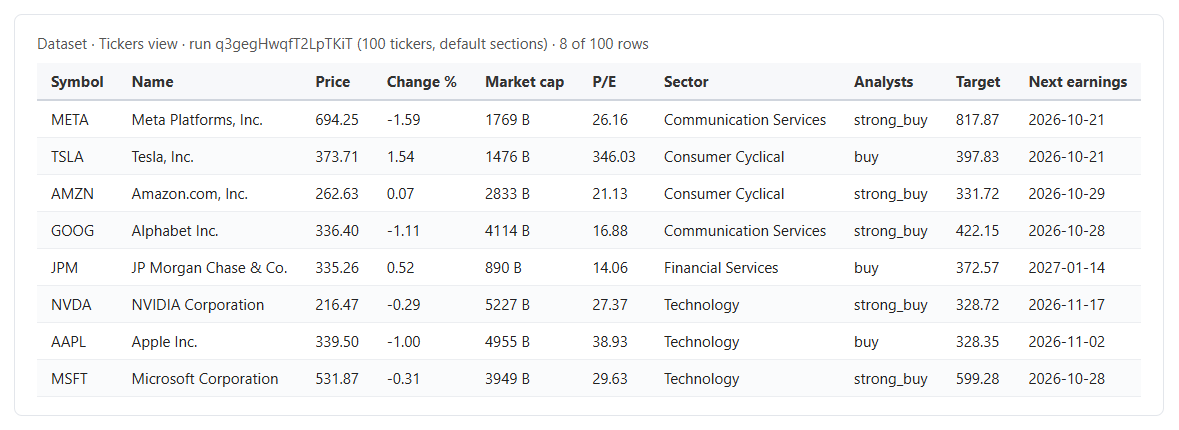 A ticker row (excerpt; real values from run `q3gegHwqfT2LpTKiT`, sections shortened):
```json
{
"rowType": "ticker",
"input": "AAPL",
"matchedBy": "ticker",
"symbol": "AAPL",
"longName": "Apple Inc.",
"quoteType": "EQUITY",
"exchange": "NMS",
"currency": "USD",
"regularMarketPrice": 339.5,
"regularMarketChangePercent": -1.00309,
"marketCap": 4954723975168,
"trailingPE": 38.933487,
"sector": "Technology",
"industry": "Consumer Electronics",
"targetMeanPrice": 328.35025,
"recommendationKey": "buy",
"nextEarningsDate": "2026-11-02",
"assetProfile": { "fullTimeEmployees": 150000, "companyOfficers": ["... 10 officers ..."] },
"financialData": { "currentPrice": 339.5, "totalRevenue": 466822987776, "...": "..." },
"upgradeDowngradeHistory": { "totalAvailable": 971, "history": ["... 25 newest ..."] },
"marketTime": "2026-10-20T20:00:01.000Z",
"url": "https://finance.yahoo.com/quote/AAPL/"
}
```
#### Row types
| `rowType` | One row is | Charged as |
|---|---|---|
| `ticker` | One symbol: the quote plus every section you picked | `ticker` |
| `priceBar` | One OHLCV bar (`historyFormat: rows`) | `price-bar` |
| `option` | One option contract with Greeks (`optionsFormat: rows`) | `option-contract` |
| `news` | One headline (from a search, or `newsFormat: rows`) | `news` |
| `searchResult` | One symbol found by a search | `search-result` |
| `record` | One statement period, holder, insider trade, rating change, earnings quarter, estimate, SEC filing or transcript (`sectionsAsRows`) | `record` |
| `notFound` | An input Yahoo does not know (`reason` says why) | not charged |
#### Fields
Quote fields are Yahoo's own names; every field Yahoo's quote endpoint returns is kept (about 90 per stock). Fill rates below are counted on real runs: 100 large US stocks with the default sections (run `q3gegHwqfT2LpTKiT`) and 300 stocks with every section (run `agAFB16dILLzGepM0`).
| Field / section | What it is | Fill |
|---|---|---|
| `symbol`, `longName`, `exchange`, `currency`, `quoteType` | Identity | 100% |
| `regularMarketPrice`, `regularMarketChange(Percent)`, `regularMarketVolume`, `regularMarketDayHigh/Low`, `regularMarketPreviousClose`, `regularMarketOpen` | The session's quote | 100% |
| `bid`, `ask`, `bidSize`, `askSize`, `averageDailyVolume3Month/10Day` | Book and volume | 100% |
| `fiftyTwoWeekHigh/Low/Range`, `fiftyDayAverage`, `twoHundredDayAverage` (+ change %) | Ranges and averages | 100% |
| `preMarketPrice`, `postMarketPrice` (+ change, time) | Extended hours, when Yahoo has them | when trading |
| `marketCap`, `sharesOutstanding`, `bookValue`, `priceToBook` | Size and book | 100% on the 300-stock run |
| `trailingPE`, `forwardPE`, `epsTrailingTwelveMonths`, `epsForward`, `epsCurrentYear` | Earnings multiples (no P/E for loss makers) | 70%, 98%, 100% |
| `dividendRate`, `dividendYield`, `trailingAnnualDividendYield`, `dividendDate` | Dividends (yield in %) | 100% on payers |
| `earningsTimestamp(Start/End)`, `earningsCallTimestampStart/End` (+ `...Iso`) | Next earnings window | as Yahoo lists it |
| `sector`, `industry`, `country`, `website`, `fullTimeEmployees`, `longBusinessSummary` | Headline profile fields | 97-100% (stocks) |
| `beta`, `enterpriseValue`, `profitMargins`, `grossMargins`, `returnOnEquity`, `totalRevenue`, `freeCashflow`, `debtToEquity` | Headline statistics | 93-100% |
| `targetMeanPrice/Median/High/Low`, `recommendationKey`, `recommendationMean`, `numberOfAnalystOpinions` | Analyst consensus | 98-100% (covered stocks) |
| `nextEarningsDate`, `exDividendDate`, `payoutRatio` | Calendar | next earnings 99%; dividend dates on payers |
| `assetProfile` | Address, phone, website, officers with pay, governance risk scores | 100% |
| `summaryDetail`, `defaultKeyStatistics`, `financialData`, `equityPerformance` | Yahoo's statistics tables | 100% |
| `financials.annual/quarterly/trailing.incomeStatement/balanceSheet/cashFlow` | Statement periods, newest first, every line item Yahoo has | 100% |
| `earnings`, `earningsHistory`, `earningsTrend` (+ GAAP / non-GAAP variants), `calendarEvents` | Earnings history, estimates, revisions | 100% |
| `recommendationTrend`, `upgradeDowngradeHistory` | Rating trend and rating changes (firm, grades, price targets) | 100%, 98% |
| `institutionOwnership`, `fundOwnership`, `majorHoldersBreakdown`, `netSharePurchaseActivity` | Holders | 100% |
| `insiderHolders`, `insiderTransactions` | Insiders | 93% |
| `secFilings` | Date, type, title, Yahoo link, exhibit links | 98% |
| `earningsCallTranscripts` | Title, fiscal period, date, link (+ `turns` with text) | 92% |
| `insights` | Short/intermediate/long-term outlook, support, resistance, valuation, research reports, significant developments | 100% |
| `similar` | Symbols people also look at, with score | 100% |
| `news[]` | `uuid`, `title`, `publisher`, `link`, `publishedAt`, `summary`, `relatedTickers`, `thumbnail` (+ `articleText`) | 100% (summary 73% of headlines) |
| `options` | `expirationDates`, `strikes`, `chains[]` with calls and puts | 100% of optionable stocks |
| `history` | `range`, `interval`, `bars[]` (date, open, high, low, close, adjClose, volume, dividend, split, session) | 100% |
| `dividends[]`, `splits[]` | Every dividend and split since listing | 44% (dividend payers) |
| `technicals` | SMA 20/50/200, EMA 12/26, MACD, RSI 14, ATR 14, 1-year volatility and max drawdown, returns 1d-5y, price vs SMA, golden cross | 100% |
| `previousPrice`, `changeSinceLastRun(Percent)`, `isNew` | Monitor mode deltas | monitor runs |
| `failedSections` | Sections Yahoo did not answer for this ticker (the rest of the row is still delivered) | rare |
**Option contract:** `contractSymbol`, `optionType`, `strike`, `expirationDate`, `daysToExpiration`, `lastPrice`, `bid`, `ask`, `mid`, `spread`, `change`, `percentChange`, `volume`, `openInterest`, `impliedVolatility`, `inTheMoney`, `lastTradeDate`, `contractSize`, `currency`, `underlyingPrice`, `greeks` {`delta`, `gamma`, `theta`, `vega`, `rho`, `theoreticalPrice`}. **Price bar:** `symbol`, `date`, `time`, `interval`, `open`, `high`, `low`, `close`, `adjClose`, `volume`, `dividend`, `split`, `session`, `provisional` (the current session's bar, filled with Yahoo's last price), `comparisons`. **Search result:** `query`, `rank`, `symbol`, `shortName`, `longName`, `exchange`, `quoteType`, `sector`, `industry`, `score`, price for lookup matches.
**yfinance layout** (`layout: "yfinance"`): `ticker`, `stock_info` {symbol, name, sector, industry, market_cap, current_price, previous_close, day_high, day_low, volume, pe_ratio, dividend_yield, beta}, `price_info`, `history` {period, interval, start, end, data\[]}, `financials` {income_statement, balance_sheet, cash_flow}, `dividends`, `splits`, `news`, `recommendations`, `holders` {major_holders, institutional_holders, mutualfund_holders}, `options` {expiration_date, calls, puts, available_expirations}, `earnings` {annual/quarterly earnings, annual/quarterly net income}. All 74 field paths of the most-run yfinance-style Yahoo actor are present and filled (offline check on captured Apple data).
### How can I use Yahoo Finance data?
- 📊 **Portfolio dashboards:** a scheduled quote run for your watchlist into Google Sheets or a database every few minutes.
- 🧮 **Fundamental screens and valuation models:** every statement line item, annual and quarterly, for hundreds of tickers in one run.
- 🤖 **Backtests and quant research:** daily or intraday OHLCV rows with adjusted closes, dividends and splits, plus technical indicators.
- 🧾 **Options analytics:** chains with Greeks, filtered by moneyness, strike window, days to expiration, volume and open interest.
- 📰 **News and event monitoring:** new headlines, SEC filings, rating changes and insider trades per ticker since the last run, pushed to a webhook or Telegram.
- 🎙️ **Earnings research:** the newest earnings call as speaker turns, next to estimates, surprises and analyst targets.
- 🧠 **AI agents:** compact ticker rows through Apify's MCP server for chat assistants and LLM pipelines.
### How much does it cost to scrape Yahoo Finance?
Pay per delivered row, no start fee, nothing charged for not-found symbols or for anything a filter removed:
| Event | Price |
|---|---:|
| Ticker row (quote + all the sections you picked) | $0.00036 |
| Price bar row | $0.00009 |
| Option contract row | $0.00009 |
| News headline row | $0.00018 |
| Search result row | $0.00018 |
| Section record row | $0.00045 |
| Full text add-on (article or transcript) | $0.00072 |
| Tickers | Cost |
|---:|---:|
| 10 | $0.0036 |
| 100 | $0.036 |
| 1,000 | $0.36 |
| 10,000 | $3.60 |
A watchlist of 20 tickers polled every 15 minutes during US market hours (26 runs a day) costs about $0.19 a day. Apify's free plan includes $5 of monthly credit.
### Integrations, API, scheduling & MCP
- **Schedules:** Console → Schedules → add this actor with your input (cron, e.g. every 5 minutes on weekdays). Turn on **Monitor mode** to get the change since the last run on every ticker and only new headlines and filings.
- **Webhooks and alerts:** Apify webhooks on run success, or this actor's own `webhookUrl` / Telegram inputs, which fire only when a run delivered something.
- **API:** start runs and read datasets with the [Apify API](https://apify.com/TopApi/yahoo-finance-scraper/api), from [Python](https://apify.com/TopApi/yahoo-finance-scraper/api/python) or [JavaScript](https://apify.com/TopApi/yahoo-finance-scraper/api/javascript).
- **MCP:** add the actor to Claude, Cursor or any MCP client through [Apify's MCP server](https://apify.com/TopApi/yahoo-finance-scraper/api/mcp); use `compactOutput` for small rows.
- **No-code:** Make, Zapier, n8n, Google Sheets, Airtable, Slack, Keboola and every Apify integration.
### More scrapers from TopApi
- [Bing Search Scraper](https://apify.com/TopApi/bing-search-scraper): search results, news and People Also Ask for any company or ticker.
- [Website Content Crawler](https://apify.com/TopApi/website-content-crawler): investor-relations pages and filings as clean text or Markdown for RAG.
- [Twitter Profile Scraper](https://apify.com/TopApi/x-profile-scraper): followers and bios of company and executive accounts.
- [Trustpilot Reviews Scraper](https://apify.com/TopApi/trustpilot-reviews-scraper): customer reviews and ratings next to a company's financials.
- [Facebook Search Posts Scraper](https://apify.com/TopApi/facebook-search-posts-scraper): public posts mentioning a brand or ticker.
- [Website Technology Scraper](https://apify.com/TopApi/website-technology-scraper): the tech stack behind a company's website.
See every actor on our [profile](https://apify.com/TopApi).
### Limits & empty runs
- **News:** Yahoo serves about 48 headlines per ticker; the summary comes from Yahoo's RSS feed and is present on about 3 in 4 headlines (73% on our test). Article text is read only for finance.yahoo.com articles; some are teasers of partner articles (`articleTextStatus: teaser_only`, not charged).
- **Transcripts:** Yahoo shows the newest earnings call in full to everyone; older calls are behind Yahoo's paid plan, so they are listed (title, date, link) and marked `paywalled`, never charged as text.
- **ESG scores:** Yahoo no longer returns them (checked on Apple, Microsoft, Exxon, JPMorgan and Vodafone); governance risk scores in `assetProfile` are kept.
- **Intraday history:** 1-minute bars for about the last 30 days (read in Yahoo's 7-day windows), 2-90 minute bars for 60 days, hourly for 2 years; a longer request is cut to that window and says so in `history.note`.
- **Statements:** about 4 annual periods, 5 quarters and trailing 12 months, as Yahoo publishes them; no trailing balance sheet exists.
- **Quotes** are as Yahoo shows them, with the exchange's delay in `exchangeDataDelayedBy`.
- **Speed:** Yahoo answers fast but limits a shared IP when a run asks too much at once; the actor slows down by itself and, only if that persists, moves to Apify's datacenter proxy. A 300-ticker run with every section took 171 s at 1 GB of memory.
- **Never charged:** symbols Yahoo does not know (`notFound` rows say why), rows a filter removed, rows past `maxItems` or your spending limit, headlines, filings and other items an earlier monitor run already delivered, and tickers that movers mode held back. In monitor mode every ticker row is still delivered and charged (it carries the change since the last run).
### FAQ
#### How much does Yahoo Finance Scraper cost?
$0.00036 per ticker row with every section you choose, so 1,000 tickers cost $0.36. Bars and option contracts are $0.00009 each, headlines and search results $0.00018, section records $0.00045. There is no start fee.
#### How many tickers can Yahoo Finance Scraper handle in one run?
As many as you list. Yahoo's quote endpoint takes 1,000 symbols per call; we have run 300 tickers with every section in under 3 minutes at 1 GB of memory. Screeners give up to 1,000 symbols each.
#### Can I run Yahoo Finance Scraper on a schedule?
Yes. Create an Apify schedule with your watchlist; with **Monitor mode** each run shows the change since the last run and only new headlines, filings, rating changes, insider trades and transcripts. **Only tickers that moved** turns it into a price alert.
#### Can I use Yahoo Finance Scraper with the Apify API or Python?
Yes: call it with `apify-client` for Python or JavaScript, or over plain HTTP, and read the dataset as JSON or CSV.
#### Can AI agents use Yahoo Finance Scraper through MCP?
Yes, through Apify's MCP server. Turn on **Compact ticker rows** for about 40 core fields per ticker.
#### Do I need a Yahoo account, cookies or a Yahoo Finance API key?
No. The actor reads the same public JSON Yahoo's own website uses, as a signed-out visitor.
#### Does Yahoo Finance Scraper give the same fields as yfinance?
With **Row layout: yfinance blocks** each row has the `stock_info`, `price_info`, `history`, `financials`, `dividends`, `splits`, `news`, `recommendations`, `holders`, `options` and `earnings` blocks yfinance-based tools expect.
#### Why did Yahoo Finance Scraper return no rows?
The status message says why: the symbol is unknown to Yahoo (`notFound` row), no ticker moved past your movers threshold, a news-only monitor found no new headline, or your spending limit was reached. None of these is charged.
#### Which markets and asset types does Yahoo Finance Scraper cover?
Everything Yahoo Finance lists: US and international stocks (use Yahoo's suffix: `.L`, `.DE`, `.T`, `.TO`, `.NS`, `.HK`...), ETFs, mutual funds, indices, crypto, currencies and futures. Statements, analysts and holders exist for companies; funds get holdings and fund profile; crypto and currencies get the quote and history.
#### Your feedback
Found a gap or need another Yahoo Finance field? Open an issue on the [Issues tab](https://apify.com/TopApi/yahoo-finance-scraper/issues/open); we read every one.
# Actor input Schema
## `tickers` (type: `array`):
Yahoo symbols, finance.yahoo.com/quote links, company names or ISINs, one per line, e.g. AAPL, BRK-B, SAP.DE, 7203.T, SPY, ^GSPC, BTC-USD, EURUSD=X, GC=F, "apple", US0378331005.
## `startUrls` (type: `array`):
finance.yahoo.com/quote/... links, or a text/CSV file of them ("Link remote text file"). Same as putting them in Tickers.
## `searchQueries` (type: `array`):
Words to find symbols and headlines by, e.g. "lithium", "semiconductor ETF", "vanguard". Each match is a search-result row; headlines are news rows.
## `screeners` (type: `array`):
Yahoo Finance's ranked lists. Each listed symbol becomes a ticker row with the sections you pick.
## `screenerRegion` (type: `string`):
Day gainers, day losers and most active for another market, by Yahoo's own criteria for its US lists. The other lists are US-only.
## `trendingRegions` (type: `array`):
Country codes for Yahoo's trending-tickers list, e.g. US, GB, DE, FR, CA, AU, IN, HK. Up to 100 symbols each.
## `marketSummary` (type: `boolean`):
Add the indices, futures, rates and currencies Yahoo shows at the top of finance.yahoo.com (about 15 rows).
## `maxDiscoveryResults` (type: `integer`):
How many symbols to take from each screener or trending list, in Yahoo's order (screeners up to 1,000, trending up to 100).
## `sections` (type: `array`):
Quote = price, change, volume, market cap, P/E, EPS, dividend, 52-week range, pre/post market. Each other section adds its data to the ticker row.
## `financialsPeriod` (type: `string`):
Financial statements: annual (about 4 years), quarterly (5 quarters), trailing 12 months, or all three.
## `maxNewsPerTicker` (type: `integer`):
Latest Yahoo Finance headlines per ticker when News is on (Yahoo serves about 50).
## `ratingChangesPerTicker` (type: `integer`):
Newest upgrades/downgrades to keep per ticker (Yahoo has hundreds for large US companies; 0 = none).
## `secFilingsPerTicker` (type: `integer`):
Newest SEC filings to keep per ticker (10-K, 10-Q, 8-K, proxy...).
## `modules` (type: `array`):
Advanced: any Yahoo quoteSummary module name added to each ticker row, e.g. earningsTrendGaap, fundPerformance, upgradeDowngradeHistoryLatest.
## `historyRange` (type: `string`):
How far back the bars go. "Every bar since listing" reads every daily bar Yahoo has (AAPL: 11,556 since 1980). Start and end dates override it.
## `historyInterval` (type: `string`):
Yahoo keeps 1-minute bars for about 30 days (we split them into its 7-day windows), 2-90 minute bars for 60 days, hourly for 2 years.
## `historyStartDate` (type: `string`):
Optional first day (YYYY-MM-DD) or a period back from today, e.g. "30 days", "6 months". Overrides the period.
## `historyEndDate` (type: `string`):
Optional last day, included. Empty = today.
## `historyFormat` (type: `string`):
Inside the ticker row (bars list or column series), or one row per bar (charged per bar; handy for CSV and backtests).
## `includePrePost` (type: `boolean`):
Intraday bars only: add extended-hours bars; each bar says its session (pre, regular, post).
## `adjustedPrices` (type: `boolean`):
Scale open/high/low/close by the adjusted-close factor (total-return series). adjClose is always included on daily and longer bars.
## `includeEvents` (type: `boolean`):
Bars carry the dividend amount or split ratio on the day it happened.
## `maxBarsPerTicker` (type: `integer`):
Keep only the most recent N bars per ticker. 0 = all in the period.
## `comparisons` (type: `array`):
Benchmark symbols whose closes come with each ticker's bars, e.g. ^GSPC, QQQ (up to 10).
## `optionExpirations` (type: `integer`):
How many expiration dates to read, nearest first. 0 = all of them (SPY lists 30+).
## `optionDates` (type: `array`):
Expiration dates (YYYY-MM-DD, e.g. 2026-12-18) instead of the nearest ones. Dates Yahoo does not list are named in requestedDatesNotListed.
## `optionMinDays` (type: `integer`):
Skip expirations sooner than this.
## `optionMaxDays` (type: `integer`):
Skip expirations later than this.
## `optionType` (type: `string`):
Both, or only calls or only puts.
## `optionMinStrike` (type: `number`):
Only strikes at or above this price.
## `optionMaxStrike` (type: `number`):
Only strikes at or below this price.
## `optionStrikeRangePercent` (type: `number`):
Only strikes within this % of the underlying price (10 keeps 90-110%). 0 = all.
## `optionStrikesAroundPrice` (type: `integer`):
Keep only the N strikes below and N above the current price in each expiration. 0 = all.
## `optionMoneyness` (type: `string`):
All contracts, or only in-the-money / out-of-the-money ones.
## `optionMinVolume` (type: `integer`):
Only contracts traded at least this many times today.
## `optionMinOpenInterest` (type: `integer`):
Only contracts with at least this open interest.
## `optionMinImpliedVolatility` (type: `number`):
Only contracts at or above this implied volatility (0.5 = 50%).
## `includeGreeks` (type: `boolean`):
Delta, gamma, theta (per day), vega and rho (per point) and a theoretical price by Black-Scholes-Merton, with the 13-week T-bill rate and the dividend yield.
## `optionsFormat` (type: `string`):
Chains inside the ticker row, or one row per contract (charged per contract).
## `maxOptionContracts` (type: `integer`):
Stop after this many contracts per ticker. 0 = no limit.
## `searchType` (type: `string`):
Which kind of symbols the search returns.
## `maxSymbolsPerQuery` (type: `integer`):
Search-result rows per search (up to 1,000; past the first few, Yahoo's symbol lookup is paged in).
## `maxNewsPerQuery` (type: `integer`):
News rows per search (0 = none, Yahoo serves up to about 50).
## `scrapeSearchMatches` (type: `boolean`):
Adds each search's best symbol to the tickers, so "apple" also gets you AAPL's ticker row.
## `includeArticleText` (type: `boolean`):
Read each headline's article on finance.yahoo.com and add its full text. Partner sites outside Yahoo are marked external, not charged.
## `includeTranscriptText` (type: `boolean`):
Add the full earnings-call transcript (speaker, role, time and text of every turn) to the newest transcripts. Turns on the Transcripts section.
## `transcriptsPerTicker` (type: `integer`):
Newest earnings-call transcripts to list per ticker (Yahoo lists up to ~60 for large US companies).
## `maxTranscriptTexts` (type: `integer`):
How many of the newest transcripts per ticker get their full text.
## `monitorMode` (type: `boolean`):
Remember what earlier runs delivered: new headlines, filings, rating changes, insider trades and transcripts only, plus previousPrice and changeSinceLastRunPercent on every ticker.
## `monitorStoreName` (type: `string`):
Named key-value store that keeps the memory between runs.
## `monitorKey` (type: `string`):
Optional name for this watch, so several schedules with the same tickers stay separate. Empty = derived from the input.
## `sinceDate` (type: `string`):
Keep only headlines, filings, rating changes, insider trades and transcripts dated on or after this day, e.g. 2026-10-01 or "7 days".
## `onlyMovers` (type: `boolean`):
Deliver a ticker only when it moved at least the threshold (since the last delivered run in monitor mode, else today). A run with no mover delivers and bills nothing.
## `alertThresholdPercent` (type: `number`):
Absolute % move that makes a ticker a mover, e.g. 5.
## `webhookUrl` (type: `string`):
Optional: we POST a JSON summary (counts, movers, dataset id) here when a run delivers anything.
## `telegramBotToken` (type: `string`):
Optional: your bot's token, to get a message when a run delivers anything.
## `telegramChatId` (type: `string`):
The chat the bot writes to.
## `layout` (type: `string`):
Yahoo's own field names, or the yfinance-style blocks (stock_info, price_info, history, financials, dividends, splits, news, recommendations, holders, options, earnings).
## `newsFormat` (type: `string`):
Headlines inside the ticker row, or one row per headline (charged per headline).
## `sectionsAsRows` (type: `boolean`):
One row per statement period, holder, insider trade, rating change, earnings quarter, estimate, SEC filing and transcript (charged per record) instead of lists inside the ticker row.
## `compactOutput` (type: `boolean`):
Only the ~40 main quote and headline fields: small rows for AI agents, MCP and quick looks.
## `maxItems` (type: `integer`):
Hard cap on all rows of the run (tickers + bars + contracts + headlines + records + search results); also caps your cost. 0 = no limit.
## `lang` (type: `string`):
Language of names and news, e.g. en-US, en-GB, de-DE, fr-FR, ja-JP, zh-Hant-HK.
## `region` (type: `string`):
Yahoo market region for names and news, e.g. US, GB, DE, JP, HK, AU, CA.
## `proxyConfiguration` (type: `object`):
Not needed: Yahoo answers directly. If it slows a run down, the actor moves to Apify's datacenter proxy by itself, then to residential within a small budget.
## `maxConcurrency` (type: `integer`):
How many tickers are read at once.
## `maxRunSeconds` (type: `integer`):
Stop starting new tickers after this many seconds and finish cleanly. 0 = the run's own timeout.
## Actor input object example
```json
{
"tickers": [
"AAPL",
"MSFT",
"BTC-USD"
],
"screenerRegion": "US",
"marketSummary": false,
"maxDiscoveryResults": 25,
"sections": [
"quote",
"profile",
"statistics",
"analyst",
"earnings"
],
"financialsPeriod": "annual",
"maxNewsPerTicker": 10,
"ratingChangesPerTicker": 25,
"secFilingsPerTicker": 20,
"historyRange": "1mo",
"historyInterval": "1d",
"historyFormat": "nested",
"includePrePost": false,
"adjustedPrices": false,
"includeEvents": true,
"maxBarsPerTicker": 0,
"optionExpirations": 1,
"optionType": "both",
"optionStrikeRangePercent": 0,
"optionStrikesAroundPrice": 0,
"optionMoneyness": "all",
"optionMinVolume": 0,
"optionMinOpenInterest": 0,
"optionMinImpliedVolatility": 0,
"includeGreeks": true,
"optionsFormat": "nested",
"maxOptionContracts": 0,
"searchType": "all",
"maxSymbolsPerQuery": 10,
"maxNewsPerQuery": 10,
"scrapeSearchMatches": false,
"includeArticleText": false,
"includeTranscriptText": false,
"transcriptsPerTicker": 8,
"maxTranscriptTexts": 1,
"monitorMode": false,
"monitorStoreName": "yahoo-finance-monitor",
"onlyMovers": false,
"alertThresholdPercent": 5,
"layout": "yahoo",
"newsFormat": "nested",
"sectionsAsRows": false,
"compactOutput": false,
"maxItems": 0,
"lang": "en-US",
"region": "US",
"proxyConfiguration": {
"useApifyProxy": false
},
"maxConcurrency": 8,
"maxRunSeconds": 0
}
```
# Actor output Schema
## `tickers` (type: `string`):
No description
## `fundamentals` (type: `string`):
No description
## `priceBars` (type: `string`):
No description
## `options` (type: `string`):
No description
## `news` (type: `string`):
No description
## `allRows` (type: `string`):
No description
# API
You can run this Actor programmatically using our API. Below are code examples in JavaScript, Python, and CLI, as well as the OpenAPI specification and MCP server setup.
## JavaScript example
```javascript
import { ApifyClient } from 'apify-client';
// Initialize the ApifyClient with your Apify API token
// Replace the '
A ticker row (excerpt; real values from run `q3gegHwqfT2LpTKiT`, sections shortened):
```json
{
"rowType": "ticker",
"input": "AAPL",
"matchedBy": "ticker",
"symbol": "AAPL",
"longName": "Apple Inc.",
"quoteType": "EQUITY",
"exchange": "NMS",
"currency": "USD",
"regularMarketPrice": 339.5,
"regularMarketChangePercent": -1.00309,
"marketCap": 4954723975168,
"trailingPE": 38.933487,
"sector": "Technology",
"industry": "Consumer Electronics",
"targetMeanPrice": 328.35025,
"recommendationKey": "buy",
"nextEarningsDate": "2026-11-02",
"assetProfile": { "fullTimeEmployees": 150000, "companyOfficers": ["... 10 officers ..."] },
"financialData": { "currentPrice": 339.5, "totalRevenue": 466822987776, "...": "..." },
"upgradeDowngradeHistory": { "totalAvailable": 971, "history": ["... 25 newest ..."] },
"marketTime": "2026-10-20T20:00:01.000Z",
"url": "https://finance.yahoo.com/quote/AAPL/"
}
```
#### Row types
| `rowType` | One row is | Charged as |
|---|---|---|
| `ticker` | One symbol: the quote plus every section you picked | `ticker` |
| `priceBar` | One OHLCV bar (`historyFormat: rows`) | `price-bar` |
| `option` | One option contract with Greeks (`optionsFormat: rows`) | `option-contract` |
| `news` | One headline (from a search, or `newsFormat: rows`) | `news` |
| `searchResult` | One symbol found by a search | `search-result` |
| `record` | One statement period, holder, insider trade, rating change, earnings quarter, estimate, SEC filing or transcript (`sectionsAsRows`) | `record` |
| `notFound` | An input Yahoo does not know (`reason` says why) | not charged |
#### Fields
Quote fields are Yahoo's own names; every field Yahoo's quote endpoint returns is kept (about 90 per stock). Fill rates below are counted on real runs: 100 large US stocks with the default sections (run `q3gegHwqfT2LpTKiT`) and 300 stocks with every section (run `agAFB16dILLzGepM0`).
| Field / section | What it is | Fill |
|---|---|---|
| `symbol`, `longName`, `exchange`, `currency`, `quoteType` | Identity | 100% |
| `regularMarketPrice`, `regularMarketChange(Percent)`, `regularMarketVolume`, `regularMarketDayHigh/Low`, `regularMarketPreviousClose`, `regularMarketOpen` | The session's quote | 100% |
| `bid`, `ask`, `bidSize`, `askSize`, `averageDailyVolume3Month/10Day` | Book and volume | 100% |
| `fiftyTwoWeekHigh/Low/Range`, `fiftyDayAverage`, `twoHundredDayAverage` (+ change %) | Ranges and averages | 100% |
| `preMarketPrice`, `postMarketPrice` (+ change, time) | Extended hours, when Yahoo has them | when trading |
| `marketCap`, `sharesOutstanding`, `bookValue`, `priceToBook` | Size and book | 100% on the 300-stock run |
| `trailingPE`, `forwardPE`, `epsTrailingTwelveMonths`, `epsForward`, `epsCurrentYear` | Earnings multiples (no P/E for loss makers) | 70%, 98%, 100% |
| `dividendRate`, `dividendYield`, `trailingAnnualDividendYield`, `dividendDate` | Dividends (yield in %) | 100% on payers |
| `earningsTimestamp(Start/End)`, `earningsCallTimestampStart/End` (+ `...Iso`) | Next earnings window | as Yahoo lists it |
| `sector`, `industry`, `country`, `website`, `fullTimeEmployees`, `longBusinessSummary` | Headline profile fields | 97-100% (stocks) |
| `beta`, `enterpriseValue`, `profitMargins`, `grossMargins`, `returnOnEquity`, `totalRevenue`, `freeCashflow`, `debtToEquity` | Headline statistics | 93-100% |
| `targetMeanPrice/Median/High/Low`, `recommendationKey`, `recommendationMean`, `numberOfAnalystOpinions` | Analyst consensus | 98-100% (covered stocks) |
| `nextEarningsDate`, `exDividendDate`, `payoutRatio` | Calendar | next earnings 99%; dividend dates on payers |
| `assetProfile` | Address, phone, website, officers with pay, governance risk scores | 100% |
| `summaryDetail`, `defaultKeyStatistics`, `financialData`, `equityPerformance` | Yahoo's statistics tables | 100% |
| `financials.annual/quarterly/trailing.incomeStatement/balanceSheet/cashFlow` | Statement periods, newest first, every line item Yahoo has | 100% |
| `earnings`, `earningsHistory`, `earningsTrend` (+ GAAP / non-GAAP variants), `calendarEvents` | Earnings history, estimates, revisions | 100% |
| `recommendationTrend`, `upgradeDowngradeHistory` | Rating trend and rating changes (firm, grades, price targets) | 100%, 98% |
| `institutionOwnership`, `fundOwnership`, `majorHoldersBreakdown`, `netSharePurchaseActivity` | Holders | 100% |
| `insiderHolders`, `insiderTransactions` | Insiders | 93% |
| `secFilings` | Date, type, title, Yahoo link, exhibit links | 98% |
| `earningsCallTranscripts` | Title, fiscal period, date, link (+ `turns` with text) | 92% |
| `insights` | Short/intermediate/long-term outlook, support, resistance, valuation, research reports, significant developments | 100% |
| `similar` | Symbols people also look at, with score | 100% |
| `news[]` | `uuid`, `title`, `publisher`, `link`, `publishedAt`, `summary`, `relatedTickers`, `thumbnail` (+ `articleText`) | 100% (summary 73% of headlines) |
| `options` | `expirationDates`, `strikes`, `chains[]` with calls and puts | 100% of optionable stocks |
| `history` | `range`, `interval`, `bars[]` (date, open, high, low, close, adjClose, volume, dividend, split, session) | 100% |
| `dividends[]`, `splits[]` | Every dividend and split since listing | 44% (dividend payers) |
| `technicals` | SMA 20/50/200, EMA 12/26, MACD, RSI 14, ATR 14, 1-year volatility and max drawdown, returns 1d-5y, price vs SMA, golden cross | 100% |
| `previousPrice`, `changeSinceLastRun(Percent)`, `isNew` | Monitor mode deltas | monitor runs |
| `failedSections` | Sections Yahoo did not answer for this ticker (the rest of the row is still delivered) | rare |
**Option contract:** `contractSymbol`, `optionType`, `strike`, `expirationDate`, `daysToExpiration`, `lastPrice`, `bid`, `ask`, `mid`, `spread`, `change`, `percentChange`, `volume`, `openInterest`, `impliedVolatility`, `inTheMoney`, `lastTradeDate`, `contractSize`, `currency`, `underlyingPrice`, `greeks` {`delta`, `gamma`, `theta`, `vega`, `rho`, `theoreticalPrice`}. **Price bar:** `symbol`, `date`, `time`, `interval`, `open`, `high`, `low`, `close`, `adjClose`, `volume`, `dividend`, `split`, `session`, `provisional` (the current session's bar, filled with Yahoo's last price), `comparisons`. **Search result:** `query`, `rank`, `symbol`, `shortName`, `longName`, `exchange`, `quoteType`, `sector`, `industry`, `score`, price for lookup matches.
**yfinance layout** (`layout: "yfinance"`): `ticker`, `stock_info` {symbol, name, sector, industry, market_cap, current_price, previous_close, day_high, day_low, volume, pe_ratio, dividend_yield, beta}, `price_info`, `history` {period, interval, start, end, data\[]}, `financials` {income_statement, balance_sheet, cash_flow}, `dividends`, `splits`, `news`, `recommendations`, `holders` {major_holders, institutional_holders, mutualfund_holders}, `options` {expiration_date, calls, puts, available_expirations}, `earnings` {annual/quarterly earnings, annual/quarterly net income}. All 74 field paths of the most-run yfinance-style Yahoo actor are present and filled (offline check on captured Apple data).
### How can I use Yahoo Finance data?
- 📊 **Portfolio dashboards:** a scheduled quote run for your watchlist into Google Sheets or a database every few minutes.
- 🧮 **Fundamental screens and valuation models:** every statement line item, annual and quarterly, for hundreds of tickers in one run.
- 🤖 **Backtests and quant research:** daily or intraday OHLCV rows with adjusted closes, dividends and splits, plus technical indicators.
- 🧾 **Options analytics:** chains with Greeks, filtered by moneyness, strike window, days to expiration, volume and open interest.
- 📰 **News and event monitoring:** new headlines, SEC filings, rating changes and insider trades per ticker since the last run, pushed to a webhook or Telegram.
- 🎙️ **Earnings research:** the newest earnings call as speaker turns, next to estimates, surprises and analyst targets.
- 🧠 **AI agents:** compact ticker rows through Apify's MCP server for chat assistants and LLM pipelines.
### How much does it cost to scrape Yahoo Finance?
Pay per delivered row, no start fee, nothing charged for not-found symbols or for anything a filter removed:
| Event | Price |
|---|---:|
| Ticker row (quote + all the sections you picked) | $0.00036 |
| Price bar row | $0.00009 |
| Option contract row | $0.00009 |
| News headline row | $0.00018 |
| Search result row | $0.00018 |
| Section record row | $0.00045 |
| Full text add-on (article or transcript) | $0.00072 |
| Tickers | Cost |
|---:|---:|
| 10 | $0.0036 |
| 100 | $0.036 |
| 1,000 | $0.36 |
| 10,000 | $3.60 |
A watchlist of 20 tickers polled every 15 minutes during US market hours (26 runs a day) costs about $0.19 a day. Apify's free plan includes $5 of monthly credit.
### Integrations, API, scheduling & MCP
- **Schedules:** Console → Schedules → add this actor with your input (cron, e.g. every 5 minutes on weekdays). Turn on **Monitor mode** to get the change since the last run on every ticker and only new headlines and filings.
- **Webhooks and alerts:** Apify webhooks on run success, or this actor's own `webhookUrl` / Telegram inputs, which fire only when a run delivered something.
- **API:** start runs and read datasets with the [Apify API](https://apify.com/TopApi/yahoo-finance-scraper/api), from [Python](https://apify.com/TopApi/yahoo-finance-scraper/api/python) or [JavaScript](https://apify.com/TopApi/yahoo-finance-scraper/api/javascript).
- **MCP:** add the actor to Claude, Cursor or any MCP client through [Apify's MCP server](https://apify.com/TopApi/yahoo-finance-scraper/api/mcp); use `compactOutput` for small rows.
- **No-code:** Make, Zapier, n8n, Google Sheets, Airtable, Slack, Keboola and every Apify integration.
### More scrapers from TopApi
- [Bing Search Scraper](https://apify.com/TopApi/bing-search-scraper): search results, news and People Also Ask for any company or ticker.
- [Website Content Crawler](https://apify.com/TopApi/website-content-crawler): investor-relations pages and filings as clean text or Markdown for RAG.
- [Twitter Profile Scraper](https://apify.com/TopApi/x-profile-scraper): followers and bios of company and executive accounts.
- [Trustpilot Reviews Scraper](https://apify.com/TopApi/trustpilot-reviews-scraper): customer reviews and ratings next to a company's financials.
- [Facebook Search Posts Scraper](https://apify.com/TopApi/facebook-search-posts-scraper): public posts mentioning a brand or ticker.
- [Website Technology Scraper](https://apify.com/TopApi/website-technology-scraper): the tech stack behind a company's website.
See every actor on our [profile](https://apify.com/TopApi).
### Limits & empty runs
- **News:** Yahoo serves about 48 headlines per ticker; the summary comes from Yahoo's RSS feed and is present on about 3 in 4 headlines (73% on our test). Article text is read only for finance.yahoo.com articles; some are teasers of partner articles (`articleTextStatus: teaser_only`, not charged).
- **Transcripts:** Yahoo shows the newest earnings call in full to everyone; older calls are behind Yahoo's paid plan, so they are listed (title, date, link) and marked `paywalled`, never charged as text.
- **ESG scores:** Yahoo no longer returns them (checked on Apple, Microsoft, Exxon, JPMorgan and Vodafone); governance risk scores in `assetProfile` are kept.
- **Intraday history:** 1-minute bars for about the last 30 days (read in Yahoo's 7-day windows), 2-90 minute bars for 60 days, hourly for 2 years; a longer request is cut to that window and says so in `history.note`.
- **Statements:** about 4 annual periods, 5 quarters and trailing 12 months, as Yahoo publishes them; no trailing balance sheet exists.
- **Quotes** are as Yahoo shows them, with the exchange's delay in `exchangeDataDelayedBy`.
- **Speed:** Yahoo answers fast but limits a shared IP when a run asks too much at once; the actor slows down by itself and, only if that persists, moves to Apify's datacenter proxy. A 300-ticker run with every section took 171 s at 1 GB of memory.
- **Never charged:** symbols Yahoo does not know (`notFound` rows say why), rows a filter removed, rows past `maxItems` or your spending limit, headlines, filings and other items an earlier monitor run already delivered, and tickers that movers mode held back. In monitor mode every ticker row is still delivered and charged (it carries the change since the last run).
### FAQ
#### How much does Yahoo Finance Scraper cost?
$0.00036 per ticker row with every section you choose, so 1,000 tickers cost $0.36. Bars and option contracts are $0.00009 each, headlines and search results $0.00018, section records $0.00045. There is no start fee.
#### How many tickers can Yahoo Finance Scraper handle in one run?
As many as you list. Yahoo's quote endpoint takes 1,000 symbols per call; we have run 300 tickers with every section in under 3 minutes at 1 GB of memory. Screeners give up to 1,000 symbols each.
#### Can I run Yahoo Finance Scraper on a schedule?
Yes. Create an Apify schedule with your watchlist; with **Monitor mode** each run shows the change since the last run and only new headlines, filings, rating changes, insider trades and transcripts. **Only tickers that moved** turns it into a price alert.
#### Can I use Yahoo Finance Scraper with the Apify API or Python?
Yes: call it with `apify-client` for Python or JavaScript, or over plain HTTP, and read the dataset as JSON or CSV.
#### Can AI agents use Yahoo Finance Scraper through MCP?
Yes, through Apify's MCP server. Turn on **Compact ticker rows** for about 40 core fields per ticker.
#### Do I need a Yahoo account, cookies or a Yahoo Finance API key?
No. The actor reads the same public JSON Yahoo's own website uses, as a signed-out visitor.
#### Does Yahoo Finance Scraper give the same fields as yfinance?
With **Row layout: yfinance blocks** each row has the `stock_info`, `price_info`, `history`, `financials`, `dividends`, `splits`, `news`, `recommendations`, `holders`, `options` and `earnings` blocks yfinance-based tools expect.
#### Why did Yahoo Finance Scraper return no rows?
The status message says why: the symbol is unknown to Yahoo (`notFound` row), no ticker moved past your movers threshold, a news-only monitor found no new headline, or your spending limit was reached. None of these is charged.
#### Which markets and asset types does Yahoo Finance Scraper cover?
Everything Yahoo Finance lists: US and international stocks (use Yahoo's suffix: `.L`, `.DE`, `.T`, `.TO`, `.NS`, `.HK`...), ETFs, mutual funds, indices, crypto, currencies and futures. Statements, analysts and holders exist for companies; funds get holdings and fund profile; crypto and currencies get the quote and history.
#### Your feedback
Found a gap or need another Yahoo Finance field? Open an issue on the [Issues tab](https://apify.com/TopApi/yahoo-finance-scraper/issues/open); we read every one.
# Actor input Schema
## `tickers` (type: `array`):
Yahoo symbols, finance.yahoo.com/quote links, company names or ISINs, one per line, e.g. AAPL, BRK-B, SAP.DE, 7203.T, SPY, ^GSPC, BTC-USD, EURUSD=X, GC=F, "apple", US0378331005.
## `startUrls` (type: `array`):
finance.yahoo.com/quote/... links, or a text/CSV file of them ("Link remote text file"). Same as putting them in Tickers.
## `searchQueries` (type: `array`):
Words to find symbols and headlines by, e.g. "lithium", "semiconductor ETF", "vanguard". Each match is a search-result row; headlines are news rows.
## `screeners` (type: `array`):
Yahoo Finance's ranked lists. Each listed symbol becomes a ticker row with the sections you pick.
## `screenerRegion` (type: `string`):
Day gainers, day losers and most active for another market, by Yahoo's own criteria for its US lists. The other lists are US-only.
## `trendingRegions` (type: `array`):
Country codes for Yahoo's trending-tickers list, e.g. US, GB, DE, FR, CA, AU, IN, HK. Up to 100 symbols each.
## `marketSummary` (type: `boolean`):
Add the indices, futures, rates and currencies Yahoo shows at the top of finance.yahoo.com (about 15 rows).
## `maxDiscoveryResults` (type: `integer`):
How many symbols to take from each screener or trending list, in Yahoo's order (screeners up to 1,000, trending up to 100).
## `sections` (type: `array`):
Quote = price, change, volume, market cap, P/E, EPS, dividend, 52-week range, pre/post market. Each other section adds its data to the ticker row.
## `financialsPeriod` (type: `string`):
Financial statements: annual (about 4 years), quarterly (5 quarters), trailing 12 months, or all three.
## `maxNewsPerTicker` (type: `integer`):
Latest Yahoo Finance headlines per ticker when News is on (Yahoo serves about 50).
## `ratingChangesPerTicker` (type: `integer`):
Newest upgrades/downgrades to keep per ticker (Yahoo has hundreds for large US companies; 0 = none).
## `secFilingsPerTicker` (type: `integer`):
Newest SEC filings to keep per ticker (10-K, 10-Q, 8-K, proxy...).
## `modules` (type: `array`):
Advanced: any Yahoo quoteSummary module name added to each ticker row, e.g. earningsTrendGaap, fundPerformance, upgradeDowngradeHistoryLatest.
## `historyRange` (type: `string`):
How far back the bars go. "Every bar since listing" reads every daily bar Yahoo has (AAPL: 11,556 since 1980). Start and end dates override it.
## `historyInterval` (type: `string`):
Yahoo keeps 1-minute bars for about 30 days (we split them into its 7-day windows), 2-90 minute bars for 60 days, hourly for 2 years.
## `historyStartDate` (type: `string`):
Optional first day (YYYY-MM-DD) or a period back from today, e.g. "30 days", "6 months". Overrides the period.
## `historyEndDate` (type: `string`):
Optional last day, included. Empty = today.
## `historyFormat` (type: `string`):
Inside the ticker row (bars list or column series), or one row per bar (charged per bar; handy for CSV and backtests).
## `includePrePost` (type: `boolean`):
Intraday bars only: add extended-hours bars; each bar says its session (pre, regular, post).
## `adjustedPrices` (type: `boolean`):
Scale open/high/low/close by the adjusted-close factor (total-return series). adjClose is always included on daily and longer bars.
## `includeEvents` (type: `boolean`):
Bars carry the dividend amount or split ratio on the day it happened.
## `maxBarsPerTicker` (type: `integer`):
Keep only the most recent N bars per ticker. 0 = all in the period.
## `comparisons` (type: `array`):
Benchmark symbols whose closes come with each ticker's bars, e.g. ^GSPC, QQQ (up to 10).
## `optionExpirations` (type: `integer`):
How many expiration dates to read, nearest first. 0 = all of them (SPY lists 30+).
## `optionDates` (type: `array`):
Expiration dates (YYYY-MM-DD, e.g. 2026-12-18) instead of the nearest ones. Dates Yahoo does not list are named in requestedDatesNotListed.
## `optionMinDays` (type: `integer`):
Skip expirations sooner than this.
## `optionMaxDays` (type: `integer`):
Skip expirations later than this.
## `optionType` (type: `string`):
Both, or only calls or only puts.
## `optionMinStrike` (type: `number`):
Only strikes at or above this price.
## `optionMaxStrike` (type: `number`):
Only strikes at or below this price.
## `optionStrikeRangePercent` (type: `number`):
Only strikes within this % of the underlying price (10 keeps 90-110%). 0 = all.
## `optionStrikesAroundPrice` (type: `integer`):
Keep only the N strikes below and N above the current price in each expiration. 0 = all.
## `optionMoneyness` (type: `string`):
All contracts, or only in-the-money / out-of-the-money ones.
## `optionMinVolume` (type: `integer`):
Only contracts traded at least this many times today.
## `optionMinOpenInterest` (type: `integer`):
Only contracts with at least this open interest.
## `optionMinImpliedVolatility` (type: `number`):
Only contracts at or above this implied volatility (0.5 = 50%).
## `includeGreeks` (type: `boolean`):
Delta, gamma, theta (per day), vega and rho (per point) and a theoretical price by Black-Scholes-Merton, with the 13-week T-bill rate and the dividend yield.
## `optionsFormat` (type: `string`):
Chains inside the ticker row, or one row per contract (charged per contract).
## `maxOptionContracts` (type: `integer`):
Stop after this many contracts per ticker. 0 = no limit.
## `searchType` (type: `string`):
Which kind of symbols the search returns.
## `maxSymbolsPerQuery` (type: `integer`):
Search-result rows per search (up to 1,000; past the first few, Yahoo's symbol lookup is paged in).
## `maxNewsPerQuery` (type: `integer`):
News rows per search (0 = none, Yahoo serves up to about 50).
## `scrapeSearchMatches` (type: `boolean`):
Adds each search's best symbol to the tickers, so "apple" also gets you AAPL's ticker row.
## `includeArticleText` (type: `boolean`):
Read each headline's article on finance.yahoo.com and add its full text. Partner sites outside Yahoo are marked external, not charged.
## `includeTranscriptText` (type: `boolean`):
Add the full earnings-call transcript (speaker, role, time and text of every turn) to the newest transcripts. Turns on the Transcripts section.
## `transcriptsPerTicker` (type: `integer`):
Newest earnings-call transcripts to list per ticker (Yahoo lists up to ~60 for large US companies).
## `maxTranscriptTexts` (type: `integer`):
How many of the newest transcripts per ticker get their full text.
## `monitorMode` (type: `boolean`):
Remember what earlier runs delivered: new headlines, filings, rating changes, insider trades and transcripts only, plus previousPrice and changeSinceLastRunPercent on every ticker.
## `monitorStoreName` (type: `string`):
Named key-value store that keeps the memory between runs.
## `monitorKey` (type: `string`):
Optional name for this watch, so several schedules with the same tickers stay separate. Empty = derived from the input.
## `sinceDate` (type: `string`):
Keep only headlines, filings, rating changes, insider trades and transcripts dated on or after this day, e.g. 2026-10-01 or "7 days".
## `onlyMovers` (type: `boolean`):
Deliver a ticker only when it moved at least the threshold (since the last delivered run in monitor mode, else today). A run with no mover delivers and bills nothing.
## `alertThresholdPercent` (type: `number`):
Absolute % move that makes a ticker a mover, e.g. 5.
## `webhookUrl` (type: `string`):
Optional: we POST a JSON summary (counts, movers, dataset id) here when a run delivers anything.
## `telegramBotToken` (type: `string`):
Optional: your bot's token, to get a message when a run delivers anything.
## `telegramChatId` (type: `string`):
The chat the bot writes to.
## `layout` (type: `string`):
Yahoo's own field names, or the yfinance-style blocks (stock_info, price_info, history, financials, dividends, splits, news, recommendations, holders, options, earnings).
## `newsFormat` (type: `string`):
Headlines inside the ticker row, or one row per headline (charged per headline).
## `sectionsAsRows` (type: `boolean`):
One row per statement period, holder, insider trade, rating change, earnings quarter, estimate, SEC filing and transcript (charged per record) instead of lists inside the ticker row.
## `compactOutput` (type: `boolean`):
Only the ~40 main quote and headline fields: small rows for AI agents, MCP and quick looks.
## `maxItems` (type: `integer`):
Hard cap on all rows of the run (tickers + bars + contracts + headlines + records + search results); also caps your cost. 0 = no limit.
## `lang` (type: `string`):
Language of names and news, e.g. en-US, en-GB, de-DE, fr-FR, ja-JP, zh-Hant-HK.
## `region` (type: `string`):
Yahoo market region for names and news, e.g. US, GB, DE, JP, HK, AU, CA.
## `proxyConfiguration` (type: `object`):
Not needed: Yahoo answers directly. If it slows a run down, the actor moves to Apify's datacenter proxy by itself, then to residential within a small budget.
## `maxConcurrency` (type: `integer`):
How many tickers are read at once.
## `maxRunSeconds` (type: `integer`):
Stop starting new tickers after this many seconds and finish cleanly. 0 = the run's own timeout.
## Actor input object example
```json
{
"tickers": [
"AAPL",
"MSFT",
"BTC-USD"
],
"screenerRegion": "US",
"marketSummary": false,
"maxDiscoveryResults": 25,
"sections": [
"quote",
"profile",
"statistics",
"analyst",
"earnings"
],
"financialsPeriod": "annual",
"maxNewsPerTicker": 10,
"ratingChangesPerTicker": 25,
"secFilingsPerTicker": 20,
"historyRange": "1mo",
"historyInterval": "1d",
"historyFormat": "nested",
"includePrePost": false,
"adjustedPrices": false,
"includeEvents": true,
"maxBarsPerTicker": 0,
"optionExpirations": 1,
"optionType": "both",
"optionStrikeRangePercent": 0,
"optionStrikesAroundPrice": 0,
"optionMoneyness": "all",
"optionMinVolume": 0,
"optionMinOpenInterest": 0,
"optionMinImpliedVolatility": 0,
"includeGreeks": true,
"optionsFormat": "nested",
"maxOptionContracts": 0,
"searchType": "all",
"maxSymbolsPerQuery": 10,
"maxNewsPerQuery": 10,
"scrapeSearchMatches": false,
"includeArticleText": false,
"includeTranscriptText": false,
"transcriptsPerTicker": 8,
"maxTranscriptTexts": 1,
"monitorMode": false,
"monitorStoreName": "yahoo-finance-monitor",
"onlyMovers": false,
"alertThresholdPercent": 5,
"layout": "yahoo",
"newsFormat": "nested",
"sectionsAsRows": false,
"compactOutput": false,
"maxItems": 0,
"lang": "en-US",
"region": "US",
"proxyConfiguration": {
"useApifyProxy": false
},
"maxConcurrency": 8,
"maxRunSeconds": 0
}
```
# Actor output Schema
## `tickers` (type: `string`):
No description
## `fundamentals` (type: `string`):
No description
## `priceBars` (type: `string`):
No description
## `options` (type: `string`):
No description
## `news` (type: `string`):
No description
## `allRows` (type: `string`):
No description
# API
You can run this Actor programmatically using our API. Below are code examples in JavaScript, Python, and CLI, as well as the OpenAPI specification and MCP server setup.
## JavaScript example
```javascript
import { ApifyClient } from 'apify-client';
// Initialize the ApifyClient with your Apify API token
// Replace the '