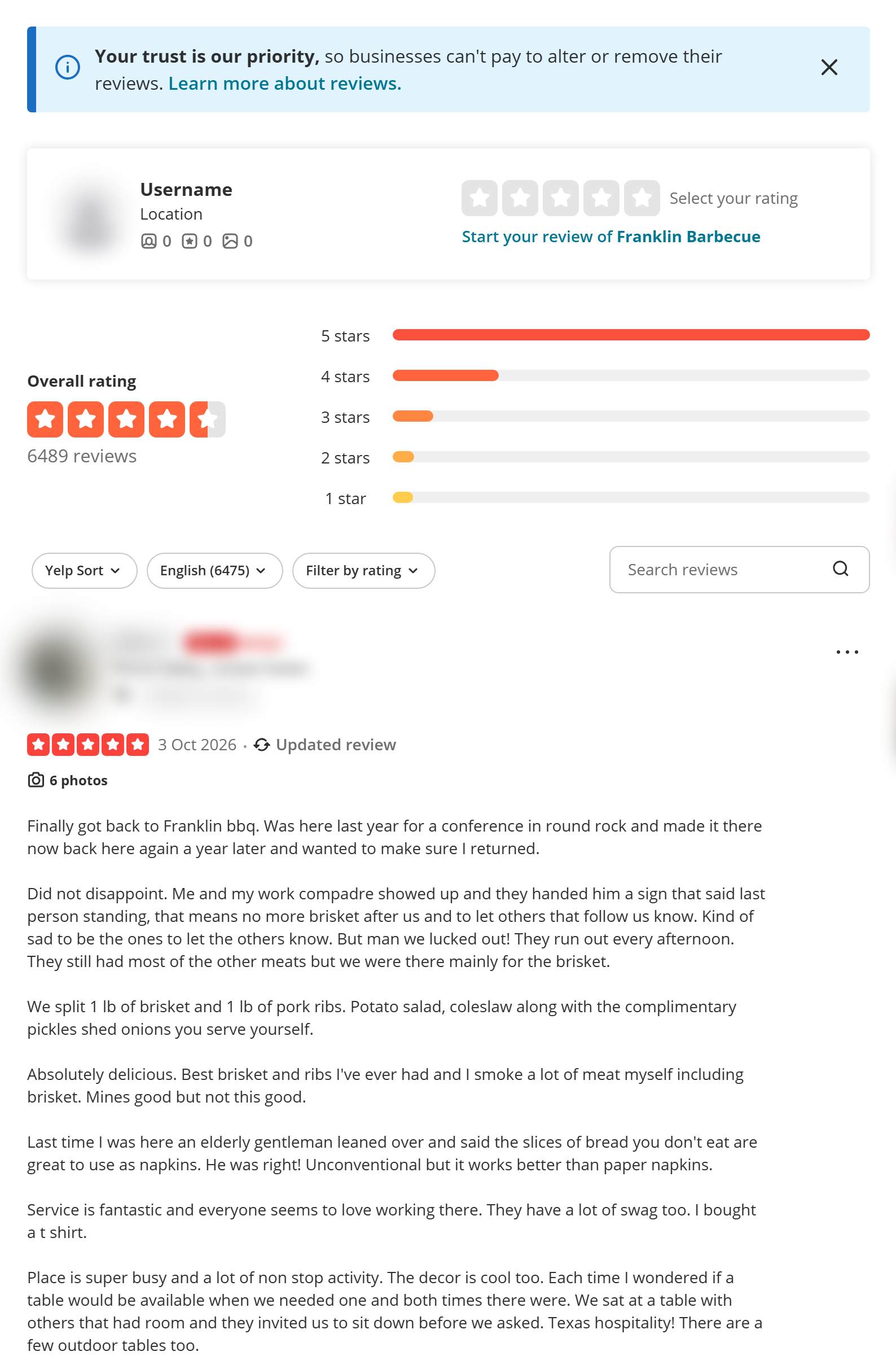
⭐ Star rating (rating) |
📝 Full review text (text) |
📅 Review date, local and UTC |
🔗 Review link (reviewUrl) |
🌐 Language + Yelp translation |
👤 Reviewer name, location, profile link |
| 🏅 Elite badge and expert badge |
📊 Reviewer review, friend and photo counts |
👍 Helpful, Thanks, Love this, Oh no |
| 🗳️ Useful, Funny, Cool votes |
💬 Owner reply text, date, role |
📷 Review photos (full size) and videos |
| 🔁 Reviewer's earlier reviews of the business |
✅ Check-ins, first-reviewer, paid/reserved via Yelp |
🚫 Not-recommended flag |
| 🏪 Business name, id, alias, URL |
⭐ Business rating, total reviews, stars breakdown |
🏷️ Categories, city, region, neighborhoods |
On a 1,000-review platform run of one business, every row had a review id, link, rating, text, language, date, reviewer name and the business fields; 50% had photos and 48% an expert badge.
### How to scrape Yelp reviews with Yelp Reviews Scraper
1. [Create a free Apify account](https://console.apify.com/sign-up) — $5 of monthly credit, no card needed.
2. Open [Yelp Reviews Scraper](https://apify.com/TopApi/yelp-reviews-scraper) and click **Try for free**.
3. Paste Yelp business URLs into **Businesses** (or fill **Search terms** + **Search location**) and set **Max reviews per business**.
4. Pick a sort order, star ratings, language or keywords if you need them.
5. Click **Start**. Reviews stream into the dataset as they are read.
6. Open the **Storage** tab and **Export** as JSON, CSV or Excel — or save the input as a task and schedule it.
### ⬇️ Input
| Parameter | Type | Description |
|---|---|---|
| **🔍 What to scrape** | | |
| `businesses` | List | Business URLs from any Yelp domain (`https://www.yelp.com/biz/franklin-barbecue-austin`, `https://www.yelp.de/biz/...`), aliases (`franklin-barbecue-austin`), business ids (`MGzro82Fi4LYvc86acoONQ`) or Yelp search URLs. Mix freely. |
| `searchTerms` | List | Find businesses with a Yelp search, e.g. `pizza`, `dentist`. Needs `searchLocation`. |
| `searchLocation` | Text | City, ZIP or neighborhood for the search terms, e.g. `Austin, TX`. |
| `maxBusinessesPerSearch` | Integer | Businesses each search adds (sponsored results skipped). Default `10`, Yelp shows at most 240. |
| `searchSort` | Select | Recommended, Highest rated or Most reviewed businesses first. Default: recommended |
| **🎯 Filters** (applied by Yelp to recommended reviews; the actor applies star ratings in keyword searches) | | |
| `reviewsSort` | Select | Newest first, Oldest first, Yelp Sort, Highest rated, Lowest rated, Elites first. Default: newest |
| `reviewRatings` | Multi-select | Only these star ratings. Default: all |
| `reviewLanguage` | Select | `all` (every language the business has, largest first) or one language. Does not apply to not-recommended reviews. Default: `all` |
| `keywords` | List | Yelp's own review search, one search per keyword (max 10), e.g. `parking`. Not-recommended reviews are kept only when their text contains one of the keywords. |
| `translateTo` | Select | Adds Yelp's translation of each review to `translatedText`. Default: none |
| **✂️ Refine results** | | |
| `reviewsNewerThan` / `reviewsOlderThan` | Text | Date window: `2026-09-01` or relative `30 days`, `6 months`. |
| `withPhotosOnly` | Boolean | Keep only reviews with photos or videos. Default `false` |
| `withOwnerReplyOnly` | Boolean | Keep only reviews the business answered. Default `false` |
| **➕ Extra data** | | |
| `includePersonalData` | Boolean | Reviewer name, profile, location, counts, Elite and expert badges, and the reviewer's earlier reviews of the business. Off = those fields are `null`. Default `true` |
| `includeNotRecommended` | Boolean | Also scrape Yelp's not-recommended reviews (`isRecommended: false`). The review-language pick does not apply to not-recommended reviews, and those rows carry no language, reactions, Useful/Funny/Cool votes or review tags (null), and no translation, photos or expert badge. Default `false` |
| **🔁 Monitoring** | | |
| `monitorMode` | Boolean | Return only reviews posted since the newest one earlier runs saw with the same filters, plus (with `includeNotRecommended`) any not-recommended review not delivered before. A review is never delivered twice through the same store. Pair with a schedule. |
| `monitorStoreName` | Text | Named store that remembers what was delivered. One name per schedule. Changing the language, star-rating, keyword or not-recommended settings starts a new baseline; reviews already delivered through the store are still skipped. |
| **📦 Output** | | |
| `maxReviewsPerBusiness` | Integer | Default `100`; `0` = every review Yelp lists. |
| `maxReviews` | Integer | Run-wide limit across all businesses. `0` = none. |
| `compact` | Boolean | Core fields only, sized for AI agents and MCP: `author` keeps only `name`, `publicReply` only `text`. |
| **⚙️ Advanced** | | |
| `proxyConfiguration` | Proxy | Used only if Yelp stops answering direct requests; a named proxy group is used from the first request. Useful/funny/cool votes are left empty on proxied pages. |
#### Input JSON
```json
{
"businesses": ["https://www.yelp.com/biz/franklin-barbecue-austin"],
"maxReviewsPerBusiness": 200,
"reviewsSort": "newest",
"reviewsNewerThan": "90 days",
"reviewRatings": ["1", "2"]
}
```
#### Paste the business page URL, not a review link
Any `/biz/` address works, from any Yelp country site, with or without `?osq=` or `?hrid=` parameters. **Do:** `https://www.yelp.com/biz/home-slice-pizza-austin` · **Don't:** a Google Maps link or the business's own website (the run log lists lines it could not read; nothing is charged for them).
#### Use a search to cover a whole category
`searchTerms: ["auto repair"]` with `searchLocation: "Los Angeles, CA"` and `maxBusinessesPerSearch: 20` reviews the first 20 organic results. For price or feature filters, filter the search on yelp.com and paste the search URL into **Businesses**.
#### Combine Newest first with a date window
With `reviewsSort: "newest"` and `reviewsNewerThan: "30 days"` the run stops reading each review language as soon as it reaches older reviews, so a 6,000-review business costs one or two requests per language it has reviews in, plus one page to look up its id when you give a URL or alias. Franklin Barbecue has reviews in 7 languages, so our test run made 7 review requests. Add `reviewLanguage: "en"` to read English reviews only.
### ⬆️ Output
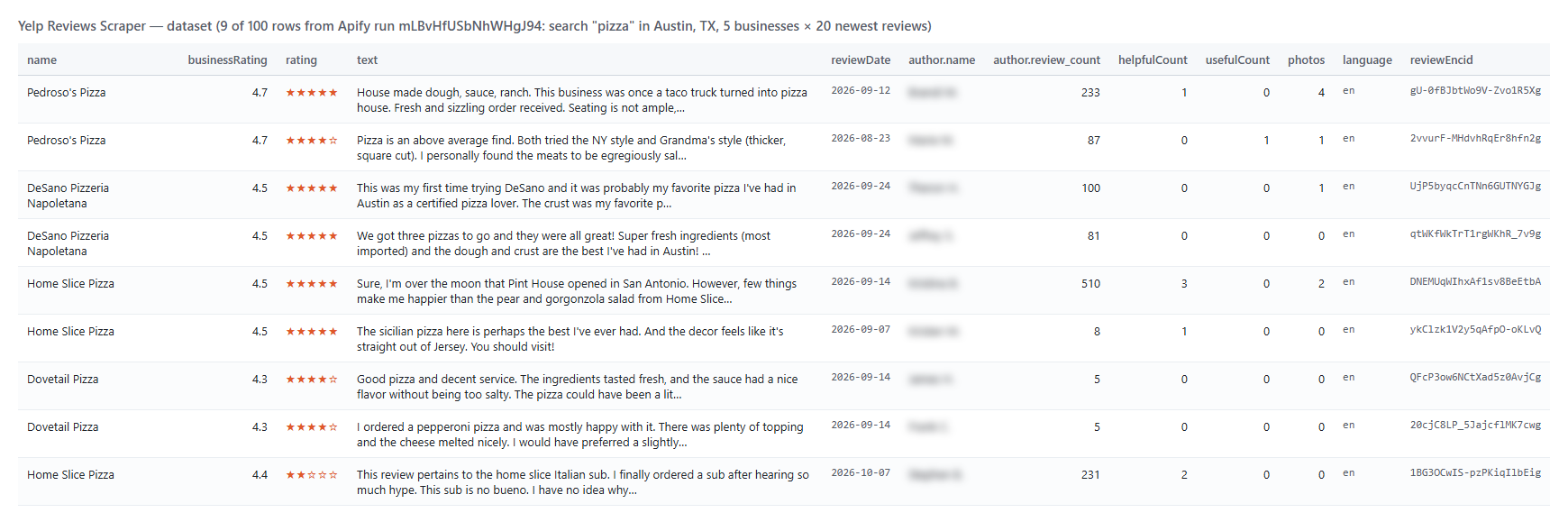
Every review becomes one dataset item. Here is the table view of a platform run for the search `pizza` in `Austin, TX` (5 businesses × 20 newest reviews):
 And one row as JSON (shortened):
```json
{
"review_position": 1,
"reviewEncid": "Q1kUFPnl5j3_0xrsLfLRYg",
"reviewUrl": "https://www.yelp.com/biz/franklin-barbecue-austin?hrid=Q1kUFPnl5j3_0xrsLfLRYg",
"rating": 5,
"text": "Finally got back to Franklin bbq. Was here last year for a conference...",
"language": "en",
"reviewDate": "2026-10-03T19:58:20-05:00",
"reviewDateUtc": "2026-10-04T00:58:20.000Z",
"isRecommended": true,
"author": { "name": "Mike S.", "location": "Yucca Valley, CA", "review_count": 168, "isElite": true },
"helpfulCount": 0, "thanksCount": 0, "loveThisCount": 0, "ohNoCount": 0,
"usefulCount": 0, "funnyCount": 0, "coolCount": 0,
"publicReply": null,
"photos": [{ "url": "https://s3-media0.fl.yelpcdn.com/bphoto/qpFcPpcLCuQDbaHM0F2nrQ/o.jpg", "caption": "Brisket closeup" }],
"expertRecognition": "BBQ",
"encid": "MGzro82Fi4LYvc86acoONQ",
"name": "Franklin Barbecue",
"businessRating": 4.5,
"totalReviews": 6489,
"ratingDetail": { "5_star": 4661, "4_star": 1031, "3_star": 391, "2_star": 209, "1_star": 199 },
"categories": ["Barbeque"],
"businessCity": "Austin"
}
```
#### Fields
| Field | Type | What it is | Fill on test runs |
|---|---|---|---|
| `reviewEncid`, `reviewUrl` | string | Yelp's review id and a direct link to the review | 100% |
| `rating` | number | Stars the reviewer gave, 1-5 | 100% |
| `text`, `language` | string | Full review text and its language code (`language` null on not-recommended reviews) | 100% (recommended reviews) |
| `translatedText` | string | Yelp's translation (with `translateTo`) | when requested |
| `reviewDate`, `reviewDateUtc` | string | Review date in the business's local time and in UTC | 100% |
| `author` | object | Reviewer name, encid, profile URL, location, review/friend/photo counts, profile photo, Elite badge | 100% (photo 72-75%) |
| `feedback`, `helpfulCount` … `ohNoCount` | array, number | Yelp reactions on the review (null on not-recommended reviews) | 100% (recommended reviews) |
| `usefulCount`, `funnyCount`, `coolCount` | number | Legacy votes (null in keyword searches, on not-recommended reviews and on pages read through a proxy, e.g. when you pick a proxy group) | 100% (recommended reviews, no keywords, no proxy) |
| `publicReply` | object | The business's reply: text, date, dateUtc, authorName, authorRole | when the business replied (9 of 30 on a tire shop) |
| `photos`, `videos` | array | Media attached to the review (full-size photo URL + thumbnail) | 44-50% |
| `expertRecognition` | string | Reviewer's Yelp expert badge for this kind of place (`null` with `includePersonalData` off) | 48-61% |
| `previousReviews` | array | The reviewer's earlier reviews of the same business (`null` with `includePersonalData` off) | 2-3% |
| `checkInCount`, `isFirstReviewer`, `hasPaidThroughYelp`, `hasPurchasedDeal`, `hasPlacedReservation`, `reservationProvider` | mixed | Review tags Yelp shows (null on not-recommended reviews) | 100% (recommended reviews; provider when booked) |
| `isRecommended` | boolean | `false` for Yelp's not-recommended reviews | 100% |
| `encid`, `alias`, `businessUrl`, `name`, `primaryPhoto` | string | The business | 100% |
| `businessRating`, `totalReviews`, `ratingDetail`, `reviewsCountByLanguage` | mixed | Business rating summary | 100% |
| `categories`, `businessCity`, `businessRegion`, `neighborhoods` | mixed | Business categories and location | 100% (neighborhoods 80-100%) |
| `input`, `searchTerm`, `searchLocation`, `review_position`, `scrapedAt` | mixed | Where the row came from | 100% (search fields for searches) |
Fill measured on two platform runs: 100 reviews from a 5-business search and 1,000 reviews of one business.
### How can I use Yelp reviews data?
- 🏪 **Franchise and multi-location owners** — pull every location's reviews weekly and compare ratings by city
- 📣 **Reputation and review-management agencies** — watch new 1- and 2-star reviews with monitor mode and route them to Slack
- 🔎 **Market researchers** — read what customers say about a whole category in a city with one search
- 🤖 **AI and data teams** — feed `text`, `rating` and `reviewDate` to sentiment models or LLM summaries
- 🧭 **Competitor analysts** — track a rival's review velocity and owner-reply rate over time
- 🏗️ **Product teams** — use `keywords` to find every review mentioning "parking", "wait" or a dish
### How much does it cost to scrape Yelp reviews?
Yelp Reviews Scraper is pay-per-result: **$0.047 per 1,000 reviews** ($0.000047 per review), no start fee.
| Reviews | Cost |
|---:|---:|
| 100 | $0.0047 |
| 1,000 | $0.047 |
| 10,000 | $0.47 |
| 100,000 | $4.70 |
There is nothing else to pay: Apify platform usage is included in these prices. Measured at the default 256 MB: 100 reviews from a 5-business search in 5.6 s, 1,000 reviews of one business in 32.5 s.
### Integrations, API, scheduling & MCP
- **Schedules:** run Yelp Reviews Scraper daily or weekly from the **Schedules** tab; with `monitorMode` each run returns only new reviews.
- **Webhooks:** fire a URL when a run finishes — push reviews to your CRM, Slack or a sheet.
- **No-code:** Make, Zapier, n8n, Google Sheets, Airtable, Slack via [Apify integrations](https://docs.apify.com/integrations).
- **API:** call it from Node.js or Python with `apify-client` — code on the [API tab](https://apify.com/TopApi/yelp-reviews-scraper/api/python) and the [Apify API reference](https://docs.apify.com/api/v2).
- **MCP / AI agents:** connect Claude, Cursor or any MCP client through the [MCP tab](https://apify.com/TopApi/yelp-reviews-scraper/api/mcp) and ask for Yelp reviews in plain language.
### More review and local-business scrapers
And one row as JSON (shortened):
```json
{
"review_position": 1,
"reviewEncid": "Q1kUFPnl5j3_0xrsLfLRYg",
"reviewUrl": "https://www.yelp.com/biz/franklin-barbecue-austin?hrid=Q1kUFPnl5j3_0xrsLfLRYg",
"rating": 5,
"text": "Finally got back to Franklin bbq. Was here last year for a conference...",
"language": "en",
"reviewDate": "2026-10-03T19:58:20-05:00",
"reviewDateUtc": "2026-10-04T00:58:20.000Z",
"isRecommended": true,
"author": { "name": "Mike S.", "location": "Yucca Valley, CA", "review_count": 168, "isElite": true },
"helpfulCount": 0, "thanksCount": 0, "loveThisCount": 0, "ohNoCount": 0,
"usefulCount": 0, "funnyCount": 0, "coolCount": 0,
"publicReply": null,
"photos": [{ "url": "https://s3-media0.fl.yelpcdn.com/bphoto/qpFcPpcLCuQDbaHM0F2nrQ/o.jpg", "caption": "Brisket closeup" }],
"expertRecognition": "BBQ",
"encid": "MGzro82Fi4LYvc86acoONQ",
"name": "Franklin Barbecue",
"businessRating": 4.5,
"totalReviews": 6489,
"ratingDetail": { "5_star": 4661, "4_star": 1031, "3_star": 391, "2_star": 209, "1_star": 199 },
"categories": ["Barbeque"],
"businessCity": "Austin"
}
```
#### Fields
| Field | Type | What it is | Fill on test runs |
|---|---|---|---|
| `reviewEncid`, `reviewUrl` | string | Yelp's review id and a direct link to the review | 100% |
| `rating` | number | Stars the reviewer gave, 1-5 | 100% |
| `text`, `language` | string | Full review text and its language code (`language` null on not-recommended reviews) | 100% (recommended reviews) |
| `translatedText` | string | Yelp's translation (with `translateTo`) | when requested |
| `reviewDate`, `reviewDateUtc` | string | Review date in the business's local time and in UTC | 100% |
| `author` | object | Reviewer name, encid, profile URL, location, review/friend/photo counts, profile photo, Elite badge | 100% (photo 72-75%) |
| `feedback`, `helpfulCount` … `ohNoCount` | array, number | Yelp reactions on the review (null on not-recommended reviews) | 100% (recommended reviews) |
| `usefulCount`, `funnyCount`, `coolCount` | number | Legacy votes (null in keyword searches, on not-recommended reviews and on pages read through a proxy, e.g. when you pick a proxy group) | 100% (recommended reviews, no keywords, no proxy) |
| `publicReply` | object | The business's reply: text, date, dateUtc, authorName, authorRole | when the business replied (9 of 30 on a tire shop) |
| `photos`, `videos` | array | Media attached to the review (full-size photo URL + thumbnail) | 44-50% |
| `expertRecognition` | string | Reviewer's Yelp expert badge for this kind of place (`null` with `includePersonalData` off) | 48-61% |
| `previousReviews` | array | The reviewer's earlier reviews of the same business (`null` with `includePersonalData` off) | 2-3% |
| `checkInCount`, `isFirstReviewer`, `hasPaidThroughYelp`, `hasPurchasedDeal`, `hasPlacedReservation`, `reservationProvider` | mixed | Review tags Yelp shows (null on not-recommended reviews) | 100% (recommended reviews; provider when booked) |
| `isRecommended` | boolean | `false` for Yelp's not-recommended reviews | 100% |
| `encid`, `alias`, `businessUrl`, `name`, `primaryPhoto` | string | The business | 100% |
| `businessRating`, `totalReviews`, `ratingDetail`, `reviewsCountByLanguage` | mixed | Business rating summary | 100% |
| `categories`, `businessCity`, `businessRegion`, `neighborhoods` | mixed | Business categories and location | 100% (neighborhoods 80-100%) |
| `input`, `searchTerm`, `searchLocation`, `review_position`, `scrapedAt` | mixed | Where the row came from | 100% (search fields for searches) |
Fill measured on two platform runs: 100 reviews from a 5-business search and 1,000 reviews of one business.
### How can I use Yelp reviews data?
- 🏪 **Franchise and multi-location owners** — pull every location's reviews weekly and compare ratings by city
- 📣 **Reputation and review-management agencies** — watch new 1- and 2-star reviews with monitor mode and route them to Slack
- 🔎 **Market researchers** — read what customers say about a whole category in a city with one search
- 🤖 **AI and data teams** — feed `text`, `rating` and `reviewDate` to sentiment models or LLM summaries
- 🧭 **Competitor analysts** — track a rival's review velocity and owner-reply rate over time
- 🏗️ **Product teams** — use `keywords` to find every review mentioning "parking", "wait" or a dish
### How much does it cost to scrape Yelp reviews?
Yelp Reviews Scraper is pay-per-result: **$0.047 per 1,000 reviews** ($0.000047 per review), no start fee.
| Reviews | Cost |
|---:|---:|
| 100 | $0.0047 |
| 1,000 | $0.047 |
| 10,000 | $0.47 |
| 100,000 | $4.70 |
There is nothing else to pay: Apify platform usage is included in these prices. Measured at the default 256 MB: 100 reviews from a 5-business search in 5.6 s, 1,000 reviews of one business in 32.5 s.
### Integrations, API, scheduling & MCP
- **Schedules:** run Yelp Reviews Scraper daily or weekly from the **Schedules** tab; with `monitorMode` each run returns only new reviews.
- **Webhooks:** fire a URL when a run finishes — push reviews to your CRM, Slack or a sheet.
- **No-code:** Make, Zapier, n8n, Google Sheets, Airtable, Slack via [Apify integrations](https://docs.apify.com/integrations).
- **API:** call it from Node.js or Python with `apify-client` — code on the [API tab](https://apify.com/TopApi/yelp-reviews-scraper/api/python) and the [Apify API reference](https://docs.apify.com/api/v2).
- **MCP / AI agents:** connect Claude, Cursor or any MCP client through the [MCP tab](https://apify.com/TopApi/yelp-reviews-scraper/api/mcp) and ask for Yelp reviews in plain language.
### More review and local-business scrapers