🆔 Zillow ID (zpid) and link |
🏷️ Status: for sale, for rent, sold, pending, coming soon |
💲 Price, sold price, price change |
| 📍 Address, ZIP, county, coordinates |
🛏️ Beds, baths, living area, lot size |
🏠 Home type and listing type (MLS-listed, by owner, new construction, foreclosure, auction) |
| 📈 Zestimate and rent Zestimate |
🧾 Tax-assessed value, annual tax, tax rate |
📅 Days on Zillow, date posted, date sold |
| 📷 Photos (carousel, or every photo in full size) |
🕒 Open house times |
🏢 Apartment buildings: units, rents, specials |
📜 Price history (listingPriceHistory) |
🧮 Tax history (listingTaxHistory) |
🏫 Nearby schools with ratings |
| 🏘️ Nearby homes and comparable homes |
📉 Zestimate history (10 years, monthly) |
🔎 Fact sheet (about 25-90 facts): heating, cooling, parking, HOA, appliances, roof, zoning |
| 🗂️ MLS number and parcel number |
👀 Page views and saves on Zillow |
📝 Full description and highlights |
On a 1,000-listing Austin test run, price, address, coordinates, beds, baths, home type, days on Zillow and photos were filled on 100% of rows and living area on 97%. On a 100-listing run with property details, description, year built, price history, nearby schools, nearby homes, parcel number and MLS number were filled on 100% of rows, tax history on 87% and page views on 93%.
### How to scrape Zillow with Zillow Scraper
1. [Create a free Apify account](https://console.apify.com/sign-up) - $5 of monthly credit, no card needed.
2. Open [Zillow Scraper](https://apify.com/TopApi/zillow-scraper) and click **Try for free**.
3. Type a city, ZIP code or neighborhood into **Locations** (or paste a Zillow search URL), pick **For sale**, **For rent** or **Recently sold**, and set **Max results**.
4. Optional: add filters, and switch on **Include property details** for price history, tax history, schools and comps.
5. Click **Start**. Rows stream into the dataset as they are found.
6. Open the **Storage** tab and **Export** as JSON, CSV or Excel - or let a schedule run it for you.
### ⬇️ Input
| Parameter | Type | Description |
|---|---|---|
| **🔍 What to scrape** | | |
| `searchLocation` | List | Cities, ZIP codes, neighborhoods or counties: `"Austin, TX"`, `"78704"`, `"Travis County, TX"`. An exact street address returns that one property. |
| `listingStatus` | Select | `forSale` (default), `forRent` or `sold` - applies to Locations, ZIP codes and map areas. |
| `searchUrls` | List of `{"url": ...}` objects | Zillow search URLs, e.g. `[{"url": "https://www.zillow.com/austin-tx/sold/"}]`, or a URL with `?searchQueryState=`. The URL's filters and map area are kept. |
| `startUrls` | List of `{"url": ...}` objects | Zillow property URLs, e.g. `[{"url": "https://www.zillow.com/homedetails/29375136_zpid/"}]`. One row each, with property details. |
| `zipCodes` | List | US ZIP codes to search, e.g. `78704`. |
| `zpids` / `addresses` | List of strings | Zillow property IDs, e.g. `["29375136"]`, or addresses like `["123 Main St, City, ST 12345"]`. One row each, with property details. |
| `mapBounds` | Object | A map rectangle: `{"north": 30.29, "south": 30.25, "east": -97.72, "west": -97.76}`. |
| `latitude`, `longitude`, `distanceMiles` | Number | Search around a point; radius in miles (default 5). |
| `searchResultsDatasetId` | String | Dataset of an earlier Zillow run: every row with a zpid or property URL is fetched again with full property details. |
| **🎯 Filters** (applied by Zillow) | | |
| `sortBy` | Select | `relevance` (Zillow's default), `newest`, `priceLowToHigh`, `priceHighToLow`, `bedrooms`, `bathrooms`, `squareFeet`, `lotSize`. |
| `homeTypes` | Multi-select | `house`, `townhouse`, `multiFamily`, `condo`, `lot`, `apartment`, `manufactured`. Empty = all. |
| `minPrice` / `maxPrice` | Integer | USD; monthly rent when the status is For rent. |
| `minBeds` / `maxBeds` / `minBaths` | Number | Bedroom and bathroom bounds. |
| `minSqft` / `maxSqft` / `minLotSize` / `maxLotSize` | Integer | Living area and lot, square feet. |
| `minYearBuilt` / `maxYearBuilt` / `maxHoaFee` | Integer | Year built window; monthly HOA ceiling. |
| `daysOnZillow` | Select | Listed within (or, for sold, sold within) 1 / 7 / 14 / 30 / 90 days, 6 / 12 / 24 / 36 months. |
| `keywords` | String | Zillow's keyword filter, e.g. `"pool"`. |
| `listingTypes` | Multi-select | For sale: MLS-listed, by owner, new construction, foreclosures, auctions, coming soon, foreclosed, pre-foreclosures, pending & under contract, accepting backup offers. |
| `mustHave` / `views` / `parkingSpots` | Multi-select / Integer | Pool, A/C, waterfront, single story, garage, basement, 3D tour, open house, price cut; city / mountain / park / water view; minimum parking spots. |
| `customFilterState` | Object | Any other Zillow `filterState` key, merged last. |
| **✂️ Refine results** | | |
| `minDaysOnZillow` | Integer | Keep listings on Zillow at least this many days. |
| `withZestimateOnly` / `withPhotosOnly` | Boolean | Keep only rows with a Zestimate / with a photo. Default `false`. |
| **➕ Extra data** | | |
| `includeDetails` | Boolean | Property details for every home row - charged as **property-details** at $0.0016 per row that gets them. Apartment-building rows carry floor-plan rents but no property details, and are not charged for them. With `compact` on, the compact row keeps the details it was charged for (see `compact`). Default `false`. |
| `includeZestimateHistory` | Boolean | With details: monthly Zestimate for up to 10 years. No extra charge. |
| **🔁 Monitoring** | | |
| `monitorMode` | Boolean | Return only listings not delivered by previous runs. Pair with a daily schedule. The memory is saved during the run as well, so a run that Apify restarts or migrates still remembers everything it delivered. |
| `trackPriceChanges` | Boolean | Also return a known listing when its price or status changed (`monitorChange`, `previousPrice`). |
| `monitorStoreName` | String | Named key-value store for the memory. Default `zillow-scraper-monitor`. |
| **📦 Output** | | |
| `maxResults` | Integer | Default `100`; `0` = up to 100,000 rows, the most one run delivers. |
| `maxResultsPerSearch` | Integer | Limit per location / URL / ZIP. `0` = none. |
| `extractionMethod` | Select | `PAGINATION_WITH_ZOOM_IN` (default, full inventory), `PAGINATION` (up to ~820 per search, sorted), `MAP_MARKERS` (500 per call, one photo per row). |
| `compact` / `flatOutput` | Boolean | `compact`: core fields only, for AI assistants and LLMs - `zpid`, link, status, price, address, beds, baths, area, home type, Zestimates, days on Zillow, coordinates, photo and `searchInput`. A row that got property details also keeps what they were charged for: year built, description, price per square foot, annual tax, monthly HOA, parcel and MLS numbers, views and saves, price and tax history, schools, comparable homes, Zestimate history, every photo URL, `resoFacts` and `detailsSource`. `flatOutput`: dot-named columns for spreadsheets. |
| **⚙️ Advanced** | | |
| `proxyConfiguration` | Proxy | Leave as is: Apify's own connection first, Apify datacenter proxy sessions added by the actor. |
| `maxConcurrency` | Integer | Parallel connections, default 4. |
#### Input JSON
```json
{
"searchLocation": ["Austin, TX", "78704"],
"listingStatus": "forSale",
"minBeds": 3,
"maxPrice": 750000,
"homeTypes": ["house", "townhouse"],
"includeDetails": true,
"maxResults": 200
}
```
#### Pick the listing status before anything else
Zillow keeps homes for sale, rentals and sold homes in separate searches, so `listingStatus` decides which one every location is searched in. **Do:** `"listingStatus": "sold"` with `"daysOnZillow": "90"` for sales of the last 90 days · **Don't:** search for sale and filter by "sold" afterwards - sold homes are not in that search.
#### Paste a Zillow search URL to keep every filter you set on the map
Draw an area or set filters on zillow.com, copy the address bar and put it in `searchUrls`. Zillow Scraper keeps the URL's filters and map area as they are; the filter inputs apply to Locations, ZIP codes and map areas only.
In the input form you paste the URLs one per line. In JSON or an API call, `searchUrls` and `startUrls` are lists of objects with a `url` key (a plain string is rejected by Apify before the run starts):
```json
{
"searchUrls": [{ "url": "https://www.zillow.com/austin-tx/sold/" }],
"startUrls": [{ "url": "https://www.zillow.com/homedetails/29375136_zpid/" }],
"zpids": ["29477119"]
}
```
#### Use the map methods to go past 820 results
Zillow shows at most 20 pages of 41 homes per search. With the default `PAGINATION_WITH_ZOOM_IN`, a search that has more homes than that is split into four smaller map areas, again and again, until every area fits; duplicates are removed. `MAP_MARKERS` reads 500 homes per call the same way and is the fastest route to a full inventory, with one photo per row instead of the photo carousel.
#### Turn on property details only when you need them
Search rows already carry price, address, beds, baths, area, home type, days on Zillow, tax-assessed value and photos. `includeDetails` opens each property page for the history, schools, comps and facts - it takes about two seconds per home and is charged per row that gets it.
### ⬆️ Output
Every listing becomes one dataset item. Here is the table view of a run for ZIP `78704` with property details on:
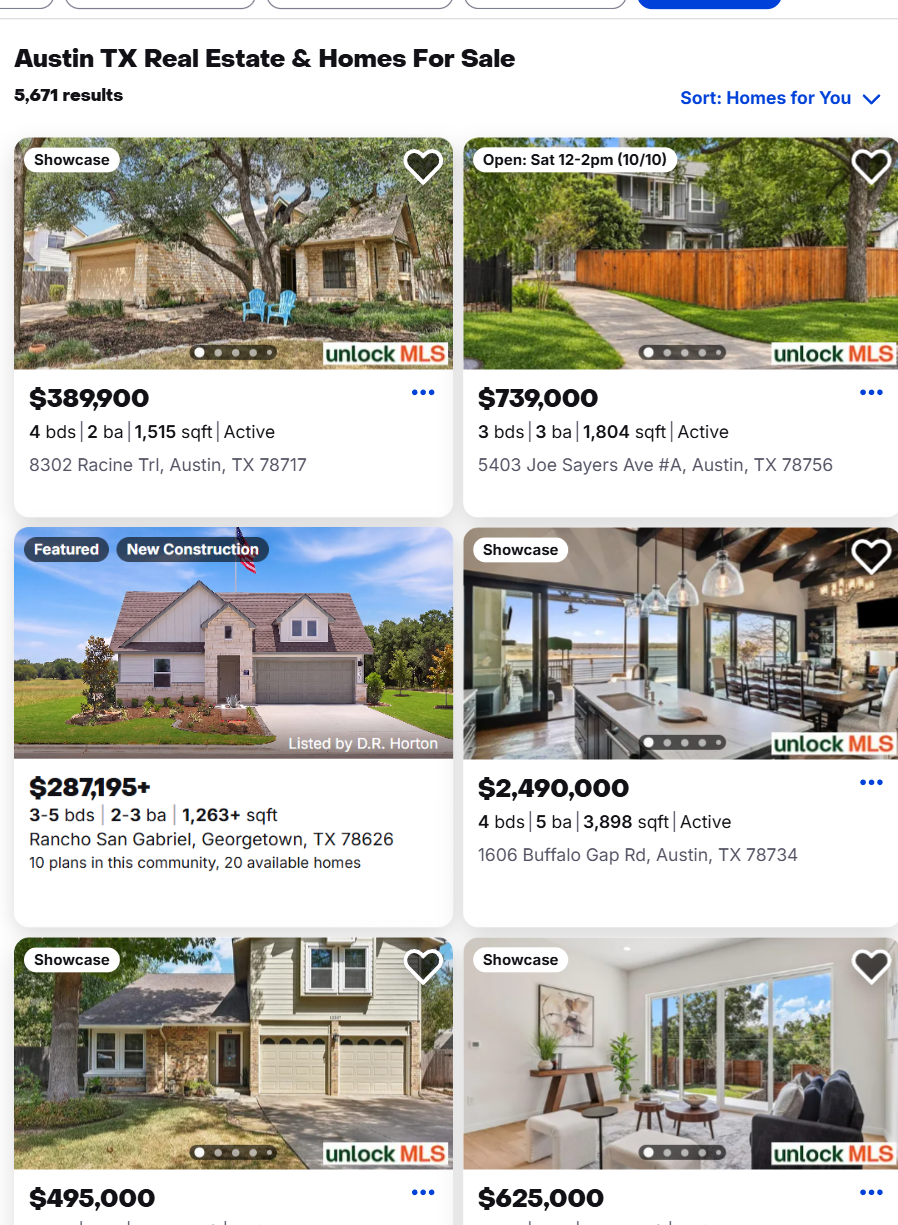
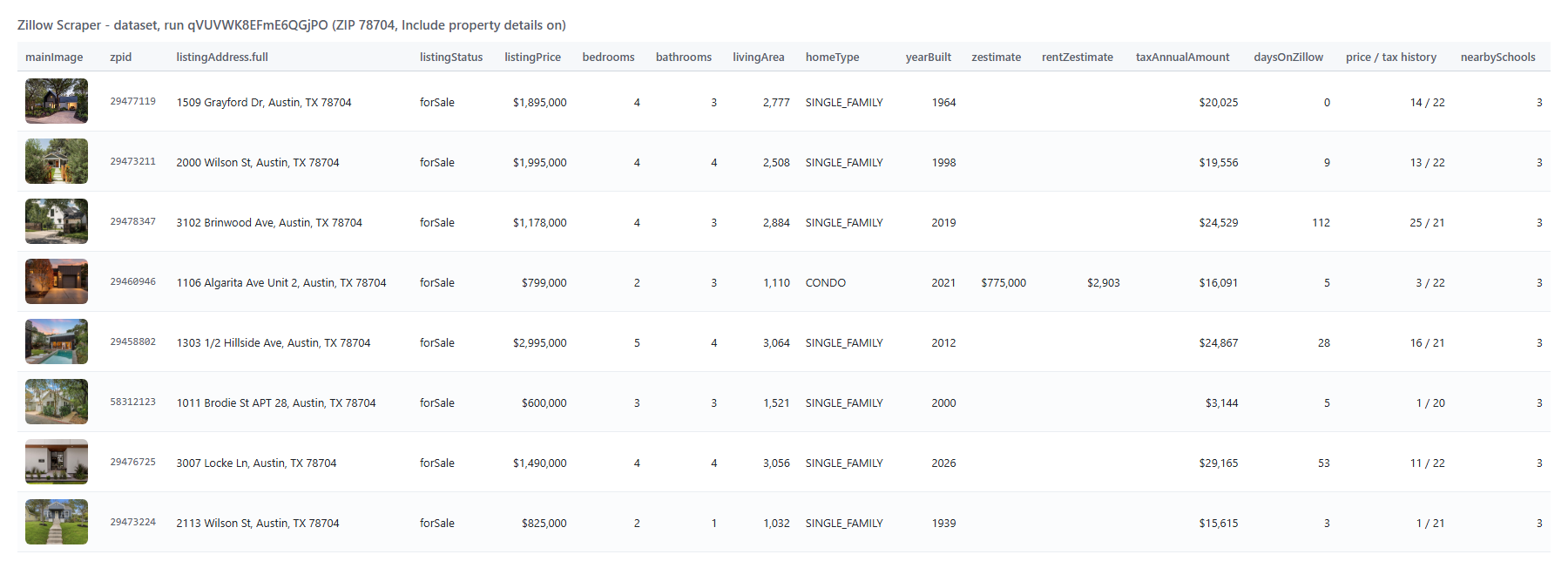 A search row as JSON (shortened):
```json
{
"zpid": "29575637",
"propertyUrl": "https://www.zillow.com/homedetails/8302-Racine-Trl-Austin-TX-78717/29575637_zpid/",
"listingStatus": "forSale",
"listingPrice": { "amount": 389900, "currency": "USD", "formatted": "$389,900" },
"listingAddress": { "street": "8302 Racine Trl", "city": "Austin", "state": "TX", "zipCode": "78717", "full": "8302 Racine Trl, Austin, TX 78717" },
"coordinates": { "latitude": 30.491026, "longitude": -97.74046 },
"homeType": "SINGLE_FAMILY",
"bedrooms": 4,
"bathrooms": 2,
"livingArea": 1515,
"lotArea": { "value": 5989.5, "unit": "sqft" },
"daysOnZillow": 9,
"taxAssessedValue": 422216,
"photoCount": 25,
"searchInput": "Austin, TX"
}
```
A row with property details adds (shortened; zpid 29477119, 1509 Grayford Dr, listed at $1,895,000):
```json
{
"yearBuilt": 1964,
"pricePerSquareFoot": 682,
"taxAnnualAmount": 20025,
"parcelId": "308059",
"mls": { "id": "2477927", "name": "Unlock MLS" },
"pageViewCount": 625,
"favoriteCount": 74,
"listingPriceHistory": [{ "date": "2026-10-07", "event": "Listed for sale", "price": 1895000, "source": "Unlock MLS", "sourceType": "mls" }],
"listingTaxHistory": [{ "year": 2025, "taxPaid": 22096.26, "value": 1269986 }],
"nearbySchools": [{ "name": "Joslin Elementary School", "distance": 0.6, "grades": "PK-5", "type": "Public", "isAssigned": true }],
"nearbyProperties": ["... 8 nearby homes"],
"comparableHomes": ["... 5 comparable homes"]
}
```
#### Fields
| Field | Type | What it is | Fill on test run |
|---|---|---|---|
| `zpid`, `propertyUrl` | string | Zillow property ID and page | 100% |
| `listingPrice` | object | Asking price or rent `{amount, currency, formatted}` | 100% (for sale) |
| `listingSoldPrice`, `dateSold` | object, string | Sale price where Zillow publishes it; sale date | date 100% (sold) |
| `listingAddress`, `coordinates` | object | Street, city, state, ZIP, county; latitude / longitude | 100% |
| `bedrooms`, `bathrooms`, `livingArea` | number | Size of the home | 100% / 100% / 97% |
| `homeType`, `listingType` | string, object | Single family, condo...; MLS-listed / by owner / new / foreclosure / auction flags | 100% |
| `daysOnZillow`, `priceChange` | number | Time on market; last price change | 100% / 49% |
| `zestimate`, `rentZestimate` | number | Shown by Zillow on a minority of active listings, most sold homes | 20% / 22% (for sale) |
| `taxAssessedValue`, `lotArea` | number, object | Assessed value; lot size | 88% / 98% |
| `mainImage`, `listingPhotos` | string, array | Photos | 100% |
| `description`, `yearBuilt`, `pricePerSquareFoot` | details | Listing text, year built, price per square foot. Phone numbers, e-mail addresses, licence numbers, links to non-tour websites, and names in contact phrasing (after "call", "contact" or "text", beside a role title such as Realtor, or beside a phone number or e-mail) in the text read `[contact removed]` | 100% |
| `listingPriceHistory`, `listingTaxHistory` | details | Price events with their data source (MLS, owner, public record, Zillow); yearly tax and assessed value | 100% / 87% |
| `nearbySchools`, `nearbyProperties`, `comparableHomes` | details | Schools with rating and distance; nearby homes; Zestimate comps | 100% / 100% / 90% |
| `zestimateHistory` | details | Monthly Zestimate, up to 10 years | 88% |
| `hoa`, `monthlyHoaFee`, `parking`, `propertyFeatures`, `resoFacts` | details | Association: `hoa.fee` as Zillow states it, per `hoa.feeFrequency` (Monthly, Quarterly, Annually); `monthlyHoaFee` = that fee per month (Zillow's own figure, or the stated fee divided by its period; null when the listing only says it has an HOA fee, with no amount). Parking, and the full fact sheet (about 25-90 facts, depending on the listing) | HOA 38%, others 100% |
| `mls`, `parcelId`, `countyFIPS`, `datePosted` | details | Listing and record identifiers | 100% / 100% / 87% / 100% |
| `pageViewCount`, `favoriteCount` | details | Views and saves on Zillow (active listings) | 93% |
| `virtualTourUrl` | details | 3D or video tour on a tour host (Zillow, Matterport, YouTube, Vimeo, Property Panorama and similar); null when the only tour is on another website | 40% |
Fill figures: search fields from a 1,000-row Austin run; detail fields from a 100-row run in ZIP 78704 (for-sale homes); `virtualTourUrl` from 126 properties across the Austin, Denver, Miami and Seattle test runs.
### How can I use Zillow data?
- 🏘️ **Real estate investors** - pull every listing in a ZIP with price, size and days on Zillow, sort by price per square foot and find homes sitting longest on the market.
- 📊 **Market analysts** - track inventory, price cuts and sold prices by neighborhood week over week with a daily schedule.
- 🧾 **Appraisers and lenders** - pull price history, tax history and Zillow's comparable homes for a list of addresses.
- 🏢 **Rental operators** - collect rents, floor plans and leasing specials of apartment buildings in a city.
- 🤖 **AI and proptech teams** - feed compact rows to an LLM or a valuation model through the API or MCP.
- 🏗️ **Builders and developers** - find lots and new-construction listings with lot size, zoning and schools.
### How much does it cost to scrape Zillow?
Zillow Scraper is pay-per-result: **$0.85 per 1,000 listings** (`listing`, $0.00085 each), no start fee. **Property details** add **$1.60 per 1,000** (`property-details`, $0.0016 per row that gets them). A property looked up by URL, ZPID or address is one listing plus its details: $0.00245.
| Rows | Listings only | With property details |
|---:|---:|---:|
| 10 | $0.0085 | $0.0245 |
| 100 | $0.085 | $0.245 |
| 1,000 | $0.85 | $2.45 |
| 10,000 | $8.50 | $24.50 |
Apify's platform usage is included. Measured: 41 listings in 6 seconds, 1,000 listings in 31 seconds, 100 listings with property details and Zestimate history in about 3.5 minutes, all on 256 MB.
### Integrations, API, scheduling & MCP
- **Schedules:** run Zillow Scraper daily or weekly from the **Schedules** tab; with `monitorMode` each run returns only new listings.
- **Webhooks:** fire a URL when a run finishes - push listings to your CRM, Slack or a sheet.
- **No-code:** Make, Zapier, n8n, Google Sheets, Airtable, Slack via [Apify integrations](https://docs.apify.com/integrations).
- **API:** call it from Node.js or Python with `apify-client` - code on the [API tab](https://apify.com/TopApi/zillow-scraper/api/python) and the [Apify API reference](https://docs.apify.com/api/v2).
- **MCP / AI assistants:** connect Claude, Cursor or any MCP client through the [MCP tab](https://apify.com/TopApi/zillow-scraper/api/mcp) and ask for Zillow listings in plain language.
### More scrapers from TopApi
A search row as JSON (shortened):
```json
{
"zpid": "29575637",
"propertyUrl": "https://www.zillow.com/homedetails/8302-Racine-Trl-Austin-TX-78717/29575637_zpid/",
"listingStatus": "forSale",
"listingPrice": { "amount": 389900, "currency": "USD", "formatted": "$389,900" },
"listingAddress": { "street": "8302 Racine Trl", "city": "Austin", "state": "TX", "zipCode": "78717", "full": "8302 Racine Trl, Austin, TX 78717" },
"coordinates": { "latitude": 30.491026, "longitude": -97.74046 },
"homeType": "SINGLE_FAMILY",
"bedrooms": 4,
"bathrooms": 2,
"livingArea": 1515,
"lotArea": { "value": 5989.5, "unit": "sqft" },
"daysOnZillow": 9,
"taxAssessedValue": 422216,
"photoCount": 25,
"searchInput": "Austin, TX"
}
```
A row with property details adds (shortened; zpid 29477119, 1509 Grayford Dr, listed at $1,895,000):
```json
{
"yearBuilt": 1964,
"pricePerSquareFoot": 682,
"taxAnnualAmount": 20025,
"parcelId": "308059",
"mls": { "id": "2477927", "name": "Unlock MLS" },
"pageViewCount": 625,
"favoriteCount": 74,
"listingPriceHistory": [{ "date": "2026-10-07", "event": "Listed for sale", "price": 1895000, "source": "Unlock MLS", "sourceType": "mls" }],
"listingTaxHistory": [{ "year": 2025, "taxPaid": 22096.26, "value": 1269986 }],
"nearbySchools": [{ "name": "Joslin Elementary School", "distance": 0.6, "grades": "PK-5", "type": "Public", "isAssigned": true }],
"nearbyProperties": ["... 8 nearby homes"],
"comparableHomes": ["... 5 comparable homes"]
}
```
#### Fields
| Field | Type | What it is | Fill on test run |
|---|---|---|---|
| `zpid`, `propertyUrl` | string | Zillow property ID and page | 100% |
| `listingPrice` | object | Asking price or rent `{amount, currency, formatted}` | 100% (for sale) |
| `listingSoldPrice`, `dateSold` | object, string | Sale price where Zillow publishes it; sale date | date 100% (sold) |
| `listingAddress`, `coordinates` | object | Street, city, state, ZIP, county; latitude / longitude | 100% |
| `bedrooms`, `bathrooms`, `livingArea` | number | Size of the home | 100% / 100% / 97% |
| `homeType`, `listingType` | string, object | Single family, condo...; MLS-listed / by owner / new / foreclosure / auction flags | 100% |
| `daysOnZillow`, `priceChange` | number | Time on market; last price change | 100% / 49% |
| `zestimate`, `rentZestimate` | number | Shown by Zillow on a minority of active listings, most sold homes | 20% / 22% (for sale) |
| `taxAssessedValue`, `lotArea` | number, object | Assessed value; lot size | 88% / 98% |
| `mainImage`, `listingPhotos` | string, array | Photos | 100% |
| `description`, `yearBuilt`, `pricePerSquareFoot` | details | Listing text, year built, price per square foot. Phone numbers, e-mail addresses, licence numbers, links to non-tour websites, and names in contact phrasing (after "call", "contact" or "text", beside a role title such as Realtor, or beside a phone number or e-mail) in the text read `[contact removed]` | 100% |
| `listingPriceHistory`, `listingTaxHistory` | details | Price events with their data source (MLS, owner, public record, Zillow); yearly tax and assessed value | 100% / 87% |
| `nearbySchools`, `nearbyProperties`, `comparableHomes` | details | Schools with rating and distance; nearby homes; Zestimate comps | 100% / 100% / 90% |
| `zestimateHistory` | details | Monthly Zestimate, up to 10 years | 88% |
| `hoa`, `monthlyHoaFee`, `parking`, `propertyFeatures`, `resoFacts` | details | Association: `hoa.fee` as Zillow states it, per `hoa.feeFrequency` (Monthly, Quarterly, Annually); `monthlyHoaFee` = that fee per month (Zillow's own figure, or the stated fee divided by its period; null when the listing only says it has an HOA fee, with no amount). Parking, and the full fact sheet (about 25-90 facts, depending on the listing) | HOA 38%, others 100% |
| `mls`, `parcelId`, `countyFIPS`, `datePosted` | details | Listing and record identifiers | 100% / 100% / 87% / 100% |
| `pageViewCount`, `favoriteCount` | details | Views and saves on Zillow (active listings) | 93% |
| `virtualTourUrl` | details | 3D or video tour on a tour host (Zillow, Matterport, YouTube, Vimeo, Property Panorama and similar); null when the only tour is on another website | 40% |
Fill figures: search fields from a 1,000-row Austin run; detail fields from a 100-row run in ZIP 78704 (for-sale homes); `virtualTourUrl` from 126 properties across the Austin, Denver, Miami and Seattle test runs.
### How can I use Zillow data?
- 🏘️ **Real estate investors** - pull every listing in a ZIP with price, size and days on Zillow, sort by price per square foot and find homes sitting longest on the market.
- 📊 **Market analysts** - track inventory, price cuts and sold prices by neighborhood week over week with a daily schedule.
- 🧾 **Appraisers and lenders** - pull price history, tax history and Zillow's comparable homes for a list of addresses.
- 🏢 **Rental operators** - collect rents, floor plans and leasing specials of apartment buildings in a city.
- 🤖 **AI and proptech teams** - feed compact rows to an LLM or a valuation model through the API or MCP.
- 🏗️ **Builders and developers** - find lots and new-construction listings with lot size, zoning and schools.
### How much does it cost to scrape Zillow?
Zillow Scraper is pay-per-result: **$0.85 per 1,000 listings** (`listing`, $0.00085 each), no start fee. **Property details** add **$1.60 per 1,000** (`property-details`, $0.0016 per row that gets them). A property looked up by URL, ZPID or address is one listing plus its details: $0.00245.
| Rows | Listings only | With property details |
|---:|---:|---:|
| 10 | $0.0085 | $0.0245 |
| 100 | $0.085 | $0.245 |
| 1,000 | $0.85 | $2.45 |
| 10,000 | $8.50 | $24.50 |
Apify's platform usage is included. Measured: 41 listings in 6 seconds, 1,000 listings in 31 seconds, 100 listings with property details and Zestimate history in about 3.5 minutes, all on 256 MB.
### Integrations, API, scheduling & MCP
- **Schedules:** run Zillow Scraper daily or weekly from the **Schedules** tab; with `monitorMode` each run returns only new listings.
- **Webhooks:** fire a URL when a run finishes - push listings to your CRM, Slack or a sheet.
- **No-code:** Make, Zapier, n8n, Google Sheets, Airtable, Slack via [Apify integrations](https://docs.apify.com/integrations).
- **API:** call it from Node.js or Python with `apify-client` - code on the [API tab](https://apify.com/TopApi/zillow-scraper/api/python) and the [Apify API reference](https://docs.apify.com/api/v2).
- **MCP / AI assistants:** connect Claude, Cursor or any MCP client through the [MCP tab](https://apify.com/TopApi/zillow-scraper/api/mcp) and ask for Zillow listings in plain language.
### More scrapers from TopApi