# AliExpress Product Scraper - Prices, Variants & Reviews (`zen-studio/aliexpress-scraper`) Actor

Extract AliExpress products with exact sales counts, prices, every variant with its own stock, seller stats, and buyer reviews with photos. Pick your delivery country, currency and language: catalog, prices, VAT and delivery times all follow. 65 fields per product. Export to JSON, CSV, Excel.

- **URL**: https://apify.com/zen-studio/aliexpress-scraper.md
- **Developed by:** [Zen Studio](https://apify.com/zen-studio) (community)
- **Categories:** E-commerce
- **Stats:** 3 total users, 2 monthly users, 100.0% runs succeeded, 0 bookmarks
- **User rating**: No ratings yet

## Pricing

from $1.99 / 1,000 products

This Actor is paid per event. You are not charged for the Apify platform usage, but only a fixed price for specific events.
Since this Actor supports Apify Store discounts, the price gets lower the higher subscription plan you have.

Learn more: https://docs.apify.com/platform/actors/running/actors-in-store#pay-per-event

## What's an Apify Actor?

Actors are web data automations that power AI and operations. They run on the Apify platform to scrape websites, process data, connect APIs, and automate workflows.
In Batch mode, an Actor accepts a well-defined JSON input, performs an action which can take anything from a few seconds to a few hours,
and optionally produces a well-defined JSON output, datasets with results, or files in key-value store.
In Standby mode, an Actor provides a web server which can be used as a website, API, or an MCP server.
Actors are written with capital "A".

## How to integrate an Actor?

If asked about integration, you help developers integrate Actors into their projects.
You adapt to their stack and deliver integrations that are safe, well-documented, and production-ready.
The best way to integrate Actors is as follows.

- **AI agents and MCP clients** — the [Apify MCP server](https://docs.apify.com/integrations/mcp.md) at `https://mcp.apify.com` (remote, streamable HTTP, OAuth on first use).
- **Agentic workflows and local Actor development** — [Agent Skills](https://apify.com/.well-known/agent-skills/index.json) with the [Apify CLI](https://docs.apify.com/cli/docs.md): `npm install -g apify-cli`, then `apify login`.
- **JavaScript/TypeScript projects** — the official [JS/TS client](https://docs.apify.com/api/client/js/docs.md): `npm install apify-client`.
- **Python projects** — the official [Python client](https://docs.apify.com/api/client/python/docs.md): `pip install apify-client`.
- **Any other language** — the [REST API](https://docs.apify.com/api/v2.md).

For usage examples, see the [API](#api) section below.

For more details, see Apify documentation as [Markdown index](https://docs.apify.com/llms.txt) and [Markdown full-text](https://docs.apify.com/llms-full.txt).

# README

## AliExpress Scraper | Products, Variants, Prices & Reviews (2026)

<blockquote style="border-left:4px solid #4C945E;background:#F0FDF4;padding:12px 16px;margin:12px 0">
<span style="font-size:16px;font-weight:700;color:#1C1917">65 fields per product at 800+ products/minute:</span> <span style="font-size:15px;color:#57534E">exact sales counts, every variant with its own price and stock, seller performance, delivery days to your country, and buyer reviews with photos.</span>
</blockquote>

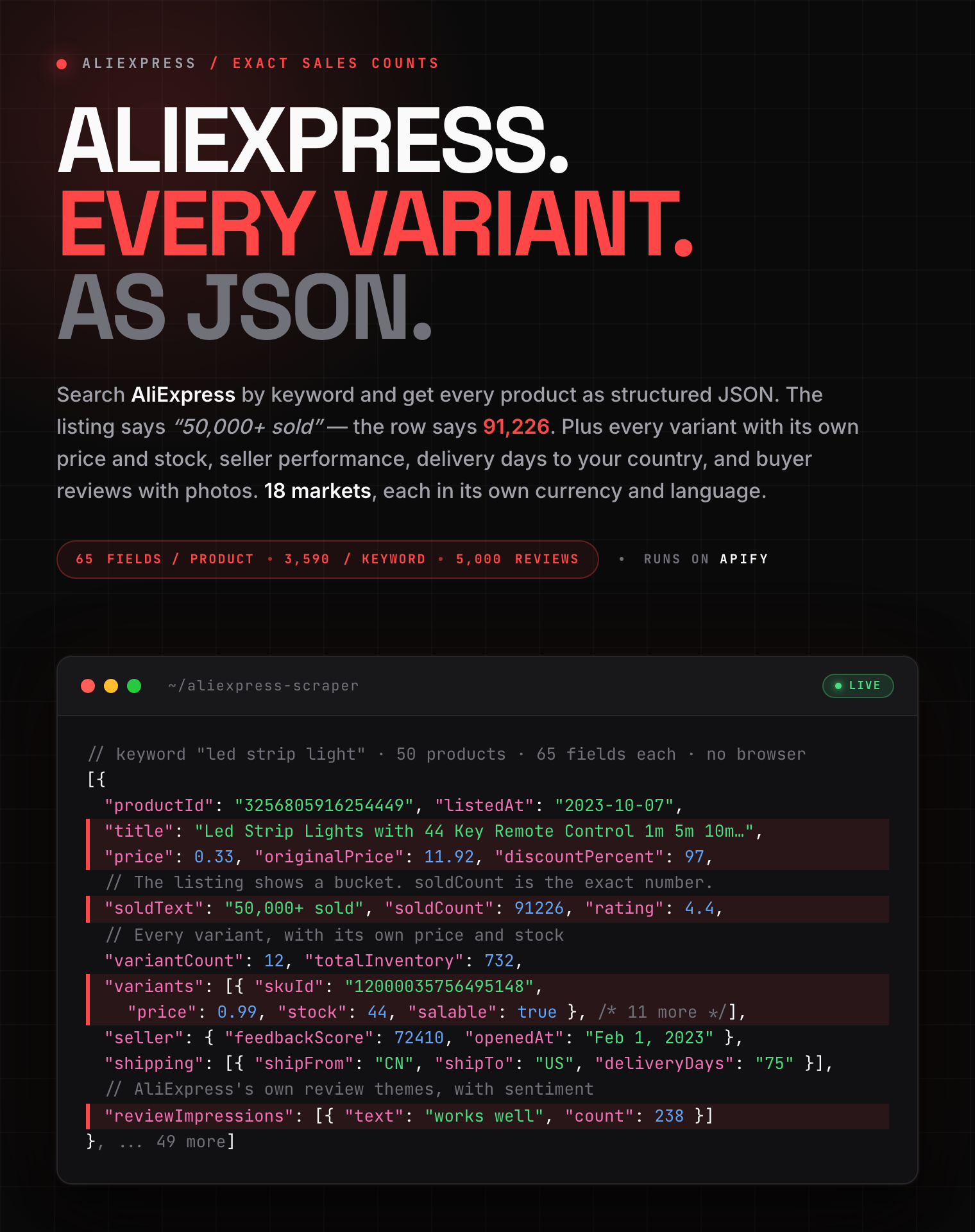
<a href="https://console.apify.com/actors/OFZVXeeKVlKMMXsJk/input"><img src="https://api.apify.com/v2/key-value-stores/pJ7iaZsTFhR3k9tjV/records/aliexpress-scraper-hero.png" alt="AliExpress scraper output: a product with its exact sales count, discounted price, full variant list with per-variant stock, seller feedback score, delivery days, and AI review themes, as structured JSON" style="max-width:100%"></a>

<table>
<tr>
<td colspan="4" style="padding:10px 14px;background:#4C945E;border:none;border-radius:4px 4px 0 0">
<span style="color:#FAFAF9;font-size:14px;font-weight:700;letter-spacing:0.5px">Zen Studio Marketplace Data</span>
<span style="color:#E8F5E9;font-size:13px">&nbsp;&nbsp;&bull;&nbsp;&nbsp;Product, price and seller data across global marketplaces</span>
</td>
</tr>
<tr>
<td style="padding:12px 16px;border:1px solid #E7E5E4;border-radius:0 0 0 4px;background:#D3EDD9;border-right:none;border-top:none;vertical-align:top;width:25%">
<a href="https://apify.com/zen-studio/aliexpress-scraper" style="color:#4C945E;text-decoration:none;font-weight:700;font-size:14px">AliExpress</a><br>
<span style="color:#4C945E;font-size:12px;font-weight:600">&#10148; You are here</span>
</td>
<td style="padding:12px 16px;border:1px solid #E7E5E4;background:#E8F5E9;border-right:none;border-top:none;vertical-align:top;width:25%">
<img src="https://apify-image-uploads-prod.s3.us-east-1.amazonaws.com/NWYsOG96fMDy8ycdf-actor-TASViBigl6dEv1GaH-RjnHoxkrmo-alibaba-scraper-logo.png" width="24" height="24" style="vertical-align:middle"> &nbsp;<a href="https://apify.com/zen-studio/alibaba-scraper" style="color:#1C1917;text-decoration:none;font-weight:700;font-size:14px">Alibaba.com</a><br>
<span style="color:#78716C;font-size:12px">Wholesale, verified suppliers</span>
</td>
<td style="padding:12px 16px;border:1px solid #E7E5E4;background:#E8F5E9;border-right:none;border-top:none;vertical-align:top;width:25%">
<img src="https://apify-image-uploads-prod.s3.us-east-1.amazonaws.com/NWYsOG96fMDy8ycdf-actor-ghXSMZcW3GxsCrkiR-5hnvsKv4Yt-1688-wholesale-scraper-logo.png" width="24" height="24" style="vertical-align:middle"> &nbsp;<a href="https://apify.com/zen-studio/1688-wholesale-scraper" style="color:#1C1917;text-decoration:none;font-weight:700;font-size:14px">1688 Wholesale</a><br>
<span style="color:#78716C;font-size:12px">China domestic pricing</span>
</td>
<td style="padding:12px 16px;border:1px solid #E7E5E4;border-radius:0 0 4px 0;background:#E8F5E9;border-top:none;vertical-align:top;width:25%">
<img src="https://apify-image-uploads-prod.s3.us-east-1.amazonaws.com/NWYsOG96fMDy8ycdf-actor-PsAKYWM55HG4AHXjK-ItywU7Bp0s-taobao-search-scraper-logo.png" width="24" height="24" style="vertical-align:middle"> &nbsp;<a href="https://apify.com/zen-studio/taobao-search-scraper" style="color:#1C1917;text-decoration:none;font-weight:700;font-size:14px">Taobao Search</a><br>
<span style="color:#78716C;font-size:12px">China consumer listings</span>
</td>
</tr>
</table>

#### Copy to your AI assistant

```
zen-studio/aliexpress-scraper on Apify. Scrapes AliExpress products with exact sales counts, every variant's price and stock, and buyer reviews. Call ApifyClient("TOKEN").actor("zen-studio/aliexpress-scraper").call(run_input={...}), then client.dataset(run["defaultDatasetId"]).list_items().items. keywords is required; one keyword yields at most ~3,590 products, so scale with more keywords. Full spec: GET https://api.apify.com/v2/acts/zen-studio~aliexpress-scraper/builds/default (Bearer TOKEN) → inputSchema, actorDefinition.storages.dataset, readme. Token: https://console.apify.com/account/integrations
```

### Why this scraper

- **The exact sales count, not the bucket.** AliExpress shows "50,000+ sold". Every row here carries `soldCount: 91226`, the real number, next to the label the page displays. Rank a category by actual demand instead of by tier.
- **Every variant, priced and counted.** Not one headline price: the complete option matrix, with each variant's own price, original price, stock, per-shopper limit and whether it is still salable. Products with 27 variants return 27 rows of stock.
- **Your market, not the US one.** Country, currency and language change the catalog itself. The same keyword in Germany returns local warehouse stock shipping in 15 days where the US result ships from China in 90, with the real 19% VAT rate attached.

### Key Features

- **65 fields per product**: title, image gallery, product video, price with discount and tax rate, exact units sold, rating, badges, category path, and the listing date.
- **Full variant matrix**: every option group and every concrete variant with its own price, stock, availability limit and bulk pricing tiers, plus total inventory.
- **Seller and delivery**: store number and URL, feedback score, positive review rate, units sold in 180 days, store opening date, and delivery options per destination with ship-from origin and delivery days.
- **Reviews that carry more than stars**: original text and translation, buyer country, the exact variant purchased, shipping route, photos, plus the full 1 to 5 star distribution and AliExpress's own AI-extracted review themes with sentiment and frequency.
- **18 delivery markets** in 12 currencies and 11 languages, with the proxy exit matched to the market automatically.

### How to Scrape AliExpress Products

1. Click **Try for free** to open the AliExpress Scraper in the Apify Console.
2. Type one or more **search terms**, for example `led strip light`.
3. Pick your **Deliver to** country, currency and language. This changes which products appear, and at what price.
4. Set **Number of products**, and turn on **Reviews per product** if you want buyer reviews too.
5. Click **Start** and download the results as JSON, CSV or Excel when the run finishes.

Full product details are on by default, so a first run already shows the complete field set.

#### Basic: products by keyword

```json
{
  "keywords": ["led strip light"],
  "maxResults": 50
}
```

#### Several keywords in one run

```json
{
  "keywords": ["led strip light", "smart bulb", "motion sensor light"],
  "maxResults": 300
}
```

**Number of products** is the total across all your search terms. A keyword that runs out early hands its remainder to the next one.

#### Priced and localized for your market

```json
{
  "keywords": ["refrigerator"],
  "maxResults": 100,
  "country": "DE",
  "currency": "EUR",
  "language": "de_DE"
}
```

Titles arrive in German, prices in euros with the real VAT rate, and delivery estimates from whichever warehouse actually serves Germany.

#### Track specific products by URL

```json
{
  "productUrls": [
    "https://www.aliexpress.com/item/3256805916254449.html",
    "https://www.aliexpress.com/item/1005003279313941.html"
  ]
}
```

Paste product links or IDs to skip searching entirely. This is the mode for price and stock
monitoring: schedule it and every run re-reads the same products, with every variant priced and
counted. Products added this way always come back with full details.

#### Products with buyer reviews

```json
{
  "keywords": ["wireless earbuds"],
  "maxResults": 25,
  "includeReviews": true,
  "maxReviewsPerProduct": 50,
  "reviewFilter": "image"
}
```

### Input Parameters

| Parameter | Type | Default | Description |
|-----------|------|---------|-------------|
| `keywords` | array | *see note* | Search terms. `searchQuery`, `query`, `search` and `searchTerm` are accepted as aliases. |
| `productUrls` | array | *see note* | Scrape specific products instead of searching. AliExpress product links or product IDs. Always returned with full details. |
| `maxResults` | integer | `50` | Total products across all search terms. `0` means no limit, which collects everything AliExpress will show for each term. On the Apify free plan, each run returns up to 62. |
| `country` | string | `US` | Delivery market. Changes which products appear, their prices, taxes and delivery times. |
| `currency` | string | `USD` | Currency for all prices. |
| `language` | string | `en_US` | Language for titles and descriptions. |
| `sort` | string | `relevance` | `relevance`, `orders`, `price_asc`, or `price_desc`. |
| `filters` | array | `[]` | `big_sale`, `free_shipping`, `ships_from_local`, `choice`, `four_star_plus`. |
| `priceMin` / `priceMax` | integer | *none* | Price range in the selected currency. |
| `shipFrom` | string | *any* | Only products dispatched from this country, for example `ES`. |
| `categoryId` | string | *none* | Restrict the search to one category. Take a `postCategoryId` from a previous run's results. |
| `includeProductDetails` | boolean | `true` | Adds variants, stock, specifications, seller and delivery to every product. |
| `includeDescription` | boolean | `false` | Adds the seller's full description text and images. |
| `includeReviews` | boolean | `false` | Adds buyer reviews to every product. Billed per review. |
| `maxReviewsPerProduct` | integer | `100` | Reviews per product when reviews are on. `0` means every review, up to 5,000. |
| `reviewFilter` | string | `all` | `all`, `image` (with photos), `additional` (follow-ups), `local` (from your country). |

Either **Search terms** or **Product URLs** is required; you can use both in one run. `maxResults` governs the search side only, so an explicit URL list is never truncated.

The residential proxy is handled for you, and its exit country follows **Deliver to**.

### What Data Can You Extract from AliExpress?

Every product row includes:

- **Identity and media**: product id, URL, title, main image with dimensions, variant thumbnails, the full image gallery, and the seller's product video with its poster frame.
- **Price**: current price and its formatted string, original price, discount percent, tax rate and tax amount, currency and symbol, plus the min/max range across all variants.
- **Demand**: rating, review count, the sold label as shown ("50,000+ sold") and the exact `soldCount`, wishlist saves, and store followers.
- **Variants**: option groups with their swatch images, then one entry per concrete variant carrying variant id, attributes, price, original price, stock, available count, per-shopper limit, availability text, bulk pricing tiers, and whether it is salable. Plus total inventory across all variants.
- **Specifications**: the full attribute sheet, product certifications, and size charts where the seller provides them.
- **Seller**: store name, store number and URL, logo, feedback score, feedback count and positive rate, units sold in 180 days, country, store opening date, seller level, top-rated and local-seller flags.
- **Delivery**: one entry per route with ship-from origin and country code, destination, delivery days, and an unreachable flag.
- **Offers**: coupon offers, buyer protections, promotion labels, selling-point badges, AliExpress Choice flag, sponsored flag, and the EU energy label with its product fiche in European markets.
- **Description** (optional): the seller's full description as HTML and as plain text, its image list, and any attached PDF manuals.
- **Reviews** (optional): per review, the rating, original text and translation, source language, date, buyer name, country and gender, the exact variant purchased, shipping route, photos and thumbnails, helpful votes, would-buy-again, and an AI-generated flag. Per product, the full star distribution with counts and rates, the positive/neutral/negative split, review counts per filter, and AliExpress's own review themes with sentiment and frequency.

#### Output Example

One fully enriched row, with details, description and reviews all turned on. Long arrays are shortened to their first entries; every field is shown.

```json
{
  "productId": "3256805916254449",
  "url": "https://www.aliexpress.com/item/3256805916254449.html",
  "title": "Led Strip Lights with 44 Key Remote Control 1m 5m 10m 20m RGB Tape Led Wall Room for Home Bedroom Party Decor",
  "image": "https://ae-pic-a1.aliexpress-media.com/kf/Sd186cfb6004f4157bf98fd2b491f01e4a.jpg",
  "imageWidth": 350,
  "imageHeight": 350,
  "images": ["https://ae-pic-a1.aliexpress-media.com/kf/Sd186cfb6004f4157bf98fd2b491f01e4a.jpg", "https://ae-pic-a1.aliexpress-media.com/kf/S462a132085da4b1bb8d110100f9f89ach.jpg"],
  "currency": "USD",
  "currencySymbol": "$",
  "price": 0.33,
  "priceFormatted": "US $0.33",
  "originalPrice": 11.92,
  "originalPriceFormatted": "US $11.92",
  "discountPercent": 97,
  "taxRate": 0.0,
  "taxAmount": null,
  "sellerOfferPrice": 11.57,
  "rating": 4.4,
  "soldText": "50,000+ sold",
  "soldCount": 91226,
  "categoryId": "39,390501,200001051",
  "postCategoryId": "200001051",
  "categoryPath": ["39", "200001051", "390501"],
  "isChoice": false,
  "sellingPoints": ["Save $11.59", "Top selling on AliExpress"],
  "energyLabel": null,
  "listedAt": "2023-10-07 00:00:00",
  "promoType": "channelProduct",
  "promoText": "Dollar Express",
  "isAd": true,
  "adLabel": "Ad",
  "spuId": null,
  "skuId": "12000035756495141",
  "skuTags": "[86884]",
  "promotionDetails": "5000000210725540:1:361;5000000213057345:1:798",
  "detailTitle": "Led Strip Lights with 44 Key Remote Control 1m 5m 10m 20m RGB Tape Led Wall Room for Home Bedroom Party Decor",
  "priceRange": { "min": 0.99, "max": 1.98, "originalMin": null, "originalMax": null, "display": null, "discountTips": null, "derivedFromSkuMap": true },
  "variantOptions": [
    {
      "name": "Emitting Color",
      "propertyId": 136,
      "values": [
        { "name": "24 key IR Control", "rawName": "Blue", "image": "https://ae-pic-a1.aliexpress-media.com/kf/S940775872d454d98aab97fcee05a5d712.jpg" },
        { "name": "44 key IR Control", "rawName": "Emitting Color2", "image": "https://ae-pic-a1.aliexpress-media.com/kf/Sea5e8bab62b24b44a57975f086cfd348H.jpg" }
      ]
    },
    { "name": "Length", "propertyId": 380, "values": [{ "name": "1m", "rawName": "1m", "image": "" }, { "name": "2m", "rawName": "2m", "image": "" }] }
  ],
  "variants": [
    {
      "skuId": "12000035756495148",
      "attributes": "136:9131245839#44 key IR Control;380:201301155",
      "salable": true,
      "stock": 44,
      "availableCount": 1,
      "maxPerOrder": 1,
      "availabilityText": "Max. 1 pcs/shopper",
      "isDefault": null,
      "bulkPricing": null,
      "price": 0.99,
      "priceFormatted": "$0.99",
      "originalPrice": 16.57,
      "originalPriceFormatted": "$16.57",
      "currency": "USD"
    }
  ],
  "variantCount": 12,
  "totalInventory": 732,
  "specifications": [{ "name": "Luminous Flux", "value": "<60" }, { "name": "High-concerned chemical", "value": "none" }],
  "certifications": [],
  "shipping": [{ "shipFrom": "China", "shipFromCode": "CN", "shipTo": "United States", "shipToCode": "US", "deliveryDays": "75", "unreachable": null }],
  "seller": {
    "name": "HEGEHE LED Factory Store",
    "logo": "https://ae-pic-a1.aliexpress-media.com/kf/Se90fceedf9d34ad1a8979283c98a1e45I/144x144.png",
    "feedbackScore": 72410,
    "positiveFeedbackCount": 9893,
    "sellerId": 2671225254,
    "companyId": 2671225254,
    "storeNumber": 1102601282,
    "storeUrl": "https://www.aliexpress.com/store/1102598307",
    "country": "China",
    "openedAt": "Feb 1, 2023",
    "level": "32-s",
    "topRated": false,
    "localSeller": false,
    "metrics": { "# sold in 180 days": "70,000+", "positive reviews": "91.9%" },
    "businessInfoUrl": "https://shoprenderview.aliexpress.com/credential/showcredential.htm?storeNum=1102598307"
  },
  "gallery": ["https://ae-pic-a1.aliexpress-media.com/kf/Sd186cfb6004f4157bf98fd2b491f01e4a.jpg_960x960.jpg"],
  "video": {
    "videoId": 1100186721813,
    "url": "https://video.aliexpress-media.com/play/u/ae_sg_item/2215382837023/p/1/e/6/t/10301/1100186721813.mp4",
    "poster": "https://ae-pic-a1.aliexpress-media.com/kf/Sba992b3a715043fa928d61f5291a4b54K.jpg"
  },
  "sizeCharts": [{ "property": "Emitting Color", "title": "Size Chart", "url": "https://www.aliexpress.com/p/secondaryPage/size-chart.html?_pid=3256805916254449" }],
  "detailRating": 4.4,
  "reviewCount": 11467,
  "detailSoldText": "50,000+ sold",
  "descriptionUrl": "https://pdp.aliexpress-media.com/product/description/pc/v2/en_US/desc.htm",
  "descriptionJsonUrl": "https://pdp.aliexpress-media.com/product/description/stdmobile/v2/en_US/desc.json",
  "attachments": ["https://ae-pic-a1.aliexpress-media.com/kf/S572be96cec8746588637c10631d89c2ev.pdf"],
  "coupons": ["$3.00 off on $15.00", "Extra 1% off with coins"],
  "buyerProtections": [
    { "title": "Safe payments", "detail": "Payment methods used by many international shoppers" },
    { "title": "Security & privacy", "detail": "Your privacy is important to us so your personal details are safe" }
  ],
  "wishlistCount": 38956,
  "storeWishedCount": 524,
  "descriptionHtml": "<div class=\"detailmodule_text\"><p>Product information ...</p></div>",
  "descriptionText": "Product information 1. Item: RGB Led Strip 2. Length: 1m /2m /3m /5m /10m /15m /20m ...",
  "descriptionImages": ["https://ae-pic-a1.aliexpress-media.com/kf/Sd186cfb6004f4157bf98fd2b491f01e4a.jpg"],
  "reviews": [
    {
      "reviewId": "60093326901553980",
      "rating": 5.0,
      "ratingRaw": 100,
      "text": "I absolutely love these led strip lights! They came just as described and everything looks great so far.",
      "textOriginal": "I absolutely love these LED strip lights! They came just as described and everything looks great so far.",
      "originalLanguage": "en",
      "translationSource": "crowdsourcing",
      "translated": true,
      "date": "02 Nov 2025",
      "buyerName": "AliExpress Shopper",
      "buyerCountry": "US",
      "buyerGender": null,
      "buyerAvatar": null,
      "anonymous": true,
      "skuId": "12000035756495141",
      "skuInfo": "Emitting Color:24 key IR Control Length:3m",
      "shippingRoute": "Aliexpress Selection Standard",
      "images": ["https://ae-pic-a1.aliexpress-media.com/kf/A3295c6092d9541148f36c27414794d541.jpg"],
      "thumbnails": ["https://ae-pic-a1.aliexpress-media.com/kf/A3295c6092d9541148f36c27414794d541.jpg_220x220.jpg"],
      "upVotes": 3,
      "downVotes": 0,
      "wouldBuyAgain": "Buy the same",
      "daysAfterPurchase": 0,
      "aiGenerated": false,
      "reviewType": "REVIEW"
    }
  ],
  "reviewStatistics": {
    "average": 4.4,
    "total": 11467,
    "positive": 9700,
    "positiveRate": 84.6,
    "neutral": 730,
    "neutralRate": 6.4,
    "negative": 1037,
    "negativeRate": 9.0,
    "averagePercent": 88.4,
    "stars": { "5": 8312, "4": 1388, "3": 730, "2": 320, "1": 717 },
    "starRates": { "5": 72.5, "4": 12.1, "3": 6.4, "2": 2.8, "1": 6.2 }
  },
  "reviewImpressions": [
    { "text": "disappointment", "sentiment": -1, "count": 280 },
    { "text": "works well", "sentiment": 1, "count": 238 }
  ],
  "reviewFilterCounts": { "all": 11467, "image": 1022, "additional": 79, "local": 957, "with_personal": 0 }
}
```

Products whose details could not be loaded are still delivered as search rows, and are not charged the details add-on.

### Advanced Usage

Ready-made configurations for dropshipping research, Amazon FBA product sourcing, competitor price tracking, and review mining.

#### Cheap listing sweep, no enrichment

```json
{
  "keywords": ["phone case"],
  "maxResults": 0,
  "includeProductDetails": false
}
```

The fastest and cheapest mode: price, rating and the exact sales count for a whole category. `maxResults: 0` means no limit, so this collects every product AliExpress will show for the term, about 3,590 of them. Set a spending limit on the run if you use it.

#### Best sellers under a price ceiling

```json
{
  "keywords": ["kitchen gadget"],
  "maxResults": 200,
  "sort": "orders",
  "priceMax": 10,
  "filters": ["four_star_plus", "free_shipping"]
}
```

#### Local stock only, for fast delivery

```json
{
  "keywords": ["garden furniture"],
  "maxResults": 100,
  "country": "ES",
  "currency": "EUR",
  "language": "es_ES",
  "filters": ["ships_from_local", "choice"]
}
```

Returns products held in warehouses that serve Spain, with the delivery days each route actually promises.

#### Review mining with photos

```json
{
  "keywords": ["dash cam"],
  "maxResults": 20,
  "includeReviews": true,
  "maxReviewsPerProduct": 200,
  "reviewFilter": "image"
}
```

### Pricing: Pay Per Event (PPE)

**$2.49 per 1,000 products.** Volume discounts apply automatically at higher Apify plan tiers. Add-ons are billed only when the data is actually returned.

| What you scrape | Per result | Per 1,000 |
|-----------------|------------|-----------|
| Product | $0.00249 | $2.49 |
| Full product details (add-on) | $0.00399 | $3.99 |
| Buyer review (add-on) | $0.00149 | $1.49 |

Full product details are on by default. Turn `includeProductDetails` off for a listing-only sweep at the base rate. Reviews are off by default, because a product can carry thousands of them.

On the Apify free plan each run returns up to 62 products, which is enough to evaluate the full field set on a real search. Any paid plan removes the cap.

Apify also charges a small fixed fee each time a run starts, which covers the session setup every run needs regardless of size. It is negligible on a large run and worth knowing about if you schedule many small ones.

### FAQ

**What is AliExpress (速卖通 / 全球速卖通)?**
AliExpress is Alibaba Group's global consumer marketplace, where mostly Chinese sellers ship directly to buyers worldwide. It is known in Chinese as 全球速卖通 and shortened to 速卖通 or simply AE. This Actor covers its public product search, product pages and buyer reviews, in whichever market you choose.

**How many products can I extract?**
On a paid plan, about 3,590 per search term; the Apify free plan returns up to 62 products per run. AliExpress stops paginating a keyword after 60 pages of 62 products, so that is the real ceiling regardless of how high you set **Number of products**. The ceiling applies to each search term separately, so to go deeper, add more specific keywords or narrow with filters. **Number of products** is still the total across all of them.

**How fresh is the data?**
Every run reads AliExpress live at request time. Prices, stock, delivery estimates and review counts reflect the market you selected, at the moment the run executes.

**Why does `soldCount` differ from what the page shows?**
It does not differ, it is more precise. AliExpress displays sales in buckets ("50,000+ sold"). Both are returned: `soldText` is the label shown to shoppers, `soldCount` is the exact figure behind it.

**Does the delivery country really change the results?**
Yes, and more than the currency. The catalog itself differs per market, prices carry that market's real VAT rate, titles come back translated, and the ship-from origin changes: a product that reaches the US from China in 90 days may reach Germany from a Polish warehouse in 20.

**How many reviews can I get per product?**
Turn on **Include buyer reviews**, then set how many. Up to 5,000, which is where AliExpress stops serving deeper pages, and `0` collects all of them. Products with more reviews than that return the most recent 5,000. Use **Only these reviews** to narrow to reviews with photos, follow-up reviews, or reviews from your own country.

**Can I sort the reviews?**
No, and no review-sort option is offered, because AliExpress ignores review sorting on its own site. Product search sorting works normally: best match, most orders, and price in either direction.

**Do I need an AliExpress account or cookies?**
No. Enter your keywords and run. No account, login, or cookie export is involved.

**Is the seller's business licence included?**
No. The registered company name, VAT number and licence details sit behind a challenge that no scraper clears reliably, so they are deliberately out of scope. Everything else about the seller is returned, including the store number, feedback score, positive review rate and 180-day sales volume. For registered company details on Chinese manufacturers, use the [Alibaba Scraper](https://apify.com/zen-studio/alibaba-scraper), which returns verified supplier profiles and verification reports.

**Can I get wholesale prices instead of retail?**
Not from AliExpress, which is a consumer marketplace. For B2B tier pricing with MOQs, use the [Alibaba Scraper](https://apify.com/zen-studio/alibaba-scraper); for China-domestic wholesale pricing, use the [1688 Wholesale Scraper](https://apify.com/zen-studio/1688-wholesale-scraper).

**Can I scrape specific products instead of searching?**
Yes. Paste product links or IDs into **Product URLs** and the run skips the search entirely. It is
the right mode for tracking prices and stock on products you already know, and you can combine it
with search terms in the same run. Note that a product added by URL has no search listing behind
it, so listing-only fields such as the EU energy label, the listing date and the sponsored flag
are not part of those rows.

**Does AliExpress have an API?**
AliExpress runs an affiliate and dropshipping program with an approval process, a limited field set, and quotas that do not suit research workloads. This Actor needs no approval and returns the full public product record, including the exact sales count, the whole variant matrix and the review themes, in whichever market you pick.

**Can I run this on a schedule?**
Yes. Add a schedule in the Apify Console to re-run any input daily or hourly, which is the usual setup for price and stock tracking. Results can be pushed straight into Google Sheets, Make, Zapier, or your own webhook through Apify integrations.

**How do I export the data?**
Download as JSON, CSV, Excel, XML, or HTML from the run's Storage tab, or pull it through the Apify API. JSON preserves the nested variant, seller and review structures best; CSV and Excel flatten them.

**Is it legal to scrape AliExpress?**
The Actor extracts only publicly available data, nothing behind a login. You are responsible for complying with AliExpress's terms of service and applicable data protection law, including GDPR, CCPA, and China's PIPL. Seller details and reviewer names are business and personal data; handle them accordingly.

### More Zen Studio scrapers for e-commerce and sourcing

**🌏 Wholesale marketplaces**

- <img src="https://apify-image-uploads-prod.s3.us-east-1.amazonaws.com/NWYsOG96fMDy8ycdf-actor-d8zT35jI7s90pcadc-f9WN8GCwgd-alibaba-scraper-logo2.png" width="16" height="16" style="vertical-align:middle;border-radius:3px"> **Alibaba.com**
  - [Alibaba Scraper](https://apify.com/zen-studio/alibaba-scraper)
  - [Alibaba Supplier Review Scraper](https://apify.com/zen-studio/alibaba-supplier-review-scraper)
- <img src="https://apify-image-uploads-prod.s3.us-east-1.amazonaws.com/NWYsOG96fMDy8ycdf-actor-ghXSMZcW3GxsCrkiR-5hnvsKv4Yt-1688-wholesale-scraper-logo.png" width="16" height="16" style="vertical-align:middle;border-radius:3px"> **1688 阿里巴巴**
  - [1688 Wholesale Scraper](https://apify.com/zen-studio/1688-wholesale-scraper)
  - [1688 Reviews Scraper](https://apify.com/zen-studio/1688-reviews-scraper)

**🏭 Supplier & manufacturer directories**

- <img src="https://apify-image-uploads-prod.s3.us-east-1.amazonaws.com/NWYsOG96fMDy8ycdf-actor-CIQKqcy6K1OOPdzVM-ibHU8BE3V3-thomasnet-suppliers-scraper-logo.png" width="16" height="16" style="vertical-align:middle;border-radius:3px"> **ThomasNet**

  - [ThomasNet Suppliers Scraper](https://apify.com/zen-studio/thomasnet-suppliers-scraper)
- <img src="https://apify-image-uploads-prod.s3.us-east-1.amazonaws.com/NWYsOG96fMDy8ycdf-actor-YhCbTw344KXuBQm1J-Z4rAQKNpKV-globalspec-supplier-scraper-logo.png" width="16" height="16" style="vertical-align:middle;border-radius:3px"> **GlobalSpec**

  - [GlobalSpec Suppliers Scraper](https://apify.com/zen-studio/globalspec-suppliers-scraper)
- <img src="https://apify-image-uploads-prod.s3.us-east-1.amazonaws.com/NWYsOG96fMDy8ycdf-actor-891C30Od021eAaAlU-NROGsMLakY-esources-logo.png" width="16" height="16" style="vertical-align:middle;border-radius:3px"> **eSources**

  - [eSources Wholesale Directory Scraper](https://apify.com/zen-studio/esources-wholesale-directory-scraper)
- <img src="https://apify-image-uploads-prod.s3.us-east-1.amazonaws.com/NWYsOG96fMDy8ycdf-actor-4SsKYeXxLtIJLtzHp-86hGQdc67D-avito-listings-scraper-logo.png" width="16" height="16" style="vertical-align:middle;border-radius:3px"> **Avito**

  - [Avito Supplier Directory Scraper](https://apify.com/zen-studio/avito-suppliers-directory-scraper)

**📦 Import & trade intelligence**

- <img src="https://apify-image-uploads-prod.s3.us-east-1.amazonaws.com/NWYsOG96fMDy8ycdf-actor-7sDq1LHYZAlHQS9yW-RbKRK5f5kR-importyeti-scraper-logo-square.png" width="16" height="16" style="vertical-align:middle;border-radius:3px"> **ImportYeti**

  - [ImportYeti Scraper](https://apify.com/zen-studio/importyeti-scraper)

**🛒 E-commerce**

- <img src="https://apify-image-uploads-prod.s3.us-east-1.amazonaws.com/NWYsOG96fMDy8ycdf-actor-0hS9yNh3RU8DC6puG-LozxRJkdHN-coupang-review-scraper-logo.png" width="16" height="16" style="vertical-align:middle;border-radius:3px"> **Coupang 쿠팡**
  - [Coupang Search Scraper](https://apify.com/zen-studio/coupang-search-scraper)
  - [Coupang Review Scraper](https://apify.com/zen-studio/coupang-review-scraper)
  - [Coupang Product Detail Scraper](https://apify.com/zen-studio/coupang-detail-scraper)
- <img src="https://apify-image-uploads-prod.s3.us-east-1.amazonaws.com/NWYsOG96fMDy8ycdf-actor-DHVT6jhgablck1CTx-kFq5oLPY2n-naver-shopping-scraper.png" width="16" height="16" style="vertical-align:middle;border-radius:3px"> **Naver Shopping 네이버쇼핑**

  - [Naver Shopping Scraper](https://apify.com/zen-studio/naver-shopping-scraper)
  - [Naver Shopping Product Detail Scraper](https://apify.com/zen-studio/naver-product-detail-scraper)
  - [Naver Shopping Review Scraper](https://apify.com/zen-studio/naver-review-scraper)
- <img src="https://apify-image-uploads-prod.s3.us-east-1.amazonaws.com/NWYsOG96fMDy8ycdf-actor-49Zb7Ewj7OXyRFnLp-kYOJCOdhrR-naver-cafe-scraper-logo.png" width="16" height="16" style="vertical-align:middle;border-radius:3px"> **Naver Blog & Cafe 네이버 블로그·카페**

  - [Naver Blog & Cafe Scraper](https://apify.com/zen-studio/naver-blog-cafe-scraper)

### Support

- **Bugs**: Issues tab
- **Features**: Issues tab

### Legal Compliance

Extracts publicly available data only. Users must comply with AliExpress terms of service and applicable data protection regulations, including GDPR, CCPA, and China's PIPL. Seller company details and reviewer names are business and personal data; handle them in line with the law.

***

*Scrape AliExpress products by keyword with exact sales counts, the full variant matrix with per-variant stock and price, seller performance, delivery times per country, and buyer reviews with photos.*

# Actor input Schema

## `keywords` (type: `array`):

What to search for on AliExpress. Add one or more terms, for example <code>led strip light</code>. Leave empty if you are scraping specific product URLs instead.

## `productUrls` (type: `array`):

Scrape specific products instead of searching. Paste AliExpress product links (or product IDs), one per line. Use this to track prices and stock for products you already know. Products added here always come back with full details, and are billed accordingly. Either search terms or product URLs are required.

## `maxResults` (type: `integer`):

How many products to return in total, shared across your search terms. Set <code>0</code> for no limit, which collects everything AliExpress will show for each term (about 3,590 products each). With full product details on, no limit can run to roughly $23 per search term, so set a spending limit on the run if you use it. <b>On the Apify free plan every run returns up to 62 products.</b>

## `country` (type: `string`):

The market to shop from. This changes which products are shown, their prices, taxes and delivery times.

## `currency` (type: `string`):

Currency for all prices.

## `language` (type: `string`):

Language for titles and descriptions.

## `sort` (type: `string`):

How to order the results.

## `filters` (type: `array`):

Narrow the results down.

## `priceMin` (type: `integer`):

Lowest price to include, in the selected currency.

## `priceMax` (type: `integer`):

Highest price to include, in the selected currency.

## `shipFrom` (type: `string`):

Only products dispatched from this country. Use it to find stock that is already near your buyers instead of shipping from China.

## `categoryId` (type: `string`):

Restrict the search to one AliExpress category. Run a search first, then copy a <code>postCategoryId</code> from the results to narrow the next run to that category.

## `includeProductDetails` (type: `boolean`):

Adds the variant list with per-option stock and price, specifications, seller details and delivery estimates to every product.

## `includeDescription` (type: `boolean`):

Adds the seller's full description text and images. Makes runs slower.

## `includeReviews` (type: `boolean`):

Adds buyer reviews to every product: rating, review text and its translation, buyer country, the exact variant purchased, and photos. Billed per review, and a product can have thousands.

## `maxReviewsPerProduct` (type: `integer`):

How many reviews to collect for each product. Set <code>0</code> for every review, up to the 5,000 AliExpress will show per product. Only used when <b>Include buyer reviews</b> is on.

## `reviewFilter` (type: `string`):

Limit which reviews are collected.

## Actor input object example

```json
{
  "keywords": [
    "led strip light"
  ],
  "productUrls": [],
  "maxResults": 50,
  "country": "US",
  "currency": "USD",
  "language": "en_US",
  "sort": "relevance",
  "filters": [],
  "shipFrom": "",
  "includeProductDetails": true,
  "includeDescription": false,
  "includeReviews": false,
  "maxReviewsPerProduct": 100,
  "reviewFilter": "all"
}
```

# Actor output Schema

## `results` (type: `string`):

Dataset of scraped AliExpress products.

# API

You can run this Actor programmatically using our API. Below are code examples in JavaScript, Python, and CLI, as well as the OpenAPI specification and MCP server setup.

## JavaScript example

```javascript
import { ApifyClient } from 'apify-client';

// Initialize the ApifyClient with your Apify API token
// Replace the '<YOUR_API_TOKEN>' with your token
const client = new ApifyClient({
    token: '<YOUR_API_TOKEN>',
});

// Prepare Actor input
const input = {
    "keywords": [
        "led strip light"
    ],
    "productUrls": []
};

// Run the Actor and wait for it to finish
const run = await client.actor("zen-studio/aliexpress-scraper").call(input);

// Fetch and print Actor results from the run's dataset (if any)
console.log('Results from dataset');
console.log(`💾 Check your data here: https://console.apify.com/storage/datasets/${run.defaultDatasetId}`);
const { items } = await client.dataset(run.defaultDatasetId).listItems();
items.forEach((item) => {
    console.dir(item);
});

// 📚 Want to learn more 📖? Go to → https://docs.apify.com/api/client/js/docs

```

## Python example

```python
from apify_client import ApifyClient

# Initialize the ApifyClient with your Apify API token
# Replace '<YOUR_API_TOKEN>' with your token.
client = ApifyClient("<YOUR_API_TOKEN>")

# Prepare the Actor input
run_input = {
    "keywords": ["led strip light"],
    "productUrls": [],
}

# Run the Actor and wait for it to finish
run = client.actor("zen-studio/aliexpress-scraper").call(run_input=run_input)

# Fetch and print Actor results from the run's dataset (if there are any)
print(f"💾 Check your data here: https://console.apify.com/storage/datasets/{run.default_dataset_id}")
for item in client.dataset(run.default_dataset_id).iterate_items():
    print(item)

# 📚 Want to learn more 📖? Go to → https://docs.apify.com/api/client/python/docs/quick-start

```

## CLI example

```bash
echo '{
  "keywords": [
    "led strip light"
  ],
  "productUrls": []
}' |
apify call zen-studio/aliexpress-scraper --silent --output-dataset

```

## MCP server setup

```json
{
    "mcpServers": {
        "apify": {
            "type": "http",
            "url": "https://mcp.apify.com/?tools=fetch-actor-details,zen-studio/aliexpress-scraper"
        }
    }
}

```

The hosted server signs you in with OAuth on first connect, so no API token belongs in this config. Clients without OAuth support can send an `Authorization: Bearer <APIFY_API_TOKEN>` header instead, using a token from API & Integrations in Apify Console (https://console.apify.com/settings/integrations).

## OpenAPI specification

Download the OpenAPI definition: https://api.apify.com/v2/actors/OFZVXeeKVlKMMXsJk/builds/Zq3QILRaFMhaKaNVO/openapi.json