# AMap (Gaode / 高德地图) Directions API - China Routing (`zen-studio/amap-directions-api`) Actor

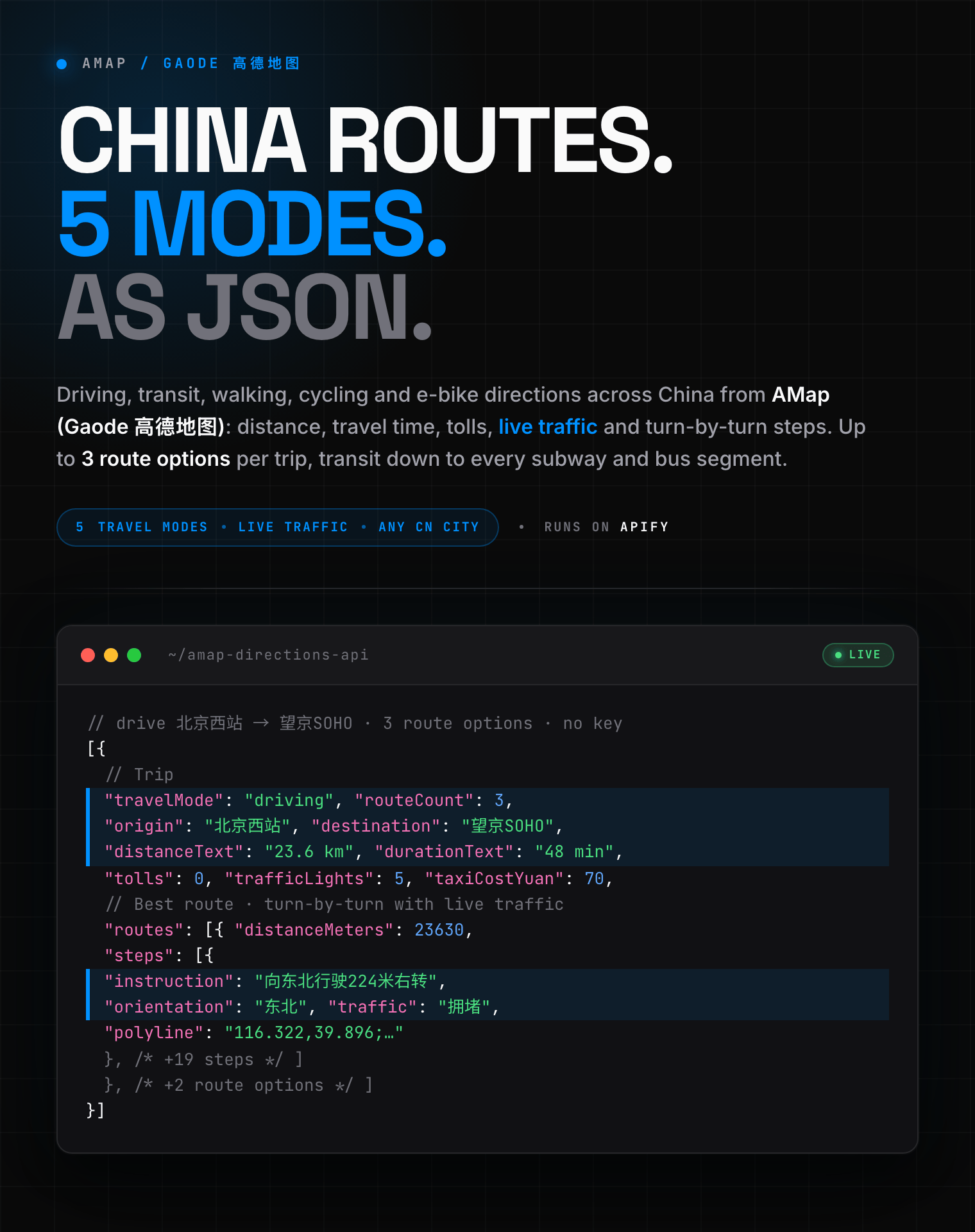
Get driving, transit, walking, cycling & e-bike directions across China from AMap (Gaode / 高德地图): distance, travel time, tolls, live traffic, turn-by-turn steps & transit segments as JSON. No AMap key or login.

- **URL**: https://apify.com/zen-studio/amap-directions-api.md
- **Developed by:** [Zen Studio](https://apify.com/zen-studio) (community)
- **Categories:** Travel
- **Stats:** 2 total users, 1 monthly users, 100.0% runs succeeded, 0 bookmarks
- **User rating**: No ratings yet

## Pricing

from $5.99 / 1,000 route computeds

This Actor is paid per event. You are not charged for the Apify platform usage, but only a fixed price for specific events.
Since this Actor supports Apify Store discounts, the price gets lower the higher subscription plan you have.

Learn more: https://docs.apify.com/platform/actors/running/actors-in-store#pay-per-event

## What's an Apify Actor?

Actors are web data automations that power AI and operations. They run on the Apify platform to scrape websites, process data, connect APIs, and automate workflows.
In Batch mode, an Actor accepts a well-defined JSON input, performs an action which can take anything from a few seconds to a few hours,
and optionally produces a well-defined JSON output, datasets with results, or files in key-value store.
In Standby mode, an Actor provides a web server which can be used as a website, API, or an MCP server.
Actors are written with capital "A".

## How to integrate an Actor?

If asked about integration, you help developers integrate Actors into their projects.
You adapt to their stack and deliver integrations that are safe, well-documented, and production-ready.
The best way to integrate Actors is as follows.

- **AI agents and MCP clients** — the [Apify MCP server](https://docs.apify.com/integrations/mcp.md) at `https://mcp.apify.com` (remote, streamable HTTP, OAuth on first use).
- **Agentic workflows and local Actor development** — [Agent Skills](https://apify.com/.well-known/agent-skills/index.json) with the [Apify CLI](https://docs.apify.com/cli/docs.md): `npm install -g apify-cli`, then `apify login`.
- **JavaScript/TypeScript projects** — the official [JS/TS client](https://docs.apify.com/api/client/js/docs.md): `npm install apify-client`.
- **Python projects** — the official [Python client](https://docs.apify.com/api/client/python/docs.md): `pip install apify-client`.
- **Any other language** — the [REST API](https://docs.apify.com/api/v2.md).

For usage examples, see the [API](#api) section below.

For more details, see Apify documentation as [Markdown index](https://docs.apify.com/llms.txt) and [Markdown full-text](https://docs.apify.com/llms-full.txt).

# README

## AMap (Gaode / 高德地图) Directions API | China Driving, Transit & Route Planner (2026)

<blockquote style="border-left:4px solid #4C945E;background:#F0FDF4;padding:12px 16px;margin:12px 0">
<span style="font-size:16px;font-weight:700;color:#1C1917">Point-to-point routes anywhere in China:</span> <span style="font-size:15px;color:#57534E">driving, transit, walking, cycling and e-bike directions with distance, travel time, tolls, live traffic, turn-by-turn steps and route geometry, as structured JSON. No AMap key or login.</span>
</blockquote>

<a href="https://console.apify.com/actors/qldrhztuWPXUN7Eaz/input"><img src="https://api.apify.com/v2/key-value-stores/pJ7iaZsTFhR3k9tjV/records/amap-directions-api-hero.png" alt="AMap (Gaode 高德地图) directions API: driving, transit, walking and cycling routes with distance, duration, tolls, live traffic and turn-by-turn steps as structured JSON" style="max-width:100%"></a>

<table>
<tr>
<td colspan="5" style="padding:10px 14px;background:#4C945E;border:none;border-radius:4px 4px 0 0">
<span style="color:#FAFAF9;font-size:14px;font-weight:700;letter-spacing:0.5px">Zen Studio Maps Suite</span>
<span style="color:#E8F5E9;font-size:13px">&nbsp;&nbsp;&bull;&nbsp;&nbsp;Places, reviews, and routes across every major map provider</span>
</td>
</tr>
<tr>
<td style="padding:12px 14px;border:1px solid #E7E5E4;border-radius:0 0 0 4px;background:#D3EDD9;border-right:none;border-top:none;vertical-align:top;width:20%">
<img src="https://apify-image-uploads-prod.s3.us-east-1.amazonaws.com/NWYsOG96fMDy8ycdf-actor-3rGXyh4kWAdtrE9vG-bsQxzBhXPT-amap-scraper-logo.jpg" width="24" height="24" style="vertical-align:middle"> &nbsp;<a href="https://apify.com/zen-studio/amap-directions-api" style="color:#4C945E;text-decoration:none;font-weight:700;font-size:13px">AMap Directions</a><br>
<span style="color:#4C945E;font-size:12px;font-weight:600">&#10148; You are here</span>
</td>
<td style="background:#E8F5E9;padding:12px 14px;border:1px solid #E7E5E4;border-right:none;border-top:none;vertical-align:top;width:20%">
<img src="https://apify-image-uploads-prod.s3.us-east-1.amazonaws.com/NWYsOG96fMDy8ycdf-actor-3rGXyh4kWAdtrE9vG-bsQxzBhXPT-amap-scraper-logo.jpg" width="24" height="24" style="vertical-align:middle"> &nbsp;<a href="https://apify.com/zen-studio/amap-places-scraper" style="color:#1C1917;text-decoration:none;font-weight:700;font-size:13px">AMap Places</a><br>
<span style="color:#78716C;font-size:12px">Places, contacts, reviews</span>
</td>
<td style="background:#E8F5E9;padding:12px 14px;border:1px solid #E7E5E4;border-right:none;border-top:none;vertical-align:top;width:20%">
<img src="https://apify-image-uploads-prod.s3.us-east-1.amazonaws.com/NWYsOG96fMDy8ycdf-actor-3rGXyh4kWAdtrE9vG-bsQxzBhXPT-amap-scraper-logo.jpg" width="24" height="24" style="vertical-align:middle"> &nbsp;<a href="https://apify.com/zen-studio/amap-gas-prices-scraper" style="color:#1C1917;text-decoration:none;font-weight:700;font-size:13px">AMap Gas Prices</a><br>
<span style="color:#78716C;font-size:12px">Discount fuel prices</span>
</td>
<td style="background:#E8F5E9;padding:12px 14px;border:1px solid #E7E5E4;border-right:none;border-top:none;vertical-align:top;width:20%">
<img src="https://apify-image-uploads-prod.s3.us-east-1.amazonaws.com/NWYsOG96fMDy8ycdf-actor-EgDf0I1X8lNhCes2E-kpZCa398Jg-baidu-maps-scraper-logo.png" width="24" height="24" style="vertical-align:middle"> &nbsp;<a href="https://apify.com/zen-studio/baidu-maps-scraper" style="color:#1C1917;text-decoration:none;font-weight:700;font-size:14px">Baidu Maps</a><br>
<span style="color:#78716C;font-size:12px">China POI, deals, reviews</span>
</td>
<td style="background:#E8F5E9;padding:12px 14px;border:1px solid #E7E5E4;border-radius:0 0 4px 0;border-top:none;vertical-align:top;width:20%">
<img src="https://apify-image-uploads-prod.s3.us-east-1.amazonaws.com/NWYsOG96fMDy8ycdf-actor-vBUd2ObzJUemitHHP-IYaavrd0t8-google-maps-directions-api-logo.png" width="24" height="24" style="vertical-align:middle"> &nbsp;<a href="https://apify.com/zen-studio/google-maps-scraper" style="color:#1C1917;text-decoration:none;font-weight:700;font-size:13px">Google Maps</a><br>
<span style="color:#78716C;font-size:12px">Places, reviews, times</span>
</td>
</tr>
</table>

### Key Features

- **Five travel modes**: driving, public transit, walking, cycling, and e-bike routing, each with its own fields and turn-by-turn steps.
- **Live traffic driving routes**: every driving route carries per-step traffic status (clear, slow, congested), toll cost, traffic-light count, and up to **3 route alternatives** to compare.
- **Full public transit plans**: subway, bus and intercity-rail segments with line names, boarding and alighting stops, every via-stop, first/last service times, fare, walking legs, and station entrances and exits.
- **Names, addresses, or coordinates**: enter a place name (`北京西站`), a nickname (`鸟巢`), a full address, or `longitude,latitude` coordinates. Everything is resolved automatically.
- **Batch routing**: compute up to 10 routes in one run from a single list of origin/destination pairs, calculated in parallel.
- **No AMap key, no login**: enter two points and run. No AMap developer key, Chinese phone number, or sign-in.

#### Copy to your AI assistant

```
zen-studio/amap-directions-api on Apify. AMap (Gaode / 高德地图) China directions: driving/walking/bicycling/electrobike/transit routes with distance, duration, tolls, live traffic, turn-by-turn steps, route geometry, and transit segments (subway/bus/rail). Call ApifyClient("TOKEN").actor("zen-studio/amap-directions-api").call(run_input={...}), then client.dataset(run["defaultDatasetId"]).list_items().items. Provide origin+destination (place name, address, or "lng,lat") + travelMode, OR routePairs[] for batch routing. Full spec: GET https://api.apify.com/v2/acts/zen-studio~amap-directions-api/builds/default (Bearer TOKEN) -> inputSchema, actorDefinition.storages.dataset, readme. Token: https://console.apify.com/account/integrations
```

### How to Get Directions from AMap (Gaode)

#### Basic: a driving route between two points

```json
{
  "origin": "北京西站",
  "destination": "望京SOHO",
  "travelMode": "driving"
}
```

Origin and destination each accept a place name, a nickname, a full address, or `longitude,latitude` coordinates (AMap's native order, GCJ-02). Names and nicknames are resolved automatically, so `鸟巢` and `国家体育场` both work.

#### Public transit, including cross-city

```json
{
  "origin": "北京南站",
  "destination": "天津站",
  "travelMode": "transit"
}
```

Transit returns every plan the app would show, broken down into walking, subway, bus and intercity-rail segments with line names, stops, fares and service times.

#### Avoid tolls or motorways (driving)

```json
{
  "origin": "上海虹桥站",
  "destination": "杭州东站",
  "travelMode": "driving",
  "avoidTolls": true
}
```

#### Multi-stop driving route with waypoints

```json
{
  "origin": "天安门",
  "destination": "北京首都国际机场",
  "waypoints": ["鸟巢", "望京SOHO"],
  "travelMode": "driving"
}
```

#### Batch: many routes in one run

```json
{
  "travelMode": "driving",
  "routePairs": [
    { "origin": "北京西站", "destination": "望京SOHO" },
    { "origin": "上海虹桥站", "destination": "外滩" },
    { "origin": "116.481,39.990", "destination": "116.434,39.908" }
  ]
}
```

When `routePairs` is filled, the single origin/destination is ignored and the travel mode and preferences apply to every route.

### Input Parameters

| Parameter | Type | Default | Description |
|-----------|------|---------|-------------|
| `origin` | string | `北京西站` | Route start: place name, address, or `lng,lat` coordinates. |
| `destination` | string | `首都国际机场T3` | Route end. Same formats as origin. |
| `waypoints` | array | `[]` | Intermediate stops, in order. Driving mode only, up to 16. |
| `city` | string | `""` | Optional region hint to disambiguate a place name shared by several cities. |
| `travelMode` | select | `driving` | `driving`, `walking`, `bicycling`, `electrobike`, or `transit`. |
| `avoidTolls` | boolean | `false` | Prefer routes that avoid toll roads (driving). |
| `avoidHighways` | boolean | `false` | Prefer routes that avoid motorways (driving). |
| `nightBus` | boolean | `false` | Prefer night-bus lines (transit). |
| `routeDetail` | select | `full` | `full` (steps + traffic + geometry), `overview` (steps, no polylines), or `summary` (trip totals only). |
| `includeAlternatives` | boolean | `true` | Keep all route options, or set `false` for the best route/plan only. |
| `routePairs` | array | `[]` | Batch mode: up to 10 `{origin, destination, waypoints}` objects, one route each, computed in parallel. |

Coordinates use AMap's native `longitude,latitude` order in the GCJ-02 system (the China grid AMap and WeChat use); distances are in metres and durations in seconds, with a human-readable `distanceText`/`durationText` alongside.

### What Data Can You Extract from AMap Directions?

Every route record includes:

- **Trip summary**: travel mode, resolved origin and destination (query, coordinates, city, admin code), waypoints, total distance and duration (metres/seconds plus readable text), estimated taxi cost, and the number of route options.
- **Driving / walking / cycling / e-bike routes**: for each alternative — distance, duration, toll cost, toll distance, traffic-light count, driving restrictions, the cities and districts the route crosses, the full route polyline, and turn-by-turn steps.
- **Steps**: instruction text, road name, orientation, distance, duration, action and assistant action, per-step tolls, and per-step live traffic status with its own geometry.
- **Transit plans**: for each plan — duration, fare, total and walking distance, night-bus flag, and ordered segments.
- **Transit segments**: walking legs with steps, station entrances and exits, and bus/subway/rail lines with names, types, departure and arrival stops, every via-stop, distances, durations, first and last service times (line-wide and at your boarding stop), and line geometry. Intercity rail carries its train number, scheduled departure and arrival times, seat classes with prices, and alternative trains; and where public transit doesn't reach, a taxi leg is included with its own distance, duration and endpoints.

#### Output example — driving

```json
{
  "travelMode": "driving",
  "origin": { "query": "北京西站", "latitude": 39.894912, "longitude": 116.322033, "matchedCity": "北京市", "adcode": "110106" },
  "destination": { "query": "望京SOHO", "latitude": 39.996743, "longitude": 116.481075, "matchedCity": "北京市", "adcode": "110105" },
  "waypoints": [],
  "distanceMeters": 23630,
  "durationSeconds": 2937,
  "distanceText": "23.6 km",
  "durationText": "48 min",
  "taxiCostYuan": 70.0,
  "routeCount": 3,
  "routes": [
    {
      "distanceMeters": 23630,
      "durationSeconds": 2937,
      "tolls": 0.0,
      "tollDistanceMeters": 0,
      "trafficLights": 5,
      "restriction": 0,
      "polyline": "116.322119,39.896235;116.322174,39.896233; ...",
      "steps": [
        {
          "instruction": "向东北行驶224米右转",
          "road": null,
          "orientation": "东北",
          "distanceMeters": 224,
          "durationSeconds": 181,
          "action": "右转",
          "assistantAction": null,
          "tolls": 0.0,
          "tollDistanceMeters": 0,
          "trafficLights": 0,
          "polyline": "116.322174,39.896233;116.322276,39.896230; ...",
          "traffic": [
            { "status": "拥堵", "distanceMeters": 17, "polyline": "116.322174,39.896233; ..." }
          ]
        },
        "... +19 more steps"
      ]
    },
    "... +2 more route alternatives"
  ]
}
```

#### Output example — transit

```json
{
  "travelMode": "transit",
  "origin": { "query": "北京南站", "latitude": 39.865246, "longitude": 116.378517, "matchedCity": "北京市", "adcode": "110106" },
  "destination": { "query": "天津站", "latitude": 39.135951, "longitude": 117.210089, "matchedCity": "天津市", "adcode": "120105" },
  "waypoints": [],
  "distanceMeters": 156913,
  "durationSeconds": 16196,
  "distanceText": "156.9 km",
  "durationText": "4 h 29 min",
  "taxiCostYuan": 1.0,
  "routeCount": 4,
  "routes": [
    {
      "durationSeconds": 16196,
      "costYuan": 37.0,
      "distanceMeters": 156913,
      "walkingDistanceMeters": 1429,
      "nightBus": false,
      "segments": [
        {
          "walking": { "distanceMeters": 160, "durationSeconds": 137, "steps": ["... 5 steps"] },
          "entrance": { "name": "D西入口", "latitude": 39.86483, "longitude": 116.378708 },
          "exit": null,
          "buslines": [
            {
              "name": "地铁14号线(张郭庄--善各庄)",
              "type": "地铁线路",
              "lineId": "900000028908",
              "departureStop": { "name": "北京南站", "stopId": "900000028908013", "latitude": 39.865029, "longitude": 116.378963 },
              "arrivalStop": { "name": "九龙山", "stopId": "900000028908023", "latitude": 39.893395, "longitude": 116.477492 },
              "distanceMeters": 11650,
              "durationSeconds": 1530,
              "firstServiceTime": "0455",
              "lastServiceTime": "2242",
              "viaStopCount": 7,
              "viaStops": [{ "name": "永定门外", "stopId": "900000028908015", "latitude": 39.867686, "longitude": 116.399253 }, "... +6"],
              "polyline": "116.378963,39.865029; ..."
            }
          ],
          "railway": null
        },
        "... +3 more segments"
      ]
    },
    "... +3 more transit plans"
  ]
}
```

No key is ever dropped: fields that do not apply to a mode (tolls on a walking route, `railway` on a subway segment) stay present as `null`.

### Advanced Usage

Ready-made configurations for logistics, travel time matrices, and multi-modal comparison.

#### Travel-time matrix: one origin to many destinations, lean output

Route geometry (polylines) is over half of a driving result, so a matrix that only needs distance and time can shrink each record from ~100 KB to ~1 KB with `routeDetail: "summary"`.

```json
{
  "travelMode": "driving",
  "routeDetail": "summary",
  "includeAlternatives": false,
  "routePairs": [
    { "origin": "上海虹桥站", "destination": "外滩" },
    { "origin": "上海虹桥站", "destination": "上海迪士尼" },
    { "origin": "上海虹桥站", "destination": "浦东国际机场" }
  ]
}
```

Use `routeDetail: "overview"` instead when you want turn-by-turn steps and live traffic but not the coordinate geometry.

#### Compare driving vs transit for the same trip

Run the actor twice with the same origin and destination, switching `travelMode` between `driving` and `transit`, then compare `durationSeconds` and cost.

#### Cycling and e-bike routes for last-mile delivery

```json
{
  "origin": "望京SOHO",
  "destination": "798艺术区",
  "travelMode": "electrobike"
}
```

#### Coordinates in, for precise pick-up and drop-off

```json
{
  "origin": "116.481,39.990",
  "destination": "116.434,39.908",
  "travelMode": "driving"
}
```

### Pricing

Pay per route, with volume discounts as your Apify plan tier rises. You are billed once for each route that returns a result: a failed lookup or an unroutable pair is free, and all route alternatives for a trip are included at no extra cost. One route is one origin-to-destination computation in one travel mode. The current per-route price and tier discounts are shown on this Actor's page.

A batch run bills one route per origin/destination pair (up to 10 per run).

### FAQ

**What is AMap (Gaode / Autonavi / 高德地图)?**
AMap, also written Gaode, Autonavi, or 高德地图, is China's most-used mapping and navigation platform, owned by Alibaba. Its routing engine has the deep road, traffic and public-transit coverage of mainland China that Google Maps lacks. This actor turns AMap route planning into structured JSON.

**Do I need an AMap API key or a Chinese account?**
No. You enter an origin and a destination and run. There is no AMap developer key, Chinese phone number, or sign-in involved. Official AMap keys are hard to obtain outside China and rate-limited, which is why this is the practical route to China routing data.

**Which travel modes are supported?**
Driving, public transit, walking, cycling, and e-bike (电动车). Driving returns up to three alternatives with live traffic; transit returns full multi-segment plans with subway, bus and intercity-rail legs.

**Does it include live traffic?**
Yes. Every driving route carries per-step traffic status (clear, slow, congested) and a traffic-light count, so the duration reflects current conditions.

**Can I enter place names, or only coordinates?**
Both. Place names, nicknames (`鸟巢`), and full addresses are resolved automatically. You can also pass `longitude,latitude` coordinates directly for exact pick-up and drop-off points.

**What coordinate system does it use?**
AMap uses GCJ-02, the offset grid shared by AMap and WeChat inside China. Coordinates are returned exactly as AMap provides them, in `longitude,latitude` order. If you pass raw GPS (WGS-84) coordinates they will be slightly offset, so use GCJ-02 or a place name for best accuracy.

**Can I compute many routes at once?**
Yes. Use `routePairs` to pass a list of origin/destination pairs and the actor computes them all in one run, billing one route each. This is the way to build a travel-time or distance matrix.

**Does transit cover high-speed rail and cross-city trips?**
Yes. Give two points in different cities and transit returns plans that include intercity rail and long-distance segments, with line names, stops, and service times.

**Why AMap instead of Google Maps for China?**
Google Maps routing inside mainland China is thin and often out of date, and Google's road and transit data for China is limited. AMap and Baidu are where accurate Chinese routing, traffic and transit data live.

**Can I schedule runs or push results to Google Sheets?**
Yes. Schedule this actor on any cadence from the Apify console, and connect the output to Google Sheets, Make, Zapier, or your own server via webhooks and the Apify API.

**How do I export the data?**
Download JSON, CSV, Excel, XML, or HTML from the run's Storage tab, or pull it through the Apify API. JSON preserves the nested fields (routes, steps, transit segments) best.

**Is it legal to use AMap (Gaode) directions data?**
This actor computes publicly available routing information. You are responsible for how you use it, including compliance with AMap's terms and applicable law. Review the terms for your use case before deploying at scale.

### More Zen Studio scrapers for maps & local data

- <img src="https://apify-image-uploads-prod.s3.us-east-1.amazonaws.com/NWYsOG96fMDy8ycdf-actor-3rGXyh4kWAdtrE9vG-bsQxzBhXPT-amap-scraper-logo.jpg" width="16" height="16" style="vertical-align:middle;border-radius:3px"> **AMap 高德地图**
  - [AMap Places Scraper](https://apify.com/zen-studio/amap-places-scraper)
  - [AMap Gas Prices Scraper](https://apify.com/zen-studio/amap-gas-prices-scraper)
- <img src="https://apify-image-uploads-prod.s3.us-east-1.amazonaws.com/NWYsOG96fMDy8ycdf-actor-EgDf0I1X8lNhCes2E-kpZCa398Jg-baidu-maps-scraper-logo.png" width="16" height="16" style="vertical-align:middle;border-radius:3px"> **Baidu Maps 百度地图**
  - [Baidu Maps Scraper](https://apify.com/zen-studio/baidu-maps-scraper)
- <img src="https://apify-image-uploads-prod.s3.us-east-1.amazonaws.com/NWYsOG96fMDy8ycdf-actor-vBUd2ObzJUemitHHP-IYaavrd0t8-google-maps-directions-api-logo.png" width="16" height="16" style="vertical-align:middle;border-radius:3px"> **Google Maps**
  - [Google Maps Scraper](https://apify.com/zen-studio/google-maps-scraper)
  - [Google Maps Directions & Routes API](https://apify.com/zen-studio/google-maps-directions-api)
- <img src="https://apify-image-uploads-prod.s3.us-east-1.amazonaws.com/NWYsOG96fMDy8ycdf-actor-5bSvAQKSK3LPq9OXb-AgVhcT1mQC-apple-maps-scraper-logo.png" width="16" height="16" style="vertical-align:middle;border-radius:3px"> **Apple Maps**

  - [Apple Maps Scraper](https://apify.com/zen-studio/apple-maps-scraper-pro)
  - [Apple Maps Directions & Route API](https://apify.com/zen-studio/apple-maps-directions-route-api)
- <img src="https://apify-image-uploads-prod.s3.us-east-1.amazonaws.com/NWYsOG96fMDy8ycdf-actor-fRSgBvgbsRB4o7t30-UkaIbH1Yhq-yandex-maps-scraper-logo.png" width="16" height="16" style="vertical-align:middle;border-radius:3px"> **Yandex Maps Яндекс Карты**

  - [Yandex Maps Scraper](https://apify.com/zen-studio/yandex-maps-scraper)
  - [Yandex Maps Reviews Scraper](https://apify.com/zen-studio/yandex-maps-reviews-scraper)
- <img src="https://apify-image-uploads-prod.s3.us-east-1.amazonaws.com/NWYsOG96fMDy8ycdf-actor-NBmcHCtkUEhA0DNP3-SrXbUedsVm-2gis-scraper-api-logo.png" width="16" height="16" style="vertical-align:middle;border-radius:3px"> **2GIS 2ГИС**

  - [2GIS Places Scraper](https://apify.com/zen-studio/2gis-places-scraper-api)
  - [2GIS Reviews Scraper](https://apify.com/zen-studio/2gis-reviews-scraper)

### Support

- **Bugs**: Issues tab
- **Features**: Issues tab

### Legal Compliance

Uses publicly available routing information. Users must comply with AMap (Gaode / 高德地图) terms and applicable data protection regulations, including GDPR, CCPA, and China's PIPL.

***

*Get driving, transit, walking, cycling and e-bike directions from AMap (Gaode / 高德地图) for anywhere in China: distance, travel time, tolls, live traffic, turn-by-turn steps and route geometry as structured JSON.*

# Actor input Schema

## `origin` (type: `string`):

路线起点。三种写法均可：<br>• 地点名称，如 <code>北京西站</code><br>• 详细地址，如 <code>北京市朝阳区望京SOHO</code><br>• 坐标（<b>经度,纬度</b> 顺序，GCJ-02），如 <code>116.397,39.909</code><br><br>Where the route starts. Any of:<br>• A place name, e.g. <code>北京西站</code><br>• A full address, e.g. <code>望京SOHO, Beijing</code><br>• Coordinates in <b>longitude,latitude</b> order (GCJ-02), e.g. <code>116.397,39.909</code>

## `destination` (type: `string`):

路线终点，写法与起点相同。<br><br>Where the route ends. Same formats as Origin.

## `waypoints` (type: `array`):

途经点，按顺序经过，每行一个。仅<b>驾车</b>模式支持，最多 16 个。<br><br>Intermediate stops, visited in order, one per line. <b>Driving</b> mode only, up to 16.

## `city` (type: `string`):

当起点或终点是同名地点时，用来指定所在城市，中英文均可。填写坐标时无需填此项。<br><br>Disambiguates a place name shared by several cities. Chinese or English. Not needed when you use coordinates.

## `travelMode` (type: `string`):

路线类型。<br><br>• <b>驾车</b> — 含收费、红绿灯、实时路况，返回多条备选路线<br>• <b>步行</b> — 步行路线<br>• <b>骑行</b> — 自行车路线<br>• <b>电动车</b> — 电动自行车路线<br>• <b>公交</b> — 公共交通，含地铁/公交/城际铁路换乘

## `avoidTolls` (type: `boolean`):

尽量避开收费路段。仅驾车模式生效。<br><br>Prefer routes that avoid toll roads. Driving mode only.

## `avoidHighways` (type: `boolean`):

尽量不走高速公路。仅驾车模式生效。<br><br>Prefer routes that avoid motorways. Driving mode only.

## `nightBus` (type: `boolean`):

公交模式下优先返回夜班线路。仅公交模式生效。<br><br>Prefer night-bus lines. Transit mode only.

## `routeDetail` (type: `string`):

控制每条路线返回多少细节。路线几何（polyline）约占驾车结果的一半以上。<br><br>• <b>完整</b> — 逐步导航 + 实时路况 + 完整路线坐标（可绘制地图）<br>• <b>概览</b> — 保留逐步导航与路况状态，去掉所有坐标几何（体积约减一半）<br>• <b>摘要</b> — 仅路线汇总（距离、时间、过路费、途经城市、票价），不含逐步导航<br><br>How much detail each route carries. Route geometry (polylines) is over half of a driving result.<br>• <b>Full</b> — turn-by-turn steps + live traffic + full route coordinates (draw it on a map)<br>• <b>Overview</b> — keeps steps and traffic status, drops all coordinate geometry (about half the size)<br>• <b>Summary</b> — trip summary only (distance, time, tolls, cities crossed, fares); no turn-by-turn

## `includeAlternatives` (type: `boolean`):

驾车最多返回 3 条备选路线，公交最多 5 种方案。关闭后只返回最优的一条，体积约为原来的三分之一。<br><br>Driving returns up to 3 route options and transit up to 5 plans. Turn this off to keep only the best one, roughly a third of the size.

## `routePairs` (type: `array`):

一次运行最多 10 条路线，并行计算。填写后将忽略上方的起点/终点。每项为一个对象：<code>origin</code>、<code>destination</code>，可选 <code>waypoints</code>（数组）。上方的出行方式与偏好适用于所有路线。<br><br>Compute up to 10 routes in one run, in parallel. When filled, the single Origin/Destination above is ignored. Each item is an object with <code>origin</code>, <code>destination</code>, and optional <code>waypoints</code> (array). The travel mode and preferences above apply to every route.

## Actor input object example

```json
{
  "origin": "北京西站",
  "destination": "首都国际机场T3",
  "waypoints": [],
  "city": "",
  "travelMode": "driving",
  "avoidTolls": false,
  "avoidHighways": false,
  "nightBus": false,
  "routeDetail": "full",
  "includeAlternatives": true,
  "routePairs": []
}
```

# Actor output Schema

## `results` (type: `string`):

No description

# API

You can run this Actor programmatically using our API. Below are code examples in JavaScript, Python, and CLI, as well as the OpenAPI specification and MCP server setup.

## JavaScript example

```javascript
import { ApifyClient } from 'apify-client';

// Initialize the ApifyClient with your Apify API token
// Replace the '<YOUR_API_TOKEN>' with your token
const client = new ApifyClient({
    token: '<YOUR_API_TOKEN>',
});

// Prepare Actor input
const input = {
    "origin": "北京西站",
    "destination": "首都国际机场T3",
    "routePairs": []
};

// Run the Actor and wait for it to finish
const run = await client.actor("zen-studio/amap-directions-api").call(input);

// Fetch and print Actor results from the run's dataset (if any)
console.log('Results from dataset');
console.log(`💾 Check your data here: https://console.apify.com/storage/datasets/${run.defaultDatasetId}`);
const { items } = await client.dataset(run.defaultDatasetId).listItems();
items.forEach((item) => {
    console.dir(item);
});

// 📚 Want to learn more 📖? Go to → https://docs.apify.com/api/client/js/docs

```

## Python example

```python
from apify_client import ApifyClient

# Initialize the ApifyClient with your Apify API token
# Replace '<YOUR_API_TOKEN>' with your token.
client = ApifyClient("<YOUR_API_TOKEN>")

# Prepare the Actor input
run_input = {
    "origin": "北京西站",
    "destination": "首都国际机场T3",
    "routePairs": [],
}

# Run the Actor and wait for it to finish
run = client.actor("zen-studio/amap-directions-api").call(run_input=run_input)

# Fetch and print Actor results from the run's dataset (if there are any)
print(f"💾 Check your data here: https://console.apify.com/storage/datasets/{run.default_dataset_id}")
for item in client.dataset(run.default_dataset_id).iterate_items():
    print(item)

# 📚 Want to learn more 📖? Go to → https://docs.apify.com/api/client/python/docs/quick-start

```

## CLI example

```bash
echo '{
  "origin": "北京西站",
  "destination": "首都国际机场T3",
  "routePairs": []
}' |
apify call zen-studio/amap-directions-api --silent --output-dataset

```

## MCP server setup

```json
{
    "mcpServers": {
        "apify": {
            "type": "http",
            "url": "https://mcp.apify.com/?tools=fetch-actor-details,zen-studio/amap-directions-api"
        }
    }
}

```

The hosted server signs you in with OAuth on first connect, so no API token belongs in this config. Clients without OAuth support can send an `Authorization: Bearer <APIFY_API_TOKEN>` header instead, using a token from API & Integrations in Apify Console (https://console.apify.com/settings/integrations).

## OpenAPI specification

Download the OpenAPI definition: https://api.apify.com/v2/actors/qldrhztuWPXUN7Eaz/builds/VD1gzN8Zg3tD8qKo4/openapi.json