# Bet365 Live Scores API | Real-Time Sports Data, 13 Sports (`zen-studio/bet365-live-scores`) Actor

Real-time sports scores via REST API. Live games, competition results, full match detail with lineups, statistics, and events. Football, basketball, tennis, hockey, and 9 more sports. 2600+ competitions. Multi-language support.

- **URL**: https://apify.com/zen-studio/bet365-live-scores.md
- **Developed by:** [Zen Studio](https://apify.com/zen-studio) (community)
- **Categories:** Automation, Integrations, Developer tools
- **Stats:** 1 total users, 0 monthly users, 0.0% runs succeeded, NaN bookmarks
- **User rating**: No ratings yet

## Pricing

from $1.99 / 1,000 live games

This Actor is paid per event and usage. You are charged both the fixed price for specific events and for Apify platform usage.

Learn more: https://docs.apify.com/platform/actors/running/actors-in-store#pay-per-event

## What's an Apify Actor?

Actors are a software tools running on the Apify platform, for all kinds of web data extraction and automation use cases.
In Batch mode, an Actor accepts a well-defined JSON input, performs an action which can take anything from a few seconds to a few hours,
and optionally produces a well-defined JSON output, datasets with results, or files in key-value store.
In Standby mode, an Actor provides a web server which can be used as a website, API, or an MCP server.
Actors are written with capital "A".

## How to integrate an Actor?

If asked about integration, you help developers integrate Actors into their projects.
You adapt to their stack and deliver integrations that are safe, well-documented, and production-ready.
The best way to integrate Actors is as follows.

In JavaScript/TypeScript projects, use official [JavaScript/TypeScript client](https://docs.apify.com/api/client/js.md):

```bash
npm install apify-client
```

In Python projects, use official [Python client library](https://docs.apify.com/api/client/python.md):

```bash
pip install apify-client
```

In shell scripts, use [Apify CLI](https://docs.apify.com/cli/docs.md):

````bash
# MacOS / Linux
curl -fsSL https://apify.com/install-cli.sh | bash
# Windows
irm https://apify.com/install-cli.ps1 | iex
```bash

In AI frameworks, you might use the [Apify MCP server](https://docs.apify.com/platform/integrations/mcp.md).

If your project is in a different language, use the [REST API](https://docs.apify.com/api/v2.md).

For usage examples, see the [API](#api) section below.

For more details, see Apify documentation as [Markdown index](https://docs.apify.com/llms.txt) and [Markdown full-text](https://docs.apify.com/llms-full.txt).


# README

## Bet365 Live Scores API | Real-Time Sports Scores, 13 Sports

**Real-time sports scores as a REST API. Live games, competition scores, full match detail. 13 sports, 2600+ competitions. Instant responses via Standby mode.**

No scraping. No browser. Just HTTP endpoints that return structured JSON.

5 endpoints. Live scores, competition data, game detail, competition discovery.

#### Copy to your AI assistant

Copy this block into ChatGPT, Claude, Cursor, or any LLM to start using this API.

````

zen-studio/bet365-live-scores on Apify (Standby actor). Base URL: https://zen-studio--bet365-live-scores.apify.actor. Auth: ?token=APIFY\_TOKEN (get at https://console.apify.com/account/integrations). Endpoints: GET /live (all live games, filter by sport/competition/team), GET /scores?competition=X (scores with Bet365 odds), GET /game/{id} (full detail: lineups, stats, events), GET /competitions?sport=X (browse 2600+ competitions), GET /health. Pricing: live-request $0.002, scores-request $0.002, game-detail $0.003. Competitions and health are free.

````

Also available as an [MCP server](https://mcp.apify.com/) — add `zen-studio/bet365-live-scores` for natural language access.

&nbsp;

### Related Actors

<table>
<tr>
<td colspan="4" style="padding:10px 14px;background:#4C945E;border:none;border-radius:4px 4px 0 0">
<span style="color:#FAFAF9;font-size:14px;font-weight:700;letter-spacing:0.5px">Zen Studio Sports Betting</span>
<span style="color:#E8F5E9;font-size:13px">&nbsp;&nbsp;&bull;&nbsp;&nbsp;Real-time odds and scores across every major sportsbook</span>
</td>
</tr>
<tr>
<td style="padding:12px 16px;border:1px solid #E7E5E4;border-radius:0 0 0 4px;background:#E8F5E9;border-right:none;border-top:none;vertical-align:top;width:25%">
<img src="https://apify-image-uploads-prod.s3.us-east-1.amazonaws.com/NWYsOG96fMDy8ycdf-actor-l6JP3yaLczAdUaiSf-yDHq17ycGp-bet365-icon_lc6m4t.png" width="24" height="24" style="vertical-align:middle"> &nbsp;<a href="https://apify.com/zen-studio/bet365-live-scores" style="color:#4C945E;text-decoration:none;font-weight:700;font-size:14px">Bet365 Scores</a><br>
<span style="color:#4C945E;font-size:12px;font-weight:600">&#10148; You are here</span>
</td>
<td style="padding:12px 16px;border:1px solid #E7E5E4;border-right:none;border-top:none;vertical-align:top;width:25%">
<img src="https://apify-image-uploads-prod.s3.us-east-1.amazonaws.com/NWYsOG96fMDy8ycdf-actor-l6JP3yaLczAdUaiSf-yDHq17ycGp-bet365-icon_lc6m4t.png" width="24" height="24" style="vertical-align:middle"> &nbsp;<a href="https://apify.com/zen-studio/bet365-real-time-odds" style="color:#1C1917;text-decoration:none;font-weight:700;font-size:14px">Bet365 Odds</a><br>
<span style="color:#78716C;font-size:12px">39 sports, all markets</span>
</td>
<td style="padding:12px 16px;border:1px solid #E7E5E4;border-right:none;border-top:none;vertical-align:top;width:25%">
<img src="https://apify-image-uploads-prod.s3.us-east-1.amazonaws.com/NWYsOG96fMDy8ycdf-actor-W8rOXiLSj8wrgF96k-PQehXxTEV5-draftkings-real-time-api-logo.png" width="24" height="24" style="vertical-align:middle"> &nbsp;<a href="https://apify.com/zen-studio/draftkings-odds" style="color:#1C1917;text-decoration:none;font-weight:700;font-size:14px">DraftKings Odds</a><br>
<span style="color:#78716C;font-size:12px">Lines, props, SGP</span>
</td>
<td style="padding:12px 16px;border:1px solid #E7E5E4;border-radius:0 0 4px 0;border-top:none;vertical-align:top;width:25%">
<img src="https://apify-image-uploads-prod.s3.us-east-1.amazonaws.com/NWYsOG96fMDy8ycdf-actor-TjShOnNguT17e9hfQ-ntCswWAqze-betmgm-real-time-api-logo-padded.png" width="24" height="24" style="vertical-align:middle"> &nbsp;<a href="https://apify.com/zen-studio/betmgm-odds" style="color:#1C1917;text-decoration:none;font-weight:700;font-size:14px">BetMGM Odds</a><br>
<span style="color:#78716C;font-size:12px">18 states, 22 sports</span>
</td>
</tr>
</table>

&nbsp;

### Endpoints

| Endpoint | Method | Description |
|----------|--------|-------------|
| `/live` | GET | All live games right now |
| `/scores` | GET | Current and recent games for a competition |
| `/game/{id}` | GET | Full game detail: events, lineups, stats, venue |
| `/competitions` | GET | Discover competition IDs and slugs |
| `/health` | GET | Health check |

&nbsp;

<table align="center" style="border:none;border-collapse:collapse;background:transparent;width:100%">
<tr>
<td align="center" style="border:none;padding:0">
<img src="https://iili.io/BBd59M7.gif" width="840" alt="Bet365 Live Scores — structured JSON output with scores, odds, and match data"/>
</td>
</tr>
</table>

&nbsp;

### Quick Start

#### Get live football games

```bash
curl "https://zen-studio--bet365-live-scores.apify.actor/live?sport=football" \
  -H "Authorization: Bearer YOUR_APIFY_TOKEN"
````

#### Get Premier League scores

```bash
curl "https://zen-studio--bet365-live-scores.apify.actor/scores?competition=premier-league" \
  -H "Authorization: Bearer YOUR_APIFY_TOKEN"
```

#### Get full game detail

```bash
curl "https://zen-studio--bet365-live-scores.apify.actor/game/4679449" \
  -H "Authorization: Bearer YOUR_APIFY_TOKEN"
```

#### Discover competitions

```bash
curl "https://zen-studio--bet365-live-scores.apify.actor/competitions?sport=football" \
  -H "Authorization: Bearer YOUR_APIFY_TOKEN"
```


### Parameters

#### `/live`

| Param | Type | Default | Description |
|-------|------|---------|-------------|
| `sport` | string | all | Filter by sport: `football`, `basketball`, `tennis`, `hockey`, `handball`, `american-football`, `baseball`, `volleyball`, `rugby` |
| `competition` | string | - | Filter by competition slug or ID. Comma-separated for multiple. Example: `premier-league` or `7` or `premier-league,champions-league` |
| `team` | int | - | Filter by team/competitor ID |
| `language` | string | English | Language for team names (English, Deutsch, Español, Français, etc.) |

#### `/scores`

| Param | Type | Default | Description |
|-------|------|---------|-------------|
| `competition` | string | *required* | Competition slug or ID. Comma-separated for multiple |
| `team` | int | - | Filter by team ID |
| `includeOdds` | bool | true | Include Bet365 1X2 odds (decimal, fractional, American) |
| `language` | string | English | Language for team names (English, Deutsch, Español, Français, etc.) |

#### `/game/{game_id}`

| Param | Type | Default | Description |
|-------|------|---------|-------------|
| `language` | string | English | Language for team names (English, Deutsch, Español, Français, etc.) |

#### `/competitions`

| Param | Type | Default | Description |
|-------|------|---------|-------------|
| `sport` | string | football | Sport name |
| `language` | string | English | Language for team names (English, Deutsch, Español, Français, etc.) |


### Competition Slugs

Use human-readable slugs instead of numeric IDs. Pass them in `competition` on `/live` and `/scores`.

| Slug | Competition |
|------|-------------|
| `premier-league` | Premier League |
| `laliga` | LaLiga |
| `bundesliga` | Bundesliga |
| `serie-a` | Serie A |
| `ligue-1` | Ligue 1 |
| `champions-league` | UEFA Champions League |
| `europa-league` | UEFA Europa League |
| `fa-cup` | FA Cup |
| `copa-del-rey` | Copa del Rey |
| `nba` | NBA |
| `nfl` | NFL |
| `nhl` | NHL |

70+ slugs supported. Use `/competitions` to discover all available competitions with their slugs and IDs.

Numeric IDs also work: `competition=7` is the same as `competition=premier-league`.


### Response Format

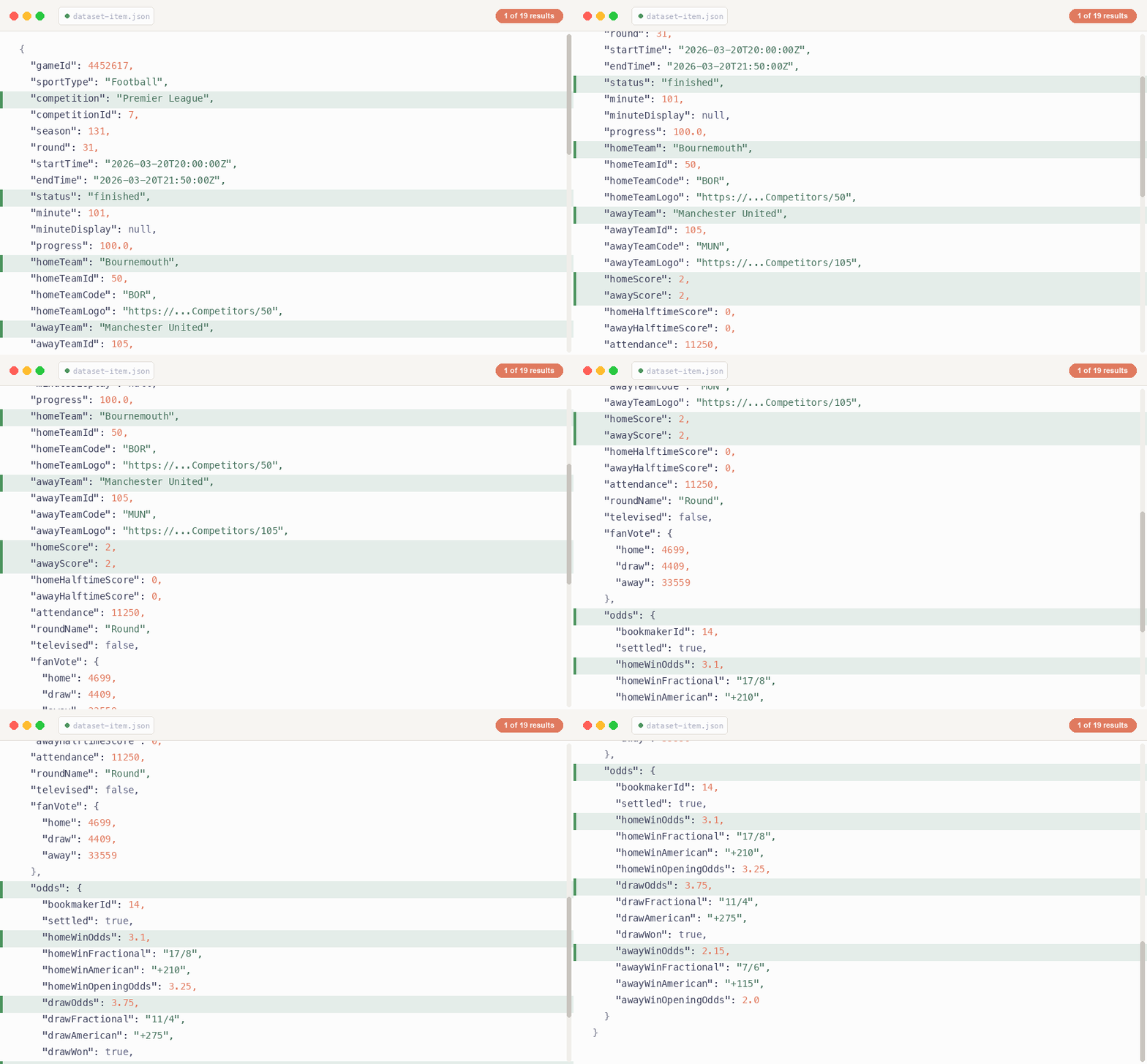
#### `/live` and `/scores`

```json
{
  "success": true,
  "count": 19,
  "games": [
    {
      "gameId": 4452851,
      "sportType": "Football",
      "competition": "Premier League",
      "competitionId": 7,
      "startTime": "2026-03-22T15:00:00Z",
      "status": "finished",
      "minute": 90,
      "progress": 100.0,
      "homeTeam": "Arsenal",
      "homeTeamId": 110,
      "homeTeamCode": "ARS",
      "homeTeamLogo": "http://cdn.example.com/...",
      "awayTeam": "Chelsea",
      "awayTeamId": 114,
      "awayTeamCode": "CHE",
      "awayTeamLogo": "http://cdn.example.com/...",
      "homeScore": 2,
      "awayScore": 1,
      "homeHalftimeScore": 1,
      "awayHalftimeScore": 0,
      "result": "home",
      "attendance": 60704,
      "odds": {
        "bookmakerId": 14,
        "homeWinOdds": 1.5,
        "homeWinFractional": "1/2",
        "homeWinAmerican": "-200",
        "homeWinOpeningOdds": 1.55,
        "drawOdds": 4.33,
        "awayWinOdds": 6.0
      }
    }
  ]
}
```

Odds are included on `/scores` when `includeOdds=true` (default). Not available on `/live` (data source limitation).

#### `/game/{id}`

Returns everything from `/scores` plus:

- **events**: Goals, cards, substitutions with minute, player name, assist
- **lineups**: Full squad (23 players per team) with formation, positions, jersey numbers, age
- **statistics**: 42 stat types (possession, shots, passes, tackles, etc.) with home/away values
- **venue**: Stadium name, capacity, location
- **officials**: Referee details
- **fanVote**: Community prediction (home/draw/away vote counts)
- **missingPlayers**: Injuries and suspensions

#### `/competitions`

```json
{
  "success": true,
  "sport": "football",
  "count": 813,
  "competitions": [
    {
      "id": 7,
      "name": "Premier League",
      "slug": "premier-league",
      "country": "England",
      "currentSeason": "2025/2026",
      "hasStandings": true
    }
  ]
}
```

#### Errors

```json
{
  "success": false,
  "error": "Unknown competition: xyz. Use /competitions to discover available IDs."
}
```

| Status | Error | Meaning |
|--------|-------|---------|
| 400 | Unknown competition | Slug or ID not recognized |
| 400 | Unknown sport | Sport name not valid |
| 400 | Missing required parameter | Required query param missing |
| 404 | Game not found | Game ID doesn't exist |
| 500 | Internal error | Unexpected server error |


### Use Cases

#### Live Dashboard

Poll `/live?sport=football` every 30-60 seconds during match hours. Get all active games with scores, game time, and status.

#### Score Tracker

Monitor specific competitions with `/scores?competition=premier-league,champions-league`. Returns current matchday games with results and upcoming fixtures.

#### Match Analysis

Pull full game data via `/game/{id}` for detailed events, lineups, formations, and match statistics.

#### Competition Discovery

Start with `/competitions?sport=football` to browse 813 football competitions. Find IDs for niche leagues, then use them in `/live` and `/scores`.


### Supported Sports

Football, Basketball, Tennis, Ice Hockey, Handball, American Football, Baseball, Volleyball, Rugby.

2600+ competitions across all sports. 813 football competitions alone.


***

### Pricing

Pay per API request. No subscriptions.

| Event | Endpoints | Per request | Per 1,000 |
|-------|-----------|------------|-----------|
| `live-request` | `/live` | $0.002 | $1.99 |
| `scores-request` | `/scores` | $0.002 | $1.99 |
| `game-detail-request` | `/game/{id}` | $0.003 | $2.99 |

`/competitions` and `/health` are free.

#### Example

Track Premier League every minute for 3 hours on match day:
180 requests x $0.002 = **$0.36**

***


### FAQ

**What is Standby mode?**
The actor runs as an always-on HTTP server. No queue, no cold start. Apify keeps it warm and routes requests directly. See the Standby tab for the hostname.

**Can I use this in batch mode?**
Yes. Pick a competition preset and click Start to get scores pushed to the dataset. For production use, Standby mode gives you real-time access via REST endpoints. For historical data, player profiles, or transfers, use the companion **Bet365 Sports Data Scraper** actor.

**Why no odds on `/live`?**
The live games data source doesn't include betting data. Odds are available on `/scores`, which uses a different data source that supports them.

**What countries block odds?**
Bet365 odds are included automatically on `/scores` when `includeOdds=true` (the default).

**How often can I poll?**
No rate limits from the API. Poll as frequently as you need. Every 30-60 seconds is typical for live tracking.

**How much does Standby mode cost to keep running?**
You don't pay anything while it's idle. The actor sleeps automatically after a period of no requests and wakes up on the next call (cold start takes 2-3 seconds). You only pay compute for hours it's actually running.

**What's the difference between this and the Bet365 Odds actor?**
This actor provides live scores, lineups, statistics, and match events. The Odds actor provides betting odds and markets. Different data, different use cases. Use both together for a complete picture.

**Can I get historical scores?**
`/scores` returns recent and upcoming games for a competition (typically the current round plus a few past rounds). For deep historical data, use the **Bet365 Sports Data Scraper** actor.


### Support

Bug reports, feature requests, or questions? Open an issue in the Issues tab.

***

*Real-time sports scores via REST API. 13 sports. 2600+ competitions. Instant responses.*

# Actor input Schema

## `preset` (type: `string`):

Pick a competition to preview. Click Start to fetch current scores and push them to the dataset.<br><br>This is for quick testing. For production use, switch to Standby mode.

## `language` (type: `string`):

Language for team names and labels.

## Actor input object example

```json
{
  "preset": "premier-league",
  "language": "English"
}
```

# Actor output Schema

## `results` (type: `string`):

No description

# API

You can run this Actor programmatically using our API. Below are code examples in JavaScript, Python, and CLI, as well as the OpenAPI specification and MCP server setup.

## JavaScript example

```javascript
import { ApifyClient } from 'apify-client';

// Initialize the ApifyClient with your Apify API token
// Replace the '<YOUR_API_TOKEN>' with your token
const client = new ApifyClient({
    token: '<YOUR_API_TOKEN>',
});

// Prepare Actor input
const input = {
    "preset": "premier-league",
    "language": "English"
};

// Run the Actor and wait for it to finish
const run = await client.actor("zen-studio/bet365-live-scores").call(input);

// Fetch and print Actor results from the run's dataset (if any)
console.log('Results from dataset');
console.log(`💾 Check your data here: https://console.apify.com/storage/datasets/${run.defaultDatasetId}`);
const { items } = await client.dataset(run.defaultDatasetId).listItems();
items.forEach((item) => {
    console.dir(item);
});

// 📚 Want to learn more 📖? Go to → https://docs.apify.com/api/client/js/docs

```

## Python example

```python
from apify_client import ApifyClient

# Initialize the ApifyClient with your Apify API token
# Replace '<YOUR_API_TOKEN>' with your token.
client = ApifyClient("<YOUR_API_TOKEN>")

# Prepare the Actor input
run_input = {
    "preset": "premier-league",
    "language": "English",
}

# Run the Actor and wait for it to finish
run = client.actor("zen-studio/bet365-live-scores").call(run_input=run_input)

# Fetch and print Actor results from the run's dataset (if there are any)
print("💾 Check your data here: https://console.apify.com/storage/datasets/" + run["defaultDatasetId"])
for item in client.dataset(run["defaultDatasetId"]).iterate_items():
    print(item)

# 📚 Want to learn more 📖? Go to → https://docs.apify.com/api/client/python/docs/quick-start

```

## CLI example

```bash
echo '{
  "preset": "premier-league",
  "language": "English"
}' |
apify call zen-studio/bet365-live-scores --silent --output-dataset

```

## MCP server setup

```json
{
    "mcpServers": {
        "apify": {
            "command": "npx",
            "args": [
                "mcp-remote",
                "https://mcp.apify.com/?tools=zen-studio/bet365-live-scores",
                "--header",
                "Authorization: Bearer <YOUR_API_TOKEN>"
            ]
        }
    }
}

```

## OpenAPI specification

```json
{
    "openapi": "3.0.1",
    "info": {
        "title": "Bet365 Live Scores API | Real-Time Sports Data, 13 Sports",
        "description": "Real-time sports scores via REST API. Live games, competition results, full match detail with lineups, statistics, and events. Football, basketball, tennis, hockey, and 9 more sports. 2600+ competitions. Multi-language support.",
        "version": "0.0",
        "x-build-id": "R8hrTIs1zE2hdA3NY"
    },
    "servers": [
        {
            "url": "https://api.apify.com/v2"
        }
    ],
    "paths": {
        "/acts/zen-studio~bet365-live-scores/run-sync-get-dataset-items": {
            "post": {
                "operationId": "run-sync-get-dataset-items-zen-studio-bet365-live-scores",
                "x-openai-isConsequential": false,
                "summary": "Executes an Actor, waits for its completion, and returns Actor's dataset items in response.",
                "tags": [
                    "Run Actor"
                ],
                "requestBody": {
                    "required": true,
                    "content": {
                        "application/json": {
                            "schema": {
                                "$ref": "#/components/schemas/inputSchema"
                            }
                        }
                    }
                },
                "parameters": [
                    {
                        "name": "token",
                        "in": "query",
                        "required": true,
                        "schema": {
                            "type": "string"
                        },
                        "description": "Enter your Apify token here"
                    }
                ],
                "responses": {
                    "200": {
                        "description": "OK"
                    }
                }
            }
        },
        "/acts/zen-studio~bet365-live-scores/runs": {
            "post": {
                "operationId": "runs-sync-zen-studio-bet365-live-scores",
                "x-openai-isConsequential": false,
                "summary": "Executes an Actor and returns information about the initiated run in response.",
                "tags": [
                    "Run Actor"
                ],
                "requestBody": {
                    "required": true,
                    "content": {
                        "application/json": {
                            "schema": {
                                "$ref": "#/components/schemas/inputSchema"
                            }
                        }
                    }
                },
                "parameters": [
                    {
                        "name": "token",
                        "in": "query",
                        "required": true,
                        "schema": {
                            "type": "string"
                        },
                        "description": "Enter your Apify token here"
                    }
                ],
                "responses": {
                    "200": {
                        "description": "OK",
                        "content": {
                            "application/json": {
                                "schema": {
                                    "$ref": "#/components/schemas/runsResponseSchema"
                                }
                            }
                        }
                    }
                }
            }
        },
        "/acts/zen-studio~bet365-live-scores/run-sync": {
            "post": {
                "operationId": "run-sync-zen-studio-bet365-live-scores",
                "x-openai-isConsequential": false,
                "summary": "Executes an Actor, waits for completion, and returns the OUTPUT from Key-value store in response.",
                "tags": [
                    "Run Actor"
                ],
                "requestBody": {
                    "required": true,
                    "content": {
                        "application/json": {
                            "schema": {
                                "$ref": "#/components/schemas/inputSchema"
                            }
                        }
                    }
                },
                "parameters": [
                    {
                        "name": "token",
                        "in": "query",
                        "required": true,
                        "schema": {
                            "type": "string"
                        },
                        "description": "Enter your Apify token here"
                    }
                ],
                "responses": {
                    "200": {
                        "description": "OK"
                    }
                }
            }
        }
    },
    "components": {
        "schemas": {
            "inputSchema": {
                "type": "object",
                "properties": {
                    "preset": {
                        "title": "Competition",
                        "enum": [
                            "premier-league",
                            "champions-league",
                            "la-liga",
                            "bundesliga",
                            "serie-a",
                            "nba",
                            "nfl",
                            "live"
                        ],
                        "type": "string",
                        "description": "Pick a competition to preview. Click Start to fetch current scores and push them to the dataset.<br><br>This is for quick testing. For production use, switch to Standby mode.",
                        "default": "premier-league"
                    },
                    "language": {
                        "title": "Language",
                        "enum": [
                            "English",
                            "Deutsch",
                            "Español",
                            "Français",
                            "Italiano",
                            "Português",
                            "Português (Brasil)",
                            "Русский",
                            "العربية",
                            "Türkçe",
                            "Nederlands",
                            "Polski",
                            "日本語",
                            "中文(简体)"
                        ],
                        "type": "string",
                        "description": "Language for team names and labels.",
                        "default": "English"
                    }
                }
            },
            "runsResponseSchema": {
                "type": "object",
                "properties": {
                    "data": {
                        "type": "object",
                        "properties": {
                            "id": {
                                "type": "string"
                            },
                            "actId": {
                                "type": "string"
                            },
                            "userId": {
                                "type": "string"
                            },
                            "startedAt": {
                                "type": "string",
                                "format": "date-time",
                                "example": "2025-01-08T00:00:00.000Z"
                            },
                            "finishedAt": {
                                "type": "string",
                                "format": "date-time",
                                "example": "2025-01-08T00:00:00.000Z"
                            },
                            "status": {
                                "type": "string",
                                "example": "READY"
                            },
                            "meta": {
                                "type": "object",
                                "properties": {
                                    "origin": {
                                        "type": "string",
                                        "example": "API"
                                    },
                                    "userAgent": {
                                        "type": "string"
                                    }
                                }
                            },
                            "stats": {
                                "type": "object",
                                "properties": {
                                    "inputBodyLen": {
                                        "type": "integer",
                                        "example": 2000
                                    },
                                    "rebootCount": {
                                        "type": "integer",
                                        "example": 0
                                    },
                                    "restartCount": {
                                        "type": "integer",
                                        "example": 0
                                    },
                                    "resurrectCount": {
                                        "type": "integer",
                                        "example": 0
                                    },
                                    "computeUnits": {
                                        "type": "integer",
                                        "example": 0
                                    }
                                }
                            },
                            "options": {
                                "type": "object",
                                "properties": {
                                    "build": {
                                        "type": "string",
                                        "example": "latest"
                                    },
                                    "timeoutSecs": {
                                        "type": "integer",
                                        "example": 300
                                    },
                                    "memoryMbytes": {
                                        "type": "integer",
                                        "example": 1024
                                    },
                                    "diskMbytes": {
                                        "type": "integer",
                                        "example": 2048
                                    }
                                }
                            },
                            "buildId": {
                                "type": "string"
                            },
                            "defaultKeyValueStoreId": {
                                "type": "string"
                            },
                            "defaultDatasetId": {
                                "type": "string"
                            },
                            "defaultRequestQueueId": {
                                "type": "string"
                            },
                            "buildNumber": {
                                "type": "string",
                                "example": "1.0.0"
                            },
                            "containerUrl": {
                                "type": "string"
                            },
                            "usage": {
                                "type": "object",
                                "properties": {
                                    "ACTOR_COMPUTE_UNITS": {
                                        "type": "integer",
                                        "example": 0
                                    },
                                    "DATASET_READS": {
                                        "type": "integer",
                                        "example": 0
                                    },
                                    "DATASET_WRITES": {
                                        "type": "integer",
                                        "example": 0
                                    },
                                    "KEY_VALUE_STORE_READS": {
                                        "type": "integer",
                                        "example": 0
                                    },
                                    "KEY_VALUE_STORE_WRITES": {
                                        "type": "integer",
                                        "example": 1
                                    },
                                    "KEY_VALUE_STORE_LISTS": {
                                        "type": "integer",
                                        "example": 0
                                    },
                                    "REQUEST_QUEUE_READS": {
                                        "type": "integer",
                                        "example": 0
                                    },
                                    "REQUEST_QUEUE_WRITES": {
                                        "type": "integer",
                                        "example": 0
                                    },
                                    "DATA_TRANSFER_INTERNAL_GBYTES": {
                                        "type": "integer",
                                        "example": 0
                                    },
                                    "DATA_TRANSFER_EXTERNAL_GBYTES": {
                                        "type": "integer",
                                        "example": 0
                                    },
                                    "PROXY_RESIDENTIAL_TRANSFER_GBYTES": {
                                        "type": "integer",
                                        "example": 0
                                    },
                                    "PROXY_SERPS": {
                                        "type": "integer",
                                        "example": 0
                                    }
                                }
                            },
                            "usageTotalUsd": {
                                "type": "number",
                                "example": 0.00005
                            },
                            "usageUsd": {
                                "type": "object",
                                "properties": {
                                    "ACTOR_COMPUTE_UNITS": {
                                        "type": "integer",
                                        "example": 0
                                    },
                                    "DATASET_READS": {
                                        "type": "integer",
                                        "example": 0
                                    },
                                    "DATASET_WRITES": {
                                        "type": "integer",
                                        "example": 0
                                    },
                                    "KEY_VALUE_STORE_READS": {
                                        "type": "integer",
                                        "example": 0
                                    },
                                    "KEY_VALUE_STORE_WRITES": {
                                        "type": "number",
                                        "example": 0.00005
                                    },
                                    "KEY_VALUE_STORE_LISTS": {
                                        "type": "integer",
                                        "example": 0
                                    },
                                    "REQUEST_QUEUE_READS": {
                                        "type": "integer",
                                        "example": 0
                                    },
                                    "REQUEST_QUEUE_WRITES": {
                                        "type": "integer",
                                        "example": 0
                                    },
                                    "DATA_TRANSFER_INTERNAL_GBYTES": {
                                        "type": "integer",
                                        "example": 0
                                    },
                                    "DATA_TRANSFER_EXTERNAL_GBYTES": {
                                        "type": "integer",
                                        "example": 0
                                    },
                                    "PROXY_RESIDENTIAL_TRANSFER_GBYTES": {
                                        "type": "integer",
                                        "example": 0
                                    },
                                    "PROXY_SERPS": {
                                        "type": "integer",
                                        "example": 0
                                    }
                                }
                            }
                        }
                    }
                }
            }
        }
    }
}
```