# Ctrip 携程酒店价格 & Trip.com Hotel Price Scraper | China & Global (`zen-studio/ctrip-hotel-prices-scraper`) Actor

Extract every room type and rate plan from Ctrip 携程 and Trip.com: nightly price, rack rate, discount, breakfast, cancellation policy with deadlines, payment terms and rooms left. 100 fields per rate plan. Covers hotels in mainland China and worldwide. Search by hotel link, name, district or city.

- **URL**: https://apify.com/zen-studio/ctrip-hotel-prices-scraper.md
- **Developed by:** [Zen Studio](https://apify.com/zen-studio) (community)
- **Categories:** Travel
- **Stats:** 2 total users, 1 monthly users, 100.0% runs succeeded, 0 bookmarks
- **User rating**: No ratings yet

## Pricing

from $3.99 / 1,000 hotels

This Actor is paid per event. You are not charged for the Apify platform usage, but only a fixed price for specific events.
Since this Actor supports Apify Store discounts, the price gets lower the higher subscription plan you have.

Learn more: https://docs.apify.com/platform/actors/running/actors-in-store#pay-per-event

## What's an Apify Actor?

Actors are web data automations that power AI and operations. They run on the Apify platform to scrape websites, process data, connect APIs, and automate workflows.
In Batch mode, an Actor accepts a well-defined JSON input, performs an action which can take anything from a few seconds to a few hours,
and optionally produces a well-defined JSON output, datasets with results, or files in key-value store.
In Standby mode, an Actor provides a web server which can be used as a website, API, or an MCP server.
Actors are written with capital "A".

## How to integrate an Actor?

If asked about integration, you help developers integrate Actors into their projects.
You adapt to their stack and deliver integrations that are safe, well-documented, and production-ready.
The best way to integrate Actors is as follows.

- **AI agents and MCP clients** — the [Apify MCP server](https://docs.apify.com/integrations/mcp.md) at `https://mcp.apify.com` (remote, streamable HTTP, OAuth on first use).
- **Agentic workflows and local Actor development** — [Agent Skills](https://apify.com/.well-known/agent-skills/index.json) with the [Apify CLI](https://docs.apify.com/cli/docs.md): `npm install -g apify-cli`, then `apify login`.
- **JavaScript/TypeScript projects** — the official [JS/TS client](https://docs.apify.com/api/client/js/docs.md): `npm install apify-client`.
- **Python projects** — the official [Python client](https://docs.apify.com/api/client/python/docs.md): `pip install apify-client`.
- **Any other language** — the [REST API](https://docs.apify.com/api/v2.md).

For usage examples, see the [API](#api) section below.

For more details, see Apify documentation as [Markdown index](https://docs.apify.com/llms.txt) and [Markdown full-text](https://docs.apify.com/llms-full.txt).

# README

## Ctrip Hotel Prices Scraper (携程 / Trip.com) | 中国与全球酒店房价采集 China & Worldwide (2026)

<blockquote style="border-left:4px solid #4C945E;background:#F0FDF4;padding:12px 16px;margin:12px 0">
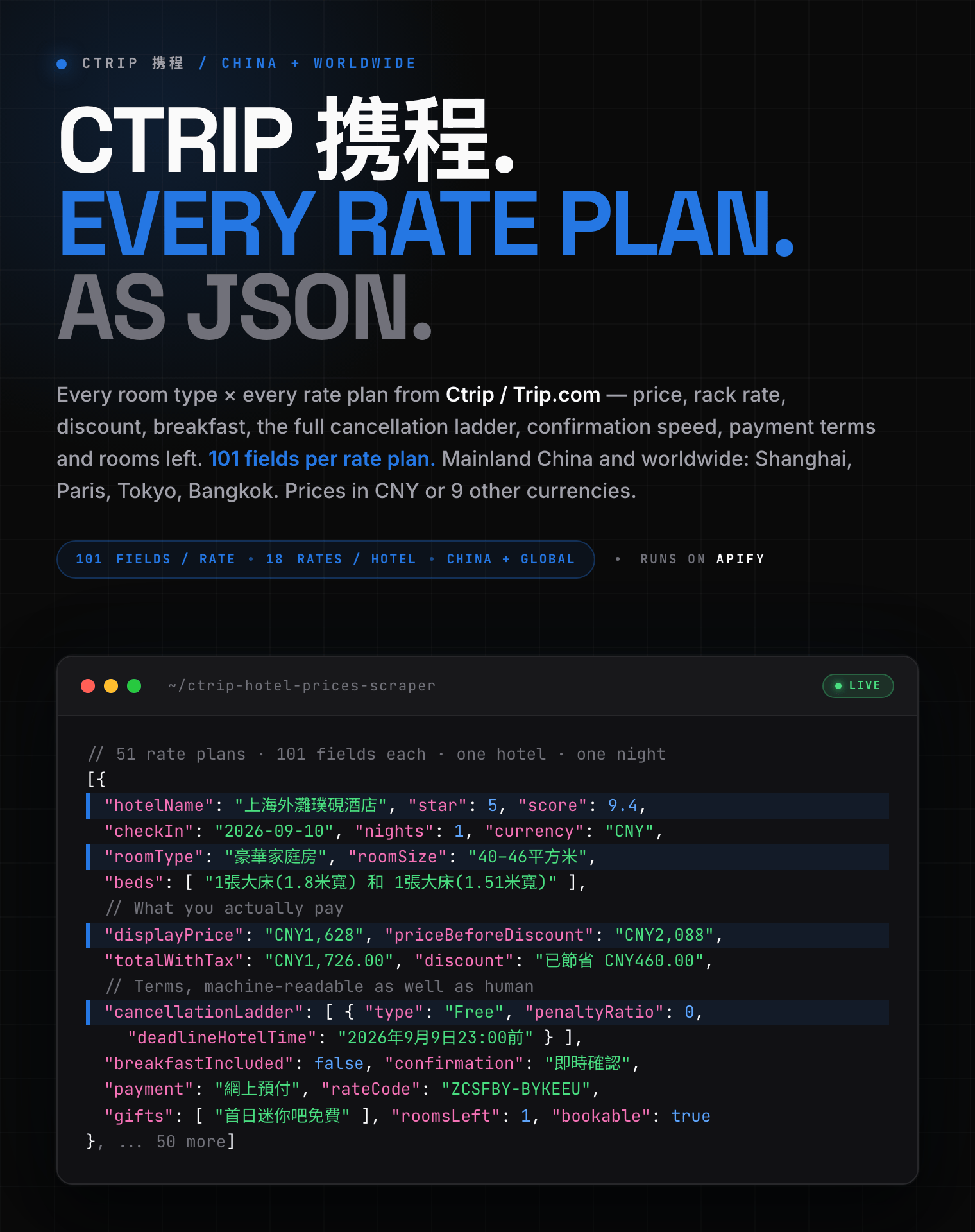
<span style="font-size:16px;font-weight:700;color:#1C1917">每个价格方案 101 个字段，单家酒店中位数 18 个方案：</span> <span style="font-size:15px;color:#57534E">房价、原价、优惠、早餐、取消阶梯、确认时效、支付方式、剩余房量。中国大陆与海外酒店都能采。101 fields per rate plan, for hotels in mainland China and worldwide.</span>
</blockquote>

<blockquote style="border-left:4px solid #E67E22;background:#FFF3E0;padding:12px 16px;margin:12px 0">
<span style="font-size:15px;font-weight:700;color:#1C1917">⚠️ 价格说明：</span><span style="font-size:15px;color:#57534E">输出的是<b>公开对外报价</b>，与携程 App／ctrip.com 登录后看到的<b>会员价、新客价、门店首单价不同</b>。携程对未登录用户一律显示「登录看低价」，因此任何免登录的采集都拿不到会员价。价格计划编码（rateCode）两边一致，可直接对齐。<br>Prices are the public rates, not the logged-in Ctrip member rates. Rate codes match on both storefronts.</span>
</blockquote>

<a href="https://console.apify.com/actors/kF3YqhAJErv0QJSx1/input"><img src="https://api.apify.com/v2/key-value-stores/pJ7iaZsTFhR3k9tjV/records/ctrip-hotel-prices-scraper-hero.png" alt="Ctrip 携程 hotel prices scraper: room type, nightly price, rack rate, breakfast, cancellation ladder and rooms left as structured JSON" style="max-width:100%"></a>

<table>
<tr>
<td colspan="4" style="padding:10px 14px;background:#4C945E;border:none;border-radius:4px 4px 0 0">
<span style="color:#FAFAF9;font-size:14px;font-weight:700;letter-spacing:0.5px">Zen Studio 住宿与出行数据</span>
<span style="color:#E8F5E9;font-size:13px">&nbsp;&nbsp;&bull;&nbsp;&nbsp;酒店、机票与租房：住一晚要多少钱</span>
</td>
</tr>
<tr>
<td style="padding:12px 16px;border:1px solid #E7E5E4;border-radius:0 0 0 4px;background:#D3EDD9;border-right:none;border-top:none;vertical-align:top;width:25%">
<a href="https://apify.com/zen-studio/ctrip-hotel-prices-scraper" style="color:#4C945E;text-decoration:none;font-weight:700;font-size:14px">Ctrip 携程 酒店价格</a><br>
<span style="color:#4C945E;font-size:12px;font-weight:600">&#10148; You are here</span>
</td>
<td style="padding:12px 16px;border:1px solid #E7E5E4;background:#E8F5E9;border-right:none;border-top:none;vertical-align:top;width:25%">
<img src="https://apify-image-uploads-prod.s3.us-east-1.amazonaws.com/NWYsOG96fMDy8ycdf-actor-j2GLqUPFol580vX7h-7ce6khMWsw-wildberries-parser-logo.png" width="24" height="24" style="vertical-align:middle"> &nbsp;<a href="https://apify.com/zen-studio/wildberries-travel-scraper" style="color:#1C1917;text-decoration:none;font-weight:700;font-size:14px">Wildberries Travel</a><br>
<span style="color:#78716C;font-size:12px">机票与酒店 Flights &amp; hotels</span>
</td>
<td style="padding:12px 16px;border:1px solid #E7E5E4;background:#E8F5E9;border-right:none;border-top:none;vertical-align:top;width:25%">
<img src="https://apify-image-uploads-prod.s3.us-east-1.amazonaws.com/NWYsOG96fMDy8ycdf-actor-lfc30NRxNSkmQX50Q-uMySapcNCz-anjuke-scraper-logo.jpg" width="24" height="24" style="vertical-align:middle"> &nbsp;<a href="https://apify.com/zen-studio/anjuke-rent-scraper" style="color:#1C1917;text-decoration:none;font-weight:700;font-size:14px">Anjuke 安居客 租房</a><br>
<span style="color:#78716C;font-size:12px">677 城租金 Rents, 677 cities</span>
</td>
<td style="padding:12px 16px;border:1px solid #E7E5E4;border-radius:0 0 4px 0;background:#E8F5E9;border-top:none;vertical-align:top;width:25%">
<img src="https://apify-image-uploads-prod.s3.us-east-1.amazonaws.com/NWYsOG96fMDy8ycdf-actor-lDO9ln9CKBBaxvzRh-CtBmQXccaN-dolphin-logo-1000.png" width="24" height="24" style="vertical-align:middle"> &nbsp;<a href="https://apify.com/zen-studio/ctrip-hotel-reviews-scraper" style="color:#1C1917;text-decoration:none;font-weight:700;font-size:14px">Ctrip 携程 酒店评价</a><br>
<span style="color:#78716C;font-size:12px">住客评价与评分 Guest reviews</span>
</td>
</tr>
</table>

#### Copy to your AI assistant

```
zen-studio/ctrip-hotel-prices-scraper on Apify. Scrapes every room type x rate plan for Chinese hotels from Ctrip 携程 / Trip.com, with prices, breakfast, cancellation ladders and availability. Call ApifyClient("TOKEN").actor("zen-studio/ctrip-hotel-prices-scraper").call(run_input={...}), then client.dataset(run["defaultDatasetId"]).list_items().items. Provide hotels (links, IDs, names, or a district/landmark) and/or city; at least one is required. Full spec: GET https://api.apify.com/v2/acts/zen-studio~ctrip-hotel-prices-scraper/builds/default (Bearer TOKEN) → inputSchema, actorDefinition.storages.dataset, readme. Token: https://console.apify.com/account/integrations
```

### 核心功能 Key Features

- **每个价格方案 101 个字段**：房价、原价、优惠金额、含税总价、早餐、取消政策与完整阶梯、确认时效、支付方式、剩余房量、可订状态、价格计划编码。
- **三种输入方式**：酒店链接、酒店名称，或一个城市／商圈／地标。填 `外滩` 就采集外滩一带的酒店。
- **取消政策是机器可读的**：不只是一句中文，还有阶梯数组，每一档带截止时间（酒店当地时间与您本地时间）、扣费比例和扣费金额。
- **中国大陆与全球都能采**：携程主打中国大陆，同一个采集器也能拉巴黎、东京、新加坡、曼谷的酒店房价。实测巴黎 25/25 家有价格，东京 22/25。
- **10 种货币、10 种语言**：价格默认人民币 CNY。Prices in CNY by default; labels in Traditional Chinese, English, Japanese and more.

### 三步开始 How to scrape Ctrip hotel prices in 3 steps

1. 打开 **Ctrip Hotel Prices Scraper** 的 Input 页，把酒店链接粘进 `hotels`，或在 `city` 里填一个城市。
2. 选好入住与离店日期；不填就默认查明天一晚。
3. 点 **Start**，运行结束后在 Storage 标签导出 JSON、CSV 或 Excel。

### 如何采集携程酒店价格 How to scrape Ctrip hotel prices

#### 基础：单家酒店 Basic: one hotel

```json
{
    "hotels": ["https://hotels.ctrip.com/hotels/75329189.html"],
    "checkIn": "2026-09-10",
    "checkOut": "2026-09-11"
}
```

酒店链接、酒店 ID 和酒店名称可以混着填，程序会自动识别。

#### 按城市采集 By destination

```json
{
    "city": "上海",
    "maxHotels": 50,
    "checkIn": "2026-09-10",
    "checkOut": "2026-09-11"
}
```

按好评优先排序，先拿到的是口碑最好、价格方案最丰富的酒店。

#### 按商圈或地标 By landmark or district

```json
{
    "hotels": ["外滩"],
    "maxHotels": 20,
    "checkIn": "2026-09-10",
    "checkOut": "2026-09-11"
}
```

填 `外滩`、`西湖`、`三里屯` 这类地名，会搜索该区域内的酒店，而不是同名的某一家。

#### 海外城市 International destinations

```json
{
    "city": "Paris",
    "maxHotels": 25,
    "checkIn": "2026-10-15",
    "checkOut": "2026-10-16",
    "currency": "EUR",
    "language": "en-XX"
}
```

海外城市与中国大陆用法完全一样，填城市名或酒店名即可。

#### 多人多间与外币 Occupancy and currency

```json
{
    "hotels": ["75329189", "346403"],
    "checkIn": "2026-09-10",
    "checkOut": "2026-09-13",
    "adults": 2,
    "rooms": 2,
    "currency": "USD",
    "language": "en-XX"
}
```

### 输入参数 Input Parameters

| 参数 Parameter | 类型 | 默认 | 说明 |
|-----------|------|---------|-------------|
| `hotels` | array | *空* | 酒店链接、ID 或名称；也可填城市／商圈／地标 |
| `city` | string | *空* | 直接搜索一个目的地，例如 `上海` |
| `maxHotels` | integer | `20` | 搜索最多采集多少家酒店（整轮合计） |
| `checkIn` | string | 明天 | 入住日期 `YYYY-MM-DD` |
| `checkOut` | string | 入住次日 | 离店日期 `YYYY-MM-DD` |
| `adults` | integer | `2` | 每间房入住人数 |
| `rooms` | integer | `1` | 房间数 |
| `hotelDetails` | boolean | `false` | 额外取入住／退房时间、交通距离与官方常见问题（每家酒店多一次请求） |
| `currency` | string | `CNY` | CNY、HKD、USD、EUR、GBP、JPY、KRW、SGD、AUD、TWD |
| `language` | string | `zh-HK` | 繁体中文、English、日本語、한국어、Deutsch 等 10 种 |

`hotels` 与 `city` 至少填一个，也可同时使用。

### 能采集哪些数据 What data can you extract from Ctrip?

每一行是一个**价格方案**（一个房型 × 一套价格），包含：

- **酒店**：ID、中英文名、星级、评分、评价数、物业类型、城市与城市 ID、省份、地址、商圈、坐标（含坐标系）、获奖与排名、特色标签、封面图
- **房型**：母房型 ID、房型名、面积、床型、楼层、窗户、景观、吸烟政策、Wi-Fi、房间特点、完整设施树、房间图片
- **价格**：现价、原价、优惠说明、含税总价、税费、计价方式、促销标签、返积分
- **条款**：早餐（布尔值 + 编码 + 文字）、取消政策（文字 + 编码 + 免费取消截止 + 完整阶梯）、确认时效、支付方式、担保金额
- **可订性**：剩余房量、是否可订、预订按钮文字、紧俏提示、最少／最多可订间数
- **套餐**：是否套餐、套餐内容、赠品清单
- **口碑**：总评分与满分基准、评价等级、分项评分（卫生／设施／位置／服务）、点评摘录与标签、获奖与排名
- **媒体**：酒店图集、酒店视频
- **附加资料（可选）**：入住／退房时间、到机场／火车站／地铁站的距离、官方常见问题
- **查询上下文**：入住、离店、间夜数、人数、房间数、货币、采集时间

#### 输出示例 Output Example

下面是一条**真实的中国大陆酒店**价格方案（上海外滩璞硯酒店，五星，已开启「附加酒店资料」），101 个字段一个不少：101 个字段中 98 个有值，只有 `supplier`（仅合作方供货的方案才有）、`taxNote`（中国大陆一般为空）和 `packageItems`（这条是赠品方案，不是套票方案）为空。数组只截断了重复项（图片、设施、常见问题等），**没有省略任何字段**。
One real mainland-China rate plan with every one of the 101 keys present; only repeated array items are trimmed.

```json
{
  "hotelId": "75329189",
  "hotelName": "上海外灘璞硯酒店",
  "hotelNameEn": "The Bund Puyan Hotel, Shanghai",
  "star": 5,
  "hotelType": "SINGLE",
  "propertyType": "酒店",
  "hourlyRoom": false,
  "score": 9.4,
  "scoreOutOf": 10,
  "scoreLabel": "非常好",
  "subScores": {
    "衛生程度": "9.4",
    "設施": "9.2",
    "位置": "9.4",
    "服務": "9.4"
  },
  "reviewCount": 16663,
  "reviewQuote": "在黃埔灘欣賞東方明珠的夜景，距離黃埔灘非常近。",
  "reviewTags": [
    "前台熱情好客"
  ],
  "award": "入選上海全球旅客精選酒店",
  "awardRank": 24,
  "highlights": [
    "東方明珠夜景",
    "適合打卡",
    "家庭房",
    "送餐機械人",
    "位置理想"
  ],
  "hotelFacts": [
    {
      "label": "最近的機場",
      "value": "上海機場（虹橋機場）"
    },
    {
      "label": "距離機場",
      "value": "19.1KM"
    },
    {
      "label": "最近的火車站",
      "value": "上海站"
    },
    {
      "label": "距離火車站",
      "value": "4.98KM"
    },
    {
      "label": "最近的地鐵站",
      "value": "南京東路"
    }
  ],
  "hotelFaq": [
    {
      "question": "上海外灘璞硯酒店的登記入住/Check in及退房/Check out時間為？",
      "answer": "上海外灘璞硯酒店的登記入住/Check in時間：16:00、退房/Check out時間：12:00。你可於預訂時要求提早辦理入住或延遲退房，但是否可行需視乎空房情況而定。於指定時段以外登記入住或退房或需額外付費。…"
    },
    {
      "question": "如何從最近的機場前往上海外灘璞硯酒店？",
      "answer": "距離上海外灘璞硯酒店最近的機場為上海虹橋國際機場，行車距離15.2公里（約1小時 1分鐘）。…"
    }
  ],
  "city": "上海",
  "cityEn": "Shanghai",
  "cityId": 2,
  "provinceId": 2,
  "countryId": 1,
  "isOversea": false,
  "address": "外灘核心區",
  "district": "上海 | 鄰近南京路步行街",
  "lat": 31.246224,
  "lon": 121.488844,
  "coordinateSystem": "BD09",
  "leadPrice": "CNY858",
  "isAd": false,
  "hotelImages": [
    "https://ak-d.tripcdn.com/images/1mc2w12000riejmmg0E02_R_600_600_R5_D.jpg_.webp",
    "https://ak-d.tripcdn.com/images/02011120009lt12n7F86E_R_600_600_R5_D.jpg_.webp"
  ],
  "hotelVideo": "https://video.c-ctrip.com/videos/u00ccn14x98cxs2s6DABC.mp4",
  "hotelImage": "https://ak-d.tripcdn.com/images/1mc2w12000riejmmg0E02_R_600_600_R5_D.jpg_.webp",
  "hotelUrl": "https://hk.trip.com/hotels/detail/?hotelId=75329189",
  "ctripUrl": "https://hotels.ctrip.com/hotels/75329189.html",
  "checkIn": "2026-09-10",
  "checkOut": "2026-09-11",
  "nights": 1,
  "adults": 2,
  "rooms": 1,
  "currency": "CNY",
  "scrapedAt": "2026-08-10T16:40:42+00:00",
  "hasRates": true,
  "physicalRoomId": "313820523",
  "roomType": "標準大床房",
  "roomSize": "27平方米",
  "beds": [
    "1張大床(1.8米寬)"
  ],
  "floor": "5-13樓",
  "window": "城景",
  "view": "城景",
  "smoking": "禁煙",
  "wifi": "免費 Wi-Fi",
  "roomFeatures": [
    "城景",
    "禁煙",
    "27平方米 | 5-13樓",
    "免費 Wi-Fi",
    "空調",
    "私人浴室"
  ],
  "roomFacilities": {
    "清潔服務": [
      "每日客房清潔",
      "洗衣用品"
    ],
    "洗浴用品": [
      "牙刷",
      "牙膏",
      "沐浴露",
      "洗頭水",
      "護髮素",
      "香皂",
      "浴帽",
      "梳子",
      "剃鬚刀"
    ],
    "房間佈局及家具": [
      "衣櫃",
      "書桌",
      "茶几",
      "休息椅",
      "餐桌",
      "用餐區",
      "掛墻裝飾畫／書法"
    ],
    "網絡及通訊": [
      "客房 Wi-Fi",
      "客房有線網絡",
      "電話"
    ]
  },
  "roomImages": [
    "https://ak-d.tripcdn.com/images/1mc5k12000kjnvpxg3B72_R_224_126_R5_D.jpg",
    "https://ak-d.tripcdn.com/images/0200p120009lxlvco3E71_R_224_126_R5_D.jpg"
  ],
  "rateId": "1276190705_ZCSFBS-BYKEF5",
  "rateCode": "ZCSFBS-BYKEF5",
  "roomToken": "ZCSFBS-BYKEF5",
  "subHotelId": 75329262,
  "supplier": null,
  "isLeadRate": true,
  "price": 1046,
  "displayPrice": "CNY1,046",
  "priceBeforeDiscount": "CNY1,342",
  "totalWithTax": "CNY1,109.00",
  "tax": "CNY62.77",
  "taxNote": null,
  "priceNote": "總額（連稅及附加費）：CNY1,109",
  "priceBasis": "1間 x 1晚",
  "discount": "此訂單已節省 CNY296.00",
  "discountItems": [
    "早鳥優惠：每房每晚節省 CNY296.00"
  ],
  "promotionLabels": [
    "早鳥優惠",
    "早鳥優惠",
    "-21%"
  ],
  "cashback": "賺取 83 Trip Coins （約 CNY5.59）",
  "breakfastIncluded": false,
  "breakfastCode": 0,
  "mealText": "精美早餐 CNY58.00 起（可選）",
  "cancellation": "30分鐘取消時限",
  "cancellationCode": 5,
  "cancellationDeadline": "30分鐘取消時限",
  "cancellationLadder": [
    {
      "policy": "免費取消",
      "type": "Free",
      "deadlineHotelTime": "30分鐘取消時限",
      "deadlineUserTime": null,
      "penaltyRatio": null,
      "penaltyAmount": null,
      "penaltyCurrency": null,
      "current": true
    },
    {
      "policy": "CNY1,109.00",
      "type": "Full",
      "deadlineHotelTime": "訂單確認後30分鐘",
      "deadlineUserTime": null,
      "penaltyRatio": null,
      "penaltyAmount": null,
      "penaltyCurrency": null,
      "current": false
    }
  ],
  "freeCancellation": true,
  "confirmation": "即時確認",
  "confirmationCode": 1,
  "payment": "網上預付",
  "paymentCode": 0,
  "deposit": 1109,
  "isPackage": false,
  "packageId": 107970017,
  "packageItems": [],
  "gifts": [
    "首日迷你吧免費"
  ],
  "guests": 2,
  "children": 0,
  "minRooms": 1,
  "maxRooms": 5,
  "roomsLeft": 5,
  "bookable": true,
  "bookButton": "預訂",
  "urgency": [
    "即時確認",
    "免費禮品",
    "只剩5間！"
  ],
  "filterIds": [
    "77|488",
    "77|489",
    "77|406",
    "77|240",
    "44|1006",
    "23|2"
  ]
}
```

采不到完整价格方案的酒店，仍然会输出一行，带上酒店信息，不会静默丢掉，也不计费：

- `hasRates: true`：拿到了完整的价格方案列表，每个方案一行。
- `hasRates: false` 且 `leadPrice` 有值：搜索结果里有最低价，但该日期的方案明细取不到（多为当日售罄）。**这一行的 `leadPrice` 就是我们能拿到的价格**，请直接用它。
- `hasRates: false` 且 `leadPrice` 为空：该酒店在这个日期确实没有对外报价。

换句话说：只要有价格，就一定出现在结果里，要么在 `displayPrice`，要么在 `leadPrice`。

If a rate table cannot be read, the row still carries `leadPrice` whenever the
search advertised one. Any price we can obtain appears in the output, either as
`displayPrice` per rate plan or as `leadPrice` on the hotel row.

### 进阶用法 Advanced Usage

比价监控、房价一致性核查、竞品房价追踪、早餐与取消政策对比，都可以用下面的配置直接跑。

#### 连锁品牌房价监控 Chain rate monitoring

```json
{
    "hotels": ["希爾頓酒店", "萬豪酒店", "凱悅酒店"],
    "checkIn": "2026-09-10",
    "checkOut": "2026-09-11",
    "currency": "CNY"
}
```

#### 商圈内的竞品对比 Competitive set by district

```json
{
    "hotels": ["三里屯"],
    "maxHotels": 30,
    "checkIn": "2026-09-10",
    "checkOut": "2026-09-11"
}
```

#### 长住价格 Longer stays

```json
{
    "city": "成都",
    "maxHotels": 20,
    "checkIn": "2026-09-10",
    "checkOut": "2026-09-17"
}
```

#### 定时监控 Scheduling

房价一天之内就会变。做价格监控的话，建议用 Apify Schedules **每天跑一次**，比价高峰期可以每 6 小时一次。把结果接到 Google Sheets、Make、Zapier 或 webhook，就是一条完整的监控流水线。

Set up a schedule and integrations here:

https://www.youtube.com/watch?v=Ujs0Xj0-hMs

### 价格 Pricing: Pay Per Event (PPE)

**每 1,000 个价格方案 $1.20**（基础价，量大有折扣）。另外每采集到一家有价格的酒店收 $0.004。

| Rate plan charges | 单价 | 每 1,000 |
|-------|----------|-----------|
| 价格方案 rate-plan | $0.0012 | $1.20 |

单家酒店中位数 18 个价格方案，因此一家酒店约 $0.026。没有价格的酒店不计费。

### 常见问题 FAQ

**什么是携程（Ctrip / Trip.com / 携程旅行网）？**
携程是中国最大的在线旅游平台，Trip.com 是它的国际站，两边共用同一套酒店和价格方案库存。本采集器覆盖中国大陆酒店的房型与价格方案，酒店 ID 在两个站点是同一个号。

**这是携程登录后的会员价吗？**
不是。输出的是公开对外报价，不是登录携程后看到的会员价、新客价或专属促销价。做比价监控通常更希望拿到公开价，因为它可复现、不随账号变化；如果您要核查的正是会员专属促销，这份数据不适用。

**覆盖率如何？Which hotels are covered?**
**中国大陆**：连锁品牌与一线城市约 91%，国际连锁（希尔顿、万豪、凯悦）实测 377/382 家有价格，约 99%。混合名单（含大量低线城市的民宿、宾馆、公寓、电竞酒店）实测 2,000 家中 1,434 家，约 72%，采不到的主要是低线城市的独立小型物业。<br>**海外**：实测巴黎 25/25 家、东京 22/25 家有价格。海外覆盖率通常比中国大陆的混合名单更高。

**能输出简体中文吗？Can I get Simplified Chinese?**
数据源只提供繁体中文（`zh-HK` / `zh-TW`），没有简体中文选项。房型名和政策文字会是繁体，可以在您这边用简繁转换处理。英文、日文、韩文等语言正常可选。

**价格多久更新一次？How fresh is the data?**
每次运行都是实时查询，不用缓存。每行都带 `scrapedAt` 时间戳，方便跨次运行对比。

**一次能采多少家酒店？**
按城市搜索单轮上限 2,000 家；直接指定的酒店不受此限制。每家酒店的价格方案数由酒店本身决定，中位数 18 个，国际连锁通常 36 到 55 个。

**取消政策能拿到具体日期吗？**
可以。除了那句中文说明，还有 `cancellationLadder` 数组：每一档带酒店当地时间与您本地时间的截止点、扣费比例和扣费金额，以及 `cancellationCode` 供系统对接使用。

**能同时拿到酒店评价吗？Can I also get guest reviews?**
本采集器只输出价格方案。评价数量和评分在每行里有（`reviewCount`、`score`），但评价正文不在范围内。

**坐标是什么坐标系？**
中国大陆酒店返回的是百度坐标系 BD09，字段 `coordinateSystem` 会明确标出。直接当成 WGS84 用会有几百米偏移，需要先转换。

**能采中国以外的酒店吗？Does it work outside China?**
可以。携程的重心是中国大陆，但同一个采集器对海外酒店同样有效：巴黎丽兹级酒店单家 175 个价格方案，曼谷文华东方 99 个。城市搜索也一样，填 `Paris`、`Tokyo`、`Singapore` 就行。字段完全相同，只是货币与语言按您的设置返回。

**怎么导出数据？How do I export the data?**
在运行页的 Storage 标签可以导出 JSON、CSV、Excel、XML 或 HTML，也可以用 Apify API 拉取。嵌套字段（取消阶梯、设施树）建议用 JSON，CSV 会把它们压平。

**采集携程数据合法吗？Is it legal to scrape Ctrip?**
本采集器只获取公开可见的数据，不涉及任何登录后才能看到的内容。您需要自行遵守携程的服务条款以及适用的数据保护法规（GDPR、CCPA，以及中国的《个人信息保护法》PIPL）。

### More Zen Studio scrapers for Chinese platforms

**🎬 Short-video & social**

- <img src="https://apify-image-uploads-prod.s3.us-east-1.amazonaws.com/NWYsOG96fMDy8ycdf-actor-3TJaaOJDU1AMiOoJM-Vu2eVr0P6N-douyin-profile-scraper-logo.png" width="16" height="16" style="vertical-align:middle;border-radius:3px"> **Douyin 抖音**
  - [Douyin Profile Scraper](https://apify.com/zen-studio/douyin-profile-scraper)
  - [Douyin Video Scraper](https://apify.com/zen-studio/douyin-video-scraper)
  - [Douyin Comments Scraper](https://apify.com/zen-studio/douyin-comments-scraper)
  - [Douyin Transcripts Scraper](https://apify.com/zen-studio/douyin-transcripts-scraper)
  - [Douyin Creator Rankings Scraper](https://apify.com/zen-studio/douyin-xingtu-rankings-scraper)
  - [Douyin Live Recorder](https://apify.com/zen-studio/douyin-live-recorder)
  - [Douyin Hot Search Scraper](https://apify.com/zen-studio/douyin-hot-search-scraper)
  - [Douyin Product Search Scraper](https://apify.com/zen-studio/douyin-product-search-scraper)
- <img src="https://apify-image-uploads-prod.s3.us-east-1.amazonaws.com/NWYsOG96fMDy8ycdf-actor-mHKEEgoDqr6btQQer-fUs5ZquIeN-xiaohongshu-search-scraper-logo-square.png" width="16" height="16" style="vertical-align:middle;border-radius:3px"> **RedNote 小红书**

  - [RedNote User Profile Scraper](https://apify.com/zen-studio/rednote-user-profile-scraper)
  - [RedNote Search Scraper](https://apify.com/zen-studio/rednote-search-scraper)
  - [RedNote Comments Scraper](https://apify.com/zen-studio/rednote-comments-scraper)
  - [RedNote Product Search Scraper](https://apify.com/zen-studio/rednote-product-search-scraper)
  - [RedNote Note Detail Scraper](https://apify.com/zen-studio/rednote-note-detail-scraper)
  - [RedNote Product Reviews Scraper](https://apify.com/zen-studio/rednote-product-reviews-scraper)
  - [RedNote Live Recorder](https://apify.com/zen-studio/rednote-live-recorder)
- <img src="https://apify-image-uploads-prod.s3.us-east-1.amazonaws.com/NWYsOG96fMDy8ycdf-actor-dexCSKEZtKS8hg4fT-lD4weyiYga-shigua-____-scraper-logo.jpg" width="16" height="16" style="vertical-align:middle;border-radius:3px"> **Xigua 西瓜视频**

  - [Xigua Video Search Scraper](https://apify.com/zen-studio/xigua-video-search-scraper)
  - [Xigua Video Detail Scraper](https://apify.com/zen-studio/xigua-video-detail-scraper)
- <img src="https://apify-image-uploads-prod.s3.us-east-1.amazonaws.com/NWYsOG96fMDy8ycdf-actor-oSxuPDE1h3HAsHZSu-x3uV98mgTe-bilibili-scraper-logo.png" width="16" height="16" style="vertical-align:middle;border-radius:3px"> **Bilibili 哔哩哔哩**

  - [Bilibili Video Scraper](https://apify.com/zen-studio/bilibili-video-scraper)
  - [Bilibili Danmaku Scraper](https://apify.com/zen-studio/bilibili-danmaku-scraper)

**🛒 E-commerce**

- <img src="https://apify-image-uploads-prod.s3.us-east-1.amazonaws.com/NWYsOG96fMDy8ycdf-actor-LwARSYSMWLBZfXfdr-FrDaNbQarB-shopee-scraper-logo.png" width="16" height="16" style="vertical-align:middle;border-radius:3px"> **Shopee**

  - [Shopee Product Detail Scraper](https://apify.com/zen-studio/shopee-product-detail-scraper)
  - [Shopee Product Reviews Scraper](https://apify.com/zen-studio/shopee-product-reviews-scraper)
  - [Shopee Product Scraper](https://apify.com/zen-studio/shopee-product-scraper)
- <img src="https://apify-image-uploads-prod.s3.us-east-1.amazonaws.com/NWYsOG96fMDy8ycdf-actor-PsAKYWM55HG4AHXjK-ItywU7Bp0s-taobao-search-scraper-logo.png" width="16" height="16" style="vertical-align:middle;border-radius:3px"> **Taobao 淘宝**

  - [Taobao Search Scraper](https://apify.com/zen-studio/taobao-search-scraper)
  - [Taobao Product Detail Scraper](https://apify.com/zen-studio/taobao-detail-scraper)
  - [Taobao Seller Products Scraper](https://apify.com/zen-studio/taobao-seller-products-scraper)
- <img src="https://apify-image-uploads-prod.s3.us-east-1.amazonaws.com/NWYsOG96fMDy8ycdf-actor-uZy6tbKLKnSVtT4BN-emXnT123uR-jd-com-scraper-logo-square.png" width="16" height="16" style="vertical-align:middle;border-radius:3px"> **JD.com 京东**

  - [JD.com Search Scraper](https://apify.com/zen-studio/jd-com-search-scraper)
- <img src="https://apify-image-uploads-prod.s3.us-east-1.amazonaws.com/NWYsOG96fMDy8ycdf-actor-ghXSMZcW3GxsCrkiR-5hnvsKv4Yt-1688-wholesale-scraper-logo.png" width="16" height="16" style="vertical-align:middle;border-radius:3px"> **1688 阿里巴巴**

  - [1688 Wholesale Scraper](https://apify.com/zen-studio/1688-wholesale-scraper)
  - [Alibaba Scraper](https://apify.com/zen-studio/alibaba-scraper)
  - [1688 Reviews Scraper](https://apify.com/zen-studio/1688-reviews-scraper)
- <img src="https://apify-image-uploads-prod.s3.us-east-1.amazonaws.com/NWYsOG96fMDy8ycdf-actor-5QcLc4BHaLMBUKYs3-f3CWQ60Row-goofish-search-scraper-logo.png" width="16" height="16" style="vertical-align:middle;border-radius:3px"> **Goofish 闲鱼**

  - [Goofish (Xianyu) Search Scraper](https://apify.com/zen-studio/goofish-xianyu-search-scraper)
  - [Goofish (Xianyu) Seller Scraper](https://apify.com/zen-studio/goofish-xianyu-seller-scraper)
  - [Goofish (Xianyu) Item Detail Scraper](https://apify.com/zen-studio/goofish-xianyu-item-detail-scraper)
  - [Goofish (Xianyu) Item Comments & Q\&A Scraper](https://apify.com/zen-studio/goofish-xianyu-item-comments-scraper)
  - [Goofish (Xianyu) Reverse Image Search Scraper](https://apify.com/zen-studio/goofish-xianyu-visual-search-scraper)
- <img src="https://apify-image-uploads-prod.s3.us-east-1.amazonaws.com/NWYsOG96fMDy8ycdf-actor-0hS9yNh3RU8DC6puG-LozxRJkdHN-coupang-review-scraper-logo.png" width="16" height="16" style="vertical-align:middle;border-radius:3px"> **Coupang 쿠팡**

  - [Coupang Review Scraper](https://apify.com/zen-studio/coupang-review-scraper)
  - [Coupang Search Scraper](https://apify.com/zen-studio/coupang-search-scraper)
  - [Coupang Product Detail Scraper](https://apify.com/zen-studio/coupang-detail-scraper)

**🏠 Real estate & autos**

- <img src="https://apify-image-uploads-prod.s3.us-east-1.amazonaws.com/NWYsOG96fMDy8ycdf-actor-1tAzNSf8Kz0v7Q2Lr-AINJ7FsZVU-anjuke-scraper-logo.jpg" width="16" height="16" style="vertical-align:middle;border-radius:3px"> **Anjuke 安居客**

  - [Anjuke For-Sale Listings Scraper](https://apify.com/zen-studio/anjuke-real-estate-scraper)
  - [Anjuke New-Home Scraper](https://apify.com/zen-studio/anjuke-new-home-scraper)
  - [Anjuke Rental Listings Scraper](https://apify.com/zen-studio/anjuke-rent-scraper)
  - [Anjuke Listing Detail Scraper](https://apify.com/zen-studio/anjuke-sale-detail-scraper)
- <img src="https://apify-image-uploads-prod.s3.us-east-1.amazonaws.com/NWYsOG96fMDy8ycdf-actor-32OkWqsiUywoq2ci3-7JhFlW1qg3-58__-real-estate-scraper-logo.jpg" width="16" height="16" style="vertical-align:middle;border-radius:3px"> **58.com 58同城**

  - [58.com Real Estate Scraper](https://apify.com/zen-studio/58-real-estate-scraper)
- <img src="https://apify-image-uploads-prod.s3.us-east-1.amazonaws.com/NWYsOG96fMDy8ycdf-actor-ytaE4YpSmjXDmibPv-L1UMPHa2bO-che168-autohome-scraper-logo.png" width="16" height="16" style="vertical-align:middle;border-radius:3px"> **Autohome 汽车之家**

  - [Autohome (Che168) Used-Car Scraper](https://apify.com/zen-studio/che168-car-scraper)

**✈️ Travel & stays**

- <img src="https://apify-image-uploads-prod.s3.us-east-1.amazonaws.com/NWYsOG96fMDy8ycdf-actor-lDO9ln9CKBBaxvzRh-CtBmQXccaN-dolphin-logo-1000.png" width="16" height="16" style="vertical-align:middle;border-radius:3px"> **Ctrip 携程**
  - [Ctrip Hotel Reviews Scraper](https://apify.com/zen-studio/ctrip-hotel-reviews-scraper)

### Support

- **Bugs**: Issues tab
- **Features**: Issues tab

### Legal Compliance

Extracts publicly available data. Users must comply with Ctrip / Trip.com terms and data protection regulations (GDPR, CCPA, PIPL).

***

*携程与 Trip.com 中国酒店的房型与价格方案采集：房价、早餐、取消政策、支付方式与可订状态。*

# Actor input Schema

## `hotels` (type: `array`):

填入酒店链接、酒店 ID 或酒店名称，可混合填写。<br><br>支持格式：<br>• 携程链接：<code>https://hotels.ctrip.com/hotels/75329189.html</code><br>• Trip.com 链接：<code>https://hk.trip.com/hotels/detail/?hotelId=75329189</code><br>• 酒店 ID：<code>75329189</code><br>• 酒店名称：<code>上海外滩璞硯酒店</code><br><br>若填的是城市、商圈或地标（例如 <code>外滩</code>、<code>西湖</code>），会自动搜索该区域内的酒店，数量受下方「最多采集酒店数」限制。<br><br>Mix links, IDs and names freely. A district or landmark searches that area instead.

## `city` (type: `string`):

搜索整个城市，例如 <code>上海</code>、<code>成都</code> 或 <code>Shanghai</code>。<br><br>按好评优先排序，因此先拿到的是该城市口碑最好、价格方案最丰富的酒店。<br><br>Searches a whole city, best-reviewed first.

## `maxHotels` (type: `integer`):

搜索最多采集多少家酒店，<b>整轮运行合计</b>，不是每个搜索各算一次。<br><br>您在上方直接指定的酒店一定会被采集，不占用此额度。<br><br>Caps search results across the whole run. Hotels you name yourself are always collected and do not count towards it.

## `checkIn` (type: `string`):

入住日期，格式 <code>YYYY-MM-DD</code>，例如 <code>2026-09-10</code>。<br><br>留空则默认为明天。必须是今天或之后的日期。<br><br>Defaults to tomorrow if left empty.

## `checkOut` (type: `string`):

离店日期，格式 <code>YYYY-MM-DD</code>。<br><br>留空则默认为入住次日。多住几晚会拿到不同的价格方案。<br><br>Defaults to the night after check-in.

## `adults` (type: `integer`):

每间房的入住人数。<br><br>部分价格方案只针对特定人数开放，改人数会看到不同的方案。<br><br>Some rates only appear for the occupancy they are sold for.

## `rooms` (type: `integer`):

需要预订的房间数量。<br><br>How many rooms the stay needs.

## `hotelDetails` (type: `boolean`):

额外获取每家酒店的入住／退房时间、到机场／火车站／地铁站的距离，以及官方常见问题（早餐种类、餐饮、接送）。<br><br>这些资料不在价格数据里，需要为每家酒店多取一次页面，运行会稍慢一些。<br><br>Adds check-in/out times, transport distances and the site's own FAQ. Costs one extra fetch per hotel.

## `currency` (type: `string`):

价格返回时使用的货币。<br><br>换货币只改变金额的计价方式，不会改变可售的房型和方案。<br><br>Currency prices are returned in.

## `language` (type: `string`):

酒店名称、房型名称与政策文字的语言。<br><br>价格不随语言变化，但<b>可售房型会略有差异</b>（各语言市场的分销不同），因此同一份数据请保持同一语言。<br><br><b>注意：数据源只提供繁体中文，不提供简体中文。</b><br><br>Prices are identical across languages, but the set of sellable rooms differs slightly. The source serves Traditional Chinese only.

## Actor input object example

```json
{
  "hotels": [
    "https://hotels.ctrip.com/hotels/75329189.html"
  ],
  "city": "上海",
  "maxHotels": 5,
  "adults": 2,
  "rooms": 1,
  "hotelDetails": false,
  "currency": "CNY",
  "language": "zh-HK"
}
```

# Actor output Schema

## `results` (type: `string`):

No description

# API

You can run this Actor programmatically using our API. Below are code examples in JavaScript, Python, and CLI, as well as the OpenAPI specification and MCP server setup.

## JavaScript example

```javascript
import { ApifyClient } from 'apify-client';

// Initialize the ApifyClient with your Apify API token
// Replace the '<YOUR_API_TOKEN>' with your token
const client = new ApifyClient({
    token: '<YOUR_API_TOKEN>',
});

// Prepare Actor input
const input = {
    "hotels": [
        "https://hotels.ctrip.com/hotels/75329189.html"
    ],
    "maxHotels": 5,
    "adults": 2,
    "rooms": 1
};

// Run the Actor and wait for it to finish
const run = await client.actor("zen-studio/ctrip-hotel-prices-scraper").call(input);

// Fetch and print Actor results from the run's dataset (if any)
console.log('Results from dataset');
console.log(`💾 Check your data here: https://console.apify.com/storage/datasets/${run.defaultDatasetId}`);
const { items } = await client.dataset(run.defaultDatasetId).listItems();
items.forEach((item) => {
    console.dir(item);
});

// 📚 Want to learn more 📖? Go to → https://docs.apify.com/api/client/js/docs

```

## Python example

```python
from apify_client import ApifyClient

# Initialize the ApifyClient with your Apify API token
# Replace '<YOUR_API_TOKEN>' with your token.
client = ApifyClient("<YOUR_API_TOKEN>")

# Prepare the Actor input
run_input = {
    "hotels": ["https://hotels.ctrip.com/hotels/75329189.html"],
    "maxHotels": 5,
    "adults": 2,
    "rooms": 1,
}

# Run the Actor and wait for it to finish
run = client.actor("zen-studio/ctrip-hotel-prices-scraper").call(run_input=run_input)

# Fetch and print Actor results from the run's dataset (if there are any)
print(f"💾 Check your data here: https://console.apify.com/storage/datasets/{run.default_dataset_id}")
for item in client.dataset(run.default_dataset_id).iterate_items():
    print(item)

# 📚 Want to learn more 📖? Go to → https://docs.apify.com/api/client/python/docs/quick-start

```

## CLI example

```bash
echo '{
  "hotels": [
    "https://hotels.ctrip.com/hotels/75329189.html"
  ],
  "maxHotels": 5,
  "adults": 2,
  "rooms": 1
}' |
apify call zen-studio/ctrip-hotel-prices-scraper --silent --output-dataset

```

## MCP server setup

```json
{
    "mcpServers": {
        "apify": {
            "type": "http",
            "url": "https://mcp.apify.com/?tools=fetch-actor-details,zen-studio/ctrip-hotel-prices-scraper"
        }
    }
}

```

The hosted server signs you in with OAuth on first connect, so no API token belongs in this config. Clients without OAuth support can send an `Authorization: Bearer <APIFY_API_TOKEN>` header instead, using a token from API & Integrations in Apify Console (https://console.apify.com/settings/integrations).

## OpenAPI specification

Download the OpenAPI definition: https://api.apify.com/v2/actors/kF3YqhAJErv0QJSx1/builds/4wXaIZ4Xy0AjlCzgd/openapi.json