# DraftKings Odds API - Real-Time Lines & Player Props (`zen-studio/draftkings-odds`) Actor

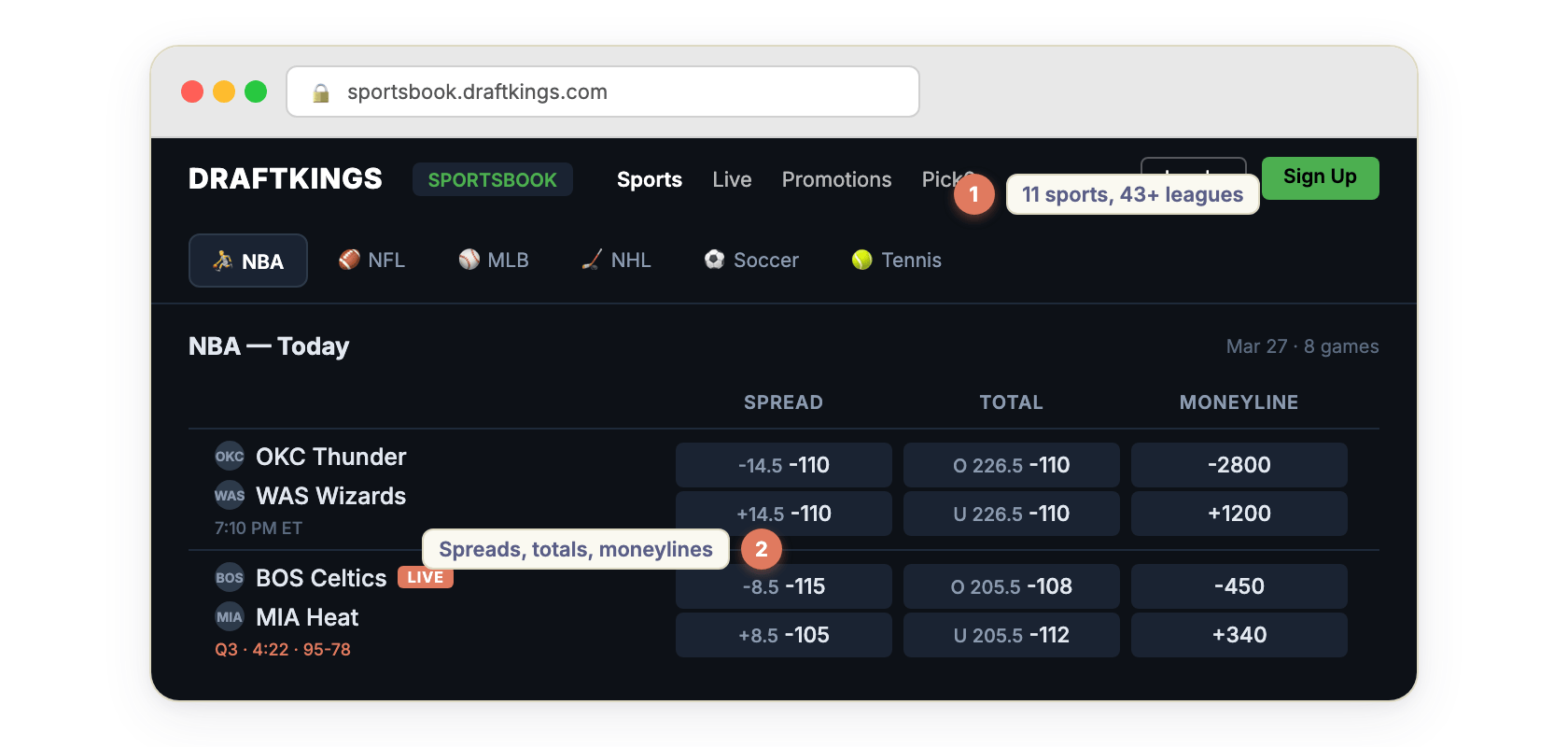
Extract real-time DraftKings sportsbook odds for 11 sports and 43+ leagues. Get spreads, moneylines, totals, player props, and futures in 3 odds formats. Always-on HTTP API. Live in-play odds with scores. NBA, NFL, MLB, NHL, EPL, and more. No login required.

- **URL**: https://apify.com/zen-studio/draftkings-odds.md
- **Developed by:** [Zen Studio](https://apify.com/zen-studio) (community)
- **Categories:** Automation, Integrations, Developer tools
- **Stats:** 2 total users, 2 monthly users, 100.0% runs succeeded, NaN bookmarks
- **User rating**: No ratings yet

## Pricing

from $1.99 / 1,000 odds requests

This Actor is paid per event and usage. You are charged both the fixed price for specific events and for Apify platform usage.
Since this Actor supports Apify Store discounts, the price gets lower the higher subscription plan you have.

Learn more: https://docs.apify.com/platform/actors/running/actors-in-store#pay-per-event

## What's an Apify Actor?

Actors are a software tools running on the Apify platform, for all kinds of web data extraction and automation use cases.
In Batch mode, an Actor accepts a well-defined JSON input, performs an action which can take anything from a few seconds to a few hours,
and optionally produces a well-defined JSON output, datasets with results, or files in key-value store.
In Standby mode, an Actor provides a web server which can be used as a website, API, or an MCP server.
Actors are written with capital "A".

## How to integrate an Actor?

If asked about integration, you help developers integrate Actors into their projects.
You adapt to their stack and deliver integrations that are safe, well-documented, and production-ready.
The best way to integrate Actors is as follows.

In JavaScript/TypeScript projects, use official [JavaScript/TypeScript client](https://docs.apify.com/api/client/js.md):

```bash
npm install apify-client
```

In Python projects, use official [Python client library](https://docs.apify.com/api/client/python.md):

```bash
pip install apify-client
```

In shell scripts, use [Apify CLI](https://docs.apify.com/cli/docs.md):

````bash
# MacOS / Linux
curl -fsSL https://apify.com/install-cli.sh | bash
# Windows
irm https://apify.com/install-cli.ps1 | iex
```bash

In AI frameworks, you might use the [Apify MCP server](https://docs.apify.com/platform/integrations/mcp.md).

If your project is in a different language, use the [REST API](https://docs.apify.com/api/v2.md).

For usage examples, see the [API](#api) section below.

For more details, see Apify documentation as [Markdown index](https://docs.apify.com/llms.txt) and [Markdown full-text](https://docs.apify.com/llms-full.txt).


# README

## DraftKings Odds API — Real-Time Lines, Player Props & Futures

<table><tr>
<td style="border-left:4px solid rgb(76,148,94);padding:12px 16px;font-weight:600">Always-on HTTP API — send a GET request, get DraftKings odds back in milliseconds.<br><br>11 sports, 43+ leagues. Spreads, moneylines, totals, player props, futures.<br>American, decimal, and fractional odds. Live in-play with scores.<br>No DraftKings account required.</td>
</tr></table>

<table>
<tr>
<td colspan="4" style="padding:10px 14px;background:#4C945E;border:none;border-radius:4px 4px 0 0">
<span style="color:#FAFAF9;font-size:14px;font-weight:700;letter-spacing:0.5px">Zen Studio Sports Betting</span>
<span style="color:#E8F5E9;font-size:13px">&nbsp;&nbsp;&bull;&nbsp;&nbsp;Real-time odds across every major sportsbook</span>
</td>
</tr>
<tr>
<td style="padding:12px 16px;border:1px solid #E7E5E4;border-radius:0 0 0 4px;border-right:none;border-top:none;vertical-align:top;width:25%">
<img src="https://apify-image-uploads-prod.s3.us-east-1.amazonaws.com/NWYsOG96fMDy8ycdf-actor-l6JP3yaLczAdUaiSf-yDHq17ycGp-bet365-icon_lc6m4t.png" width="24" height="24" style="vertical-align:middle"> &nbsp;<a href="https://apify.com/zen-studio/bet365-real-time-odds" style="color:#1C1917;text-decoration:none;font-weight:700;font-size:14px">Bet365 Odds</a><br>
<span style="color:#78716C;font-size:12px">Global odds, live scores</span>
</td>
<td style="padding:12px 16px;border:1px solid #E7E5E4;background:#E8F5E9;border-right:none;border-top:none;vertical-align:top;width:25%">
<img src="https://apify-image-uploads-prod.s3.us-east-1.amazonaws.com/NWYsOG96fMDy8ycdf-actor-W8rOXiLSj8wrgF96k-PQehXxTEV5-draftkings-real-time-api-logo.png" width="24" height="24" style="vertical-align:middle"> &nbsp;<a href="https://apify.com/zen-studio/draftkings-odds" style="color:#4C945E;text-decoration:none;font-weight:700;font-size:14px">DraftKings Odds</a><br>
<span style="color:#4C945E;font-size:12px;font-weight:600">&#10148; You are here</span>
</td>
<td style="padding:12px 16px;border:1px solid #E7E5E4;border-right:none;border-top:none;vertical-align:top;width:25%">
<img src="https://apify-image-uploads-prod.s3.us-east-1.amazonaws.com/NWYsOG96fMDy8ycdf-actor-09TtSjF9Uzs5qfvLc-f9HhMKXsLt-underdog-fantasy-picks-api-logo.png" width="24" height="24" style="vertical-align:middle"> &nbsp;<a href="https://apify.com/zen-studio/underdog-player-props" style="color:#1C1917;text-decoration:none;font-weight:700;font-size:14px">Underdog Props</a><br>
<span style="color:#78716C;font-size:12px">Lines and odds</span>
</td>
<td style="padding:12px 16px;border:1px solid #E7E5E4;border-radius:0 0 4px 0;border-top:none;vertical-align:top;width:25%">
<img src="https://apify-image-uploads-prod.s3.us-east-1.amazonaws.com/NWYsOG96fMDy8ycdf-actor-4AmgQeem8dEgMEiRF-VGffbe665M-prizepicks-scraper-logo.jpeg" width="24" height="24" style="vertical-align:middle"> &nbsp;<a href="https://apify.com/zen-studio/prizepicks-player-props" style="color:#1C1917;text-decoration:none;font-weight:700;font-size:14px">PrizePicks Props</a><br>
<span style="color:#78716C;font-size:12px">Projections and lines</span>
</td>
</tr>
</table>

#### Copy to your AI assistant

Copy this block into ChatGPT, Claude, Cursor, or any LLM to start building with this API.

````

DraftKings Odds API. Base: https://zen-studio--draftkings-odds.apify.actor Auth: ?token=APIFY\_TOKEN (get at https://console.apify.com/account/integrations). Endpoints: GET /sports (list all sports), GET /leagues?sport=X (leagues for a sport), GET /leagues/{id}?market=game\_lines|player\_props|futures|all (events with odds), GET /events/{id}?market=X\&league={leagueId} (single event detail). Full API spec (OpenAPI, README): GET https://api.apify.com/v2/acts/zen-studio~draftkings-odds/builds/default (Bearer TOKEN) → actorDefinition.webServerSchema (full OpenAPI spec), readme. League IDs: NBA=42648 NFL=88808 MLB=84240 NHL=42133 EPL=40253 Champions League=40685 La Liga=40031 Bundesliga=40481 Serie A=40030 F1=84896. OpenAPI spec also at: /openapi.json?token=TOKEN

```

Also available as an [MCP server](https://mcp.apify.com/) — add `zen-studio/draftkings-odds` for natural language access.

### How to Scrape DraftKings Odds in Real Time

<table align="center" style="border:none;border-collapse:collapse;background:transparent;width:100%">
<tr>
<td align="center" style="border:none;padding:0">
<img src="https://iili.io/qZmpyI2.png" width="840" alt="DraftKings sportsbook odds scraper — NBA, NFL, MLB, NHL spreads, moneylines, and totals"/>
</td>
</tr>
<tr>
<td align="center" style="border:none;padding:8px 0">
<img src="https://iili.io/qVhQ8N9.png" width="72" alt=""/>
</td>
</tr>
<tr>
<td align="center" style="border:none;padding:0">
<a href="https://console.apify.com/actors/W8rOXiLSj8wrgF96k/input"><img src="https://iili.io/qZmynIV.png" width="840" alt="DraftKings odds API — configure sport and market type"/></a>
</td>
</tr>
<tr>
<td align="center" style="border:none;padding:8px 0">
<img src="https://iili.io/qVhQvA7.png" width="72" alt=""/>
</td>
</tr>
<tr>
<td align="center" style="border:none;padding:0">
<a href="https://console.apify.com/actors/W8rOXiLSj8wrgF96k/input"><img src="https://iili.io/qZmycIp.png" width="840" alt="DraftKings real-time API — GET request example for NBA odds"/></a>
</td>
</tr>
<tr>
<td align="center" style="border:none;padding:8px 0">
<img src="https://iili.io/qVhQ8N9.png" width="72" alt=""/>
</td>
</tr>
<tr>
<td align="center" style="border:none;padding:0">
<img src="https://iili.io/qtRw1mF.gif" width="840" alt="DraftKings odds JSON output — American, decimal, fractional odds formats"/>
</td>
</tr>
</table>

### DraftKings Odds API Endpoints

Your API base URL:

```

https://zen-studio--draftkings-odds.apify.actor?token=YOUR\_APIFY\_TOKEN

````

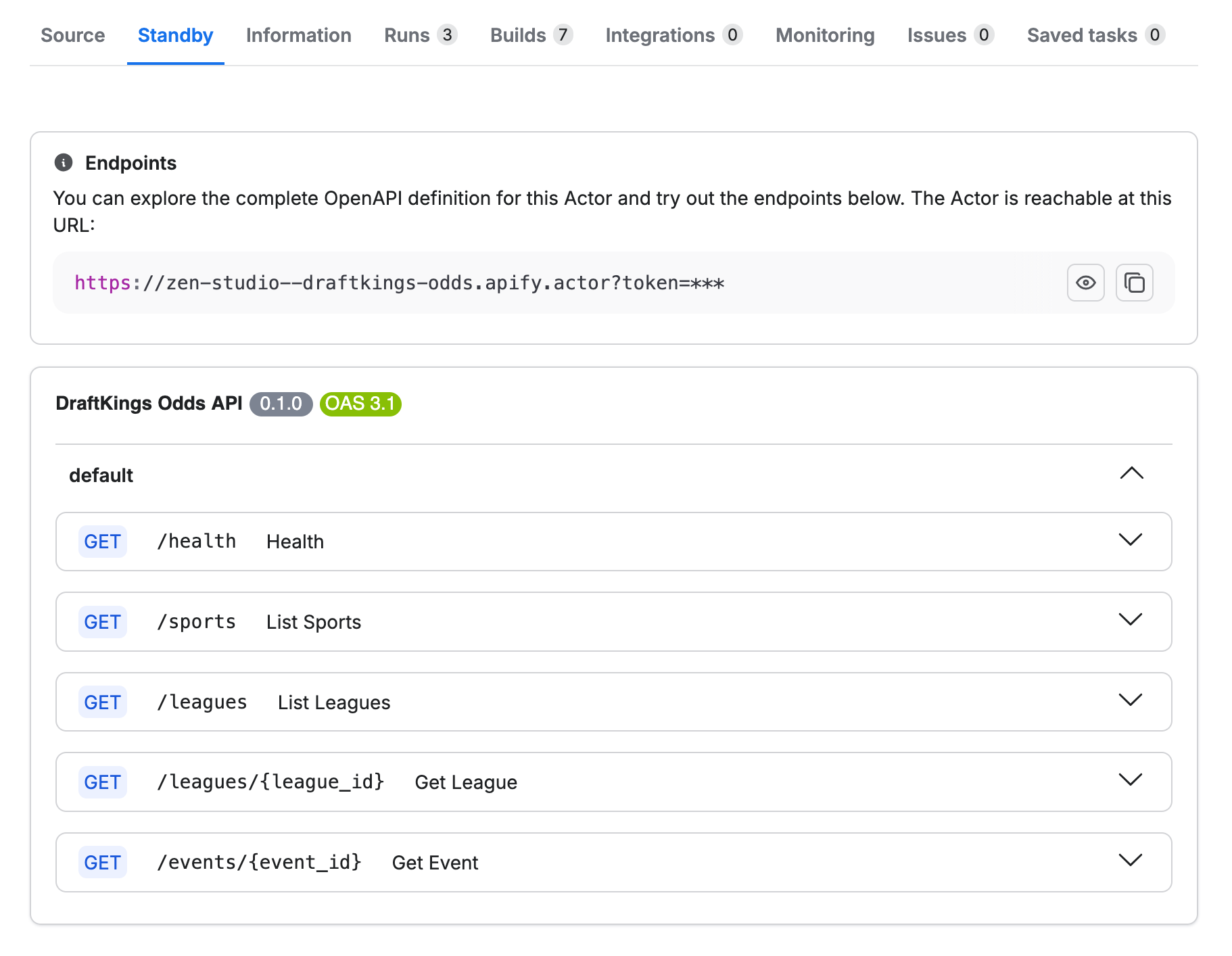
Five endpoints, all GET. `/health` and `/sports` are free, the rest cost $0.003 per request.

<a href="https://console.apify.com/organization/NWYsOG96fMDy8ycdf/actors/W8rOXiLSj8wrgF96k/standby"><img src="https://iili.io/qtfu35N.png" width="840" alt="DraftKings odds API endpoints — real-time REST API with OpenAPI spec"/></a>

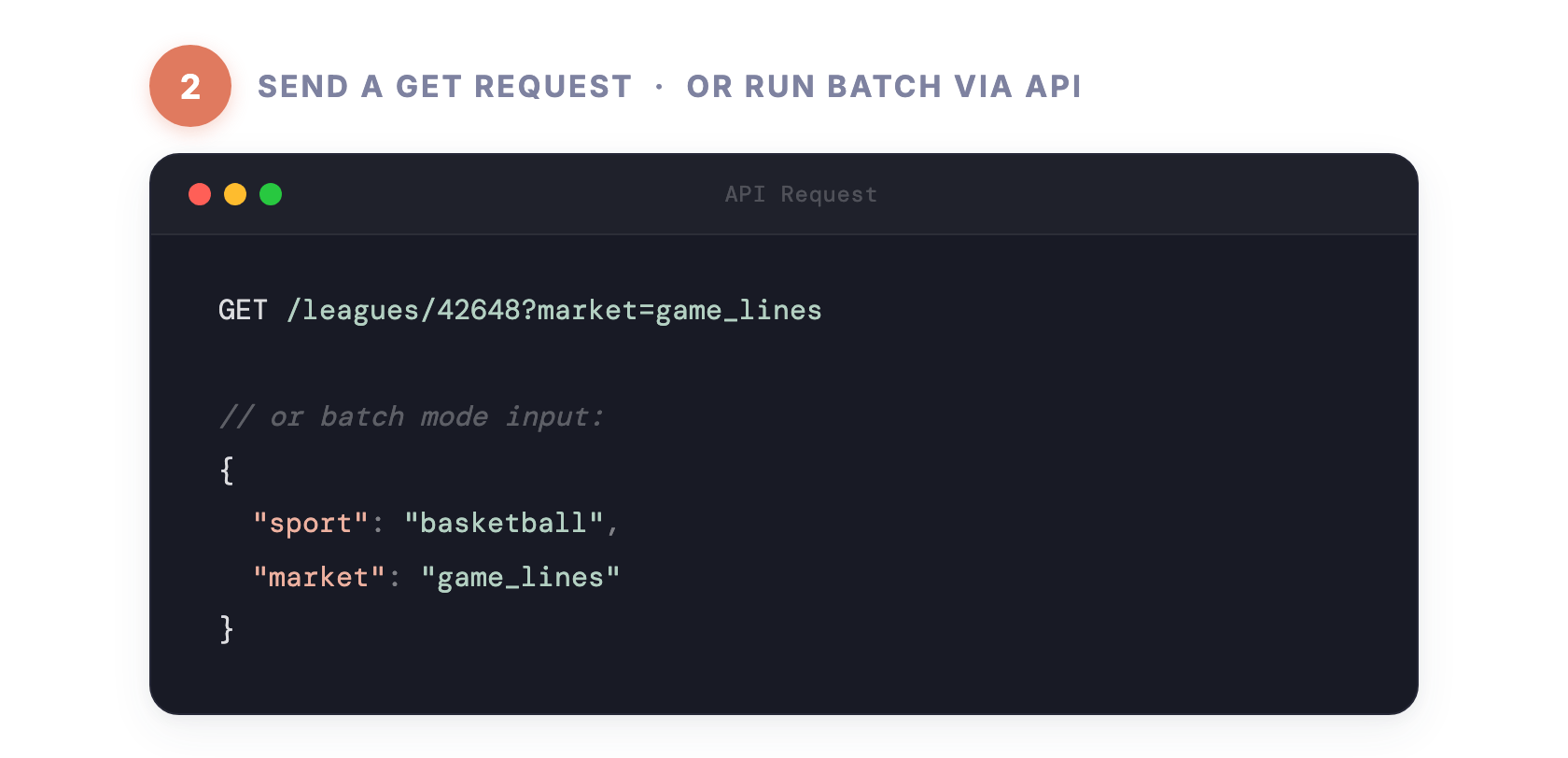
The `market` parameter controls what you get back: **game_lines** (spread, moneyline, total), **player_props** (points, rebounds, assists, combos, H2H), **futures** (championship, MVP, division winners), or **all** for everything.

### Pricing — Pay Per Event (PPE)

**$0.003 per request.** `/health` and `/sports` are free. No monthly fee, no minimum.

### DraftKings Odds JSON Output

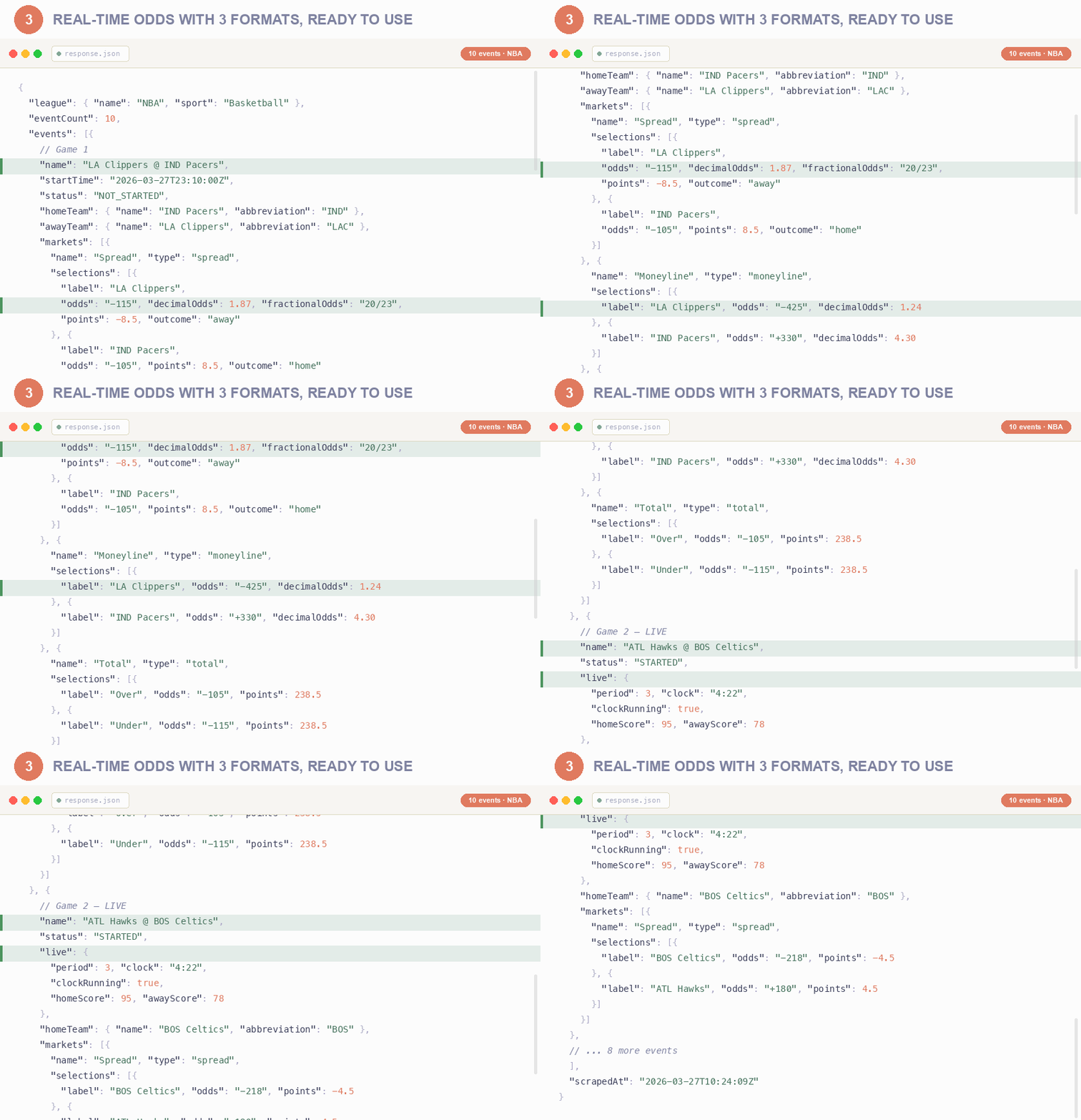
Every response returns the full odds structure below. Real NBA game lines example:

```json
{
  "success": true,
  "league": {
    "id": "42648",
    "name": "NBA",
    "sport": "Basketball",
    "sportId": "2"
  },
  "eventCount": 8,
  "events": [
    {
      "id": "33841191",
      "name": "OKC Thunder @ WAS Wizards",
      "startTime": "2026-03-21T21:10:00Z",
      "status": "NOT_STARTED",
      "homeTeam": {
        "id": "32962",
        "name": "WAS Wizards",
        "abbreviation": "WAS"
      },
      "awayTeam": {
        "id": "32942",
        "name": "OKC Thunder",
        "abbreviation": "OKC"
      },
      "markets": [
        {
          "name": "Spread",
          "type": "spread",
          "isMain": true,
          "selections": [
            {
              "label": "WAS Wizards",
              "odds": "+1400",
              "decimalOdds": 15.0,
              "fractionalOdds": "14/1",
              "points": 14.5,
              "outcome": "home"
            },
            {
              "label": "OKC Thunder",
              "odds": "-2800",
              "decimalOdds": 1.04,
              "fractionalOdds": "1/28",
              "points": -14.5,
              "outcome": "away"
            }
          ]
        },
        {
          "name": "Moneyline",
          "type": "moneyline",
          "isMain": true,
          "selections": [
            {
              "label": "WAS Wizards",
              "odds": "+1200",
              "decimalOdds": 13.0,
              "outcome": "home"
            },
            {
              "label": "OKC Thunder",
              "odds": "-2500",
              "decimalOdds": 1.04,
              "outcome": "away"
            }
          ]
        },
        {
          "name": "Total",
          "type": "total",
          "isMain": true,
          "selections": [
            {
              "label": "Over",
              "odds": "-110",
              "decimalOdds": 1.91,
              "points": 226.5,
              "outcome": "over"
            },
            {
              "label": "Under",
              "odds": "-110",
              "decimalOdds": 1.91,
              "points": 226.5,
              "outcome": "under"
            }
          ]
        }
      ]
    }
  ],
  "scrapedAt": "2026-03-21T14:30:00Z"
}
````

#### DraftKings Live In-Play Odds

When a game is in progress, each event includes live scoring data:

```json
{
  "id": "33841191",
  "name": "OKC Thunder @ WAS Wizards",
  "status": "STARTED",
  "live": {
    "period": 3,
    "clock": "04:22",
    "clockRunning": true,
    "homeScore": 78,
    "awayScore": 95
  },
  "markets": [...]
}
```

#### DraftKings Player Props Data

```json
{
  "name": "Shai Gilgeous-Alexander Over/Under Points",
  "type": "other",
  "selections": [
    {
      "label": "Over",
      "odds": "-115",
      "decimalOdds": 1.87,
      "points": 30.5,
      "outcome": "over",
      "participant": {
        "id": "1234567",
        "name": "Shai Gilgeous-Alexander",
        "type": "Player"
      }
    }
  ]
}
```

### DraftKings League IDs

Common leagues for quick reference. Call `GET /leagues` for the full list.

| League | ID | Sport |
|--------|-----|-------|
| NBA | `42648` | Basketball |
| NFL | `88808` | Football |
| MLB | `84240` | Baseball |
| NHL | `42133` | Hockey |
| English Premier League | `40253` | Soccer |
| Champions League | `40685` | Soccer |
| La Liga | `40031` | Soccer |
| Bundesliga | `40481` | Soccer |
| Serie A | `40030` | Soccer |
| Ligue 1 | `40032` | Soccer |
| Formula 1 | `84896` | Motorsports |
| College Basketball | `92483` | Basketball |
| College Football | `87637` | Football |

### Scheduling

| Cadence | Best For |
|---------|----------|
| Once or twice daily | Daily odds snapshots, content creation |
| Every 1-4 hours | Line comparison, data collection |
| Every 30-60 seconds | Live odds dashboards, arbitrage detection |

### Data Export

Results are available in:

- **JSON** — structured nested data for programmatic use
- **CSV** — flattened rows (batch mode) for spreadsheets
- **Excel** — download from Apify Console

Export directly from Apify Console or via API.

### FAQ — DraftKings Odds Scraper

**How do I scrape DraftKings odds?**
Use the Standby mode endpoints. Send `GET /leagues/42648` to get NBA odds instantly. No setup, no login, no browser.

**What odds formats are available?**
American (+150, -110), decimal (2.50, 1.91), and fractional (3/2, 10/11). All three in every response.

**Does this include live in-play odds?**
Yes. When a game is in progress, the response includes live scores, game clock, current period, and updated odds.

**How often are odds updated?**
Odds reflect the current DraftKings state at the time of your request. For live games, query every 30-60 seconds.

**Do I need a DraftKings account?**
No. All data is publicly available. No login, cookies, or account required.

**Can I get odds for a single event?**
Yes. Use `GET /events/{id}?league={leagueId}&market=all` to get every market for one event.

**What's the difference between Standby and Batch mode?**
Standby is an always-on HTTP API for real-time queries. Batch runs on a schedule and exports all odds to a dataset.

**Can I track line movements?**
Schedule the actor to run periodically and compare odds values across runs using event and selection identifiers.

### Legal Compliance

This Actor extracts publicly available odds data from DraftKings. Users must ensure compliance with DraftKings terms of service and applicable data protection and gambling regulations.

***

[**Start Getting DraftKings Odds Now**](https://console.apify.com/actors/W8rOXiLSj8wrgF96k)

# Actor input Schema

## `sport` (type: `string`):

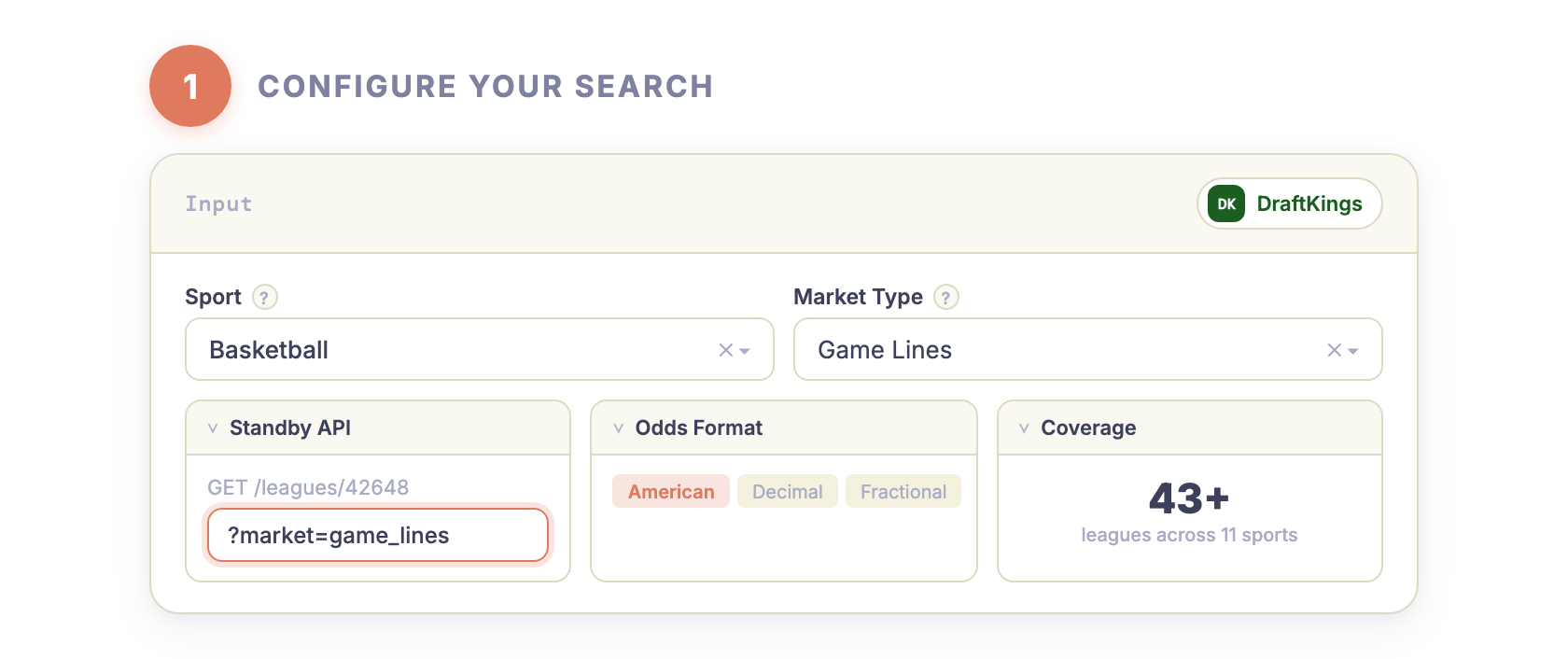
Pick a sport or fetch all leagues at once.<br><br><b>Basketball</b> — 3 leagues (NBA, College, ACB)<br><b>Soccer</b> — 20+ leagues (EPL, La Liga, Bundesliga, etc.)<br><b>Hockey</b> — 3 leagues (NHL, SM Liiga, College)<br><b>All Sports</b> — 43+ leagues across 11 sports (largest output)

## `market` (type: `string`):

Which betting markets to include.<br><br><b>Game Lines</b> — spread, moneyline, total. ~30 rows per league.<br><b>Player Props</b> — points, rebounds, assists, combos, H2H. Thousands of rows per league.<br><b>Futures</b> — championship, MVP, division winners.<br><b>All Markets</b> — everything combined. Use <code>maxResults</code> to control output size.

## `maxResults` (type: `integer`):

Cap the number of odds rows exported to the dataset. Keeps runs fast and predictable.<br><br>Set to <code>0</code> for unlimited. With <b>Game Lines</b>, 500 covers most sports comfortably. With <b>Player Props</b> or <b>All Markets</b>, you may want to increase this.

## Actor input object example

```json
{
  "sport": "basketball",
  "market": "game_lines",
  "maxResults": 500
}
```

# Actor output Schema

## `results` (type: `string`):

No description

# API

You can run this Actor programmatically using our API. Below are code examples in JavaScript, Python, and CLI, as well as the OpenAPI specification and MCP server setup.

## JavaScript example

```javascript
import { ApifyClient } from 'apify-client';

// Initialize the ApifyClient with your Apify API token
// Replace the '<YOUR_API_TOKEN>' with your token
const client = new ApifyClient({
    token: '<YOUR_API_TOKEN>',
});

// Prepare Actor input
const input = {};

// Run the Actor and wait for it to finish
const run = await client.actor("zen-studio/draftkings-odds").call(input);

// Fetch and print Actor results from the run's dataset (if any)
console.log('Results from dataset');
console.log(`💾 Check your data here: https://console.apify.com/storage/datasets/${run.defaultDatasetId}`);
const { items } = await client.dataset(run.defaultDatasetId).listItems();
items.forEach((item) => {
    console.dir(item);
});

// 📚 Want to learn more 📖? Go to → https://docs.apify.com/api/client/js/docs

```

## Python example

```python
from apify_client import ApifyClient

# Initialize the ApifyClient with your Apify API token
# Replace '<YOUR_API_TOKEN>' with your token.
client = ApifyClient("<YOUR_API_TOKEN>")

# Prepare the Actor input
run_input = {}

# Run the Actor and wait for it to finish
run = client.actor("zen-studio/draftkings-odds").call(run_input=run_input)

# Fetch and print Actor results from the run's dataset (if there are any)
print("💾 Check your data here: https://console.apify.com/storage/datasets/" + run["defaultDatasetId"])
for item in client.dataset(run["defaultDatasetId"]).iterate_items():
    print(item)

# 📚 Want to learn more 📖? Go to → https://docs.apify.com/api/client/python/docs/quick-start

```

## CLI example

```bash
echo '{}' |
apify call zen-studio/draftkings-odds --silent --output-dataset

```

## MCP server setup

```json
{
    "mcpServers": {
        "apify": {
            "command": "npx",
            "args": [
                "mcp-remote",
                "https://mcp.apify.com/?tools=zen-studio/draftkings-odds",
                "--header",
                "Authorization: Bearer <YOUR_API_TOKEN>"
            ]
        }
    }
}

```

## OpenAPI specification

```json
{
    "openapi": "3.0.1",
    "info": {
        "title": "DraftKings Odds API - Real-Time Lines & Player Props",
        "description": "Extract real-time DraftKings sportsbook odds for 11 sports and 43+ leagues. Get spreads, moneylines, totals, player props, and futures in 3 odds formats. Always-on HTTP API. Live in-play odds with scores. NBA, NFL, MLB, NHL, EPL, and more. No login required.",
        "version": "0.0",
        "x-build-id": "o2IgacqPklvJ61COI"
    },
    "servers": [
        {
            "url": "https://api.apify.com/v2"
        }
    ],
    "paths": {
        "/acts/zen-studio~draftkings-odds/run-sync-get-dataset-items": {
            "post": {
                "operationId": "run-sync-get-dataset-items-zen-studio-draftkings-odds",
                "x-openai-isConsequential": false,
                "summary": "Executes an Actor, waits for its completion, and returns Actor's dataset items in response.",
                "tags": [
                    "Run Actor"
                ],
                "requestBody": {
                    "required": true,
                    "content": {
                        "application/json": {
                            "schema": {
                                "$ref": "#/components/schemas/inputSchema"
                            }
                        }
                    }
                },
                "parameters": [
                    {
                        "name": "token",
                        "in": "query",
                        "required": true,
                        "schema": {
                            "type": "string"
                        },
                        "description": "Enter your Apify token here"
                    }
                ],
                "responses": {
                    "200": {
                        "description": "OK"
                    }
                }
            }
        },
        "/acts/zen-studio~draftkings-odds/runs": {
            "post": {
                "operationId": "runs-sync-zen-studio-draftkings-odds",
                "x-openai-isConsequential": false,
                "summary": "Executes an Actor and returns information about the initiated run in response.",
                "tags": [
                    "Run Actor"
                ],
                "requestBody": {
                    "required": true,
                    "content": {
                        "application/json": {
                            "schema": {
                                "$ref": "#/components/schemas/inputSchema"
                            }
                        }
                    }
                },
                "parameters": [
                    {
                        "name": "token",
                        "in": "query",
                        "required": true,
                        "schema": {
                            "type": "string"
                        },
                        "description": "Enter your Apify token here"
                    }
                ],
                "responses": {
                    "200": {
                        "description": "OK",
                        "content": {
                            "application/json": {
                                "schema": {
                                    "$ref": "#/components/schemas/runsResponseSchema"
                                }
                            }
                        }
                    }
                }
            }
        },
        "/acts/zen-studio~draftkings-odds/run-sync": {
            "post": {
                "operationId": "run-sync-zen-studio-draftkings-odds",
                "x-openai-isConsequential": false,
                "summary": "Executes an Actor, waits for completion, and returns the OUTPUT from Key-value store in response.",
                "tags": [
                    "Run Actor"
                ],
                "requestBody": {
                    "required": true,
                    "content": {
                        "application/json": {
                            "schema": {
                                "$ref": "#/components/schemas/inputSchema"
                            }
                        }
                    }
                },
                "parameters": [
                    {
                        "name": "token",
                        "in": "query",
                        "required": true,
                        "schema": {
                            "type": "string"
                        },
                        "description": "Enter your Apify token here"
                    }
                ],
                "responses": {
                    "200": {
                        "description": "OK"
                    }
                }
            }
        }
    },
    "components": {
        "schemas": {
            "inputSchema": {
                "type": "object",
                "properties": {
                    "sport": {
                        "title": "Sport",
                        "enum": [
                            "ALL",
                            "basketball",
                            "football",
                            "baseball",
                            "hockey",
                            "soccer",
                            "tennis",
                            "golf",
                            "cricket",
                            "motorsports",
                            "rugby",
                            "snooker"
                        ],
                        "type": "string",
                        "description": "Pick a sport or fetch all leagues at once.<br><br><b>Basketball</b> — 3 leagues (NBA, College, ACB)<br><b>Soccer</b> — 20+ leagues (EPL, La Liga, Bundesliga, etc.)<br><b>Hockey</b> — 3 leagues (NHL, SM Liiga, College)<br><b>All Sports</b> — 43+ leagues across 11 sports (largest output)",
                        "default": "basketball"
                    },
                    "market": {
                        "title": "Market Type",
                        "enum": [
                            "game_lines",
                            "player_props",
                            "futures",
                            "all"
                        ],
                        "type": "string",
                        "description": "Which betting markets to include.<br><br><b>Game Lines</b> — spread, moneyline, total. ~30 rows per league.<br><b>Player Props</b> — points, rebounds, assists, combos, H2H. Thousands of rows per league.<br><b>Futures</b> — championship, MVP, division winners.<br><b>All Markets</b> — everything combined. Use <code>maxResults</code> to control output size.",
                        "default": "game_lines"
                    },
                    "maxResults": {
                        "title": "Max Results",
                        "minimum": 0,
                        "type": "integer",
                        "description": "Cap the number of odds rows exported to the dataset. Keeps runs fast and predictable.<br><br>Set to <code>0</code> for unlimited. With <b>Game Lines</b>, 500 covers most sports comfortably. With <b>Player Props</b> or <b>All Markets</b>, you may want to increase this.",
                        "default": 500
                    }
                }
            },
            "runsResponseSchema": {
                "type": "object",
                "properties": {
                    "data": {
                        "type": "object",
                        "properties": {
                            "id": {
                                "type": "string"
                            },
                            "actId": {
                                "type": "string"
                            },
                            "userId": {
                                "type": "string"
                            },
                            "startedAt": {
                                "type": "string",
                                "format": "date-time",
                                "example": "2025-01-08T00:00:00.000Z"
                            },
                            "finishedAt": {
                                "type": "string",
                                "format": "date-time",
                                "example": "2025-01-08T00:00:00.000Z"
                            },
                            "status": {
                                "type": "string",
                                "example": "READY"
                            },
                            "meta": {
                                "type": "object",
                                "properties": {
                                    "origin": {
                                        "type": "string",
                                        "example": "API"
                                    },
                                    "userAgent": {
                                        "type": "string"
                                    }
                                }
                            },
                            "stats": {
                                "type": "object",
                                "properties": {
                                    "inputBodyLen": {
                                        "type": "integer",
                                        "example": 2000
                                    },
                                    "rebootCount": {
                                        "type": "integer",
                                        "example": 0
                                    },
                                    "restartCount": {
                                        "type": "integer",
                                        "example": 0
                                    },
                                    "resurrectCount": {
                                        "type": "integer",
                                        "example": 0
                                    },
                                    "computeUnits": {
                                        "type": "integer",
                                        "example": 0
                                    }
                                }
                            },
                            "options": {
                                "type": "object",
                                "properties": {
                                    "build": {
                                        "type": "string",
                                        "example": "latest"
                                    },
                                    "timeoutSecs": {
                                        "type": "integer",
                                        "example": 300
                                    },
                                    "memoryMbytes": {
                                        "type": "integer",
                                        "example": 1024
                                    },
                                    "diskMbytes": {
                                        "type": "integer",
                                        "example": 2048
                                    }
                                }
                            },
                            "buildId": {
                                "type": "string"
                            },
                            "defaultKeyValueStoreId": {
                                "type": "string"
                            },
                            "defaultDatasetId": {
                                "type": "string"
                            },
                            "defaultRequestQueueId": {
                                "type": "string"
                            },
                            "buildNumber": {
                                "type": "string",
                                "example": "1.0.0"
                            },
                            "containerUrl": {
                                "type": "string"
                            },
                            "usage": {
                                "type": "object",
                                "properties": {
                                    "ACTOR_COMPUTE_UNITS": {
                                        "type": "integer",
                                        "example": 0
                                    },
                                    "DATASET_READS": {
                                        "type": "integer",
                                        "example": 0
                                    },
                                    "DATASET_WRITES": {
                                        "type": "integer",
                                        "example": 0
                                    },
                                    "KEY_VALUE_STORE_READS": {
                                        "type": "integer",
                                        "example": 0
                                    },
                                    "KEY_VALUE_STORE_WRITES": {
                                        "type": "integer",
                                        "example": 1
                                    },
                                    "KEY_VALUE_STORE_LISTS": {
                                        "type": "integer",
                                        "example": 0
                                    },
                                    "REQUEST_QUEUE_READS": {
                                        "type": "integer",
                                        "example": 0
                                    },
                                    "REQUEST_QUEUE_WRITES": {
                                        "type": "integer",
                                        "example": 0
                                    },
                                    "DATA_TRANSFER_INTERNAL_GBYTES": {
                                        "type": "integer",
                                        "example": 0
                                    },
                                    "DATA_TRANSFER_EXTERNAL_GBYTES": {
                                        "type": "integer",
                                        "example": 0
                                    },
                                    "PROXY_RESIDENTIAL_TRANSFER_GBYTES": {
                                        "type": "integer",
                                        "example": 0
                                    },
                                    "PROXY_SERPS": {
                                        "type": "integer",
                                        "example": 0
                                    }
                                }
                            },
                            "usageTotalUsd": {
                                "type": "number",
                                "example": 0.00005
                            },
                            "usageUsd": {
                                "type": "object",
                                "properties": {
                                    "ACTOR_COMPUTE_UNITS": {
                                        "type": "integer",
                                        "example": 0
                                    },
                                    "DATASET_READS": {
                                        "type": "integer",
                                        "example": 0
                                    },
                                    "DATASET_WRITES": {
                                        "type": "integer",
                                        "example": 0
                                    },
                                    "KEY_VALUE_STORE_READS": {
                                        "type": "integer",
                                        "example": 0
                                    },
                                    "KEY_VALUE_STORE_WRITES": {
                                        "type": "number",
                                        "example": 0.00005
                                    },
                                    "KEY_VALUE_STORE_LISTS": {
                                        "type": "integer",
                                        "example": 0
                                    },
                                    "REQUEST_QUEUE_READS": {
                                        "type": "integer",
                                        "example": 0
                                    },
                                    "REQUEST_QUEUE_WRITES": {
                                        "type": "integer",
                                        "example": 0
                                    },
                                    "DATA_TRANSFER_INTERNAL_GBYTES": {
                                        "type": "integer",
                                        "example": 0
                                    },
                                    "DATA_TRANSFER_EXTERNAL_GBYTES": {
                                        "type": "integer",
                                        "example": 0
                                    },
                                    "PROXY_RESIDENTIAL_TRANSFER_GBYTES": {
                                        "type": "integer",
                                        "example": 0
                                    },
                                    "PROXY_SERPS": {
                                        "type": "integer",
                                        "example": 0
                                    }
                                }
                            }
                        }
                    }
                }
            }
        }
    }
}
```