# JD.com Distressed Asset Scraper - NPL Debt & Collateral Data (`zen-studio/jd-com-distressed-asset-scraper`) Actor

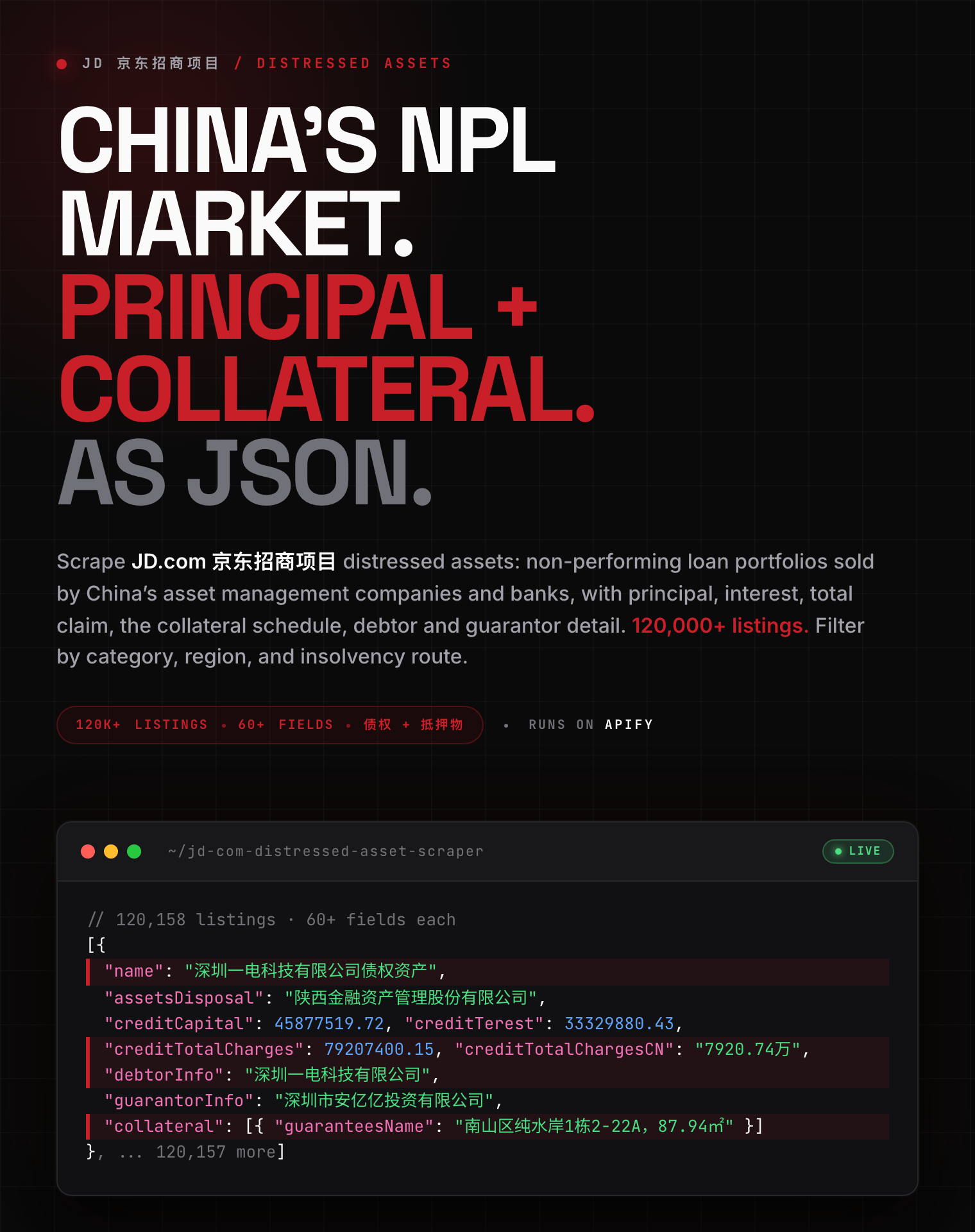
Extract distressed asset and non-performing loan listings from JD.com 京东招商项目: principal, interest, total claim, collateral schedule, debtor and guarantor detail. Filter by category, province, and insolvency route. 120,000+ listings from Chinese AMCs and banks. Export JSON, CSV, Excel.

- **URL**: https://apify.com/zen-studio/jd-com-distressed-asset-scraper.md
- **Developed by:** [Zen Studio](https://apify.com/zen-studio) (community)
- **Categories:** E-commerce
- **Stats:** 2 total users, 1 monthly users, 100.0% runs succeeded, 0 bookmarks
- **User rating**: No ratings yet

## Pricing

from $3.79 / 1,000 listing results

This Actor is paid per event. You are not charged for the Apify platform usage, but only a fixed price for specific events.
Since this Actor supports Apify Store discounts, the price gets lower the higher subscription plan you have.

Learn more: https://docs.apify.com/platform/actors/running/actors-in-store#pay-per-event

## What's an Apify Actor?

Actors are web data automations that power AI and operations. They run on the Apify platform to scrape websites, process data, connect APIs, and automate workflows.
In Batch mode, an Actor accepts a well-defined JSON input, performs an action which can take anything from a few seconds to a few hours,
and optionally produces a well-defined JSON output, datasets with results, or files in key-value store.
In Standby mode, an Actor provides a web server which can be used as a website, API, or an MCP server.
Actors are written with capital "A".

## How to integrate an Actor?

If asked about integration, you help developers integrate Actors into their projects.
You adapt to their stack and deliver integrations that are safe, well-documented, and production-ready.
The best way to integrate Actors is as follows.

- **AI agents and MCP clients** — the [Apify MCP server](https://docs.apify.com/integrations/mcp.md) at `https://mcp.apify.com` (remote, streamable HTTP, OAuth on first use).
- **Agentic workflows and local Actor development** — [Agent Skills](https://apify.com/.well-known/agent-skills/index.json) with the [Apify CLI](https://docs.apify.com/cli/docs.md): `npm install -g apify-cli`, then `apify login`.
- **JavaScript/TypeScript projects** — the official [JS/TS client](https://docs.apify.com/api/client/js/docs.md): `npm install apify-client`.
- **Python projects** — the official [Python client](https://docs.apify.com/api/client/python/docs.md): `pip install apify-client`.
- **Any other language** — the [REST API](https://docs.apify.com/api/v2.md).

For usage examples, see the [API](#api) section below.

For more details, see Apify documentation as [Markdown index](https://docs.apify.com/llms.txt) and [Markdown full-text](https://docs.apify.com/llms-full.txt).

# README

## JD.com Distressed Asset Scraper 京东招商项目 | NPL Portfolios, Collateral & Debtor Data (2026)

<blockquote style="border-left:4px solid #C91F28;background:#FEF2F2;padding:12px 16px;margin:12px 0">
<strong style="color:#1C1917">Scrape JD.com 京东招商项目, China's largest online marketplace for non-performing loan portfolios: principal 本金, interest 利息, total claim 债权总额, the collateral schedule, and named debtors and guarantors.</strong><br>
<span style="color:#555">120,000+ listings from 中国长城资产, 中国信达, provincial asset management companies and banks. Export to JSON, CSV, or Excel.</span>
</blockquote>

<a href="https://console.apify.com/actors/unlLOdNfp8ATupyR9/input"><img src="https://api.apify.com/v2/key-value-stores/pJ7iaZsTFhR3k9tjV/records/jd-com-distressed-asset-scraper-hero.png" alt="JD.com 京东招商项目 distressed asset scraper: NPL portfolio principal, interest, total claim, collateral schedule, debtor and guarantor data as structured JSON" style="max-width:100%"></a>

<table>
<tr>
<td colspan="4" style="padding:10px 14px;background:#C91F28;border:none;border-radius:4px 4px 0 0">
<span style="color:#FFFFFF;font-size:14px;font-weight:700;letter-spacing:0.5px">Zen Studio China Assets</span>
<span style="color:#FEE2E2;font-size:13px">&nbsp;&nbsp;&bull;&nbsp;&nbsp;Distressed assets, judicial auctions and marketplace data from JD and Taobao</span>
</td>
</tr>
<tr>
<td style="padding:12px 16px;border:1px solid #E7E5E4;border-radius:0 0 0 4px;background:#FEE2E2;border-right:none;border-top:none;vertical-align:top;width:25%">
<img src="https://apify-image-uploads-prod.s3.us-east-1.amazonaws.com/NWYsOG96fMDy8ycdf-actor-uZy6tbKLKnSVtT4BN-emXnT123uR-jd-com-scraper-logo-square.png" width="24" height="24" style="vertical-align:middle"> &nbsp;<a href="https://apify.com/zen-studio/jd-com-distressed-asset-scraper" style="color:#C91F28;text-decoration:none;font-weight:700;font-size:14px">JD Distressed 招商项目</a><br>
<span style="color:#C91F28;font-size:12px;font-weight:600">&#10148; You are here</span>
</td>
<td style="padding:12px 16px;border:1px solid #E7E5E4;background:#FEF2F2;border-right:none;border-top:none;vertical-align:top;width:25%">
<img src="https://apify-image-uploads-prod.s3.us-east-1.amazonaws.com/NWYsOG96fMDy8ycdf-actor-uZy6tbKLKnSVtT4BN-emXnT123uR-jd-com-scraper-logo-square.png" width="24" height="24" style="vertical-align:middle"> &nbsp;<a href="https://apify.com/zen-studio/jd-com-auction-scraper" style="color:#1C1917;text-decoration:none;font-weight:700;font-size:14px">JD Auction 京东拍卖</a><br>
<span style="color:#78716C;font-size:12px">Judicial lots + 成交价</span>
</td>
<td style="padding:12px 16px;border:1px solid #E7E5E4;background:#FEF2F2;border-right:none;border-top:none;vertical-align:top;width:25%">
<img src="https://apify-image-uploads-prod.s3.us-east-1.amazonaws.com/NWYsOG96fMDy8ycdf-actor-8iQPEMryER2Nldfen-vgv7NeG1LN-____-scraper-logo.png" width="24" height="24" style="vertical-align:middle"> &nbsp;<a href="https://apify.com/zen-studio/taobao-judicial-auction-scraper" style="color:#1C1917;text-decoration:none;font-weight:700;font-size:14px">Ali Auction 阿里拍卖</a><br>
<span style="color:#78716C;font-size:12px">Taobao judicial auctions</span>
</td>
<td style="padding:12px 16px;border:1px solid #E7E5E4;border-radius:0 0 4px 0;background:#FEF2F2;border-top:none;vertical-align:top;width:25%">
<img src="https://apify-image-uploads-prod.s3.us-east-1.amazonaws.com/NWYsOG96fMDy8ycdf-actor-uZy6tbKLKnSVtT4BN-emXnT123uR-jd-com-scraper-logo-square.png" width="24" height="24" style="vertical-align:middle"> &nbsp;<a href="https://apify.com/zen-studio/jd-com-search-scraper" style="color:#1C1917;text-decoration:none;font-weight:700;font-size:14px">JD Search 京东</a><br>
<span style="color:#78716C;font-size:12px">Products, prices, reviews</span>
</td>
</tr>
</table>

#### Copy to your AI assistant

```text
zen-studio/jd-com-distressed-asset-scraper on Apify. Scrapes JD.com 京东招商项目 distressed assets and non-performing loan portfolios with principal, interest, total claim 债权总额, the collateral schedule with geo coordinates, and named debtors and guarantors. Call ApifyClient("TOKEN").actor("zen-studio/jd-com-distressed-asset-scraper").call(run_input={...}), then client.dataset(run["defaultDatasetId"]).list_items().items. mode="incremental" returns only listings added since your last run. city takes a numeric cityId from the enum, not a name. Full spec: GET https://api.apify.com/v2/acts/zen-studio~jd-com-distressed-asset-scraper/builds/default (Bearer TOKEN) → inputSchema, actorDefinition.storages.dataset, readme. Token: https://console.apify.com/account/integrations
```

### Key Features

- **80 fields per listing**: principal 本金, interest 利息, other charges and total claim 债权总额, each as a number and in JD's own 万 notation, plus the disposing institution, 意向人数 interest count, and reference price bounds.
- **The collateral, itemised**: every pledged property with its category, province, city, district, community and geo coordinates. About one listing in three carries it.
- **Who owes it**: debtor 债务人 and guarantor 保证人 named on the listing, alongside the full project description and, on insolvency listings, the court case number.
- **The loan schedules themselves**: 债权清单 spreadsheets, announcements and court papers saved into your run storage. Roughly one listing in twenty has one.
- **Only what is new**: incremental mode returns listings added since your last run, about 95 a day, so a daily schedule never re-delivers rows you already paid for.
- **Filter without Chinese**: asset category, 34 provinces and 457 searchable cities, and the insolvency route (重整 restructuring, 破产清算 liquidation, 预重整).
- **Lossless output**: named fields for everything worth naming, and the complete source record under `detailRaw`, so nothing is dropped.
- **Free tier**: 5 runs, 20 listings per run.

### How to Scrape JD.com 京东招商项目 Distressed Assets

1. Open the **JD.com Distressed Asset Scraper** and click **Try for free**.
2. Leave the defaults, or type a keyword such as `债权` in the Input tab.
3. Optionally narrow by category (Debt 债权 is the largest), province, or insolvency route.
4. Click **Start** and wait for the run to finish.
5. Open the **Output** tab and export as JSON, CSV, or Excel.

#### Track only new listings

Set **Mode** to *New listings only*. The first run collects the most recent listings and remembers where it stopped; every run after that returns only what appeared since. Around 95 new listings are added per day, so pair it with a **daily schedule** and the actor never re-delivers rows you already paid for.

```json
{ "mode": "incremental", "maxItems": 200 }
```

Connect the output to **Google Sheets**, **Make**, **Zapier**, or a **webhook** from the Integrations tab to push new portfolios straight into your deal pipeline. See [Apify's scheduling docs](https://docs.apify.com/platform/schedules) to set the cadence.

### Input Parameters

Everything is optional. Configure it in the **Input** tab.

| Input | What it does |
|---|---|
| `searchKeyword` | Free text, e.g. `债权`, `重整`, or an institution name like `长城` |
| `mode` | *Search* or *New listings only* (incremental) |
| `category` | Asset category. Debt 债权 is by far the largest; property, land and equity also appear |
| `investmentType` | Insolvency route: 重整 · 共益债 · 破产清算 · 强制清算 · 预重整. Pick several to combine |
| `province` / `city` | Location, by name or from the city list |
| `sort` | Newest, most interested parties, or reference value |
| `enrichDetail` | Full record per listing. On by default |
| `downloadAttachments` | Save documents into run storage. Off by default |
| `includeTestRows` | Include the handful of placeholder listings the source leaves in its live data |
| `maxItems` | Up to 5,000 per run |
| `maxPages` | Optional hard stop on how deep a search goes. Leave blank for automatic |
| `sinceId` | Advanced. In *New listings only* mode, start after this listing number instead of the position the Actor stored for you |

```json
{
  "searchKeyword": "债权",
  "category": "debt",
  "province": "广东",
  "investmentType": ["restructuring"],
  "maxItems": 100
}
```

### What Data Can You Extract from JD.com 京东招商项目?

Every field the source exposes. `detailRaw` carries the complete untouched record, so nothing is lost even where this Actor does not promote it to a named column.

#### Output Example

One real listing, complete. Only the `attachments` array is trimmed (2 of 5 shown, all the same shape) and `detailRaw` is collapsed, since it repeats the fields above verbatim. Guarantor names are masked here for the docs; the Actor returns them as published.

```json
{
  "announcementPubDate": 1784692684000,
  "assetType": 1033,
  "assetsDisposal": "苏州资产管理有限公司",
  "auctionType": 4,
  "baseDate": 1717084800000,
  "categoryId": 12767,
  "categoryName": "债权",
  "consultTel": "",
  "consultant": "",
  "creditCapital": 17650000,
  "creditCapitalAndTerest": 23393300,
  "creditCapitalAndTerestCN": "2339.33万",
  "creditCapitalAndTerestStr": "23,393,300",
  "creditCapitalCN": "1765万",
  "creditCapitalStr": "17,650,000",
  "creditOtherCharges": 286400,
  "creditTerest": 5743300,
  "creditTerestCN": "574.33万",
  "creditTerestStr": "5,743,300",
  "creditTotalCharges": 23679700,
  "creditTotalChargesCN": "2367.97万",
  "creditTotalChargesString": "23679700",
  "guarantyStyle": "无",
  "guarantyStyleType": [
    3,
    1
  ],
  "intendedPersonNum": "0",
  "investmentTypeDesc": "金融资产",
  "labelType": [
    1033,
    1076
  ],
  "mainImgUrl": "jfs/t1/486363/36/3134/75644/6a603fc1F071f6555/00832ee1cc9b9ad9.png",
  "merchantsStatus": 1,
  "name": "关于江苏盛业建设集团有限公司的债权",
  "onlookersNum": "592",
  "pawnCategoryName": [
    "债权"
  ],
  "pawnLocation": [
    "江苏省,徐州市"
  ],
  "publishTime": 1782700274000,
  "referenceLowerLimit": 0,
  "referenceLowerLimitCN": "0",
  "referenceLowerLimitStr": "0",
  "referenceLowerLimitString": "0",
  "referenceUpperLimit": 0,
  "referenceUpperLimitCN": "0",
  "referenceUpperLimitStr": "0",
  "referenceUpperLimitString": "0",
  "shopDisplay": 1,
  "templateType": 1,
  "twoCategoryId": 12680,
  "vendorId": 12326864,
  "vendorName": "苏州资产管理有限公司",
  "listingId": 167832,
  "detailUrl": "https://auction.jd.com/zichan/tuijie/item/167832",
  "attachments": [
    {
      "attachmentId": 517943,
      "attachmentJfsId": "1-17846926795166848.jpg",
      "attachmentName": "14b88bef-ec89-49c0-946f-a492b9a67946.jpg",
      "attachmentType": 1,
      "attachmentUrl": "9e80d70d4517c92c5e785e3ccad11481",
      "url": "https://storage.360buyimg.com/auction-treasure-1/1-17846926795166848.jpg",
      "isDocument": true
    },
    {
      "attachmentId": 517944,
      "attachmentJfsId": "1ilhc-81a7e0fd83-2n6",
      "attachmentName": "关于江苏盛业建设集团有限公司的债权图片0",
      "attachmentType": 3,
      "attachmentUrl": "jfs/t1/486363/36/3134/75644/6a603fc1F071f6555/00832ee1cc9b9ad9.png",
      "url": "https://img30.360buyimg.com/n1/jfs/t1/486363/36/3134/75644/6a603fc1F071f6555/00832ee1cc9b9ad9.png",
      "isDocument": false
    },
    "... 3 more attachments of the same shape"
  ],
  "mainImage": {
    "path": "jfs/t1/486363/36/3134/75644/6a603fc1F071f6555/00832ee1cc9b9ad9.png",
    "fullUrl": "https://img30.360buyimg.com/n1/jfs/t1/486363/36/3134/75644/6a603fc1F071f6555/00832ee1cc9b9ad9.png",
    "thumbUrl": "https://img30.360buyimg.com/n5/s56x56_jfs/t1/486363/36/3134/75644/6a603fc1F071f6555/00832ee1cc9b9ad9.png"
  },
  "mainVideo": [],
  "isTestRow": false,
  "address": null,
  "allotmentServiceList": [
    {
      "annualizedRate": 9,
      "annualizedRateLow": 7,
      "deadLine": 36,
      "modified": 1784626986000,
      "rateHigh": 70,
      "serviceId": "31801",
      "serviceName": "某国有金融资产管理公司",
      "servicePhone": "15628895306",
      "serviceShow": 1,
      "serviceUrl": "https://pro.m.jd.com/mall/active/wq6evEVLYG2AHtm8RmgKMpQqiRa/index.html"
    },
    {
      "annualizedRate": 12,
      "annualizedRateLow": 10,
      "deadLine": 24,
      "modified": 1770281860000,
      "rateHigh": 70,
      "serviceId": "30201",
      "serviceName": "江西兴资项目咨询有限公司",
      "servicePhone": "13970979818",
      "serviceShow": 1,
      "serviceUrl": "https://pro.m.jd.com/mall/active/41Ydn3SW7KceBricV6fpPAR7wzQm/index.html"
    }
  ],
  "allotmentServiceTel": "15628895306",
  "applyAllotmentService": false,
  "belongOrgDisplay": null,
  "belongOrgId": null,
  "caseId": null,
  "cityId": null,
  "countyId": null,
  "countyName": null,
  "endTime": null,
  "investmentType": null,
  "mainVideoUrl": null,
  "matchAllotmentService": true,
  "multiCateId": 5,
  "provinceId": null,
  "showType": 2,
  "submitted": false,
  "debtorInfo": "江苏盛业建设集团有限公司",
  "guarantorInfo": "徐州****有限公司、李**、李*",
  "detailHtml": "联系人:王经理\n<br> 联系电话:18795960798\n<br>",
  "collateral": [
    {
      "address": "七里沟七里沟",
      "description": "7#-106的3#-104室-107室、109-114室、5#-101、-103~110室，-112~-120室，7#-102~-106室等33套房产",
      "guaranteesCategoryId": 12767,
      "guaranteesCategoryName": "债权",
      "guaranteesCityId": 911,
      "guaranteesCityName": "徐州市",
      "guaranteesCommunityId": "541F8F6C3CEC7AEDCAFEFE58E9206D4DEAC5C3944B6E60395925C4B65D68BDF1CB88103B25DA6C1DF77F959BB8AB1D327C361F4B5F9CA8CA",
      "guaranteesCommunityName": "新泉路",
      "guaranteesCountyId": 23688,
      "guaranteesCountyName": "泉山区",
      "guaranteesLocationGeo": "34.22653384024806,117.2228343955482",
      "guaranteesName": "徐州汽配城有限责任公司名下位于徐州市七里沟汽配城",
      "guaranteesProvinceId": 12,
      "guaranteesProvinceName": "江苏省",
      "guaranteestId": 63650
    }
  ],
  "allotmentSummary": {
    "annualizedRateMax": 13,
    "annualizedRateMin": 7,
    "deadLineMax": 240,
    "rateMax": 70
  },
  "detailRaw": {
    "…": "the complete untouched source record, 56 keys, mirroring the fields above"
  },
  "_detailEnriched": true,
  "searchRank": 1,
  "scrapedAt": "2026-08-06T07:41:12Z"
}
```

Download the results as **JSON, CSV, Excel, or HTML**, or pull them from the Apify API.

### Advanced Usage

#### Daily monitor for one province

```json
{ "mode": "incremental", "province": "广东", "maxItems": 500 }
```

#### Restructuring and pre-restructuring opportunities

```json
{ "investmentType": ["restructuring", "pre_restructuring"], "maxItems": 300 }
```

#### Property-backed portfolios with the loan schedules attached

```json
{ "category": "residential", "downloadAttachments": true, "maxItems": 100 }
```

### Pricing

Pay per event. You are charged for what you actually receive.

| Event | Price per 1,000 |
|---|---|
| Listing result | **$4.99** |
| Detail enrichment | $2.99 |
| Document saved | $9.99 |

Detail enrichment is charged only when it succeeds. Document saving is off by default and charged per file; only about 1 listing in 20 has a document, so it rarely adds much. New Apify accounts get $5 of free platform credit to try it.

### FAQ

**Does JD.com have an API for this data?**
Not a public one. The site is built for browsers, has no documented developer interface for these listings, and returns results as rendered pages rather than structured records. This Actor gives you clean JSON with the loan economics already parsed and every source field preserved.

**Does this show what a portfolio actually sold for?**
No. The source publishes what is currently on offer, not completed transactions. There is no clearing price anywhere in this marketplace. If you need sale outcomes for court-auctioned property, use the [JD Auction Scraper](https://apify.com/zen-studio/jd-com-auction-scraper), where ended lots carry the hammer price 成交价.

**How much does it cost to scrape JD.com distressed assets?**
$4.99 per 1,000 listings, plus $2.99 per 1,000 detail enrichments if you keep enrichment on. A 1,000-listing run with full detail costs about $8.

**How many listings can one search return?**
Up to 5,000 per run, and the source itself stops serving any single search past 10,000 rows. To go deeper, narrow by province, category, or keyword and run each slice, or use *New listings only* mode on a schedule to accumulate the whole marketplace over time. A 300-listing run with full detail takes about half a minute.

**What is in the downloaded documents?**
Whatever the seller uploaded. Often a loan-by-loan schedule with debtor, principal, interest, collateral and litigation stage, but also announcements, court judgments, and scanned certificates. Formats vary, so they are delivered as files rather than parsed into columns.

**Why do some listings have almost no financial detail?**
Sellers fill in what they choose to. Reference price ranges in particular are populated on only a small share of listings. Fields that are empty at the source are returned empty rather than guessed at.

**Is the data ordered by date?**
Promoted listings appear first regardless of the sort you pick. Sort your export on `publishTime` if exact ordering matters.

**Can I schedule this and get alerts?**
Yes. Use *New listings only* mode with a daily schedule, then connect Slack, email, Google Sheets, Make, or a webhook from the Integrations tab.

**Something is broken or missing.**
Open an issue on the Actor's **Issues** tab with the run ID and the input you used. For a custom variant of this Actor, contact us through the Apify Store profile.

### More Zen Studio scrapers for Chinese platforms

**🛒 E-commerce & auctions**

- <img src="https://apify-image-uploads-prod.s3.us-east-1.amazonaws.com/NWYsOG96fMDy8ycdf-actor-uZy6tbKLKnSVtT4BN-emXnT123uR-jd-com-scraper-logo-square.png" width="16" height="16" style="vertical-align:middle;border-radius:3px"> **JD 京东**
  - [JD.com Search Scraper](https://apify.com/zen-studio/jd-com-search-scraper)
- <img src="https://apify-image-uploads-prod.s3.us-east-1.amazonaws.com/NWYsOG96fMDy8ycdf-actor-8iQPEMryER2Nldfen-vgv7NeG1LN-____-scraper-logo.png" width="16" height="16" style="vertical-align:middle;border-radius:3px"> **Ali 阿里拍卖 (judicial auctions)**
  - [Taobao Judicial Auction Scraper](https://apify.com/zen-studio/taobao-judicial-auction-scraper)
- <img src="https://apify-image-uploads-prod.s3.us-east-1.amazonaws.com/NWYsOG96fMDy8ycdf-actor-PsAKYWM55HG4AHXjK-ItywU7Bp0s-taobao-search-scraper-logo.png" width="16" height="16" style="vertical-align:middle;border-radius:3px"> **Taobao 淘宝**

  - [Taobao Search Scraper](https://apify.com/zen-studio/taobao-search-scraper)
  - [Taobao Product Detail Scraper](https://apify.com/zen-studio/taobao-detail-scraper)
  - [Taobao Seller Products Scraper](https://apify.com/zen-studio/taobao-seller-products-scraper)
- <img src="https://apify-image-uploads-prod.s3.us-east-1.amazonaws.com/NWYsOG96fMDy8ycdf-actor-ghXSMZcW3GxsCrkiR-5hnvsKv4Yt-1688-wholesale-scraper-logo.png" width="16" height="16" style="vertical-align:middle;border-radius:3px"> **1688 阿里巴巴**

  - [1688 Wholesale Scraper](https://apify.com/zen-studio/1688-wholesale-scraper)
- <img src="https://apify-image-uploads-prod.s3.us-east-1.amazonaws.com/NWYsOG96fMDy8ycdf-actor-5QcLc4BHaLMBUKYs3-f3CWQ60Row-goofish-search-scraper-logo.png" width="16" height="16" style="vertical-align:middle;border-radius:3px"> **Goofish 闲鱼**

  - [Goofish (Xianyu) Search Scraper](https://apify.com/zen-studio/goofish-xianyu-search-scraper)
  - [Goofish (Xianyu) Seller Scraper](https://apify.com/zen-studio/goofish-xianyu-seller-scraper)

**🏠 Real estate & autos**

- <img src="https://apify-image-uploads-prod.s3.us-east-1.amazonaws.com/NWYsOG96fMDy8ycdf-actor-1tAzNSf8Kz0v7Q2Lr-AINJ7FsZVU-anjuke-scraper-logo.jpg" width="16" height="16" style="vertical-align:middle;border-radius:3px"> **Anjuke 安居客**

  - [Anjuke For-Sale Listings Scraper](https://apify.com/zen-studio/anjuke-real-estate-scraper)
  - [Anjuke New-Home Scraper](https://apify.com/zen-studio/anjuke-new-home-scraper)
  - [Anjuke Rental Listings Scraper](https://apify.com/zen-studio/anjuke-rent-scraper)
  - [Anjuke Listing Detail Scraper](https://apify.com/zen-studio/anjuke-sale-detail-scraper)
- <img src="https://apify-image-uploads-prod.s3.us-east-1.amazonaws.com/NWYsOG96fMDy8ycdf-actor-32OkWqsiUywoq2ci3-7JhFlW1qg3-58__-real-estate-scraper-logo.jpg" width="16" height="16" style="vertical-align:middle;border-radius:3px"> **58.com 58同城**

  - [58.com Real Estate Scraper](https://apify.com/zen-studio/58-real-estate-scraper)
- <img src="https://apify-image-uploads-prod.s3.us-east-1.amazonaws.com/NWYsOG96fMDy8ycdf-actor-ytaE4YpSmjXDmibPv-L1UMPHa2bO-che168-autohome-scraper-logo.png" width="16" height="16" style="vertical-align:middle;border-radius:3px"> **Autohome 汽车之家**

  - [Autohome (Che168) Used-Car Scraper](https://apify.com/zen-studio/che168-car-scraper)

**🎬 Short-video & social**

- <img src="https://apify-image-uploads-prod.s3.us-east-1.amazonaws.com/NWYsOG96fMDy8ycdf-actor-3TJaaOJDU1AMiOoJM-Vu2eVr0P6N-douyin-profile-scraper-logo.png" width="16" height="16" style="vertical-align:middle;border-radius:3px"> **Douyin 抖音**

  - [Douyin Search Scraper](https://apify.com/zen-studio/douyin-search-scraper)
  - [Douyin Profile Scraper](https://apify.com/zen-studio/douyin-profile-scraper)
  - [Douyin Video Scraper](https://apify.com/zen-studio/douyin-video-scraper)
  - [Douyin Comments Scraper](https://apify.com/zen-studio/douyin-comments-scraper)
  - [Douyin Transcripts Scraper](https://apify.com/zen-studio/douyin-transcripts-scraper)
  - [Douyin Creator Rankings Scraper](https://apify.com/zen-studio/douyin-xingtu-rankings-scraper)
  - [Douyin Live Recorder](https://apify.com/zen-studio/douyin-live-recorder)
  - [Douyin Hot Search Scraper](https://apify.com/zen-studio/douyin-hot-search-scraper)
- <img src="https://apify-image-uploads-prod.s3.us-east-1.amazonaws.com/NWYsOG96fMDy8ycdf-actor-mHKEEgoDqr6btQQer-fUs5ZquIeN-xiaohongshu-search-scraper-logo-square.png" width="16" height="16" style="vertical-align:middle;border-radius:3px"> **RedNote 小红书**

  - [RedNote User Profile Scraper](https://apify.com/zen-studio/rednote-user-profile-scraper)
  - [RedNote Search Scraper](https://apify.com/zen-studio/rednote-search-scraper)
  - [RedNote Comments Scraper](https://apify.com/zen-studio/rednote-comments-scraper)
- <img src="https://apify-image-uploads-prod.s3.us-east-1.amazonaws.com/NWYsOG96fMDy8ycdf-actor-dexCSKEZtKS8hg4fT-lD4weyiYga-shigua-____-scraper-logo.jpg" width="16" height="16" style="vertical-align:middle;border-radius:3px"> **Xigua 西瓜视频**

  - [Xigua Video Search Scraper](https://apify.com/zen-studio/xigua-video-search-scraper)
  - [Xigua Video Detail Scraper](https://apify.com/zen-studio/xigua-video-detail-scraper)

**✈️ Travel & stays**

- <img src="https://apify-image-uploads-prod.s3.us-east-1.amazonaws.com/NWYsOG96fMDy8ycdf-actor-kF3YqhAJErv0QJSx1-cYCSbByQ5P-dolphin-logo-1000.png" width="16" height="16" style="vertical-align:middle;border-radius:3px"> **Ctrip 携程**

  - [Ctrip Hotel Prices Scraper](https://apify.com/zen-studio/ctrip-hotel-prices-scraper)

### Support

Found a bug, or need a field the Actor does not return yet? Open an issue on the **Issues** tab with the run ID and your input, and it gets looked at.

### Legal Compliance

This Actor collects listings that are published publicly on JD.com 京东招商项目, without logging in and without circumventing access controls. You are responsible for how you use the output.

**Personal data 个人信息.** Listings, collateral schedules, and attached documents can name individuals: debtors, guarantors, and their pledged property. This is published openly by the disposing institutions on a public marketplace, and this Actor returns it as found. You must have a lawful basis for processing it under PIPL, GDPR, and any other regime that applies to you, and you must honour data-subject rights. If you do not need personal data, turn off `downloadAttachments` and drop the `debtorInfo`, `guarantorInfo`, and `collateral` fields from your export.

***

*JD.com Distressed Asset Scraper — scrape 京东招商项目 non-performing loan portfolios, collateral schedules, debtor and guarantor data, and loan-schedule documents from China's largest online distressed asset marketplace.*

# Actor input Schema

## `searchKeyword` (type: `string`):

Optional keyword.<br><br>Examples:<br>• <code>债权</code> debt claim<br>• <code>长城</code> a disposing institution<br>• <code>重整</code> restructuring<br><br>Leave blank to return everything in the selected filters.

## `mode` (type: `string`):

<b>Search</b> returns listings matching your filters. <b>New listings only</b> returns just what appeared since your last run of this Actor, so a scheduled run never re-delivers what you already have.

## `category` (type: `string`):

Asset category. <b>Debt 债权</b> is by far the largest here. Property, land and equity also appear; this marketplace carries no consumer goods, so those categories are not offered.

## `investmentType` (type: `array`):

Optional. Restrict to insolvency routes such as <b>restructuring 重整</b> or <b>bankruptcy liquidation 破产清算</b>. Pick several to combine them.

## `province` (type: `string`):

Optional province to narrow by location, for example <code>广东</code>, <code>山东</code>, <code>浙江</code>. Combine with city and district to narrow further.

## `city` (type: `string`):

Pick a city (or a district for the municipalities 北京/上海/天津/重庆). Type the pinyin name to filter, for example <code>Shenzhen</code> or <code>Chaoyang</code>. When set, this narrows past Province on its own.

## `sort` (type: `string`):

Order the results. Note that promoted listings appear first regardless of the sort you choose, so sort your export on <code>publishTime</code> if exact ordering matters.

## `enrichDetail` (type: `boolean`):

Fetch the full record for each listing: debtor and guarantor detail, the collateral schedule, the full project description, and available financing terms. Billed per listing enriched.

## `downloadAttachments` (type: `boolean`):

Save attached documents (loan schedules 债权清单, announcements, court papers) into this run's storage and return their keys. Roughly 1 listing in 20 has one. Billed per file saved.

## `includeTestRows` (type: `boolean`):

A small number of placeholder listings sit in the live data. They are excluded by default; the run log reports how many were skipped.

## `sinceId` (type: `integer`):

Advanced, for <b>New listings only</b> mode. Return listings newer than this listing number instead of the automatically stored position. Leave blank for normal use.

## `maxItems` (type: `integer`):

Maximum listings to return.

## `maxPages` (type: `integer`):

Optional hard stop on pages fetched. Leave blank for automatic.

## Actor input object example

```json
{
  "mode": "search",
  "category": "all",
  "investmentType": [],
  "province": "",
  "city": "",
  "sort": "default",
  "enrichDetail": true,
  "downloadAttachments": false,
  "includeTestRows": false,
  "maxItems": 20
}
```

# Actor output Schema

## `results` (type: `string`):

Link to the dataset containing all scraped listings.

# API

You can run this Actor programmatically using our API. Below are code examples in JavaScript, Python, and CLI, as well as the OpenAPI specification and MCP server setup.

## JavaScript example

```javascript
import { ApifyClient } from 'apify-client';

// Initialize the ApifyClient with your Apify API token
// Replace the '<YOUR_API_TOKEN>' with your token
const client = new ApifyClient({
    token: '<YOUR_API_TOKEN>',
});

// Prepare Actor input
const input = {
    "searchKeyword": ""
};

// Run the Actor and wait for it to finish
const run = await client.actor("zen-studio/jd-com-distressed-asset-scraper").call(input);

// Fetch and print Actor results from the run's dataset (if any)
console.log('Results from dataset');
console.log(`💾 Check your data here: https://console.apify.com/storage/datasets/${run.defaultDatasetId}`);
const { items } = await client.dataset(run.defaultDatasetId).listItems();
items.forEach((item) => {
    console.dir(item);
});

// 📚 Want to learn more 📖? Go to → https://docs.apify.com/api/client/js/docs

```

## Python example

```python
from apify_client import ApifyClient

# Initialize the ApifyClient with your Apify API token
# Replace '<YOUR_API_TOKEN>' with your token.
client = ApifyClient("<YOUR_API_TOKEN>")

# Prepare the Actor input
run_input = { "searchKeyword": "" }

# Run the Actor and wait for it to finish
run = client.actor("zen-studio/jd-com-distressed-asset-scraper").call(run_input=run_input)

# Fetch and print Actor results from the run's dataset (if there are any)
print(f"💾 Check your data here: https://console.apify.com/storage/datasets/{run.default_dataset_id}")
for item in client.dataset(run.default_dataset_id).iterate_items():
    print(item)

# 📚 Want to learn more 📖? Go to → https://docs.apify.com/api/client/python/docs/quick-start

```

## CLI example

```bash
echo '{
  "searchKeyword": ""
}' |
apify call zen-studio/jd-com-distressed-asset-scraper --silent --output-dataset

```

## MCP server setup

```json
{
    "mcpServers": {
        "apify": {
            "type": "http",
            "url": "https://mcp.apify.com/?tools=fetch-actor-details,zen-studio/jd-com-distressed-asset-scraper"
        }
    }
}

```

The hosted server signs you in with OAuth on first connect, so no API token belongs in this config. Clients without OAuth support can send an `Authorization: Bearer <APIFY_API_TOKEN>` header instead, using a token from API & Integrations in Apify Console (https://console.apify.com/settings/integrations).

## OpenAPI specification

Download the OpenAPI definition: https://api.apify.com/v2/actors/unlLOdNfp8ATupyR9/builds/o6P8adh1dejBFnMvQ/openapi.json