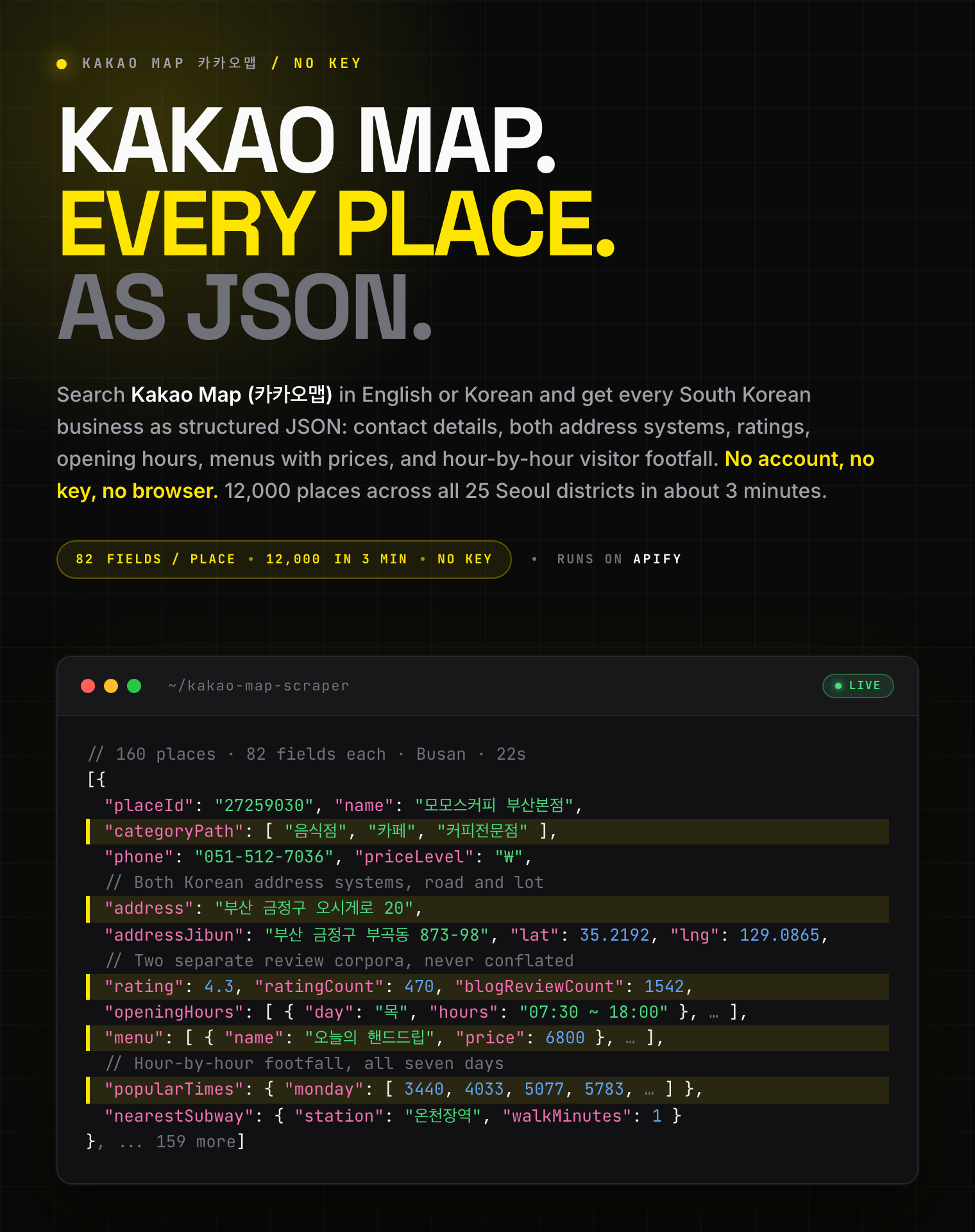
# Kakao Map (카카오맵) Scraper - All Reviews, Places, Hours, Menus (`zen-studio/kakao-map-scraper`) Actor

Extract Korean businesses from Kakao Map (카카오맵) with every review a place has, plus phone, address, GPS, opening hours, menus, hourly footfall, live fuel prices against the regional average, EV charger availability and hotel nightly rates. 카카오맵 리뷰·맛집·주유소·호텔 데이터 전체 수집. 한국어·영어 검색.

- **URL**: https://apify.com/zen-studio/kakao-map-scraper.md
- **Developed by:** [Zen Studio](https://apify.com/zen-studio) (community)
- **Categories:** Lead generation, Travel
- **Stats:** 2 total users, 1 monthly users, 100.0% runs succeeded, 0 bookmarks
- **User rating**: No ratings yet

## Pricing

from $3.29 / 1,000 places

This Actor is paid per event. You are not charged for the Apify platform usage, but only a fixed price for specific events.
Since this Actor supports Apify Store discounts, the price gets lower the higher subscription plan you have.

Learn more: https://docs.apify.com/actors/running/actors-in-store.md#pay-per-event

## What's an Apify Actor?

Actors are web data automations that power AI and operations. They run on the Apify platform to scrape websites, process data, connect APIs, and automate workflows.
In Batch mode, an Actor accepts a well-defined JSON input, performs an action which can take anything from a few seconds to a few hours,
and optionally produces a well-defined JSON output, datasets with results, or files in key-value store.
In Standby mode, an Actor provides a web server which can be used as a website, API, or an MCP server.
Actors are written with capital "A".

## How to integrate an Actor?

If asked about integration, you help developers integrate Actors into their projects.
You adapt to their stack and deliver integrations that are safe, well-documented, and production-ready.
The best way to integrate Actors is as follows.

- **AI agents and MCP clients** — the [Apify MCP server](https://docs.apify.com/integrations/mcp.md) at `https://mcp.apify.com` (remote, streamable HTTP, OAuth on first use).
- **Agentic workflows and local Actor development** — [Agent Skills](https://apify.com/.well-known/agent-skills/index.json) with the [Apify CLI](https://docs.apify.com/cli/docs.md): `npm install -g apify-cli`, then `apify login`.
- **JavaScript/TypeScript projects** — the official [JS/TS client](https://docs.apify.com/api/client/js/docs.md): `npm install apify-client`.
- **Python projects** — the official [Python client](https://docs.apify.com/api/client/python/docs.md): `pip install apify-client`.
- **Any other language** — the [REST API](https://docs.apify.com/api/v2.md).

For usage examples, see the [API](#api) section below.

For more details, see Apify documentation as [Markdown index](https://docs.apify.com/llms.txt) and [Markdown full-text](https://docs.apify.com/llms-full.txt).

# README

## Kakao Map Scraper (카카오맵) | Every Review, Places, Hours, Menus & Fuel Prices (2026)

<blockquote style="border-left:4px solid #FEE500;background:#FFFDF0;padding:12px 16px;margin:12px 0">
<span style="font-size:17px;font-weight:700;color:#1C1917">12,000 Korean businesses in 3 minutes, 82 fields on every one</span>
<span style="font-size:15px;color:#57534E"><br>Every review a place has, contact details, both Korean address systems, opening hours, menus with prices, and hour-by-hour visitor footfall. Plus live petrol prices, EV chargers and hotel rates. Search in English or Korean.</span>
</blockquote>

<a href="https://console.apify.com/actors/Qn4Jh4wff6sgCEvQ5/input"><img src="https://api.apify.com/v2/key-value-stores/pJ7iaZsTFhR3k9tjV/records/kakao-map-scraper-hero.png" alt="Kakao Map (카카오맵) scraper: Korean business name, phone, address, rating, opening hours, menus and hourly footfall as structured JSON" style="max-width:100%"></a>

<blockquote style="border-left:4px solid #FEE500;padding:12px 16px;margin:12px 0">
⚡ <strong>Kakao serves at most 500 places per search.</strong> This one re-centres the sweep on places it has already found and keeps going: 12,000 places across all 25 Seoul districts in 188 seconds.
</blockquote>

<table>
<tr>
<td colspan="6" style="padding:10px 14px;background:#FEE500;border:none;border-radius:4px 4px 0 0">
<span style="color:#1C1917;font-size:14px;font-weight:700;letter-spacing:0.5px">Zen Studio Maps Suite</span>
<span style="color:#3F3A1A;font-size:13px">&nbsp;&nbsp;&bull;&nbsp;&nbsp;Places, reviews and routes across every major map provider</span>
</td>
</tr>
<tr>
<td style="background:#FFF7CC;padding:12px 14px;border:1px solid #E7E5E4;border-radius:0 0 0 4px;border-right:none;border-top:none;vertical-align:top;width:16%">
<img src="https://apify-image-uploads-prod.s3.us-east-1.amazonaws.com/NWYsOG96fMDy8ycdf-actor-Qn4Jh4wff6sgCEvQ5-X3AegHM3lL-kakao-map-scraper-logo.png" width="24" height="24" style="vertical-align:middle"> &nbsp;<a href="https://apify.com/zen-studio/kakao-map-scraper" style="color:#B8860B;text-decoration:none;font-weight:700;font-size:13px">Kakao Map</a><br>
<span style="color:#B8860B;font-size:12px;font-weight:600">&#10148; You are here</span>
</td>
<td style="background:#FFFDF0;padding:12px 14px;border:1px solid #E7E5E4;border-right:none;border-top:none;vertical-align:top;width:16%">
<img src="https://apify-image-uploads-prod.s3.us-east-1.amazonaws.com/NWYsOG96fMDy8ycdf-actor-F5g6zADHgY9XgfKpv-uUDQtIEe9Q-naver-place-maps-scraper-logo.png" width="24" height="24" style="vertical-align:middle"> &nbsp;<a href="https://apify.com/zen-studio/naver-place-scraper" style="color:#1C1917;text-decoration:none;font-weight:700;font-size:13px">Naver Place</a><br>
<span style="color:#78716C;font-size:12px">The other Korean map</span>
</td>
<td style="background:#FFFDF0;padding:12px 14px;border:1px solid #E7E5E4;border-right:none;border-top:none;vertical-align:top;width:16%">
<img src="https://apify-image-uploads-prod.s3.us-east-1.amazonaws.com/NWYsOG96fMDy8ycdf-actor-vBUd2ObzJUemitHHP-IYaavrd0t8-google-maps-directions-api-logo.png" width="24" height="24" style="vertical-align:middle"> &nbsp;<a href="https://apify.com/zen-studio/google-maps-scraper" style="color:#1C1917;text-decoration:none;font-weight:700;font-size:13px">Google Maps</a><br>
<span style="color:#78716C;font-size:12px">40+ fields, popular times</span>
</td>
<td style="background:#FFFDF0;padding:12px 14px;border:1px solid #E7E5E4;border-right:none;border-top:none;vertical-align:top;width:16%">
<img src="https://apify-image-uploads-prod.s3.us-east-1.amazonaws.com/NWYsOG96fMDy8ycdf-actor-EgDf0I1X8lNhCes2E-kpZCa398Jg-baidu-maps-scraper-logo.png" width="24" height="24" style="vertical-align:middle"> &nbsp;<a href="https://apify.com/zen-studio/baidu-maps-scraper" style="color:#1C1917;text-decoration:none;font-weight:700;font-size:13px">Baidu Maps</a><br>
<span style="color:#78716C;font-size:12px">China POI and reviews</span>
</td>
<td style="background:#FFFDF0;padding:12px 14px;border:1px solid #E7E5E4;border-right:none;border-top:none;vertical-align:top;width:16%">
<img src="https://apify-image-uploads-prod.s3.us-east-1.amazonaws.com/NWYsOG96fMDy8ycdf-actor-NBmcHCtkUEhA0DNP3-SrXbUedsVm-2gis-scraper-api-logo.png" width="24" height="24" style="vertical-align:middle"> &nbsp;<a href="https://apify.com/zen-studio/2gis-places-scraper-api" style="color:#1C1917;text-decoration:none;font-weight:700;font-size:13px">2GIS Places</a><br>
<span style="color:#78716C;font-size:12px">Russia, CIS, Middle East</span>
</td>
<td style="background:#FFFDF0;padding:12px 14px;border:1px solid #E7E5E4;border-radius:0 0 4px 0;border-top:none;vertical-align:top;width:16%">
<img src="https://apify-image-uploads-prod.s3.us-east-1.amazonaws.com/NWYsOG96fMDy8ycdf-actor-NrhaGcIgNVy9fCV5b-mEAgbbceA8-bing-maps-scraper-logo.png" width="24" height="24" style="vertical-align:middle"> &nbsp;<a href="https://apify.com/zen-studio/bing-maps-scraper" style="color:#1C1917;text-decoration:none;font-weight:700;font-size:13px">Bing Maps</a><br>
<span style="color:#78716C;font-size:12px">Contacts, hours, photos</span>
</td>
</tr>
</table>

### Key Features

- **Every Kakao Map review a place has**, not a sample: star rating, full text, photos, dates. Measured against Kakao's own count, one pass returns 469 of 469. Blog write-ups come too, up to Kakao's own 100-per-place ceiling.
- **82 fields per place**, from name and phone to hour-by-hour footfall. 41 come from search alone, no enrichment needed.
- **Search in English or Korean.** `cafe`, `hotel`, `convenience store` and `starbucks` all resolve, and so do 카페, 맛집, 편의점, 주유소 and 스타벅스.
- **Goes past the 500-per-search ceiling.** Sweeps the area you name until it has what you asked for: 12,000 places across all 25 Seoul districts.
- **Hour-by-hour visitor footfall**, seven days a week. No other Kakao Map scraper on the Store returns it.
- **Both Korean address systems** on every row: 도로명주소 and 지번주소, plus zip code and coordinates.
- **13 category-specific data blocks nobody else on the Store returns from Kakao Map.** Live petrol prices against the regional average, live EV charger counts, hotel nightly rates four months forward, hospital doctor counts, apartment sale and lease prices, live airport parking spaces, step-free subway access. [See the full table](#what-data-can-you-extract-from-kakao-map).
- **No account, no key, no browser.** Runs straight through.

#### Copy to your AI assistant

```
zen-studio/kakao-map-scraper on Apify. Scrapes South Korean businesses from Kakao Map (카카오맵), 82 fields per place. Call ApifyClient("TOKEN").actor("zen-studio/kakao-map-scraper").call(run_input={...}), then client.dataset(run["defaultDatasetId"]).list_items().items. Queries work in English or Korean; includeDetails adds hours, menus and footfall. Full spec: GET https://api.apify.com/v2/acts/zen-studio~kakao-map-scraper/builds/default (Bearer TOKEN) → inputSchema, actorDefinition.storages.dataset, readme. Token: https://console.apify.com/account/integrations
```

### How to Scrape Kakao Map Data

#### Basic, search a city

```json
{
  "query": ["cafe"],
  "location": "Seoul",
  "maxResults": 100
}
```

#### Search in Korean

```json
{
  "query": ["맛집", "카페"],
  "location": "강남구",
  "maxResults": 300,
  "includeDetails": true
}
```

Korean terms behave exactly like English ones. Use whichever is natural: 맛집, 카페, 편의점,
주유소, 병원 all work, and so do brand names like 스타벅스.

#### Everything in one district, past the 500 ceiling

```json
{
  "query": ["cafe"],
  "location": "Gangnam",
  "maxResults": 3000
}
```

Kakao caps any single search at 500 places, so this sweeps the district until it has what you asked for.

Passing sub-categories alongside the main term catches the last stragglers, since each one is searched separately: `["카페", "디저트카페"]`.

#### Scrape specific places, no search needed

```json
{
  "placeUrls": [
    "https://place.map.kakao.com/27259030",
    "https://place.map.kakao.com/22894118"
  ]
}
```

Paste place links and those exact places come back, fetched in parallel and always fully
enriched. Map links and bare place ids work too.

#### Fuel prices, EV chargers and hotel rates

```json
{
  "query": ["주유소"],
  "location": "서울",
  "maxResults": 500,
  "includeDetails": true
}
```

Petrol stations come back with the price per grade **and the regional average beside it**, so
you can see which stations are actually cheap rather than just what they charge.

Swap the query for `전기차충전소` and you get live free-charger counts per station. Use `호텔`
and you get a nightly rate calendar about four months forward, wherever the hotel is bookable
through Kakao.

#### Every review of a place

```json
{
  "placeUrls": ["https://place.map.kakao.com/27259030"],
  "maxReviews": 5000
}
```

**Kakao Map visitor reviews have no depth limit**, so a high number returns every one a place
has and bills only for what exists, with star rating, full text, photos and dates.

**Korean blog write-ups (블로그 후기) stop at 100 per place.** That is Kakao's own ceiling, not
ours: page 11 returns nothing whatever the total says, and no cursor or page size gets past it.

The handful of each that enrichment already includes are not billed.

#### Photo galleries

```json
{
  "query": ["cafe"],
  "location": "Seoul",
  "maxResults": 200,
  "includeDetails": true,
  "maxPhotos": 100
}
```

**The first 30 photos per place are free** whenever enrichment is on, and anything up to 30
here costs nothing extra and makes no extra requests. Only photos beyond those 30 are billed.
With enrichment off there is no free allowance, so every photo is billed.

**To take every photo a place has, set `maxPhotos` to 3000.** Galleries top out at roughly
2,100 even for landmarks, so 3000 collects all of them and you pay only for what exists. One
café's full 2,094-photo gallery takes about 14 seconds.

#### Add opening hours, menus and footfall

```json
{
  "query": ["restaurant", "bakery"],
  "location": "Busan",
  "maxResults": 500,
  "includeDetails": true
}
```

Set these on the Input tab and press Start.

| Input | 설명 | What it does |
|---|---|---|
| 검색어 / Search terms | 찾을 키워드, 한 줄에 하나씩 | One or more terms, each runs its own search |
| 지역 / Location | 시·도, 구·군, 동 이름 | City, district or neighbourhood. Empty means the whole country |
| 장소 수 / Max places | 검색어당 수집할 장소 수 | How many places per search term |
| 영업시간·메뉴 / Enrichment | 영업시간, 메뉴, 방문자 수 추가 | Adds hours, menus with prices, hourly footfall |
| 장소 링크 / Place links | 특정 장소만 수집 | Scrape exact places, skipping search |
| 사진 / Photos | 장소당 사진 수, 30장 무료 | Photo URLs per place, first 30 free |

### What Data Can You Extract From Kakao Map?

Every place carries these, with no enrichment needed:

| Group | Fields |
|---|---|
| **Identity** | name, category path (4 levels), category ids, Kakao Map URL |
| **Contact** | phone, extra phones, homepage, KakaoTalk channel |
| **Location** | road address, lot address, zip code, province, city, district, coordinates, entrances |
| **Reputation** | rating, Kakao review count, blog post count |
| **Practical** | 13 amenity flags, payment methods, keywords, photos |

Turn on enrichment and every place also gets:

| Group | Fields |
|---|---|
| **Hours** | per day, with break times, last orders and closure reasons |
| **Menu** | every item with price, description and photo |
| **Footfall** | visitor counts per hour, for all seven days |
| **Opinion** | review text with ratings and photos, blog write-ups, review strengths |
| **Extras** | coupons, certifications, photo galleries, nearest subway exit |

Some categories carry a block of their own, filled only when it applies:

| Category | Extra block | What is in it |
|---|---|---|
| **Petrol stations** | `fuelPrices`, `gasStation` | Live price per grade **against the regional average**, so you can see which stations are cheap, plus the read date, self-service, car wash and repair shop |
| **EV charging** | `evCharging` | Operator, paid or free, **live free-charger count**, and every charger's power, connector type, status and last use. 96,234 stations in Korea |
| **Hotels** | `hotelRooms`, `hotelRates` | Room name, occupancy, bed types, photos, booking link, plus a **nightly rate and availability calendar about four months forward** where the hotel is bookable |
| **Hospitals** | `medicalInfo` | Institution grade, founding date, **doctor counts by seniority**, department list, emergency room status |
| **Subway stations** | `subwayStation` | **Step-free access** (lift, wheelchair lift, service centre), every exit with its nearby landmarks, previous, next and transfer stations, and train arrivals |
| **Apartments** | `apartment` | Households, buildings, floors, build year, unit mix, management costs, **sale and lease prices**, listing counts, parking, heating, catchment schools |
| **Car parks** | `parkingRates`, `parkingFeeFirstHour` | Rate tables from two providers, business hours, space count |
| **Airports** | `airportParking` | **Live free and occupied space counts** per car park |
| **Motorway services** | `serviceArea` | Every facility with its opening hours, plus fuel and menu where the stop has them |
| **Walking trails** | `trail`, `course` | Distance, duration, difficulty, start and end, waypoints |
| **Campsites** | `camping` | Ownership, pitch types with counts, ground types, facilities, site sizes |
| **Convenience stores** | `convenienceStoreServices` | ATM, parcel, medicine, tax refund and the rest |
| **Train stations** | `trainTypes` | Which services call there (KTX, ITX, Mugunghwa) |

#### Example row

One real place with enrichment on. Long arrays are trimmed with a `... N more` marker and long
text is cut, but **every one of the 82 keys is shown, at every level of nesting**. The empty
ones are the category blocks that do not apply to a cafe.

```json
{
  "placeId": "965653384",
  "name": "모모스커피 마린시티점",
  "url": "https://place.map.kakao.com/965653384",
  "category": "커피전문점",
  "categoryGroup": "음식점",
  "categoryPath": [
    "음식점",
    "카페",
    "... 1 more"
  ],
  "categoryIds": [
    "9",
    "86",
    "... 1 more"
  ],
  "phone": "051-715-7034",
  "additionalPhones": [],
  "kakaoTalkChannelId": "428641704",
  "address": "부산 해운대구 마린시티1로 91",
  "addressJibun": "부산 해운대구 우동 1410-1 마린시티두산위브포세이돈 101동 1층 101호",
  "zipCode": "48119",
  "province": "부산",
  "city": "해운대구",
  "district": "우동",
  "latitude": 35.15445351,
  "longitude": 129.14439673,
  "rating": 4.3,
  "ratingCount": 183,
  "blogReviewCount": 1140,
  "homepage": "https://m.site.naver.com/1opH2",
  "mainImage": "http://t1.kakaocdn.net/mystore/5E737B583EDF4535AA473B52BFF6F711",
  "images": [
    "http://t1.kakaocdn.net/mystore/5E737B583EDF4535AA473B52BFF6F711",
    "http://t1.kakaocdn.net/mystore/8F2B2C43199A4D009BE3575FE02BE8C3",
    "... 8 more"
  ],
  "amenities": {
    "parking": false,
    "petFriendly": false,
    "delivery": false,
    "takeaway": true,
    "reservation": false,
    "wheelchairAccessible": true,
    "nursingRoom": null,
    "wifi": true,
    "smokingArea": null,
    "freeParking": null,
    "sellsMedicine": null,
    "parcelService": null,
    "atm": null,
    "lottery": null
  },
  "paymentMethods": [
    "카카오페이",
    "제로페이"
  ],
  "keywords": [
    "로스팅전문",
    "핸드드립전문점"
  ],
  "fuelPrices": null,
  "parkingFeeFirstHour": null,
  "isPermanentlyClosed": false,
  "entrances": [
    {
      "name": "입구",
      "type": null,
      "latitude": 35.15417891,
      "longitude": 129.14440763
    },
    {
      "name": "입구",
      "type": null,
      "latitude": 35.1541789139506,
      "longitude": 129.144407628437
    }
  ],
  "relatedPlaces": [],
  "subwayLineId": null,
  "course": null,
  "deliveryAndBookingLinks": [],
  "bookableProducts": [],
  "benefits": [],
  "externalSource": null,
  "bookingStoreType": null,
  "externalId": null,
  "openStatus": "영업 마감",
  "openStatusDetail": "내일 07:00 오픈",
  "openingHours": [
    {
      "day": "금(9/4)",
      "hours": "07:00 ~ 18:00",
      "closed": false,
      "closedReason": null,
      "breaks": [],
      "lastOrders": [
        "17:30 라스트오더"
      ],
      "note": null,
      "isToday": true
    },
    {
      "day": "토(9/5)",
      "hours": "07:00 ~ 18:00",
      "closed": false,
      "closedReason": null,
      "breaks": [],
      "lastOrders": [
        "17:30 라스트오더"
      ],
      "note": null,
      "isToday": false
    },
    "... 5 more"
  ],
  "openingHoursNote": null,
  "menu": [
    {
      "name": "쇼콜라 누아쥬",
      "price": 6800,
      "description": "초콜릿과 캐러멜의 진한 풍미를 지닌 에스쇼콜라 블렌드에 흑설탕 시럽의 묵직한 단맛을 더해, 우유와 함께 블렌딩했습니다.",
      "image": "http://t1.kakaocdn.net/mystore/43C8EF9F1DCD4CFC82EFFE14768F2292",
      "isRecommended": true,
      "recommendedFor": [
        "부드럽고 폭신한 폼",
        "초콜릿과 커피 균형감"
      ]
    },
    {
      "name": "아이스크림라떼",
      "price": 9000,
      "description": "진한 다크 초콜릿 아이스크림에 우유, 시그니처 블렌드 에스쇼콜라 에스프레소가 올라간 부드럽고 달콤한 음료입니다.",
      "image": "http://t1.kakaocdn.net/mystore/5B07F71D46764C118B07B4B3D6C610DB",
      "isRecommended": false,
      "recommendedFor": []
    },
    "... 8 more"
  ],
  "menuType": "FOOD",
  "menuUpdatedAt": "2026-07-09 19:02:02",
  "popularTimes": {
    "hours": [
      0,
      1,
      "... 22 more"
    ],
    "weeklyAverage": [
      null,
      null,
      "... 22 more"
    ],
    "monday": [
      null,
      null,
      "... 22 more"
    ],
    "tuesday": [
      null,
      null,
      "... 22 more"
    ],
    "wednesday": [
      null,
      null,
      "... 22 more"
    ],
    "thursday": [
      null,
      null,
      "... 22 more"
    ],
    "friday": [
      null,
      null,
      "... 22 more"
    ],
    "saturday": [
      null,
      null,
      "... 22 more"
    ],
    "sunday": [
      null,
      null,
      "... 22 more"
    ],
    "peak": 7320,
    "updatedAt": "2026-09-04 01:20:36"
  },
  "priceLevel": "₩",
  "summary": "해운대 마린시티의 아름다운 정원과 바다 전망을 갖춘 카페입니다. 통창뷰와 우드톤 인테리어로 편안한 분위기를 제공하며, 다양한 시그니처 음료와 디저트를 즐길 수 있습니다. 특히, 커피 맛이 뛰어나고,...",
  "photoCount": 1702,
  "photoCounts": {
    "total": 1702,
    "food": 86,
    "indoor": 334,
    "outdoor": 350,
    "menu": 12,
    "video": 2,
    "fromReviews": 124
  },
  "photos": [
    "http://t1.kakaocdn.net/mystore/5E737B583EDF4535AA473B52BFF6F711",
    "http://t1.kakaocdn.net/mystore/8F2B2C43199A4D009BE3575FE02BE8C3",
    "... 28 more"
  ],
  "reviews": [
    {
      "reviewId": 15981891,
      "rating": 4,
      "text": "북적북적 .. 창가 명당은 자리 쟁탈전이 있어요. 오랜만에 맛있는 게이샤 마셨어용. 가격도 이정도면 괜찮은 것 같습니다. 다만 방문객이 아주 많아서 브루잉은 나오는 속도가 오래 걸려요. ",
      "postedAt": "2026-07-14 00:01:16",
      "updatedAt": "2026-07-14 00:01:16",
      "photoCount": 1,
      "photos": [
        "http://t1.daumcdn.net/local/kakaomapPhoto/review/f903635b1f3b4fab4a8d78f6b3a01eff128be942?original"
      ],
      "likeCount": 0,
      "viewCount": null,
      "author": {
        "nickname": "공덕동농담곰",
        "reviewCount": 103,
        "averageScore": 4.3,
        "followerCount": 29
      }
    },
    {
      "reviewId": 15946469,
      "rating": 3,
      "text": "커피가 맛있는진 모르겠지만 야외 분위기는 괜찮았음\n\n근데 내부는 너무너무 시끄러워서 정신없음\n평일 점심인데도 꽉 차 있고 소리가 울려서 그런지 너무 시끄러워서 들어갔다가 그냥 야외 좌석 찾아 앉음 ...",
      "postedAt": "2026-07-09 20:47:43",
      "updatedAt": "2026-07-09 20:48:31",
      "photoCount": 1,
      "photos": [
        "http://t1.daumcdn.net/local/kakaomapPhoto/review/c1fb9ca523460ab9a8111c7820928158cd2732ee?original"
      ],
      "likeCount": 0,
      "viewCount": null,
      "author": {
        "nickname": "잉",
        "reviewCount": 277,
        "averageScore": 3.3,
        "followerCount": 37
      }
    },
    "... 1 more"
  ],
  "blogReviews": [
    {
      "title": "유퀴즈 전주연 바리스타 챔피언 부산 모모스커피 마린시티점",
      "excerpt": "부산을 다녀 오자마자 유퀴즈에 나온 모모스 커피 유퀴즈를 보고 알았지만 부산 외에는 다른 매장은 없다 본점은 온천장이지만 내가 간 곳은 마린시티점 모모스커피 마린시티점 부산광역시 해운대구 마린시티1...",
      "author": "일상과 부의 기록",
      "url": "https://blog.naver.com/jhh_nis/224397727443",
      "postedAt": "2026-09-01 21:12:00",
      "photoCount": 12,
      "photos": [
        "https://postfiles.pstatic.net/MjAyNjA5MDFfMjIx/MDAxNzg4MjYzMzA0Mjk1.WzTPHjBWA6e5u2qN88NhRuLopvvuiHUuIaSTQNy1Vq...",
        "https://postfiles.pstatic.net/MjAyNjA4MTlfMjA0/MDAxNzg3MTM5MzQ2NDMw.A9iBgs3NDoc7CvKYVkypYb1tgRlAyFsp5D5MtUCD5f...",
        "... 8 more"
      ]
    },
    {
      "title": "모모스커피 해운대마린시티점 굳이...?",
      "excerpt": "모모스커피 마린시티점 부산광역시 해운대구 마린시티1로 91 101동 1층 101호 사람꽉차서 자리도없음 아이스크림라떼 먹고싶었는데 품절이라함 시간은 낮 2시였음 경치는 좋다 주차장은 따로있는지 모르...",
      "author": "HOo",
      "url": "https://blog.naver.com/gjfzmalsu94/224397170400",
      "postedAt": "2026-09-01 12:31:00",
      "photoCount": 10,
      "photos": [
        "https://postfiles.pstatic.net/MjAyNjA4MjhfMTEz/MDAxNzg3OTA1NDA2MDYy.gjufLKJFq3Ly_gdTkAgQBqBbKtxKWo1zBI4RPSXhqw...",
        "https://postfiles.pstatic.net/MjAyNjA4MjhfMjQ2/MDAxNzg3OTA1Mzk1NzA5.xtJtyebj-YfWa4yUcnskfjgFj0CjOLZazldG327RGS...",
        "... 8 more"
      ]
    },
    "... 2 more"
  ],
  "reviewStrengths": [
    {
      "strength": "taste",
      "label": "맛",
      "count": 99
    },
    {
      "strength": "atmosphere",
      "label": "분위기",
      "count": 97
    },
    "... 3 more"
  ],
  "certifications": [
    {
      "title": "2024 트렌드랭킹 부산 TOP 100",
      "detail": null,
      "issuer": "카카오맵",
      "issuerUrl": "H"
    }
  ],
  "notices": [],
  "kakaoTalkChannel": {
    "name": "모모스커피마린시티점",
    "url": "http://pf.kakao.com/_FcExan",
    "followerCount": 1,
    "statusMessage": "바닷길에서 아파트 방면 횡단보도를 건너 인도를 따라 들어오시면 우측에 정문이 있습니다."
  },
  "coupons": [],
  "parkingRates": null,
  "gasStation": null,
  "medicalInfo": null,
  "hotelRooms": [],
  "trail": null,
  "airportParking": [],
  "ticketStores": [],
  "evCharging": null,
  "camping": null,
  "apartment": null,
  "eventCardUrl": null,
  "serviceArea": null,
  "subwayStationId": null,
  "trainTypes": [],
  "subwayStation": null,
  "hotelRates": [],
  "convenienceStoreServices": [],
  "tags": [
    "베이커리",
    "스페셜티커피",
    "... 3 more"
  ],
  "nearestSubway": {
    "station": "동백역",
    "exit": "1",
    "walkMinutes": 18,
    "distanceMeters": 1065,
    "lines": [
      "2"
    ]
  },
  "roadviewUrl": "https://map.kakaocdn.net/map_roadview/2025/11/9149684/2_102146_9149684_20251107025029_cube/right_800.jpg",
  "relatedLinks": [
    "https://m.site.naver.com/1opH2"
  ],
  "lastUpdatedAt": "2026-08-25 14:04:48"
}
```

Download as JSON, CSV, Excel, XML or HTML from the Storage tab, or pull it through the API.

### How Much Does It Cost to Scrape Kakao Map?

Pay per result, no monthly fee.

| Event | Free plan | Down to |
|---|---|---|
| Place scraped | $3.99 / 1,000 | $3.29 / 1,000 |
| Opening hours, menu and footfall | $1.99 / 1,000 | $1.29 / 1,000 |
| Review, **beyond the preview** | $0.9999 / 1,000 | $0.4999 / 1,000 |
| Photo, **beyond the free 30 per place** | $0.4999 / 1,000 | $0.2999 / 1,000 |
| Actor start | $0.007 per run | $0.007 per run |

You pay for places actually returned. Enrichment is billed only when you switch it on, and
only for places that had it. Photos are billed only above the 30 per place that enrichment
already includes, so leaving `maxPhotos` at 30 or below never costs extra.

### Schedule It and Send It Somewhere

Local data goes stale. Places close, hours change, ratings move. Set a schedule and the dataset keeps itself current.

- **Daily** for ratings, opening hours and petrol prices, which move fastest.
- **Weekly** for lead lists and competitor tracking.
- **Monthly** for a market map you refresh occasionally.

Results go straight into **Google Sheets**, **Slack**, **Make**, **Zapier**, or your own service through a **webhook**. Set up from the Integrations tab, no code.

https://www.youtube.com/watch?v=1jI7WcVQmwM

### FAQ

**Which is better, Naver Map or Kakao Map?** They cover Korea differently, which is why the
data differs. Kakao Map is strongest on cafés, restaurants and everyday retail, and it is the
one that carries menus with prices and hour-by-hour footfall. If you need both, there is a
[Naver Map & Place Scraper](https://apify.com/zen-studio/naver-place-scraper) too, and running
both is the only way to get full coverage of a Korean market.

**What do Koreans use instead of Google Maps?** Google Maps is crippled in South Korea by
export restrictions on mapping data, so locals use Kakao Map and Naver Map. That is why a
Korean business often has rich data here and almost nothing on Google.

**Is scraping Kakao Map legal? (카카오맵 크롤링)** This Actor collects publicly available
business listings, the same information any visitor sees on the map. It collects no personal
data. You are responsible for how you use the output, including under GDPR and Korean data
protection law (개인정보 보호법).

**Do I need a Kakao account?** No. No sign-up, no credentials, nothing to configure.

**Does Kakao Map have an API?** Kakao publishes a local-search API, but it needs a registered key, caps results per query, and returns a small subset of what the map itself shows. It has no opening hours, no menus, no footfall and no review text. This Actor returns all of it, with no key.

**Does it work in English?** Yes. Kakao resolves English search terms and place names to their Korean entries. Both Korean address systems come back on every row.

**How many places can I get for one search term?** Up to the number you set, or every place of that type in the area if there are fewer. Set a location to keep a large sweep tight.

**Why are there two review counts?** Kakao carries two separate bodies of opinion. `ratingCount` is the number of Kakao Map reviews the star rating is calculated from. `blogReviewCount` is the number of Korean blog posts written about the place.

**Are results in Korean?** Names, addresses and categories come back as Kakao holds them. Coordinates, ratings, phone numbers and prices are language-neutral.

**Some places came back without opening hours or menus.** Enrichment costs one extra fetch per
place, so a very large enriched run can outrun what the source will serve. Split the area or
lower the places-per-term and they come back. You are never billed for a place that was not
enriched.

**Can I track petrol prices?** Yes. Search `주유소` with enrichment on and every station
returns its price per grade, the regional average for comparison, and the time each price was
read. Schedule it daily, since fuel prices move fastest of anything here.

**Can I get hotel prices?** Where a hotel is bookable through Kakao, yes: `hotelRates` carries
a nightly price and availability calendar about four months forward, with the rooms left per
night. Hotels without booking inventory return rooms but no rates.

**Can I find EV charging stations?** Yes. `evCharging` gives the operator, whether it is paid,
the live count of free chargers, and every charger's power, connector type and status. There
are over 96,000 charging stations in Korea.

**How do I get every review of a place?** Set **Reviews per place** high, for example 5000.
Kakao Map visitor reviews have no depth cap, so you get all of them and pay only for what
exists. Verified against Kakao's own count: one pass returned 469 of 469, and sorting by
newest or filtering to photo reviews adds nothing.

**Why do I only get 100 blog write-ups?** That is Kakao's ceiling on the blog tab, not ours.
It stops at 100 per place however many exist, and nothing gets past it: page size is fixed at
10, page 11 is empty, and offset, cursor, sort and date parameters are all ignored.

For Korean blog coverage deeper than 100 posts, the
[Naver Blog & Cafe Scraper](https://apify.com/zen-studio/naver-blog-cafe-scraper) reaches
around 1,000 posts by searching the place name instead.

That is a different surface without this ceiling. The star-rated Kakao Map reviews here are
complete either way.

**How do I get every photo of a place?** Set **Photos per place** to 3000. Galleries top out
around 2,100, so that collects the lot and bills only for what actually exists, minus the 30
that enrichment already includes.

**Can I scrape one specific place?** Yes. Paste its link into **Place links** and skip search
entirely. Those places are always fully enriched.

**Something looks wrong.** Open an issue on the Issues tab and it gets looked at. For a custom variant, contact us through the Apify Store profile.

**Is it legal?** The Actor collects publicly available business listings, the same information any visitor sees on the map. It collects no personal data. You are responsible for how you use the output, including under GDPR and Korean data protection law.

### More Zen Studio Scrapers for Maps and Local Business Data

**Korea**

- <img src="https://apify-image-uploads-prod.s3.us-east-1.amazonaws.com/NWYsOG96fMDy8ycdf-actor-F5g6zADHgY9XgfKpv-uUDQtIEe9Q-naver-place-maps-scraper-logo.png" width="20" height="20" style="vertical-align:middle">  [Naver Map & Place](https://apify.com/zen-studio/naver-place-scraper) · 네이버 지도, the other Korean map
- <img src="https://apify-image-uploads-prod.s3.us-east-1.amazonaws.com/NWYsOG96fMDy8ycdf-actor-yK9Fwkji44bQkuS7P-f1uyK15FaQ-naver-shopping-scraper.png" width="20" height="20" style="vertical-align:middle">  [Naver Search](https://apify.com/zen-studio/naver-search-scraper) · 네이버 검색 results and AI briefing

- <img src="https://apify-image-uploads-prod.s3.us-east-1.amazonaws.com/NWYsOG96fMDy8ycdf-actor-HngnV5OlFdsPYkaUS-IhZke9cHui-naver-shopping-scraper.png" width="20" height="20" style="vertical-align:middle">  [Naver Land](https://apify.com/zen-studio/naver-land-scraper) · 네이버 부동산 property listings

**Global maps**

- <img src="https://apify-image-uploads-prod.s3.us-east-1.amazonaws.com/NWYsOG96fMDy8ycdf-actor-vBUd2ObzJUemitHHP-IYaavrd0t8-google-maps-directions-api-logo.png" width="20" height="20" style="vertical-align:middle">  [Google Maps](https://apify.com/zen-studio/google-maps-scraper) · 40+ fields, popular times, every place
- <img src="https://apify-image-uploads-prod.s3.us-east-1.amazonaws.com/NWYsOG96fMDy8ycdf-actor-ojjo6BxQiOiLYRca1-RU3DuH650K-google-maps-directions-api-logo.png" width="20" height="20" style="vertical-align:middle">  [Google Maps Reviews](https://apify.com/zen-studio/google-maps-reviews-scraper) · full review text per place

- <img src="https://apify-image-uploads-prod.s3.us-east-1.amazonaws.com/NWYsOG96fMDy8ycdf-actor-y6Jak0F6vxdZew3b2-HljeTJZkhm-google-maps-directions-api-logo.png" width="20" height="20" style="vertical-align:middle">  [Google Maps Directions](https://apify.com/zen-studio/google-maps-directions-api) · routes, ETA, turn-by-turn steps

- <img src="https://apify-image-uploads-prod.s3.us-east-1.amazonaws.com/NWYsOG96fMDy8ycdf-actor-5bSvAQKSK3LPq9OXb-AgVhcT1mQC-apple-maps-scraper-logo.png" width="20" height="20" style="vertical-align:middle">  [Apple Maps](https://apify.com/zen-studio/apple-maps-scraper-pro) · phones, ratings, opening hours

- <img src="https://apify-image-uploads-prod.s3.us-east-1.amazonaws.com/NWYsOG96fMDy8ycdf-actor-NrhaGcIgNVy9fCV5b-mEAgbbceA8-bing-maps-scraper-logo.png" width="20" height="20" style="vertical-align:middle">  [Bing Maps](https://apify.com/zen-studio/bing-maps-scraper) · contacts, hours, photos
- <img src="https://apify-image-uploads-prod.s3.us-east-1.amazonaws.com/NWYsOG96fMDy8ycdf-actor-fRSgBvgbsRB4o7t30-UkaIbH1Yhq-yandex-maps-scraper-logo.png" width="20" height="20" style="vertical-align:middle">  [Yandex Maps](https://apify.com/zen-studio/yandex-maps-scraper) · leads and reviews

- <img src="https://apify-image-uploads-prod.s3.us-east-1.amazonaws.com/NWYsOG96fMDy8ycdf-actor-dzSQ0CtgXCkq4plWf-XSrOzhkglt-yandex-maps-scraper-logo.png" width="20" height="20" style="vertical-align:middle">  [Yandex Maps Reviews](https://apify.com/zen-studio/yandex-maps-reviews-scraper) · review text and ratings

**Asia**

- <img src="https://apify-image-uploads-prod.s3.us-east-1.amazonaws.com/NWYsOG96fMDy8ycdf-actor-EgDf0I1X8lNhCes2E-kpZCa398Jg-baidu-maps-scraper-logo.png" width="20" height="20" style="vertical-align:middle">  [Baidu Maps](https://apify.com/zen-studio/baidu-maps-scraper) · 百度地图, mainland China POI
- <img src="https://apify-image-uploads-prod.s3.us-east-1.amazonaws.com/NWYsOG96fMDy8ycdf-actor-3rGXyh4kWAdtrE9vG-bsQxzBhXPT-amap-scraper-logo.jpg" width="20" height="20" style="vertical-align:middle">  [Amap Places](https://apify.com/zen-studio/amap-places-scraper) · 高德地图, China POI and fuel prices

- <img src="https://apify-image-uploads-prod.s3.us-east-1.amazonaws.com/NWYsOG96fMDy8ycdf-actor-m6N528dGvfD6p2iLa-cPplSXPm7y-tencent-maps-qq-scraper-logo.png" width="20" height="20" style="vertical-align:middle">  [Tencent Maps](https://apify.com/zen-studio/tencent-maps-scraper) · 腾讯地图, China POI

**Russia, CIS and the Middle East**

- <img src="https://apify-image-uploads-prod.s3.us-east-1.amazonaws.com/NWYsOG96fMDy8ycdf-actor-NBmcHCtkUEhA0DNP3-SrXbUedsVm-2gis-scraper-api-logo.png" width="20" height="20" style="vertical-align:middle">  [2GIS Places](https://apify.com/zen-studio/2gis-places-scraper-api) · phones, emails, reviews
- <img src="https://apify-image-uploads-prod.s3.us-east-1.amazonaws.com/NWYsOG96fMDy8ycdf-actor-NBmcHCtkUEhA0DNP3-SrXbUedsVm-2gis-scraper-api-logo.png" width="20" height="20" style="vertical-align:middle">  [2GIS Reviews](https://apify.com/zen-studio/2gis-reviews-scraper) · one row per review

***

*Kakao Map scraper for South Korean local business data: names, phone numbers, both address systems, coordinates, ratings, reviews, opening hours, menus and hourly visitor footfall, in English or Korean.*

# Actor input Schema

## `query` (type: `array`):

카카오맵에서 찾을 키워드입니다. 한 줄에 하나씩 입력하세요.<br>한국어와 영어 모두 됩니다. <b>카페</b>, <b>맛집</b>, <b>편의점</b>, <b>스타벅스</b> 처럼 업종명이나 브랜드명을 그대로 넣으면 됩니다. 검색어마다 별도로 실행되며, 각각 <b>장소 수</b> 만큼 수집합니다.<br><br>What to look for. Each term runs its own search and returns up to <b>Max places</b> results. English works as well as Korean: <code>cafe</code>, <code>hotel</code>, <code>convenience store</code> and <code>starbucks</code> all resolve.

## `location` (type: `string`):

검색할 지역입니다. 시·도, 구·군, 동 이름 모두 됩니다. 예: <code>서울</code>, <code>강남구</code>, <code>부산 해운대</code>. 비워 두면 전국을 검색합니다.<br>지역을 지정하면 넓게 수집할 때도 그 지역 밖으로 넘어가지 않습니다.<br><br>City, district or neighbourhood to search in, for example <code>Seoul</code>, <code>Gangnam</code> or <code>Busan Haeundae</code>. Leave empty to search the whole country. Setting a location also keeps deep sweeps inside that area.

## `maxResults` (type: `integer`):

검색어 하나당 수집할 장소 수입니다. 검색어 3개에 200을 넣으면 최대 600곳입니다.<br>해당 업종의 장소가 그보다 적으면 있는 만큼만 수집하고 종료합니다.<br><br>How many places to return for <b>each</b> search term. Three terms with 200 here returns up to 600 places. If fewer places of that type exist, you get all of them and the run stops.

## `includeDetails` (type: `boolean`):

각 장소의 상세 정보를 함께 가져옵니다. <b>영업시간</b>(브레이크타임·라스트오더 포함), <b>메뉴와 가격</b>, <b>요일별 시간대 방문자 수</b>, 가격대, 리뷰 본문, 사진, 가까운 지하철 출구까지 포함됩니다.<br><br>Fetches a detail page for every place and adds <b>opening hours</b> (with breaks and last orders), <b>menu items with prices</b>, <b>hourly visitor footfall for each weekday</b>, price level, review text, photo galleries and the nearest subway exit.<br><br>장소당 요청이 한 번 더 필요하므로 수천 곳을 한 번에 처리하기보다 수백 곳 단위가 적합합니다. This is one extra fetch per place, so it suits hundreds of places rather than many thousands in a single run. The run log reports how many places were enriched, and you are only billed for those.

## `placeUrls` (type: `array`):

특정 장소만 수집하려면 카카오맵 장소 링크를 붙여 넣으세요. 검색은 건너뜁니다. 전체 링크, 지도 링크, 장소 ID 숫자 모두 인식합니다.<br>링크로 넣은 장소는 항상 상세 정보까지 함께 수집됩니다.<br><br>Paste Kakao Map place links to scrape exactly those places, skipping search entirely. Full links, map links or bare place ids all work, and every place is always fully enriched.

## `maxReviews` (type: `integer`):

각 장소에서 가져올 리뷰 수입니다. <b>0이면 상세 정보에 포함된 미리보기만</b> 제공됩니다.<br><br><b>카카오맵 방문자 리뷰는 상한이 없습니다.</b> 넉넉한 값을 넣으면 그 장소의 리뷰를 전부 수집합니다. 별점, 본문, 사진, 작성일이 포함됩니다.<br><b>블로그 후기는 장소당 100개까지만</b> 제공됩니다. 이는 카카오맵 자체 제한이며, 그 이상은 가져올 수 없습니다.<br><br>How many reviews to collect for each place.<br><b>Kakao Map visitor reviews have no depth limit:</b> set this high and you get every one the place has, with star rating, full text, photos and dates.<br><b>Korean blog write-ups stop at 100 per place.</b> That is Kakao's own ceiling, not ours, and no amount of paging gets past it.<br><br><b>상세 정보에 포함된 미리보기 분은 과금되지 않습니다.</b> The few reviews that enrichment already includes are not billed; only reviews beyond those are.

## `maxPhotos` (type: `integer`):

각 장소에서 가져올 사진 URL 수입니다. 최신순이며, <b>0이면 사진을 수집하지 않습니다.</b><br><br><b>처음 30장은 과금되지 않습니다.</b> 위의 <i>영업시간·메뉴·방문자 수 추가</i>를 켜면 장소당 사진 30장이 이미 포함되어 있어, 30 이하로 설정하면 추가 요청도 추가 요금도 없습니다. 30장을 넘는 사진만 과금됩니다. (상세 정보를 끄면 무료 제공분이 없어 전부 과금됩니다.)<br><br><b>You are not billed for the first 30.</b> With <i>Add hours, menus & footfall</i> on, 30 photos per place are already included, so anything up to 30 here costs nothing extra and makes no extra requests. Only photos beyond those 30 are billed. With enrichment off there is no free allowance, so every photo is billed.<br><br><b>한 장소의 사진을 전부 받으려면 3000을 넣으세요.</b> 명소도 2,100장 정도가 최대라 3000이면 전부 수집되고, 실제 존재하는 만큼만 과금됩니다. <b>To take every photo a place has, set 3000.</b> Galleries top out at roughly 2,100 even for landmarks.<br><br><b>30장을 넘으면 수가 빠르게 늘어납니다.</b> 500곳에 250장씩이면 과금 대상은 250장이 아니라 110,000장입니다. <b>Above 30 it multiplies:</b> 250 photos across 500 enriched places is 110,000 billable photos, not 250.

## Actor input object example

```json
{
  "query": [
    "cafe"
  ],
  "location": "Seoul",
  "maxResults": 100,
  "includeDetails": false,
  "placeUrls": [],
  "maxReviews": 0,
  "maxPhotos": 0
}
```

# Actor output Schema

## `results` (type: `string`):

No description

# API

You can run this Actor programmatically using our API. Below are code examples in JavaScript, Python, and CLI, as well as the OpenAPI specification and MCP server setup.

## JavaScript example

```javascript
import { ApifyClient } from 'apify-client';

// Initialize the ApifyClient with your Apify API token
// Replace the '<YOUR_API_TOKEN>' with your token
const client = new ApifyClient({
    token: '<YOUR_API_TOKEN>',
});

// Prepare Actor input
const input = {
    "query": [
        "cafe"
    ],
    "location": "Seoul",
    "maxResults": 100,
    "placeUrls": []
};

// Run the Actor and wait for it to finish
const run = await client.actor("zen-studio/kakao-map-scraper").call(input);

// Fetch and print Actor results from the run's dataset (if any)
console.log('Results from dataset');
console.log(`💾 Check your data here: https://console.apify.com/storage/datasets/${run.defaultDatasetId}`);
const { items } = await client.dataset(run.defaultDatasetId).listItems();
items.forEach((item) => {
    console.dir(item);
});

// 📚 Want to learn more 📖? Go to → https://docs.apify.com/api/client/js/docs

```

## Python example

```python
from apify_client import ApifyClient

# Initialize the ApifyClient with your Apify API token
# Replace '<YOUR_API_TOKEN>' with your token.
client = ApifyClient("<YOUR_API_TOKEN>")

# Prepare the Actor input
run_input = {
    "query": ["cafe"],
    "location": "Seoul",
    "maxResults": 100,
    "placeUrls": [],
}

# Run the Actor and wait for it to finish
run = client.actor("zen-studio/kakao-map-scraper").call(run_input=run_input)

# Fetch and print Actor results from the run's dataset (if there are any)
print(f"💾 Check your data here: https://console.apify.com/storage/datasets/{run.default_dataset_id}")
for item in client.dataset(run.default_dataset_id).iterate_items():
    print(item)

# 📚 Want to learn more 📖? Go to → https://docs.apify.com/api/client/python/docs/quick-start

```

## CLI example

```bash
echo '{
  "query": [
    "cafe"
  ],
  "location": "Seoul",
  "maxResults": 100,
  "placeUrls": []
}' |
apify call zen-studio/kakao-map-scraper --silent --output-dataset

```

## MCP server setup

```json
{
    "mcpServers": {
        "apify": {
            "type": "http",
            "url": "https://mcp.apify.com/?tools=fetch-actor-details,zen-studio/kakao-map-scraper"
        }
    }
}

```

The hosted server signs you in with OAuth on first connect, so no API token belongs in this config. Clients without OAuth support can send an `Authorization: Bearer <APIFY_API_TOKEN>` header instead, using a token from API & Integrations in Apify Console (https://console.apify.com/settings/integrations).

## OpenAPI specification

Download the OpenAPI definition: https://api.apify.com/v2/actors/Qn4Jh4wff6sgCEvQ5/builds/W4qLsyuH3py0DR3bv/openapi.json