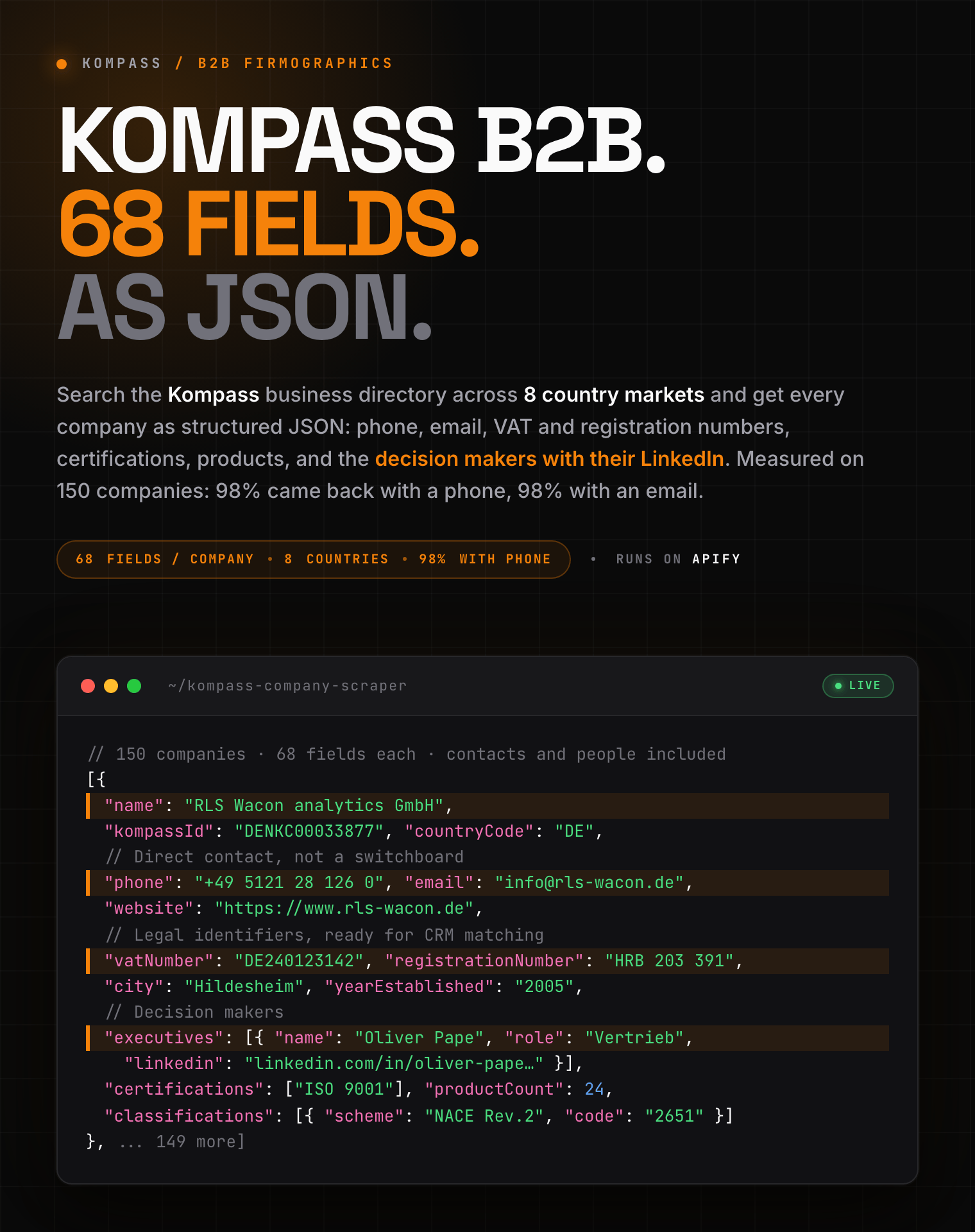
| What you get that a plain listing scrape misses |
| 👤 Decision makers |
Name, role and personal LinkedIn, not just a company switchboard |
| 🌐 Direct contacts |
Phone, email, fax and website. Measured on 150 companies: 98% had a phone, 98% an email |
| 🏢 Legal identifiers |
VAT and company registration numbers, ready for CRM matching |
| 📊 Official codes |
NACE, ISIC and national classifications, each with a readable label |
| 📅 Buying signals |
Trade shows the company is attending, plus catalogues, brands and certifications |
#### Copy to your AI assistant
```
zen-studio/kompass-company-scraper on Apify. Full B2B company profiles from the Kompass directory, executives with LinkedIn included. Call ApifyClient("TOKEN").actor("zen-studio/kompass-company-scraper").call(run_input={...}), then client.dataset(run["defaultDatasetId"]).list_items().items. Give one of profileUrls, searchUrls, query+country, or category, in that precedence. Full spec: GET https://api.apify.com/v2/acts/zen-studio~kompass-company-scraper/builds/default (Bearer TOKEN) → inputSchema, actorDefinition.storages.dataset, readme. Token: https://console.apify.com/account/integrations
```
### Key Features
- **68 fields per company**: contacts, full address with GPS, legal identifiers, executives, products, certifications and classifications, all in one row.
- **Always fully enriched**: every result opens the company's own page. There is no shallow mode to remember to switch on.
- **Four ways to search**: a keyword, a whole industry or region by name, pasted listing URLs, or specific company URLs.
- **8 country directories**: India, Germany, France, Italy, Spain, Netherlands, Belgium and Poland.
- **Free tier**: 10 lifetime runs, up to 20 companies per run.
### How to Scrape Kompass Company Data
#### Basic: search a keyword in one country
```json
{
"query": "packaging machinery",
"country": "DE",
"maxResults": 100
}
```
#### Browse a whole industry, no keyword needed
```json
{
"category": "transport logistics",
"country": "IN",
"maxResults": 500
}
```
`category` matches the directory's own tree, so it also accepts a specific activity such as `metal finishing` or a region such as `Gujarat`.
#### Scrape listing URLs you already have
```json
{
"searchUrls": [
"https://in.kompass.com/x/service/s/transport-logistics/10/"
]
}
```
#### Look up specific companies
```json
{
"profileUrls": [
"https://de.kompass.com/c/rls-wacon-analytics-gmbh/denkc00033877/"
]
}
```
Precedence runs company URLs, then listing URLs, then keyword, then category. Give one; the rest are ignored.
### Input Parameters
| Parameter | Type | Default | Description |
|-----------|------|---------|-------------|
| `query` | string | *optional* | Search term, for example `metal finishing services` |
| `country` | string | `IN` | Which country directory to search |
| `maxResults` | integer | `100` | Stop after this many companies |
| `category` | string | *optional* | Industry, activity or region to browse |
| `searchUrls` | array | *optional* | Listing URLs to scrape directly |
| `profileUrls` | array | *optional* | Company URLs to scrape directly |
### What Data Can You Extract from Kompass?
Every company comes back with the same 68 keys. Fields the directory does not publish return `null` or an empty list, so your columns never shift between rows.
- **Identity**: name, Kompass ID, description, summary, main activity, logo
- **Contact**: phone, fax, email, website, all websites, social profiles
- **Address**: street, city, postcode, region, district, country, ISO code, latitude, longitude, map link
- **Firmographics**: year founded, legal form, employees total and on site, corporate capital, export area, membership, site type
- **Legal identifiers**: VAT number, registration numbers
- **Classification**: supplier types, activity tree with roles and codes, NACE and ISIC codes, keywords
- **People**: executives with name, role, LinkedIn and languages
- **Commercial**: products, brands, certifications, opening hours, news and trade shows
- **Media**: catalogues with page counts, PDF links, videos
#### Output Example
```json
{
"name": "RLS Wacon analytics GmbH",
"kompassId": "DENKC00033877",
"mainActivity": "Elektrische Messgeräte und Steuergeräte",
"description": "RLS Wacon analytics GmbH is a family business based in Hildesheim, specialising in online water analysis and process measurement technology.",
"phone": "+49 5121 28 126 0",
"fax": "+49 5121 28 126 20",
"email": "info@rls-wacon.de",
"website": "https://www.rls-wacon.de",
"websites": ["https://www.rls-wacon.de"],
"socialProfiles": [
{ "network": "linkedin", "url": "https://de.linkedin.com/company/rls-wacon-gmbh" },
{ "network": "facebook", "url": "https://www.facebook.com/rlswacon/" }
],
"street": "Gropiusstraße 12",
"city": "Hildesheim",
"postalCode": "31137",
"region": "Niedersachsen",
"regionCode": "de_03",
"district": "Hildesheim",
"country": "Deutschland",
"countryCode": "DE",
"address": "Gropiusstraße 12, 31137 Hildesheim",
"latitude": 52.16463,
"longitude": 9.92306,
"mapUrl": "https://maps.google.com/?q=52.16463,9.92306",
"logo": "https://prokcssmedia.blob.core.windows.net/sys-master-images/h8d/hbb/9954449686558/logo2-white-png",
"yearEstablished": "2005",
"legalForm": "Gesellschaft mit beschränkter Haftung (GmbH)",
"establishmentType": "Headquarters",
"employeesTotal": "Von 20 bis 49",
"employeesAtAddress": null,
"corporateCapital": "100,000 EUR",
"exportArea": "Worldwide",
"membership": "Booster International",
"memberFor": "+ 4 years",
"isVerified": true,
"isBooster": true,
"vatNumber": "DE240123142",
"registrationNumber": "HRB 203 391 Hildesheim",
"registrationNumbers": ["HRB 203 391 Hildesheim", "HRB 203391 Hildesheim"],
"companyTypes": ["distributor", "manufacturer", "service"],
"executives": [
{ "name": "Dr. Sascha Matern", "role": "Geschäftsführung", "linkedin": null, "languages": ["de"] },
{ "name": "Herr Oliver Pape", "role": "Vertriebsleitung", "linkedin": "https://www.linkedin.com/in/oliver-pape-1b8a46b0/", "languages": ["de", "en"] }
],
"activities": [
{
"code": "42010",
"name": "Elektrische Messgeräte und Steuergeräte",
"url": "https://de.kompass.com/a/elektrische-messgerate-und-steuergerate/42010/",
"roles": ["producer"],
"tree": "primary",
"parentCode": null
}
],
"classifications": [
{ "scheme": "NACE Rev.2 (EU 2008)", "label": "Herstellung von Mess-, Kontroll-, Navigations- u. ä. Instrumenten", "code": "2651" },
{ "scheme": "ISIC 4 (WORLD)", "label": "Manufacture of measuring, testing, navigating and control equipment", "code": "2651" }
],
"mainClassificationCode": "42010",
"classificationCodes": [
{ "code": "42010", "label": "Elektrische Messgeräte und Steuergeräte" },
{ "code": "72250", "label": "Wasserqualitäts-Überwachungsgeräte" }
],
"keywords": ["Härtekontrollgeräte", "Wasseranalytik", "Prozessmesstechnik"],
"certifications": ["Qualitätsmanagement"],
"brands": [
{ "name": "CALDUR", "description": "CALDUR® is a registered trademark of RLS Wacon analytics GmbH covering test sets for water hardness." }
],
"openingHours": [
{ "day": "Montag", "open": true, "hours": ["06:30 - 16:00"] },
{ "day": "Samstag", "open": false, "hours": [] }
],
"news": [
{
"title": "Besuchen Sie uns auf der Environtec 2026",
"type": "Attending an event",
"date": "Okt 7 2026",
"startDate": "7. Oktober 2026",
"endDate": "9. Oktober 2026",
"url": "https://de.kompass.com/c/news/rls-wacon-analytics-gmbh/denkc00033877/besuchen-sie-uns-auf-der-environtec-2026/",
"externalUrl": "https://environtec.hu/en/for-visitors/general-information/",
"imageUrl": "https://img.kompass.com/sys-master-images/environtec.jpg"
}
],
"products": [
{
"name": "Analysegerät SYCON 2702",
"url": "https://de.kompass.com/p/rls-wacon-analytics-gmbh/denkc00033877/analysegerat-sycon-2702/",
"productId": "090ab133-c996-47ae-adc1-ea8c40a03cf6",
"imageUrl": "https://img.kompass.com/sys-master-images/sycon-2702.png"
}
],
"productCount": 24,
"catalogs": [
{
"id": "lif1f48279-bfc7-45f6-bf0a-5452995ce329",
"title": "Katalog Online-Analytik",
"language": "Deutsch",
"pages": 44,
"pdfUrl": "https://prokcssmedia.blob.core.windows.net/sys-master-images/Wasserkatalog.pdf",
"thumbnailUrl": "https://img.kompass.com/sys-master-images/catalog-thumb.jpg"
}
],
"catalogPdfs": ["https://prokcssmedia.blob.core.windows.net/sys-master-images/Wasserkatalog.pdf"],
"videos": [
{ "videoId": "2o8dDcKe_sQ", "url": "https://www.youtube.com/watch?v=2o8dDcKe_sQ" }
],
"catalogUrl": "https://de.kompass.com/c/cv/rls-wacon-analytics-gmbh/denkc00033877/",
"productsUrl": "https://de.kompass.com/c/p/rls-wacon-analytics-gmbh/denkc00033877/",
"newsUrl": "https://de.kompass.com/c/news/rls-wacon-analytics-gmbh/denkc00033877/",
"profileUrl": "https://de.kompass.com/c/rls-wacon-analytics-gmbh/denkc00033877/",
"sourceUrl": "https://de.kompass.com/c/rls-wacon-analytics-gmbh/denkc00033877/",
"sourcePlatform": "kompass.com",
"scrapedAt": "2026-09-03T09:14:22+00:00",
"attributes": {
"gründungsjahr": ["2005"],
"registernummer": ["HRB 203 391 Hildesheim", "HRB 203391 Hildesheim"],
"ust-idnr": ["DE240123142"]
}
}
```
`attributes` keeps every labelled row exactly as the directory publishes it, including any field not yet mapped to a named column, so nothing on the page is lost.
### Advanced Usage
Ready-made configurations for territory planning, competitor mapping, CRM enrichment and trade-show prospecting.
#### Build a territory list for one region
```json
{
"category": "Gujarat",
"country": "IN",
"maxResults": 1000
}
```
#### Map an industry across two markets
Run once per country directory and merge the datasets on `kompassId`.
```json
{
"category": "packaging",
"country": "PL",
"maxResults": 500
}
```
#### Enrich companies you already track
```json
{
"profileUrls": [
"https://de.kompass.com/c/rls-wacon-analytics-gmbh/denkc00033877/",
"https://in.kompass.com/c/cmk-electro-power-private-limited/inc0078847/"
]
}
```
#### Find exporters in a specific activity
```json
{
"query": "electro hydraulic thruster brakes",
"country": "IN",
"maxResults": 200
}
```
Filter the output on `companyTypes` containing `exporter`, or on `exportArea`.
### How to Run It and Put It on a Schedule
How to run the scraper and put it on a schedule (official Apify videos):
https://www.youtube.com/watch?v=1OW8gOqlZbY
https://www.youtube.com/watch?v=1jI7WcVQmwM
### Pricing: Pay Per Event (PPE)
**$3.99 per 1,000 companies** on the free and starter plans, falling to **$2.99 per 1,000** on higher plans. Every result is a complete profile; there is no cheaper partial tier and no separate charge for the enrichment.
| Companies | Cost |
|-----------|------|
| 100 | $0.40 |
| 500 | $2.00 |
| 1,000 | $3.99 |
Free tier: 10 lifetime runs, up to 20 companies per run.
### FAQ
**What is Kompass?**
Kompass is a long-running international B2B business directory that profiles companies by industry, region and activity, covering manufacturers, distributors, service providers, importers and exporters. Each company page carries firmographics, contact details and a classification against standard industry codes. This scraper turns those pages into structured rows.
**How many companies can I extract?**
Set `maxResults` to whatever you need. A run can return fewer than you asked for when the directory simply holds fewer matches for that search. Very large runs are bounded by your run's time limit, and the actor stops cleanly and reports how many it collected rather than being cut off mid-write.
**How fresh is the data?**
Every run reads the live directory. Nothing is served from a cache, and each row carries `scrapedAt` so you can prove when it was collected.
**Which countries are covered?**
India, Germany, France, Italy, Spain, Netherlands, Belgium and Poland. Ask if you need another directory added.
**Why is `email` or `phone` empty for some companies?**
Not every company publishes them. The actor returns `null` rather than guessing or substituting a directory-wide switchboard number, so an empty field means the company genuinely did not list one.
**Are the field names in English?**
The keys are always English and identical across countries. Some values stay in the directory's own language, for example a German legal form or an activity label, because that is how the source publishes them.
**Do the results include personal data?**
Executive names, roles and LinkedIn links are personal data. They are published openly on the company's own directory page, but you are responsible for handling them lawfully, including GDPR duties around lawful basis and retention.
**How do I export the data?**
JSON, CSV, Excel, XML or HTML from the run's Storage tab, or through the Apify API. Nested fields such as `executives` and `activities` keep their structure in JSON; CSV flattens them.
**Can I get product-level detail for each company?**
Each row carries a product sample plus the real `productCount` and a `productsUrl`. For deep supplier and product data on other directories, see [ThomasNet](https://apify.com/zen-studio/thomasnet-suppliers-scraper) or [GlobalSpec](https://apify.com/zen-studio/globalspec-suppliers-scraper).
**Can I see who a company actually ships to?**
Not from this directory. US import and shipment records are covered by [ImportYeti](https://apify.com/zen-studio/importyeti-scraper).
**Is it legal to scrape Kompass company data?**
The actor collects only publicly available business information. Nothing behind a login is touched. You remain responsible for the source platform's terms and for data protection law, including GDPR and CCPA, particularly where executive names are involved.
**What's the free tier?**
10 lifetime runs, up to 20 companies per run.
### More Zen Studio scrapers for B2B and supplier data
**🏭 Industrial & supplier directories**
- 
 Kompass
 ThomasNet
 GlobalSpec
 ImportYeti
 **MakersRow**
- [MakersRow Factory Directory](https://apify.com/zen-studio/makersrow-manufacturer-search)
**📦 Wholesale & trade records**
-
**MakersRow**
- [MakersRow Factory Directory](https://apify.com/zen-studio/makersrow-manufacturer-search)
**📦 Wholesale & trade records**
-  **eSources**
- [eSources Wholesale Directory Scraper](https://apify.com/zen-studio/esources-wholesale-directory-scraper)
### Support
- **Bugs**: Issues tab
- **Features**: Issues tab
### Legal Compliance
Extracts publicly available data. Users must comply with Kompass terms and data protection regulations (GDPR, CCPA).
***
*Turn a Kompass search into a CRM-ready list of companies, contacts and decision makers.*
# Actor input Schema
## `query` (type: `string`):
What to search for, e.g. metal finishing services or packaging machinery. Combined with the country below.
## `country` (type: `string`):
Which Kompass country directory to search.
## `maxResults` (type: `integer`):
Stop after this many companies.
## `category` (type: `string`):
Browse a whole industry or region without a search term. Matches the directory's own tree, so it accepts a broad sector (transport logistics, agriculture), a specific activity (metal finishing) or a region (Gujarat, Bavaria). Used only when no search term or URL is given.
## `searchUrls` (type: `array`):
Paste Kompass search or category URLs to scrape directly. Takes priority over the search term and category.
## `profileUrls` (type: `array`):
Scrape specific companies by their Kompass profile URL. Takes priority over everything else, and always returns full profiles.
## Actor input object example
```json
{
"query": "metal finishing services",
"country": "IN",
"maxResults": 100
}
```
# Actor output Schema
## `companies` (type: `string`):
No description
# API
You can run this Actor programmatically using our API. Below are code examples in JavaScript, Python, and CLI, as well as the OpenAPI specification and MCP server setup.
## JavaScript example
```javascript
import { ApifyClient } from 'apify-client';
// Initialize the ApifyClient with your Apify API token
// Replace the '
**eSources**
- [eSources Wholesale Directory Scraper](https://apify.com/zen-studio/esources-wholesale-directory-scraper)
### Support
- **Bugs**: Issues tab
- **Features**: Issues tab
### Legal Compliance
Extracts publicly available data. Users must comply with Kompass terms and data protection regulations (GDPR, CCPA).
***
*Turn a Kompass search into a CRM-ready list of companies, contacts and decision makers.*
# Actor input Schema
## `query` (type: `string`):
What to search for, e.g. metal finishing services or packaging machinery. Combined with the country below.
## `country` (type: `string`):
Which Kompass country directory to search.
## `maxResults` (type: `integer`):
Stop after this many companies.
## `category` (type: `string`):
Browse a whole industry or region without a search term. Matches the directory's own tree, so it accepts a broad sector (transport logistics, agriculture), a specific activity (metal finishing) or a region (Gujarat, Bavaria). Used only when no search term or URL is given.
## `searchUrls` (type: `array`):
Paste Kompass search or category URLs to scrape directly. Takes priority over the search term and category.
## `profileUrls` (type: `array`):
Scrape specific companies by their Kompass profile URL. Takes priority over everything else, and always returns full profiles.
## Actor input object example
```json
{
"query": "metal finishing services",
"country": "IN",
"maxResults": 100
}
```
# Actor output Schema
## `companies` (type: `string`):
No description
# API
You can run this Actor programmatically using our API. Below are code examples in JavaScript, Python, and CLI, as well as the OpenAPI specification and MCP server setup.
## JavaScript example
```javascript
import { ApifyClient } from 'apify-client';
// Initialize the ApifyClient with your Apify API token
// Replace the '