# WeChat Official Account Scraper 公众号 | Articles & Read Counts (`zen-studio/wechat-official-account-scraper`) Actor
Extract WeChat Official Account (公众号) data: search articles and accounts by keyword, pull read counts, likes, shares and comments, resolve the verified company behind an account, and track WeChat Index (微信指数) keyword trends. 16 operations, up to 52 fields per result, 50 entries per run.
- **URL**: https://apify.com/zen-studio/wechat-official-account-scraper.md
- **Developed by:** [Zen Studio](https://apify.com/zen-studio) (community)
- **Categories:** Social media
- **Stats:** 5 total users, 3 monthly users, 94.4% runs succeeded, 0 bookmarks
- **User rating**: No ratings yet
## Pricing
from $4.99 / 1,000 article results
This Actor is paid per event. You are not charged for the Apify platform usage, but only a fixed price for specific events.
Since this Actor supports Apify Store discounts, the price gets lower the higher subscription plan you have.
Learn more: https://docs.apify.com/platform/actors/running/actors-in-store#pay-per-event
## What's an Apify Actor?
Actors are web data automations that power AI and operations. They run on the Apify platform to scrape websites, process data, connect APIs, and automate workflows.
In Batch mode, an Actor accepts a well-defined JSON input, performs an action which can take anything from a few seconds to a few hours,
and optionally produces a well-defined JSON output, datasets with results, or files in key-value store.
In Standby mode, an Actor provides a web server which can be used as a website, API, or an MCP server.
Actors are written with capital "A".
## How to integrate an Actor?
If asked about integration, you help developers integrate Actors into their projects.
You adapt to their stack and deliver integrations that are safe, well-documented, and production-ready.
The best way to integrate Actors is as follows.
- **AI agents and MCP clients** — the [Apify MCP server](https://docs.apify.com/integrations/mcp.md) at `https://mcp.apify.com` (remote, streamable HTTP, OAuth on first use).
- **Agentic workflows and local Actor development** — [Agent Skills](https://apify.com/.well-known/agent-skills/index.json) with the [Apify CLI](https://docs.apify.com/cli/docs.md): `npm install -g apify-cli`, then `apify login`.
- **JavaScript/TypeScript projects** — the official [JS/TS client](https://docs.apify.com/api/client/js/docs.md): `npm install apify-client`.
- **Python projects** — the official [Python client](https://docs.apify.com/api/client/python/docs.md): `pip install apify-client`.
- **Any other language** — the [REST API](https://docs.apify.com/api/v2.md).
For usage examples, see the [API](#api) section below.
For more details, see Apify documentation as [Markdown index](https://docs.apify.com/llms.txt) and [Markdown full-text](https://docs.apify.com/llms-full.txt).
# README
## WeChat Official Account (公众号 / Weixin MP) Scraper | Articles, Read Counts & WeChat Index (2026)
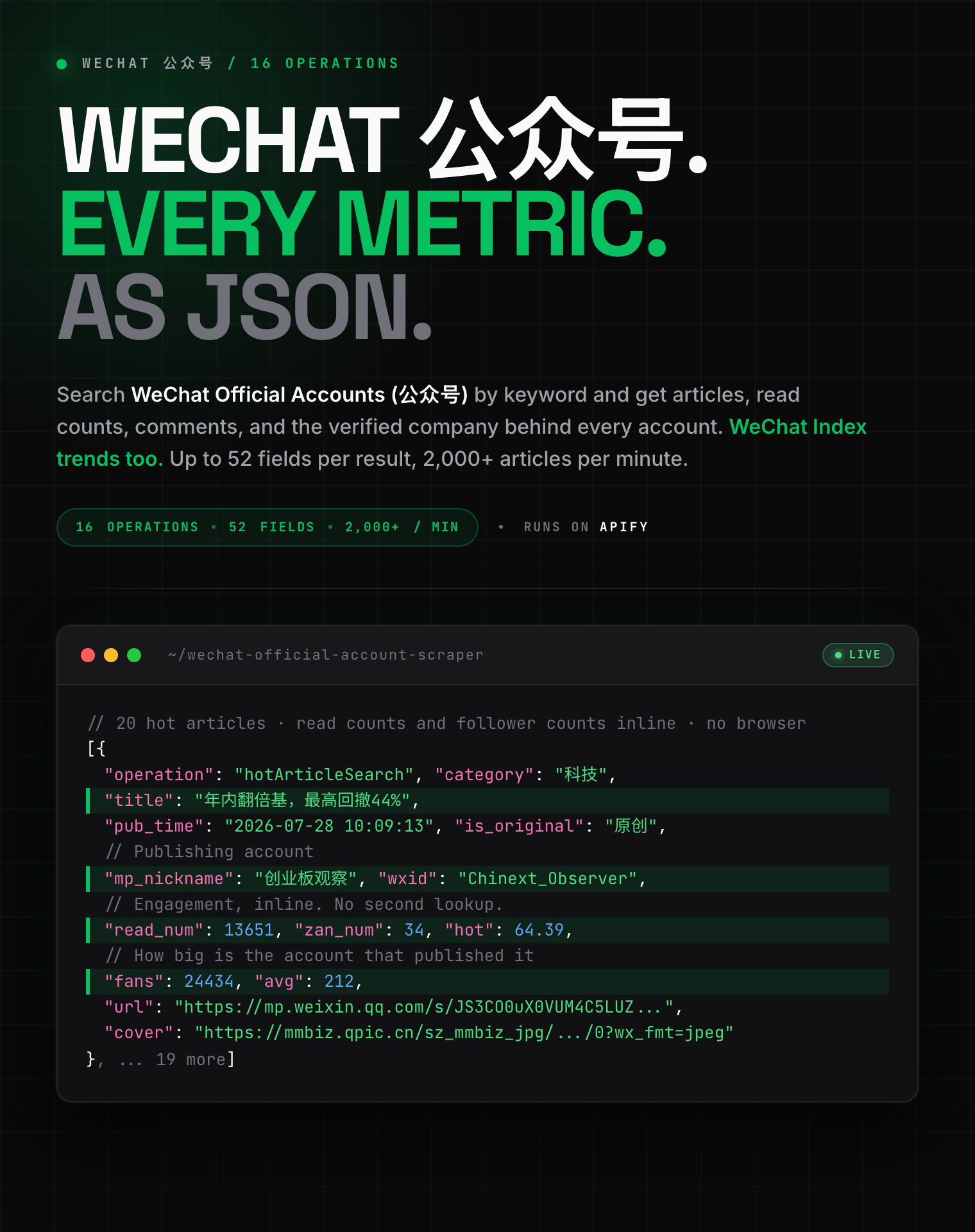
16 operations, up to 52 fields per result, 2,000+ articles per minute: article search, read counts, comments, account owners and WeChat Index trends from 公众号.
 #### Copy to your AI assistant
```
zen-studio/wechat-official-account-scraper on Apify. Call ApifyClient("TOKEN").actor("zen-studio/wechat-official-account-scraper").call(run_input={...}), then client.dataset(run["defaultDatasetId"]).list_items().items. One of 16 operations per run; it picks which input array is read (keywords, articleUrls, accounts, links). Full spec: GET https://api.apify.com/v2/acts/zen-studio~wechat-official-account-scraper/builds/default (Bearer TOKEN) → inputSchema, actorDefinition.storages.dataset, readme. Token: https://console.apify.com/account/integrations
```
### Key Features
- **16 operations in one Actor**: article search, account search, hot articles, article detail, read counts, comments, replies, account profiles, owners, original counts, today's articles, article history, mini programs, autocomplete, and WeChat Index trends.
- **Up to 52 fields per result**: the full upstream record is passed through, not a hand-picked subset. Account profiles carry the linked WeChat Channels account; hot articles carry read counts, like counts and follower counts inline.
- **Batch input**: pass up to 50 keywords, article links or accounts per run. Entries are processed in parallel and de-duplicated.
- **Free tier**: 25 lifetime runs, one page of results each. No credit card required.
### How to Scrape WeChat Official Account Articles
Pick one operation per run. Each one reads a different part of WeChat Official Accounts.
#### Basic: find articles by keyword
```json
{
"operation": "articleSearch",
"keywords": ["人工智能"],
"maxPages": 3
}
```
Chinese keywords return the richest results. English terms and brand names work too.
#### Several keywords at once
```json
{
"operation": "articleSearch",
"keywords": ["人工智能", "新能源汽车", "跨境电商"],
"sortBy": "latest",
"publishTime": "week",
"maxPages": 5
}
```
`sortBy` accepts `relevance`, `latest` or `hot`. `publishTime` narrows to `day`, `week` or `halfYear`.
#### Read counts and engagement for a specific article
```json
{
"operation": "articleMetrics",
"articleUrls": ["https://mp.weixin.qq.com/s/TSNQKkRpN1qbKsT7BvzqIw"]
}
```
#### An account's publishing history
```json
{
"operation": "accountHistoryArticles",
"accounts": ["rmrbwx"],
"maxPages": 10
}
```
Accounts accept a short id (`rmrbwx`), a `gh_` id (`gh_363b924965e9`), the display name (`人民日报`), or any article link from that account. All four resolve automatically.
### Input Parameters
| Parameter | Type | Default | Description |
|-----------|------|---------|-------------|
| `operation` | string | `articleSearch` | Which of the 16 capabilities to run |
| `keywords` | array | | Search terms. Used by article, account, hot, mini program, suggestion and Index operations |
| `articleUrls` | array | | Article links. Used by detail, metrics, comments and replies |
| `accounts` | array | | Short id, `gh_` id, display name or an article link |
| `links` | array | | Short links to expand |
| `maxPages` | integer | `3` | Depth per entry. For comment replies, how many threads to expand |
| `sortBy` | string | `relevance` | `relevance`, `latest`, `hot` |
| `publishTime` | string | `all` | `all`, `day`, `week`, `halfYear` |
| `startDay` | string | 7 days ago | Hot articles, `yyyy-MM-dd` |
| `endDay` | string | today | Hot articles, `yyyy-MM-dd` |
| `publishType` | string | `ALL` | Hot articles: image and text, video, audio, image, text, reprint |
| `category` | string | `ALL` | Hot articles: 30 topic categories including finance, technology, health, parenting |
| `businessType` | string | `ALL` | Autocomplete scope: accounts, articles, channels, mini programs and more |
### What Data Can You Extract from WeChat Official Accounts?
Every row carries the `operation` that produced it and the `queryTarget` it came from, so batched runs stay traceable.
**Articles**: title, digest, cover image, publish time and timestamp, author, account name and `gh_` id, full body text, album (合集) membership, IP region, hashtags and topics.
**Engagement**: read count, like count, "wow" count, share count, favourite count, comment count, star count.
**Accounts**: display name, avatar, signature, verified owner (the registered company), original-article count, service type, IP region, custom menus, and the linked WeChat Channels account.
**Comments**: content, author nickname and avatar, like count, IP region down to province, pinned and featured flags, and reply threads.
**Trends**: daily WeChat Index (微信指数) values per keyword, and autocomplete suggestion sets.
#### Output example: article search
```json
{
"operation": "articleSearch",
"queryTarget": "人工智能",
"title": "当算法开始参与决策:人工智能重塑全球治理的底层逻辑",
"desc": "在他们看来,人工智能对全球治理的影响远非工具层面的增量叠加,而是涉及治理主体、治理逻辑和治理模式的范式变革。",
"docID": "12609487120201217758",
"doc_url": "http://mp.weixin.qq.com/s?__biz=MzA4NDUwMjMxNA==&mid=2650556473&idx=1&sn=ff2b0f1204754f241c51acbb43b159a0#rd",
"thumbUrl": "https://mmbiz.qpic.cn/sz_mmbiz_jpg/UCwHTaPWCPIdefEG84ia3BhMN5aVyWAuq/0?wx_fmt=jpeg",
"date": 1785801091,
"timestamp": 1785801091,
"source": {
"title": "中国社会科学网",
"dateTime": "14小时前"
},
"docType": 0,
"itemShowType": 0,
"mpScene": 7,
"src_type": 49
}
```
#### Output example: article metrics
```json
{
"operation": "articleMetrics",
"queryTarget": "https://mp.weixin.qq.com/s/TSNQKkRpN1qbKsT7BvzqIw",
"read_num": 28492,
"like_count": 22,
"old_like_count": 111,
"share_count": 978,
"collect_count": 34,
"comment_count": 28,
"star_num": 0,
"original_content_num": 0,
"friend_subscribe_count": 0,
"ai_summary_uv": 0,
"comment_enabled": 1,
"get_data_succ": 1,
"is_subscribed": 0,
"verify_status": 2,
"can_use_star": 0,
"show_read": 1,
"show_like": 1,
"show_old_like": 1,
"show_share": 1,
"show_collect": 1,
"show_star": 0,
"show_friend_seen": 2,
"show_like_gray": 0,
"show_old_like_gray": 0,
"show_share_gray": 0,
"show_collect_gray": 0,
"friend_seen_info": { "friend_info": [] }
}
```
#### Output example: account search
```json
{
"operation": "accountSearch",
"queryTarget": "人工智能",
"userName": "gh_00d68db4a358",
"nickName": "世界人工智能大会",
"aliasName": "",
"principalName": "上海东浩兰生会展(集团)有限公司",
"verified": true,
"signature": "聚焦人工智能行业前沿,跟踪世界人工智能大会信息",
"avatarUrl": "http://wx.qlogo.cn/mmhead/uI5pczeERTal9dSId0upRjkIj5nkzEYTep1ccfNj9/0",
"iconUrl": "http://mmbiz.qpic.cn/mmbiz_png/HvibadYHMA2ib2dyTpP0xDM1c6D4mheoR0/0?wx_fmt=png",
"originalContentStr": "816篇原创内容",
"lastUpdatedStr": "3小时前更新",
"accTypeName": "公众号",
"title": "世界人工智能大会",
"desc": "聚焦人工智能行业前沿",
"acctDesc": "816篇原创内容",
"extraDesc": "3小时前更新",
"docID": "3582835969",
"isMixedAcc": true,
"isTwoLineExpt": false,
"foldHide": 0,
"style": 0,
"menus": [
{ "title": "WAIC 2026", "jumpInfo": { "jumpType": 3, "jumpUrl": "http://mp.weixin.qq.com/mp/homepage?__biz=MzU4MjgzNTk2OQ==" } }
],
"source": { "auth": 1, "title": "上海东浩兰生会展(集团)有限公司" },
"jumpInfo": { "userName": "gh_00d68db4a358", "nickName": "世界人工智能大会", "verifyFlag": 24 }
}
```
#### Output example: WeChat Index trend
```json
{
"operation": "wechatIndexSearch",
"queryTarget": "人工智能",
"dataPointCount": 30,
"latestIndex": 79794786,
"docID": "1-7123206500956315942",
"dataPoints": [
{ "index": 75740322, "timestamp": 1783180800 },
{ "index": 72432297, "timestamp": 1783267200 },
{ "index": 75270441, "timestamp": 1783353600 }
]
}
```
### Advanced Usage
Ready-made configurations for brand monitoring, competitor benchmarking, KOL discovery and content trend research.
#### Brand monitoring: track a keyword's popularity over time
```json
{
"operation": "wechatIndexSearch",
"keywords": ["蔚来", "理想汽车", "小鹏汽车"]
}
```
Schedule this **daily** and each run appends a fresh 30 day trend series per brand. Plot the result against your campaign dates to see which pushes moved the needle.
#### Competitor benchmarking: what did their account publish, and did it land
```json
{
"operation": "accountHistoryArticles",
"accounts": ["gh_363b924965e9", "rmrbwx"],
"maxPages": 20
}
```
Feed the resulting article links back in with `articleMetrics` to attach read and share counts to each one.
#### KOL discovery: find and vet accounts in a niche
```json
{
"operation": "accountSearch",
"keywords": ["新能源汽车", "母婴", "健身"],
"maxPages": 5
}
```
Every hit already carries the verified owning company and the original-article count, so you can filter out reposting accounts without a second lookup.
#### Content research: what is trending in a category this week
```json
{
"operation": "hotArticleSearch",
"category": "TECHNOLOGY",
"startDay": "2026-07-28",
"endDay": "2026-08-04",
"maxPages": 5
}
```
Hot article rows include read count, like count and the publishing account's follower count, so no follow-up call is needed to size the account.
#### Daily monitoring: what an account posted today
```json
{
"operation": "accountTodayArticles",
"accounts": ["rmrbwx"]
}
```
Run this on a **daily** schedule. Results are filtered to the current day in China time.
### Integrations
Results land in a standard Apify dataset, so they flow into Google Sheets, Make, Zapier, Slack, or any HTTP webhook without extra work. Schedule runs from the Apify console for recurring monitoring.
New to scheduling on Apify? This walkthrough covers it:
https://www.youtube.com/watch?v=1jI7WcVQmwM
### Pricing: Pay Per Event (PPE)
**$5.99 per 1,000 article search results.** Volume discounts apply automatically as your Apify tier rises.
| Event | Per result | Per 1,000 |
|-------|-----------|-----------|
| Article result | $0.00599 | $5.99 |
| Comment | $0.00299 | $2.99 |
| Account result | $0.00799 | $7.99 |
| Article detail, metrics or account info | $0.02999 | $29.99 |
Hot articles are $0.01199 each, mini programs $0.01499, and WeChat Index trends and autocomplete sets $0.29999 each.
Free tier: 25 lifetime runs, one page of results per run. No credit card required.
### FAQ
**What is a WeChat Official Account (公众号 / Gongzhonghao)?**
A WeChat Official Account is the publishing channel brands, media and government bodies use inside WeChat (Weixin, 微信), China's largest messaging platform. Accounts push articles to subscribers, and those articles are the main long-form content format in the Chinese internet. This Actor covers the Official Account side, sometimes called WeChat MP; the short-video side is WeChat Channels (视频号), which is a separate product.
**Which operations can I run?**
Sixteen: article search, account search, hot articles, mini program search, autocomplete suggestions, WeChat Index, article details, article metrics, article comments, comment replies, link conversion, account profile, account owner, original article count, today's articles and article history.
**How many results can I extract?**
Up to 50 entries per run, each paginated up to 50 pages. Article search returns roughly 20 results per page, account history 10 per page.
**How fresh is the data?**
Live. Every run reads WeChat at request time, with no cached layer in between. Read counts and comment counts reflect the moment you run it.
**How do I get the read count of an article?**
Use the `articleMetrics` operation with the article link. It returns reads, likes, "wow" reactions, shares, favourites and comment count in one row.
**What is WeChat Index (微信指数) and what is it used for?**
WeChat Index is WeChat's own keyword popularity measure, drawn from in-app searches, Official Account articles and Moments shares. It works like Google Trends for the Chinese market. Brands use it to size their share of attention, measure campaign lift, and spot rising topics. The `wechatIndexSearch` operation returns 30 daily values per keyword.
**Can I find who owns an account?**
Yes. The `accountPrincipalInfo` operation returns the verified registered company or organisation behind an account. It is also included free on every `accountSearch` hit.
**Do I need a WeChat account or cookies?**
No. Provide a keyword, an article link or an account id and run it. No account, cookie export or QR login is involved.
**Do I need a proxy or a China IP address?**
No. Everything is handled for you.
**How far back does article history go?**
As far as the account's public history page goes, 10 articles per page. Set `maxPages` higher to go deeper.
**Can I get WeChat Channels (视频号) videos too?**
Not in this Actor. Channels is a separate product with a different data shape. In the meantime, `accountBasicInfo` returns the Channels account linked to an Official Account, which is the join key between the two.
**How do I export the data?**
JSON, CSV, Excel, XML or HTML from the run's Storage tab, or through the Apify API. JSON preserves the nested fields such as `dataPoints`, `menus` and `source` best; CSV flattens them.
**What happens if an article or account is unavailable?**
That entry is skipped and the run continues with the rest. Deleted, private and region-restricted articles are the usual causes.
**Is it legal to scrape WeChat Official Account data?**
This Actor reads only publicly visible content, nothing behind a login. You are responsible for complying with WeChat's terms of service and with applicable data protection law, including GDPR, CCPA and China's PIPL. Comments and account profiles contain personal data such as nicknames, avatars and IP regions, so treat those fields accordingly.
**What is the free tier?**
25 lifetime runs, each capped at one page of results for the first entry. No credit card required.
### More Zen Studio scrapers for Chinese platforms
**💬 WeChat 微信**
- [WeChat Official Account Scraper](https://apify.com/zen-studio/wechat-official-account-scraper) — articles, read counts, WeChat Index
- [WeChat Channels Scraper](https://apify.com/zen-studio/wechat-channels-scraper) — short video, creators, comments
**🎬 Short-video & social**
-
#### Copy to your AI assistant
```
zen-studio/wechat-official-account-scraper on Apify. Call ApifyClient("TOKEN").actor("zen-studio/wechat-official-account-scraper").call(run_input={...}), then client.dataset(run["defaultDatasetId"]).list_items().items. One of 16 operations per run; it picks which input array is read (keywords, articleUrls, accounts, links). Full spec: GET https://api.apify.com/v2/acts/zen-studio~wechat-official-account-scraper/builds/default (Bearer TOKEN) → inputSchema, actorDefinition.storages.dataset, readme. Token: https://console.apify.com/account/integrations
```
### Key Features
- **16 operations in one Actor**: article search, account search, hot articles, article detail, read counts, comments, replies, account profiles, owners, original counts, today's articles, article history, mini programs, autocomplete, and WeChat Index trends.
- **Up to 52 fields per result**: the full upstream record is passed through, not a hand-picked subset. Account profiles carry the linked WeChat Channels account; hot articles carry read counts, like counts and follower counts inline.
- **Batch input**: pass up to 50 keywords, article links or accounts per run. Entries are processed in parallel and de-duplicated.
- **Free tier**: 25 lifetime runs, one page of results each. No credit card required.
### How to Scrape WeChat Official Account Articles
Pick one operation per run. Each one reads a different part of WeChat Official Accounts.
#### Basic: find articles by keyword
```json
{
"operation": "articleSearch",
"keywords": ["人工智能"],
"maxPages": 3
}
```
Chinese keywords return the richest results. English terms and brand names work too.
#### Several keywords at once
```json
{
"operation": "articleSearch",
"keywords": ["人工智能", "新能源汽车", "跨境电商"],
"sortBy": "latest",
"publishTime": "week",
"maxPages": 5
}
```
`sortBy` accepts `relevance`, `latest` or `hot`. `publishTime` narrows to `day`, `week` or `halfYear`.
#### Read counts and engagement for a specific article
```json
{
"operation": "articleMetrics",
"articleUrls": ["https://mp.weixin.qq.com/s/TSNQKkRpN1qbKsT7BvzqIw"]
}
```
#### An account's publishing history
```json
{
"operation": "accountHistoryArticles",
"accounts": ["rmrbwx"],
"maxPages": 10
}
```
Accounts accept a short id (`rmrbwx`), a `gh_` id (`gh_363b924965e9`), the display name (`人民日报`), or any article link from that account. All four resolve automatically.
### Input Parameters
| Parameter | Type | Default | Description |
|-----------|------|---------|-------------|
| `operation` | string | `articleSearch` | Which of the 16 capabilities to run |
| `keywords` | array | | Search terms. Used by article, account, hot, mini program, suggestion and Index operations |
| `articleUrls` | array | | Article links. Used by detail, metrics, comments and replies |
| `accounts` | array | | Short id, `gh_` id, display name or an article link |
| `links` | array | | Short links to expand |
| `maxPages` | integer | `3` | Depth per entry. For comment replies, how many threads to expand |
| `sortBy` | string | `relevance` | `relevance`, `latest`, `hot` |
| `publishTime` | string | `all` | `all`, `day`, `week`, `halfYear` |
| `startDay` | string | 7 days ago | Hot articles, `yyyy-MM-dd` |
| `endDay` | string | today | Hot articles, `yyyy-MM-dd` |
| `publishType` | string | `ALL` | Hot articles: image and text, video, audio, image, text, reprint |
| `category` | string | `ALL` | Hot articles: 30 topic categories including finance, technology, health, parenting |
| `businessType` | string | `ALL` | Autocomplete scope: accounts, articles, channels, mini programs and more |
### What Data Can You Extract from WeChat Official Accounts?
Every row carries the `operation` that produced it and the `queryTarget` it came from, so batched runs stay traceable.
**Articles**: title, digest, cover image, publish time and timestamp, author, account name and `gh_` id, full body text, album (合集) membership, IP region, hashtags and topics.
**Engagement**: read count, like count, "wow" count, share count, favourite count, comment count, star count.
**Accounts**: display name, avatar, signature, verified owner (the registered company), original-article count, service type, IP region, custom menus, and the linked WeChat Channels account.
**Comments**: content, author nickname and avatar, like count, IP region down to province, pinned and featured flags, and reply threads.
**Trends**: daily WeChat Index (微信指数) values per keyword, and autocomplete suggestion sets.
#### Output example: article search
```json
{
"operation": "articleSearch",
"queryTarget": "人工智能",
"title": "当算法开始参与决策:人工智能重塑全球治理的底层逻辑",
"desc": "在他们看来,人工智能对全球治理的影响远非工具层面的增量叠加,而是涉及治理主体、治理逻辑和治理模式的范式变革。",
"docID": "12609487120201217758",
"doc_url": "http://mp.weixin.qq.com/s?__biz=MzA4NDUwMjMxNA==&mid=2650556473&idx=1&sn=ff2b0f1204754f241c51acbb43b159a0#rd",
"thumbUrl": "https://mmbiz.qpic.cn/sz_mmbiz_jpg/UCwHTaPWCPIdefEG84ia3BhMN5aVyWAuq/0?wx_fmt=jpeg",
"date": 1785801091,
"timestamp": 1785801091,
"source": {
"title": "中国社会科学网",
"dateTime": "14小时前"
},
"docType": 0,
"itemShowType": 0,
"mpScene": 7,
"src_type": 49
}
```
#### Output example: article metrics
```json
{
"operation": "articleMetrics",
"queryTarget": "https://mp.weixin.qq.com/s/TSNQKkRpN1qbKsT7BvzqIw",
"read_num": 28492,
"like_count": 22,
"old_like_count": 111,
"share_count": 978,
"collect_count": 34,
"comment_count": 28,
"star_num": 0,
"original_content_num": 0,
"friend_subscribe_count": 0,
"ai_summary_uv": 0,
"comment_enabled": 1,
"get_data_succ": 1,
"is_subscribed": 0,
"verify_status": 2,
"can_use_star": 0,
"show_read": 1,
"show_like": 1,
"show_old_like": 1,
"show_share": 1,
"show_collect": 1,
"show_star": 0,
"show_friend_seen": 2,
"show_like_gray": 0,
"show_old_like_gray": 0,
"show_share_gray": 0,
"show_collect_gray": 0,
"friend_seen_info": { "friend_info": [] }
}
```
#### Output example: account search
```json
{
"operation": "accountSearch",
"queryTarget": "人工智能",
"userName": "gh_00d68db4a358",
"nickName": "世界人工智能大会",
"aliasName": "",
"principalName": "上海东浩兰生会展(集团)有限公司",
"verified": true,
"signature": "聚焦人工智能行业前沿,跟踪世界人工智能大会信息",
"avatarUrl": "http://wx.qlogo.cn/mmhead/uI5pczeERTal9dSId0upRjkIj5nkzEYTep1ccfNj9/0",
"iconUrl": "http://mmbiz.qpic.cn/mmbiz_png/HvibadYHMA2ib2dyTpP0xDM1c6D4mheoR0/0?wx_fmt=png",
"originalContentStr": "816篇原创内容",
"lastUpdatedStr": "3小时前更新",
"accTypeName": "公众号",
"title": "世界人工智能大会",
"desc": "聚焦人工智能行业前沿",
"acctDesc": "816篇原创内容",
"extraDesc": "3小时前更新",
"docID": "3582835969",
"isMixedAcc": true,
"isTwoLineExpt": false,
"foldHide": 0,
"style": 0,
"menus": [
{ "title": "WAIC 2026", "jumpInfo": { "jumpType": 3, "jumpUrl": "http://mp.weixin.qq.com/mp/homepage?__biz=MzU4MjgzNTk2OQ==" } }
],
"source": { "auth": 1, "title": "上海东浩兰生会展(集团)有限公司" },
"jumpInfo": { "userName": "gh_00d68db4a358", "nickName": "世界人工智能大会", "verifyFlag": 24 }
}
```
#### Output example: WeChat Index trend
```json
{
"operation": "wechatIndexSearch",
"queryTarget": "人工智能",
"dataPointCount": 30,
"latestIndex": 79794786,
"docID": "1-7123206500956315942",
"dataPoints": [
{ "index": 75740322, "timestamp": 1783180800 },
{ "index": 72432297, "timestamp": 1783267200 },
{ "index": 75270441, "timestamp": 1783353600 }
]
}
```
### Advanced Usage
Ready-made configurations for brand monitoring, competitor benchmarking, KOL discovery and content trend research.
#### Brand monitoring: track a keyword's popularity over time
```json
{
"operation": "wechatIndexSearch",
"keywords": ["蔚来", "理想汽车", "小鹏汽车"]
}
```
Schedule this **daily** and each run appends a fresh 30 day trend series per brand. Plot the result against your campaign dates to see which pushes moved the needle.
#### Competitor benchmarking: what did their account publish, and did it land
```json
{
"operation": "accountHistoryArticles",
"accounts": ["gh_363b924965e9", "rmrbwx"],
"maxPages": 20
}
```
Feed the resulting article links back in with `articleMetrics` to attach read and share counts to each one.
#### KOL discovery: find and vet accounts in a niche
```json
{
"operation": "accountSearch",
"keywords": ["新能源汽车", "母婴", "健身"],
"maxPages": 5
}
```
Every hit already carries the verified owning company and the original-article count, so you can filter out reposting accounts without a second lookup.
#### Content research: what is trending in a category this week
```json
{
"operation": "hotArticleSearch",
"category": "TECHNOLOGY",
"startDay": "2026-07-28",
"endDay": "2026-08-04",
"maxPages": 5
}
```
Hot article rows include read count, like count and the publishing account's follower count, so no follow-up call is needed to size the account.
#### Daily monitoring: what an account posted today
```json
{
"operation": "accountTodayArticles",
"accounts": ["rmrbwx"]
}
```
Run this on a **daily** schedule. Results are filtered to the current day in China time.
### Integrations
Results land in a standard Apify dataset, so they flow into Google Sheets, Make, Zapier, Slack, or any HTTP webhook without extra work. Schedule runs from the Apify console for recurring monitoring.
New to scheduling on Apify? This walkthrough covers it:
https://www.youtube.com/watch?v=1jI7WcVQmwM
### Pricing: Pay Per Event (PPE)
**$5.99 per 1,000 article search results.** Volume discounts apply automatically as your Apify tier rises.
| Event | Per result | Per 1,000 |
|-------|-----------|-----------|
| Article result | $0.00599 | $5.99 |
| Comment | $0.00299 | $2.99 |
| Account result | $0.00799 | $7.99 |
| Article detail, metrics or account info | $0.02999 | $29.99 |
Hot articles are $0.01199 each, mini programs $0.01499, and WeChat Index trends and autocomplete sets $0.29999 each.
Free tier: 25 lifetime runs, one page of results per run. No credit card required.
### FAQ
**What is a WeChat Official Account (公众号 / Gongzhonghao)?**
A WeChat Official Account is the publishing channel brands, media and government bodies use inside WeChat (Weixin, 微信), China's largest messaging platform. Accounts push articles to subscribers, and those articles are the main long-form content format in the Chinese internet. This Actor covers the Official Account side, sometimes called WeChat MP; the short-video side is WeChat Channels (视频号), which is a separate product.
**Which operations can I run?**
Sixteen: article search, account search, hot articles, mini program search, autocomplete suggestions, WeChat Index, article details, article metrics, article comments, comment replies, link conversion, account profile, account owner, original article count, today's articles and article history.
**How many results can I extract?**
Up to 50 entries per run, each paginated up to 50 pages. Article search returns roughly 20 results per page, account history 10 per page.
**How fresh is the data?**
Live. Every run reads WeChat at request time, with no cached layer in between. Read counts and comment counts reflect the moment you run it.
**How do I get the read count of an article?**
Use the `articleMetrics` operation with the article link. It returns reads, likes, "wow" reactions, shares, favourites and comment count in one row.
**What is WeChat Index (微信指数) and what is it used for?**
WeChat Index is WeChat's own keyword popularity measure, drawn from in-app searches, Official Account articles and Moments shares. It works like Google Trends for the Chinese market. Brands use it to size their share of attention, measure campaign lift, and spot rising topics. The `wechatIndexSearch` operation returns 30 daily values per keyword.
**Can I find who owns an account?**
Yes. The `accountPrincipalInfo` operation returns the verified registered company or organisation behind an account. It is also included free on every `accountSearch` hit.
**Do I need a WeChat account or cookies?**
No. Provide a keyword, an article link or an account id and run it. No account, cookie export or QR login is involved.
**Do I need a proxy or a China IP address?**
No. Everything is handled for you.
**How far back does article history go?**
As far as the account's public history page goes, 10 articles per page. Set `maxPages` higher to go deeper.
**Can I get WeChat Channels (视频号) videos too?**
Not in this Actor. Channels is a separate product with a different data shape. In the meantime, `accountBasicInfo` returns the Channels account linked to an Official Account, which is the join key between the two.
**How do I export the data?**
JSON, CSV, Excel, XML or HTML from the run's Storage tab, or through the Apify API. JSON preserves the nested fields such as `dataPoints`, `menus` and `source` best; CSV flattens them.
**What happens if an article or account is unavailable?**
That entry is skipped and the run continues with the rest. Deleted, private and region-restricted articles are the usual causes.
**Is it legal to scrape WeChat Official Account data?**
This Actor reads only publicly visible content, nothing behind a login. You are responsible for complying with WeChat's terms of service and with applicable data protection law, including GDPR, CCPA and China's PIPL. Comments and account profiles contain personal data such as nicknames, avatars and IP regions, so treat those fields accordingly.
**What is the free tier?**
25 lifetime runs, each capped at one page of results for the first entry. No credit card required.
### More Zen Studio scrapers for Chinese platforms
**💬 WeChat 微信**
- [WeChat Official Account Scraper](https://apify.com/zen-studio/wechat-official-account-scraper) — articles, read counts, WeChat Index
- [WeChat Channels Scraper](https://apify.com/zen-studio/wechat-channels-scraper) — short video, creators, comments
**🎬 Short-video & social**
-  **RedNote 小红书**
- [RedNote Search Scraper](https://apify.com/zen-studio/rednote-search-scraper)
- [RedNote User Profile Scraper](https://apify.com/zen-studio/rednote-user-profile-scraper)
- [RedNote Comments Scraper](https://apify.com/zen-studio/rednote-comments-scraper)
- [RedNote Product Search Scraper](https://apify.com/zen-studio/rednote-product-search-scraper)
- [RedNote Note Detail Scraper](https://apify.com/zen-studio/rednote-note-detail-scraper)
- [RedNote Product Reviews Scraper](https://apify.com/zen-studio/rednote-product-reviews-scraper)
- [RedNote Live Recorder](https://apify.com/zen-studio/rednote-live-recorder)
-
**RedNote 小红书**
- [RedNote Search Scraper](https://apify.com/zen-studio/rednote-search-scraper)
- [RedNote User Profile Scraper](https://apify.com/zen-studio/rednote-user-profile-scraper)
- [RedNote Comments Scraper](https://apify.com/zen-studio/rednote-comments-scraper)
- [RedNote Product Search Scraper](https://apify.com/zen-studio/rednote-product-search-scraper)
- [RedNote Note Detail Scraper](https://apify.com/zen-studio/rednote-note-detail-scraper)
- [RedNote Product Reviews Scraper](https://apify.com/zen-studio/rednote-product-reviews-scraper)
- [RedNote Live Recorder](https://apify.com/zen-studio/rednote-live-recorder)
-  **Douyin 抖音**
- [Douyin Search Scraper](https://apify.com/zen-studio/douyin-search-scraper)
- [Douyin Profile Scraper](https://apify.com/zen-studio/douyin-profile-scraper)
- [Douyin Video Scraper](https://apify.com/zen-studio/douyin-video-scraper)
- [Douyin Comments Scraper](https://apify.com/zen-studio/douyin-comments-scraper)
- [Douyin Transcripts Scraper](https://apify.com/zen-studio/douyin-transcripts-scraper)
- [Douyin Creator Rankings Scraper](https://apify.com/zen-studio/douyin-xingtu-rankings-scraper)
- [Douyin Live Recorder](https://apify.com/zen-studio/douyin-live-recorder)
- [Douyin Hot Search Scraper](https://apify.com/zen-studio/douyin-hot-search-scraper)
- [Douyin Product Search Scraper](https://apify.com/zen-studio/douyin-product-search-scraper)
-
**Douyin 抖音**
- [Douyin Search Scraper](https://apify.com/zen-studio/douyin-search-scraper)
- [Douyin Profile Scraper](https://apify.com/zen-studio/douyin-profile-scraper)
- [Douyin Video Scraper](https://apify.com/zen-studio/douyin-video-scraper)
- [Douyin Comments Scraper](https://apify.com/zen-studio/douyin-comments-scraper)
- [Douyin Transcripts Scraper](https://apify.com/zen-studio/douyin-transcripts-scraper)
- [Douyin Creator Rankings Scraper](https://apify.com/zen-studio/douyin-xingtu-rankings-scraper)
- [Douyin Live Recorder](https://apify.com/zen-studio/douyin-live-recorder)
- [Douyin Hot Search Scraper](https://apify.com/zen-studio/douyin-hot-search-scraper)
- [Douyin Product Search Scraper](https://apify.com/zen-studio/douyin-product-search-scraper)
-  **Xigua 西瓜视频**
- [Xigua Video Search Scraper](https://apify.com/zen-studio/xigua-video-search-scraper)
- [Xigua Video Detail Scraper](https://apify.com/zen-studio/xigua-video-detail-scraper)
-
**Xigua 西瓜视频**
- [Xigua Video Search Scraper](https://apify.com/zen-studio/xigua-video-search-scraper)
- [Xigua Video Detail Scraper](https://apify.com/zen-studio/xigua-video-detail-scraper)
-  **Bilibili 哔哩哔哩**
- [Bilibili Video Scraper](https://apify.com/zen-studio/bilibili-video-scraper)
- [Bilibili Danmaku Scraper](https://apify.com/zen-studio/bilibili-danmaku-scraper)
**🛒 E-commerce**
-
**Bilibili 哔哩哔哩**
- [Bilibili Video Scraper](https://apify.com/zen-studio/bilibili-video-scraper)
- [Bilibili Danmaku Scraper](https://apify.com/zen-studio/bilibili-danmaku-scraper)
**🛒 E-commerce**
-  **Shopee**
- [Shopee Product Detail Scraper](https://apify.com/zen-studio/shopee-product-detail-scraper)
- [Shopee Product Reviews Scraper](https://apify.com/zen-studio/shopee-product-reviews-scraper)
- [Shopee Product Scraper](https://apify.com/zen-studio/shopee-product-scraper)
-
**Shopee**
- [Shopee Product Detail Scraper](https://apify.com/zen-studio/shopee-product-detail-scraper)
- [Shopee Product Reviews Scraper](https://apify.com/zen-studio/shopee-product-reviews-scraper)
- [Shopee Product Scraper](https://apify.com/zen-studio/shopee-product-scraper)
-  **Taobao 淘宝**
- [Taobao Search Scraper](https://apify.com/zen-studio/taobao-search-scraper)
- [Taobao Product Detail Scraper](https://apify.com/zen-studio/taobao-detail-scraper)
- [Taobao Seller Products Scraper](https://apify.com/zen-studio/taobao-seller-products-scraper)
-
**Taobao 淘宝**
- [Taobao Search Scraper](https://apify.com/zen-studio/taobao-search-scraper)
- [Taobao Product Detail Scraper](https://apify.com/zen-studio/taobao-detail-scraper)
- [Taobao Seller Products Scraper](https://apify.com/zen-studio/taobao-seller-products-scraper)
-  **JD.com 京东**
- [JD.com Search Scraper](https://apify.com/zen-studio/jd-com-search-scraper)
-
**JD.com 京东**
- [JD.com Search Scraper](https://apify.com/zen-studio/jd-com-search-scraper)
-  **1688 阿里巴巴**
- [1688 Wholesale Scraper](https://apify.com/zen-studio/1688-wholesale-scraper)
- [Alibaba Scraper](https://apify.com/zen-studio/alibaba-scraper)
- [1688 Reviews Scraper](https://apify.com/zen-studio/1688-reviews-scraper)
-
**1688 阿里巴巴**
- [1688 Wholesale Scraper](https://apify.com/zen-studio/1688-wholesale-scraper)
- [Alibaba Scraper](https://apify.com/zen-studio/alibaba-scraper)
- [1688 Reviews Scraper](https://apify.com/zen-studio/1688-reviews-scraper)
-  **Goofish 闲鱼**
- [Goofish (Xianyu) Search Scraper](https://apify.com/zen-studio/goofish-xianyu-search-scraper)
- [Goofish (Xianyu) Seller Scraper](https://apify.com/zen-studio/goofish-xianyu-seller-scraper)
- [Goofish (Xianyu) Item Detail Scraper](https://apify.com/zen-studio/goofish-xianyu-item-detail-scraper)
- [Goofish (Xianyu) Item Comments & Q\&A Scraper](https://apify.com/zen-studio/goofish-xianyu-item-comments-scraper)
- [Goofish (Xianyu) Reverse Image Search Scraper](https://apify.com/zen-studio/goofish-xianyu-visual-search-scraper)
-
**Goofish 闲鱼**
- [Goofish (Xianyu) Search Scraper](https://apify.com/zen-studio/goofish-xianyu-search-scraper)
- [Goofish (Xianyu) Seller Scraper](https://apify.com/zen-studio/goofish-xianyu-seller-scraper)
- [Goofish (Xianyu) Item Detail Scraper](https://apify.com/zen-studio/goofish-xianyu-item-detail-scraper)
- [Goofish (Xianyu) Item Comments & Q\&A Scraper](https://apify.com/zen-studio/goofish-xianyu-item-comments-scraper)
- [Goofish (Xianyu) Reverse Image Search Scraper](https://apify.com/zen-studio/goofish-xianyu-visual-search-scraper)
-  **Coupang 쿠팡**
- [Coupang Review Scraper](https://apify.com/zen-studio/coupang-review-scraper)
- [Coupang Search Scraper](https://apify.com/zen-studio/coupang-search-scraper)
- [Coupang Product Detail Scraper](https://apify.com/zen-studio/coupang-detail-scraper)
**🏠 Real estate & autos**
-
**Coupang 쿠팡**
- [Coupang Review Scraper](https://apify.com/zen-studio/coupang-review-scraper)
- [Coupang Search Scraper](https://apify.com/zen-studio/coupang-search-scraper)
- [Coupang Product Detail Scraper](https://apify.com/zen-studio/coupang-detail-scraper)
**🏠 Real estate & autos**
-  **Anjuke 安居客**
- [Anjuke For-Sale Listings Scraper](https://apify.com/zen-studio/anjuke-real-estate-scraper)
- [Anjuke New-Home Scraper](https://apify.com/zen-studio/anjuke-new-home-scraper)
- [Anjuke Rental Listings Scraper](https://apify.com/zen-studio/anjuke-rent-scraper)
- [Anjuke Listing Detail Scraper](https://apify.com/zen-studio/anjuke-sale-detail-scraper)
-
**Anjuke 安居客**
- [Anjuke For-Sale Listings Scraper](https://apify.com/zen-studio/anjuke-real-estate-scraper)
- [Anjuke New-Home Scraper](https://apify.com/zen-studio/anjuke-new-home-scraper)
- [Anjuke Rental Listings Scraper](https://apify.com/zen-studio/anjuke-rent-scraper)
- [Anjuke Listing Detail Scraper](https://apify.com/zen-studio/anjuke-sale-detail-scraper)
-  **58.com 58同城**
- [58.com Real Estate Scraper](https://apify.com/zen-studio/58-real-estate-scraper)
-
**58.com 58同城**
- [58.com Real Estate Scraper](https://apify.com/zen-studio/58-real-estate-scraper)
-  **Autohome 汽车之家**
- [Autohome (Che168) Used-Car Scraper](https://apify.com/zen-studio/che168-car-scraper)
**✈️ Travel & stays**
-
**Autohome 汽车之家**
- [Autohome (Che168) Used-Car Scraper](https://apify.com/zen-studio/che168-car-scraper)
**✈️ Travel & stays**
-  **Ctrip 携程**
- [Ctrip Hotel Prices Scraper](https://apify.com/zen-studio/ctrip-hotel-prices-scraper)
- [Ctrip Hotel Reviews Scraper](https://apify.com/zen-studio/ctrip-hotel-reviews-scraper)
### Support
- **Bugs**: Issues tab
- **Features**: Issues tab
### Legal Compliance
Extracts publicly available data. Users must comply with WeChat terms and data protection regulations (GDPR, CCPA, PIPL).
***
*Sixteen WeChat Official Account operations in one Actor: search articles and accounts, pull read counts and comments, resolve account owners, and track WeChat Index keyword trends.*
# Actor input Schema
## `operation` (type: `string`):
选择本次运行要抓取的能力,每次运行只跑一个。不同能力读取公众号的不同部分,并使用下方对应的输入框(说明里已标注)。
**Ctrip 携程**
- [Ctrip Hotel Prices Scraper](https://apify.com/zen-studio/ctrip-hotel-prices-scraper)
- [Ctrip Hotel Reviews Scraper](https://apify.com/zen-studio/ctrip-hotel-reviews-scraper)
### Support
- **Bugs**: Issues tab
- **Features**: Issues tab
### Legal Compliance
Extracts publicly available data. Users must comply with WeChat terms and data protection regulations (GDPR, CCPA, PIPL).
***
*Sixteen WeChat Official Account operations in one Actor: search articles and accounts, pull read counts and comments, resolve account owners, and track WeChat Index keyword trends.*
# Actor input Schema
## `operation` (type: `string`):
选择本次运行要抓取的能力,每次运行只跑一个。不同能力读取公众号的不同部分,并使用下方对应的输入框(说明里已标注)。
Pick one capability per run. Each reads a different part of WeChat Official Accounts and uses the input field named in its description.
## `keywords` (type: `array`):
用于文章搜索、公众号搜索、热门文章、小程序搜索、搜索建议和微信指数。可一次填入多个关键词,并行抓取。中文关键词效果最好(如 人工智能、财经、健康),英文和品牌名同样可用。热门文章的关键词可留空,留空即浏览整个分类。
Used by the search operations. Add several to cover them in one run; Chinese keywords return the richest results. Optional for Hot articles.
## `articleUrls` (type: `array`):
用于文章详情、文章数据、文章评论和评论回复。填写完整的公众号文章链接,例如 https://mp.weixin.qq.com/s/XXXXXXXXXXXX
Used by the article operations. Full article links.
## `accounts` (type: `array`):
用于公众号资料、认证主体、原创篇数、今日文章和历史文章。支持四种写法,均可自动识别:微信号(rmrbwx)、gh\_ 开头的原始 ID(gh\_363b924965e9)、公众号名称(人民日报),或该号任意一篇文章的链接。
Used by the account operations. Accepts a short id, a gh\_ id, the display name, or any article link from that account.
## `links` (type: `array`):
用于链接还原。填写公众号短链或中间跳转链接,将还原为完整文章地址。
Used by Convert link. Short or intermediate article links to expand.
## `maxPages` (type: `integer`):
对分页类能力(各类搜索、文章评论、历史文章)每个关键词或账号最多翻多少页。评论回复下表示每篇文章展开多少条留言的回复。结果会自动去重,没有更多内容时提前结束。
How deep to go per entry for the paginated operations. Results are de-duplicated and the run stops early when nothing is left.
## `sortBy` (type: `string`):
用于文章搜索和公众号搜索。
Used by the search operations.
## `publishTime` (type: `string`):
用于文章搜索和公众号搜索。
Used by the search operations.
## `businessType` (type: `string`):
仅用于搜索建议,限定联想词来自微信的哪个板块。
Used by Search suggestions only.
## `startDay` (type: `string`):
用于热门文章,格式 yyyy-MM-dd。留空默认取最近 7 天。
Used by Hot articles. Defaults to 7 days ago.
## `endDay` (type: `string`):
用于热门文章,格式 yyyy-MM-dd。留空默认取今天。
Used by Hot articles. Defaults to today.
## `publishType` (type: `string`):
用于热门文章,按内容形式筛选。
Used by Hot articles.
## `category` (type: `string`):
用于热门文章,把爆文限定在某一个话题分类。
Used by Hot articles.
## Actor input object example
```json
{
"operation": "articleSearch",
"keywords": [
"人工智能"
],
"maxPages": 3,
"sortBy": "relevance",
"publishTime": "all",
"businessType": "ALL",
"startDay": "2026-07-28",
"endDay": "2026-08-04",
"publishType": "ALL",
"category": "ALL"
}
```
# Actor output Schema
## `results` (type: `string`):
No description
# API
You can run this Actor programmatically using our API. Below are code examples in JavaScript, Python, and CLI, as well as the OpenAPI specification and MCP server setup.
## JavaScript example
```javascript
import { ApifyClient } from 'apify-client';
// Initialize the ApifyClient with your Apify API token
// Replace the '' with your token
const client = new ApifyClient({
token: '',
});
// Prepare Actor input
const input = {
"keywords": [
"人工智能"
]
};
// Run the Actor and wait for it to finish
const run = await client.actor("zen-studio/wechat-official-account-scraper").call(input);
// Fetch and print Actor results from the run's dataset (if any)
console.log('Results from dataset');
console.log(`💾 Check your data here: https://console.apify.com/storage/datasets/${run.defaultDatasetId}`);
const { items } = await client.dataset(run.defaultDatasetId).listItems();
items.forEach((item) => {
console.dir(item);
});
// 📚 Want to learn more 📖? Go to → https://docs.apify.com/api/client/js/docs
```
## Python example
```python
from apify_client import ApifyClient
# Initialize the ApifyClient with your Apify API token
# Replace '' with your token.
client = ApifyClient("")
# Prepare the Actor input
run_input = { "keywords": ["人工智能"] }
# Run the Actor and wait for it to finish
run = client.actor("zen-studio/wechat-official-account-scraper").call(run_input=run_input)
# Fetch and print Actor results from the run's dataset (if there are any)
print(f"💾 Check your data here: https://console.apify.com/storage/datasets/{run.default_dataset_id}")
for item in client.dataset(run.default_dataset_id).iterate_items():
print(item)
# 📚 Want to learn more 📖? Go to → https://docs.apify.com/api/client/python/docs/quick-start
```
## CLI example
```bash
echo '{
"keywords": [
"人工智能"
]
}' |
apify call zen-studio/wechat-official-account-scraper --silent --output-dataset
```
## MCP server setup
```json
{
"mcpServers": {
"apify": {
"type": "http",
"url": "https://mcp.apify.com/?tools=fetch-actor-details,zen-studio/wechat-official-account-scraper"
}
}
}
```
The hosted server signs you in with OAuth on first connect, so no API token belongs in this config. Clients without OAuth support can send an `Authorization: Bearer ` header instead, using a token from API & Integrations in Apify Console (https://console.apify.com/settings/integrations).
## OpenAPI specification
Download the OpenAPI definition: https://api.apify.com/v2/actors/sz7QV5y8yVD8ODuXh/builds/DbQolBCi2vw2UnLW4/openapi.json