


Website Content Crawler
Pricing
Pay per usage
Website Content Crawler
Crawl websites and extract text content to feed AI models, LLM applications, vector databases, or RAG pipelines. The Actor supports rich formatting using Markdown, cleans the HTML, downloads files, and integrates well with 🦜🔗 LangChain, LlamaIndex, and the wider LLM ecosystem.
Pricing
Pay per usage
Rating
4.6
(205)
Developer

Apify
Maintained by ApifyActor stats
2.6K
Bookmarked
130K
Total users
7.6K
Monthly active users
11 days
Issues response
11 hours ago
Last modified
Categories
Share
Website Content Crawler is an Apify Actor that can perform a deep crawl of one or more websites and extract text content and files from the web pages.
It is useful for extracting web data from websites such as documentation, knowledge bases, help sites, or blogs for feeding large language models (LLMs) and AI applications.
Website Content Crawler has a simple input configuration so that it can be easily integrated into customer-facing products, where customers can enter just a URL of the website they want to have indexed by an AI application. You can retrieve the results using the API to formats such as JSON or CSV, which can be fed directly to your LLM, vector database, or RAG pipeline.
Main features
Website Content Crawler is built upon Crawlee, Apify's state-of-the-art open-source library for web scraping and crawling. The Actor can:
- Crawl JavaScript-enabled websites using headless Firefox or simple sites using raw HTTP.
- Circumvent anti-scraping protections using browser fingerprinting and proxies.
- Save web content in plain text, Markdown, or HTML.
- Crawl pages behind a login by providing cookies.
- Download files in PDF, DOC, DOCX, XLS, XLSX, or CSV formats.
- Remove fluff from pages like navigation, header, footers, ads, modals, or cookies warnings to improve the accuracy of the data.
- Load content of pages with infinite scroll.
- Use sitemaps to find more URLs on the website.
- Scale gracefully from tiny sites to sites with millions of pages by leveraging the Apify platform capabilities.
- Integrate with 🦜🔗LangChain,: LlamaIndex, Haystack, Pinecone, Qdrant, or OpenAI Assistant
- and much more...
Learn about the key features and capabilities in the Website Content Crawler Overview video:
Still unsure if the Website Content Crawler can handle your use case? Simply try it for free and see the results for yourself.
Designed for generative AI and LLMs
The results of Website Content Crawler can help you feed, fine-tune or train your large language models (LLMs) or provide context for prompts for ChatGPT. In return, the model will answer questions based on your or your customer's websites and content.
To learn more, check out our Web Scraping Data for Generative AI video on this topic, showcasing the Website Content Crawler:
Custom chatbots for customer support
Customer service chatbots personalized on customer websites, such as documentation or knowledge bases, are one of the most promising use cases of AI and LLMs. Let your customers easily onboard by typing the URL of their site, and thus give your chatbot detailed knowledge of their product or service. Learn more about this use case in our blog post.
Generate personalized content based on customer’s copy
ChatGPT and LLMs can write articles for you, but they won’t sound like you wrote them. Feed all your old blogs into your model to make it sound like you. Alternatively, train the model on your customers’ blogs and have it write in their tone of voice. Or help their technical writers with making first drafts of new documentation pages.
Retrieval Augmented Generation (RAG) use cases
Use your website content to create an all-knowing AI assistant. The LLM-powered bot can then answer questions based on your website content, or even generate new content based on the existing one. This is a great way to provide a personalized experience to your customers or help your employees find the information they need faster.
Summarization, translation, proofreading at scale
Got some old docs or blogs that need to be improved? Use Website Content Crawler to scrape the content, feed it to the ChatGPT API, and ask it to summarize, proofread, translate, or change the style of the content.
Enhance your custom GPTs
Uploading knowledge files gives custom OpenAI GPTs reliable information to refer to when generating answers. With Website Content Crawler, you can scrape data from any website to provide your GPT with custom knowledge.
How does it work?
Website Content Crawler operates in three stages:
- Crawling - Finds and downloads the right web pages.
- HTML processing - Transforms the DOM of crawled pages to e.g. remove navigation, header, footer, cookie warnings, and other fluff.
- Output - Converts the resulting DOM to plain text or Markdown and saves downloaded files.
For clarity, the input settings of the Actor are organized according to the above stages. Note that input settings have reasonable defaults—the only mandatory setting is the Start URLs.
Crawling
Website Content Crawler only needs one or more Start URLs to run, typically the top-level URL of the documentation site, blog, or knowledge base that you want to scrape. The actor crawls the start URLs, finds links to other pages, and recursively crawls those pages, too, as long as their URL is under the start URL.
For example, if you enter the start URL https://example.com/blog/, the
actor will crawl pages like https://example.com/blog/article-1 or https://example.com/blog/section/article-2,
but will skip pages like https://example.com/docs/something-else.
You can also force the crawler to skip certain URLs using the Exclude URLs (globs) input setting,
which specifies an array of glob patterns matching URLs of pages to be skipped.
Note that this setting affects only links found on pages, but not Start URLs, which are always crawled.
For example, https://{store,docs}.example.com/** will exclude all URLs starting with
https://store.example.com/ and https://docs.example.com/.
Or https://example.com/**/*\?*foo=* exclude all URLs that contain foo query parameter with any value.
You can learn more about globs and test them here.
The Actor automatically skips duplicate pages identified by the same canonical URL; those pages are loaded and counted towards the Max pages limit but not saved to the results.
Crawler types
Website Content Crawler provides various input settings to customize the crawling. For example, you can select the crawler type:
- Adaptive switching between browser and raw HTTP client (default) - The crawler automatically switches between raw HTTP for static pages and Firefox browser (via Playwright) for dynamic pages, to get the maximum performance wherever possible.
- Headless web browser - Useful for modern websites with anti-scraping protections and JavaScript rendering. It recognizes common blocking patterns like CAPTCHAs and automatically retries blocked requests through new sessions. However, running web browsers is more expensive as it requires more computing resources and is slower.
- Raw HTTP client - High-performance crawling mode that uses raw HTTP requests to fetch the pages. It is faster and cheaper, but it might not work on all websites.
- Raw HTTP client with JS execution (JSDOM) (deprecated) - A compromise between a browser and raw HTTP crawlers. This crawler type is deprecated, use Raw HTTP client (Cheerio) instead.
- Headless browser (Chrome+Playwright) (deprecated) - This crawler type is deprecated, use Headless browser (Firefox+Playwright) instead.
You can also set additional input parameters such as a maximum number of pages, maximum crawling depth, maximum concurrency, proxy configuration, timeout, etc., to control the behavior and performance of the Actor.
HTML processing
The goal of the HTML processing step is to ensure each web page has the right content — neither less nor more.
If you're using a headless browser Crawler type, whenever a web page is loaded, the Actor can wait a certain time or scroll to a certain height to ensure all dynamic page content is loaded, using the Wait for dynamic content or Maximum scroll height input settings, respectively. If Expand clickable elements is enabled, the Actor tries to click various DOM elements to ensure their content is expanded and visible in the resulting text.
Once the web page is ready, the Actor transforms its DOM to remove irrelevant content in order to help you ensure you're feeding your AI models with relevant data to keep them accurate.
First, the Actor removes DOM nodes matching the Remove HTML elements (CSS selector). The provided default value attempts to remove all common types of modals, navigation, headers, or footers, as well as scripts and inline images to reduce the output HTML size.
If the Extract HTML elements (CSS selector) option is specified, the Actor only keeps the contents of the elements targeted by this CSS selector and removes all the other HTML elements from the DOM.
Then, if Remove cookie warnings is enabled, the Actor removes cookie warnings using the I don't care about cookies browser extension.
Finally, the Actor transforms the page using the selected HTML transformer, whose goal is to only keep the important content of the page and reduce its complexity before converting it to text. Basically, to keep just the "meat" of the article or a page.
File download
If the Save files option is set, the Actor will download "document" files linked from the page. This is limited to PDF, DOC, DOCX, XLS, and XLSX files.
Note that these files are exempt from the URL scoping rules - any file linked from the page will be downloaded, regardless of its URL.
You can change this behaviour by using the Include / Exclude URLs (globs) setting.
The hard limit for a single file download time is 1 hour. If the download of a single file takes longer, the Actor will abort the download.
Furthermore, you can specify the minimal file download speed in kilobytes per second. If the download speed stays below this threshold for more than 10 seconds, the download will be aborted.
This is configurable via the Minimal file download speed (KB/s) setting.
Output
Once the web page HTML is processed, the Actor converts it to the desired output format, including plain text, Markdown to preserve rich formatting, or save the full HTML or a screenshot of the page, which is useful for debugging. The Actor also saves important metadata about the content, such as author, language, publishing date, etc.
The results of the actor are stored in the default Dataset associated with the Actor run, from where you can access it via API and export to formats like JSON, XML, or CSV.
Example
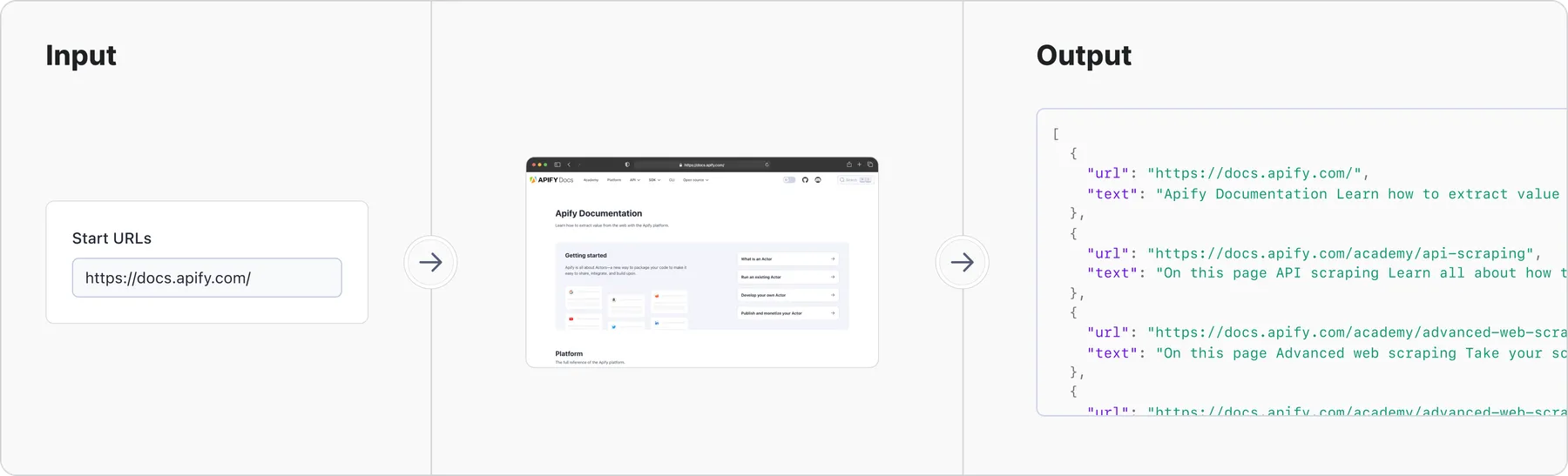
This example shows how to scrape all pages from the Apify documentation at https://docs.apify.com/:
Input

See full input with description.
Output
This is how one crawled page (https://docs.apify.com/academy/web-scraping-for-beginners) looks in a browser:
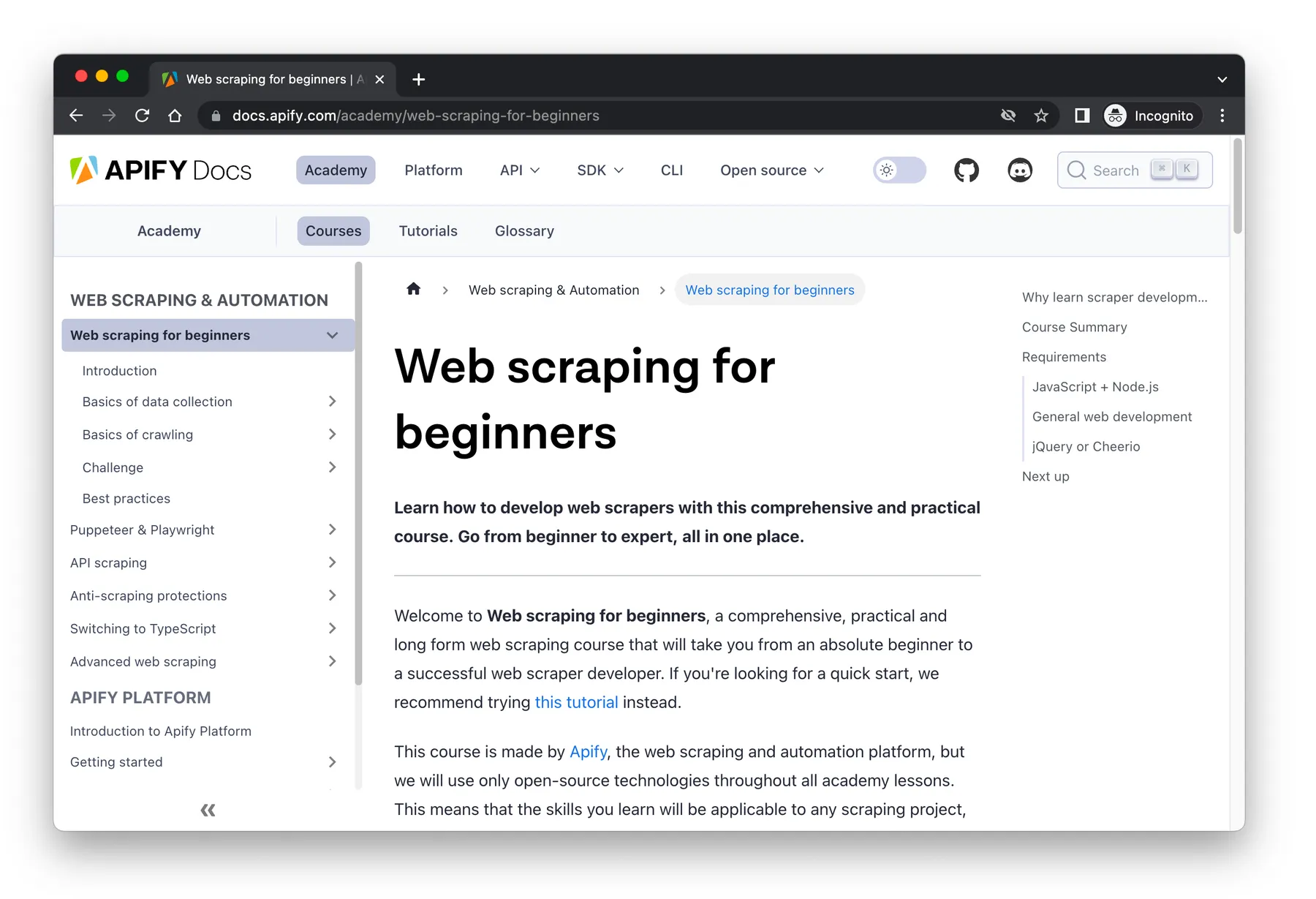
And here is how the crawling result looks in JSON format (note that other formats like CSV or Excel are also supported).
The main page content can be found in the text field, and it only contains the valuable
content, without menus and other noise:
Integration with the AI ecosystem
Thanks to the native Apify platform integrations, Website Content Crawler can seamlessly connect with various third-party systems and tools.
Exporting GPT knowledge files
Apify allows you to seamlessly export the results of Website Content Crawler runs to your custom GPTs.
To do this, go to the Output tab of the Actor run and click the "Export results" button. From here, pick JSON and click "Export". You can then upload the JSON file to your custom GPTs.
For a step-by-step guide, see How to add a knowledge base to your GPTs.
LangChain integration
LangChain is the most popular framework for developing applications powered by language models. It provides an integration for Apify, so you can feed Actor results directly to LangChain’s vector databases, enabling you to easily create ChatGPT-like query interfaces to websites with documentation, knowledge base, blog, etc.
Python example
First, install LangChain with OpenAI LLM and Apify API client for Python:
And then create a ChatGPT-powered answering machine:
The query produces an answer like this:
Apify is a platform for developing, running, and sharing serverless cloud programs. It enables users to create web scraping and automation tools and publish them on the Apify platform.
https://docs.apify.com/platform/actors, https://docs.apify.com/platform/actors/running/actors-in-store, https://docs.apify.com/platform/security, https://docs.apify.com/platform/actors/examples
For details and Jupyter notebook, see Apify integration for LangChain.
Node.js example
See detailed example in LangChain for JavaScript.
LlamaIndex integration
LlamaIndex is a Python library that provides a central interface to connect LLMs with external data. The Apify integration makes it easy to feed LlamaIndex applications with data crawled from the web.
Install all required packages:
Vector database integrations (Pinecone, Qdrant)
Website Content Crawler can be easily integrated with vector databases to store the crawled data for semantic search. Using Apify's Pinecone or Qdrant integration Actors, you can upload the results of Website Content Crawler directly into a vector database. The integrations support incremental updates, updating only the data that has changed since the last crawl. This helps to reduce costly embedding computation and storage operations, making it suitable for regular updates of large websites. Just set up the Pinecone integration Actor with Website Content Crawler using this step-by-step guide.
GPT integration
You can use Website Content Crawler to add knowledge to your GPTs. Crawl a website and upload the scraped dataset to your custom GPT. The video tutorial below demonstrates how it works.
You can also use the Website Content Crawler together with the OpenAI Assistant to update its knowledge base with web content using the OpenAI VectorStore Integration.
How much does it cost?
Website Content Crawler is free to use—you only pay for the Apify platform usage consumed by the Actor. The exact price depends on the crawler type and settings, website complexity, network speed, and random circumstances.
The main cost driver of Website Content Crawler is the compute power, which is measured in the Actor compute units (CU): 1 CU corresponds to an actor with 1 GB of memory running for 1 hour. With the baseline price of $0.25/CU, from our tests, the actor usage costs approximately:
- $0.5 - $5 per 1,000 web pages with a headless browser, depending on the website
- $0.2 per 1,000 web pages with raw HTTP crawler
Note that Apify's free plan gives you $5 free credits every month and access to Apify Proxy, which is sufficient for testing and low-volume use cases.
Troubleshooting
- The Actor works best for crawling sites with multiple URLs. For extracting text or Markdown from a single URL, you might prefer to use RAG Web Browser in the Standby mode, which is much faster and more efficient.
- If the extracted text doesn’t contain the expected page content, try to select another Crawler type. Generally, a headless browser will extract more text as it loads dynamic page content and is less likely to be blocked.
- If the extracted text has more than expected page content (e.g. navigation or footer), try to select another HTML transformer, or use the Remove HTML elements setting to skip unwanted parts of the page.
- If the crawler is too slow, try increasing the Actor memory and/or the Initial concurrency setting. Note that if you set the concurrency too high, the Actor will run out of memory and crash, or potentially overload the target site.
- If the target website is blocking the crawler, make sure to use the Stealthy web browser (Firefox+Playwright) crawler type and use residential proxies
- The crawler automatically restarts on crash, and continues where it left off. But if it crashes more than 3 times per minute, the system fails the Actor run.
Help & support
Website Content Crawler is under active development. If you have any feedback or feature ideas, please submit an issue.
Is it legal?
Web scraping is generally legal if you scrape publicly available non-personal data. What you do with the data is another question. Documentation, help articles, or blogs are typically protected by copyright, so you can't republish the content without the owner's permission.
Learn more about the legality of web scraping in this blog post. If you're not sure, please seek professional legal advice.