# Hotel Review Aggregator: Google, Tripadvisor, Booking & Yelp (`clearpath/hotel-review-aggregator`) Actor

Aggregate hotel reviews from Google, Tripadvisor, Booking.com, and Yelp in one property-matched dataset with normalized ratings and guest details.

- **URL**: https://apify.com/clearpath/hotel-review-aggregator.md
- **Developed by:** [ClearPath](https://apify.com/clearpath) (community)
- **Categories:** Travel, Lead generation
- **Stats:** 2 total users, 1 monthly users, 100.0% runs succeeded, 0 bookmarks
- **User rating**: No ratings yet

## Pricing

from $1.99 / 1,000 reviews

This Actor is paid per event. You are not charged for the Apify platform usage, but only a fixed price for specific events.
Since this Actor supports Apify Store discounts, the price gets lower the higher subscription plan you have.

Learn more: https://docs.apify.com/actors/running/actors-in-store.md#pay-per-event

## What's an Apify Actor?

Actors are web data automations that power AI and operations. They run on the Apify platform to scrape websites, process data, connect APIs, and automate workflows.
In Batch mode, an Actor accepts a well-defined JSON input, performs an action which can take anything from a few seconds to a few hours,
and optionally produces a well-defined JSON output, datasets with results, or files in key-value store.
In Standby mode, an Actor provides a web server which can be used as a website, API, or an MCP server.
Actors are written with capital "A".

## How to integrate an Actor?

If asked about integration, you help developers integrate Actors into their projects.
You adapt to their stack and deliver integrations that are safe, well-documented, and production-ready.
The best way to integrate Actors is as follows.

- **AI agents and MCP clients** — the [Apify MCP server](https://docs.apify.com/integrations/mcp.md) at `https://mcp.apify.com` (remote, streamable HTTP, OAuth on first use).
- **Agentic workflows and local Actor development** — [Agent Skills](https://apify.com/.well-known/agent-skills/index.json) with the [Apify CLI](https://docs.apify.com/cli/docs.md): `npm install -g apify-cli`, then `apify login`.
- **JavaScript/TypeScript projects** — the official [JS/TS client](https://docs.apify.com/api/client/js/docs.md): `npm install apify-client`.
- **Python projects** — the official [Python client](https://docs.apify.com/api/client/python/docs.md): `pip install apify-client`.
- **Any other language** — the [REST API](https://docs.apify.com/api/v2.md).

For usage examples, see the [API](#api) section below.

For more details, see Apify documentation as [Markdown index](https://docs.apify.com/llms.txt) and [Markdown full-text](https://docs.apify.com/llms-full.txt).

# README

## Hotel Review Aggregator | Google, Tripadvisor, Booking.com & Yelp Reviews (2026)

<blockquote style="margin:0 0 16px;border-left:5px solid #006D77;background:#E0F2F1;padding:16px 20px">
<span style="font-size:18px;font-weight:700;color:#1C1917">We match the hotel across every platform, so you don’t have to.</span>
</blockquote>

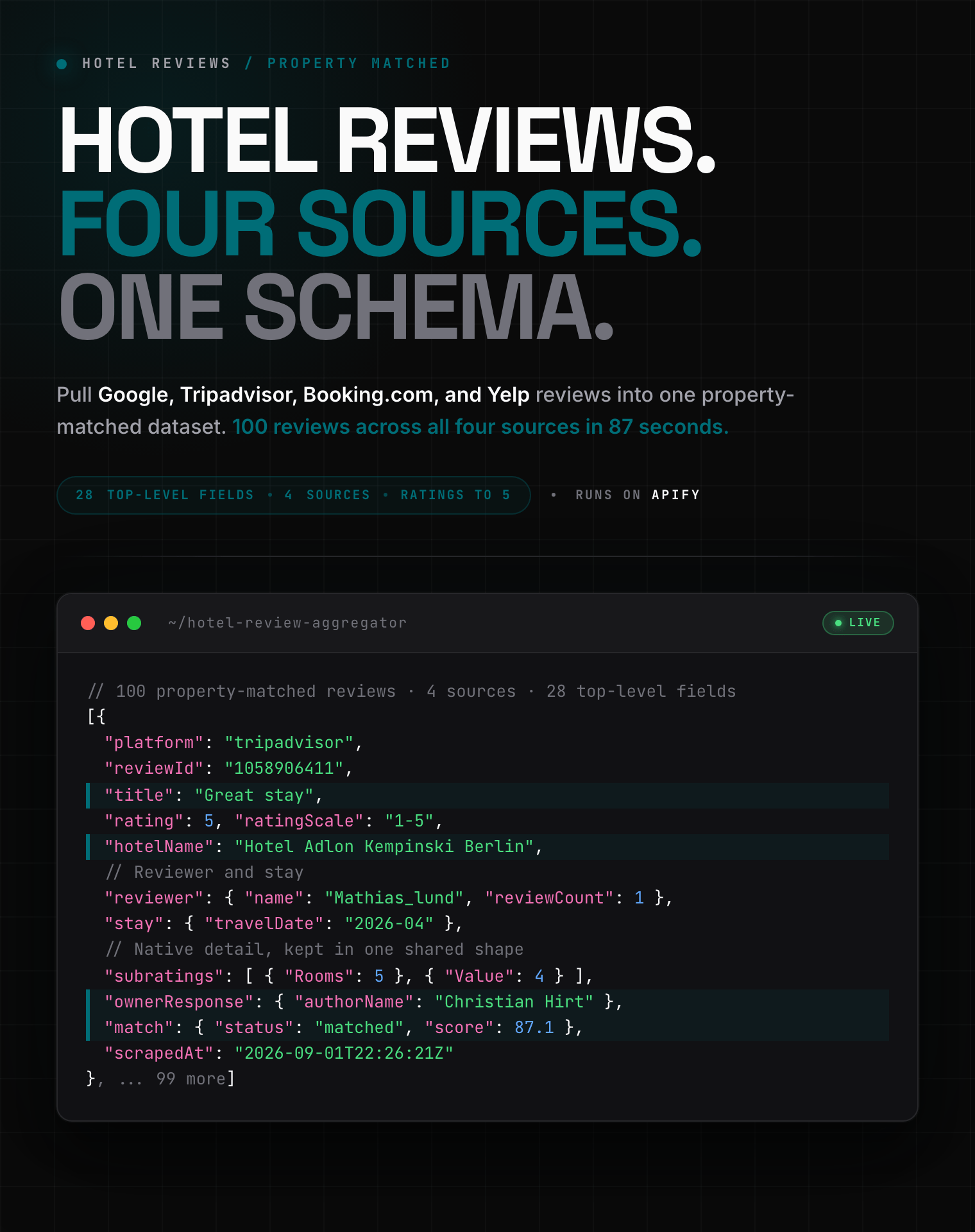
<a href="https://console.apify.com/actors/qIdkSE8q4I8DIfNlD/input"><img src="https://api.apify.com/v2/key-value-stores/21hatybJqakfiJoxJ/records/hotel-review-aggregator-hero.png" alt="Hotel review aggregator output: Google, Tripadvisor, Booking.com, and Yelp reviews as structured JSON" style="max-width:100%"></a>

<blockquote style="border-left:4px solid #83C5BE;padding:8px 14px;margin:12px 0">
<span style="font-size:14px"><strong>One hotel. Four review platforms. One clean dataset.</strong> Property matching and rating normalization are handled automatically.</span>
</blockquote>

<table style="width:100%;table-layout:fixed">
<tr>
<td colspan="5" style="padding:10px 14px;background:#006D77;border:none;border-radius:4px 4px 0 0">
<span style="color:#FAFAF9;font-size:14px;font-weight:700;letter-spacing:0.5px">Clearpath Hotel Review Suite</span>
<span style="color:#EDF6F9;font-size:13px">&nbsp;&nbsp;&bull;&nbsp;&nbsp;Aggregate everything or use one source directly</span>
</td>
</tr>
<tr>
<td style="padding:10px;border:1px solid #E7E5E4;border-radius:0 0 0 4px;background:#C9E8E6;border-right:none;border-top:none;vertical-align:middle;width:20%;white-space:nowrap">
<img src="https://api.apify.com/v2/key-value-stores/21hatybJqakfiJoxJ/records/hotel-review-aggregator-icon.png" alt="Hotel Review Aggregator" width="18" height="18" style="vertical-align:middle"> <a href="https://apify.com/clearpath/hotel-review-aggregator" style="color:#006D77;text-decoration:none;font-weight:700;font-size:13px">All sources</a> <span style="color:#006D77;font-size:11px;font-weight:600">(current)</span>
</td>
<td style="padding:10px;border:1px solid #E7E5E4;background:#E0F2F1;border-right:none;border-top:none;vertical-align:middle;width:20%;white-space:nowrap">
<img src="https://apify-image-uploads-prod.s3.us-east-1.amazonaws.com/NWYsOG96fMDy8ycdf-actor-ojjo6BxQiOiLYRca1-RU3DuH650K-google-maps-directions-api-logo.png" alt="Google Maps Reviews Scraper" width="18" height="18" style="vertical-align:middle"> <a href="https://apify.com/zen-studio/google-maps-reviews-scraper" style="color:#1C1917;text-decoration:none;font-weight:700;font-size:13px">Google Reviews</a>
</td>
<td style="padding:10px;border:1px solid #E7E5E4;background:#E0F2F1;border-right:none;border-top:none;vertical-align:middle;width:20%;white-space:nowrap">
<img src="https://apify-image-uploads-prod.s3.us-east-1.amazonaws.com/DSvMCAwsufMyZeLyt-actor-2is3rJRNMT6pfa0Oi-1v3qI3KcRX-booking-reviews-scraper-logo.png" alt="Booking.com Reviews Scraper" width="18" height="18" style="vertical-align:middle"> <a href="https://apify.com/clearpath/booking-reviews-scraper" style="color:#1C1917;text-decoration:none;font-weight:700;font-size:13px">Booking.com Reviews</a>
</td>
<td style="padding:10px;border:1px solid #E7E5E4;background:#E0F2F1;border-right:none;border-top:none;vertical-align:middle;width:20%;white-space:nowrap">
<img src="https://apify-image-uploads-prod.s3.us-east-1.amazonaws.com/DSvMCAwsufMyZeLyt-actor-w0KUpCAUnd23Z9mTB-56fastRocJ-tripadvisor-review-scraper-logo.png" alt="Tripadvisor Reviews Scraper" width="18" height="18" style="vertical-align:middle"> <a href="https://apify.com/clearpath/tripadvisor-reviews-scraper" style="color:#1C1917;text-decoration:none;font-weight:700;font-size:13px">Tripadvisor Reviews</a>
</td>
<td style="padding:10px;border:1px solid #E7E5E4;border-radius:0 0 4px 0;background:#E0F2F1;border-top:none;vertical-align:middle;width:20%;white-space:nowrap">
<img src="https://apify-image-uploads-prod.s3.us-east-1.amazonaws.com/DSvMCAwsufMyZeLyt-actor-AQGRB6KUvHqkSvHPj-KDZIkmFvBu-yelp-review-scraper-logo.png" alt="Yelp Reviews Scraper" width="18" height="18" style="vertical-align:middle"> <a href="https://apify.com/clearpath/yelp-reviews-scraper" style="color:#1C1917;text-decoration:none;font-weight:700;font-size:13px">Yelp Reviews</a>
</td>
</tr>
</table>

#### Copy to your AI assistant

```
clearpath/hotel-review-aggregator on Apify. Aggregates property-matched hotel reviews from Google, Tripadvisor, Booking.com, and Yelp into one schema. Call ApifyClient("TOKEN").actor("clearpath/hotel-review-aggregator").call(run_input={...}), then client.dataset(run["defaultDatasetId"]).list_items().items. Provide one hotel plus a location, Google Maps URL, or Place ID. Full spec: GET https://api.apify.com/v2/acts/clearpath~hotel-review-aggregator/builds/default (Bearer TOKEN) → inputSchema, actorDefinition.storages.dataset, readme. Token: https://console.apify.com/account/integrations
```

### What does this hotel review aggregator do?

Give the Actor one hotel. It finds the corresponding property on [Google Maps](https://www.google.com/maps), [Tripadvisor](https://www.tripadvisor.com), [Booking.com](https://www.booking.com), and optionally [Yelp](https://www.yelp.com).

Every candidate must match the same canonical hotel before collection starts. Uncertain sources are skipped and explained in the run summary. A similar name or high search rank alone is not enough.

- **Aggregate hotel reviews across platforms**: one run and one dataset for up to four sources
- **Normalize hotel ratings**: compare five-star and ten-point scores on a shared five-star scale while retaining the original value
- **Export hotel review data**: download JSON, CSV, Excel, XML, or HTML from Apify storage
- **Monitor hotel reputation**: schedule daily or weekly runs and send results through webhooks, Make, Zapier, Google Sheets, or your data warehouse

### How to aggregate hotel reviews

1. Open the [Hotel Review Aggregator Input tab](https://console.apify.com/actors/qIdkSE8q4I8DIfNlD/input).
2. Enter the hotel's full public name and its city or address.
3. Select at least two review sources and choose a result limit from 100 to 5,000.
4. Run the Actor, then open the Dataset for reviews and `OUTPUT` for property and source status.

#### Basic: Google, Tripadvisor, and Booking.com

```json
{
  "hotel": "Hotel Adlon Kempinski",
  "location": "Berlin, Germany",
  "countryCode": "DE",
  "sources": ["google", "tripadvisor", "booking"],
  "maxReviews": 100
}
```

#### Add Yelp hotel reviews

```json
{
  "hotel": "Hotel Adlon Kempinski",
  "location": "Berlin, Germany",
  "countryCode": "DE",
  "sources": ["google", "tripadvisor", "booking", "yelp"],
  "maxReviews": 500
}
```

#### Resolve an ambiguous hotel with exact links

```json
{
  "hotel": "The Plaza",
  "sources": ["google", "tripadvisor", "booking"],
  "maxReviews": 1000,
  "sourceUrls": {
    "google": "https://www.google.com/maps/place/The+Plaza/",
    "tripadvisor": "https://www.tripadvisor.com/Hotel_Review-g60763-d675616-Reviews-The_Plaza_New_York.html",
    "booking": "https://www.booking.com/hotel/us/the-plaza.html"
  }
}
```

An exact Google Maps URL or `googlePlaceId` can replace `location`. Other exact source links still pass the cross-source identity check.

### Hotel review aggregator input

| Parameter | Type | Default | Description |
| --- | --- | --- | --- |
| `hotel` | string | required | One hotel's full public name |
| `location` | string | none | City, area, postal code, or street address; required without exact Google identity |
| `countryCode` | string | none | Optional country picker in Console; API input uses an ISO two-letter code such as `DE`, `GB`, or `US` |
| `sources` | array | Google, Tripadvisor, Booking.com | Two to four sources; Yelp is opt-in |
| `maxReviews` | integer | `100` | Global result limit, 100 to 5,000 for paid accounts |
| `sourceUrls` | object | `{}` | Exact Google, Tripadvisor, Booking.com, or Yelp property links |
| `googlePlaceId` | string | none | Exact Google Place ID used as canonical identity |

The requested limit is balanced across matched sources and reassigned when one source has fewer reviews available. The Actor streams bounded batches to the dataset, so 5,000-review runs do not retain the full result set in memory.

### What hotel review data can you extract?

Each dataset item is one normalized review with 28 top-level fields. Source-specific detail remains under `platformData`, so unification does not discard useful native fields.

- **Review content**: title, text, pros, cons, language, date, helpful votes, photos, and owner response
- **Reviewer and stay**: profile, contribution counts, country, traveller type, room, dates, and nights where available
- **Hotel identity**: canonical Google Place ID, address, coordinates, phone, website, and source property record
- **Quality controls**: normalized and original ratings, match status, match score, source status, and partial-result messages

This is one complete Tripadvisor dataset row from Hotel Adlon Kempinski Berlin. Empty arrays are the review's actual values; no keys are omitted.

```json
{
  "schemaVersion": "1.0",
  "recordType": "review",
  "platform": "tripadvisor",
  "reviewId": "1058906411",
  "title": "Great stay",
  "text": "I had luxurious and absolutely lovely stay.",
  "pros": null,
  "cons": null,
  "rating": 5,
  "ratingOriginal": 5,
  "ratingScale": "1-5",
  "date": "2026-05-04",
  "publishedAt": "2026-05-04T00:44:08-04:00",
  "reviewUrl": "https://www.tripadvisor.com/ShowUserReviews-g187323-d190694-r1058906411-Hotel_Adlon_Kempinski_Berlin-Berlin.html#review1058906411",
  "language": "en",
  "helpfulVotes": 0,
  "reviewer": {
    "id": "07ACE69DF86D94F0DFC42B2E4908D95A",
    "name": "Mathias_lund",
    "url": "https://www.tripadvisor.com/MemberProfile-a_uid.07ACE69DF86D94F0DFC42B2E4908D95A",
    "location": null,
    "countryCode": null,
    "reviewCount": 1,
    "contributions": {
      "reviews": 1,
      "hotelReviews": 1,
      "restaurantReviews": 0,
      "attractionReviews": 0,
      "photos": 0,
      "helpfulVotes": 0
    },
    "avatarUrl": null,
    "joinedAt": "2019-04-08T14:19:05-04:00",
    "anonymous": false,
    "verified": null
  },
  "hotelId": "google:ChIJHQQciMZRqEcR2X4b8-vf5Bk",
  "hotelName": "Hotel Adlon Kempinski Berlin",
  "hotel": {
    "id": "google:ChIJHQQciMZRqEcR2X4b8-vf5Bk",
    "name": "Hotel Adlon Kempinski Berlin",
    "address": "Unter den Linden 77, 10117 Berlin",
    "city": "10117 Berlin",
    "region": null,
    "postalCode": null,
    "countryCode": "DE",
    "latitude": 52.5161791,
    "longitude": 13.3805048,
    "phone": "030 22610",
    "website": "https://www.kempinski.com/en/hotel-adlon",
    "googlePlaceId": "ChIJHQQciMZRqEcR2X4b8-vf5Bk",
    "googleMapsUrl": "https://www.google.com/maps/preview/place/Hotel+Adlon+Kempinski+Berlin"
  },
  "sourceHotel": {
    "id": "190694",
    "name": "Hotel Adlon Kempinski Berlin",
    "url": "https://www.tripadvisor.com/Hotel_Review-g187323-d190694-Reviews-Hotel_Adlon_Kempinski_Berlin-Berlin.html"
  },
  "stay": {
    "travelDate": "2026-04",
    "travellerType": null,
    "guestType": null,
    "roomName": null,
    "roomId": null,
    "nights": null,
    "checkinDate": null,
    "checkoutDate": null,
    "status": null
  },
  "ownerResponse": {
    "text": "Dear Guest, thank you so much for your kind words. We look forward to welcoming you back.",
    "title": "Owner Response",
    "authorName": "Christian Hirt",
    "authorRole": "Inhaber",
    "publishedAt": "2026-05-04T23:32:46-04:00",
    "language": "en"
  },
  "subratings": [
    {"name": "Rooms", "label": "Rooms", "rating": 5, "ratingOriginal": 5, "ratingScale": "1-5"},
    {"name": "Value", "label": "Value", "rating": 4, "ratingOriginal": 4, "ratingScale": "1-5"},
    {"name": "Sleep Quality", "label": "Sleep Quality", "rating": 4, "ratingOriginal": 4, "ratingScale": "1-5"},
    {"name": "Location", "label": "Location", "rating": 5, "ratingOriginal": 5, "ratingScale": "1-5"},
    {"name": "Cleanliness", "label": "Cleanliness", "rating": 5, "ratingOriginal": 5, "ratingScale": "1-5"},
    {"name": "Service", "label": "Service", "rating": 5, "ratingOriginal": 5, "ratingScale": "1-5"}
  ],
  "photos": [],
  "match": {
    "status": "matched",
    "score": 87.1
  },
  "platformData": {
    "locationId": 190694,
    "placeName": "Hotel Adlon Kempinski Berlin",
    "placeKind": "hotel",
    "placeUrl": "https://www.tripadvisor.com/Hotel_Review-g187323-d190694-Reviews-Hotel_Adlon_Kempinski_Berlin-Berlin.html",
    "reviewId": "1058906411",
    "rating": 5,
    "title": "Great stay",
    "text": "I had luxurious and absolutely lovely stay.",
    "publishedDate": "2026-05-04T00:44:08-04:00",
    "publishedPlatform": "Desktop",
    "travelDate": "2026-04",
    "language": "en",
    "helpfulVotes": 0,
    "machineTranslated": false,
    "subratings": [
      {"name": "Rooms", "value": 5},
      {"name": "Value", "value": 4},
      {"name": "Sleep Quality", "value": 4},
      {"name": "Location", "value": 5},
      {"name": "Cleanliness", "value": 5},
      {"name": "Service", "value": 5}
    ],
    "reviewUrl": "https://www.tripadvisor.com/ShowUserReviews-g187323-d190694-r1058906411-Hotel_Adlon_Kempinski_Berlin-Berlin.html#review1058906411",
    "ownerResponse": {
      "text": "Dear Guest, thank you so much for your kind words. We look forward to welcoming you back.",
      "title": "Owner Response",
      "responder": "Christian Hirt",
      "connection": "Inhaber",
      "publishedDate": "2026-05-04T23:32:46-04:00",
      "language": "en"
    },
    "user": {
      "userId": "07ACE69DF86D94F0DFC42B2E4908D95A",
      "username": "Mathias_lund",
      "displayName": null,
      "location": null,
      "avatar": "//static.tacdn.com/img2/generic/site/no_user_photo-v1.gif",
      "profileUrl": "https://www.tripadvisor.com/MemberProfile-a_uid.07ACE69DF86D94F0DFC42B2E4908D95A",
      "joinedDate": "2019-04-08T14:19:05-0400",
      "contributions": {
        "reviews": 1,
        "hotelReviews": 1,
        "restaurantReviews": 0,
        "attractionReviews": 0,
        "photos": 0,
        "helpfulVotes": 0
      }
    },
    "scrapedAt": "2026-09-01T22:26:21.612194+00:00"
  },
  "scrapedAt": "2026-09-01T22:26:21.612194+00:00"
}
```

The run's `OUTPUT` record separately reports the canonical hotel, requested and effective limits, total reviews, partial status, and per-source status. That makes failed, unavailable, ambiguous, mismatched, and exhausted sources visible without polluting the review dataset.

### How to monitor hotel reviews and reputation

Schedule a daily run for active reputation monitoring or a weekly run for competitor benchmarking. Send the dataset to Google Sheets, Airtable, Make, Zapier, a webhook, or your warehouse.

Use `platform`, `rating`, `date`, and `hotelId` for cross-source trend analysis. Keep `ratingOriginal` and `ratingScale` when you need to reproduce the platform's native score.

For lead generation, combine recurring review data with property records to prioritize hotels with falling ratings, unanswered complaints, or rapid review growth. Reviewer personal data should only be processed for a lawful and necessary purpose.

How to run the scraper and put it on a schedule (official Apify videos):

https://www.youtube.com/watch?v=1OW8gOqlZbY

https://www.youtube.com/watch?v=1jI7WcVQmwM

### How much does the hotel review aggregator cost?

Pricing is pay per event. Review charges apply only to property-matched reviews delivered to the default dataset.

See the Actor's **Pricing** tab for current rates and Apify plan discounts.

Free Apify accounts can use 10 lifetime runs with up to 10 reviews per run. Those runs use the account's included Apify platform credits.

### Hotel review API FAQ

#### What is a hotel review aggregator?

A hotel review aggregator combines guest feedback for the same property from multiple platforms. This Actor returns Google, Tripadvisor, Booking.com, and Yelp reviews in one consistent schema.

#### Does this replace the Google, Tripadvisor, Booking.com, or Yelp API?

It provides one Apify API and dataset instead of four separate integrations. It also preserves source-specific fields under `platformData`, which avoids forcing every platform into the lowest common denominator.

#### How does the Actor avoid mixing two hotels?

Google establishes the canonical property. Other sources must agree on explainable identity signals such as name, address, coordinates, country, phone, or website. Hard location and category conflicts are rejected.

The matcher was developed against 225 live hotels and replayed against frozen holdouts. Its production rule is fail closed: uncertain candidates are skipped, never silently merged.

#### What happens when a hotel name is ambiguous?

The source status becomes `ambiguous` and the summary includes alternative candidates where useful. Paste exact source links or a Google Place ID to resolve the property without guessing.

#### Why can a Booking.com hotel require an exact URL?

Some live property pages do not appear in Booking.com's searchable inventory when rooms are not currently sellable. If name search cannot discover the hotel, paste its Booking.com property URL.

#### Is Yelp included?

Yelp is optional because regional hotel coverage varies. A four-source live run completed successfully. If Yelp is unavailable, reviews from successful sources are still returned.

#### How many hotel reviews can I collect?

Paid accounts can request 100 to 5,000 reviews per run. The global limit is balanced across matched sources and reassigned when a source has fewer reviews.

#### Can I export reviews to CSV or Excel?

Yes. Download as JSON, CSV, Excel, XML, or HTML from the run's Storage tab. JSON preserves nested objects and arrays most accurately.

#### Can I use the Actor through an API?

Yes. Use the Apify API, Python client, JavaScript client, webhooks, schedules, or MCP. The output and dataset schemas expose the full machine-readable contract.

#### What should I do if a source fails?

Check the `OUTPUT` record for that source's status and message. Retry transient failures, or add the exact property URL when discovery is ambiguous or unavailable. Report repeatable problems in the Actor's Issues tab.

#### Is it legal to scrape hotel reviews?

The Actor collects publicly available review data. You are responsible for each platform's terms, copyright, database rights, and applicable privacy law, including GDPR and CCPA.

Reviewer names, profile links, locations, photos, and review text may be personal data. Use data minimization, a lawful basis, retention limits, and deletion procedures appropriate to your use case.

### More hotel and place review scrapers

**🏨 Hotel review sources**

- <img src="https://apify-image-uploads-prod.s3.us-east-1.amazonaws.com/DSvMCAwsufMyZeLyt-actor-2is3rJRNMT6pfa0Oi-1v3qI3KcRX-booking-reviews-scraper-logo.png" alt="Booking.com Reviews Scraper" width="16" height="16" style="vertical-align:middle;border-radius:3px"> **Booking.com**
  - [Booking.com Reviews Scraper](https://apify.com/clearpath/booking-reviews-scraper)
- <img src="https://apify-image-uploads-prod.s3.us-east-1.amazonaws.com/DSvMCAwsufMyZeLyt-actor-w0KUpCAUnd23Z9mTB-56fastRocJ-tripadvisor-review-scraper-logo.png" alt="Tripadvisor Reviews Scraper" width="16" height="16" style="vertical-align:middle;border-radius:3px"> **Tripadvisor**
  - [Tripadvisor Reviews Scraper](https://apify.com/clearpath/tripadvisor-reviews-scraper)
- <img src="https://apify-image-uploads-prod.s3.us-east-1.amazonaws.com/DSvMCAwsufMyZeLyt-actor-AQGRB6KUvHqkSvHPj-KDZIkmFvBu-yelp-review-scraper-logo.png" alt="Yelp Reviews Scraper" width="16" height="16" style="vertical-align:middle;border-radius:3px"> **Yelp**
  - [Yelp Reviews Scraper](https://apify.com/clearpath/yelp-reviews-scraper)

**📍 Place reviews**

- <img src="https://apify-image-uploads-prod.s3.us-east-1.amazonaws.com/NWYsOG96fMDy8ycdf-actor-ojjo6BxQiOiLYRca1-RU3DuH650K-google-maps-directions-api-logo.png" alt="Google Maps Reviews Scraper" width="16" height="16" style="vertical-align:middle;border-radius:3px"> **Google Maps Reviews**
  - [Google Maps Reviews Scraper](https://apify.com/zen-studio/google-maps-reviews-scraper)
  - [Google Maps Scraper](https://apify.com/zen-studio/google-maps-scraper)

### Support

- **Bugs**: use the Actor's Issues tab with the hotel input and affected source
- **Features**: request new sources or schema fields in Issues
- **Email**: max@mapa.slmail.me

### Legal compliance

This Actor extracts publicly available Google, Tripadvisor, Booking.com, and Yelp review data. Users must comply with platform terms and data protection regulations, including GDPR and CCPA.

***

*Aggregate property-matched Google, Tripadvisor, Booking.com, and Yelp hotel reviews into one analysis-ready dataset.*

# Actor input Schema

## `hotel` (type: `string`):

Enter one hotel name. Use the property's full public name for the most reliable match.<br><br><b>Example:</b> <code>Hotel Adlon Kempinski</code>

## `location` (type: `string`):

Required unless you provide a Google Maps link or Place ID. Enter a city, area, postal code, or full street address.<br><br><b>Example:</b> <code>Berlin, Germany</code>

## `countryCode` (type: `string`):

Select the country where the hotel is located. This improves automatic property matching.

## `sources` (type: `array`):

Choose which review sources to include in the dataset. Google, Tripadvisor, and Booking.com are the recommended default. Yelp coverage varies by region.<br><br>Google Maps is always used privately to establish the canonical hotel, even when Google reviews are not selected.

## `maxReviews` (type: `integer`):

Maximum number of reviews across all matched sources. The allowance is balanced between sources and automatically reassigned when a source has fewer reviews available.

## `sourceUrls` (type: `object`):

Add exact property links when names are ambiguous. A Google link establishes the canonical hotel; every other source must match it before reviews are included.

## `googlePlaceId` (type: `string`):

Add an exact Google Place ID instead of a Google Maps link. This establishes the canonical hotel for the run.

## Actor input object example

```json
{
  "hotel": "Hotel Adlon Kempinski",
  "location": "Berlin, Germany",
  "sources": [
    "google",
    "tripadvisor",
    "booking"
  ],
  "maxReviews": 100,
  "sourceUrls": {}
}
```

# Actor output Schema

## `reviews` (type: `string`):

No description

## `summary` (type: `string`):

No description

# API

You can run this Actor programmatically using our API. Below are code examples in JavaScript, Python, and CLI, as well as the OpenAPI specification and MCP server setup.

## JavaScript example

```javascript
import { ApifyClient } from 'apify-client';

// Initialize the ApifyClient with your Apify API token
// Replace the '<YOUR_API_TOKEN>' with your token
const client = new ApifyClient({
    token: '<YOUR_API_TOKEN>',
});

// Prepare Actor input
const input = {
    "hotel": "Hotel Adlon Kempinski",
    "location": "Berlin, Germany",
    "maxReviews": 100
};

// Run the Actor and wait for it to finish
const run = await client.actor("clearpath/hotel-review-aggregator").call(input);

// Fetch and print Actor results from the run's dataset (if any)
console.log('Results from dataset');
console.log(`💾 Check your data here: https://console.apify.com/storage/datasets/${run.defaultDatasetId}`);
const { items } = await client.dataset(run.defaultDatasetId).listItems();
items.forEach((item) => {
    console.dir(item);
});

// 📚 Want to learn more 📖? Go to → https://docs.apify.com/api/client/js/docs

```

## Python example

```python
from apify_client import ApifyClient

# Initialize the ApifyClient with your Apify API token
# Replace '<YOUR_API_TOKEN>' with your token.
client = ApifyClient("<YOUR_API_TOKEN>")

# Prepare the Actor input
run_input = {
    "hotel": "Hotel Adlon Kempinski",
    "location": "Berlin, Germany",
    "maxReviews": 100,
}

# Run the Actor and wait for it to finish
run = client.actor("clearpath/hotel-review-aggregator").call(run_input=run_input)

# Fetch and print Actor results from the run's dataset (if there are any)
print(f"💾 Check your data here: https://console.apify.com/storage/datasets/{run.default_dataset_id}")
for item in client.dataset(run.default_dataset_id).iterate_items():
    print(item)

# 📚 Want to learn more 📖? Go to → https://docs.apify.com/api/client/python/docs/quick-start

```

## CLI example

```bash
echo '{
  "hotel": "Hotel Adlon Kempinski",
  "location": "Berlin, Germany",
  "maxReviews": 100
}' |
apify call clearpath/hotel-review-aggregator --silent --output-dataset

```

## MCP server setup

```json
{
    "mcpServers": {
        "apify": {
            "type": "http",
            "url": "https://mcp.apify.com/?tools=fetch-actor-details,clearpath/hotel-review-aggregator"
        }
    }
}

```

The hosted server signs you in with OAuth on first connect, so no API token belongs in this config. Clients without OAuth support can send an `Authorization: Bearer <APIFY_API_TOKEN>` header instead, using a token from API & Integrations in Apify Console (https://console.apify.com/settings/integrations).

## OpenAPI specification

Download the OpenAPI definition: https://api.apify.com/v2/actors/qIdkSE8q4I8DIfNlD/builds/8M0oRMbNF8Etz21Rh/openapi.json