| 📦 What you can extract | ⚙️ Features & integrations |
|---|---|
|
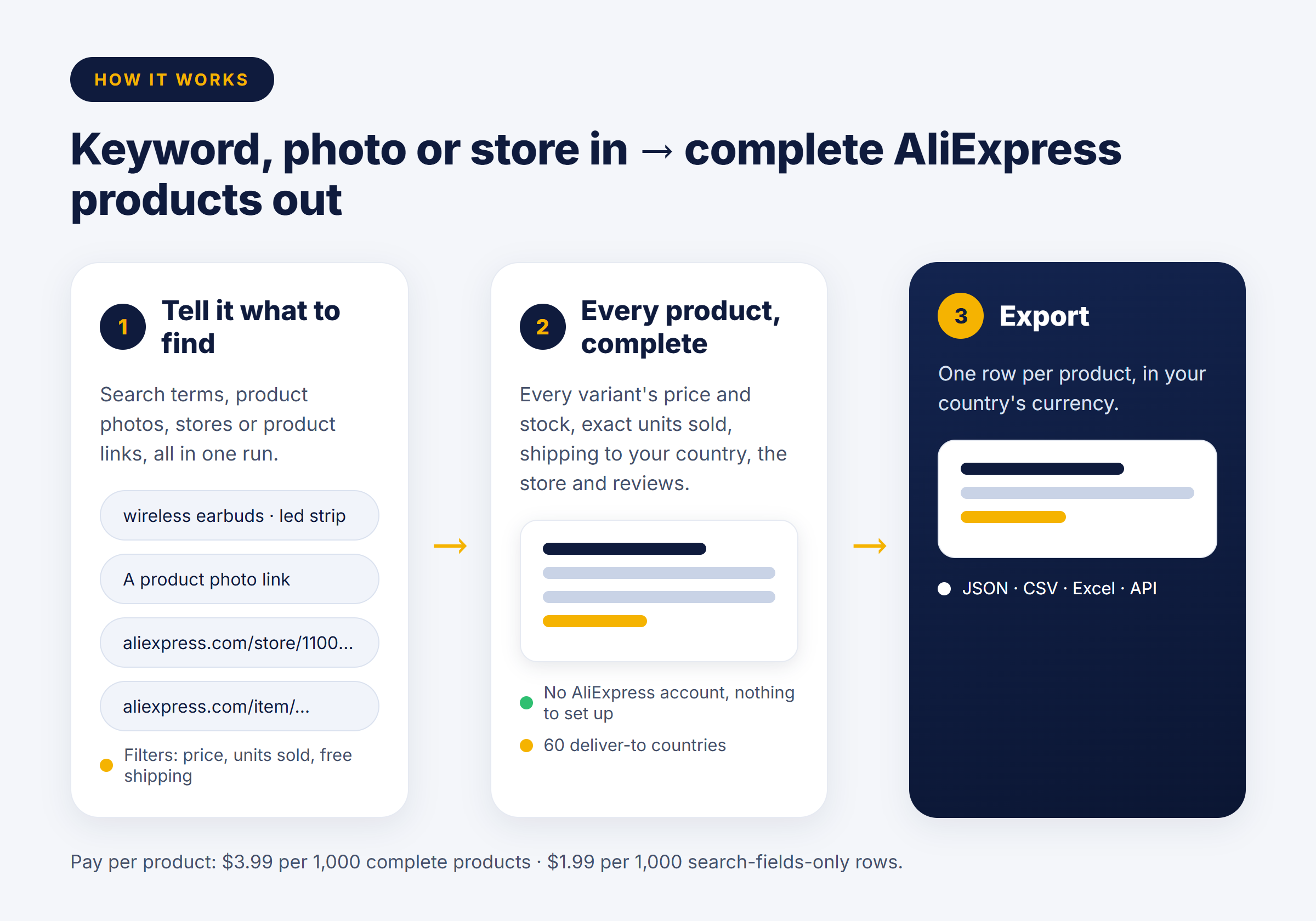
🛒 **Products** with every variant's price and stock 📈 **Sales**: exact units sold, wishlists 🚚 **Shipping**: fee, carrier, delivery days 🏪 **Stores**: ratings, followers, years open ⭐ **Reviews**: summary, latest 10, translated 📋 **Specifications**, description, manuals 🌍 **60 countries** and their currencies |
🔎 **Search** by keyword, photo, store or link 🎯 **Filters**: price, sold, rating, shipping 🏆 **Sort** by best sellers or price ⏰ **Scheduling** for daily price tracking ⬇️ **Export data** to JSON, CSV, Excel or XML 🦾 **API access, webhooks**, Node.js & Python 🤖 **LLM-ready data** for MCP, Claude, ChatGPT |
1. [Create](https://console.apify.com/sign-up) a free Apify account.
2. Open **[AliExpress Scraper](https://console.apify.com/actors/dYHIRW9jFIgQzXlQQ)** in Apify Console.
3. Type **search terms**, or paste **photos**, **stores** or **product links**.
4. Pick the **Deliver to** country, set **Maximum products** and, if you need them, the filters: price, units sold, rating, free shipping.
5. Click **Save & Start**: 200 complete products take 13 to 25 seconds.
6. Download the dataset as **JSON, CSV, Excel or XML**, or read it through the Apify API.
### ⬇️ Input
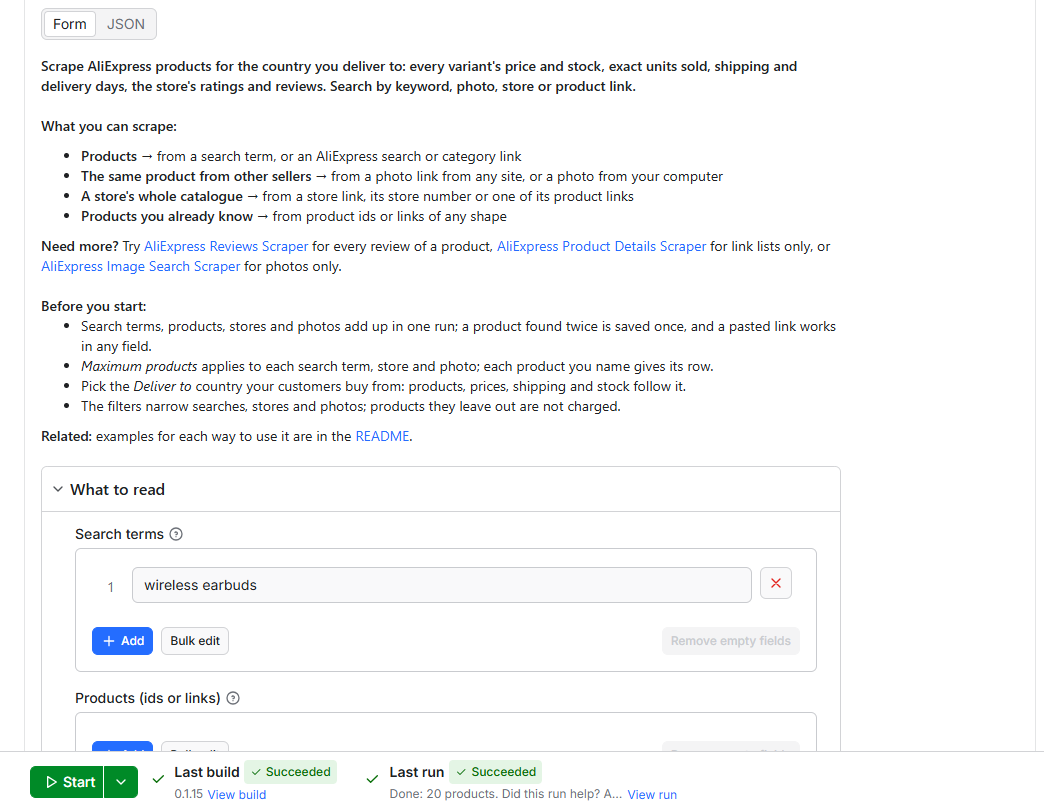
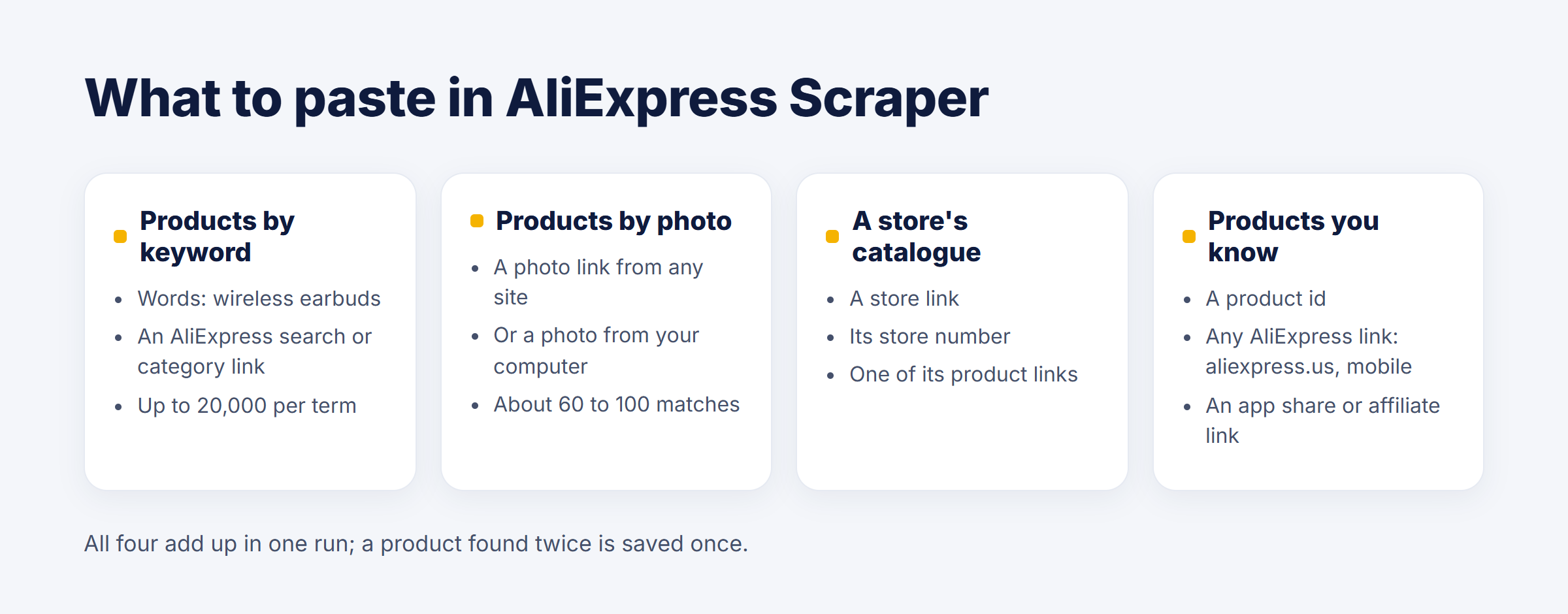
Every search term, product, store and photo is read in one run; a product found twice is saved once, a pasted link works in any field, and the filters narrow searches, stores and photos.
 | Paste this | And you get |
|---|---|
| A search term, or an AliExpress search or category link | Products in AliExpress's order, up to 20,000 per term |
| A photo link (JPG, PNG, WebP) from anywhere, or a photo from your computer | The products that look the same, about 60 to 100 |
| A store link, its store number or one of its product links | The store's whole catalogue |
| A product id or link (country sites, aliexpress.us, mobile, app share and affiliate links) | That product, complete |
#### 🔎 Search AliExpress by keyword
Each search term returns products in AliExpress's order, each complete. AliExpress's own pages stop at about 3,600 products for one search; the actor reads past that, up to 20,000 per term, each product once: on 2026-11-11 one search gave 6,000 distinct products in under 2 minutes.
```json
{
"searchTerms": ["wireless earbuds", "phone case"],
"maxItems": 200
}
```
#### 📸 Find AliExpress products by photo
A product photo from Amazon, Shopify, TikTok Shop, 1688 or anywhere else returns the AliExpress products that look the same, about 60 to 100 per photo, each complete: on 2026-11-11 one photo gave 97 of the 99 matches AliExpress counted.
```json
{
"imageUrls": ["https://example.com/my-product.jpg"],
"sort": "bestSellers"
}
```
#### 🏪 Scrape an AliExpress store's whole catalogue
A store link, its store number (in every complete row, `store.storeNumber`) or one of its product links. The run reads the store's whole catalogue, and the summary gives the store's own count to compare.
```json
{
"stores": ["https://www.aliexpress.com/store/1100955127", "https://www.aliexpress.com/item/1005006255429323.html"],
"maxItems": 1000
}
```
#### 🔗 Get AliExpress products by link or id
Links in whatever shape your team or your store uses, one complete row each, for the country you pick. A product not delivered to that country is listed in the summary and not charged.
```json
{
"products": ["1005006959700436", "https://www.aliexpress.us/item/3256806773385684.html", "https://fr.aliexpress.com/item/1005006255429323.html"],
"country": "UK"
}
```
#### 💸 Sweep a niche for less
Turn complete rows off: each row then has the id, title, price, original price, exact units sold, rating, delivery days, photos and position, at $1.99 per 1,000. Read the products that interest you afterwards with complete rows on.
```json
{
"searchTerms": ["camping lamp", "tent light", "headlamp"],
"maxItems": 2000,
"details": false
}
```
#### Input fields
| Field | Type | Default | Meaning |
|---|---|---|---|
| Search terms (`searchTerms`) | list | – | Words, or an AliExpress search or category link (its filters are kept); up to 100 |
| Products (`products`) | list | – | Product ids or links of any shape: aliexpress.com and country sites, aliexpress.us, mobile, app share and affiliate links; up to 20,000 |
| Stores (`stores`) | list | – | A store link, its store number, or one of its product links; up to 100 |
| Photos (`imageUrls`, `imageFile`) | list, upload | – | Public photo links (JPG, PNG, WebP) from anywhere, or a photo from your computer; up to 100 |
| Maximum products (`maxItems`) | number | 100 | Products per search term, store and photo, up to 20,000 |
| Deliver to (`country`) | choice | United States | One of 60 countries: decides products, prices, shipping and availability |
| Currency (`currency`), Language (`language`) | text | the country's | Prices in another currency; titles in another language when the seller wrote one |
| Order (`sort`) | choice | best match | AliExpress's best match, best sellers first, lowest or highest price first |
| Minimum and maximum price (`minPrice`, `maxPrice`) | number | none | In the chosen currency |
| Minimum units sold (`minSold`), minimum rating (`minRating`) | number | none | Exact units sold on search rows; stars from 0 to 5 |
| Free shipping, Choice, 4 stars and up (`freeShipping`, `choiceOnly`, `fourStarsAndUp`) | true or false | false | AliExpress's own filters for searches; free shipping also for photos |
| Ships from (`shipFrom`) | text | – | Only products shipped from this country's warehouses (US, ES, FR, China…) |
| Complete rows (`details`) | true or false | true | Off: search fields only, at the lower price |
| Fail below this many products (`minItems`) | number | 0 | Fail the run when fewer products come back (for monitoring) |
### ⬆️ Output
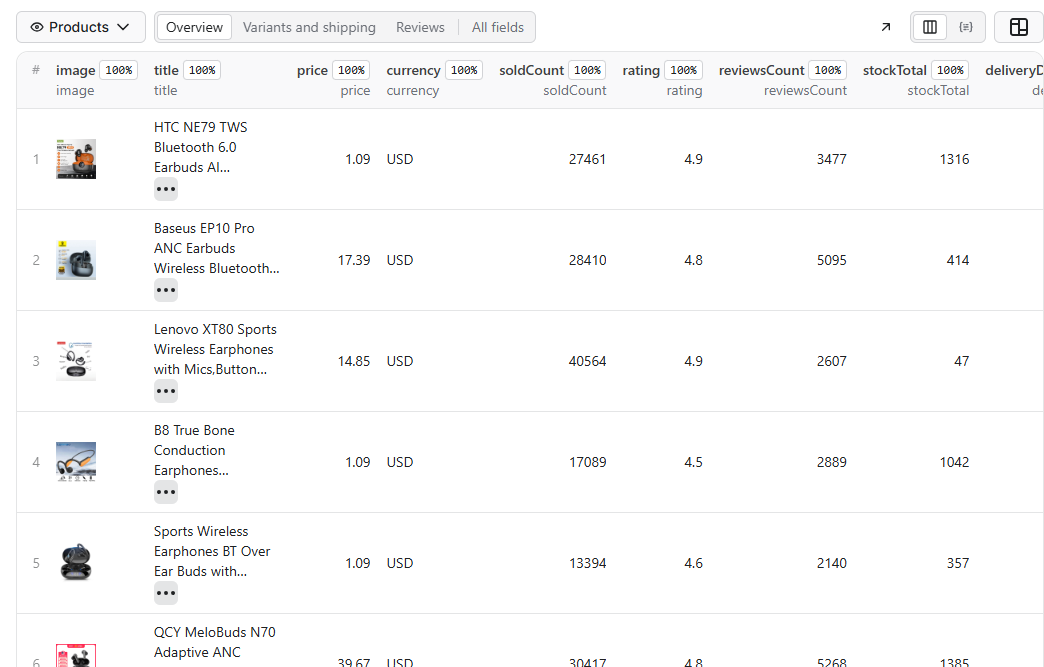 Results land in the run's dataset: view them as a table, download them as JSON, CSV, Excel or XML, or read them through the API. Every source gives the same row.
#### 📦 AliExpress product data sample
A product read by id, delivered to the United States (lists shortened to one or two entries):
```json
{
"productId": "1005006959700436",
"url": "https://www.aliexpress.com/item/1005006959700436.html",
"title": "QCY MeloBuds Pro ANC Bluetooth 5.3 Earphones Wireless 46dB Hybrid ANC Hi-Res LDAC Earbuds 6 Mic Headphones 34H In-Ear Detection",
"price": 19.15,
"priceMax": 25.26,
"originalPrice": 86.86,
"discountPercent": 78,
"currency": "USD",
"newShopperPrice": true,
"soldCount": 10000,
"soldText": "10,000+ sold",
"rating": 4.8,
"reviewsCount": 4810,
"wishlistCount": 43971,
"stockTotal": 9534,
"available": true,
"store": {
"storeNumber": "1100955127",
"name": "QCY Official Store",
"url": "https://www.aliexpress.com/store/1100955127",
"sellerId": "221859663",
"country": "China",
"openedOn": "2014-09-23",
"yearsOpen": 12,
"positiveFeedbackPercent": 97.4,
"storeRating": "4.9",
"sold180Days": "70,000+",
"followers": 2057203
},
"variants": [
{
"skuId": "12000039477279755",
"options": { "Color": "BLACK", "Ships From": "United States" },
"price": 19.15,
"originalPrice": 82.43,
"stock": 961,
"available": true,
"maxPerShopper": 1,
"image": "https://ae-pic-a1.aliexpress-media.com/kf/Sf3383a35bac041acad10e4c903fa6804V.jpg"
}
],
"shipping": [
{
"carrier": "Aliexpress Selection Standard",
"free": true,
"fee": 0,
"currency": "USD",
"shipsFrom": "China",
"shipsFromCode": "CN",
"minDays": 12,
"maxDays": 17,
"arrivesBy": "Nov. 28",
"tracking": true
}
],
"specifications": [{ "name": "Material", "value": "PVC,ABS" }],
"categoryIdPath": ["44", "100000306", "63705"],
"reviewSummary": {
"average": 4.8,
"count": 4810,
"positivePercent": 96.1,
"stars": { "1": 103, "2": 28, "3": 59, "4": 270, "5": 4350 },
"withPhotos": 1025,
"highlights": [{ "text": "fast delivery", "count": 259 }]
},
"latestReviews": [
{
"date": "05 Dec 2025",
"stars": 5,
"translation": "Simply the best earphone I've ever tried, excellent noise cancellation…",
"variant": "Color:BLACK Ships From:Brazil",
"images": ["https://ae-pic-a1.aliexpress-media.com/kf/A78324186d163441ea71c0cdf5dff0a64i.jpg"]
}
],
"shipTo": "US",
"details": true
}
```
#### Fields
Source: **AliExpress** = AliExpress's value unchanged. **Derived** = computed by this actor from AliExpress's values. Missing values are `null`, never an empty string.
| Field | Source | Meaning |
|---|---|---|
| `productId` | AliExpress | AliExpress's product id (the global id, also for products found on aliexpress.us); never changes |
| `url` | Derived | The product page |
| `title` | AliExpress | Title as the seller wrote it |
| `price`, `priceMax` | AliExpress | Lowest price in stock now, and the highest variant price when they differ, in `currency` |
| `originalPrice`, `discountPercent` | AliExpress | The price before the discount, and the discount |
| `newShopperPrice` | AliExpress | `true` when the price is AliExpress's welcome deal for new shoppers (what a signed-out visitor sees) |
| `soldCount`, `soldText` | AliExpress | Units sold: the exact count on search and photo rows (100,312 where the page says "100K+ sold"); on product links the lower bound of the label |
| `rating`, `reviewsCount`, `wishlistCount` | AliExpress | Stars, reviews, shoppers who saved it |
| `stockTotal`, `available`, `unavailableReason` | AliExpress | Units in stock over all variants; whether it can be bought in your country, and AliExpress's message when not |
| `image`, `images`, `video` | AliExpress | Main photo, gallery, product video |
| `store` | AliExpress | `storeNumber`, `name`, `url`, `sellerId`, `country`, `province`, `openedOn`, `yearsOpen`, `topRatedSeller`, `positiveFeedbackPercent`, `positiveFeedbacks`, `feedbackScore`, `storeRating`, `communicationRating`, `sold180Days`, `followers` |
| `variantOptions`, `variants` | AliExpress | Option groups (Color, Size, Ships From) with their photos; every variant: `skuId`, `options`, `price`, `originalPrice`, `stock`, `available`, `maxPerShopper`, `image` |
| `shipping` | AliExpress | Each shipping option to your country: `carrier`, `code`, `free`, `fee`, `currency`, `shipsFrom`, `shipsFromCode`, `minDays`, `maxDays`, `arrivesBy`, `tracking` |
| `deliveryDaysMin`, `deliveryDaysMax` | AliExpress | Fastest and slowest delivery in days |
| `tags` | AliExpress | Labels on the product (Free shipping, Choice, deals) |
| `specifications` | AliExpress | `{name, value}` pairs |
| `categoryId`, `categoryIdPath` | AliExpress | AliExpress's category, and its ids from the top category down |
| `descriptionText`, `descriptionImages`, `manuals` | AliExpress | The seller's description as text, its images, attached manuals (PDF) |
| `reviewSummary` | AliExpress | `average`, `count`, `positivePercent`, `stars` (count per star), `withPhotos`, `fromBuyersCountry`, `withFollowUp`, `highlights` |
| `latestReviews` | AliExpress | The latest 10 reviews: `id`, `date`, `stars`, `text`, `translation`, `country`, `variant`, `images`, `helpfulVotes` |
| `listedOn` | AliExpress | Date the product was listed (search and photo rows) |
| `shipTo` | Derived | The deliver-to country of the run |
| `searchTerm`, `searchResultCount`, `storeInput`, `imageInput`, `position` | Derived | What found the product, AliExpress's count there, and its rank |
| `details` | Derived | `true` = complete row, `false` = search fields only |
| `scrapedAt` | Derived | When the run read it (UTC) |
#### Run summary
Every run saves a `SUMMARY` record in its key-value store. This one is a search, two product links and a store:
```json
{
"products": 61,
"completeRows": 61,
"searchFieldsOnlyRows": 0,
"rowsWithoutDetails": 0,
"leftOutByFilters": 0,
"notDeliveredToCountry": ["1005002686973435"],
"productIdsNotOnAliExpress": [],
"inputsNotFound": [],
"countPerSearch": { "wireless earbuds": 16836 },
"countPerStore": { "https://www.aliexpress.com/store/1102519010": 44 },
"countPerPhoto": {},
"deliverTo": "US",
"currency": "USD",
"durationSec": 8,
"stoppedSources": []
}
```
`leftOutByFilters` counts products your filters left out, not charged. `notDeliveredToCountry` and `productIdsNotOnAliExpress` list products AliExpress does not sell to your country or does not have, not charged. `countPerSearch`, `countPerStore` and `countPerPhoto` are AliExpress's own counts. Set `minItems` to make a short run fail outright.
#### 📝 Notes and limits
- **Prices are for your deliver-to country.** AliExpress shows different products, prices, shipping and stock per country: pick the country your customers buy from.
- **New-shopper prices.** On most products AliExpress shows signed-out visitors its welcome deal for new shoppers (75% of products on 2026-11-11). `newShopperPrice: true` marks those prices; `originalPrice` is the price before any discount.
- **Units sold.** Search and photo rows carry AliExpress's exact count; a product read by link has only the rounded label ("10,000+ sold"), so `soldCount` is its lower bound there.
- **Variants:** each has its own price and units in stock; `available: false` on a variant means it cannot be bought now.
- **Shipping:** the options AliExpress offers to your country for the product's main warehouse; variants shipping from other warehouses are listed with their "Ships From" option.
- **Reviews:** each complete row has the review summary and the latest 10 reviews; buyer names are left out.
- **Prices and stock move daily** and around AliExpress's sales: schedule runs as often as you need a fresh price.
### What can you do with AliExpress data?
#### 🏆 [Find best sellers with free shipping](https://apify.com/sleepmodesystems/aliexpress-scraper/examples/aliexpress-best-sellers-free-shipping-product-research)
Shopify and TikTok Shop sellers look for winning products: what sells, ships free to their customers, and comes from a store they can trust.
**Recipe:**
1. Search a product word with **Order: best sellers first**, **Free shipping** on and **Minimum units sold: 500**; the run keeps reading until it has the number you asked for that match.
2. Sort the rows by `soldCount` and `wishlistCount`, and keep products whose `rating` and `reviewSummary` hold up.
3. Check `deliveryDaysMax` and the `store` card (years open, positive feedback) before you list a product.
On 2026-11-11, the 100 best-selling LED strips with free shipping to the US and 500+ units sold took 19 seconds, about $0.40.
#### 📸 [Find an AliExpress supplier from a product photo](https://apify.com/sleepmodesystems/aliexpress-scraper/examples/find-aliexpress-supplier-by-product-photo)
Amazon, TikTok Shop and Shopify sellers find the same product on AliExpress, and compare its sellers on price, sales and delivery.
**Recipe:**
1. Paste the product's photo link in **Photos**, from your listing or a competitor's, with **Order: best sellers first**.
2. Compare the matches on `price`, `soldCount`, `deliveryDaysMax` and the `store` ratings.
3. Paste the best store's link in **Stores** to see everything else it sells.
On 2026-11-11, 50 complete matches for one photo took 7 seconds, about $0.20.
#### 📈 [Track AliExpress prices and stock for dropshipping](https://apify.com/sleepmodesystems/aliexpress-scraper/examples/aliexpress-price-and-stock-tracker-for-dropshipping)
Dropshippers keep their store in sync: a price change or a sold-out color on AliExpress costs them an order.
**Recipe:**
1. Save the products you sell in **Products** as an Apify task, with your customers' **Deliver to** country.
2. Schedule it daily, and send each run's dataset to Google Sheets, your database or your store app.
3. Compare each variant's `price`, `stock` and `available`, and the `shipping` fee, with the previous day.
100 products tracked every day for a month cost about $12.
#### 🏪 Watch an AliExpress store's catalogue
Brands and marketplace sellers follow the stores that sell look-alikes of their products, and what those stores add.
**Recipe:**
1. Paste the store's link or one of its product links in **Stores**.
2. Schedule it weekly; new `productId` values are the products the store added.
3. Compare `price` and `soldCount` across runs to see what sells for them.
### AliExpress scrapers compared
| | AliExpress Scraper | piotrv1001 | zen-studio | pro100chok | kawsar | devcake |
|---|---|---|---|---|---|---|
| Price per 1,000 products | $3.99 | $8 | $6.48 | $6 | ❌ | ❌ |
| Keyword search | ✅ | ❌ | ✅ | ✅ | ✅ | ✅ |
| Photo search | ✅ | ❌ | ❌ | ❌ | ❌ | ❌ |
| Store catalogue | ✅ | ❌ | ✅ | ✅ | ❌ | ❌ |
| Link or id | ✅ | ✅ | ✅ | ✅ | ❌ | ❌ |
| Variant stock | ✅ | ✅ | ✅ | ✅ | ❌ | ✅ |
| Exact units sold | ✅ | ❌ | ✅ | ❌ | ❌ | ❌ |
| Reviews included | ✅ | ❌ | ❌ | ❌ | ❌ | ❌ |
| Country choice | ✅ | ✅ | ✅ | ✅ | ❌ | ✅ |
### Want to get other data from AliExpress?
You can use the other dedicated AliExpress scrapers below for one job each:
| 📦 AliExpress Product Details Scraper | 📸 AliExpress Image Search Scraper | 💬 AliExpress Reviews Scraper |
wireless earbuds, phone case), or an AliExpress search or category link: its filters are kept. Each gives products in AliExpress's order, up to 20,000 per term, past the ~3,600 AliExpress's own pages show (one search gave 6,000 distinct products in under 2 minutes). Up to 100 terms.
## `products` (type: `array`):
Product ids or links, one per line, any shape: 1005006959700436, https://www.aliexpress.com/item/1005006959700436.html, country sites (aliexpress.us, fr.aliexpress.com…), mobile links, app share links (a.aliexpress.com/*…) and affiliate links (s.click.aliexpress.com/e/*…). One complete row each. Up to 20,000.
## `stores` (type: `array`):
A store's whole catalogue, one per line: its link (https://www.aliexpress.com/store/1100955127), its store number (1100955127) or one of its product links. Up to Maximum products per store, 100 stores.
## `imageUrls` (type: `array`):
Find a product by photo: public photo links, one per line (any JPG, PNG or WebP: an Amazon, Shopify, TikTok Shop or 1688 product photo works). Each gives the AliExpress products that look the same, about 80-100 per photo. Up to 100 photos.
## `imageFile` (type: `string`):
A photo from your computer, searched like the photo links above.
## `maxItems` (type: `integer`):
Products per search term, store and photo (up to 20,000). A product you named always gives its row.
## `country` (type: `string`):
The country AliExpress delivers to: it decides which products appear, their price, shipping options and delivery days, and which variants can be bought there. A product not delivered there is reported and not charged.
## `currency` (type: `string`):
Prices in this currency (USD, EUR, GBP…). Empty: the country's own (euros for Germany, pounds for the UK).
## `language` (type: `string`):
Titles and specifications in this language when the seller wrote one (en, fr, de, es, pt…). Empty: the country's own.
## `sort` (type: `string`):
The order of searches and photos as AliExpress shows them. Stores are read whole, best sellers first unless you sort by price.
## `minPrice` (type: `number`):
In the chosen currency. Searches ask AliExpress for this range; stores and photos are filtered on each product's price.
## `maxPrice` (type: `number`):
In the chosen currency.
## `minSold` (type: `integer`):
Only products with at least this many units sold. Search rows carry AliExpress's exact count (100,312 where the page says "100K+ sold"), so the floor is exact.
## `minRating` (type: `number`):
Only products rated at least this many stars (for example 4.5).
## `freeShipping` (type: `boolean`):
Searches and photos: only products with free shipping to your country, as AliExpress labels them.
## `choiceOnly` (type: `boolean`):
Searches: only AliExpress Choice products (faster, tracked delivery).
## `fourStarsAndUp` (type: `boolean`):
Searches: AliExpress's own 4-stars-and-up filter (for photos, use Minimum rating).
## `shipFrom` (type: `string`):
Searches: only products shipped from this country's warehouses (US, ES, FR, China…): faster delivery and no customs for local buyers.
## `details` (type: `boolean`):
On: every product with every variant's price and stock, shipping options, the store card, specifications, the description, the review summary and the latest 10 reviews. Off: search fields only (price, exact units sold, rating, delivery days, photos), at a lower price and faster: 1,000 search rows in under a minute.
## `minItems` (type: `integer`):
For scheduled runs: the run is marked failed when it saves fewer products, so your monitoring notices. 0 = never.
## Actor input object example
```json
{
"searchTerms": [
"wireless earbuds"
],
"maxItems": 20,
"country": "US",
"sort": "bestMatch",
"freeShipping": false,
"choiceOnly": false,
"fourStarsAndUp": false,
"details": true,
"minItems": 0
}
```
# Actor output Schema
## `products` (type: `string`):
No description
## `summary` (type: `string`):
No description
# API
You can run this Actor programmatically using our API. Below are code examples in JavaScript, Python, and CLI, as well as the OpenAPI specification and MCP server setup.
## JavaScript example
```javascript
import { ApifyClient } from 'apify-client';
// Initialize the ApifyClient with your Apify API token
// Replace the '