

AliExpress Image Search Scraper
Pricing
from $3.39 / 1,000 products
AliExpress Image Search Scraper
[💰 $3.99 / 1K products] Find a product on AliExpress from any photo (Amazon, TikTok Shop, Shopify, 1688): each match with price, exact units sold, every variant's stock, shipping for 60 countries, store. Search fields only $1.99 / 1K. No fee per photo.
Pricing
from $3.39 / 1,000 products
Rating
0.0
(0)
Developer

Sleep Mode Systems
Maintained by CommunityActor stats
0
Bookmarked
1
Total users
1
Monthly active users
7 days ago
Last modified
Categories
Features
Share
[💰 $3.99 per 1,000 products] Find a product on AliExpress from any photo: 30 complete matches, best sellers first, in under 10 seconds; matches with search fields only at $1.99 per 1,000.
What can AliExpress Image Search Scraper do?
AliExpress Image Search Scraper finds the products on AliExpress that look the same as a photo (https://www.aliexpress.com): paste a product photo from Amazon, TikTok Shop, Shopify or 1688, or upload one, and get each match complete for the country you deliver to, from the exact units sold to every variant's price and stock, shipping, the store and reviews. No fee per photo: you pay per product found. No AliExpress account, no proxy, nothing to set up.
| 📦 What you can extract | ⚙️ Features & integrations |
|---|---|
|
📸 Matches, ranked, about 60 to 100 a photo |
🖼️ Any photo: a link or an upload |
If you look for the AliExpress supplier of a product you saw elsewhere, compare its sellers or check who sells look-alikes of your brand, you can do it from a single photo.
What data can I scrape from AliExpress by photo?
One row per matching product, with its rank:
- Matches: what AliExpress has that looks like your photo. Title, photos, price, original price and discount, the exact units sold, rating, reviews and wishlists, listing date, and the match's rank.
- Variants: exactly what you would order. Every variant (SKU) with its own price, units in stock, whether it can be bought now and its photo.
- Shipping: how it gets there. Each option to your country: carrier, free or its fee, where it ships from, minimum and maximum days, arrival date.
- Stores: who you are buying from. Name, number, country, opening date and years open, positive feedback, followers, units sold in 180 days.
- Product and reviews: what it is and what buyers say. Specifications, the description with its images, the review summary and the latest 10 reviews with their English translation.
With complete rows off, each match keeps its search fields (id, title, price, exact units sold, rating, delivery days, photos) at $1.99 per 1,000.
Need more? These dedicated scrapers cover other AliExpress jobs:
- 🛒 AliExpress Scraper: search by keyword or store too, in the same run as your photos
- 💬 AliExpress Reviews Scraper: every review of a product, down to the last one
- 📦 AliExpress Product Details Scraper: products by link or id
How much will scraping AliExpress by photo cost?
AliExpress Image Search Scraper uses pay-per-event pricing: you pay for each product found, and nothing else. No fee per photo, the start fee is a fraction of a cent, platform usage is included, and matches your filters leave out are not charged.
| Event | FREE | BRONZE | SILVER | GOLD |
|---|---|---|---|---|
| Product with every variant, shipping, the store and reviews (per 1,000) | $3.99 | $3.79 | $3.59 | $3.39 |
| Product, search fields only (per 1,000) | $1.99 | $1.89 | $1.79 | $1.69 |
| Actor start | $0.00005 | $0.00005 | $0.00005 | $0.00005 |
The tiers are Apify's discount tiers; the PLATINUM and DIAMOND tiers pay the GOLD price. Each price covers every field of its row: no add-ons.
Cost examples
| Scenario | Products | Cost (FREE) | Cost (GOLD) |
|---|---|---|---|
| Try it: one photo, 30 complete matches | 30 | $0.12 | $0.10 |
| 10 photos × 30 complete matches | 300 | $1.20 | $1.02 |
| 10 photos × 100 matches, search fields only | 1,000 | $1.99 | $1.69 |
Set maxItems to cap each photo, and the run's maximum charge in Apify to cap spend: the actor stops cleanly and says how many products it delivered.
How do I use AliExpress Image Search Scraper?
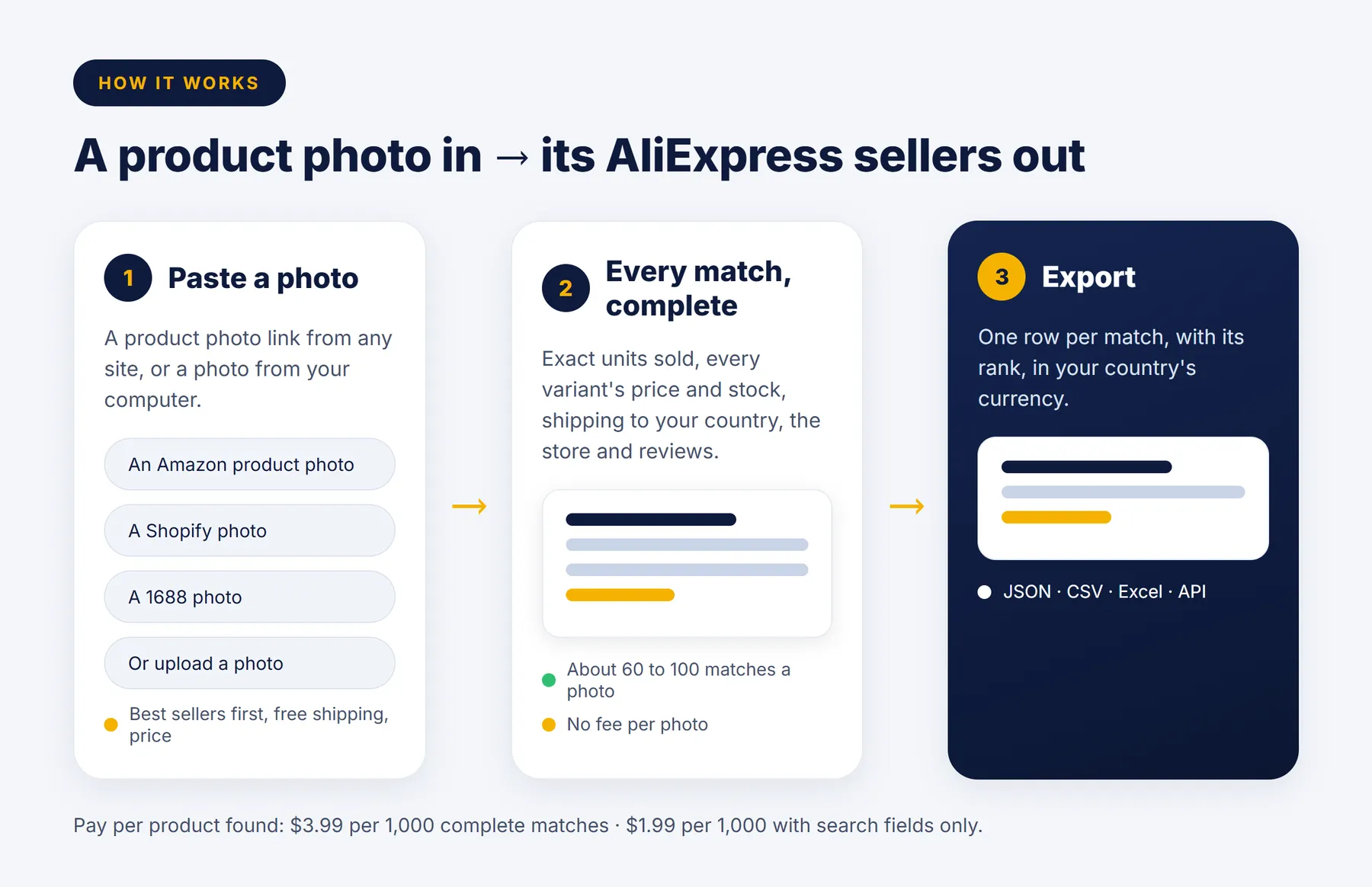
- Create a free Apify account.
- Open AliExpress Image Search Scraper in Apify Console.
- Paste a photo link (right-click a product photo, "Copy image address"), or upload a photo.
- Pick the Deliver to country, set Maximum products per photo and, if you need them, the order and filters.
- Click Save & Start: 30 complete matches take 6 to 9 seconds.
- Download the dataset as JSON, CSV, Excel or XML, or read it through the Apify API.
⬇️ Input
Each photo gives up to Maximum products matches; the filters narrow every photo, and a product matched by two photos is saved once.
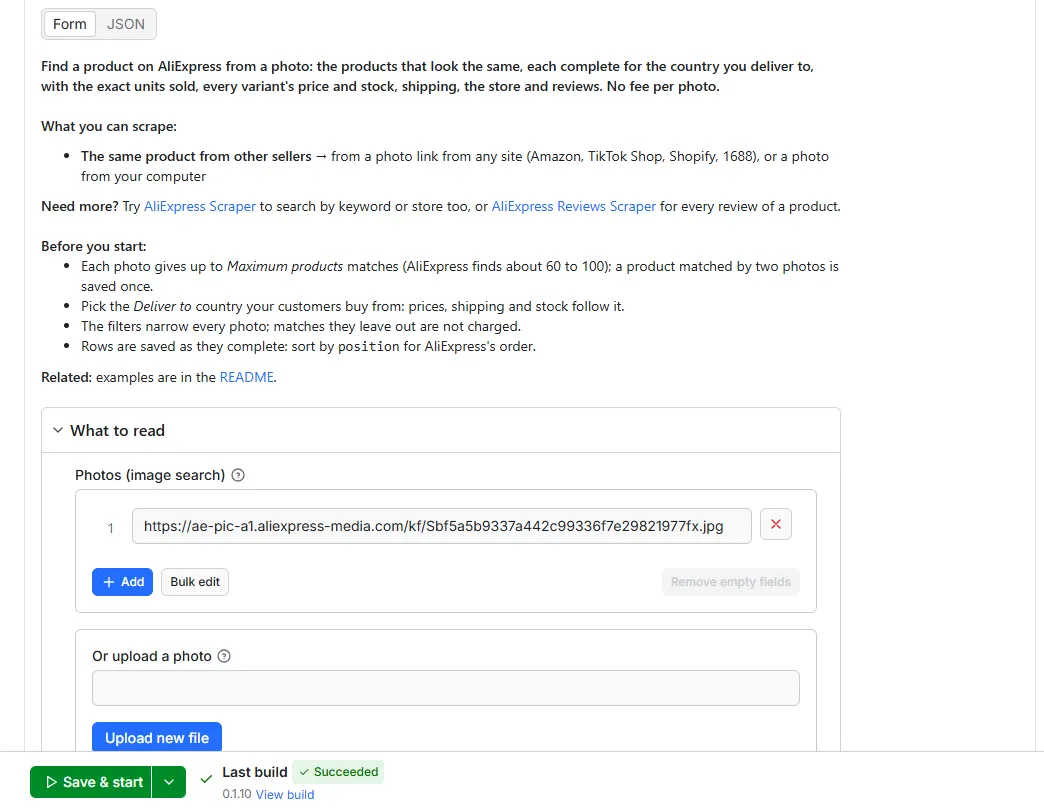
Input fields
| Field | Type | Default | Meaning |
|---|---|---|---|
Photos (imageUrls) | list | – | Public photo links (JPG, PNG, WebP) from any site; up to 100 |
Or upload a photo (imageFile) | file | – | A photo from your computer, searched like a link |
Maximum products (maxItems) | number | 100 | Matches per photo (AliExpress finds about 60 to 100) |
Deliver to (country) | choice | United States | One of 60 countries: decides prices, shipping and availability |
Currency (currency), Language (language) | text | the country's | Prices in another currency; titles in another language when the seller wrote one |
Order (sort) | choice | best match | AliExpress's best match, best sellers first, lowest or highest price first |
Minimum and maximum price (minPrice, maxPrice) | number | none | In the chosen currency |
Minimum units sold (minSold), minimum rating (minRating) | number | none | On the exact units sold; stars from 0 to 5 |
Free shipping only (freeShipping) | true or false | false | Only matches AliExpress labels with free shipping to your country |
Complete rows (details) | true or false | true | Off: search fields only, at the lower price |
Fail below this many products (minItems) | number | 0 | Fail the run when fewer products come back (for monitoring) |
⬆️ Output
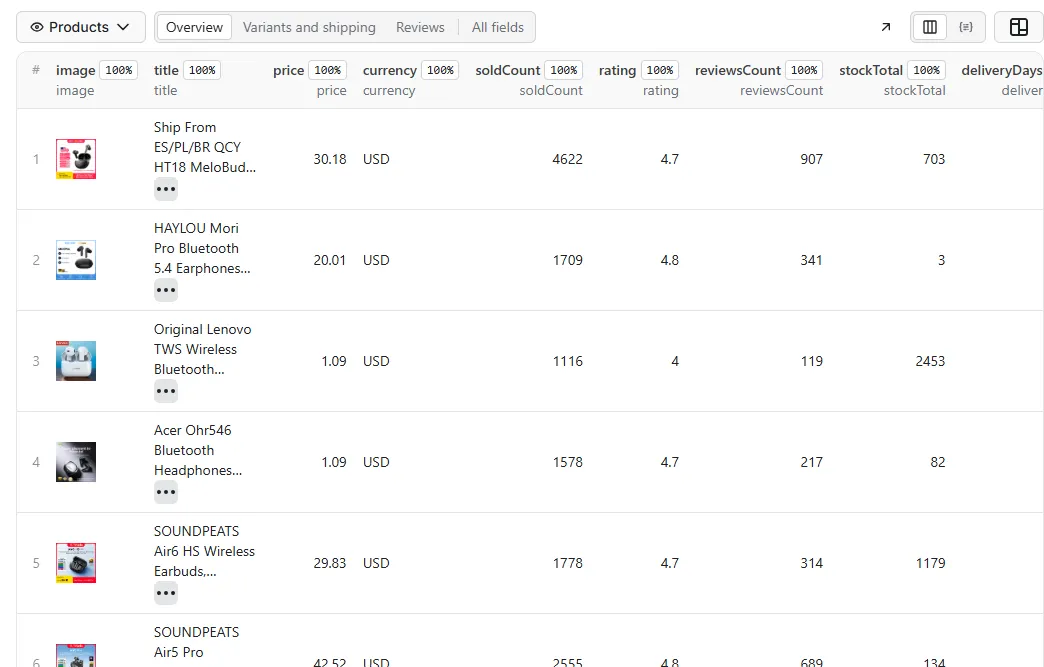
Results land in the run's dataset: view them as a table, download them as JSON, CSV, Excel or XML, or read them through the API. The rows are the same as AliExpress Scraper's, so datasets from both combine directly; its README lists every field.
📸 AliExpress match data sample
The best-selling match for a photo of wireless earbuds, delivered to the United States (lists shortened to one entry):
Fields
Every row has the fields of AliExpress Scraper's rows; the ones that matter most for a photo search:
| Field | Source | Meaning |
|---|---|---|
imageInput | Derived | The photo that found the product |
position | Derived | The match's rank for that photo, in the order you chose |
searchResultCount | AliExpress | AliExpress's count of matches for the photo |
productId, url, title, image, images | AliExpress | The product, its page, title and photos |
price, originalPrice, discountPercent, currency | AliExpress | Price in your country's currency, the price before the discount, and the discount |
soldCount, soldText | AliExpress | The exact units sold (100,312 where the page says "100K+ sold"), and AliExpress's label |
rating, reviewsCount, wishlistCount, listedOn | AliExpress | Stars, reviews, shoppers who saved it, listing date |
stockTotal, variants | AliExpress | Units in stock over all variants; every variant's price, stock, availability and photo |
shipping, deliveryDaysMin, deliveryDaysMax | AliExpress | Each shipping option to your country, and the fastest and slowest delivery in days |
store | AliExpress | The store's number, name, country, opening date, positive feedback, followers, units sold in 180 days |
specifications, descriptionText, descriptionImages | AliExpress | Specifications and the seller's description |
reviewSummary, latestReviews | AliExpress | Count per star and highlights; the latest 10 reviews with their English translation |
details | Derived | true = complete row, false = search fields only |
Run summary
Every run saves a SUMMARY record in its key-value store. This one is one photo, best sellers first, 30 complete matches (shortened):
countPerPhoto is AliExpress's count of matches for each photo. inputsNotFound lists photos that could not be opened, not charged. leftOutByFilters counts matches your filters left out, not charged. Set minItems to make a short run fail outright.
📝 Notes and limits
- Rows are saved as they complete, so the dataset is not in rank order: sort by
positionfor AliExpress's order. - Similar is not identical. AliExpress ranks products by how much they look like your photo; check titles, photos and specifications before you order.
- Prices are for your deliver-to country, in its currency unless you pick another;
newShopperPrice: truemarks AliExpress's welcome deal for new shoppers. - Reviews: each complete row has the review summary and the latest 10 reviews, without buyer names.
- Prices and stock move daily and around AliExpress's sales.
What can you do with AliExpress photo search data?
🔎 Find the AliExpress supplier of an Amazon product
Amazon, TikTok Shop and Shopify sellers find the same product on AliExpress, and compare its sellers on price, sales and delivery.
Recipe:
- Copy the product's photo link from Amazon and paste it in Photos, with Order: best sellers first.
- Sort the matches by
position, then compareprice,soldCount,deliveryDaysMaxand thestoreratings. - Check each variant's
stockbefore you list the product.
On 2026-11-11, 30 complete matches for one photo cost about $0.12.
🚚 AliExpress look-alikes with free shipping
Brands watch who sells copies of their products, and sellers compare offers that ship free to their customers.
Recipe:
- Paste your product photo in Photos and turn Free shipping only on.
- Group the matches by
storeto see each seller once, with itssoldCount. - Run it again each month to spot new sellers.
On 2026-11-11, 30 complete matches with free shipping cost about $0.12; 3 without free shipping were left out and not charged.
💸 Cheapest AliExpress sellers of a product by photo
Buyers and sellers compare the sellers of the same product, cheapest first, for a quick and cheap check.
Recipe:
- Paste the photo, set Order: lowest price first and turn Complete rows off for the lower price.
- Compare
price,soldCount,ratinganddeliveryDaysMaxacross the matches. - Read the two or three best in AliExpress Product Details Scraper for every variant's stock.
On 2026-11-11, 60 sellers, cheapest first, took 3 seconds, about $0.12.
AliExpress image search scrapers compared
| AliExpress Image Search Scraper | piotrv1001 | devcake | dev00 | |
|---|---|---|---|---|
| Price per 1,000 matches | $1.99 | $0.33 | $5 | $1 |
| Complete matches | ✅ | ❌ | ❌ | ❌ |
| Variant stock | ✅ | ❌ | ❌ | ❌ |
| Shipping to you | ✅ | ❌ | ❌ | ❌ |
| Reviews included | ✅ | ❌ | ❌ | ❌ |
| Country choice | ✅ | ✅ | ❌ | ❌ |
| No fee per photo | ✅ | ❌ | ✅ | ❌ |
Want to get other data from AliExpress?
You can use the other dedicated AliExpress scrapers below for one job each:
| 🛒 AliExpress Scraper | 📦 AliExpress Product Details Scraper | 💬 AliExpress Reviews Scraper |
Want more Chinese marketplaces? 1688 Image Search Scraper for the factories behind a photo, Alibaba Scraper for export suppliers with shipping costs, Taobao & Tmall Scraper and JD.com Scraper for China's retail prices. For second-hand prices, Goofish Scraper reads Xianyu (闲鱼) listings, sellers and reviews.
🤖 AI agents and MCP
The AliExpress Image Search Scraper is a ready tool for AI agents through the Apify MCP server. Add this server to Claude (desktop, web or Code), ChatGPT, Cursor or any MCP client:
For a client that takes a JSON config:
Then ask, for example:
- "Here is the photo of a product I sell on Amazon: find it on AliExpress and show the 10 best-selling sellers with their price and delivery days to the US."
- "Which AliExpress stores sell look-alikes of our product (photo attached), and how many have they sold?"
- "Find this product on AliExpress with free shipping to France and list its variants and stock."
The video shows how to connect Apify to Claude with MCP:
Why agents should choose AliExpress Image Search Scraper
- Any photo, complete answers. A photo link from any site, or an upload; every match with variants, stock, shipping and the store.
- Fast. 30 complete matches in 6 to 9 seconds, 60 search-field matches in 2 to 3 seconds; the run starts in about 0.1 seconds.
- Filters that hold. Best sellers first, price range, units sold, rating, free shipping: matches left out are not charged.
- No fee per photo. $3.99 per 1,000 complete products, $1.99 with search fields only (FREE tier).
Quick reference for AI agents
- Actor:
sleepmodesystems/aliexpress-image-search-scraper - Does: one dataset row per AliExpress product matching each photo.
- Smallest input:
{"imageUrls": ["https://example.com/my-product.jpg"], "maxItems": 30}. - Best sellers with free shipping: add
"sort": "bestSellers", "freeShipping": true. - Cheaper:
"details": falsegives search fields only at $1.99 per 1,000. - Rank:
positionis the match's rank; rows are saved as they complete, so sort by it. - The run summary (
SUMMARYrecord) gives AliExpress's count of matches per photo (countPerPhoto) and photos that could not be opened (inputsNotFound). - Zero rows means the photo could not be opened (listed in
inputsNotFound) or the filters left everything out (leftOutByFilters).
❓ Frequently Asked Questions
Which photos work best?
Any public JPG, PNG or WebP link (Amazon, TikTok Shop, Shopify, 1688, your own site), or a photo uploaded from your computer. A clear photo of the product alone matches best.
How many matches does a photo give?
About 60 to 100, as AliExpress counts them; the run summary gives AliExpress's count for each photo.
Is there a fee per photo?
No. You pay for the products found: $3.99 per 1,000 complete, $1.99 with search fields only.
Can I get the exact units sold of each match?
Yes. Matches carry AliExpress's exact count (100,312 where the page says "100K+ sold").
Do I need an AliExpress account?
No. The actor reads what any signed-out shopper sees; there is nothing to set up.
Is it legal to scrape AliExpress by photo?
This actor reads product data AliExpress shows publicly to anyone, without logging in; your photos are used only to search. It collects no personal data about buyers. You are responsible for how you use the data, including AliExpress's terms and any law that applies to you; see Apify's guide to web scraping legality. AliExpress Image Search Scraper is an independent tool by Sleep Mode Systems, not affiliated with, endorsed by or sponsored by AliExpress or Alibaba Group; AliExpress is a trademark of its owner.
Can I integrate AliExpress data with other apps?
Yes. Use Apify Schedules, and an integration or webhook to send each run's dataset to Google Sheets, Make, Zapier, n8n, Slack, Notion or your database.
Can I use AliExpress Image Search Scraper with the Apify API?
Yes. Any Apify client (JavaScript, Python, REST) can start the actor and read the dataset; the API tab of this actor has ready code.
AliExpress Image Search Scraper not working?
Write the run's link in the Issues tab of this actor, or to sleepmodesystems@proton.me; questions, a missing field or a custom pipeline on top of this data are welcome too. Did AliExpress Image Search Scraper save you time? A review on its Apify page takes a minute and helps other people find it. Thank you!


