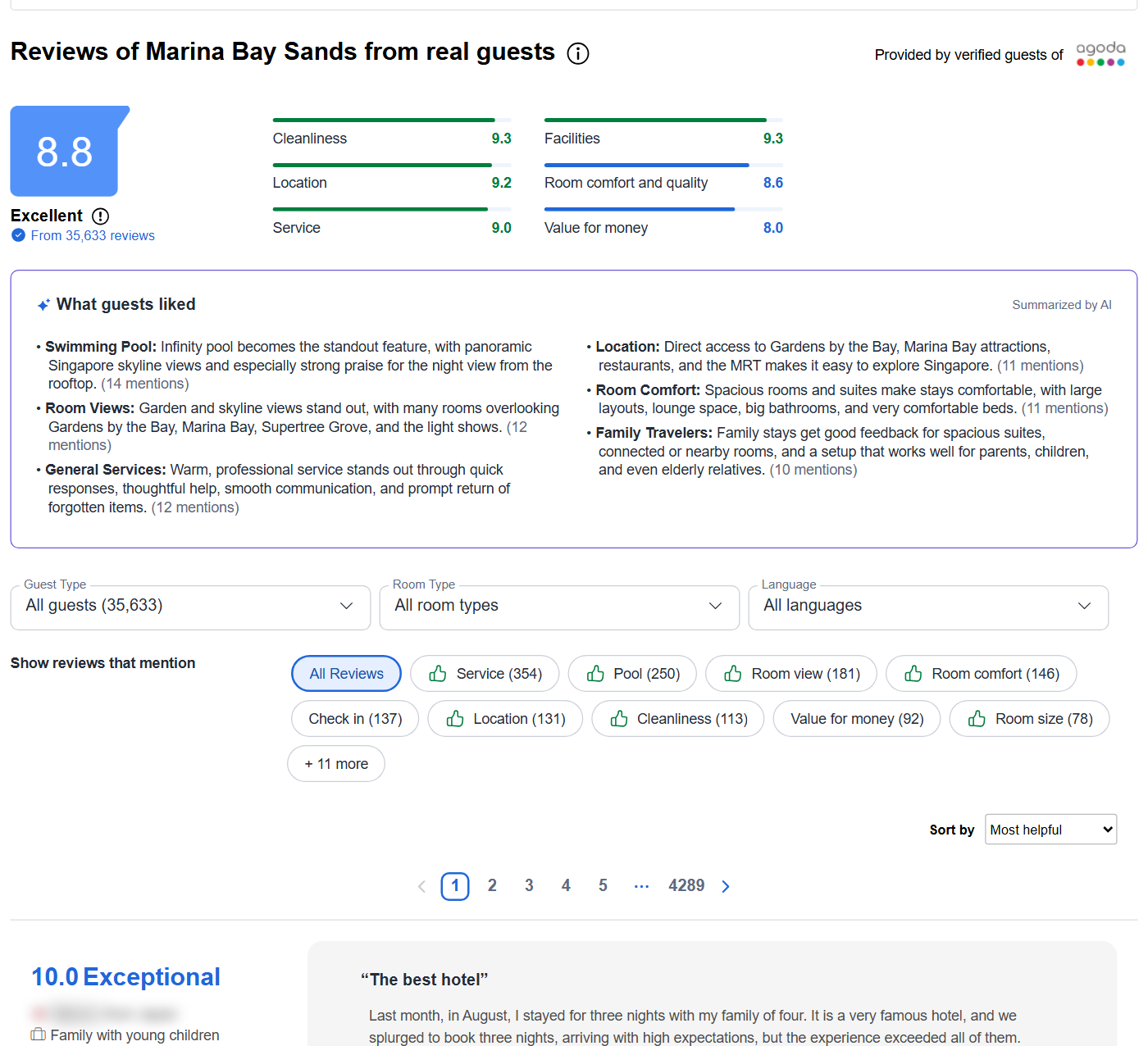
| 🏨 Hotel name, id and link |
🆔 Review id (hotelReviewId) |
⭐ Score 0-10 + label (rating, ratingText) |
| 📝 Title and text |
👍 Liked / 👎 disliked text |
🌐 Review language |
| 🔤 Original text of translated reviews |
📅 Review date |
🛎️ Check-in / check-out dates, stay month |
| 🌙 Nights stayed |
🗺️ Reviewer country + country code |
🧳 Traveller type (couple, family, solo, group, business) |
| 🛏️ Room type the guest booked |
📷 Guest photos |
💬 Hotel reply, replier and reply date |
| 📊 Hotel Agoda score + sub-scores on every row |
🤖 AI review summary per hotel |
💲 Room offers with prices for a stay |
On a 6,507-review test run (10 hotels), every row had the review id, score, title, review date, stay dates, traveller type and language; 99.2% had review text, 99.7% the reviewer's country, 90.7% the room type and 33.7% a hotel reply.
### How to scrape Agoda reviews with Agoda Reviews Scraper
1. [Create a free Apify account](https://console.apify.com/sign-up) - $5 of monthly credit, no card needed.
2. Open [Agoda Reviews Scraper](https://apify.com/topapi/agoda-reviews-scraper) and click **Try for free**.
3. Paste Agoda hotel links, hotel ids or hotel names into **Hotels** and set **Max reviews per hotel**.
4. Pick filters if you need them: sort order, review languages, guest rating, traveller type, room type, dates.
5. Click **Start**. Reviews stream into the dataset as each page is read.
6. Open the **Storage** tab and **Export** as JSON, CSV or Excel - or let a schedule run it for you.
### ⬇️ Input
| Parameter | Type | Description |
|---|---|---|
| **🔍 What to scrape** | | |
| `startUrls` | List | **Required.** Agoda hotel links (any language version), Agoda hotel ids, or hotel names, e.g. `https://www.agoda.com/marina-bay-sands/hotel/singapore-sg.html`, `185945`, `ibis Budapest City` |
| `propertyIds` | List | Optional Agoda property ids, same as putting the id in `startUrls` |
| `mode` | Select | `reviews` (default), `hotel` (summary row only), `both`, `rooms` (room prices only) |
| **🎯 Filters** (applied by Agoda) | | |
| `sort` | Select | `recent` (Agoda's "Most recent", default), `newest` (true newest first across every language), `oldest`, `helpful`, `ratingDesc`, `ratingAsc` |
| `reviewSources` | Multi-select | `agoda` (default) and/or `additional` (partner reviews Agoda lists under "Additional reviews", e.g. Priceline.com) |
| `language` | Multi-select | Review languages, e.g. `en`, `ja`, `ko`, `zh-tw`. Empty = all |
| `rating` | Multi-select | Agoda score bands: `exceptional`, `excellent`, `very_good`, `good`, `below_expectation` |
| `travellerType` | Select | `couple`, `solo`, `family_young_children`, `family_teens`, `group`, `business`. Default: all |
| `roomType` | Text | Only reviews of rooms whose name contains this text, e.g. `Suite` |
| **✂️ Refine results** | | |
| `cutoffDate` / `toDate` | Date | Review date window, `YYYY-MM-DD` or a relative age like `30 days` |
| `minRating` / `maxRating` | Number | Score range on Agoda's 0-10 scale |
| `keyword` | List | Keep reviews whose title or text contains any of these words |
| `onlyWithText` | Boolean | Skip reviews without comment text |
| **➕ Extra data** | | |
| `aggregateRatings` | Boolean | Hotel scores and review counts on every review row. Default `true`, free |
| `includeRooms` + `checkIn`, `checkOut`, `nights`, `adults`, `children`, `childrenAges`, `roomsWanted`, `currency` | | Room offers for the stay, charged as **room** at $0.001 per offer |
| **🔁 Monitoring** | | |
| `monitorMode` + `monitorStoreName` | Boolean / Text | Return only reviews that earlier runs with the same name did not deliver |
| **📦 Output** | | |
| `maxReviewsPerHotel` | Integer | Default `50`; `0` = every review Agoda serves |
| `maxResults` | Integer | Ceiling on review rows for the whole run. `0` = none |
| `stripPersonalData` | Boolean | Default `true`: the reviewer's display name is left out |
| `includeOwnerResponse` | Boolean | Hotel replies. Default `true` |
| `compact` | Boolean | Core fields only, sized for AI agents and MCP |
#### Input JSON
```json
{
"startUrls": [
"https://www.agoda.com/marina-bay-sands/hotel/singapore-sg.html",
"335650",
"ibis Budapest City"
],
"maxReviewsPerHotel": 200,
"sort": "newest",
"language": ["en", "ja"],
"mode": "both"
}
```
#### Paste any Agoda hotel link, id or name
Links from any Agoda language version work (`/de-de/...`, `?cid=...`); the actor reads the hotel id from the page. A name uses the first hotel Agoda's own search box suggests, so add the city when the name is common: **Do:** `Hilton Bali Resort` · **Don't:** `Hilton` (Agoda suggests one Hilton of many).
#### Pick "Newest first" when you want the latest reviews
Agoda's "Most recent" order lists reviews written in, or translated into, English first and then every other language. With `sort: "newest"` the actor reads the hotel's recent review list in full and returns the newest reviews of every language first: on Marina Bay Sands the 100 newest came from 11 languages, against mostly English ones in Agoda's own order.
### ⬆️ Output
Every Agoda review becomes one dataset item. Here is the table view of a 10-hotel run:
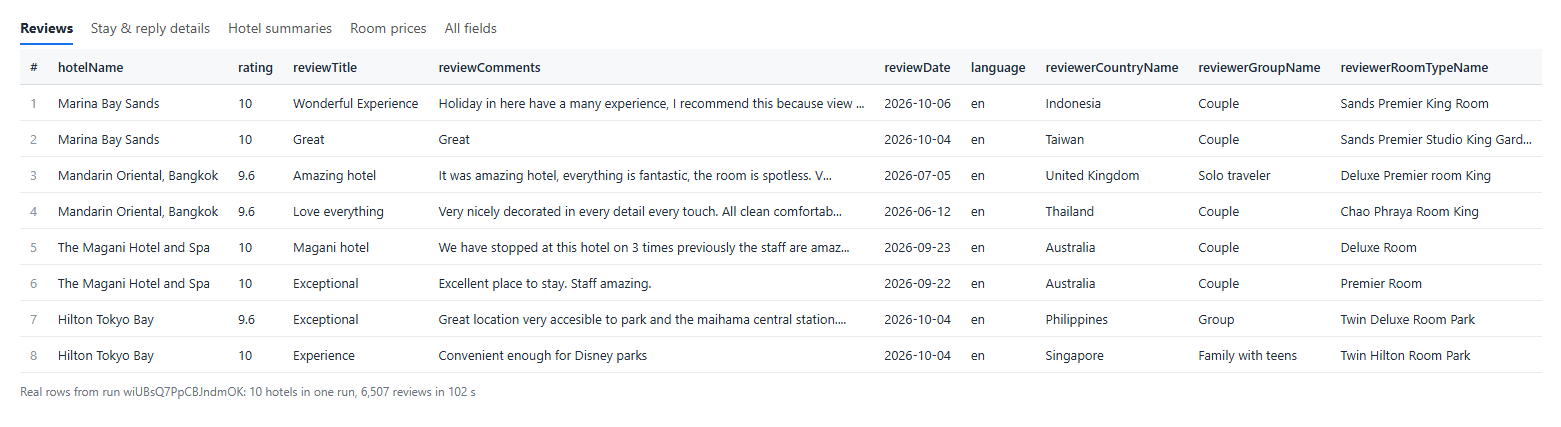 One review row from that run (aggregate arrays shortened):
```json
{
"type": "review",
"hotelId": 335650,
"hotelName": "The Magani Hotel and Spa",
"hotelReviewId": 1185557602,
"rating": 10,
"ratingText": "Exceptional",
"reviewTitle": "Magani hotel",
"reviewComments": "We have stopped at this hotel on 3 times previously the staff are amazing service very good and we are going to book there again for our 2027 holiday",
"language": "en",
"reviewDate": "2026-09-23T11:11:43+07:00",
"checkInDate": "2026-09-03T00:00:00+07:00",
"checkOutDate": "2026-09-19T00:00:00+07:00",
"reviewerLengthOfStay": 16,
"reviewerCountryName": "Australia",
"reviewerGroupName": "Couple",
"reviewerRoomTypeName": "Deluxe Room",
"responderName": "The Magani Hotel and Spa",
"responseText": "... Thank you very much for your continued loyalty and for choosing The Magani Hotel and Spa on three occasions. ...",
"responseDate": "2026-10-08T08:44:02.715+07:00",
"agodaAggregateReviewScore": 9,
"agodaReviewsCount": 2301,
"bookingAggregateReviewScore": 9.4
}
```
A translated review carries both texts: `"reviewTitle": "Thoughtfulness!"`, `"originalTitle": "心遣い‼︎"`, `"language": "ja"`, `"isTranslated": true`.
#### Fields
| Field | Type | What it is | Fill on test run |
|---|---|---|---|
| `hotelReviewId` | number | Agoda's review id | 100% |
| `rating`, `ratingText` | number, string | Score 0-10 and Agoda's label | 100% |
| `reviewTitle`, `reviewComments` | string | Title and review text | 100%, 99.2% |
| `reviewPositives`, `reviewNegatives` | string | Liked / disliked text, when the guest split them | 6.0%, 0.5% |
| `language`, `isTranslated`, `translatedTo`, `originalTitle`, `originalComment` | | Language written in; original text of the 3.9% Agoda translated | 100% / 3.9% |
| `reviewDate`, `checkInDate`, `checkOutDate`, `stayMonth` | string (ISO 8601) | Review and stay dates (Agoda's UTC+7 clock) | 100% |
| `reviewerLengthOfStay` | number | Nights | 100% |
| `reviewerCountryName`, `reviewerCountryCode` | string | Reviewer's country | 99.7% |
| `reviewerGroupName` | string | Traveller type | 100% |
| `reviewerRoomTypeName` | string | Room booked | 90.7% |
| `reviewerName` | string | Display name, only with `stripPersonalData: false` | - |
| `helpfulVotes`, `unhelpfulVotes` | number | Votes on the review | 100% |
| `images` | array | Guest photo URLs | 4.6% |
| `responderName`, `responseText`, `responseDate` | string | Hotel reply | 33.7% |
| `agodaAggregateReviewScore`, `agodaAggregateDetailedReviewScore`, `agodaReviewsCount`, `bookingAggregateReviewScore`, `bookingAggregateDetailedReviewScore`, `bookingReviewsCount` | | Hotel-level scores and counts (`aggregateRatings`) | 100% |
**Hotel summary rows** (`type: "hotel"`, mode `hotel` or `both`): name, stars, type, address, area, city, country, postal code, coordinates, overall score and review count, Agoda score, sub-scores, score distribution, scores by traveller type, review topics with positive/negative shares, recent scores, the Booking.com score and count Agoda shows, review languages, and Agoda's AI review summary where Agoda has one (6 of 10 hotels on the test run).
**Room rows** (`type: "room"`, `includeRooms` or mode `rooms`): room name, offer, size, bedding, max guests, nightly price, price with taxes, total for the stay, crossed-out price and discount, breakfast, free cancellation, cancellation text, pay-later terms, benefits, availability note, supplier and room photos. A 2-night stay returned 76 offers for Marina Bay Sands and 12 for ibis Budapest City.
### How can I use Agoda reviews data?
- 🏨 **Hotel managers** - track every new Agoda review of your property and the replies your team posted.
- 📊 **Revenue and market analysts** - compare scores by traveller type and room across a city's hotels.
- 🔎 **Competitor benchmarking** - read what guests praise and complain about at the hotels next door.
- 🌏 **Asia travel research** - Agoda reviews are dense for Thailand, Japan, Korea, Indonesia, Singapore and Vietnam; get them in the language they were written in.
- 🤖 **AI and sentiment teams** - feed review text, original-language text and stay context into LLMs and dashboards.
- 💲 **Rate shoppers** - pull room offers and prices for given dates next to the reviews.
### How much does it cost to scrape Agoda reviews?
Agoda Reviews Scraper is pay-per-result: **$4.80 per 1,000 reviews** ($0.0048 per review), no start fee. Hotel summary rows are $0.001 each and room offers $0.001 each, only when you ask for them.
| Reviews | Cost |
|---:|---:|
| 10 | $0.048 |
| 100 | $0.48 |
| 1,000 | $4.80 |
| 10,000 | $48 |
There is nothing else to pay: Apify platform usage is included in these prices. Measured on 256 MB: 1,000 Marina Bay Sands reviews in 8-14 seconds (the time depends on how many empty answers Agoda sends that need a retry); 10 hotels, 6,507 reviews in 102 seconds.
### Integrations, API, scheduling & MCP
- **Schedules:** run Agoda Reviews Scraper daily or weekly from **Schedules**; with `monitorMode` each run returns only reviews you have not received yet.
- **Webhooks:** call a URL when a run finishes and push the reviews to your CRM, Slack or a sheet.
- **No-code:** Make, Zapier, n8n, Google Sheets, Airtable and Slack via [Apify integrations](https://docs.apify.com/integrations).
- **API:** run it from Node.js or Python with `apify-client` - code on the [API tab](https://apify.com/topapi/agoda-reviews-scraper/api/python) and the [Apify API reference](https://docs.apify.com/api/v2).
- **MCP / AI agents:** connect Claude, Cursor or any MCP client through the [MCP tab](https://apify.com/topapi/agoda-reviews-scraper/api/mcp) and ask for Agoda reviews in plain language.
### More travel and review scrapers
One review row from that run (aggregate arrays shortened):
```json
{
"type": "review",
"hotelId": 335650,
"hotelName": "The Magani Hotel and Spa",
"hotelReviewId": 1185557602,
"rating": 10,
"ratingText": "Exceptional",
"reviewTitle": "Magani hotel",
"reviewComments": "We have stopped at this hotel on 3 times previously the staff are amazing service very good and we are going to book there again for our 2027 holiday",
"language": "en",
"reviewDate": "2026-09-23T11:11:43+07:00",
"checkInDate": "2026-09-03T00:00:00+07:00",
"checkOutDate": "2026-09-19T00:00:00+07:00",
"reviewerLengthOfStay": 16,
"reviewerCountryName": "Australia",
"reviewerGroupName": "Couple",
"reviewerRoomTypeName": "Deluxe Room",
"responderName": "The Magani Hotel and Spa",
"responseText": "... Thank you very much for your continued loyalty and for choosing The Magani Hotel and Spa on three occasions. ...",
"responseDate": "2026-10-08T08:44:02.715+07:00",
"agodaAggregateReviewScore": 9,
"agodaReviewsCount": 2301,
"bookingAggregateReviewScore": 9.4
}
```
A translated review carries both texts: `"reviewTitle": "Thoughtfulness!"`, `"originalTitle": "心遣い‼︎"`, `"language": "ja"`, `"isTranslated": true`.
#### Fields
| Field | Type | What it is | Fill on test run |
|---|---|---|---|
| `hotelReviewId` | number | Agoda's review id | 100% |
| `rating`, `ratingText` | number, string | Score 0-10 and Agoda's label | 100% |
| `reviewTitle`, `reviewComments` | string | Title and review text | 100%, 99.2% |
| `reviewPositives`, `reviewNegatives` | string | Liked / disliked text, when the guest split them | 6.0%, 0.5% |
| `language`, `isTranslated`, `translatedTo`, `originalTitle`, `originalComment` | | Language written in; original text of the 3.9% Agoda translated | 100% / 3.9% |
| `reviewDate`, `checkInDate`, `checkOutDate`, `stayMonth` | string (ISO 8601) | Review and stay dates (Agoda's UTC+7 clock) | 100% |
| `reviewerLengthOfStay` | number | Nights | 100% |
| `reviewerCountryName`, `reviewerCountryCode` | string | Reviewer's country | 99.7% |
| `reviewerGroupName` | string | Traveller type | 100% |
| `reviewerRoomTypeName` | string | Room booked | 90.7% |
| `reviewerName` | string | Display name, only with `stripPersonalData: false` | - |
| `helpfulVotes`, `unhelpfulVotes` | number | Votes on the review | 100% |
| `images` | array | Guest photo URLs | 4.6% |
| `responderName`, `responseText`, `responseDate` | string | Hotel reply | 33.7% |
| `agodaAggregateReviewScore`, `agodaAggregateDetailedReviewScore`, `agodaReviewsCount`, `bookingAggregateReviewScore`, `bookingAggregateDetailedReviewScore`, `bookingReviewsCount` | | Hotel-level scores and counts (`aggregateRatings`) | 100% |
**Hotel summary rows** (`type: "hotel"`, mode `hotel` or `both`): name, stars, type, address, area, city, country, postal code, coordinates, overall score and review count, Agoda score, sub-scores, score distribution, scores by traveller type, review topics with positive/negative shares, recent scores, the Booking.com score and count Agoda shows, review languages, and Agoda's AI review summary where Agoda has one (6 of 10 hotels on the test run).
**Room rows** (`type: "room"`, `includeRooms` or mode `rooms`): room name, offer, size, bedding, max guests, nightly price, price with taxes, total for the stay, crossed-out price and discount, breakfast, free cancellation, cancellation text, pay-later terms, benefits, availability note, supplier and room photos. A 2-night stay returned 76 offers for Marina Bay Sands and 12 for ibis Budapest City.
### How can I use Agoda reviews data?
- 🏨 **Hotel managers** - track every new Agoda review of your property and the replies your team posted.
- 📊 **Revenue and market analysts** - compare scores by traveller type and room across a city's hotels.
- 🔎 **Competitor benchmarking** - read what guests praise and complain about at the hotels next door.
- 🌏 **Asia travel research** - Agoda reviews are dense for Thailand, Japan, Korea, Indonesia, Singapore and Vietnam; get them in the language they were written in.
- 🤖 **AI and sentiment teams** - feed review text, original-language text and stay context into LLMs and dashboards.
- 💲 **Rate shoppers** - pull room offers and prices for given dates next to the reviews.
### How much does it cost to scrape Agoda reviews?
Agoda Reviews Scraper is pay-per-result: **$4.80 per 1,000 reviews** ($0.0048 per review), no start fee. Hotel summary rows are $0.001 each and room offers $0.001 each, only when you ask for them.
| Reviews | Cost |
|---:|---:|
| 10 | $0.048 |
| 100 | $0.48 |
| 1,000 | $4.80 |
| 10,000 | $48 |
There is nothing else to pay: Apify platform usage is included in these prices. Measured on 256 MB: 1,000 Marina Bay Sands reviews in 8-14 seconds (the time depends on how many empty answers Agoda sends that need a retry); 10 hotels, 6,507 reviews in 102 seconds.
### Integrations, API, scheduling & MCP
- **Schedules:** run Agoda Reviews Scraper daily or weekly from **Schedules**; with `monitorMode` each run returns only reviews you have not received yet.
- **Webhooks:** call a URL when a run finishes and push the reviews to your CRM, Slack or a sheet.
- **No-code:** Make, Zapier, n8n, Google Sheets, Airtable and Slack via [Apify integrations](https://docs.apify.com/integrations).
- **API:** run it from Node.js or Python with `apify-client` - code on the [API tab](https://apify.com/topapi/agoda-reviews-scraper/api/python) and the [Apify API reference](https://docs.apify.com/api/v2).
- **MCP / AI agents:** connect Claude, Cursor or any MCP client through the [MCP tab](https://apify.com/topapi/agoda-reviews-scraper/api/mcp) and ask for Agoda reviews in plain language.
### More travel and review scrapers