

Google Maps Reviews Scraper - Ratings, Owner Replies & Dates
Pricing
from $0.04 / 1,000 review scrapeds
Google Maps Reviews Scraper - Ratings, Owner Replies & Dates
Scrape Google Maps reviews of any place: star rating, full text, exact publish and edit dates, owner reply with date, photos, reviewer name, review count and Local Guide level. Paste place URLs, place IDs, CIDs or a business name. Newest-first, star and date filters, monitor mode for scheduled runs.
Pricing
from $0.04 / 1,000 review scrapeds
Rating
0.0
(0)
Developer

Top Api
Maintained by CommunityActor stats
0
Bookmarked
19
Total users
6
Monthly active users
8 days ago
Last modified
Categories
Share
What does Google Maps Reviews Scraper do?
Google Maps Reviews Scraper extracts Google Maps reviews from any place on google.com/maps and turns a place URL, Place ID, CID or business name into structured rows: one review per row with the star rating, the full text, the exact publish date, the owner's reply and the reviewer's details. Built for reputation managers, local-SEO agencies and market researchers who need every Google review of a business, or just the new ones since yesterday, without clicking "More reviews" a thousand times.
Google Maps Reviews Scraper - Google Reviews Scraper - Google Business Profile Reviews Scraper
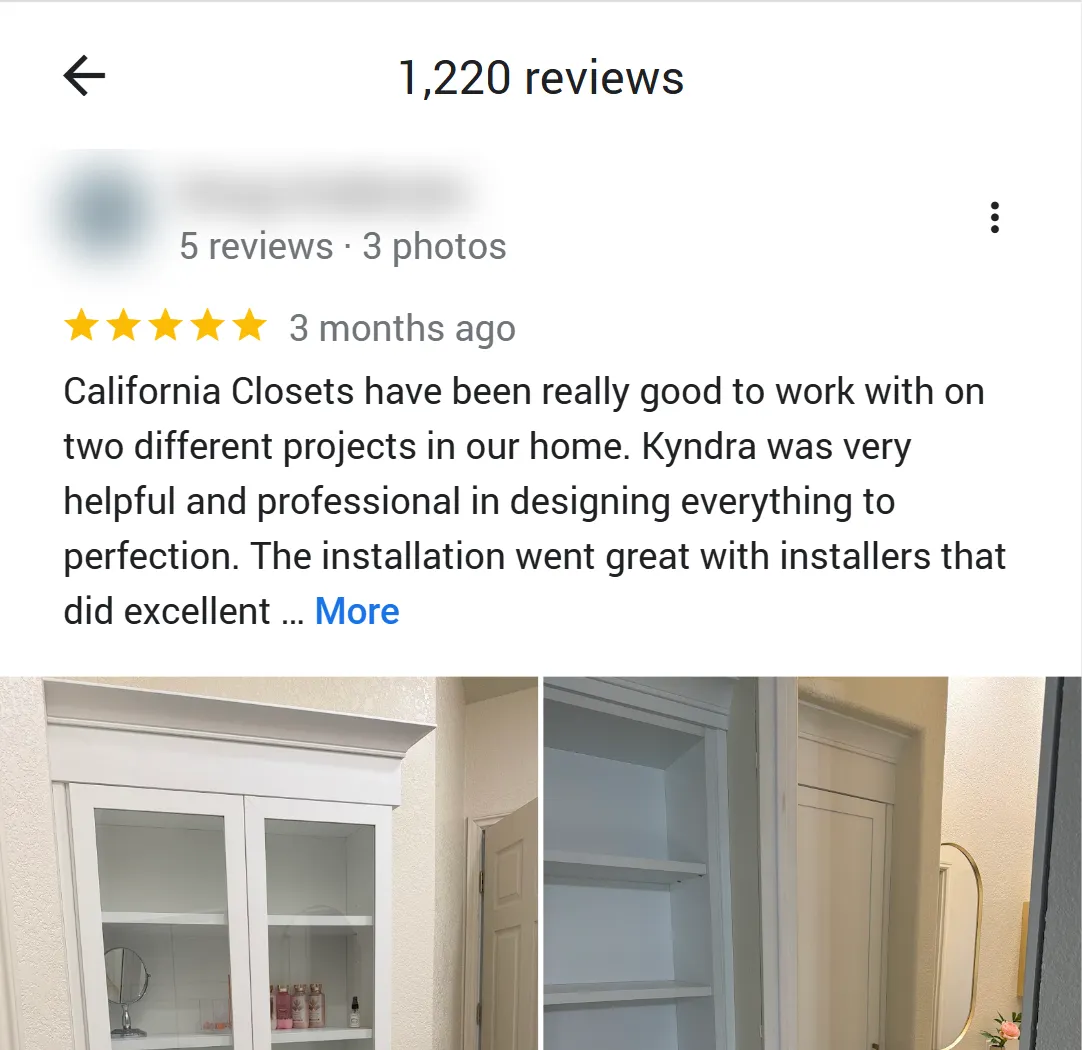
- Every field a review shows, and the ones it hides: stars, text, Google's translation, exact publish and edit timestamps, likes, photos, the owner's reply with its date, the reviewer's name, review count, photo count and Local Guide level.
- Complete, newest-first history: Google serves 20 reviews per request; a 1,000-review place takes about 15 to 20 seconds. Measured on the Apify platform: a 20-review run finishes in 7 seconds end to end, a 10-review monitor run in 6 seconds; 75 reviews from 3 places took 5.7 seconds of scraping.
- Exact timestamps and edit dates:
publishedAtDateandupdatedAtDateto the millisecond (ISO 8601), not just "3 months ago", andisEditedwhen the author changed the review later. - Reviewer depth other Google reviews scrapers skip:
localGuideLevel(1-10),reviewerNumberOfPhotosand the badge label, so you can weight a 5-star from a level-8 Local Guide differently from a first review. - No login, cookies or Google API key: paste the place URL, Place ID or name and nothing else.
- Pay per place and per review: $0.002 when Google serves a place's reviews, then $0.038 per 1,000 delivered reviews, no start fee.
- Export anywhere: JSON, CSV, Excel, XML, RSS; schedules, webhooks, Make, Zapier, n8n, Google Sheets, Slack.
- Works with AI agents: call it through the Apify API or the MCP server, with a
compactmode sized for LLM context windows.
What data can you get from Google Maps reviews?
| ⭐ Star rating (`stars`) | 📝 Review text (`text`) + Google's translation (`textTranslated`) | 📅 Exact publish date (`publishedAtDate`) and edit date (`updatedAtDate`) |
| 💬 Owner reply (`responseFromOwnerText`) with date and language | 👍 Likes (`likesCount`) | 📷 Review photos (`reviewImageUrls`, `reviewPhotos` with size and upload day) |
| 👤 Reviewer name, profile URL, photo, ID | 🏅 Local Guide status and level (`isLocalGuide`, `localGuideLevel`) | 🔢 Reviewer's review and photo counts |
| 🍽️ Per-aspect stars (`reviewDetailedRating`: Food, Service, Atmosphere, Rooms, Location) | 🏷️ Guided answers (`reviewContext`: Order type, Meal type, Price per person, Trip type) | 🔗 Review URL (`reviewUrl`) and review ID |
| 🏢 Place name, rating and total review count | 📍 Address, coordinates, country, categories, phone, website | 🆔 Place ID, CID and feature id (`fid`) |
On a 75-review test run across three places (a corporate office, a New York deli and a London hotel) every row had stars, dates, reviewer details and place fields; 68% carried text, 24% an owner reply, 24% photos, 57% per-aspect ratings and 29% guided answers. The remaining reviews are star-only ratings, which Google Maps shows exactly the same way.
How to scrape Google Maps reviews with Google Maps Reviews Scraper
- Create a free Apify account - $5 of monthly credit, no card needed.
- Open Google Maps Reviews Scraper and click Try for free.
- Paste one or more place URLs, Place IDs or CIDs into Place URLs, Place IDs or CIDs (or type business names into Business names to look up) and set Max reviews per place.
- Click Start. Reviews stream into the dataset newest first, 20 per request.
- Open the Storage tab and Export as JSON, CSV or Excel - or let a schedule run it for you with Only new reviews since the last run switched on.
⬇️ Input
| Parameter | Type | Description |
|---|---|---|
| 🔍 What to scrape | ||
placeUrls | List | Place URLs, Place IDs (ChIJN1t_tDeuEmsRUsoyG83frY4), CIDs (10281119596374313554), feature ids (0x89c2598f7ff4aa09:0x313547e757cb8cea) or maps.app.goo.gl share links, one per line. Default: one demo Place ID |
searchQueries | List | Business names with a city (Katz's Delicatessen New York); each resolves to its top Google Maps match |
mode | Select | full (default): every review, newest first, 20 per request. quick: only the 5 to 8 reviews Google embeds in the place record (its most relevant), plain HTTP, no browser, about 2 seconds per place |
| 🎯 Filters (applied by Google) | ||
reviewsSort | Select | newest (default, complete and date-ordered), mostRelevant, highestRanking, lowestRanking |
language | Select | Interface and translation language, e.g. en, de, ja. Default en |
region | Text | Two-letter country Google is asked from. Default us |
| ✂️ Refine results | ||
reviewsNewerThan | Text | Absolute (2026-09-01) or relative (7 days, 3 months). With newest the actor stops reading at this date |
reviewsOlderThan | Text | Upper bound, same formats |
minStars / maxStars | Integer | Keep only reviews in this star range, e.g. 1 to 3 for complaints. Default 1 to 5 |
withTextOnly | Boolean | Skip star-only ratings with no written review. Default false |
reviewsFilterString | Text | Keep reviews whose text or owner reply contains any of these comma-separated words |
| ➕ Extra data | ||
includePlaceSummary | Boolean | One extra row of type place per place (rating, total reviews, address, phone, website, categories, coordinates, IDs, reviews read and delivered) - included in the place fee |
| 🔁 Monitoring | ||
monitorMode | Boolean | Deliver only reviews not delivered by previous runs with the same memory name, newest first, then stop. Pair with a daily schedule; each place checked pays its place fee, new reviews pay per review |
monitorStoreName | Text | Name of the key-value store that keeps the per-place memory. Default google-maps-reviews-monitor |
| 📦 Output | ||
maxReviewsPerPlace | Integer | Cap per place after filters. Default 100; 0 = every review Google serves |
personalData | Boolean | Include reviewer name, profile URL, photo and ID. Default true |
compact | Boolean | Core fields only (id, stars, text, translation, date, reviewer, owner reply, URL, place), sized for AI agents and MCP |
| ⚙️ Advanced | ||
proxyConfiguration | Object | Apify Proxy, datacenter is enough. One session per run, rotated only when Google limits a page |
Input JSON
Give it the place, not the search page
Any Google Maps URL that carries the place works: the long /maps/place/... URL from your browser, ?cid=, ?q=place_id:, a maps.app.goo.gl share link, or just the Place ID or CID. Do: https://www.google.com/maps/place/Katz's+Delicatessen/@40.72,-73.98,17z/data=!4m6!3m5!1s0x89c2598f7ff4aa09:0x313547e757cb8cea · Don't: https://www.google.com/maps/search/delis+in+new+york (a search for many places - this actor reads reviews of one place at a time; put the business name in searchQueries instead, and it takes the top match).
Pick quick mode for a snapshot of many places
mode: quick reads the place record only: rating, total review count, address, phone, website and the 5 to 8 reviews Google shows first (most relevant, with owner replies and photos). It needs no browser, so 100 places take about 100 HTTP requests and a couple of minutes at the smallest memory setting. Sorting, date filters and monitor mode need full; a quick run still applies your star, text and keyword filters.
Use newest-first for anything complete or scheduled
newest walks Google's complete, date-ordered feed, so reviewsNewerThan can stop early and monitorMode can stop at the first page it has already seen. mostRelevant is Google's ranking of a subset and is only reliable for small samples; highestRanking and lowestRanking are handy for pulling all 1-star complaints with maxStars: 1.
Name lookups take the top match
searchQueries resolves each line through Google Maps search and uses the first result. Add the city or street (Katz's Delicatessen New York, The Ritz London) so a chain or a common name lands on the right branch; for a generic query such as plumber in Austin TX only the first business is used.
⬆️ Output
Every review becomes one dataset item. Here is the table view of a run for three places:
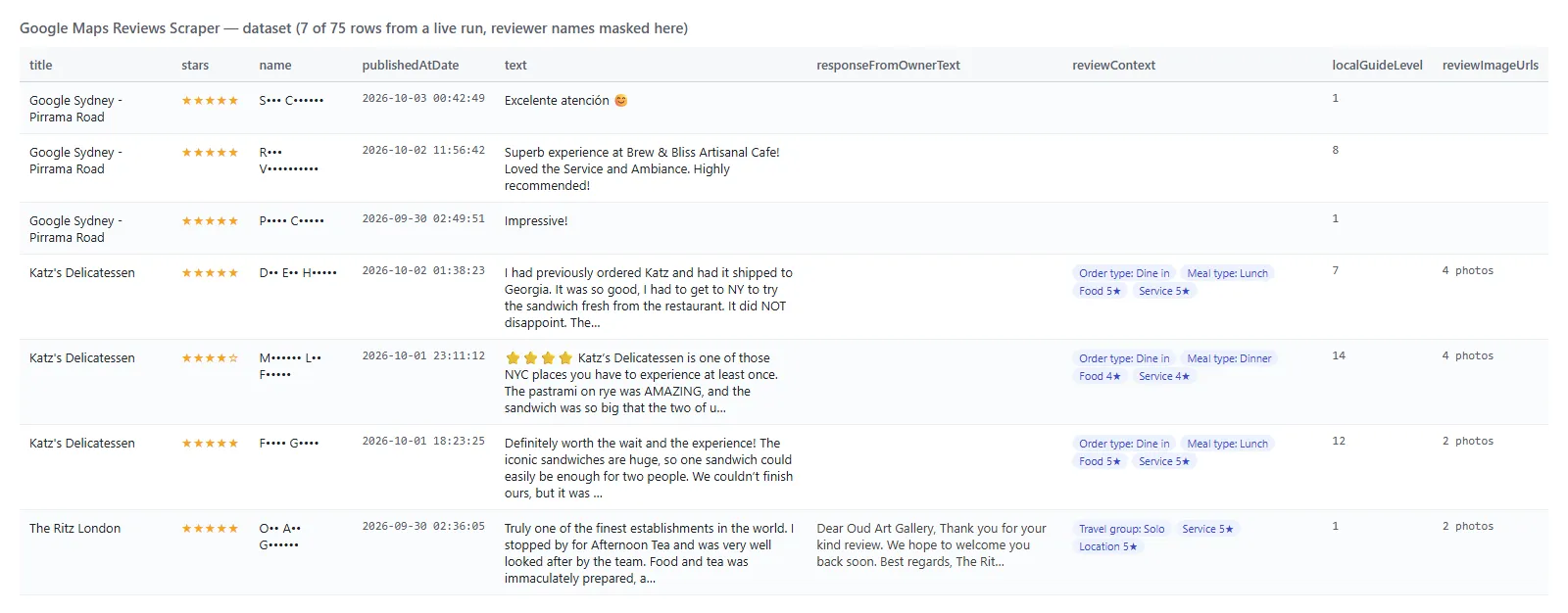
And one row as JSON (reviewer name shortened here):
Fields
| Field | Type | What it is | Fill on test run |
|---|---|---|---|
reviewId, reviewUrl | string | Google's review id and the review's own Maps URL | 100% |
stars | integer | 1-5 | 100% |
text, textTranslated | string | Original text and Google's translation into language when the review is in another language | 68% / 11% |
originalLanguage, translatedLanguage | string | ISO codes of the two texts | 68% / 11% |
publishAt | string | Google's relative date ("3 months ago") | 100% |
publishedAtDate, updatedAtDate, isEdited | string (ISO 8601) / boolean | Publish and last-edit timestamps to the millisecond | 100% |
likesCount | integer | "Helpful" votes | 100% |
name, reviewerId, reviewerUrl, reviewerPhotoUrl | string | Reviewer identity (blanked when personalData is off) | 100% |
reviewerNumberOfReviews, reviewerNumberOfPhotos | integer | The reviewer's contribution counts | 100% |
isLocalGuide, localGuideLevel, reviewerBadge | boolean / integer / string | Local Guide status and level 1-10, plus the badge text | 100% / 68% / 87% |
responseFromOwnerText, responseFromOwnerDate, responseFromOwnerLanguage | string | The owner's reply | 24% |
reviewImageUrls, reviewPhotos | array | Photo URLs; reviewPhotos adds width, height and upload day | 24% |
reviewContext | object | Guided answers: Order type, Meal type, Price per person, Trip type, Travel group | 29% |
reviewDetailedRating | object | Per-aspect stars: Food, Service, Atmosphere, Rooms, Location | 57% |
title, placeId, cid, fid, address, categoryName, categories, totalScore, reviewsCount, url, location, countryCode, phone, website | place fields | Repeated on every row so each export stands alone | 100% |
searchString, language, scrapedAt | string | The input line this row came from, the request language, the scrape time | 100% |
With includePlaceSummary on, one extra item per place has type: "place" and the place fields plus reviewsRead, reviewsDelivered, reviewsAlreadyDelivered and reviewsFiltered. It is included in the place fee.
How can I use Google Maps reviews data?
- 🛎️ Reputation and franchise managers - pull every review of all your branches, filter
maxStars: 3, and route the complaints with noresponseFromOwnerTextto the team that answers them. - 🧭 Local-SEO agencies - track a client's and three competitors' review velocity and star mix week over week from the exact
publishedAtDate. - 🔎 Market researchers - export 5,000 restaurant reviews with
reviewDetailedRatingandreviewContextto see whether Food or Service drives the 2-star ratings. - 🤖 AI and research teams - feed
text,stars,reviewDetailedRatingandlocalGuideLevelto an LLM for sentiment, topic and credibility scoring; usecompactto keep the context small. - 📈 Product and CX teams - run
monitorModedaily and get only the new reviews, already deduplicated, into Slack or a sheet. - 🏨 Hospitality analysts - compare
Rooms,ServiceandLocationaspect stars across hotels and trip types.
How much does it cost to scrape Google Maps reviews?
Google Maps Reviews Scraper is pay-per-event with two prices (the Pricing tab always shows the live rates):
| Event | Price | When it is charged |
|---|---|---|
place-scraped | $0.002 per place | Once per place per run, when Google serves that place's reviews (opening the place). Includes the optional place summary row |
review-scraped | $0.000038 per review ($0.038 per 1,000) | Each review written to the dataset after your filters |
There is no start fee. In monitor mode every place checked pays its place fee, even when it has no new review: the check is the service.
What one place costs:
| Reviews from one place | Place fee | Reviews | Total |
|---|---|---|---|
| 10 | $0.002 | $0.00038 | $0.00238 |
| 100 | $0.002 | $0.0038 | $0.0058 |
| 1,000 | $0.002 | $0.038 | $0.040 |
| 10,000 | $0.002 | $0.38 | $0.382 |
Worked examples:
- 1 place × 100 reviews = $0.002 + 100 × $0.000038 = $0.002 + $0.0038 = $0.0058
- 50 branches × 10 reviews = 50 × $0.002 + 500 × $0.000038 = $0.10 + $0.019 = $0.119
- Quick mode, 100 places × 8 reviews with summary rows = 100 × $0.002 + 800 × $0.000038 = $0.20 + $0.0304 = $0.2304
- Daily monitor of 1 place with 3 new reviews = $0.002 + 3 × $0.000038 = $0.0021; a day with nothing new costs $0.002
There is nothing else to pay: Apify platform usage (compute, proxy) is included in these prices. Measured on the Apify platform: a 20-review run finishes in about 7 seconds end to end and a 10-review monitor run in 6 seconds; a run reads 20 reviews per request, about 50 reviews per second once the place is open; quick mode (5 to 8 reviews per place, no browser) read 4 places in 19 seconds.
Integrations, API, scheduling & MCP
- Schedules: run Google Maps Reviews Scraper hourly, daily or weekly from the Schedules tab; combine with
monitorModeto receive only the reviews that are new since the last run. - Webhooks: fire a URL when a run finishes - push new reviews to your CRM, Slack or a sheet.
- No-code: Make, Zapier, n8n, Google Sheets, Airtable, Slack via Apify integrations.
- API: call it from Node.js or Python with
apify-client- code on the API tab and the Apify API reference. - MCP / AI agents: connect Claude, Cursor or any MCP client through the MCP tab and ask for Google Maps reviews in plain language; set
compact: trueto keep responses small.
More TopApi scrapers
| 🎵 TikTok Scraper | 📸 Instagram Scraper | 📰 Facebook Search Posts Scraper |
| 💼 Indeed Jobs Scraper | 📊 Similarweb Scraper | 🧭 All TopApi actors |
Limits & empty runs
- Results per run: Google serves the complete review history newest first, 20 per request; very large places (50,000+ reviews) are read page by page, so set
maxReviewsPerPlaceor a date floor to control cost. Other sort orders may expose only a ranked subset. - Speed: about 50 reviews per second per place after the place is opened; opening a place costs one lookup (0.2 to 0.5 s).
- Throttling: Google limits a second Maps session from the same IP within about a minute; the actor detects the limited page, switches to a fresh proxy session automatically (up to 5 times per place) and, if every session is limited, waits the limit out once before giving up. Keep Apify Proxy on for scheduled runs.
- Empty dataset: means no review matched your filters, the place has no reviews, the input did not match a place, or Google limited every session tried - the run log and
RUN_SUMMARYsay which. - Not available: Google publishes no reviewer email or phone, and third-party (hotel booking site) reviews are not included - only Google reviews.
FAQ
How many Google Maps reviews can Google Maps Reviews Scraper collect in one run?
In full mode, all reviews Google serves for a place, in 20-review pages; a 1,000-review place takes about 20 seconds. Use maxReviewsPerPlace to cap the bill, or reviewsNewerThan with newest to stop at a date. In quick mode, the 5 to 8 reviews Google embeds in the place record.
Can I run Google Maps Reviews Scraper on a schedule to get new reviews automatically?
Yes. Save your input as a task with monitorMode: true, open Schedules, pick the cadence, and each run delivers only reviews with activity after the previous run's newest review (new reviews; an old review that was merely edited is not re-delivered). A run that finds nothing new bills only the $0.002 place fee per place checked.
Can I integrate Google Maps Reviews Scraper with other apps?
Yes - Make, Zapier, n8n, Google Sheets, Slack and more via Apify integrations, or use webhooks to trigger an action when a run finishes.
Can I use Google Maps Reviews Scraper with the Apify API?
Yes. The API lets you start runs, fetch datasets and manage schedules. Use apify-client for Node.js or Python; the API tab has ready-to-paste code.
Can I use Google Maps Reviews Scraper through an MCP server?
Yes. Open the MCP tab, connect your MCP client (Claude Desktop, Cursor, LibreChat...), and ask for the reviews of a place in plain language. Set compact: true so each review is a few hundred bytes.
Do I need a Google account, cookies or a Google Maps API key?
No. Google Maps Reviews Scraper reads only what Google Maps shows to any visitor; you pass a place URL, Place ID, CID or business name and nothing else. The official Places API returns at most five reviews per place; this actor reads the whole feed.
Why did my run return no results?
In order of frequency on test runs: the input was a search URL for many places instead of one place (use searchQueries or a place URL); a date or star filter removed everything; the place has no reviews yet; Google limited every proxy session tried (run again in a minute - the log says "limited reviews page").
Can Google Maps Reviews Scraper translate reviews?
Google does it for you: set language and any review written in another language comes back with text (original) and textTranslated (Google's translation), plus both language codes.
How is Google Maps Reviews Scraper different from other Google reviews scrapers?
Same review and place fields as the largest Google Maps reviews scrapers (review text, translation, stars, dates, owner reply, photos, reviewer and place details), plus the exact edit timestamp, the reviewer's Local Guide level and photo count, per-aspect stars and guided answers as structured objects, star and keyword filters, and a monitor mode that delivers only new reviews - measured on a 75-review run across three places.
Is it legal to scrape Google Maps reviews?
Google Maps Reviews Scraper extracts only publicly available Google reviews; it does not log in or collect private data. Results may contain personal data (reviewer names and photos), which is regulated, for example by GDPR; switch personalData off if you do not need it, and make sure you have a legitimate purpose before you use it.
Your feedback
We keep improving Google Maps Reviews Scraper. Found a bug or missing a field? Open an issue on the Issues tab - we answer within one business day.


