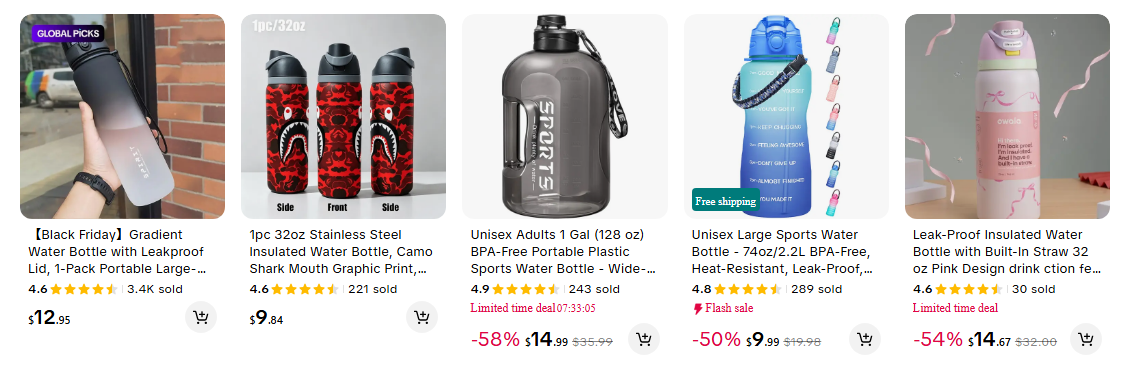
 - **Every way into TikTok Shop:** keyword search, category pages (with all sub-categories), a seller's whole store, product links and plain product ids, in one run.
- **Sales and pricing signals:** units sold, current and original price, discount %, rating, review count and an estimated GMV (price × units sold) on every row.
- **Full product details on demand:** every SKU with its price, stock and purchase limit, **package weight and dimensions per SKU**, the seller's SKU code, shipping fee and delivery time, description, specifications, category path, the first reviews, the TikTok videos shown with the product and the seller's registered business name and address.
- **Whole stores, checked:** a store link returns every product the shop lists; the run summary compares what was read with the count TikTok shows (52 of 52 on our test store).
- **No login, cookies or TikTok API key:** paste keywords or links; the actor reads the same public pages any shopper sees.
- **Monitoring built in:** return only new products on each scheduled run, or also the ones whose price, units sold, rating or review count changed.
- **Export anywhere:** JSON, CSV, Excel, XML or RSS; schedules, webhooks, Make, Zapier, n8n, Google Sheets, the Apify API and MCP.
### What data can you get from TikTok Shop?
- **Every way into TikTok Shop:** keyword search, category pages (with all sub-categories), a seller's whole store, product links and plain product ids, in one run.
- **Sales and pricing signals:** units sold, current and original price, discount %, rating, review count and an estimated GMV (price × units sold) on every row.
- **Full product details on demand:** every SKU with its price, stock and purchase limit, **package weight and dimensions per SKU**, the seller's SKU code, shipping fee and delivery time, description, specifications, category path, the first reviews, the TikTok videos shown with the product and the seller's registered business name and address.
- **Whole stores, checked:** a store link returns every product the shop lists; the run summary compares what was read with the count TikTok shows (52 of 52 on our test store).
- **No login, cookies or TikTok API key:** paste keywords or links; the actor reads the same public pages any shopper sees.
- **Monitoring built in:** return only new products on each scheduled run, or also the ones whose price, units sold, rating or review count changed.
- **Export anywhere:** JSON, CSV, Excel, XML or RSS; schedules, webhooks, Make, Zapier, n8n, Google Sheets, the Apify API and MCP.
### What data can you get from TikTok Shop?
| 🛍️ Product title and link (`productUrl`) | 💲 Current price (`currentPrice`) | 🏷️ Original price and discount % |
| 📈 Units sold (`soldCount`) | 💰 Estimated GMV (`estimatedGmv`) | ⭐ Rating and review count |
| 🏬 Seller id, name, logo and store link | 🔖 Brand | 🚚 Free-shipping and deal labels |
| 📦 SKUs with price, stock, purchase limit | 📐 Package weight and size per SKU | 🧾 Seller SKU code (`sellerSku`) |
| 🚛 Shipping fee, delivery days, lead time | 🗂️ Category path and ids | 📝 Description and specifications |
| 💬 First reviews (rating, text, date, variant) | 🎬 Related TikTok videos (plays, likes, creator) | 🏢 Seller's business name and address |
 A product row from a keyword search (details off):
```json
{
"productId": "1732180317008925072",
"title": "Funny Lipstick DStick | Viral Funny Lipstick | Long-Lasting Hydrating Lipstick…",
"productUrl": "https://shop.tiktok.com/us/pdp/funny-lipstick-for-galentines-day-anti-valentines-day/1732180317008925072",
"region": "US",
"currency": "USD",
"currentPrice": 16.89,
"originalPrice": 16.89,
"discountPercent": 0,
"soldCount": 816,
"rating": 4.8,
"reviewCount": 67,
"estimatedGmv": 13782.24,
"sellerId": "7495480508926560656",
"sellerName": "FunnyLipstick Official",
"source": "search",
"query": "lipstick",
"searchRank": 1
}
```
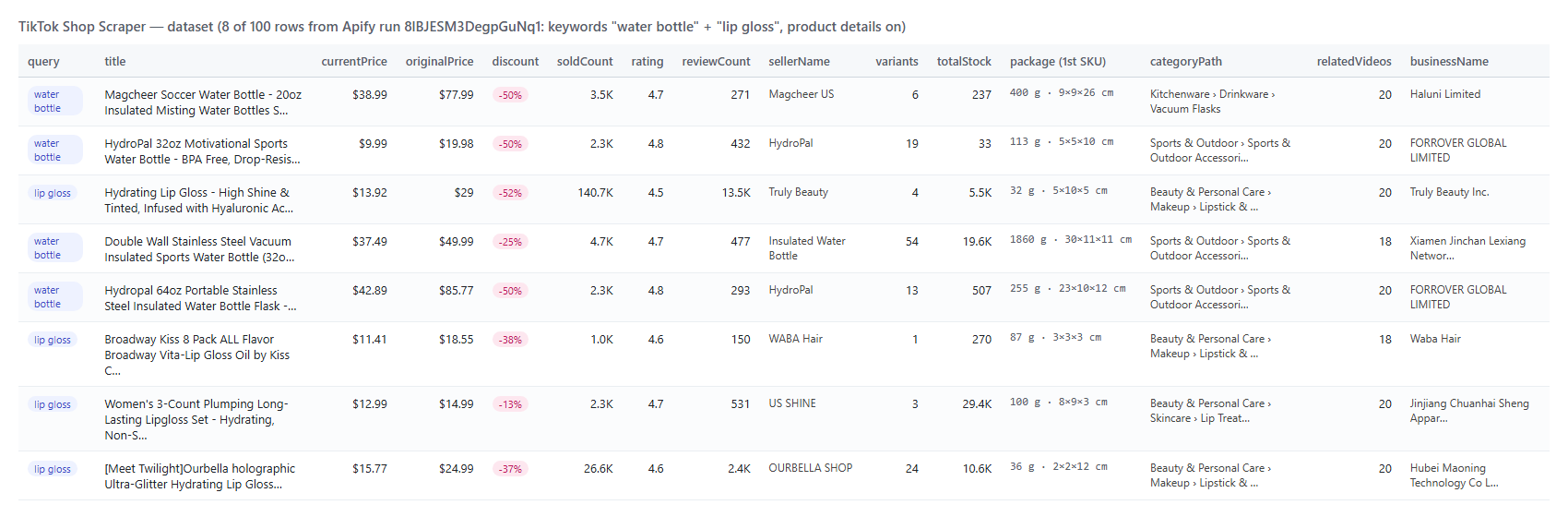
With **Include product details** on, a row also carries SKUs, package size, shipping, category, business entity, reviews and videos. A real row from the "water bottle" run (lists cut to their first item, review text shortened):
```json
{
"productId": "1732379226018321361",
"title": "Magcheer Soccer Water Bottle - 20oz Insulated Misting Water Bottles Stainless St…",
"currentPrice": 38.99,
"originalPrice": 77.99,
"discountPercent": 50,
"soldCount": 3483,
"variants": [{ "skuId": "1732380799031874513", "options": { "Color": "Soccer" }, "price": 38.99, "originalPrice": 77.99, "stock": 137, "purchaseLimit": 200, "sellerSku": "WBMS20SC1", "packageWeightG": 400, "packageDimensionsCm": { "length": 9, "width": 9, "height": 26 } }],
"variantCount": 6,
"totalStock": 237,
"shipping": { "deliveryName": "Standard", "freeShipping": true, "fee": 0, "originalFee": 5.99, "deliveryMinDays": 4, "deliveryMaxDays": 7, "shipFrom": "local" },
"categoryPath": ["Kitchenware", "Drinkware", "Vacuum Flasks"],
"businessName": "Haluni Limited",
"reviews": [{ "rating": 1, "text": "Water bottle arrived, looks dirty, scratches and with a dent…", "date": "2026-06-26T20:48:31.008Z", "isVerifiedPurchase": true }],
"relatedVideos": [{ "videoId": "7644628280514989342", "url": "https://www.tiktok.com/@/video/7644628280514989342", "plays": 627436, "likes": 4397 }],
"videoCount": 20
}
```
#### Fields
| Field | What it is | Fill (test run) |
|---|---|---|
| `productId`, `title`, `productUrl`, `currentPrice`, `originalPrice`, `discountPercent` | Product and price | 100% |
| `soldCount`, `estimatedGmv` | Units sold TikTok shows; price × units sold | 100% |
| `rating`, `reviewCount` | Product rating and reviews | 100% of search / category rows |
| `sellerId`, `sellerName`, `sellerLogo`, `sellerUrl` | The shop | 100% |
| `brand` | Brand TikTok prints on the card | 37-38% (TikTok shows it on some products) |
| `tags`, `freeShipping`, `dealEndsAt` | TikTok's labels | 56-57% / 50-56% / 6-11% |
| `variants`, `variantCount`, `totalStock` | Every SKU with price, stock, limit (details) | 100% |
| `packageWeightG`, `packageDimensionsCm`, `packageDimensionsIn` | Per SKU (details, US / GB) | 100% of SKUs |
| `sellerSku` | Seller's own SKU code (details, US / GB) | 93% of SKUs |
| `shipping`, `categoryPath`, `specifications` | Details | 100% / 99% / 99% |
| `description` / `descriptionImages` | Text (null when the seller uses images only) | 83% / 60% |
| `businessName`, `businessAddress` | Seller's registered entity (details, US) | 100% |
| `reviews`, `relatedVideos`, `shopTopProducts` | Details | 86% / 56% / 93% |
| `sellerScores`, `sellerIsOfficial`, `sellerSold` | With `includeSellerStats`, or on store links | store links 100% |
| `changeType`, `previous`, `soldDelta` | Monitor mode | on monitor rows |
### How can I use TikTok Shop data?
- 🛒 **Dropshippers and product researchers** — find products with high `soldCount`, strong ratings and a discount; schedule the same keywords weekly and read `soldDelta` for sales velocity.
- 🏷️ **Brands and pricing teams** — monitor your products and resellers: price, original price, discount and stock per SKU.
- 🤝 **Agencies, 3PLs and SaaS selling to TikTok sellers** — build seller lists from stores and categories with units sold, followers, rating and the registered business name and address.
- 📦 **Logistics and fulfilment** — package weight and dimensions per SKU, shipping fees and delivery times.
- 🎬 **Affiliate and creator marketing** — the TikTok videos already selling a product, with plays, likes and the creator.
- 🤖 **AI and analytics teams** — feed `compact` rows or the full detail rows to an LLM or a dashboard.
### How much does it cost to scrape TikTok Shop?
TikTok Shop Scraper is pay-per-result: **$0.045 per 1,000 products**, plus **$1.30 per 1,000 products** that carry product details (only when **Include product details** is on). No start fee; empty pages, duplicates, products removed by your filters and products TikTok would not show are not charged.
| Products | List rows | With details |
|---:|---:|---:|
| 10 | $0.00045 | $0.013 |
| 100 | $0.0045 | $0.135 |
| 1,000 | $0.045 | $1.35 |
| 10,000 | $0.45 | $13.45 |
Measured on the platform: 100 list rows from two keywords in 5 seconds, 1,000 category rows in 111 seconds and 100 rows with details in about 2 minutes, all on 256 MB.
### Integrations, API, scheduling & MCP
- **Schedules:** run TikTok Shop Scraper hourly, daily or weekly from the **Schedules** tab; turn on **Only new products** (and **Also changed products**) to get just what is new.
- **Webhooks:** fire a URL when a run finishes — push products to your sheet, CRM or Slack.
- **No-code:** Make, Zapier, n8n, Google Sheets, Airtable and Slack through [Apify integrations](https://docs.apify.com/integrations).
- **API:** call it from Node.js or Python with `apify-client` — code on the [API tab](https://apify.com/topapi/tiktok-shop-scraper/api/python) and in the [Apify API reference](https://docs.apify.com/api/v2).
- **MCP / AI agents:** connect Claude, Cursor or any MCP client through the [MCP tab](https://apify.com/topapi/tiktok-shop-scraper/api/mcp) and ask for TikTok Shop products in plain language; `compact` keeps answers small.
### More TikTok scrapers
A product row from a keyword search (details off):
```json
{
"productId": "1732180317008925072",
"title": "Funny Lipstick DStick | Viral Funny Lipstick | Long-Lasting Hydrating Lipstick…",
"productUrl": "https://shop.tiktok.com/us/pdp/funny-lipstick-for-galentines-day-anti-valentines-day/1732180317008925072",
"region": "US",
"currency": "USD",
"currentPrice": 16.89,
"originalPrice": 16.89,
"discountPercent": 0,
"soldCount": 816,
"rating": 4.8,
"reviewCount": 67,
"estimatedGmv": 13782.24,
"sellerId": "7495480508926560656",
"sellerName": "FunnyLipstick Official",
"source": "search",
"query": "lipstick",
"searchRank": 1
}
```
With **Include product details** on, a row also carries SKUs, package size, shipping, category, business entity, reviews and videos. A real row from the "water bottle" run (lists cut to their first item, review text shortened):
```json
{
"productId": "1732379226018321361",
"title": "Magcheer Soccer Water Bottle - 20oz Insulated Misting Water Bottles Stainless St…",
"currentPrice": 38.99,
"originalPrice": 77.99,
"discountPercent": 50,
"soldCount": 3483,
"variants": [{ "skuId": "1732380799031874513", "options": { "Color": "Soccer" }, "price": 38.99, "originalPrice": 77.99, "stock": 137, "purchaseLimit": 200, "sellerSku": "WBMS20SC1", "packageWeightG": 400, "packageDimensionsCm": { "length": 9, "width": 9, "height": 26 } }],
"variantCount": 6,
"totalStock": 237,
"shipping": { "deliveryName": "Standard", "freeShipping": true, "fee": 0, "originalFee": 5.99, "deliveryMinDays": 4, "deliveryMaxDays": 7, "shipFrom": "local" },
"categoryPath": ["Kitchenware", "Drinkware", "Vacuum Flasks"],
"businessName": "Haluni Limited",
"reviews": [{ "rating": 1, "text": "Water bottle arrived, looks dirty, scratches and with a dent…", "date": "2026-06-26T20:48:31.008Z", "isVerifiedPurchase": true }],
"relatedVideos": [{ "videoId": "7644628280514989342", "url": "https://www.tiktok.com/@/video/7644628280514989342", "plays": 627436, "likes": 4397 }],
"videoCount": 20
}
```
#### Fields
| Field | What it is | Fill (test run) |
|---|---|---|
| `productId`, `title`, `productUrl`, `currentPrice`, `originalPrice`, `discountPercent` | Product and price | 100% |
| `soldCount`, `estimatedGmv` | Units sold TikTok shows; price × units sold | 100% |
| `rating`, `reviewCount` | Product rating and reviews | 100% of search / category rows |
| `sellerId`, `sellerName`, `sellerLogo`, `sellerUrl` | The shop | 100% |
| `brand` | Brand TikTok prints on the card | 37-38% (TikTok shows it on some products) |
| `tags`, `freeShipping`, `dealEndsAt` | TikTok's labels | 56-57% / 50-56% / 6-11% |
| `variants`, `variantCount`, `totalStock` | Every SKU with price, stock, limit (details) | 100% |
| `packageWeightG`, `packageDimensionsCm`, `packageDimensionsIn` | Per SKU (details, US / GB) | 100% of SKUs |
| `sellerSku` | Seller's own SKU code (details, US / GB) | 93% of SKUs |
| `shipping`, `categoryPath`, `specifications` | Details | 100% / 99% / 99% |
| `description` / `descriptionImages` | Text (null when the seller uses images only) | 83% / 60% |
| `businessName`, `businessAddress` | Seller's registered entity (details, US) | 100% |
| `reviews`, `relatedVideos`, `shopTopProducts` | Details | 86% / 56% / 93% |
| `sellerScores`, `sellerIsOfficial`, `sellerSold` | With `includeSellerStats`, or on store links | store links 100% |
| `changeType`, `previous`, `soldDelta` | Monitor mode | on monitor rows |
### How can I use TikTok Shop data?
- 🛒 **Dropshippers and product researchers** — find products with high `soldCount`, strong ratings and a discount; schedule the same keywords weekly and read `soldDelta` for sales velocity.
- 🏷️ **Brands and pricing teams** — monitor your products and resellers: price, original price, discount and stock per SKU.
- 🤝 **Agencies, 3PLs and SaaS selling to TikTok sellers** — build seller lists from stores and categories with units sold, followers, rating and the registered business name and address.
- 📦 **Logistics and fulfilment** — package weight and dimensions per SKU, shipping fees and delivery times.
- 🎬 **Affiliate and creator marketing** — the TikTok videos already selling a product, with plays, likes and the creator.
- 🤖 **AI and analytics teams** — feed `compact` rows or the full detail rows to an LLM or a dashboard.
### How much does it cost to scrape TikTok Shop?
TikTok Shop Scraper is pay-per-result: **$0.045 per 1,000 products**, plus **$1.30 per 1,000 products** that carry product details (only when **Include product details** is on). No start fee; empty pages, duplicates, products removed by your filters and products TikTok would not show are not charged.
| Products | List rows | With details |
|---:|---:|---:|
| 10 | $0.00045 | $0.013 |
| 100 | $0.0045 | $0.135 |
| 1,000 | $0.045 | $1.35 |
| 10,000 | $0.45 | $13.45 |
Measured on the platform: 100 list rows from two keywords in 5 seconds, 1,000 category rows in 111 seconds and 100 rows with details in about 2 minutes, all on 256 MB.
### Integrations, API, scheduling & MCP
- **Schedules:** run TikTok Shop Scraper hourly, daily or weekly from the **Schedules** tab; turn on **Only new products** (and **Also changed products**) to get just what is new.
- **Webhooks:** fire a URL when a run finishes — push products to your sheet, CRM or Slack.
- **No-code:** Make, Zapier, n8n, Google Sheets, Airtable and Slack through [Apify integrations](https://docs.apify.com/integrations).
- **API:** call it from Node.js or Python with `apify-client` — code on the [API tab](https://apify.com/topapi/tiktok-shop-scraper/api/python) and in the [Apify API reference](https://docs.apify.com/api/v2).
- **MCP / AI agents:** connect Claude, Cursor or any MCP client through the [MCP tab](https://apify.com/topapi/tiktok-shop-scraper/api/mcp) and ask for TikTok Shop products in plain language; `compact` keeps answers small.
### More TikTok scrapers
| 🎵 TikTok Scraper — videos by profile, hashtag or keyword | 🎬 TikTok Video Scraper — stats and transcript by video URL | 👤 TikTok User Search Scraper — creators, bio links, emails |
| 📣 TikTok Ads Library Scraper — Ad Library and Creative Center ads | 🛍️ TikTok Shop Scraper — products, sales and sellers (this actor) | 🧭 All TopApi actors |