

TikTok Scraper - Videos, Hashtags, Profiles & Transcripts
Pricing
from $0.28 / 1,000 post scrapeds
TikTok Scraper - Videos, Hashtags, Profiles & Transcripts
Scrape TikTok videos by profile, hashtag, search keyword or video URL: caption, plays, likes, comments, shares, saves, engagement rate, publish date, author stats, sound, resolution, download and subtitle links, optional transcript. Date, like, ad and pinned filters, monitor mode.
Pricing
from $0.28 / 1,000 post scrapeds
Rating
0.0
(0)
Developer

Top Api
Maintained by CommunityActor stats
0
Bookmarked
11
Total users
10
Monthly active users
15 days ago
Last modified
Categories
Share
What does TikTok Scraper do?
TikTok Scraper extracts TikTok videos from tiktok.com and turns a profile, a hashtag or a video URL into structured rows: one post per row with its caption, plays, likes, comments, shares, saves, publish date, author stats, sound, video files and, as an add-on, the transcript of what is said in the video. Built for social-media analysts, influencer-marketing teams, brand monitors and researchers who need every TikTok post of an account or a topic, or only the new ones since yesterday, without scrolling the app.
TikTok Scraper - TikTok Video Scraper - TikTok Transcript Scraper - TikTok Hashtag Scraper - TikTok Profile Scraper
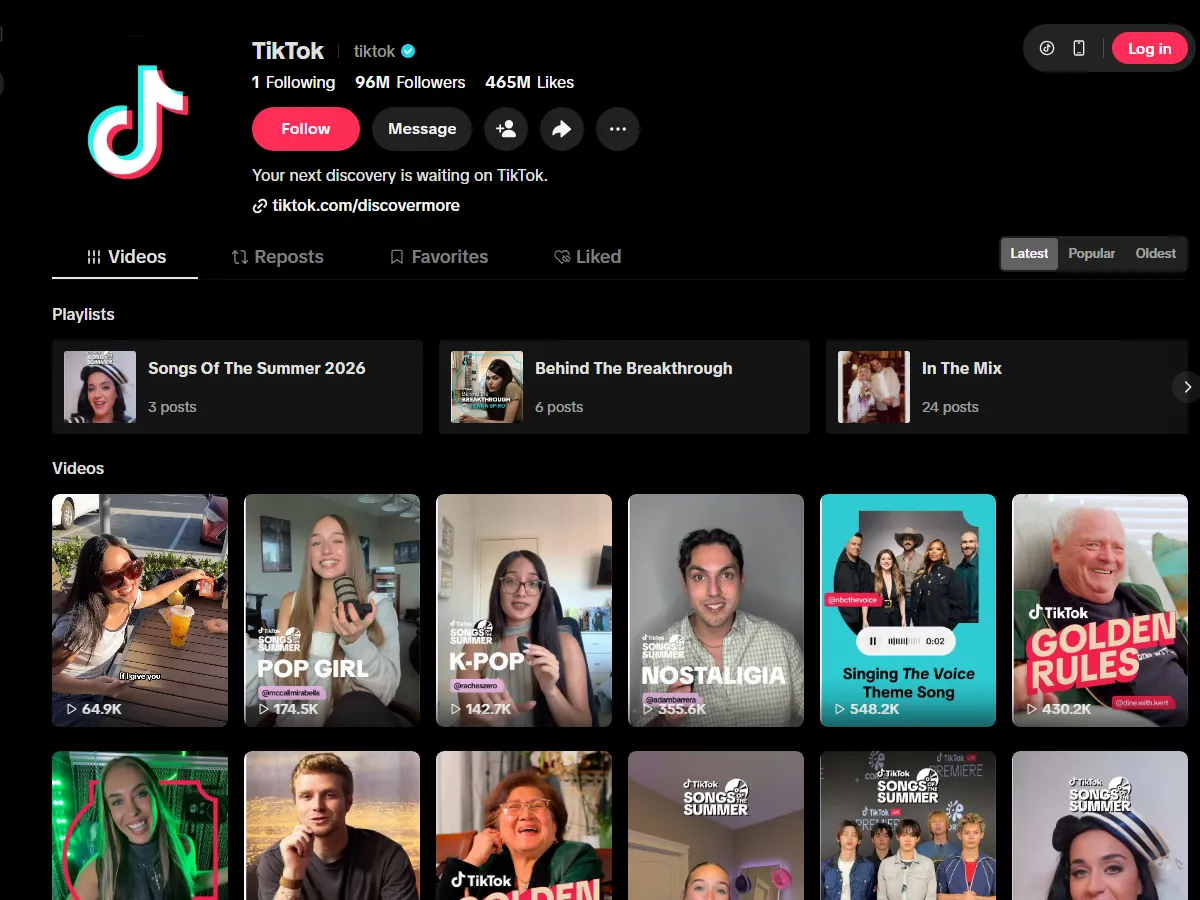
- Transcripts next to the stats: the spoken text of the video from TikTok's own caption files (creator captions or TikTok's speech recognition) in a
transcriptfield, no AI cost and no separate tool - 68% of posts on a 25-post platform run had one. - Profiles, hashtags and video URLs, one row shape: profiles (videos or reposts), hashtags and direct video or photo-post URLs, all in one run, all delivering the same fields. Words in Search queries are read as the public hashtag feed for the same words, because TikTok shows keyword search only after login; the run says so (see Limits).
- Every number the post shows: plays, likes, comments, shares, saves and reposts, plus a computed
engagementRate, exactcreateTimeISO, duration, resolution and the cover image. - The author on every row: username, nickname, verified badge, bio, followers, total likes and video count; on profile runs also the bio link and seller flag.
- Filters: date window, minimum likes, exclude ads and paid partnerships, exclude pinned posts, videos-only or photo-posts-only, keyword filter.
- No login, cookies or TikTok API key: paste names, tags, keywords or URLs and nothing else.
- Monitor mode for schedules: each run delivers only posts it has not delivered before; a profile checked daily costs one page.
- Export anywhere: JSON, CSV, Excel, XML, RSS; schedules, webhooks, Make, Zapier, n8n, Google Sheets, Slack; Apify API and MCP server, with a
compactmode for AI agents.
What data can you get from TikTok?
| 🆔 Post id and URL (`id`, `webVideoUrl`) | 📝 Caption and its language (`text`, `textLanguage`) | 📅 Publish time (`createTime`, `createTimeISO`) |
| ▶️ Plays (`playCount`) | ❤️ Likes (`diggCount`) | 💬 Comments (`commentCount`) |
| 🔁 Shares and reposts (`shareCount`, `repostCount`) | 🔖 Saves (`collectCount`) | 📈 Engagement rate (`engagementRate`, percent of plays) |
| 👤 Author: username, nickname, verified, bio, bio link, avatar (`authorMeta`) | 👥 Author stats: followers, following, total likes, videos (`authorMeta.fans`, `.heart`, `.video`) | 🎵 Sound: name, artist, original flag, sound id, play URL (`musicMeta`) |
| 🎬 Video: duration, width, height, definition, format, cover, play and download URLs (`videoMeta`) | 🔤 Subtitle files per language (`videoMeta.subtitleLinks`) and transcript text (`transcript`, add-on) | #️⃣ Hashtags with ids (`hashtags`) and mentions (`mentions`, `detailedMentions`) |
| 🖼️ Photo posts: `isSlideshow`, image links (`slideshowImageLinks`) | 📢 Ad and paid-partnership flags (`isAd`, `isSponsored`), pinned flag (`isPinned`) | 📍 Tagged place (`poi`), attached links (`anchors`), TikTok Shop flag (`hasTikTokShopProduct`) |
| 🏷️ Content category labels (`diversificationLabels`, `categoryType`) | 🤖 AI-generated label (`isAIGC`, `aigcLabel`) | ⚙️ Duet, stitch, share and comment settings |
On a 25-post run on the Apify platform (profile @tiktok, #cooking, the query "cooking recipes" and one video URL) every row had the id, caption, publish time, all six engagement counts, the author's name and stats, the sound, the cover image and the video file links; 72% carried subtitle files, 68% hashtags, 44% mentions and 24% on-screen text stickers. Photo slideshows (isSlideshow, no video file) were about 1 in 100 posts across 208 captured hashtag and profile posts.
How to scrape TikTok with TikTok Scraper
- Create a free Apify account - $5 of monthly credit, no card needed.
- Open TikTok Scraper and click Try for free.
- Paste usernames into Profiles, tags into Hashtags or video links into Video URLs (words in Search queries are read as the matching hashtag feed), switch on Include transcript for the spoken text, and set Max posts per profile, hashtag or search.
- Click Start. Posts stream into the dataset as TikTok serves them, about 30 per feed page.
- Open the Storage tab and Export as JSON, CSV or Excel - or let a schedule run it for you with Only new posts since the last run switched on.
⬇️ Input
| Parameter | Type | Description |
|---|---|---|
| 🔍 What to scrape (fill any of the four; URLs are routed by what they are) | ||
profiles | List | Usernames or profile URLs: tiktok, @zachking, https://www.tiktok.com/@khaby.lame. Newest videos first, about 35 per feed page |
hashtags | List | Hashtags or tag URLs: cooking, #fyp, https://www.tiktok.com/tag/dance |
searchQueries | List | Keywords or search URLs: cooking recipes, ai tools 2026. TikTok login-walls keyword search, so a query is read as the hashtag feed for the same words (#cookingrecipes); rows carry searchQuery and searchHashtag |
postURLs | List | Video or photo-post URLs, short links or bare ids: https://www.tiktok.com/@zachking/video/7095025543627705643, https://vm.tiktok.com/ZMabc123/, 7095025543627705643 |
| 🎯 Filters (applied by TikTok) | ||
profileSection | Select | videos (the creator's own posts) or reposts (videos the creator reposted; authorMeta is the original creator). Default: videos |
profileSorting | Select | latest (complete, newest-first), popular (TikTok's Popular order), oldest (oldest video first). Default: latest |
| ✂️ Refine results | ||
oldestPostDate | String | Only posts published after: 2026-09-01, 7 days, 3 weeks, or a day count (1 = today). On a latest-first profile the run stops at the first page older than this |
newestPostDate | String | Only posts published before: 2026-06-30, 30 days |
leastDiggs | Integer | Minimum likes, e.g. 10000. Default 0 |
excludePinnedPosts | Boolean | Skip posts pinned to the top of a profile. Default false |
excludeAds | Boolean | Skip ads and paid partnerships (isAd, isSponsored). Default false |
postType | Select | all, video (skip photo slideshows) or photo (slideshows only). Default all |
keywordFilter | String | Keep posts whose caption, hashtags, on-screen text or author name contain the word(s), comma = any: giveaway, recipe, meal prep |
| ➕ Extra data | ||
includeTranscript | Boolean | Adds transcript, transcriptLanguage, transcriptSource from TikTok's caption file - charged as the transcript event only for posts that receive one. Default false |
| 🔁 Monitoring | ||
monitorMode | Boolean | Deliver only posts not delivered by previous runs with the same monitorStoreName. Pair with a daily schedule. Default false |
monitorStoreName | String | Key-value store that keeps the per-target memory. Default tiktok-posts-monitor |
| 📦 Output | ||
resultsPerPage | Integer | Max posts per profile, hashtag or search after filters. 0 = everything TikTok serves. Default 30 (prefill 10) |
maxItems | Integer | Hard cap for the whole run. 0 = no total cap. Default 0 |
compact | Boolean | Core fields only (id, text, date, URL, author, counts, engagement rate, duration, hashtags, transcript), sized for AI agents and MCP. Default false |
| ⚙️ Advanced | ||
proxyConfiguration | Proxy | Default: Apify Proxy, RESIDENTIAL group. With this default, feeds are read through Apify datacenter proxies first and through the residential group only when TikTok refuses those; video pages and subtitles go through datacenter proxies automatically. Custom proxies are used as given |
Input JSON
Give it the name, not the search for the name
A profile is zachking or @zachking or the profile URL; a hashtag is cooking or #cooking; only free text goes into Search queries, where it is read as the hashtag feed for the same words. Do: profiles: ["zachking"] · Don't: searchQueries: ["zachking"] (that reads the #zachking hashtag feed: other people's videos tagged with the name, not his own posts).
Use latest-first for anything complete, scheduled or date-bounded
TikTok's profile feed is newest-first, so oldestPostDate and monitorMode can stop reading as soon as a page is older than the floor or the last run's newest post. Hashtag feeds (and search queries, which are served as hashtag feeds) are TikTok's ranking: the date window still applies, but the whole page is read first, so set resultsPerPage to what you actually need.
A video URL is the cheapest way to refresh known posts
Each URL in postURLs is one HTML page fetched through a datacenter proxy, no browser session, and returns the same row shape, plus locationCreated (the country the post was made in), which TikTok only publishes on the video page. Short links (vm.tiktok.com/..., tiktok.com/t/...) are resolved first.
⬆️ Output
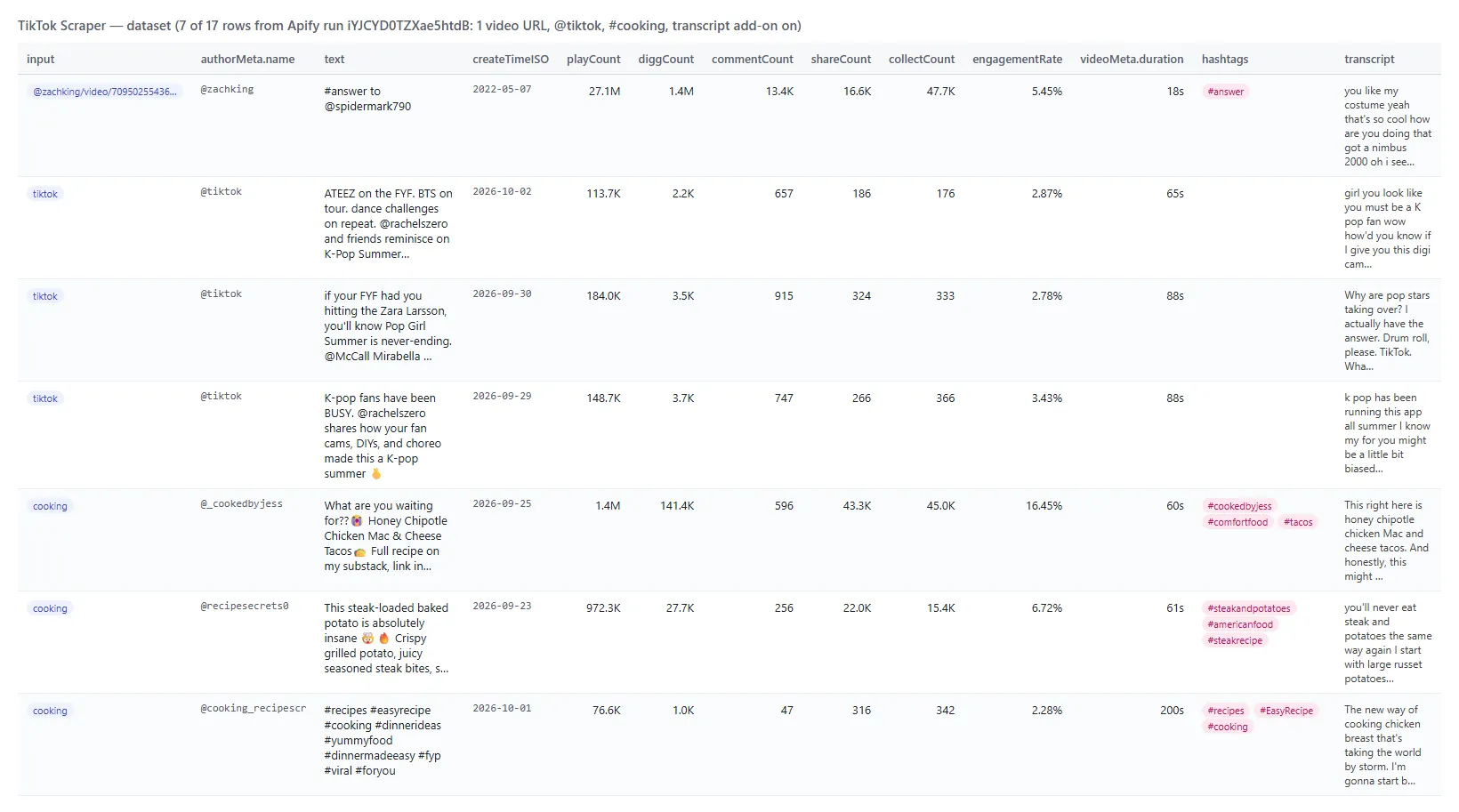
Every TikTok post becomes one dataset item. Here is the table view of a platform run (profile @tiktok, #cooking and one video URL, transcript add-on on):
And one row as JSON (long URL fields shortened):
Fields
| Field | Type | What it is | Fill on a 25-post platform run |
|---|---|---|---|
id, webVideoUrl | string | Post id and canonical URL (/photo/ for slideshows) | 100% |
text, textLanguage | string | Caption and TikTok's language code | 100% |
createTime, createTimeISO | integer, string | Publish time, Unix seconds and ISO 8601 | 100% |
playCount, diggCount, commentCount, shareCount, collectCount, repostCount | integer | Plays, likes, comments, shares, saves, reposts | 100% |
engagementRate | number | (likes + comments + shares + saves) / plays, in percent | 100% |
authorMeta | object | id, name, nickName, profileUrl, verified, signature, avatar, secUid, privateAccount, following, friends, fans, heart, video, digg; on profile runs also bioLink, commerceUserInfo, ttSeller, region, roomId | 100% (bioLink 32%: the profile rows) |
musicMeta | object | musicName, musicAuthor, musicOriginal, musicAlbum, musicId, duration, playUrl, coverMediumUrl, isCopyrighted, isCommerceMusic | 100% |
videoMeta | object | height, width, duration, definition, format, bitrate, codecType, size, coverUrl, originalCoverUrl, dynamicCoverUrl, playAddr, downloadAddr, subtitleLinks[] | 100% (file links on every video; photo posts have none) |
mediaUrls | array | Direct media URLs (expire after a few hours) | 100% |
hashtags, mentions, detailedMentions | array | Hashtags with ids; mentioned accounts with id, secUid and profile URL | 68% / 44% |
isSlideshow, slideshowImageLinks | boolean, array | Photo posts and their image links | 0% in this run; about 1% of 208 captured posts |
isAd, isSponsored, isPinned | boolean | TikTok's ad flag, paid-partnership flag, pinned-to-profile flag | flags; 1 of 25 here, 15% of brand-account posts on a 210-post sample |
subtitleLanguages, transcript, transcriptLanguage, transcriptSource | array, string | Caption languages; the transcript text (add-on) | subtitle files 72%, transcript 68% |
poi, anchors, hasTikTokShopProduct | object, array, boolean | Tagged place; attached links (CapCut templates, shop products); shop flag | 0% / 24% / 0% here (poi 3% of 208 captured posts) |
diversificationLabels, categoryType, isAIGC, aigcLabel | array, integer, boolean, string | TikTok's content category labels and AI-generated label | labels 4% (video URL rows only), category 100% |
duetEnabled, stitchEnabled, shareEnabled, commentsDisabled | boolean | Interaction settings | 100% |
input, fromProfileSection, searchQuery, searchHashtag, submittedVideoUrl | string | Which input produced the row | 100% |
How can I use TikTok data?
- 🎯 Influencer-marketing teams - pull the last 30 videos of 50 creators, rank by
engagementRateandfans, and shortlist who actually moves an audience. - 📊 Social-media managers and agencies - track a brand account and its competitors daily with
monitorMode; every new video lands in a Google Sheet with its first-day plays. - 🔎 Trend and hashtag research - read
#cookingor#fypeach morning, keep posts withleastDiggs: 10000, and see which sounds (musicMeta.musicName) and formats are rising. - 🛍️ Brands and e-commerce - read the hashtag of your product or brand, filter paid partnerships out with
excludeAds, and read what creators say about it intranscript. - 🤖 AI and research teams - feed
text,transcriptandhashtagsto an LLM for sentiment or topic analysis;compactkeeps a thousand posts inside a context window. - 📈 Content strategists - compare
postTypevideo vs photo, duration vsengagementRate, posting cadence fromcreateTimeISO, week over week on a schedule.
How much does it cost to scrape TikTok?
TikTok Scraper is pay-per-event (the Pricing tab always shows the live rates):
| Event | Price | When it is charged |
|---|---|---|
feed-scraped | $0.005 per profile, hashtag or search query | Once per target per run, when TikTok serves its feed (opening it in a browser session). Never for video URLs |
post-scraped | $0.00028 per post ($0.28 per 1,000) | Each post written to the dataset after your filters |
transcript | $0.001 per transcript ($1.00 per 1,000) | Optional add-on; only posts that receive a transcript |
There is no start fee. Once TikTok serves a feed, its fee applies even if your filters remove every post or, in monitor mode, nothing is new: opening and checking the feed is the service.
What one profile or hashtag costs:
| Posts | Feed fee | Posts | Total | With a transcript on every post |
|---|---|---|---|---|
| 10 | $0.005 | $0.0028 | $0.0078 | $0.0178 |
| 100 | $0.005 | $0.028 | $0.033 | $0.133 |
| 1,000 | $0.005 | $0.28 | $0.285 | $1.285 |
Worked examples:
- 1 profile × 30 posts = $0.005 + 30 × $0.00028 = $0.005 + $0.0084 = $0.0134
- 1 profile × 30 posts with transcripts (about 7 in 10 videos have a caption file, so about 21 transcripts) = $0.0134 + 21 × $0.001 = $0.0344
- 20 video URLs = 20 × $0.00028 = $0.0056 (no feed fee)
- Daily monitor of 10 creators with 2 new posts each = 10 × $0.005 + 20 × $0.00028 = $0.05 + $0.0056 = $0.0556; a day with nothing new costs $0.05
There is nothing else to pay: Apify platform usage (compute, residential proxy) is included in these prices. Measured on the platform on 2026-10-07 (default 2 GB of memory): a 25-post profile run took 23 seconds end to end, and 125 posts across two profiles, two hashtags and a search query took 35 seconds; a profile page delivers about 35 posts and a hashtag page about 30.
Integrations, API, scheduling & MCP
- Schedules: run TikTok Scraper hourly, daily or weekly from the Schedules tab; combine with
monitorModeto get only new posts, and witholdestPostDate: "2"to re-read yesterday's and today's posts with fresh counts. - Webhooks: fire a URL when a run finishes - push rows to your CRM, Slack or a sheet.
- No-code: Make, Zapier, n8n, Google Sheets, Airtable, Slack via Apify integrations.
- API: call it from Node.js or Python with
apify-client- code on the API tab and the Apify API reference. - MCP / AI agents: connect Claude, Cursor or any MCP client through the MCP tab and ask for TikTok videos in plain language; switch on
compactto keep the answer small.
More TopApi scrapers
| ⭐ Google Maps Reviews Scraper - every review of a place, newest first, with owner replies and exact dates | 🎵 TikTok Scraper - this actor: posts by profile, hashtag, search or URL | 🧭 All TopApi social-media and lead-gen actors - Instagram, YouTube Shorts, Facebook and X scrapers are next on this account |
Limits & empty runs
- Keyword search is a login feature on TikTok's web app. To the signed-out sessions this actor uses, the search page shows "Log in to search for popular content" and never loads results (measured on every platform session on 2026-10-03). The actor never logs in, so a search query is served as the public hashtag feed for the same words (
cooking recipes->#cookingrecipes), every row carriessearchQueryandsearchHashtag, and the status message says how many queries were served that way. A query with no hashtag equivalent delivers nothing. - Feeds are read in a real browser session. The run opens TikTok's web app once, then requests each feed page from TikTok the way the app does, through Apify datacenter proxies (residential when TikTok refuses those). If TikTok still serves no feed, that target is read from TikTok's own page in the browser, through fresh residential sessions (up to three per target), and otherwise reported as "got no data from TikTok".
- Posts per feed page: TikTok serves about 35 posts per profile page and about 30 per hashtag page; a profile with 1,500 videos is about 45 pages.
resultsPerPageandoldestPostDateare the cost controls. - Cut-down hashtag feeds: TikTok serves some visitors a short hashtag feed with no further pages. Measured on 2026-10-07:
#fitnessanswered 10-11 posts to 6 of 9 fresh sessions (and 30 per page, 100+ in all, to the others);#fypand#foryouanswered 1-5 posts every time. A hashtag that comes back short is read once more on a fresh session; what TikTok serves then is what the run delivers. - Speed: the first feed page arrives about 5-20 seconds after the run starts (browser start and TikTok's web app booting, once per run); each further page takes 1-3 seconds. A target that needs the fallback takes from 30 seconds to two minutes more.
- Sorted profile feeds:
popularfollows TikTok's Popular order andoldeststarts at the account's first video. If a profile has to be read from TikTok's own page and that page serves no sorted feed, the run reads it latest-first and logs it. - Reposts: only profiles that show a Reposts tab; a profile without one returns no rows for
profileSection: "reposts". - Empty dataset: means no matches after your filters, a private, removed or non-existent target, or TikTok served no data to the session (the status message names which). A feed TikTok did serve still pays its feed fee.
- Not available: comment text and follower lists (separate products), email or phone of the author (TikTok publishes none), view history over time (each run is a snapshot). Media URLs expire after a few hours; re-run the video URL to refresh them.
FAQ
Can TikTok Scraper give me the transcript of a TikTok video?
Yes, with includeTranscript: true: it fetches TikTok's own caption file (the creator's captions or TikTok's automatic speech recognition) and delivers the plain text in transcript, with the language and source, on the same row as the post's stats. Videos without a caption file return null.
How many TikTok posts can TikTok Scraper collect in one run?
Everything TikTok serves: resultsPerPage: 0 walks a profile to its oldest video (a 1,500-video account is about 45 feed pages, roughly a minute). Hashtag feeds (and search queries, served as hashtag feeds) are TikTok's ranking and go as deep as TikTok pages them; on tests #cooking kept serving 28-30 new posts per page, while some hashtags are cut short for some visitors (see Limits).
Can I run TikTok Scraper on a schedule to get new TikTok videos automatically?
Yes. Save your input as a task, open Schedules, pick the cadence, and switch on monitorMode. Each run delivers only posts not delivered before and stops at the last run's newest post on profile feeds, so a daily check of a big account costs one page. A run that finds nothing new delivers nothing and bills only the $0.005 feed fee per profile, hashtag or query checked.
Can I integrate TikTok Scraper with other apps?
Yes - Make, Zapier, n8n, Google Sheets, Slack and more via Apify integrations, or use webhooks to trigger an action when a run finishes.
Can I use TikTok Scraper with the Apify API?
Yes. The API lets you start runs, fetch datasets and manage schedules. Use apify-client for Node.js or Python; the API tab has ready-to-paste code.
Can I use TikTok Scraper through an MCP server?
Yes. Open the MCP tab, connect your MCP client (Claude Desktop, Cursor, LibreChat...), and ask for TikTok videos of a creator or hashtag in plain language. Set compact: true so a hundred posts fit the model's context.
Do I need a TikTok account, cookies or an API key?
No. TikTok Scraper reads only what TikTok shows a signed-out visitor; you pass names, hashtags, keywords or URLs and nothing else. That is also why keyword search is served as a hashtag feed: TikTok's search results page asks visitors to log in, and this actor never does.
Why did my run return no TikTok videos?
In order of frequency on test runs: (1) the target is private, removed or misspelled - the status message says "not found" or "private"; (2) your filters removed everything - the run summary lists how many posts were read and why they were dropped; (3) monitorMode found nothing new since the last run; (4) a search query had no hashtag equivalent (TikTok login-walls keyword search, so queries are served as hashtag feeds); (5) TikTok served no feed data to the run's sessions, the browser fallback included - retry in a few minutes or use postURLs for posts you already know. In (2) and (3) TikTok did serve the feed, so its feed fee applies.
Does TikTok Scraper download the video files?
It delivers the direct media URLs (videoMeta.downloadAddr, mediaUrls) and the cover images; the files themselves are not stored. The URLs expire after a few hours, so download them right after the run or re-run the video URL.
How is TikTok Scraper different from other TikTok scrapers?
It puts the transcript text on the same row as the post, from TikTok's own caption files, and delivers the same post fields as the lane's leading TikTok Scraper plus engagementRate, content labels, AI-generated flags, tagged places and attached links; it filters by date, likes, ads, pinned posts, type and keyword, and ships monitor mode for scheduled runs. On the 32-post test run every row carried all six engagement counts and the author's stats.
Is it legal to scrape TikTok data?
TikTok Scraper extracts only publicly available TikTok posts; it does not log in or collect private data. Results may still contain personal data (creator names, captions), which is regulated by laws such as GDPR. Make sure you have a legitimate purpose before you use it.
Your feedback
We keep improving TikTok Scraper. Found a bug or missing a field? Open an issue on the Issues tab - we answer within two working days.


