# \[New] Fast Airbnb Scraper
Scrape destinations on Airbnb. Extract places and their prices, ratings, reviews counts, images and other details. Download scraped data in various formats including HTML, JSON and Excel.
## Actor Statistics
- Total users: 518
- Monthly users: 38
- Runs succeeded: 99.70%
- Categories: Real estate, Travel
## Pricing
$0.50 / 1,000 results
## Input Schema
- **locationQueries** (type: array): List of location queries to scrape. Example: London, Manchester, Birmingham, etc.
- **checkIn** (type: string): Visual format only allows YYYY-MM-DD, e.g., 2022-02-20.
- **checkOut** (type: string): Visual format only allows YYYY-MM-DD, e.g., 2022-02-20.
- **locale** (type: string): Localized results in this locale will be extracted (language and region).
- **priceMin** (type: integer): No description
- **priceMax** (type: integer): No description
- **currency** (type: string): Currency that will be extracted for prices.
- **minBeds** (type: integer): No description
- **minBedrooms** (type: integer): No description
- **minBathrooms** (type: integer): No description
- **adults** (type: integer): No description
- **children** (type: integer): No description
- **infants** (type: integer): No description
- **pets** (type: integer): No description
## API example
## \[New] Fast Airbnb Scraper
- **OpenAPI Version:** `3.1.1`
- **API Version:** `0.0`
Scrape destinations on Airbnb. Extract places and their prices, ratings, reviews counts, images and other details. Download scraped data in various formats including HTML, JSON and Excel.
### Servers
- **URL:** `https://api.apify.com/v2`
### Operations
#### Executes an Actor, waits for its completion, and returns Actor's dataset items in response.
- **Method:** `POST`
- **Path:** `/acts/tri_angle~new-fast-airbnb-scraper/run-sync-get-dataset-items`
- **Tags:** Run Actor
##### Request Body
###### Content-Type: application/json
- **`adults`**
`integer`
- **`checkIn`**
`string` — Visual format only allows YYYY-MM-DD, e.g., \2022-02-20\.
- **`checkOut`**
`string` — Visual format only allows YYYY-MM-DD, e.g., \2022-02-20\.
- **`children`**
`integer`
- **`currency`**
`string`, possible values: `"USD", "CZK", "AUD", "BRL", "BGN", "CAD", "CLP", "CNY", "COP", "CRC", "HRK", "DKK", "EGP", "AED", "EUR", "GHS", "HKD", "HUF", "INR", "IDR", "ILS", "JPY", "KZT", "KES", "MYR", "MXN", "MAD", "TWD", "NZD", "NOK", "PEN", "PHP", "PLN", "GBP", "QAR", "RON", "SAR", "SGD", "ZAR", "KRW", "SEK", "CHF", "THB", "TRY", "UGX", "UAH", "UYU", "VND"`, default: `"USD"` — Currency that will be extracted for prices.
- **`infants`**
`integer`
- **`locale`**
`string`, possible values: `"en-US", "az-AZ", "id-ID", "bs-BA", "ca-ES", "cs-CZ", "sr-ME", "da-DK", "de-DE", "de-AT", "de-CH", "de-LU", "et-EE", "en-AU", "en-CA", "en-GB", "en-GY", "en-IN", "en-IE", "en-NZ", "en-SG", "en-AE", "es-AR", "es-BZ", "es-BO", "es-CL", "es-CO", "es-CR", "es-EC", "es-SV", "es-ES", "es-US", "es-GT", "es-HN", "es-419", "es-MX", "es-NI", "es-PA", "es-PY", "es-PE", "es-VE", "fr-BE", "fr-CA", "fr-FR", "fr-CH", "fr-LU", "ga-IE", "hr-HR", "xh-ZA", "zu-ZA", "is-IS", "it-IT", "it-CH", "sw-XX", "lv-LV", "lt-LT", "hu-HU", "mt-MT", "ms-MY", "nl-BE", "nl-NL", "no-NO", "pl-PL", "pt-BR", "pt-PT", "ro-RO", "sq-AL", "sk-SK", "sl-SI", "sr-RS", "fi-FI", "sv-SE", "tl-PH", "vi-VN", "tr-TR", "el-GR", "bg-BG", "mk-MK", "ru-RU", "uk-UA", "ka-GE", "hy-AM", "he-IL", "ar-XX", "hi-IN", "th-TH", "ko-KR", "ja-JP", "zh-US", "zh-TW-US", "zh-CN", "zh-HK", "zh-TW"`, default: `"en-US"` — Localized results in this locale will be extracted (language and region).
- **`locationQueries`**
`array` — List of location queries to scrape. Example: London, Manchester, Birmingham, etc.
**Items:**
`string`
- **`minBathrooms`**
`integer`
- **`minBedrooms`**
`integer`
- **`minBeds`**
`integer`
- **`pets`**
`integer`
- **`priceMax`**
`integer`
- **`priceMin`**
`integer`
**Example:**
```
{
"locationQueries": [
""
],
"checkIn": "",
"checkOut": "",
"locale": "en-US",
"priceMin": 1,
"priceMax": 1,
"currency": "USD",
"minBeds": 1,
"minBedrooms": 1,
"minBathrooms": 1,
"adults": 1,
"children": 1,
"infants": 1,
"pets": 1
}
```
##### Responses
###### Status: 200 OK
#### Executes an Actor and returns information about the initiated run in response.
- **Method:** `POST`
- **Path:** `/acts/tri_angle~new-fast-airbnb-scraper/runs`
- **Tags:** Run Actor
##### Request Body
###### Content-Type: application/json
- **`adults`**
`integer`
- **`checkIn`**
`string` — Visual format only allows YYYY-MM-DD, e.g., \2022-02-20\.
- **`checkOut`**
`string` — Visual format only allows YYYY-MM-DD, e.g., \2022-02-20\.
- **`children`**
`integer`
- **`currency`**
`string`, possible values: `"USD", "CZK", "AUD", "BRL", "BGN", "CAD", "CLP", "CNY", "COP", "CRC", "HRK", "DKK", "EGP", "AED", "EUR", "GHS", "HKD", "HUF", "INR", "IDR", "ILS", "JPY", "KZT", "KES", "MYR", "MXN", "MAD", "TWD", "NZD", "NOK", "PEN", "PHP", "PLN", "GBP", "QAR", "RON", "SAR", "SGD", "ZAR", "KRW", "SEK", "CHF", "THB", "TRY", "UGX", "UAH", "UYU", "VND"`, default: `"USD"` — Currency that will be extracted for prices.
- **`infants`**
`integer`
- **`locale`**
`string`, possible values: `"en-US", "az-AZ", "id-ID", "bs-BA", "ca-ES", "cs-CZ", "sr-ME", "da-DK", "de-DE", "de-AT", "de-CH", "de-LU", "et-EE", "en-AU", "en-CA", "en-GB", "en-GY", "en-IN", "en-IE", "en-NZ", "en-SG", "en-AE", "es-AR", "es-BZ", "es-BO", "es-CL", "es-CO", "es-CR", "es-EC", "es-SV", "es-ES", "es-US", "es-GT", "es-HN", "es-419", "es-MX", "es-NI", "es-PA", "es-PY", "es-PE", "es-VE", "fr-BE", "fr-CA", "fr-FR", "fr-CH", "fr-LU", "ga-IE", "hr-HR", "xh-ZA", "zu-ZA", "is-IS", "it-IT", "it-CH", "sw-XX", "lv-LV", "lt-LT", "hu-HU", "mt-MT", "ms-MY", "nl-BE", "nl-NL", "no-NO", "pl-PL", "pt-BR", "pt-PT", "ro-RO", "sq-AL", "sk-SK", "sl-SI", "sr-RS", "fi-FI", "sv-SE", "tl-PH", "vi-VN", "tr-TR", "el-GR", "bg-BG", "mk-MK", "ru-RU", "uk-UA", "ka-GE", "hy-AM", "he-IL", "ar-XX", "hi-IN", "th-TH", "ko-KR", "ja-JP", "zh-US", "zh-TW-US", "zh-CN", "zh-HK", "zh-TW"`, default: `"en-US"` — Localized results in this locale will be extracted (language and region).
- **`locationQueries`**
`array` — List of location queries to scrape. Example: London, Manchester, Birmingham, etc.
**Items:**
`string`
- **`minBathrooms`**
`integer`
- **`minBedrooms`**
`integer`
- **`minBeds`**
`integer`
- **`pets`**
`integer`
- **`priceMax`**
`integer`
- **`priceMin`**
`integer`
**Example:**
```
{
"locationQueries": [
""
],
"checkIn": "",
"checkOut": "",
"locale": "en-US",
"priceMin": 1,
"priceMax": 1,
"currency": "USD",
"minBeds": 1,
"minBedrooms": 1,
"minBathrooms": 1,
"adults": 1,
"children": 1,
"infants": 1,
"pets": 1
}
```
##### Responses
###### Status: 200 OK
\####### Content-Type: application/json
- **`data`**
`object`
- **`actId`**
`string`
- **`buildId`**
`string`
- **`buildNumber`**
`string`
- **`containerUrl`**
`string`
- **`defaultDatasetId`**
`string`
- **`defaultKeyValueStoreId`**
`string`
- **`defaultRequestQueueId`**
`string`
- **`finishedAt`**
`string`, format: `date-time`
- **`id`**
`string`
- **`meta`**
`object`
- **`origin`**
`string`
- **`userAgent`**
`string`
- **`options`**
`object`
- **`build`**
`string`
- **`diskMbytes`**
`integer`
- **`memoryMbytes`**
`integer`
- **`timeoutSecs`**
`integer`
- **`startedAt`**
`string`, format: `date-time`
- **`stats`**
`object`
- **`computeUnits`**
`integer`
- **`inputBodyLen`**
`integer`
- **`rebootCount`**
`integer`
- **`restartCount`**
`integer`
- **`resurrectCount`**
`integer`
- **`status`**
`string`
- **`usage`**
`object`
- **`ACTOR_COMPUTE_UNITS`**
`integer`
- **`DATA_TRANSFER_EXTERNAL_GBYTES`**
`integer`
- **`DATA_TRANSFER_INTERNAL_GBYTES`**
`integer`
- **`DATASET_READS`**
`integer`
- **`DATASET_WRITES`**
`integer`
- **`KEY_VALUE_STORE_LISTS`**
`integer`
- **`KEY_VALUE_STORE_READS`**
`integer`
- **`KEY_VALUE_STORE_WRITES`**
`integer`
- **`PROXY_RESIDENTIAL_TRANSFER_GBYTES`**
`integer`
- **`PROXY_SERPS`**
`integer`
- **`REQUEST_QUEUE_READS`**
`integer`
- **`REQUEST_QUEUE_WRITES`**
`integer`
- **`usageTotalUsd`**
`number`
- **`usageUsd`**
`object`
- **`ACTOR_COMPUTE_UNITS`**
`integer`
- **`DATA_TRANSFER_EXTERNAL_GBYTES`**
`integer`
- **`DATA_TRANSFER_INTERNAL_GBYTES`**
`integer`
- **`DATASET_READS`**
`integer`
- **`DATASET_WRITES`**
`integer`
- **`KEY_VALUE_STORE_LISTS`**
`integer`
- **`KEY_VALUE_STORE_READS`**
`integer`
- **`KEY_VALUE_STORE_WRITES`**
`number`
- **`PROXY_RESIDENTIAL_TRANSFER_GBYTES`**
`integer`
- **`PROXY_SERPS`**
`integer`
- **`REQUEST_QUEUE_READS`**
`integer`
- **`REQUEST_QUEUE_WRITES`**
`integer`
- **`userId`**
`string`
**Example:**
```
{
"data": {
"id": "",
"actId": "",
"userId": "",
"startedAt": "2025-01-08T00:00:00.000Z",
"finishedAt": "2025-01-08T00:00:00.000Z",
"status": "READY",
"meta": {
"origin": "API",
"userAgent": ""
},
"stats": {
"inputBodyLen": 2000,
"rebootCount": 0,
"restartCount": 0,
"resurrectCount": 0,
"computeUnits": 0
},
"options": {
"build": "latest",
"timeoutSecs": 300,
"memoryMbytes": 1024,
"diskMbytes": 2048
},
"buildId": "",
"defaultKeyValueStoreId": "",
"defaultDatasetId": "",
"defaultRequestQueueId": "",
"buildNumber": "1.0.0",
"containerUrl": "",
"usage": {
"ACTOR_COMPUTE_UNITS": 0,
"DATASET_READS": 0,
"DATASET_WRITES": 0,
"KEY_VALUE_STORE_READS": 0,
"KEY_VALUE_STORE_WRITES": 1,
"KEY_VALUE_STORE_LISTS": 0,
"REQUEST_QUEUE_READS": 0,
"REQUEST_QUEUE_WRITES": 0,
"DATA_TRANSFER_INTERNAL_GBYTES": 0,
"DATA_TRANSFER_EXTERNAL_GBYTES": 0,
"PROXY_RESIDENTIAL_TRANSFER_GBYTES": 0,
"PROXY_SERPS": 0
},
"usageTotalUsd": 0.00005,
"usageUsd": {
"ACTOR_COMPUTE_UNITS": 0,
"DATASET_READS": 0,
"DATASET_WRITES": 0,
"KEY_VALUE_STORE_READS": 0,
"KEY_VALUE_STORE_WRITES": 0.00005,
"KEY_VALUE_STORE_LISTS": 0,
"REQUEST_QUEUE_READS": 0,
"REQUEST_QUEUE_WRITES": 0,
"DATA_TRANSFER_INTERNAL_GBYTES": 0,
"DATA_TRANSFER_EXTERNAL_GBYTES": 0,
"PROXY_RESIDENTIAL_TRANSFER_GBYTES": 0,
"PROXY_SERPS": 0
}
}
}
```
#### Executes an Actor, waits for completion, and returns the OUTPUT from Key-value store in response.
- **Method:** `POST`
- **Path:** `/acts/tri_angle~new-fast-airbnb-scraper/run-sync`
- **Tags:** Run Actor
##### Request Body
###### Content-Type: application/json
- **`adults`**
`integer`
- **`checkIn`**
`string` — Visual format only allows YYYY-MM-DD, e.g., \2022-02-20\.
- **`checkOut`**
`string` — Visual format only allows YYYY-MM-DD, e.g., \2022-02-20\.
- **`children`**
`integer`
- **`currency`**
`string`, possible values: `"USD", "CZK", "AUD", "BRL", "BGN", "CAD", "CLP", "CNY", "COP", "CRC", "HRK", "DKK", "EGP", "AED", "EUR", "GHS", "HKD", "HUF", "INR", "IDR", "ILS", "JPY", "KZT", "KES", "MYR", "MXN", "MAD", "TWD", "NZD", "NOK", "PEN", "PHP", "PLN", "GBP", "QAR", "RON", "SAR", "SGD", "ZAR", "KRW", "SEK", "CHF", "THB", "TRY", "UGX", "UAH", "UYU", "VND"`, default: `"USD"` — Currency that will be extracted for prices.
- **`infants`**
`integer`
- **`locale`**
`string`, possible values: `"en-US", "az-AZ", "id-ID", "bs-BA", "ca-ES", "cs-CZ", "sr-ME", "da-DK", "de-DE", "de-AT", "de-CH", "de-LU", "et-EE", "en-AU", "en-CA", "en-GB", "en-GY", "en-IN", "en-IE", "en-NZ", "en-SG", "en-AE", "es-AR", "es-BZ", "es-BO", "es-CL", "es-CO", "es-CR", "es-EC", "es-SV", "es-ES", "es-US", "es-GT", "es-HN", "es-419", "es-MX", "es-NI", "es-PA", "es-PY", "es-PE", "es-VE", "fr-BE", "fr-CA", "fr-FR", "fr-CH", "fr-LU", "ga-IE", "hr-HR", "xh-ZA", "zu-ZA", "is-IS", "it-IT", "it-CH", "sw-XX", "lv-LV", "lt-LT", "hu-HU", "mt-MT", "ms-MY", "nl-BE", "nl-NL", "no-NO", "pl-PL", "pt-BR", "pt-PT", "ro-RO", "sq-AL", "sk-SK", "sl-SI", "sr-RS", "fi-FI", "sv-SE", "tl-PH", "vi-VN", "tr-TR", "el-GR", "bg-BG", "mk-MK", "ru-RU", "uk-UA", "ka-GE", "hy-AM", "he-IL", "ar-XX", "hi-IN", "th-TH", "ko-KR", "ja-JP", "zh-US", "zh-TW-US", "zh-CN", "zh-HK", "zh-TW"`, default: `"en-US"` — Localized results in this locale will be extracted (language and region).
- **`locationQueries`**
`array` — List of location queries to scrape. Example: London, Manchester, Birmingham, etc.
**Items:**
`string`
- **`minBathrooms`**
`integer`
- **`minBedrooms`**
`integer`
- **`minBeds`**
`integer`
- **`pets`**
`integer`
- **`priceMax`**
`integer`
- **`priceMin`**
`integer`
**Example:**
```
{
"locationQueries": [
""
],
"checkIn": "",
"checkOut": "",
"locale": "en-US",
"priceMin": 1,
"priceMax": 1,
"currency": "USD",
"minBeds": 1,
"minBedrooms": 1,
"minBathrooms": 1,
"adults": 1,
"children": 1,
"infants": 1,
"pets": 1
}
```
##### Responses
###### Status: 200 OK
### Schemas
#### inputSchema
- **Type:**`object`
* **`adults`**
`integer`
* **`checkIn`**
`string` — Visual format only allows YYYY-MM-DD, e.g., \2022-02-20\.
* **`checkOut`**
`string` — Visual format only allows YYYY-MM-DD, e.g., \2022-02-20\.
* **`children`**
`integer`
* **`currency`**
`string`, possible values: `"USD", "CZK", "AUD", "BRL", "BGN", "CAD", "CLP", "CNY", "COP", "CRC", "HRK", "DKK", "EGP", "AED", "EUR", "GHS", "HKD", "HUF", "INR", "IDR", "ILS", "JPY", "KZT", "KES", "MYR", "MXN", "MAD", "TWD", "NZD", "NOK", "PEN", "PHP", "PLN", "GBP", "QAR", "RON", "SAR", "SGD", "ZAR", "KRW", "SEK", "CHF", "THB", "TRY", "UGX", "UAH", "UYU", "VND"`, default: `"USD"` — Currency that will be extracted for prices.
* **`infants`**
`integer`
* **`locale`**
`string`, possible values: `"en-US", "az-AZ", "id-ID", "bs-BA", "ca-ES", "cs-CZ", "sr-ME", "da-DK", "de-DE", "de-AT", "de-CH", "de-LU", "et-EE", "en-AU", "en-CA", "en-GB", "en-GY", "en-IN", "en-IE", "en-NZ", "en-SG", "en-AE", "es-AR", "es-BZ", "es-BO", "es-CL", "es-CO", "es-CR", "es-EC", "es-SV", "es-ES", "es-US", "es-GT", "es-HN", "es-419", "es-MX", "es-NI", "es-PA", "es-PY", "es-PE", "es-VE", "fr-BE", "fr-CA", "fr-FR", "fr-CH", "fr-LU", "ga-IE", "hr-HR", "xh-ZA", "zu-ZA", "is-IS", "it-IT", "it-CH", "sw-XX", "lv-LV", "lt-LT", "hu-HU", "mt-MT", "ms-MY", "nl-BE", "nl-NL", "no-NO", "pl-PL", "pt-BR", "pt-PT", "ro-RO", "sq-AL", "sk-SK", "sl-SI", "sr-RS", "fi-FI", "sv-SE", "tl-PH", "vi-VN", "tr-TR", "el-GR", "bg-BG", "mk-MK", "ru-RU", "uk-UA", "ka-GE", "hy-AM", "he-IL", "ar-XX", "hi-IN", "th-TH", "ko-KR", "ja-JP", "zh-US", "zh-TW-US", "zh-CN", "zh-HK", "zh-TW"`, default: `"en-US"` — Localized results in this locale will be extracted (language and region).
* **`locationQueries`**
`array` — List of location queries to scrape. Example: London, Manchester, Birmingham, etc.
**Items:**
`string`
* **`minBathrooms`**
`integer`
* **`minBedrooms`**
`integer`
* **`minBeds`**
`integer`
* **`pets`**
`integer`
* **`priceMax`**
`integer`
* **`priceMin`**
`integer`
**Example:**
```
{
"locationQueries": [
""
],
"checkIn": "",
"checkOut": "",
"locale": "en-US",
"priceMin": 1,
"priceMax": 1,
"currency": "USD",
"minBeds": 1,
"minBedrooms": 1,
"minBathrooms": 1,
"adults": 1,
"children": 1,
"infants": 1,
"pets": 1
}
```
#### runsResponseSchema
- **Type:**`object`
* **`data`**
`object`
- **`actId`**
`string`
- **`buildId`**
`string`
- **`buildNumber`**
`string`
- **`containerUrl`**
`string`
- **`defaultDatasetId`**
`string`
- **`defaultKeyValueStoreId`**
`string`
- **`defaultRequestQueueId`**
`string`
- **`finishedAt`**
`string`, format: `date-time`
- **`id`**
`string`
- **`meta`**
`object`
- **`origin`**
`string`
- **`userAgent`**
`string`
- **`options`**
`object`
- **`build`**
`string`
- **`diskMbytes`**
`integer`
- **`memoryMbytes`**
`integer`
- **`timeoutSecs`**
`integer`
- **`startedAt`**
`string`, format: `date-time`
- **`stats`**
`object`
- **`computeUnits`**
`integer`
- **`inputBodyLen`**
`integer`
- **`rebootCount`**
`integer`
- **`restartCount`**
`integer`
- **`resurrectCount`**
`integer`
- **`status`**
`string`
- **`usage`**
`object`
- **`ACTOR_COMPUTE_UNITS`**
`integer`
- **`DATA_TRANSFER_EXTERNAL_GBYTES`**
`integer`
- **`DATA_TRANSFER_INTERNAL_GBYTES`**
`integer`
- **`DATASET_READS`**
`integer`
- **`DATASET_WRITES`**
`integer`
- **`KEY_VALUE_STORE_LISTS`**
`integer`
- **`KEY_VALUE_STORE_READS`**
`integer`
- **`KEY_VALUE_STORE_WRITES`**
`integer`
- **`PROXY_RESIDENTIAL_TRANSFER_GBYTES`**
`integer`
- **`PROXY_SERPS`**
`integer`
- **`REQUEST_QUEUE_READS`**
`integer`
- **`REQUEST_QUEUE_WRITES`**
`integer`
- **`usageTotalUsd`**
`number`
- **`usageUsd`**
`object`
- **`ACTOR_COMPUTE_UNITS`**
`integer`
- **`DATA_TRANSFER_EXTERNAL_GBYTES`**
`integer`
- **`DATA_TRANSFER_INTERNAL_GBYTES`**
`integer`
- **`DATASET_READS`**
`integer`
- **`DATASET_WRITES`**
`integer`
- **`KEY_VALUE_STORE_LISTS`**
`integer`
- **`KEY_VALUE_STORE_READS`**
`integer`
- **`KEY_VALUE_STORE_WRITES`**
`number`
- **`PROXY_RESIDENTIAL_TRANSFER_GBYTES`**
`integer`
- **`PROXY_SERPS`**
`integer`
- **`REQUEST_QUEUE_READS`**
`integer`
- **`REQUEST_QUEUE_WRITES`**
`integer`
- **`userId`**
`string`
**Example:**
```
{
"data": {
"id": "",
"actId": "",
"userId": "",
"startedAt": "2025-01-08T00:00:00.000Z",
"finishedAt": "2025-01-08T00:00:00.000Z",
"status": "READY",
"meta": {
"origin": "API",
"userAgent": ""
},
"stats": {
"inputBodyLen": 2000,
"rebootCount": 0,
"restartCount": 0,
"resurrectCount": 0,
"computeUnits": 0
},
"options": {
"build": "latest",
"timeoutSecs": 300,
"memoryMbytes": 1024,
"diskMbytes": 2048
},
"buildId": "",
"defaultKeyValueStoreId": "",
"defaultDatasetId": "",
"defaultRequestQueueId": "",
"buildNumber": "1.0.0",
"containerUrl": "",
"usage": {
"ACTOR_COMPUTE_UNITS": 0,
"DATASET_READS": 0,
"DATASET_WRITES": 0,
"KEY_VALUE_STORE_READS": 0,
"KEY_VALUE_STORE_WRITES": 1,
"KEY_VALUE_STORE_LISTS": 0,
"REQUEST_QUEUE_READS": 0,
"REQUEST_QUEUE_WRITES": 0,
"DATA_TRANSFER_INTERNAL_GBYTES": 0,
"DATA_TRANSFER_EXTERNAL_GBYTES": 0,
"PROXY_RESIDENTIAL_TRANSFER_GBYTES": 0,
"PROXY_SERPS": 0
},
"usageTotalUsd": 0.00005,
"usageUsd": {
"ACTOR_COMPUTE_UNITS": 0,
"DATASET_READS": 0,
"DATASET_WRITES": 0,
"KEY_VALUE_STORE_READS": 0,
"KEY_VALUE_STORE_WRITES": 0.00005,
"KEY_VALUE_STORE_LISTS": 0,
"REQUEST_QUEUE_READS": 0,
"REQUEST_QUEUE_WRITES": 0,
"DATA_TRANSFER_INTERNAL_GBYTES": 0,
"DATA_TRANSFER_EXTERNAL_GBYTES": 0,
"PROXY_RESIDENTIAL_TRANSFER_GBYTES": 0,
"PROXY_SERPS": 0
}
}
}
```
### What does \[New] Fast Airbnb Scraper do?
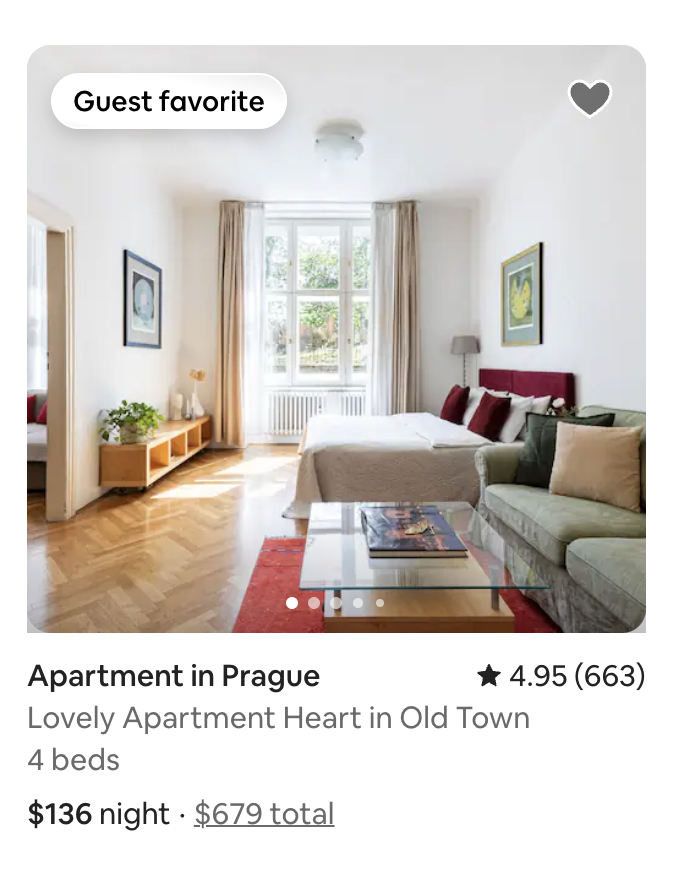
This scraper can extract listings for a particular area. You can get **Airbnb listings from one location**: room type, rating, reviews count, coordinates, price, number of guests, room ID, URL, images with captions.
### How many results can you scrape with \[New] Fast Airbnb Scraper?
The scraper currently returns around 240 listings. However, you have to keep in mind that scraping airbnb.com has many variables to it and may cause the results to fluctuate case by case. Some of the factors are:
- website gives a different number of results depending on the type/value of the input
- website has an internal limit that no scraper can cross
- scraper has a limit that we are working on improving
While we regularly run Actor tests to keep the benchmarks in check, the results may also fluctuate without our knowing. The best way to know for sure for your particular use case is to do a test run yourself.
### How much will scraping Airbnb cost you?
This Actor is paid per result. You are not charged for the Apify platform usage, but only a fixed price for each dataset of 1,000 items in the Actor outputs, which is $0.50 per 1,000 results. For 240 results (which is the average number of results returned for a destination), you will pay $0.12
### How can you use scraped Airbnb data?
- **Monitor Airbnb listings** in your chosen location and get the newest prices updates.
- **Predict prices** for the given location for the upcoming tourist season.
- **Find emerging trends** and gain **competitive intelligence** for the travel industry and adapt your own pricing.
- Narrow down **emerging popular locations to target** with the new touring or lodging offers.
- **Support your decisions with data** when deciding to open pr visit a new spot away from most popular destinations.
### How to scrape Airbnb Destination
Scraping **by Destination** will get you data from Airbnb search results page. You'll get main info on all available listings in any city or town.
#### How to scrape Airbnb listings in an area
It's super easy to get Airbnb listings by Destination. Just enter the city name as you would do it in and Airbnb search. You can add the desired check-in and check-out dates (this is optional).
#### Input example in JSON
```json
{
"locationQueries": [
"prague"
]
}
```
For the full list of optional parameters, their default values, and how to set the values of your own, see the [Input Schema tab](https://apify.com/tri_angle/new-fast-airbnb-scraper/input-schema).
### Airbnb data output
The output from \[New] Fast Airbnb Scraper is stored in the dataset. After the run is finished, you can download the dataset in various data formats (JSON, CSV, XML, RSS, HTML Table).
#### Output example in JSON
```json
{
"url": "https://www.airbnb.com/rooms/1686130?locale=en-US¤cy=USD&check_in=2025-01-14&check_out=2025-01-19",
"id": "1686130",
"name": "Lovely Apartment Heart in Old Town",
"title": "Apartment in Prague",
"titleLocale": "en",
"subtitles": [
"Free cancellation"
],
"additionalInfo": "Jan 14 – 19",
"roomType": "entire_home",
"coordinates": {
"latitude": 50.090172,
"longitude": 14.417268
},
"rating": {
"label": "4.95 out of 5 average rating, 663 reviews",
"localizedLabel": "4.95 (663)",
"average": 4.95,
"reviewsCount": 663
},
"images": [
{
"url": "https://a0.muscache.com/im/pictures/airflow/Hosting-1686130/original/e294c1c7-0654-4bc1-8e5e-c7166cece3d8.jpg",
"captions": []
},
{
"url": "https://a0.muscache.com/im/pictures/airflow/Hosting-1686130/original/1fed53f9-e0bc-4abe-aa2f-3c782dd72fd4.jpg",
"captions": [
"4 beds",
"3 bedrooms"
]
},
{
"url": "https://a0.muscache.com/im/pictures/airflow/Hosting-1686130/original/1fba23b3-10cd-409e-aa6f-7a5f9c88ff7f.jpg",
"captions": [
"1.5 baths"
]
},
{
"url": "https://a0.muscache.com/im/pictures/airflow/Hosting-1686130/original/b2bf4a9b-836f-4668-81ec-9c7d0366bba5.jpg",
"captions": [
"2 king beds",
"1 single bed",
"more"
]
},
{
"url": "https://a0.muscache.com/im/pictures/airflow/Hosting-1686130/original/225cede3-835d-4861-bdd7-c1cf419e57e9.jpg",
"captions": [
"Wifi",
"Kitchen",
"Washer"
]
},
{
"url": "https://a0.muscache.com/im/pictures/airflow/Hosting-1686130/original/8293ac3c-9854-4266-b50a-90914f9ae98b.jpg",
"captions": [
"Rated 4.9 out of 5 for cleanliness"
]
}
],
"badges": [
"Guest favorite"
],
"pricing": {
"label": "$136 per night",
"originalPrice": null,
"price": "$136",
"qualifier": "night",
"total": "$679 total"
},
"checkIn": "2025-01-14",
"checkOut": "2025-01-19"
}
```
)
### Limitations
\[New] Fast Airbnb Scraper currently returns around 240 results for a destination, which is what you can see on the website after you type in your destination and click "Search" (there are 15 pages of listings). We are working on ways to increase the number of returned listings.
### Advantages
\[New] Fast Airbnb Scraper only extracts data from the listings page (overview of offers) - it doesn't open each accomodation's page with details. This makes it faster and cheaper than any scraper that extracts details of each accommodation, like the [Airbnb Scraper](https://apify.com/tri_angle/airbnb-scraper).
### Integrations and \[New] Fast Airbnb Scraper
Last but not least, \[New] Fast Airbnb Scraper can be connected with almost any cloud service or web app thanks to integrations on the Apify platform. You can integrate with Make, Zapier, Slack, Airbyte, GitHub, Google Sheets, Google Drive, and more. Or you can use webhooks to carry out an action whenever an event occurs, e.g. get a notification whenever \[New] Fast Airbnb Scraper successfully finishes a run.
### Using \[New] Fast Airbnb Scraper with the Apify API
The Apify API gives you programmatic access to the Apify platform. The API is organized around RESTful HTTP endpoints that enable you to manage, schedule, and run Apify actors. The API also lets you access any datasets, monitor actor performance, fetch results, create and update versions, and more.
To access the API using Node.js, use the apify-client NPM package. To access the API using Python, use the apify-client PyPI package.
Check out the Apify API reference docs for full details or click on the API tab for code examples.
### Other travel scrapers
We have other tourism-related scrapers for you to try, such as [Booking Scraper](https://apify.com/voyager/booking-scraper) and [Tripadvisor Scraper](https://apify.com/maxcopell/tripadvisor). If you're interested in those, browse the [Travel Category](https://apify.com/store?category=TRAVEL) in Apify Store.
### Not your cup of tea? Build your own scraper
\[New] Fast Airbnb Scraper doesn’t exactly do what you need? You can always build your own! We have various [scraper templates](https://apify.com/templates) in Python, JavaScript, and TypeScript to get you started. Alternatively, you can write it from scratch using our [open-source library Crawlee](https://crawlee.dev/). You can keep the scraper to yourself or make it public by adding it to Apify Store (and [find users](https://blog.apify.com/make-regular-passive-income-developing-web-automation-actors-b0392278d085/) for it).
Or let us know if you need a custom scraping solution.
### Your feedback
We’re always working on improving the performance of our Actors. So if you’ve got any technical feedback for \[New] Fast Airbnb Scraper or simply found a bug, please create an issue on the Actor’s [Issues tab](https://console.apify.com/actors/NDa1latMI7JHJzSYU/issues) in Apify Console.