# SHEIN Catalog & New Arrivals Tracker (`yck69/shein-catalog-tracker`) Actor

Search SHEIN's full catalogue by keyword across European stores and track what SHEIN adds every day: titles, links, main images and listing dates, plus listing counts and launch trends per keyword.

- **URL**: https://apify.com/yck69/shein-catalog-tracker.md
- **Developed by:** [yck](https://apify.com/yck69) (community)
- **Categories:** E-commerce
- **Features:** Limited permissions
- **Stats:** 3 total users, 1 monthly users, 0.0% runs succeeded, 0 bookmarks
- **User rating**: 5.00 out of 5 stars

## Pricing

from $1.00 / 1,000 product listeds

This Actor is paid per event. You are not charged for the Apify platform usage, but only a fixed price for specific events.

Learn more: https://docs.apify.com/actors/running/actors-in-store.md#pay-per-event

## What's an Apify Actor?

An Actor is a serverless cloud program that runs on the Apify platform. It has two run modes.
In Batch mode, an Actor accepts a well-defined JSON input, performs an action which can take anything from a few seconds to a few hours,
and optionally produces a well-defined JSON output, datasets with results, or files in key-value store.
In Standby mode, an Actor provides a web server which can be used as a website, API, or an MCP server.

Apify vocabulary and the platform model are defined once, in the agent quickstart at https://apify.com/agents.md.

## How to integrate an Actor?

If asked about integration, you help developers integrate Actors into their projects.
You adapt to their stack and deliver integrations that are safe, well-documented, and production-ready.

Do not guess an integration path. Every one of them is in the agent quickstart at https://apify.com/agents.md: the Apify MCP server, Agent Skills with the Apify CLI, the JavaScript and Python clients, the REST API, and the account-free path for an agent with no human to sign in. It also carries the rule on stating cost before the first paid run.

For examples already wired to this Actor's own input schema, see the [API](#api) section below.

Each client library has reference documentation the quickstart does not restate: [JavaScript/TypeScript](https://docs.apify.com/api/client/js/docs.md) (`npm install apify-client`) and [Python](https://docs.apify.com/api/client/python/docs.md) (`pip install apify-client`).

# README

<p align="center">

<a href="https://api.apify.com/v2/key-value-stores/zT1EJ1dwSrsWcMvrQ/records/shein-catalog-tracker--video.mp4"><img src="https://api.apify.com/v2/key-value-stores/zT1EJ1dwSrsWcMvrQ/records/shein-catalog-tracker--preview.gif" width="85%" alt="SHEIN Catalog & New Arrivals Tracker: animated preview"></a><br>
<sub>▶ <a href="https://api.apify.com/v2/key-value-stores/zT1EJ1dwSrsWcMvrQ/records/shein-catalog-tracker--video.mp4">Watch the video with sound (1:16)</a></sub>

</p>

**Search SHEIN's entire catalogue by keyword and see what SHEIN adds every day**, across 13 European stores. For every matching product you get the title, link, full-size main image and an approximate listing date. For every keyword you get the exact number of listings and how many were launched in the last 7 and 30 days.

No login, no browser, no proxies, no captchas: the Actor reads the product sitemaps that SHEIN publishes for search engines, so it keeps working where page scrapers get blocked.

### What does SHEIN Catalog & New Arrivals Tracker do?

- 🔍 **Searches every product title in a store**: 2.8 million products in France alone, all keywords in one pass.
- 📈 **Counts the market**: exact listings per keyword, plus how many SHEIN launched in the last 7 and 30 days.
- 🆕 **Feeds you new arrivals**: on a schedule, each run returns only the products added since the previous one.
- 🖼️ **Returns full-size images and links** for every product, newest first.
- 🌍 **Covers 13 European stores**: UK, France, Germany, Spain, Italy, Netherlands, Sweden, Poland, Portugal, Austria, Switzerland and two EU-wide stores.
- ⚡ **Quick or complete**: grab examples in seconds, or scan the whole catalogue for exact numbers.
- 🧾 **Builds a visual report** with counts and a grid of the newest products.

### What data can you get?

<table>
<tr><td>🆔 Product ID</td><td>🏷️ Product title</td><td>🔗 Product link</td></tr>
<tr><td>🖼️ Main image, full size</td><td>📅 Approximate listing date</td><td>🌍 Store</td></tr>
<tr><td>🔑 Matched keyword</td><td>🆕 New since last run</td><td>📊 Listings per keyword</td></tr>
<tr><td>📈 Launches in the last 7 and 30 days</td><td>📉 Change since last run</td><td>🧾 Visual HTML report</td></tr>
</table>

### How to use it

1. Click **Try for free** at the top of this page (Apify gives you free monthly credit).
2. Type one or more **keywords**, for example `linen pants` or `barrel jeans`.
3. Pick the **stores** you care about.
4. Choose **Quick** for a fast sample of matching products, or **Complete** for exact counts and the newest products.
5. Click **Start**. Download the results as JSON, CSV, Excel or HTML, or get them through the API.

💡 For a daily new-arrivals feed, turn on **Only products added since the previous run** and add a [schedule](https://docs.apify.com/platform/schedules).

### Input

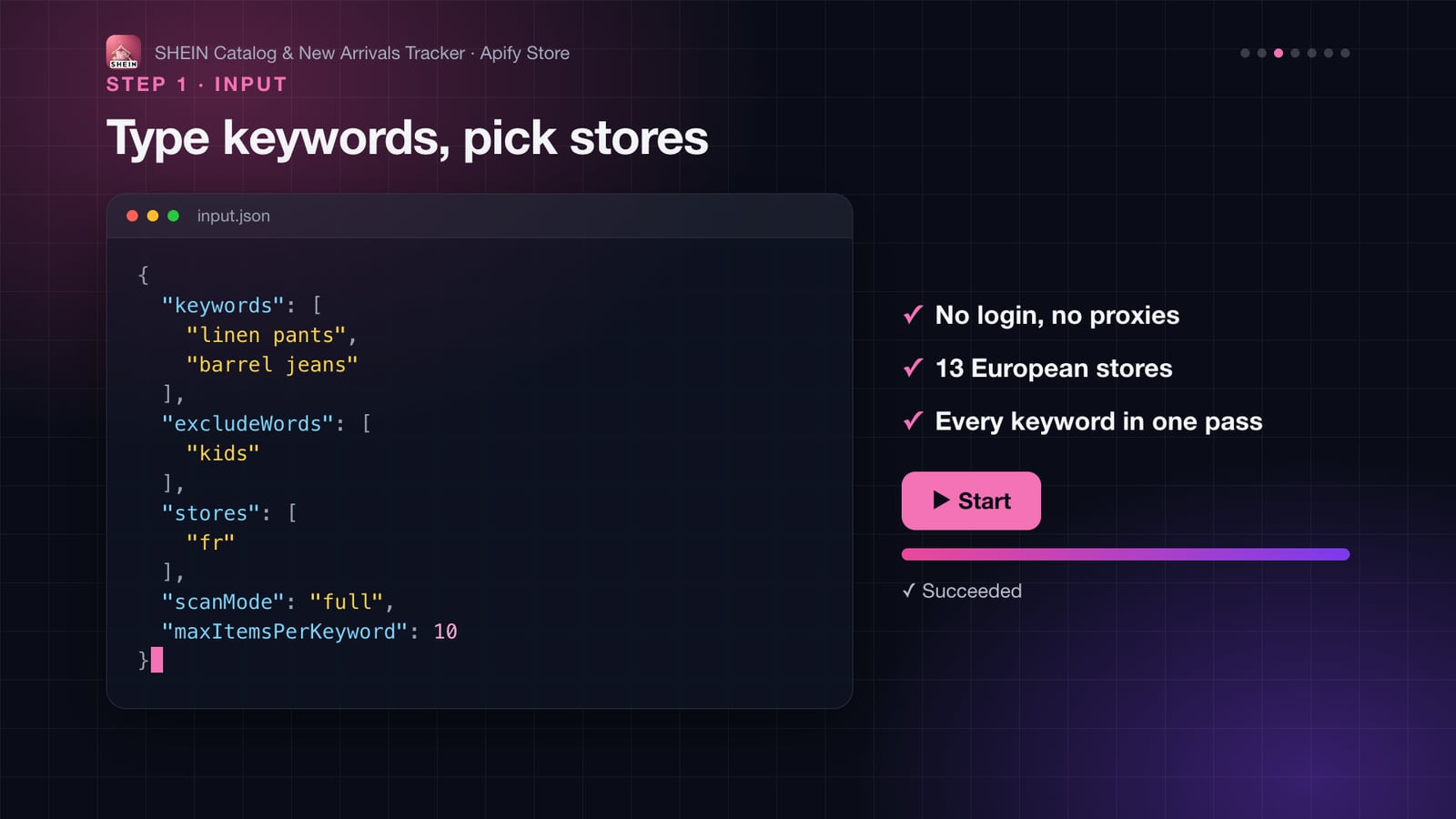
<p align="center"><img src="https://api.apify.com/v2/key-value-stores/zT1EJ1dwSrsWcMvrQ/records/shein-catalog-tracker--input.jpg" width="80%" alt="Input example"></p>

```json
{
  "keywords": ["linen pants", "barrel jeans"],
  "stores": ["fr"],
  "scanMode": "full",
  "maxItemsPerKeyword": 50
}
```

| Field | What it does |
|---|---|
| `keywords` | Each keyword is searched separately in product titles. Every word must start a word in the title, so `linen pant` matches "Linen Wide Leg Pants". Titles are in English in every store. Empty = whole catalogue. |
| `stores` | `uk`, `fr`, `de`, `es`, `it`, `nl`, `se`, `pl`, `pt`, `at`, `ch`, `eur` (other EU countries), `roe` (rest of Europe). |
| `scanMode` | `quick` stops as soon as enough products are found (seconds). `full` reads the whole store: exact counts and the newest products. |
| `maxItemsPerKeyword` | How many of the newest matches to return per keyword and store. Counts always cover every match. |
| `onlyNewSinceLastRun` | Return only products listed after your previous run with the same store and keyword (always a complete scan). |
| `listedWithinDays` | Only products whose main image was uploaded in the last N days. |
| `excludeWords` | Drop titles containing any of these words, e.g. `kids`. |
| `productIds` | Look up specific products by link or ID instead of searching. |

### Output

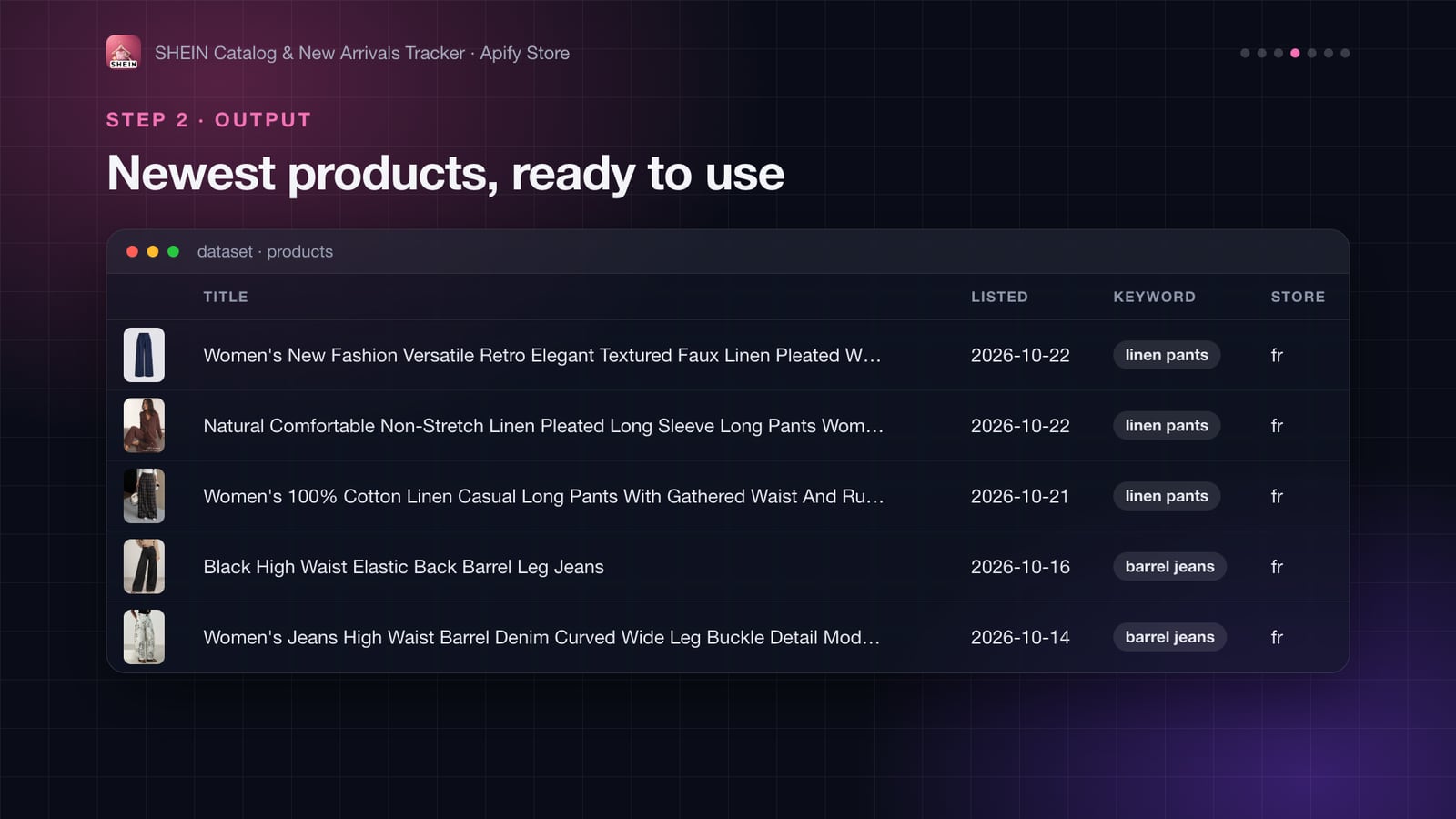
<p align="center"><img src="https://api.apify.com/v2/key-value-stores/zT1EJ1dwSrsWcMvrQ/records/shein-catalog-tracker--output.jpg" width="80%" alt="Output example"></p>

One row per product, newest first (real output from the France store):

```json
{
  "productId": "578038317",
  "title": "Women's New Fashion Versatile Retro Elegant Textured Faux Linen Pleated Wide Leg Long Pants",
  "url": "https://fr.shein.com/Women%27s-New-Fashion-Versatile-Retro-Elegant-Textured-Faux-Linen-Pleated-Wide-Leg-Long-Pants-p-578038317.html",
  "imageUrl": "https://img.ltwebstatic.com/v4/j/smartflow/2026/10/22/7c/17926630171a3377f7127bbf5edff80e70590bdf52.jpg",
  "imageDate": "2026-10-22",
  "store": "fr",
  "keyword": "linen pants",
  "newSinceLastRun": null,
  "scrapedAt": "2026-10-27T22:07:55+00:00"
}
```

- `imageDate` is the upload date of the main image: usually the day the product was created, sometimes older when SHEIN reuses an image.
- `newSinceLastRun` is `true` when SHEIN listed the product after your previous run with the same settings (`null` on a first run).

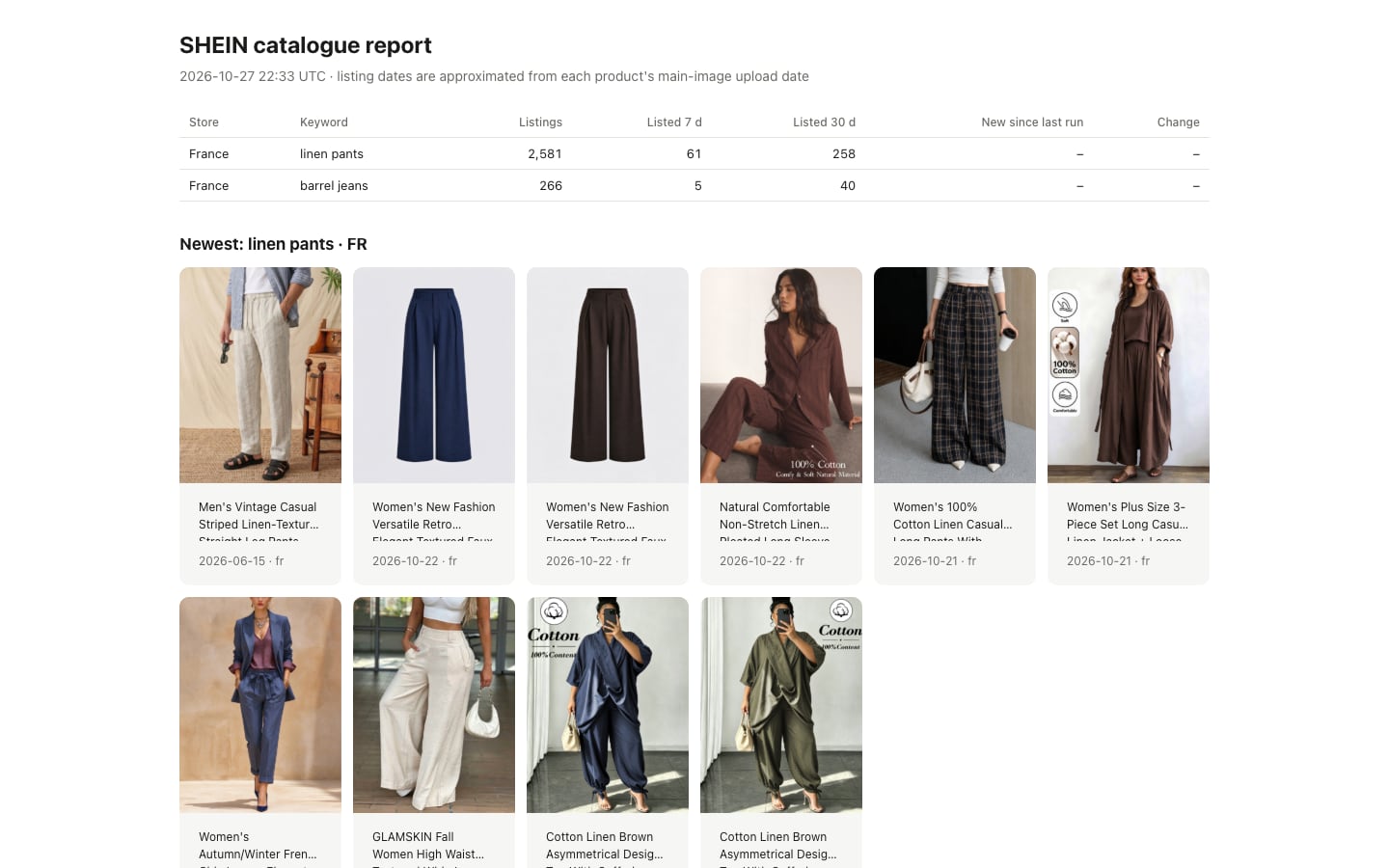
The run's key-value store also holds a **SUMMARY** (JSON) per store and keyword. Real numbers for "linen pants" in France on 27 October 2026:

```json
{
  "store": "fr",
  "keyword": "linen pants",
  "complete": true,
  "totalListings": 2581,
  "listedLast7Days": 61,
  "listedLast30Days": 258,
  "newSinceLastRun": null,
  "changeSinceLastRun": null,
  "newestProductId": "578482352"
}
```

…and a **REPORT** page you can open in the browser or share:

<p align="center"><img src="https://api.apify.com/v2/key-value-stores/zT1EJ1dwSrsWcMvrQ/records/shein-catalog-tracker--report.jpg" width="80%" alt="Visual report"></p>

### How can you use the data?

- 📈 **Spot trends before they peak**: compare listing counts and 7-day launches for "barrel jeans" vs "skinny jeans", week after week.
- 🛒 **Research products for dropshipping or reselling**: the newest listings in your niche, with images, in a spreadsheet.
- 🏷️ **Watch SHEIN in your category** as a fashion brand or marketplace: how fast it launches, store by store.
- 📊 **Feed dashboards and BI tools** through the API, Google Sheets or Make/Zapier integrations.
- 🔎 **Check which stores sell a product**: paste links or IDs.

### More input examples

**Daily new-arrivals feed** (schedule it once a day):

```json
{ "keywords": ["dress"], "excludeWords": ["kids", "girls"], "stores": ["de"], "onlyNewSinceLastRun": true, "maxItemsPerKeyword": 1000 }
```

**Everything SHEIN listed in the last 7 days**, whole catalogue:

```json
{ "stores": ["es"], "scanMode": "full", "listedWithinDays": 7, "maxItemsPerKeyword": 5000 }
```

**Track listing counts only** (cheapest: one product per keyword, the counts are in SUMMARY):

```json
{ "keywords": ["puffer jacket", "cargo pants", "maxi skirt", "corset top"], "stores": ["it"], "scanMode": "full", "maxItemsPerKeyword": 1 }
```

**Look up products** by link or ID:

```json
{ "productIds": ["578038317", "578482352"], "stores": ["fr", "de"] }
```

### Quick or complete?

| | Quick | Complete (default via API) |
|---|---|---|
| Reads | until every keyword has enough products | the store's whole catalogue |
| Time | seconds to a minute | about 5–8 min (France, 2.8 million products) to 15 min (United Kingdom) per store |
| Products | the first matches found | the newest matches |
| Listing counts, 7- and 30-day launches | – | exact |
| New since last run, trend history | – | yes |

Adding keywords doesn't slow a complete scan down: every keyword is matched in the same pass.

### Pricing

Pay only for what you get:

| Event | Price | When |
|---|---|---|
| Product listed | **$0.001** ($1 per 1,000) | per product row returned |
| Store scanned (complete) | **$0.03** | once per store for a complete scan, however many keywords |

Counts, SUMMARY and REPORT cost nothing extra. Example: 5 keywords × 100 newest products in one store, complete scan = $0.03 + $0.50 = **$0.53**. A quick run with 20 products costs about **$0.02**.

### Limits, honestly

- **No prices, sizes, stock or reviews.** SHEIN's sitemaps don't contain them, and SHEIN blocks automated access to its product pages. Each row links to the product page.
- **One image per product**: the main image, full size.
- **Listing dates are approximate** (see `imageDate`). Newest-first ordering uses SHEIN's product IDs, which grow over time.
- **European stores only.** SHEIN does not serve its US, Canadian, Australian or other non-European sitemaps to cloud servers.
- **Images and product texts belong to SHEIN.** Use them for research; don't republish them as your own.

### More Actors from this developer

<table>
<tr><td width="33%">🚗 <a href="https://apify.com/yck69/car-deal-score"><b>European Car Deal Score</b></a><br>Fair price and deal rating for used cars in 8 countries</td><td width="33%">🚨 <a href="https://apify.com/yck69/french-product-recalls"><b>French Product Recalls (RappelConso)</b></a><br>French product recalls and barcode checks</td><td width="33%">🏢 <a href="https://apify.com/yck69/french-company-data"><b>French Company Data</b></a><br>Every French company: SIREN, address, NAF, directors</td></tr>
<tr><td width="33%">🌐 <a href="https://apify.com/yck69/website-meta-extractor"><b>Website Meta Extractor</b></a><br>Title, description, Open Graph and more for any URL</td><td width="33%">📜 <a href="https://apify.com/yck69/french-law"><b>French Law</b></a><br>French codes, laws and what changed</td><td width="33%">⛽ <a href="https://apify.com/yck69/french-fuel-prices"><b>French Fuel Prices</b></a><br>Live French fuel prices and cheapest stations</td></tr>
</table>

### Errors and what they mean

| Message | Meaning |
|---|---|
| `Store sitemap not available from this server` | SHEIN didn't serve that store's sitemap. The other stores are still processed. |
| `Found 0 of N product(s); N not listed in these stores` | The product IDs aren't in the selected stores' catalogues (removed, or sold elsewhere). |
| Status ends with `Stopped at your maximum cost per run` | Your cost limit was reached; raise it in the run options to get more products. |

If some sitemap files fail during a run, the starting point for "new since last run" isn't moved, so nothing is skipped next time.

### FAQ

##### How much does it cost?

See [Pricing](#pricing). A quick run costs a couple of cents; Apify's free monthly credit covers plenty of tests.

##### Is it legal to use this data?

The Actor only reads public sitemaps that SHEIN lists in its `robots.txt` for crawlers, with no login and no personal data. Product texts and images remain SHEIN's property: use them for research and analysis, not to republish. If in doubt about your use case, ask a lawyer.

##### Can I use it through the API, Make, Zapier or Google Sheets?

Yes. Every run can be started and read through the [Apify API](https://docs.apify.com/api/v2), and Apify integrations connect it to Make, Zapier, Google Sheets, Slack, webhooks and more.

##### Why are results in this order?

Newest first, by product ID: SHEIN gives newer products higher IDs.

##### My first `onlyNewSinceLastRun` run returned products. Is that right?

Yes. A first run has nothing to compare with, so it returns the newest products and saves the starting point.

##### Something's not working, or you need another field?

Open an issue on the **Issues** tab. Feedback is read and answered.

# Actor input Schema

## `keywords` (type: `array`):

Each keyword is searched separately in product titles. Every word must appear ("linen pant" matches "Linen Wide Leg Pants"). Titles are in English in every store. Leave empty to take the whole catalogue.

## `stores` (type: `array`):

SHEIN stores to scan. Each store lists 2 to 5 million products; reading one takes about 8 minutes (France) to 15 minutes (United Kingdom), whatever the number of keywords.

## `scanMode` (type: `string`):

Quick returns the first matching products it finds, in seconds, without listing counts. Complete reads the store's whole catalogue: every match counted, the newest products first, and trend history between runs. 'Only products added since the previous run' always uses a complete scan.

## `maxItemsPerKeyword` (type: `integer`):

How many of the newest matching products to return for each keyword in each store. Counts in the summary always cover every match.

## `onlyNewSinceLastRun` (type: `boolean`):

For scheduled runs: return only products SHEIN listed after your previous run with the same store and keyword. The first run returns the newest products and saves the starting point.

## `listedWithinDays` (type: `integer`):

Only return products whose main image was uploaded in the last N days (a close proxy for the listing date). Leave empty for no date filter.

## `excludeWords` (type: `array`):

Skip products whose title contains any of these words, e.g. "kids" or "plus size".

## `productIds` (type: `array`):

Instead of a keyword search, find specific SHEIN products (links or IDs) and see which of the selected stores list them, with title and main image. Keywords are ignored when this is filled.

## Actor input object example

```json
{
  "keywords": [
    "linen pants"
  ],
  "stores": [
    "fr"
  ],
  "scanMode": "quick",
  "maxItemsPerKeyword": 20,
  "onlyNewSinceLastRun": false
}
```

# Actor output Schema

## `products` (type: `string`):

Newest matching products with image, link and listing date.

## `report` (type: `string`):

Listing counts, launches in the last 7 and 30 days, and the newest products as a visual grid.

## `summary` (type: `string`):

Per store and keyword: total listings, listed in the last 7 and 30 days, new since the last run and change.

# API

You can run this Actor programmatically using our API. Below are code examples in JavaScript, Python, and CLI, as well as the OpenAPI specification and MCP server setup.

## JavaScript example

```javascript
import { ApifyClient } from 'apify-client';

// Initialize the ApifyClient with your Apify API token
// Replace the '<YOUR_API_TOKEN>' with your token
const client = new ApifyClient({
    token: '<YOUR_API_TOKEN>',
});

// Prepare Actor input
const input = {
    "keywords": [
        "linen pants"
    ],
    "stores": [
        "fr"
    ],
    "scanMode": "quick",
    "maxItemsPerKeyword": 20
};

// Run the Actor and wait for it to finish
const run = await client.actor("yck69/shein-catalog-tracker").call(input);

// Fetch and print Actor results from the run's dataset (if any)
console.log('Results from dataset');
console.log(`💾 Check your data here: https://console.apify.com/storage/datasets/${run.defaultDatasetId}`);
const { items } = await client.dataset(run.defaultDatasetId).listItems();
items.forEach((item) => {
    console.dir(item);
});

// 📚 Want to learn more 📖? Go to → https://docs.apify.com/api/client/js/docs

```

## Python example

```python
from apify_client import ApifyClient

# Initialize the ApifyClient with your Apify API token
# Replace '<YOUR_API_TOKEN>' with your token.
client = ApifyClient("<YOUR_API_TOKEN>")

# Prepare the Actor input
run_input = {
    "keywords": ["linen pants"],
    "stores": ["fr"],
    "scanMode": "quick",
    "maxItemsPerKeyword": 20,
}

# Run the Actor and wait for it to finish
run = client.actor("yck69/shein-catalog-tracker").call(run_input=run_input)

# Fetch and print Actor results from the run's dataset (if there are any)
print(f"💾 Check your data here: https://console.apify.com/storage/datasets/{run.default_dataset_id}")
for item in client.dataset(run.default_dataset_id).iterate_items():
    print(item)

# 📚 Want to learn more 📖? Go to → https://docs.apify.com/api/client/python/docs/quick-start

```

## CLI example

```bash
echo '{
  "keywords": [
    "linen pants"
  ],
  "stores": [
    "fr"
  ],
  "scanMode": "quick",
  "maxItemsPerKeyword": 20
}' |
apify call yck69/shein-catalog-tracker --silent --output-dataset

```

## MCP server setup

```json
{
    "mcpServers": {
        "apify": {
            "type": "http",
            "url": "https://mcp.apify.com/?tools=fetch-actor-details,yck69/shein-catalog-tracker"
        }
    }
}
```

The hosted server signs you in with OAuth on first connect, so no API token belongs in this config. Clients without OAuth support can send an `Authorization: Bearer <APIFY_API_TOKEN>` header instead, using a token from API & Integrations in Apify Console (https://console.apify.com/settings/integrations).

## OpenAPI specification

Download the OpenAPI definition: https://api.apify.com/v2/actors/kinfesV2t3d0G5i7O/builds/YKlyLdcmrAJCyenx2/openapi.json