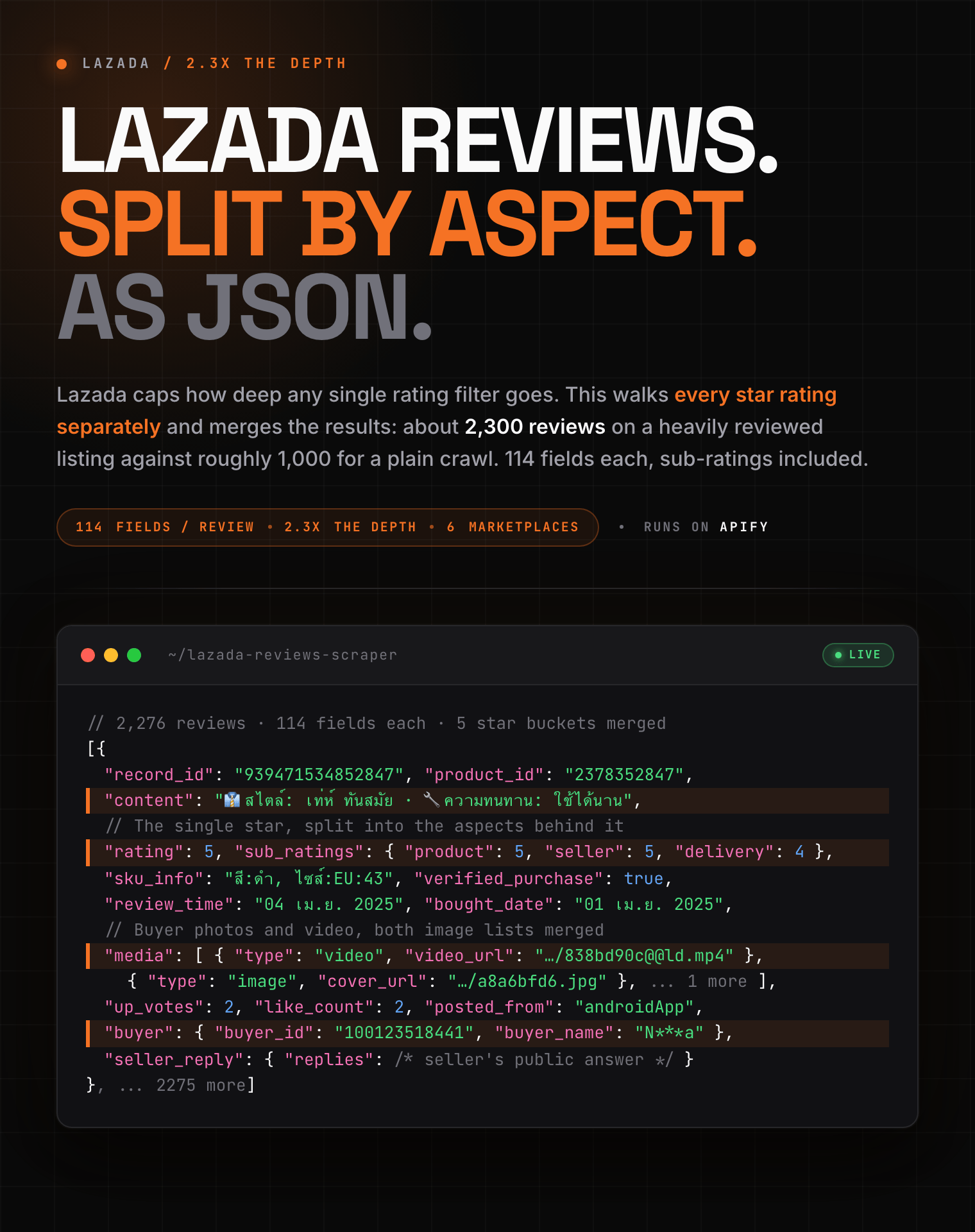
2,241 reviews from one product in 19 seconds, with product, seller and delivery rated separately.
| Zen Studio · Southeast Asia • Lazada and Shopee, every marketplace | |||
 Lazada Products Lazada ProductsPer-variant price and stock |
 Lazada Reviews Lazada Reviews➤ You are here |
 Lazada Store Lazada StoreCatalogue with unit sales |
 Shopee Reviews Shopee ReviewsFull history, star filters |
⚡ Roughly twice the review history you would otherwise get, with every 1-, 2-, 3- and 4-star review included, not just the most recent page of praise.### Key Features - **Fast**: 1,000 reviews in about 6 seconds, measured. - **114 fields per review**: star rating plus per-aspect sub-ratings (product, seller, delivery), review text broken into attribute parts, buyer photos and video, the exact variant purchased, seller replies, and helpful votes. - **Sub-ratings split out**: a 5-star product from a 2-star courier reads very differently once `product`, `seller` and `delivery` are separate numbers. Nothing else exposes them. - **2.3x depth**: about 2,300 reviews on a heavily reviewed listing, against roughly 1,000 you would otherwise get. - **Free rating summary**: one extra row per product with the average, the star histogram, and how many reviews carry photos or video. - **All six marketplaces**: Thailand, Singapore, Malaysia, Indonesia, the Philippines and Vietnam. Each link keeps its own marketplace, so you can mix countries in one run. - **Free tier**: 10 runs lifetime, up to 20 rows each. No credit card required. ### How to Scrape Lazada Reviews #### Basic: reviews for one product ```json { "startUrls": [ { "url": "https://www.lazada.co.th/products/i2378352847.html" } ] } ``` #### Several products across marketplaces ```json { "startUrls": [ { "url": "https://www.lazada.co.th/products/i2378352847.html" }, { "url": "https://www.lazada.sg/products/i3078783735.html" }, { "url": "https://www.lazada.com.my/products/i4817459425.html" } ], "maxReviewsPerProduct": 1000 } ``` #### Cap the whole run, not just each product ```json { "startUrls": [ { "url": "https://www.lazada.co.th/products/i2378352847.html" }, { "url": "https://www.lazada.co.th/products/i4817459425.html" } ], "maxReviewsPerProduct": 2000, "maxReviews": 500 } ``` `maxReviews` is the ceiling for the run as a whole, so a long list of links cannot multiply into a much larger bill than you expected. #### Reviews only, no summary rows ```json { "startUrls": [ { "url": "https://www.lazada.co.th/products/i2378352847.html" } ], "includeRatingSummary": false } ``` ### Input Parameters | Parameter | Type | Default | Description | |-----------|------|---------|-------------| | `startUrls` | array | *required* | Lazada product page links. The marketplace is read from each link. | | `maxReviewsPerProduct` | integer | `500` | Stop after this many reviews for each product. | | `maxReviews` | integer | *unset* | Total across all products. Only matters when you have several. | | `includeRatingSummary` | boolean | `true` | Adds one summary row per product with the star histogram. | | `productIds` | array | *unset* | Numeric product IDs instead of links. Needs `country`. | | `country` | string | *unset* | Marketplace for `productIds` only: `th`, `sg`, `my`, `id`, `ph`, `vn`. | ### What Data Can You Extract from Lazada Reviews? Every review row carries: - **Ratings**: the star rating, the per-aspect breakdown (product, seller, delivery), and the original rating where the buyer revised it. - **Content**: the review text, the same text split into labelled attribute parts, the review and purchase dates, and structured fit tags. - **Media**: every photo and video, cover images, and the video ID. - **Purchase**: the exact variant bought, its SKU ID, and the verified-purchase flag. - **Engagement**: helpful votes, up and down votes, like count, view count, and comment count. - **People**: buyer ID and display name, anonymity flag, and the seller's public reply. - **Product context**: title, image, canonical link and category, so a review row stands alone without a join. #### Output Example ```json { "record_type": "review", "record_id": "939471534852847", "product_id": "2378352847", "url": "https://www.lazada.co.th/products/i2378352847.html", "source_context": { "source_id": "lazada", "source_domain": "www.lazada.co.th", "seed_type": "product", "seed_value": "2378352847", "country": "TH", "language": "th" }, "product": { "product_id": "2378352847", "title": "ส่งเร็ว🚚รองเท้าผ้าใบ36-44ผู้หญิง ผู้ชาย 👟 รองเท้าแฟชั่น สวมใส่สบาย รองเท้านำเข้าราคาถูก B-050", "url": "https://www.lazada.co.th/products/36-44-b-050-i2378352847-s8066125690.html", "image_url": "https://th-live.slatic.net/p/293bb1ddf7297d16129b4cd31c8b436b.jpg", "category_id": "6718", "config_sku": "2378352847_TH" }, "review": { "review_id": "939471534852847", "rating": 5, "sub_ratings": { "delivery": 5, "product": 5, "seller": 5 }, "original_rating": null, "title": null, "content": "👔สไตล์:เท่ห์ ทันสมัย\n 🔧ความทนทาน:ใช้ได้นาน\n 😌ความสะดวกสบาย:ใส่สบายเหมาะสำหรับใช้ในช่วงฤดูร้อนด้วยการออกแบบส่วนบนต่ำ, สวม …", "content_parts": [ { "attribute": "👔สไตล์", "content": "เท่ห์ ทันสมัย", "selected": null }, { "attribute": "🔧ความทนทาน", "content": "ใช้ได้นาน", "selected": null }, { "attribute": "😌ความสะดวกสบาย", "content": "ใส่สบายเหมาะสำหรับใช้ในช่วงฤดูร้อนด้วยการออกแบบส่วนบนต่ำ, สวมใส่สบายตลอดทั้งวัน, สวมใส่สบายตลอดทั้งวัน, การออกแบบที่มีสไ …", "selected": null } ], "review_time": "04 เม.ย. 2025", "bought_date": "01 เม.ย. 2025", "sku_info": "สี:ดำ, ไซส์:EU:43", "sku_id": "8066125690", "verified_purchase": true, "tags": null, "fit_tag": null, "up_votes": 2, "down_votes": 0, "helpful": null, "like_count": 2, "image_count": null, "video_count": null, "view_count": 0, "comment_count": 0, "comments": null, "follow_up_reviews": null, "media": [ { "type": "video", "cover_url": "https://sg-test-11.slatic.net/p/9eff8188b53b399c8f6d1fe2312c420e.jpg", "video_url": "https://lazvideo.lazcdn.com/psp/20250404/838bd90c-7321-452c-ad2f-8af6845f069e@@ld.mp4?auth_key=1789138760-0-0-655c38d4ff …", "width": null, "height": null, "title": null }, { "type": "image", "cover_url": "https://lzd-u.slatic.net/a8a6bfd643784adcac49388bf173ac10_bc92dc01013e4da9804627859d0ad6da.jpg", "video_url": null, "width": 0, "height": 0, "title": null }, { "type": "image", "cover_url": "https://lzd-u.slatic.net/a8a6bfd643784adcac49388bf173ac10_54805103bcc84cc797f06ac5d325fd4b.jpg", "video_url": null, "width": 0, "height": 0, "title": null } ], "video_id": "30324912503", "video_cover_url": "https://sg-test-11.slatic.net/p/9eff8188b53b399c8f6d1fe2312c420e.jpg", "posted_from": "write_review_next_review", "status": "approved", "type": "PRODUCT_REVIEW", "relevance_score": 90.06, "original_country": null, "is_auto_translated": null, "foreign_content": null }, "buyer": { "buyer_id": "100123518441", "buyer_name": "N***a", "avatar_url": null, "is_anonymous": true, "is_guest": false, "reviewer_type": null }, "seller_reply": null, "seller": { "seller_id": "100180545473", "seller_name": null }, "attributes": { "source_specific": { "lazada": { "canEdit": false, "imageHost": "//th-live.slatic.net", "imageQCStatus": "approved", "isBuyerShowEnabled": true, "isCompleted": 1, "isCrossVenture": false, "isExternal": 0, "isGoodReview": false, "isQced": false, "isReportable": 0, "isSocialCommentsEnabled": true, "isVideoReady": true, "rejected": false, "reportTimes": 0, "showUploader": true, "showVideoUploader": true, "targetId": 2378352847, "targetType": "item" } } } } ``` #### Per-product rating summary ```json { "record_type": "product_reviews_summary", "record_id": "2378352847", "product_id": "2378352847", "average_rating": 4.8, "review_count": 24317, "hidden_count": 13851, "retrievable_count": 10466, "rating_histogram": [ 21854, 830, 658, 311, 664 ], "with_media_count": 3305, "with_image_count": 3203, "with_video_count": 186, "local_reviews_count": 24317 } ``` `review_count` is Lazada's public total and includes ratings left with no written text. `retrievable_count` is how many actually carry content. ### Advanced Usage Ready-made configurations for voice-of-customer analysis, negative review mining, competitor monitoring, and multi-market comparison. #### Voice of customer: deep history on one listing ```json { "startUrls": [ { "url": "https://www.lazada.co.th/products/i2378352847.html" } ], "maxReviewsPerProduct": 3000 } ``` #### Competitor monitoring: a shortlist on a schedule ```json { "startUrls": [ { "url": "https://www.lazada.co.th/products/i2378352847.html" }, { "url": "https://www.lazada.co.th/products/i3078783735.html" }, { "url": "https://www.lazada.co.th/products/i4817459425.html" } ], "maxReviewsPerProduct": 200 } ``` #### Same product across marketplaces ```json { "startUrls": [ { "url": "https://www.lazada.co.th/products/i2378352847.html" }, { "url": "https://www.lazada.vn/products/i2378352847.html" }, { "url": "https://www.lazada.co.id/products/i2378352847.html" } ], "maxReviewsPerProduct": 300 } ``` #### From IDs you already hold ```json { "productIds": ["2378352847", "4817459425"], "country": "th", "maxReviewsPerProduct": 500 } ``` ### Pricing: Pay Per Event (PPE) **$1.49 per 1,000 reviews** on the FREE Apify plan, proxies included. Paid Apify plans pay less.
| Reviews collected | Cost (FREE plan) |
|---|---|
| 100 | $0.15 |
| 1,000 | $1.49 |
**Lazada**
- [Lazada Product Scraper](https://apify.com/zen-studio/lazada-product-scraper)
- [Lazada Store Scraper](https://apify.com/zen-studio/lazada-store-scraper)
-  **Naver Search 네이버 검색**
- [Naver Search Scraper](https://apify.com/zen-studio/naver-search-scraper)
-
**Naver Search 네이버 검색**
- [Naver Search Scraper](https://apify.com/zen-studio/naver-search-scraper)
-  **AliExpress 全球速卖通**
- [AliExpress Product Scraper](https://apify.com/zen-studio/aliexpress-scraper)
-
**AliExpress 全球速卖通**
- [AliExpress Product Scraper](https://apify.com/zen-studio/aliexpress-scraper)
-  **Shopee**
- [Shopee Product Detail Scraper](https://apify.com/zen-studio/shopee-product-detail-scraper)
- [Shopee Product Scraper](https://apify.com/zen-studio/shopee-product-scraper)
- [Shopee Product Reviews Scraper](https://apify.com/zen-studio/shopee-product-reviews-scraper)
-
**Shopee**
- [Shopee Product Detail Scraper](https://apify.com/zen-studio/shopee-product-detail-scraper)
- [Shopee Product Scraper](https://apify.com/zen-studio/shopee-product-scraper)
- [Shopee Product Reviews Scraper](https://apify.com/zen-studio/shopee-product-reviews-scraper)
-  **Taobao 淘宝**
- [Taobao Search Scraper](https://apify.com/zen-studio/taobao-search-scraper)
- [Taobao Product Detail Scraper](https://apify.com/zen-studio/taobao-detail-scraper)
- [Taobao Seller Products Scraper](https://apify.com/zen-studio/taobao-seller-products-scraper)
-
**Taobao 淘宝**
- [Taobao Search Scraper](https://apify.com/zen-studio/taobao-search-scraper)
- [Taobao Product Detail Scraper](https://apify.com/zen-studio/taobao-detail-scraper)
- [Taobao Seller Products Scraper](https://apify.com/zen-studio/taobao-seller-products-scraper)
-  **JD.com 京东**
- [JD.com Search Scraper](https://apify.com/zen-studio/jd-com-search-scraper)
-
**JD.com 京东**
- [JD.com Search Scraper](https://apify.com/zen-studio/jd-com-search-scraper)
-  **1688 阿里巴巴**
- [1688 Wholesale Scraper](https://apify.com/zen-studio/1688-wholesale-scraper)
- [Alibaba Scraper](https://apify.com/zen-studio/alibaba-scraper)
- [1688 Reviews Scraper](https://apify.com/zen-studio/1688-reviews-scraper)
-
**1688 阿里巴巴**
- [1688 Wholesale Scraper](https://apify.com/zen-studio/1688-wholesale-scraper)
- [Alibaba Scraper](https://apify.com/zen-studio/alibaba-scraper)
- [1688 Reviews Scraper](https://apify.com/zen-studio/1688-reviews-scraper)
-  **Goofish 闲鱼**
- [Goofish (Xianyu) Search Scraper](https://apify.com/zen-studio/goofish-xianyu-search-scraper)
- [Goofish (Xianyu) Seller Scraper](https://apify.com/zen-studio/goofish-xianyu-seller-scraper)
- [Goofish (Xianyu) Item Detail Scraper](https://apify.com/zen-studio/goofish-xianyu-item-detail-scraper)
- [Goofish (Xianyu) Item Comments & Q\&A Scraper](https://apify.com/zen-studio/goofish-xianyu-item-comments-scraper)
- [Goofish (Xianyu) Reverse Image Search Scraper](https://apify.com/zen-studio/goofish-xianyu-visual-search-scraper)
-
**Goofish 闲鱼**
- [Goofish (Xianyu) Search Scraper](https://apify.com/zen-studio/goofish-xianyu-search-scraper)
- [Goofish (Xianyu) Seller Scraper](https://apify.com/zen-studio/goofish-xianyu-seller-scraper)
- [Goofish (Xianyu) Item Detail Scraper](https://apify.com/zen-studio/goofish-xianyu-item-detail-scraper)
- [Goofish (Xianyu) Item Comments & Q\&A Scraper](https://apify.com/zen-studio/goofish-xianyu-item-comments-scraper)
- [Goofish (Xianyu) Reverse Image Search Scraper](https://apify.com/zen-studio/goofish-xianyu-visual-search-scraper)
-  **Coupang 쿠팡**
- [Coupang Review Scraper](https://apify.com/zen-studio/coupang-review-scraper)
- [Coupang Search Scraper](https://apify.com/zen-studio/coupang-search-scraper)
- [Coupang Product Detail Scraper](https://apify.com/zen-studio/coupang-detail-scraper)
-
**Coupang 쿠팡**
- [Coupang Review Scraper](https://apify.com/zen-studio/coupang-review-scraper)
- [Coupang Search Scraper](https://apify.com/zen-studio/coupang-search-scraper)
- [Coupang Product Detail Scraper](https://apify.com/zen-studio/coupang-detail-scraper)
-  **Naver Shopping 네이버쇼핑**
- [Naver Shopping Scraper](https://apify.com/zen-studio/naver-shopping-scraper)
- [Naver Shopping Product Detail Scraper](https://apify.com/zen-studio/naver-product-detail-scraper)
- [Naver Shopping Review Scraper](https://apify.com/zen-studio/naver-review-scraper)
**🎬 Short-video & social**
-
**Naver Shopping 네이버쇼핑**
- [Naver Shopping Scraper](https://apify.com/zen-studio/naver-shopping-scraper)
- [Naver Shopping Product Detail Scraper](https://apify.com/zen-studio/naver-product-detail-scraper)
- [Naver Shopping Review Scraper](https://apify.com/zen-studio/naver-review-scraper)
**🎬 Short-video & social**
-  **Kwai (Brazil)**
- [Kwai Search Scraper](https://apify.com/zen-studio/kwai-search-scraper)
- [Kwai Comments Scraper](https://apify.com/zen-studio/kwai-comments-scraper)
-
**Kwai (Brazil)**
- [Kwai Search Scraper](https://apify.com/zen-studio/kwai-search-scraper)
- [Kwai Comments Scraper](https://apify.com/zen-studio/kwai-comments-scraper)
-  **Douyin 抖音**
- [Douyin Search Scraper](https://apify.com/zen-studio/douyin-search-scraper)
- [Douyin Profile Scraper](https://apify.com/zen-studio/douyin-profile-scraper)
- [Douyin Video Scraper](https://apify.com/zen-studio/douyin-video-scraper)
- [Douyin Comments Scraper](https://apify.com/zen-studio/douyin-comments-scraper)
- [Douyin Transcripts Scraper](https://apify.com/zen-studio/douyin-transcripts-scraper)
- [Douyin Creator Rankings Scraper](https://apify.com/zen-studio/douyin-xingtu-rankings-scraper)
- [Douyin Live Recorder](https://apify.com/zen-studio/douyin-live-recorder)
- [Douyin Hot Search Scraper](https://apify.com/zen-studio/douyin-hot-search-scraper)
- [Douyin Product Search Scraper](https://apify.com/zen-studio/douyin-product-search-scraper)
-
**Douyin 抖音**
- [Douyin Search Scraper](https://apify.com/zen-studio/douyin-search-scraper)
- [Douyin Profile Scraper](https://apify.com/zen-studio/douyin-profile-scraper)
- [Douyin Video Scraper](https://apify.com/zen-studio/douyin-video-scraper)
- [Douyin Comments Scraper](https://apify.com/zen-studio/douyin-comments-scraper)
- [Douyin Transcripts Scraper](https://apify.com/zen-studio/douyin-transcripts-scraper)
- [Douyin Creator Rankings Scraper](https://apify.com/zen-studio/douyin-xingtu-rankings-scraper)
- [Douyin Live Recorder](https://apify.com/zen-studio/douyin-live-recorder)
- [Douyin Hot Search Scraper](https://apify.com/zen-studio/douyin-hot-search-scraper)
- [Douyin Product Search Scraper](https://apify.com/zen-studio/douyin-product-search-scraper)
-  **RedNote 小红书**
- [RedNote User Profile Scraper](https://apify.com/zen-studio/rednote-user-profile-scraper)
- [RedNote Search Scraper](https://apify.com/zen-studio/rednote-search-scraper)
- [RedNote Comments Scraper](https://apify.com/zen-studio/rednote-comments-scraper)
- [RedNote Product Search Scraper](https://apify.com/zen-studio/rednote-product-search-scraper)
- [RedNote Note Detail Scraper](https://apify.com/zen-studio/rednote-note-detail-scraper)
- [RedNote Product Reviews Scraper](https://apify.com/zen-studio/rednote-product-reviews-scraper)
- [RedNote Live Recorder](https://apify.com/zen-studio/rednote-live-recorder)
-
**RedNote 小红书**
- [RedNote User Profile Scraper](https://apify.com/zen-studio/rednote-user-profile-scraper)
- [RedNote Search Scraper](https://apify.com/zen-studio/rednote-search-scraper)
- [RedNote Comments Scraper](https://apify.com/zen-studio/rednote-comments-scraper)
- [RedNote Product Search Scraper](https://apify.com/zen-studio/rednote-product-search-scraper)
- [RedNote Note Detail Scraper](https://apify.com/zen-studio/rednote-note-detail-scraper)
- [RedNote Product Reviews Scraper](https://apify.com/zen-studio/rednote-product-reviews-scraper)
- [RedNote Live Recorder](https://apify.com/zen-studio/rednote-live-recorder)
-  **Xigua 西瓜视频**
- [Xigua Video Search Scraper](https://apify.com/zen-studio/xigua-video-search-scraper)
- [Xigua Video Detail Scraper](https://apify.com/zen-studio/xigua-video-detail-scraper)
-
**Xigua 西瓜视频**
- [Xigua Video Search Scraper](https://apify.com/zen-studio/xigua-video-search-scraper)
- [Xigua Video Detail Scraper](https://apify.com/zen-studio/xigua-video-detail-scraper)
-  **Bilibili 哔哩哔哩**
- [Bilibili Video Scraper](https://apify.com/zen-studio/bilibili-video-scraper)
- [Bilibili Danmaku Scraper](https://apify.com/zen-studio/bilibili-danmaku-scraper)
-
**Bilibili 哔哩哔哩**
- [Bilibili Video Scraper](https://apify.com/zen-studio/bilibili-video-scraper)
- [Bilibili Danmaku Scraper](https://apify.com/zen-studio/bilibili-danmaku-scraper)
-  **Naver Blog & Cafe 네이버 블로그·카페**
- [Naver Blog & Cafe Scraper](https://apify.com/zen-studio/naver-blog-cafe-scraper)
**🏠 Real estate & autos**
-
**Naver Blog & Cafe 네이버 블로그·카페**
- [Naver Blog & Cafe Scraper](https://apify.com/zen-studio/naver-blog-cafe-scraper)
**🏠 Real estate & autos**
-  **Naver 부동산**
- [Naver Real Estate Scraper](https://apify.com/zen-studio/naver-land-scraper)
-
**Naver 부동산**
- [Naver Real Estate Scraper](https://apify.com/zen-studio/naver-land-scraper)
-  **Anjuke 安居客**
- [Anjuke For-Sale Listings Scraper](https://apify.com/zen-studio/anjuke-real-estate-scraper)
- [Anjuke New-Home Scraper](https://apify.com/zen-studio/anjuke-new-home-scraper)
- [Anjuke Rental Listings Scraper](https://apify.com/zen-studio/anjuke-rent-scraper)
- [Anjuke Listing Detail Scraper](https://apify.com/zen-studio/anjuke-sale-detail-scraper)
-
**Anjuke 安居客**
- [Anjuke For-Sale Listings Scraper](https://apify.com/zen-studio/anjuke-real-estate-scraper)
- [Anjuke New-Home Scraper](https://apify.com/zen-studio/anjuke-new-home-scraper)
- [Anjuke Rental Listings Scraper](https://apify.com/zen-studio/anjuke-rent-scraper)
- [Anjuke Listing Detail Scraper](https://apify.com/zen-studio/anjuke-sale-detail-scraper)
-  **58.com 58同城**
- [58.com Real Estate Scraper](https://apify.com/zen-studio/58-real-estate-scraper)
-
**58.com 58同城**
- [58.com Real Estate Scraper](https://apify.com/zen-studio/58-real-estate-scraper)
-  **Autohome 汽车之家**
- [Autohome (Che168) Used-Car Scraper](https://apify.com/zen-studio/che168-car-scraper)
### Support
- **Bugs**: Issues tab
- **Features**: Issues tab
### Legal Compliance
Extracts publicly available data. Users must comply with Lazada's Terms of Service and applicable data protection regulations (the PDPA laws across Southeast Asia, GDPR, and CCPA). Reviews contain personal data including reviewer display names and avatars.
***
*Lazada reviews with per-aspect sub-ratings, buyer photos and seller replies, across all six Southeast Asian marketplaces.*
# Actor input Schema
## `startUrls` (type: `array`):
Paste Lazada product page links. Works with every marketplace: Thailand, Singapore, Malaysia, Indonesia, Philippines and Vietnam. The marketplace is detected from each link, so you can mix countries in one run.
## `maxReviewsPerProduct` (type: `integer`):
Stop after this many reviews for each product, counted separately. Deep history is supported: a heavily reviewed product can return roughly 2,300 reviews.
## `maxReviews` (type: `integer`):
A second, run-wide ceiling on top of the per-product limit. Example: 5 products at 500 each can return 2,500 reviews; set this to 1,000 and the run stops at 1,000. Leave empty for no overall limit.
## `includeRatingSummary` (type: `boolean`):
Adds one extra row per product with the average rating, the star breakdown, and how many reviews contain photos or video.
## `productIds` (type: `array`):
Numeric Lazada product IDs, if you already have them. Requires the marketplace below, since an ID on its own does not say which country it belongs to.
## `country` (type: `string`):
Only used for the product IDs above. Links always keep their own marketplace.
## Actor input object example
```json
{
"startUrls": [
{
"url": "https://www.lazada.co.th/products/i2378352847.html"
}
],
"maxReviewsPerProduct": 500,
"includeRatingSummary": true,
"country": "th"
}
```
# Actor output Schema
## `results` (type: `string`):
No description
# API
You can run this Actor programmatically using our API. Below are code examples in JavaScript, Python, and CLI, as well as the OpenAPI specification and MCP server setup.
## JavaScript example
```javascript
import { ApifyClient } from 'apify-client';
// Initialize the ApifyClient with your Apify API token
// Replace the '
**Autohome 汽车之家**
- [Autohome (Che168) Used-Car Scraper](https://apify.com/zen-studio/che168-car-scraper)
### Support
- **Bugs**: Issues tab
- **Features**: Issues tab
### Legal Compliance
Extracts publicly available data. Users must comply with Lazada's Terms of Service and applicable data protection regulations (the PDPA laws across Southeast Asia, GDPR, and CCPA). Reviews contain personal data including reviewer display names and avatars.
***
*Lazada reviews with per-aspect sub-ratings, buyer photos and seller replies, across all six Southeast Asian marketplaces.*
# Actor input Schema
## `startUrls` (type: `array`):
Paste Lazada product page links. Works with every marketplace: Thailand, Singapore, Malaysia, Indonesia, Philippines and Vietnam. The marketplace is detected from each link, so you can mix countries in one run.
## `maxReviewsPerProduct` (type: `integer`):
Stop after this many reviews for each product, counted separately. Deep history is supported: a heavily reviewed product can return roughly 2,300 reviews.
## `maxReviews` (type: `integer`):
A second, run-wide ceiling on top of the per-product limit. Example: 5 products at 500 each can return 2,500 reviews; set this to 1,000 and the run stops at 1,000. Leave empty for no overall limit.
## `includeRatingSummary` (type: `boolean`):
Adds one extra row per product with the average rating, the star breakdown, and how many reviews contain photos or video.
## `productIds` (type: `array`):
Numeric Lazada product IDs, if you already have them. Requires the marketplace below, since an ID on its own does not say which country it belongs to.
## `country` (type: `string`):
Only used for the product IDs above. Links always keep their own marketplace.
## Actor input object example
```json
{
"startUrls": [
{
"url": "https://www.lazada.co.th/products/i2378352847.html"
}
],
"maxReviewsPerProduct": 500,
"includeRatingSummary": true,
"country": "th"
}
```
# Actor output Schema
## `results` (type: `string`):
No description
# API
You can run this Actor programmatically using our API. Below are code examples in JavaScript, Python, and CLI, as well as the OpenAPI specification and MCP server setup.
## JavaScript example
```javascript
import { ApifyClient } from 'apify-client';
// Initialize the ApifyClient with your Apify API token
// Replace the '