
# Product Search by Image - 1688, Alibaba, AliExpress (`zen-studio/product-search-by-image`) Actor

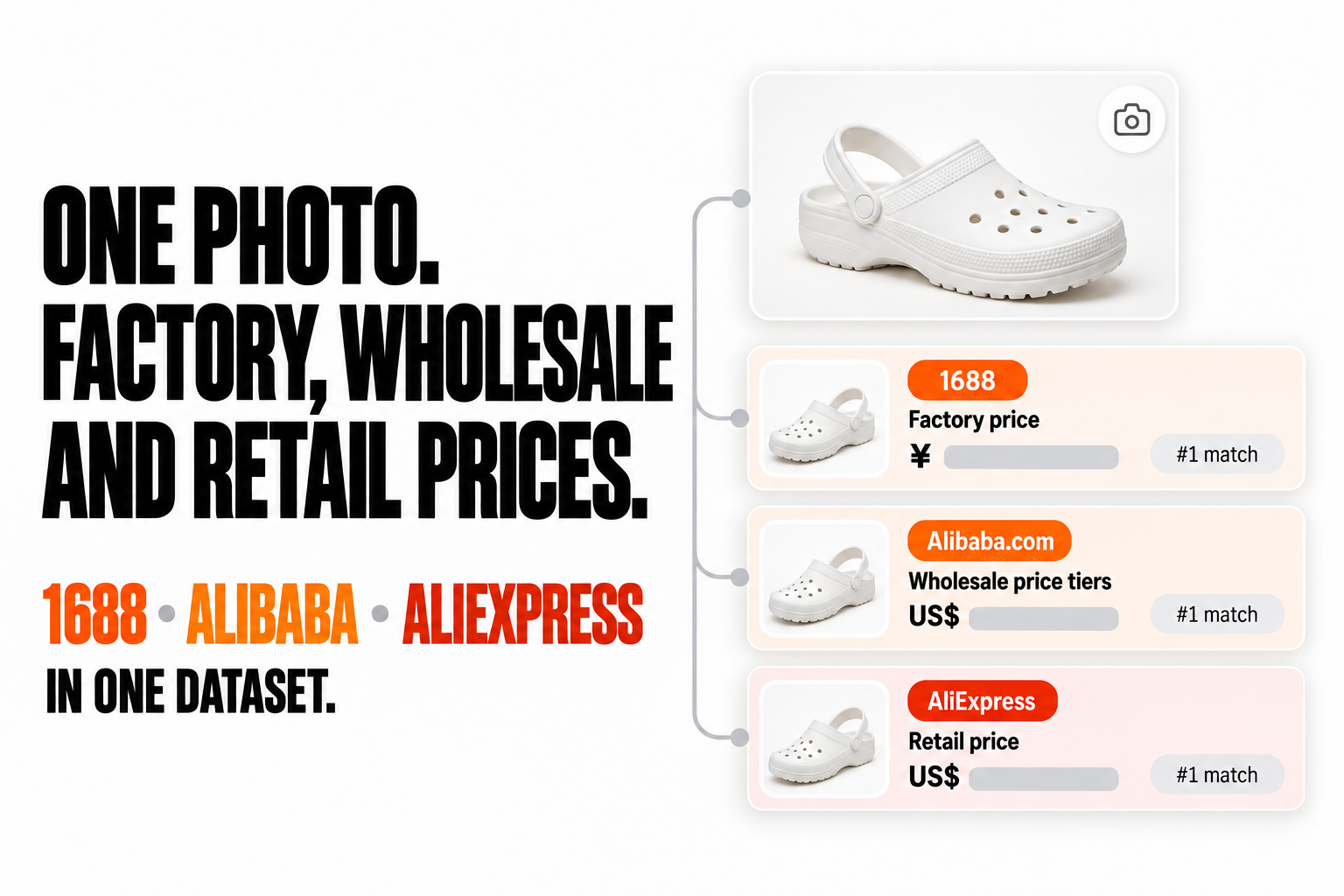
Search 1688, Alibaba and AliExpress with one product photo in a single run. Get factory, wholesale and retail prices, sellers, links and match rank in one dataset. Add full details: price tiers, variants with stock, specs, shipping and verified Alibaba suppliers.

- **URL**: https://apify.com/zen-studio/product-search-by-image.md
- **Developed by:** [Zen Studio](https://apify.com/zen-studio) (community)
- **Categories:** E-commerce, Lead generation
- **Stats:** 2 total users, 1 monthly users, 100.0% runs succeeded, 0 bookmarks
- **User rating**: No ratings yet

## Pricing

from $2.99 / 1,000 results

This Actor is paid per event. You are not charged for the Apify platform usage, but only a fixed price for specific events.
Since this Actor supports Apify Store discounts, the price gets lower the higher subscription plan you have.

Learn more: https://docs.apify.com/actors/running/actors-in-store.md#pay-per-event

## What's an Apify Actor?

Actors are web data automations that power AI and operations. They run on the Apify platform to scrape websites, process data, connect APIs, and automate workflows.
In Batch mode, an Actor accepts a well-defined JSON input, performs an action which can take anything from a few seconds to a few hours,
and optionally produces a well-defined JSON output, datasets with results, or files in key-value store.
In Standby mode, an Actor provides a web server which can be used as a website, API, or an MCP server.
Actors are written with capital "A".

## How to integrate an Actor?

If asked about integration, you help developers integrate Actors into their projects.
You adapt to their stack and deliver integrations that are safe, well-documented, and production-ready.
The best way to integrate Actors is as follows.

- **AI agents and MCP clients** — the [Apify MCP server](https://docs.apify.com/integrations/mcp.md) at `https://mcp.apify.com` (remote, streamable HTTP, OAuth on first use).
- **Agentic workflows and local Actor development** — [Agent Skills](https://apify.com/.well-known/agent-skills/index.json) with the [Apify CLI](https://docs.apify.com/cli/docs.md): `npm install -g apify-cli`, then `apify login`.
- **JavaScript/TypeScript projects** — the official [JS/TS client](https://docs.apify.com/api/client/js/docs.md): `npm install apify-client`.
- **Python projects** — the official [Python client](https://docs.apify.com/api/client/python/docs.md): `pip install apify-client`.
- **Any other language** — the [REST API](https://docs.apify.com/api/v2.md).

For usage examples, see the [API](#api) section below.

For more details, see Apify documentation as [Markdown index](https://docs.apify.com/llms.txt) and [Markdown full-text](https://docs.apify.com/llms-full.txt).

# README

<p><a href="https://console.apify.com/actors/2yFoEvpM38ZZppoPR/input"><img src="https://api.apify.com/v2/key-value-stores/pJ7iaZsTFhR3k9tjV/records/product-search-by-image-hero-v1.png" alt="One photo. Factory, wholesale and retail prices from 1688, Alibaba and AliExpress in one dataset, top matches from each marketplace first."></a></p>

From Zen Studio, creators of [1688 Wholesale Scraper](https://apify.com/zen-studio/1688-wholesale-scraper), [Alibaba Scraper](https://apify.com/zen-studio/alibaba-scraper) and [AliExpress Scraper](https://apify.com/zen-studio/aliexpress-scraper), with **119,000+ combined lifetime runs**.

### Why choose this actor?

- **Three marketplaces, one run.** Your photo is searched on 1688, Alibaba and AliExpress together, and every match lands in one dataset with the same columns. Factory, wholesale and retail prices sit side by side. A two-photo run returned 2,992 results in under two and a half minutes.
- **Top matches first, with the detail to decide.** Results keep each marketplace's own match order, top match first. Turn on full details to add price tiers, variants with stock, specifications, shipping and the seller profile.
- **Suppliers, not just listings.** Ask Alibaba for the suppliers behind a product, with their verification report, or add 1688 supplier intelligence with the dropshipping price and 7 and 30 day order volume.

<p><a href="https://console.apify.com/actors/2yFoEvpM38ZZppoPR/input"><img src="https://api.apify.com/v2/key-value-stores/pJ7iaZsTFhR3k9tjV/records/product-search-by-image-cta-v1.png" width="225" height="48" alt="Search by photo"></a></p>

### Try it

Open the actor's [input page](https://console.apify.com/actors/2yFoEvpM38ZZppoPR/input), switch to JSON and paste this. It searches one photo of a white kids' clog on all three marketplaces and returns the top 10 matches from each: 30 results for about $0.17.

```json
{
  "imageUrls": [
    "https://s.alicdn.com/@sc04/kf/Ha59080c6bc4a4404aa64b46bede54e497.png"
  ],
  "targets": ["1688", "alibaba", "aliexpress"],
  "maxResultsPerImage": 10
}
```

Add `"includeProductDetails": true` for price tiers, variants, specifications and shipping on every result. Details are billed per result that has them.

<table>
<tr>
<td colspan="4" style="padding:10px 14px;background:#4C945E;border:none;border-radius:4px 4px 0 0">
<span style="color:#FAFAF9;font-size:14px;font-weight:700;letter-spacing:0.5px">Zen Studio Sourcing</span>
<span style="color:#E8F5E9;font-size:13px">&nbsp;&nbsp;&bull;&nbsp;&nbsp;China wholesale and retail marketplaces</span>
</td>
</tr>
<tr>
<td style="padding:12px 16px;border:1px solid #E7E5E4;border-radius:0 0 0 4px;background:#D3EDD9;border-right:none;border-top:none;vertical-align:top;width:25%">
<span style="white-space:nowrap"><img src="https://api.apify.com/v2/key-value-stores/pJ7iaZsTFhR3k9tjV/records/product-search-by-image-icon-v1.png" width="20" height="20" style="vertical-align:middle">&nbsp;&nbsp;<a href="https://apify.com/zen-studio/product-search-by-image" style="color:#4C945E;text-decoration:none;font-weight:700;font-size:13px">Search by Image</a></span><br>
<span style="color:#4C945E;font-size:12px;font-weight:600">&#10148; You are here</span>
</td>
<td style="padding:12px 16px;border:1px solid #E7E5E4;background:#E8F5E9;border-right:none;border-top:none;vertical-align:top;width:25%">
<span style="white-space:nowrap"><img src="https://apify-image-uploads-prod.s3.us-east-1.amazonaws.com/NWYsOG96fMDy8ycdf-actor-ghXSMZcW3GxsCrkiR-5hnvsKv4Yt-1688-wholesale-scraper-logo.png" width="20" height="20" style="vertical-align:middle">&nbsp;&nbsp;<a href="https://apify.com/zen-studio/1688-wholesale-scraper" style="color:#1C1917;text-decoration:none;font-weight:700;font-size:13px">1688 Wholesale</a></span><br>
<span style="color:#78716C;font-size:12px">Search by keyword</span>
</td>
<td style="padding:12px 16px;border:1px solid #E7E5E4;background:#E8F5E9;border-right:none;border-top:none;vertical-align:top;width:25%">
<span style="white-space:nowrap"><img src="https://apify-image-uploads-prod.s3.us-east-1.amazonaws.com/NWYsOG96fMDy8ycdf-actor-TASViBigl6dEv1GaH-RjnHoxkrmo-alibaba-scraper-logo.png" width="20" height="20" style="vertical-align:middle">&nbsp;&nbsp;<a href="https://apify.com/zen-studio/alibaba-scraper" style="color:#1C1917;text-decoration:none;font-weight:700;font-size:13px">Alibaba</a></span><br>
<span style="color:#78716C;font-size:12px">Products and suppliers</span>
</td>
<td style="padding:12px 16px;border:1px solid #E7E5E4;border-radius:0 0 4px 0;background:#E8F5E9;border-top:none;vertical-align:top;width:25%">
<span style="white-space:nowrap"><img src="https://apify-image-uploads-prod.s3.us-east-1.amazonaws.com/NWYsOG96fMDy8ycdf-actor-OFZVXeeKVlKMMXsJk-wE33BzvwYy-aliexpress-scraper-logo.jpg" width="20" height="20" style="vertical-align:middle">&nbsp;&nbsp;<a href="https://apify.com/zen-studio/aliexpress-scraper" style="color:#1C1917;text-decoration:none;font-weight:700;font-size:13px">AliExpress</a></span><br>
<span style="color:#78716C;font-size:12px">Stores and reviews</span>
</td>
</tr>
</table>

#### Copy to your AI assistant

```
zen-studio/product-search-by-image on Apify. Searches 1688, Alibaba and AliExpress with the same product photo and returns one row per match: marketplace, imageIndex, rank (the marketplace's own order per photo: 1 = its top match, or first by sortBy1688 on 1688; not sorted by similarity), title, url, price, priceMax, currency, shopName, plus the full marketplace record under data. Give imageUrls (direct JPEG/PNG/WebP links, up to 25) or imageFile; targets any of 1688, alibaba, aliexpress (omit for all three); maxResultsPerImage 10-500 per photo per marketplace (default 20). For price tiers, variants with stock, specifications, shipping and seller profile set includeProductDetails=true (off unless set, +$2.99/1k rows). For the suppliers behind a product set alibabaResultType="suppliers"; verification reports need alibabaSupplierReport=true (+$1.99/1k). For 1688 dropshipping price and 7/30-day orders set supplierIntelligence1688=true (+$2.99/1k). Both add-ons also add details, billed as details. AliExpress market: aliexpressCountry, aliexpressCurrency, aliexpressLanguage. Prices stay in each marketplace currency; similarity compares only within one marketplace and photo. Cost: $0.05 per run plus $3.99/1k results ($2.99 on Gold plans), so put all photos in one run. Full spec: GET https://api.apify.com/v2/actors/zen-studio~product-search-by-image/builds/default (Authorization: Bearer TOKEN) returns inputSchema, actorDefinition.storages.dataset and readme.
```

### How product search by image works

1. **Add your photos.** Paste direct links to JPEG, PNG or WebP images, or upload a photo from your computer. Up to 25 photos per run.
2. **Pick the marketplaces.** 1688 (China domestic wholesale), Alibaba (global B2B suppliers) and AliExpress (retail and dropshipping). Leave the choice empty to search all three.
3. **Choose how many matches you want.** Between 10 and 500 per photo per marketplace, in each marketplace's own match order. One photo on three marketplaces at 20 each returns up to 60 results.
4. **Export.** Every result is one row in the same dataset: JSON, CSV, Excel, or straight into Google Sheets, Make, Zapier or n8n.

Good photos give good matches: one product, filling most of the frame, on a plain background. A busy lifestyle photo still returns results, but more of them are similar styles rather than the same product.

### Input

| Field | Type | Default | What it does |
|---|---|---|---|
| `imageUrls` | array of links | none | Direct links to product photos. Up to 25 per run. |
| `imageFile` | file upload | none | A photo from your computer, searched after the links. |
| `targets` | array | all three | Any of `1688`, `alibaba`, `aliexpress`. |
| `maxResultsPerImage` | integer | 20 | Matches per photo per marketplace, 10 to 500. |
| `includeProductDetails` | boolean | off (pre-ticked in the input form) | Adds price tiers, variants with stock, specifications, shipping and the seller profile. Billed per result that has them. |
| `alibabaResultType` | `products` or `suppliers` | `products` | Return the matching products, or the suppliers that make them. |
| `alibabaSupplierReport` | boolean | off | Adds the supplier's verification report and factory media. Also fetches full details. |
| `alibabaVerifiedManufacturer` | boolean | off | Only products from verified manufacturers. |
| `alibabaVerifiedSupplier` | boolean | off | Only products from verified suppliers. |
| `alibabaMinPrice`, `alibabaMaxPrice` | integer (USD) | none | Price range for Alibaba products. |
| `alibabaMaxMoq` | integer | none | Only products you can order in this quantity or less. |
| `aliexpressCountry` | country code | `US` | Delivery country: changes the products, prices and shipping you see. |
| `aliexpressCurrency` | currency code | `USD` | Currency for AliExpress prices. |
| `aliexpressLanguage` | language code | `en_US` | Language for AliExpress titles. |
| `sortBy1688` | `relevance`, `bestSelling`, `priceAsc`, `priceDesc` | `relevance` | Order of 1688 results. |
| `minPrice1688`, `maxPrice1688` | integer (CNY) | none | Price range for 1688 products. |
| `supplierIntelligence1688` | boolean | off | Adds the dropshipping price and tiers, 7 and 30 day order volume and distributor counts. Also fetches full details. |

Coming from another image search tool? `maxProducts`, `maxResults`, `maxItems`, `imageUrl`, `images`, `provider` and similar field names are understood too.

### What data you get

Every row starts with the same columns on every marketplace, so you can sort and compare across 1688, Alibaba and AliExpress without reshaping anything:

| Column | Meaning |
|---|---|
| `marketplace` | `1688`, `alibaba` or `aliexpress` |
| `imageIndex`, `imageUrl` | Which of your photos this result matches |
| `rank` | Position in the marketplace's own results for that photo: 1 = first, which is the marketplace's top match, or first in your `sortBy1688` order on 1688 |
| `resultType` | `product`, or `supplier` in Alibaba suppliers mode |
| `title`, `productId`, `url`, `image` | The matching listing |
| `price`, `priceMax`, `currency`, `priceText` | Price or price range in the marketplace's currency: CNY on 1688, USD on Alibaba, your chosen currency on AliExpress. `priceText` is the price as displayed (Alibaba, AliExpress) |
| `similarity` | Visual match score where the marketplace provides one (1688, AliExpress). Compare it only within one marketplace and one photo; use `rank` across marketplaces |
| `shopName`, `shopUrl` | Seller or supplier. On AliExpress the shop link comes with full details |
| `hasDetails` | Whether full product details were added to this row |
| `data` | The complete marketplace record: everything the marketplace shows for this result |

A real AliExpress result for the same photo (`skuImages` shortened from 7 entries to 2):

```json
{
  "marketplace": "aliexpress",
  "imageIndex": 1,
  "imageUrl": "https://s.alicdn.com/@sc04/kf/Ha59080c6bc4a4404aa64b46bede54e497.png",
  "rank": 1,
  "resultType": "product",
  "title": "Fashion Girl Boy Summer Slippers EVA Beach Sandals Garden Shoes Soft Kids Outdoor Slippers Flip Shoes",
  "productId": "1005011682303608",
  "url": "https://www.aliexpress.com/item/1005011682303608.html",
  "image": "https://ae-pic-a1.aliexpress-media.com/kf/S537c9e6a2f06447ba46f75d60823528bh.jpg",
  "price": 1.09,
  "priceMax": null,
  "currency": "USD",
  "priceText": "US $1.09",
  "similarity": 0.722217321395874,
  "shopName": "DIY Children Shoes Store",
  "shopUrl": null,
  "hasDetails": false,
  "data": {
    "productId": "1005011682303608",
    "url": "https://www.aliexpress.com/item/1005011682303608.html",
    "title": "Fashion Girl Boy Summer Slippers EVA Beach Sandals Garden Shoes Soft Kids Outdoor Slippers Flip Shoes",
    "image": "https://ae-pic-a1.aliexpress-media.com/kf/S537c9e6a2f06447ba46f75d60823528bh.jpg",
    "imageWidth": 350,
    "imageHeight": 350,
    "images": [],
    "currency": "USD",
    "currencySymbol": "$",
    "price": 1.09,
    "priceFormatted": "US $1.09",
    "originalPrice": 12.98,
    "originalPriceFormatted": null,
    "discountPercent": 91,
    "taxRate": 0,
    "taxAmount": null,
    "sellerOfferPrice": 12.6,
    "rating": 4.4,
    "soldText": "149 sold",
    "soldCount": 149,
    "categoryId": "1501,200000947,200001005",
    "postCategoryId": "200001005",
    "isChoice": true,
    "sellingPoints": [],
    "energyLabel": null,
    "listedAt": "2026-02-07 00:00:00",
    "promoType": null,
    "promoText": null,
    "isAd": false,
    "adLabel": null,
    "itemId": "1005011682303608",
    "spuId": null,
    "skuId": "12000056232459096",
    "skuTags": "[86884]",
    "promotionDetails": "5000000210788678:1:501;5000000216892080:1:688",
    "promotionSource": "platformItemSubsidy,realSuperDeals",
    "subProductId": "3256811495988856",
    "skuImages": [
      {
        "propertyId": 14,
        "valueId": 173,
        "image": "https://ae-pic-a1.aliexpress-media.com/kf/S0ce3b9195c2b492c92f539a4f30ec850q.jpg"
      },
      {
        "propertyId": 14,
        "valueId": 193,
        "image": "https://ae-pic-a1.aliexpress-media.com/kf/S53d18569aab045468f2f2fc08bdaa315k.jpg"
      }
    ],
    "skuImagesRaw": null,
    "imageSlot": "Best priced item",
    "similarity": {
      "ctcvr_score": 0.09471702575683594,
      "model_act_score": 0.22355148196220398,
      "model_cvr_score": 0.023159116506576538,
      "model_ctr_score": 0.12031131982803345,
      "v1cnn_score": 0.6586546897888184,
      "mm_vit_score": 0.722217321395874,
      "model_ctcvr_score": 0.09471702575683594,
      "corre_score": 1.584325510263443,
      "mm_vit_bert_score": 0.5417075753211975,
      "a_fusion_ecpm": 1.2968171992488358,
      "mm_bert_score": 0.6193913817405701,
      "mm_qwenvl_score": 0.7218791246414185,
      "a_cate_similarity_score_rep_topk": 0.8776608109474182,
      "model_rel_score": 0.18943405151367188
    },
    "deliveryDaysMin": 6,
    "deliveryDaysMax": 11,
    "estimatedDeliveryFrom": "2026-09-22",
    "estimatedDeliveryTo": "2026-09-27",
    "storeName": "DIY Children Shoes Store",
    "companyName": "义乌若虹饰品有限公司"
  }
}
```

#### Full product details

With `includeProductDetails` on, `data` grows into the full product record. Detailed rows are large (roughly 20 to 150 KB each), so JSON export keeps them intact best.

| Marketplace | What details add |
|---|---|
| 1688 | Every variant with price, stock and image (`skuDetails`), quantity price tiers, minimum order, stock and unit, shipping fee, ship-from city and dispatch time, specifications, description, supplier business type and years on 1688 |
| Alibaba | Quantity price tiers (`detail.ladderPrices`), variants (`detail.skus`), specifications, lead time, samples, certifications, customization options, and the supplier's response time, on-time delivery rate, operational address and 6-month orders |
| AliExpress | Every variant with price and stock (`variants`), price range, total inventory, shipping options with cost and delivery days, specifications, gallery, description, coupons, buyer protections, and the seller block with store id, country, opening date and positive feedback rate |

#### Suppliers and add-ons

- **Alibaba suppliers mode** (`alibabaResultType: "suppliers"`): one row per supplier that makes the product in your photo, with company name, country and city, factory flag and certifications, main products, staff size, verified-supplier badges and profile link. `price` is empty on supplier rows.
- **Alibaba supplier verification report** (`alibabaSupplierReport`): the third-party verification report and factory photos or videos, under `data.report` and `data.supplierMedia`, for suppliers that have one.
- **1688 supplier intelligence** (`supplierIntelligence1688`): `data.dropship` with the dropshipping price and tiers, supported sales channels, 7 and 30 day order volume and distributor count as 1688 shows them (ranges such as "500+"), and 24/48 hour pickup rates.

### More examples

Find the Alibaba suppliers behind a product, with verification reports:

```json
{
  "imageUrls": [
    "https://s.alicdn.com/@sc04/kf/Ha59080c6bc4a4404aa64b46bede54e497.png"
  ],
  "targets": ["alibaba"],
  "maxResultsPerImage": 20,
  "alibabaResultType": "suppliers",
  "alibabaSupplierReport": true
}
```

Best-selling 1688 matches in a price range, with dropshipping price and order volume:

```json
{
  "imageUrls": [
    "https://s.alicdn.com/@sc04/kf/Ha59080c6bc4a4404aa64b46bede54e497.png"
  ],
  "targets": ["1688"],
  "maxResultsPerImage": 20,
  "sortBy1688": "bestSelling",
  "minPrice1688": 1,
  "maxPrice1688": 200,
  "includeProductDetails": true,
  "supplierIntelligence1688": true
}
```

AliExpress listings for buyers in Germany, priced in euros:

```json
{
  "imageUrls": [
    "https://s.alicdn.com/@sc04/kf/Ha59080c6bc4a4404aa64b46bede54e497.png"
  ],
  "targets": ["aliexpress"],
  "maxResultsPerImage": 20,
  "aliexpressCountry": "DE",
  "aliexpressCurrency": "EUR",
  "aliexpressLanguage": "de_DE"
}
```

### Pricing

Pay per event: you pay for the results you get, plus a small fee per run.

| Event | When it is charged | Price |
|---|---|---|
| Actor start | Once per run | $0.05 |
| Result | Each product or supplier row | $3.99 per 1,000 ($2.99 on Gold plans and above) |
| Full product details | Each row that has details | $2.99 per 1,000 |
| Supplier verification report | Each Alibaba row that has a report | $1.99 per 1,000 |
| Supplier intelligence | Each 1688 row that has it | $2.99 per 1,000 |
| Dataset item | Each row stored | $0.01 per 1,000 |

Result prices drop with your Apify plan: $3.99 on Free, $3.69 on Bronze, $3.39 on Silver, $2.99 on Gold and above. Add-ons are charged only when the data is actually in the row.

What typical runs cost at Free plan prices:

| Run | Results | Cost |
|---|---|---|
| 1 photo, 3 marketplaces, 10 each | 30 | $0.17 |
| 1 photo, 3 marketplaces, 10 each, with details | 30 | $0.26 |
| 10 photos, 3 marketplaces, 20 each | 600 | $2.45 |

The input form pre-ticks full details: one photo at the form's 20 results per marketplace with details costs $0.47.

The start fee is charged once per run, so put all your photos into one run instead of starting one run per photo. Set a maximum cost per run in the run options and the search stops cleanly when it is reached.

### FAQ

**Do I need a 1688, Alibaba or AliExpress account?**
No. Paste a photo link or upload a file and start the run. There is nothing to install and no browser extension. 1688 titles and seller names come back in Chinese, exactly as 1688 shows them.

**Does it find the exact product or similar ones?**
Both. Each marketplace returns its own top matches first, so the same product usually appears near the top, followed by close alternatives. Clear photos of a single product on a plain background match best.

**Can I compare 1688, Alibaba and AliExpress prices from the same photo?**
Yes, that is what the shared columns are for. `price`, `priceMax` and `currency` sit in the same place on every row. Currencies are kept as each marketplace shows them (CNY, USD, or your AliExpress currency), so convert before comparing totals.

**How many results can I get per photo?**
Between 10 and 500 per photo per marketplace, up to 25 photos per run. A photo on all three marketplaces at 500 each returns up to 1,500 results.

**Which image links work?**
Direct links to a JPEG, PNG or WebP file, or a photo uploaded in the input form. A link to a web page that merely contains the image does not work. Images that cannot be opened are skipped with a message in the log, and the run continues with the rest.

**Why did a marketplace return fewer results than I asked for?**
Filters narrow the search: a price range, a maximum order quantity or verified-only options can leave fewer matches. If a marketplace could not be searched, the log says so. Apart from the start fee, you are only charged for the rows you receive.

**What happens when the cost or time limit is reached?**
The run stops cleanly, keeps every result delivered so far and says in the log which marketplaces stopped early. If none of your images can be opened, the run fails with a message; the $0.05 start fee still applies.

**How do I find verified manufacturers from a photo?**
Search Alibaba with `alibabaVerifiedManufacturer` on for matching products from verified manufacturers, or set `alibabaResultType` to `suppliers` and add `alibabaSupplierReport` for the suppliers themselves with their verification reports.

**Can I run it on a schedule or from my own code?**
Yes. Use Apify schedules, webhooks, the Apify client libraries for Python and JavaScript, or integrations such as Make, Zapier and n8n. Each run writes to its own dataset.

### More Zen Studio scrapers for e-commerce and sourcing

**🌏 Wholesale marketplaces**

- <img src="https://apify-image-uploads-prod.s3.us-east-1.amazonaws.com/NWYsOG96fMDy8ycdf-actor-d8zT35jI7s90pcadc-f9WN8GCwgd-alibaba-scraper-logo2.png" width="16" height="16" style="vertical-align:middle;border-radius:3px"> **Alibaba.com**
  - [Alibaba Scraper](https://apify.com/zen-studio/alibaba-scraper)
  - [Alibaba Supplier Review Scraper](https://apify.com/zen-studio/alibaba-supplier-review-scraper)
- <img src="https://apify-image-uploads-prod.s3.us-east-1.amazonaws.com/NWYsOG96fMDy8ycdf-actor-ghXSMZcW3GxsCrkiR-5hnvsKv4Yt-1688-wholesale-scraper-logo.png" width="16" height="16" style="vertical-align:middle;border-radius:3px"> **1688 阿里巴巴**
  - [1688 Wholesale Scraper](https://apify.com/zen-studio/1688-wholesale-scraper)
  - [1688 Reviews Scraper](https://apify.com/zen-studio/1688-reviews-scraper)

**🏭 Supplier & manufacturer directories**

- <img src="https://apify-image-uploads-prod.s3.us-east-1.amazonaws.com/NWYsOG96fMDy8ycdf-actor-CIQKqcy6K1OOPdzVM-ibHU8BE3V3-thomasnet-suppliers-scraper-logo.png" width="16" height="16" style="vertical-align:middle;border-radius:3px"> **ThomasNet**

  - [ThomasNet Suppliers Scraper](https://apify.com/zen-studio/thomasnet-suppliers-scraper)
- <img src="https://apify-image-uploads-prod.s3.us-east-1.amazonaws.com/NWYsOG96fMDy8ycdf-actor-YhCbTw344KXuBQm1J-Z4rAQKNpKV-globalspec-supplier-scraper-logo.png" width="16" height="16" style="vertical-align:middle;border-radius:3px"> **GlobalSpec**

  - [GlobalSpec Suppliers Scraper](https://apify.com/zen-studio/globalspec-suppliers-scraper)
- <img src="https://apify-image-uploads-prod.s3.us-east-1.amazonaws.com/NWYsOG96fMDy8ycdf-actor-891C30Od021eAaAlU-NROGsMLakY-esources-logo.png" width="16" height="16" style="vertical-align:middle;border-radius:3px"> **eSources**

  - [eSources Wholesale Directory Scraper](https://apify.com/zen-studio/esources-wholesale-directory-scraper)
- <img src="https://apify-image-uploads-prod.s3.us-east-1.amazonaws.com/NWYsOG96fMDy8ycdf-actor-4SsKYeXxLtIJLtzHp-86hGQdc67D-avito-listings-scraper-logo.png" width="16" height="16" style="vertical-align:middle;border-radius:3px"> **Avito**

  - [Avito Supplier Directory Scraper](https://apify.com/zen-studio/avito-suppliers-directory-scraper)

**📦 Import & trade intelligence**

- <img src="https://apify-image-uploads-prod.s3.us-east-1.amazonaws.com/NWYsOG96fMDy8ycdf-actor-7sDq1LHYZAlHQS9yW-RbKRK5f5kR-importyeti-scraper-logo-square.png" width="16" height="16" style="vertical-align:middle;border-radius:3px"> **ImportYeti**

  - [ImportYeti Scraper](https://apify.com/zen-studio/importyeti-scraper)

**🛒 E-commerce**

- <img src="https://apify-image-uploads-prod.s3.us-east-1.amazonaws.com/NWYsOG96fMDy8ycdf-actor-eab843E8WtuH7V3oz-a9TgvZnNOZ-weidian-scraper-icon.png" width="16" height="16" alt="Weidian 微店 scraper icon" style="vertical-align:middle;border-radius:3px"> **Weidian 微店**

  - [Weidian Scraper](https://apify.com/zen-studio/weidian-scraper)
- <img src="https://apify-image-uploads-prod.s3.us-east-1.amazonaws.com/NWYsOG96fMDy8ycdf-actor-BxfAdacLJc6abdnGC-tt95RgkJY6-lazada-product-search-scraper-logo.png" width="16" height="16" style="vertical-align:middle;border-radius:3px"> **Lazada**

  - [Lazada Product Scraper](https://apify.com/zen-studio/lazada-product-scraper)
  - [Lazada Reviews Scraper](https://apify.com/zen-studio/lazada-reviews-scraper)
  - [Lazada Store Scraper](https://apify.com/zen-studio/lazada-store-scraper)
- <img src="https://apify-image-uploads-prod.s3.us-east-1.amazonaws.com/NWYsOG96fMDy8ycdf-actor-yK9Fwkji44bQkuS7P-f1uyK15FaQ-naver-shopping-scraper.png" width="16" height="16" style="vertical-align:middle;border-radius:3px"> **Naver Search 네이버 검색**

  - [Naver Search Scraper](https://apify.com/zen-studio/naver-search-scraper)
- <img src="https://apify-image-uploads-prod.s3.us-east-1.amazonaws.com/NWYsOG96fMDy8ycdf-actor-OFZVXeeKVlKMMXsJk-wE33BzvwYy-aliexpress-scraper-logo.jpg" width="16" height="16" style="vertical-align:middle;border-radius:3px"> **AliExpress 全球速卖通**
  - [AliExpress Product Scraper](https://apify.com/zen-studio/aliexpress-scraper)
- <img src="https://apify-image-uploads-prod.s3.us-east-1.amazonaws.com/NWYsOG96fMDy8ycdf-actor-0hS9yNh3RU8DC6puG-LozxRJkdHN-coupang-review-scraper-logo.png" width="16" height="16" style="vertical-align:middle;border-radius:3px"> **Coupang 쿠팡**
  - [Coupang Search Scraper](https://apify.com/zen-studio/coupang-search-scraper)
  - [Coupang Review Scraper](https://apify.com/zen-studio/coupang-review-scraper)
  - [Coupang Product Detail Scraper](https://apify.com/zen-studio/coupang-detail-scraper)
- <img src="https://apify-image-uploads-prod.s3.us-east-1.amazonaws.com/NWYsOG96fMDy8ycdf-actor-DHVT6jhgablck1CTx-kFq5oLPY2n-naver-shopping-scraper.png" width="16" height="16" style="vertical-align:middle;border-radius:3px"> **Naver Shopping 네이버쇼핑**

  - [Naver Shopping Scraper](https://apify.com/zen-studio/naver-shopping-scraper)
  - [Naver Shopping Product Detail Scraper](https://apify.com/zen-studio/naver-product-detail-scraper)
  - [Naver Shopping Review Scraper](https://apify.com/zen-studio/naver-review-scraper)
- <img src="https://apify-image-uploads-prod.s3.us-east-1.amazonaws.com/NWYsOG96fMDy8ycdf-actor-49Zb7Ewj7OXyRFnLp-kYOJCOdhrR-naver-cafe-scraper-logo.png" width="16" height="16" style="vertical-align:middle;border-radius:3px"> **Naver Blog & Cafe 네이버 블로그·카페**

  - [Naver Blog & Cafe Scraper](https://apify.com/zen-studio/naver-blog-cafe-scraper)

### Support

- **Bugs**: Issues tab
- **Features**: Issues tab

### Legal compliance

This actor collects publicly available product and seller listings. You are responsible for using the data in line with each marketplace's terms of service and applicable data protection law, including GDPR, CCPA and China's PIPL. Seller and company details can be business or personal data; handle them accordingly.

***

*Product search by image on 1688, Alibaba and AliExpress: factory, wholesale and retail prices, suppliers and full product details from one photo.*

# Actor input Schema

## `imageUrls` (type: `array`):

Direct links to product photos (JPEG, PNG or WebP). Up to 25 images per run, including an uploaded photo. Every image is searched on each marketplace you pick.<br>Add all your photos to one run instead of starting one run per photo.

## `imageFile` (type: `string`):

Upload a product photo from your computer. Works on its own or together with links, and counts toward the 25 images per run.

## `targets` (type: `array`):

Where to look. Leave empty to search all three. Every marketplace you add returns its own results for each image.

## `maxResultsPerImage` (type: `integer`):

How many matches to return for each image on each marketplace, top matches first. Results add up per image per marketplace: 1 image x 3 marketplaces x 20 = up to 60 results.<br>Minimum 10, maximum 500. Defaults to 20.

## `includeProductDetails` (type: `boolean`):

Adds price tiers, variants with stock, specifications, shipping and the seller profile to every result. Charged per result that has them. Pre-ticked in this form, off when left out of the input.

## `alibabaResultType` (type: `string`):

Matching products, or the suppliers behind them (one result per supplier). Defaults to products.

## `alibabaSupplierReport` (type: `boolean`):

Adds the third-party verification report and factory media for each supplier. Charged per result that has a report. Also adds full product details to every result, charged as details.

## `alibabaVerifiedManufacturer` (type: `boolean`):

Only results from verified manufacturers.

## `alibabaVerifiedSupplier` (type: `boolean`):

Only results from verified suppliers.

## `alibabaMinPrice` (type: `integer`):

Only products priced at or above this. Not used when finding suppliers.

## `alibabaMaxPrice` (type: `integer`):

Only products priced at or below this. Not used when finding suppliers.

## `alibabaMaxMoq` (type: `integer`):

Only products you can order in this quantity or less.

## `aliexpressCountry` (type: `string`):

Changes which products, prices and shipping you see. Defaults to United States.

## `aliexpressCurrency` (type: `string`):

Defaults to USD.

## `aliexpressLanguage` (type: `string`):

Defaults to English.

## `sortBy1688` (type: `string`):

Defaults to best match.

## `minPrice1688` (type: `integer`):

Only products priced at or above this.

## `maxPrice1688` (type: `integer`):

Only products priced at or below this.

## `supplierIntelligence1688` (type: `boolean`):

Adds dropshipping price and tiers, 7 and 30 day orders and distributor counts. Charged per result that has them. Also adds full product details to every result, charged as details.

## Actor input object example

```json
{
  "imageUrls": [
    "https://s.alicdn.com/@sc04/kf/Ha59080c6bc4a4404aa64b46bede54e497.png"
  ],
  "targets": [
    "1688",
    "alibaba",
    "aliexpress"
  ],
  "maxResultsPerImage": 20,
  "includeProductDetails": true
}
```

# Actor output Schema

## `results` (type: `string`):

All products and suppliers found for your images, with the full marketplace record for each.

## `priceComparison` (type: `string`):

Prices, currency and seller for every result, side by side across marketplaces.

# API

You can run this Actor programmatically using our API. Below are code examples in JavaScript, Python, and CLI, as well as the OpenAPI specification and MCP server setup.

## JavaScript example

```javascript
import { ApifyClient } from 'apify-client';

// Initialize the ApifyClient with your Apify API token
// Replace the '<YOUR_API_TOKEN>' with your token
const client = new ApifyClient({
    token: '<YOUR_API_TOKEN>',
});

// Prepare Actor input
const input = {
    "imageUrls": [
        "https://s.alicdn.com/@sc04/kf/Ha59080c6bc4a4404aa64b46bede54e497.png"
    ],
    "targets": [
        "1688",
        "alibaba",
        "aliexpress"
    ],
    "maxResultsPerImage": 20,
    "includeProductDetails": true
};

// Run the Actor and wait for it to finish
const run = await client.actor("zen-studio/product-search-by-image").call(input);

// Fetch and print Actor results from the run's dataset (if any)
console.log('Results from dataset');
console.log(`💾 Check your data here: https://console.apify.com/storage/datasets/${run.defaultDatasetId}`);
const { items } = await client.dataset(run.defaultDatasetId).listItems();
items.forEach((item) => {
    console.dir(item);
});

// 📚 Want to learn more 📖? Go to → https://docs.apify.com/api/client/js/docs

```

## Python example

```python
from apify_client import ApifyClient

# Initialize the ApifyClient with your Apify API token
# Replace '<YOUR_API_TOKEN>' with your token.
client = ApifyClient("<YOUR_API_TOKEN>")

# Prepare the Actor input
run_input = {
    "imageUrls": ["https://s.alicdn.com/@sc04/kf/Ha59080c6bc4a4404aa64b46bede54e497.png"],
    "targets": [
        "1688",
        "alibaba",
        "aliexpress",
    ],
    "maxResultsPerImage": 20,
    "includeProductDetails": True,
}

# Run the Actor and wait for it to finish
run = client.actor("zen-studio/product-search-by-image").call(run_input=run_input)

# Fetch and print Actor results from the run's dataset (if there are any)
print(f"💾 Check your data here: https://console.apify.com/storage/datasets/{run.default_dataset_id}")
for item in client.dataset(run.default_dataset_id).iterate_items():
    print(item)

# 📚 Want to learn more 📖? Go to → https://docs.apify.com/api/client/python/docs/quick-start

```

## CLI example

```bash
echo '{
  "imageUrls": [
    "https://s.alicdn.com/@sc04/kf/Ha59080c6bc4a4404aa64b46bede54e497.png"
  ],
  "targets": [
    "1688",
    "alibaba",
    "aliexpress"
  ],
  "maxResultsPerImage": 20,
  "includeProductDetails": true
}' |
apify call zen-studio/product-search-by-image --silent --output-dataset

```

## MCP server setup

```json
{
    "mcpServers": {
        "apify": {
            "type": "http",
            "url": "https://mcp.apify.com/?tools=fetch-actor-details,zen-studio/product-search-by-image"
        }
    }
}
```

The hosted server signs you in with OAuth on first connect, so no API token belongs in this config. Clients without OAuth support can send an `Authorization: Bearer <APIFY_API_TOKEN>` header instead, using a token from API & Integrations in Apify Console (https://console.apify.com/settings/integrations).

## OpenAPI specification

Download the OpenAPI definition: https://api.apify.com/v2/actors/2yFoEvpM38ZZppoPR/builds/5FnNxiocT380UoLuy/openapi.json