

Product Search by Image - 1688, Alibaba, AliExpress
Pricing
from $2.99 / 1,000 results
Product Search by Image - 1688, Alibaba, AliExpress
Search 1688, Alibaba and AliExpress with one product photo in a single run. Get factory, wholesale and retail prices, sellers, links and match rank in one dataset. Add full details: price tiers, variants with stock, specs, shipping and verified Alibaba suppliers.
Pricing
from $2.99 / 1,000 results
Rating
0.0
(0)
Developer

Zen Studio
Maintained by CommunityActor stats
0
Bookmarked
18
Total users
15
Monthly active users
4 days ago
Last modified
Categories
Share
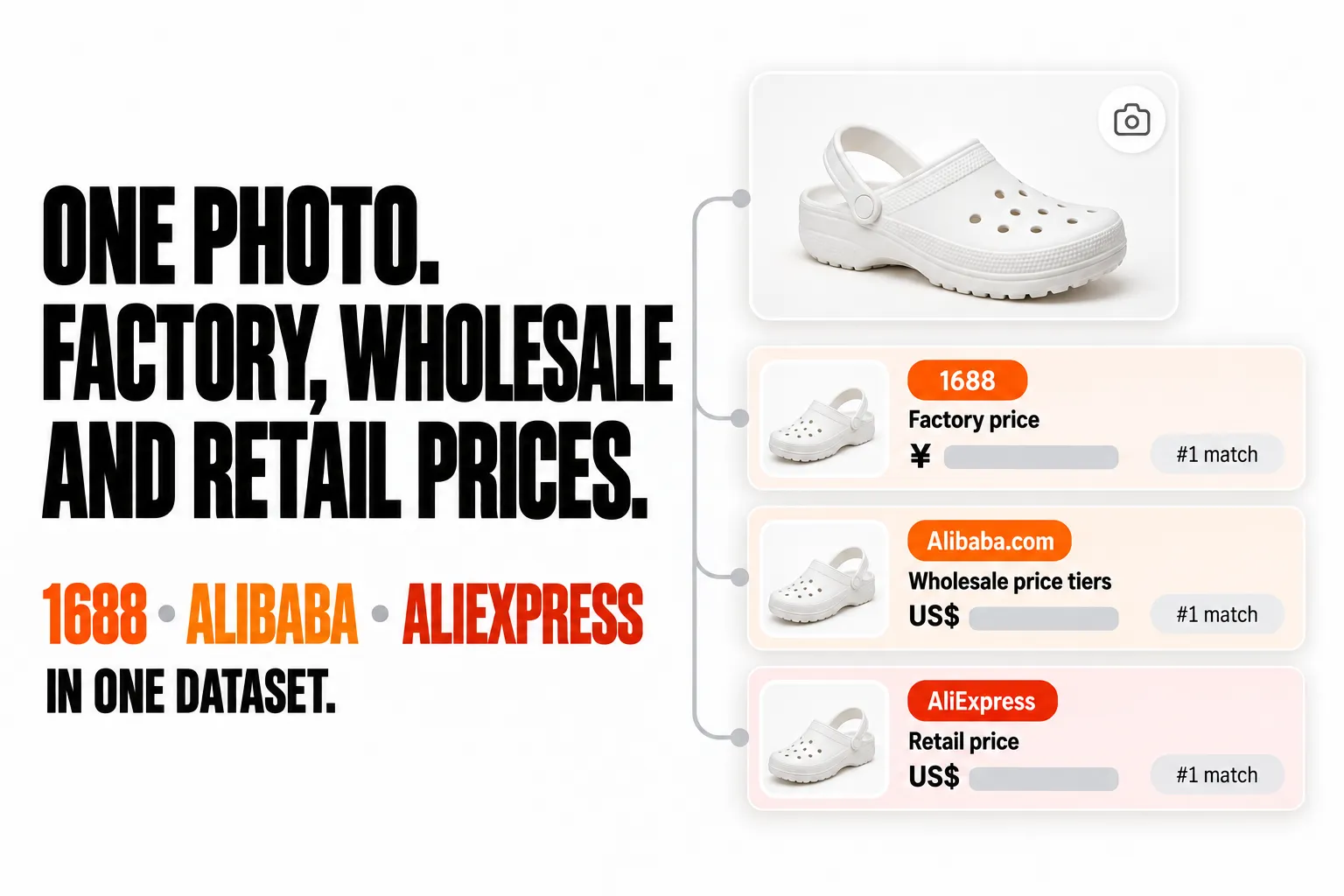
From Zen Studio, creators of 1688 Wholesale Scraper, Alibaba Scraper and AliExpress Scraper, with 119,000+ combined lifetime runs.
Why choose this actor?
- Three marketplaces, one run. Your photo is searched on 1688, Alibaba and AliExpress together, and every match lands in one dataset with the same columns. Factory, wholesale and retail prices sit side by side. A two-photo run returned 2,992 results in under two and a half minutes.
- Top matches first, with the detail to decide. Results keep each marketplace's own match order, top match first. Turn on full details to add price tiers, variants with stock, specifications, shipping and the seller profile.
- Suppliers, not just listings. Ask Alibaba for the suppliers behind a product, with their verification report, or add 1688 supplier intelligence with the dropshipping price and 7 and 30 day order volume.

Try it
Open the actor's input page, switch to JSON and paste this. It searches one photo of a white kids' clog on all three marketplaces and returns the top 10 matches from each: 30 results for about $0.17.
Add "includeProductDetails": true for price tiers, variants, specifications and shipping on every result. Details are billed per result that has them.
| Zen Studio Sourcing • China wholesale and retail marketplaces | |||
 Search by Image Search by Image➤ You are here |
 1688 Wholesale 1688 WholesaleSearch by keyword |
 Alibaba AlibabaProducts and suppliers |
 AliExpress AliExpressStores and reviews |
Copy to your AI assistant
How product search by image works
- Add your photos. Paste direct links to JPEG, PNG or WebP images, or upload a photo from your computer. Up to 25 photos per run.
- Pick the marketplaces. 1688 (China domestic wholesale), Alibaba (global B2B suppliers) and AliExpress (retail and dropshipping). Leave the choice empty to search all three.
- Choose how many matches you want. Between 10 and 500 per photo per marketplace, in each marketplace's own match order. One photo on three marketplaces at 20 each returns up to 60 results.
- Export. Every result is one row in the same dataset: JSON, CSV, Excel, or straight into Google Sheets, Make, Zapier or n8n.
Good photos give good matches: one product, filling most of the frame, on a plain background. A busy lifestyle photo still returns results, but more of them are similar styles rather than the same product.
Input
| Field | Type | Default | What it does |
|---|---|---|---|
imageUrls | array of links | none | Direct links to product photos. Up to 25 per run. |
imageFile | file upload | none | A photo from your computer, searched after the links. |
targets | array | all three | Any of 1688, alibaba, aliexpress. |
maxResultsPerImage | integer | 20 | Matches per photo per marketplace, 10 to 500. |
includeProductDetails | boolean | off (pre-ticked in the input form) | Adds price tiers, variants with stock, specifications, shipping and the seller profile. Billed per result that has them. |
alibabaResultType | products or suppliers | products | Return the matching products, or the suppliers that make them. |
alibabaSupplierReport | boolean | off | Adds the supplier's verification report and factory media. Also fetches full details. |
alibabaVerifiedManufacturer | boolean | off | Only products from verified manufacturers. |
alibabaVerifiedSupplier | boolean | off | Only products from verified suppliers. |
alibabaMinPrice, alibabaMaxPrice | integer (USD) | none | Price range for Alibaba products. |
alibabaMaxMoq | integer | none | Only products you can order in this quantity or less. |
aliexpressCountry | country code | US | Delivery country: changes the products, prices and shipping you see. |
aliexpressCurrency | currency code | USD | Currency for AliExpress prices. |
aliexpressLanguage | language code | en_US | Language for AliExpress titles. |
sortBy1688 | relevance, bestSelling, priceAsc, priceDesc | relevance | Order of 1688 results. |
minPrice1688, maxPrice1688 | integer (CNY) | none | Price range for 1688 products. |
supplierIntelligence1688 | boolean | off | Adds the dropshipping price and tiers, 7 and 30 day order volume and distributor counts. Also fetches full details. |
Coming from another image search tool? maxProducts, maxResults, maxItems, imageUrl, images, provider and similar field names are understood too.
What data you get
Every row starts with the same columns on every marketplace, so you can sort and compare across 1688, Alibaba and AliExpress without reshaping anything:
| Column | Meaning |
|---|---|
marketplace | 1688, alibaba or aliexpress |
imageIndex, imageUrl | Which of your photos this result matches |
rank | Position in the marketplace's own results for that photo: 1 = first, which is the marketplace's top match, or first in your sortBy1688 order on 1688 |
resultType | product, or supplier in Alibaba suppliers mode |
title, productId, url, image | The matching listing |
price, priceMax, currency, priceText | Price or price range in the marketplace's currency: CNY on 1688, USD on Alibaba, your chosen currency on AliExpress. priceText is the price as displayed (Alibaba, AliExpress) |
similarity | Visual match score where the marketplace provides one (1688, AliExpress). Compare it only within one marketplace and one photo; use rank across marketplaces |
shopName, shopUrl | Seller or supplier. On AliExpress the shop link comes with full details |
hasDetails | Whether full product details were added to this row |
data | The complete marketplace record: everything the marketplace shows for this result |
A real AliExpress result for the same photo (skuImages shortened from 7 entries to 2):
Full product details
With includeProductDetails on, data grows into the full product record. Detailed rows are large (roughly 20 to 150 KB each), so JSON export keeps them intact best.
| Marketplace | What details add |
|---|---|
| 1688 | Every variant with price, stock and image (skuDetails), quantity price tiers, minimum order, stock and unit, shipping fee, ship-from city and dispatch time, specifications, description, supplier business type and years on 1688 |
| Alibaba | Quantity price tiers (detail.ladderPrices), variants (detail.skus), specifications, lead time, samples, certifications, customization options, and the supplier's response time, on-time delivery rate, operational address and 6-month orders |
| AliExpress | Every variant with price and stock (variants), price range, total inventory, shipping options with cost and delivery days, specifications, gallery, description, coupons, buyer protections, and the seller block with store id, country, opening date and positive feedback rate |
Suppliers and add-ons
- Alibaba suppliers mode (
alibabaResultType: "suppliers"): one row per supplier that makes the product in your photo, with company name, country and city, factory flag and certifications, main products, staff size, verified-supplier badges and profile link.priceis empty on supplier rows. - Alibaba supplier verification report (
alibabaSupplierReport): the third-party verification report and factory photos or videos, underdata.reportanddata.supplierMedia, for suppliers that have one. - 1688 supplier intelligence (
supplierIntelligence1688):data.dropshipwith the dropshipping price and tiers, supported sales channels, 7 and 30 day order volume and distributor count as 1688 shows them (ranges such as "500+"), and 24/48 hour pickup rates.
More examples
Find the Alibaba suppliers behind a product, with verification reports:
Best-selling 1688 matches in a price range, with dropshipping price and order volume:
AliExpress listings for buyers in Germany, priced in euros:
Pricing
Pay per event: you pay for the results you get, plus a small fee per run.
| Event | When it is charged | Price |
|---|---|---|
| Actor start | Once per run | $0.05 |
| Result | Each product or supplier row | $3.99 per 1,000 ($2.99 on Gold plans and above) |
| Full product details | Each row that has details | $2.99 per 1,000 |
| Supplier verification report | Each Alibaba row that has a report | $1.99 per 1,000 |
| Supplier intelligence | Each 1688 row that has it | $2.99 per 1,000 |
| Dataset item | Each row stored | $0.01 per 1,000 |
Result prices drop with your Apify plan: $3.99 on Free, $3.69 on Bronze, $3.39 on Silver, $2.99 on Gold and above. Add-ons are charged only when the data is actually in the row.
What typical runs cost at Free plan prices:
| Run | Results | Cost |
|---|---|---|
| 1 photo, 3 marketplaces, 10 each | 30 | $0.17 |
| 1 photo, 3 marketplaces, 10 each, with details | 30 | $0.26 |
| 10 photos, 3 marketplaces, 20 each | 600 | $2.45 |
The input form pre-ticks full details: one photo at the form's 20 results per marketplace with details costs $0.47.
The start fee is charged once per run, so put all your photos into one run instead of starting one run per photo. Set a maximum cost per run in the run options and the search stops cleanly when it is reached.
FAQ
Do I need a 1688, Alibaba or AliExpress account? No. Paste a photo link or upload a file and start the run. There is nothing to install and no browser extension. 1688 titles and seller names come back in Chinese, exactly as 1688 shows them.
Does it find the exact product or similar ones? Both. Each marketplace returns its own top matches first, so the same product usually appears near the top, followed by close alternatives. Clear photos of a single product on a plain background match best.
Can I compare 1688, Alibaba and AliExpress prices from the same photo?
Yes, that is what the shared columns are for. price, priceMax and currency sit in the same place on every row. Currencies are kept as each marketplace shows them (CNY, USD, or your AliExpress currency), so convert before comparing totals.
How many results can I get per photo? Between 10 and 500 per photo per marketplace, up to 25 photos per run. A photo on all three marketplaces at 500 each returns up to 1,500 results.
Which image links work? Direct links to a JPEG, PNG or WebP file, or a photo uploaded in the input form. A link to a web page that merely contains the image does not work. Images that cannot be opened are skipped with a message in the log, and the run continues with the rest.
Why did a marketplace return fewer results than I asked for? Filters narrow the search: a price range, a maximum order quantity or verified-only options can leave fewer matches. If a marketplace could not be searched, the log says so. Apart from the start fee, you are only charged for the rows you receive.
What happens when the cost or time limit is reached? The run stops cleanly, keeps every result delivered so far and says in the log which marketplaces stopped early. If none of your images can be opened, the run fails with a message; the $0.05 start fee still applies.
How do I find verified manufacturers from a photo?
Search Alibaba with alibabaVerifiedManufacturer on for matching products from verified manufacturers, or set alibabaResultType to suppliers and add alibabaSupplierReport for the suppliers themselves with their verification reports.
Can I run it on a schedule or from my own code? Yes. Use Apify schedules, webhooks, the Apify client libraries for Python and JavaScript, or integrations such as Make, Zapier and n8n. Each run writes to its own dataset.
More Zen Studio scrapers for e-commerce and sourcing
🌏 Wholesale marketplaces
 Alibaba.com
- 1688 阿里巴巴
🏭 Supplier & manufacturer directories
 ThomasNet
 GlobalSpec
 eSources
 Avito
Avito
📦 Import & trade intelligence
 ImportYeti
🛒 E-commerce
 TikTok Shop
 Weidian 微店
 Lazada
 Naver Search 네이버 검색
- AliExpress 全球速卖通
 Coupang 쿠팡
 Naver Shopping 네이버쇼핑
 Naver Blog & Cafe 네이버 블로그·카페
Support
- Bugs: Issues tab
- Features: Issues tab
Legal compliance
This actor collects publicly available product and seller listings. You are responsible for using the data in line with each marketplace's terms of service and applicable data protection law, including GDPR, CCPA and China's PIPL. Seller and company details can be business or personal data; handle them accordingly.
Product search by image on 1688, Alibaba and AliExpress: factory, wholesale and retail prices, suppliers and full product details from one photo.


