# Facebook Marketplace Scraper (`apify/facebook-marketplace-scraper`) Actor
Extract data from one or multiple Facebook Marketplace listings. Scrape data on apartments, whole categories, items for sale, prices, location and sellers. Export scraped data in JSON, CSV, and Excel, run the scraper via API, schedule and monitor runs or integrate with other tools.
- **URL**: https://apify.com/apify/facebook-marketplace-scraper.md
- **Developed by:** [Apify](https://apify.com/apify) (Apify)
- **Categories:** Social media, E-commerce, Real estate
- **Features:** Limited permissions
- **Stats:** 12,478 total users, 1,112 monthly users, 100.0% runs succeeded, 177 bookmarks
- **User rating**: 3.91 out of 5 stars
## Pricing
from $2.60 / 1,000 listings
This Actor is paid per event. You are not charged for the Apify platform usage, but only a fixed price for specific events.
Since this Actor supports Apify Store discounts, the price gets lower the higher subscription plan you have.
Learn more: https://docs.apify.com/actors/running/actors-in-store.md#pay-per-event
## What's an Apify Actor?
An Actor is a serverless cloud program that runs on the Apify platform. It has two run modes.
In Batch mode, an Actor accepts a well-defined JSON input, performs an action which can take anything from a few seconds to a few hours,
and optionally produces a well-defined JSON output, datasets with results, or files in key-value store.
In Standby mode, an Actor provides a web server which can be used as a website, API, or an MCP server.
Apify vocabulary and the platform model are defined once, in the agent quickstart at https://apify.com/agents.md.
## How to integrate an Actor?
If asked about integration, you help developers integrate Actors into their projects.
You adapt to their stack and deliver integrations that are safe, well-documented, and production-ready.
Do not guess an integration path. Every one of them is in the agent quickstart at https://apify.com/agents.md: the Apify MCP server, Agent Skills with the Apify CLI, the JavaScript and Python clients, the REST API, and the account-free path for an agent with no human to sign in. It also carries the rule on stating cost before the first paid run.
For examples already wired to this Actor's own input schema, see the [API](#api) section below.
Each client library has reference documentation the quickstart does not restate: [JavaScript/TypeScript](https://docs.apify.com/api/client/js/docs.md) (`npm install apify-client`) and [Python](https://docs.apify.com/api/client/python/docs.md) (`pip install apify-client`).
# README
### 👀 What is Facebook Marketplace Scraper?
It's a simple and powerful scraping tool that allows you to **extract data on local listings and sellers from Facebook Marketplace**. To get that data, just **paste the Marketplace page URLs and click "Save & Start" button**.
### 💳 What Facebook Marketplace data can I extract?
With this Facebook Marketplace API, you will be able to extract the following data from Facebook Marketplace listings:
📌 Listing title
🔗 Listing URL
💰 Min&max listing price
💸 Sale price
📍 Location
🖼️ Listing photo
👤 Seller details
📹 Listing video
🛑 Status: Sold, Live, Pending
🚚 Delivery type
### 🔗 How do I scrape Facebook Marketplace?
Use Facebook Marketplace Scraper. It was designed to be easy to start with even if you've never extracted data from the web before. Here's how you can scrape Facebook data with this tool:
1. Open [Facebook Marketplace Scraper](https://apify.com/apify/facebook-marketplace-scraper) on the Apify Store and sign into your Apify account.
2. Head over to Facebook Marketplace, then choose location, listing category, or search query.
3. Copy the resulting Facebook Marketplace URL, and add it to the scraper to extract details on each listing.
4. Click "Start" and wait for the data to be extracted.
5. Download your Facebook Marketplace dataset in JSON, XML, CSV, Excel, or HTML.
If you need guidance on how to run the scraper, you can follow our [video guide](https://www.youtube.com/watch?v=r-1J94tk5Fo) ▷ on YouTube.
https://www.youtube.com/watch?v=r-1J94tk5Fo
### ⬇️ Input
The input for Facebook Marketplace Scraper should be **Facebook Marketplace URLs** and the **number of listings** you want scraped. The scraper accepts three types of Marketplace URLs:
- 📍 Location: `https://www.facebook.com/marketplace/sanfrancisco/`
- 🎻 Category:`https://www.facebook.com/marketplace/sanfrancisco/instruments`
- 🔍 Search query: `https://www.facebook.com/marketplace/sanfrancisco/search/?query=crane`
You can input data by filling out fields, using JSON, or programmatically via an API. For a full explanation of an input example in JSON, see the [input tab](https://apify.com/apify/facebook-marketplace-scraper/input-schema).
### ⬆️ Output sample
The results will be wrapped into a dataset which you can find in the **Output** tab. You can preview all the fields in the **Storage** tab and choose the format in which to export the Facebook Marketplace data you've extracted: JSON, CSV, Excel, or HTML table. Here below is a sample Facebook Marketplace dataset:
[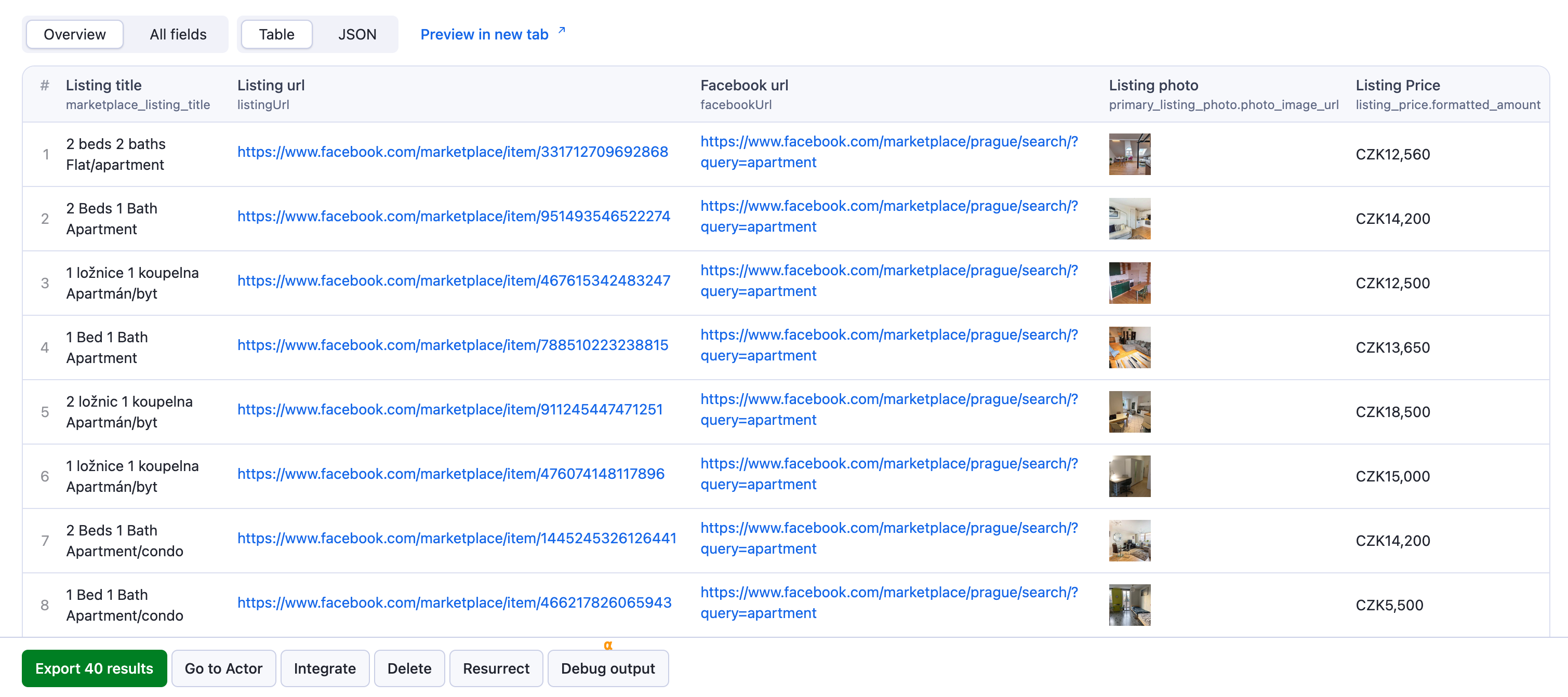](https://console.apify.com/sign-up)
```json
[
{
"facebookUrl": "https://www.facebook.com/marketplace/sanfrancisco/search/?query=guitar",
"listingUrl": "https://www.facebook.com/marketplace/item/1189200412268517",
"id": "1189200412268517",
"primary_listing_photo": {
"__typename": "ProductImage",
"image": {
"uri": "https://scontent-hou1-1.xx.fbcdn.net/v/t45.5328-4/437005937_3853471901547531_4591930955732494222_n.jpg?stp=c0.43.261.261a_dst-jpg_p261x260&_nc_cat=110&ccb=1-7&_nc_sid=247b10&_nc_ohc=ohHOyN4bm1gQ7kNvgGKZUeE&_nc_ht=scontent-hou1-1.xx&oh=00_AYCAUOvqBiQA9TlS6zY0xGq7ujrYDqJvxW92B7nzGfey7g&oe=664AF519"
},
"id": "3853471898214198"
},
"listing_price": {
"formatted_amount": "$65",
"amount_with_offset_in_currency": "6500",
"amount": "65.00"
},
"strikethrough_price": null,
"comparable_price": null,
"comparable_price_type": null,
"location": {
"reverse_geocode": {
"city": "San Francisco",
"state": "CA",
"city_page": {
"display_name": "San Francisco, California",
"id": "114952118516947"
}
}
},
"is_hidden": false,
"is_live": true,
"is_pending": false,
"is_sold": false,
"is_viewer_seller": false,
"min_listing_price": null,
"max_listing_price": null,
"marketplace_listing_category_id": "676772489112490",
"marketplace_listing_title": "Ashthorpe Full-Size Dreadnought Acoustic-Electric Guitar",
"custom_title": null,
"custom_sub_titles_with_rendering_flags": [],
"origin_group": null,
"listing_video": null,
"parent_listing": null,
"marketplace_listing_seller": {
"__typename": "User",
"name": "Gabi Serrano",
"id": "pfbid02Emnr61gEXoFWrix5GetFwmEAiC7wnieUg52xDmaGNe154LRSdZSirmmUNGb6Psqsl"
},
"delivery_types": [
"IN_PERSON"
]
},
{
"facebookUrl": "https://www.facebook.com/marketplace/sanfrancisco/search/?query=guitar",
"listingUrl": "https://www.facebook.com/marketplace/item/890679662817803",
"id": "890679662817803",
"primary_listing_photo": {
"__typename": "ProductImage",
"image": {
"uri": "https://scontent-hou1-1.xx.fbcdn.net/v/t45.5328-4/427212581_470381202096766_8794677249409317491_n.jpg?stp=c0.43.261.261a_dst-jpg_p261x260&_nc_cat=105&ccb=1-7&_nc_sid=247b10&_nc_ohc=dmutQVoMURUQ7kNvgFRzXL2&_nc_oc=AdhgXVFIZSZNrH0toUYMt8TJdBQ_8NPY-o59fOuIFwM3sAuzS718I7TjE5gnJ65o5PEDmOI9e6OChASS61p480Gv&_nc_ht=scontent-hou1-1.xx&oh=00_AYCVBRurrmHyB1W9oHM97bBFjbQ5pBgyIG_IM67V5LlN-Q&oe=664ADF4D"
},
"id": "470381198763433"
},
"listing_price": {
"formatted_amount": "$20",
"amount_with_offset_in_currency": "2000",
"amount": "20.00"
},
"strikethrough_price": null,
"comparable_price": null,
"comparable_price_type": null,
"location": {
"reverse_geocode": {
"city": "Berkeley",
"state": "CA",
"city_page": {
"display_name": "Berkeley, California",
"id": "113857331958379"
}
}
},
"is_hidden": false,
"is_live": true,
"is_pending": false,
"is_sold": false,
"is_viewer_seller": false,
"min_listing_price": null,
"max_listing_price": null,
"marketplace_listing_category_id": "676772489112490",
"marketplace_listing_title": "Electric guitar",
"custom_title": null,
"custom_sub_titles_with_rendering_flags": [],
"origin_group": null,
"listing_video": null,
"parent_listing": null,
"marketplace_listing_seller": {
"__typename": "User",
"name": "Zixin Jiang",
"id": "pfbid032BPoHpPZqrqb4oufJS5AwzwhNamBPKWGRchKmBPiNqeriPshTS8PK7N148s65BiLl"
},
"delivery_types": [
"IN_PERSON"
]
}
...
```
### 💸 How much will scraping Facebook Marketplace cost you?
This scraper uses the Pay-per-result pricing model, so your costs can be easily calculated: it will cost you $6.20 to scrape 1,000 Marketplace items on the Free plan, so $0.0062 per item. Apify provides you with $5 free usage credits every month on the Apify Free plan, so you can **scrape about 800 items on Facebook Marketplace for free** for those credits.
But if you need to extract data regularly, you should get an Apify subscription. We recommend our $19/month Starter plan. It costs $5 per 1,000 items and could get you **up to 3,800 Marketplace listings every month**.
### 💬 Want to scrape Facebook games or groups?
You can use the dedicated scrapers below if you want to scrape specific Facebook data. Each of them is built particularly for the relevant Facebook scraping case be it pages, likes, events, or photos. Feel free to browse them:
### ❓FAQ
#### Does Facebook Marketplace have an API?
Facebook Marketplace does not have an official API for retrieving data on Marketplace listings. While there are old sources [from 2007](https://developers.facebook.com/blog/post/43/) and an API for posting and receiving seller data ([Marketplace Approval API](https://developers.facebook.com/docs/commerce-platform/platforms/distribution/MPApprovalAPI/)), neither of these APIs provide access to the listings themselves. This means developers cannot use the official Marketplace API to extract details about listings on Facebook Marketplace regularly and at scale.
This is why alternative solutions like [Facebook Marketplace Scraper](https://apify.com/apify/facebook-marketplace-scraper) exist. A scraper is essentially an API of its own if it allows exporting scraped data via an API.
#### How do I use data from Facebook Marketplace?
Scraping Facebook Marketplace can help you to:
💸 Discover the best-selling items on Facebook Marketplace
🏎 Secure the fastest-selling items
👀 Do comparative analysis on items in the same category
🏠 Find apartments for rent/sale and jobs on Facebook marketplace
📍 Monitor local Marketplace listings, identify market trends, and understand local pricing
💼 Create your own aggregator platform for items in a specific category or topic
#### Can I integrate Facebook Marketplace Scraper with other apps?
Yes. This Facebook Marketplace Scraper can be connected with almost any cloud service or web app thanks to integrations on the Apify platform. You can **integrate your Facebook Marketplace data with Zapier, Slack, Make, Airbyte, GitHub, Google Sheets, Asana, LangChain,** [and more](https://docs.apify.com/integrations).
You can also use [webhooks](https://docs.apify.com/integrations/webhooks) to carry out an action whenever an event occurs, e.g., get a notification whenever Facebook Marketplace Scraper successfully finishes a run.
#### Can I use Facebook Marketplace Scraper as its own API?
Yes, you can use the Apify API to access Facebook Marketplace Scraper programmatically. The API allows you to manage, schedule, and run Apify Actors, access datasets, monitor performance, get results, create and update Actor versions, and more.
To access the API using Node.js, you can use the `apify-client` [NPM package](https://apify.com/apify/facebook-marketplace-scraper/api/client/nodejs). To access the API using Python, you can use the `apify-client` [PyPI package](https://apify.com/apify/facebook-marketplace-scraper/api/client/python).
For detailed information and code examples, see the [API tab](https://apify.com/apify/facebook-marketplace-scraper/api) or refer to the [Apify API documentation](https://docs.apify.com/api/v2).
#### Can I use this Facebook Marketplace API in Python?
Yes, you can use the Apify API with Python. To access the Facebook Marketplace [API with Python](https://apify.com/apify/facebook-marketplace-scraper/api/client/python), use the `apify-client` PyPI package. You can find more details about the client in our [Python Client documentation](https://docs.apify.com/api/client/python/).
#### Is it legal to scrape data from Facebook Marketplace?
Our [Facebook scrapers](https://apify.com/store?search=facebook) are ethical and **do not extract any private user data**. They only extract what the user has chosen to share publicly. However, you should be aware that your results could contain personal data. You should not scrape personal data unless you have a legitimate reason to do so.
If you're unsure whether your reason is legitimate, consult your lawyers. You can also read our blog post on the [legality of web scraping](https://blog.apify.com/is-web-scraping-legal/) and [ethical scraping](https://blog.apify.com/what-is-ethical-web-scraping-and-how-do-you-do-it/).
#### Not your cup of tea? Build your own Marketplace scraper.
Facebook Marketplace scraper doesn’t exactly do what you need? You can always build your own! We have various [web scraping templates](https://apify.com/templates) in Python, JavaScript, and TypeScript to get you started. Alternatively, you can write it from scratch using our [open-source library Crawlee](https://crawlee.dev/). You can keep the scraper to yourself or make it public by adding it to the Apify Store (and [find users](https://apify.com/partners/actor-developers) for it to make money).
#### How do I export Facebook marketplace listings?
Run Facebook Marketplace Scraper with a search query of your choice + location. Once the Actor has finished scraping, go to the Apify Console, navigate to your Actor's run, and click on the dataset. From there, you can export the data in various formats like CSV, JSON, or Excel.
#### Your feedback
We’re always working on improving the performance of our Actors. So if you’ve got any technical feedback for Facebook Marketplace Scraper or simply found a bug, please create an issue on the Actor’s [Issues tab](https://apify.com/apify/facebook-marketplace-scraper/issues).
# Changelog
This Actor's version history is a separate document: https://apify.com/apify/facebook-marketplace-scraper/changelog.md
# Actor input Schema
## `startUrls` (type: `array`):
This lets you tell the scraper where to start. You can enter Facebook Marketplace URLs one by one. You can also link to or upload a text file with a list of URLs.
## `resultsLimit` (type: `integer`):
Select the number of listings you want to scrape. If this limit is not set, as many results as possible will be returned.
## `includeListingDetails` (type: `boolean`):
If enabled, extra details are scraped for each listing. This includes description, location coordinates, time stamp, listing attributes, and more.
## Actor input object example
```json
{
"startUrls": [
{
"url": "https://www.facebook.com/marketplace/prague/home-improvements"
},
{
"url": "https://www.facebook.com/marketplace/prague/search/?query=apartment"
}
],
"resultsLimit": 20,
"includeListingDetails": false
}
```
# Actor output Schema
## `dataset` (type: `string`):
Dataset containing all scraped data
# API
You can run this Actor programmatically using our API. Below are code examples in JavaScript, Python, and CLI, as well as the OpenAPI specification and MCP server setup.
## JavaScript example
```javascript
import { ApifyClient } from 'apify-client';
// Initialize the ApifyClient with your Apify API token
// Replace the '' with your token
const client = new ApifyClient({
token: '',
});
// Prepare Actor input
const input = {
"startUrls": [
{
"url": "https://www.facebook.com/marketplace/prague/home-improvements"
},
{
"url": "https://www.facebook.com/marketplace/prague/search/?query=apartment"
}
],
"resultsLimit": 20
};
// Run the Actor and wait for it to finish
const run = await client.actor("apify/facebook-marketplace-scraper").call(input);
// Fetch and print Actor results from the run's dataset (if any)
console.log('Results from dataset');
console.log(`💾 Check your data here: https://console.apify.com/storage/datasets/${run.defaultDatasetId}`);
const { items } = await client.dataset(run.defaultDatasetId).listItems();
items.forEach((item) => {
console.dir(item);
});
// 📚 Want to learn more 📖? Go to → https://docs.apify.com/api/client/js/docs
```
## Python example
```python
from apify_client import ApifyClient
# Initialize the ApifyClient with your Apify API token
# Replace '' with your token.
client = ApifyClient("")
# Prepare the Actor input
run_input = {
"startUrls": [
{ "url": "https://www.facebook.com/marketplace/prague/home-improvements" },
{ "url": "https://www.facebook.com/marketplace/prague/search/?query=apartment" },
],
"resultsLimit": 20,
}
# Run the Actor and wait for it to finish
run = client.actor("apify/facebook-marketplace-scraper").call(run_input=run_input)
# Fetch and print Actor results from the run's dataset (if there are any)
print(f"💾 Check your data here: https://console.apify.com/storage/datasets/{run.default_dataset_id}")
for item in client.dataset(run.default_dataset_id).iterate_items():
print(item)
# 📚 Want to learn more 📖? Go to → https://docs.apify.com/api/client/python/docs/quick-start
```
## CLI example
```bash
echo '{
"startUrls": [
{
"url": "https://www.facebook.com/marketplace/prague/home-improvements"
},
{
"url": "https://www.facebook.com/marketplace/prague/search/?query=apartment"
}
],
"resultsLimit": 20
}' |
apify call apify/facebook-marketplace-scraper --silent --output-dataset
```
## MCP server setup
```json
{
"mcpServers": {
"apify": {
"type": "http",
"url": "https://mcp.apify.com/?tools=fetch-actor-details,apify/facebook-marketplace-scraper"
}
}
}
```
The hosted server signs you in with OAuth on first connect, so no API token belongs in this config. Clients without OAuth support can send an `Authorization: Bearer ` header instead, using a token from API & Integrations in Apify Console (https://console.apify.com/settings/integrations).
## OpenAPI specification
Download the OpenAPI definition: https://api.apify.com/v2/actors/U5DUNxhH3qKt5PnCf/builds/dRIbOgB4Kop3rdCMY/openapi.json