| 🔗 Post URL and shortcode (`url`, `shortCode`) |
📝 Caption, hashtags, mentions |
📅 Publish date (`timestamp`) |
| ❤️ Likes (`likesCount`) |
💬 Comments (`commentsCount`) |
▶️ Reel plays (`videoPlayCount`) |
| 📈 Engagement count and rate |
🖼️ Image URLs in every size (`displayUrl`, `images`) |
🎬 Video URL, duration, audio flag |
| 🎵 Music: song, artist, audio type, trending |
🏷️ Tagged users with positions |
🤝 Co-authors and paid-partnership sponsors |
| 📍 Location name, id, city, coordinates |
🧩 Carousel items (`childPosts`) |
📌 Pinned, type, product type (reel / feed / carousel) |
| 👤 Owner username, name, id, verified, avatar, followers |
🪪 Optional profile row: bio, links, followers, category, business address |
🔍 Which input and keyword each row came from |
On the first live run (17 posts from a profile, a keyword and a URL) every row had a caption, date, likes, comments, image URL, dimensions and owner; 65% carried hashtags, 53% a play count (every reel), 35% tagged users, 24% a location.
### How to scrape Instagram with Instagram Scraper
1. [Create a free Apify account](https://console.apify.com/sign-up) - $5 of monthly credit, no card needed.
2. Open [Instagram Scraper](https://apify.com/topapi/instagram-scraper) and click **Try for free**.
3. Paste usernames into **Profiles**, hashtags into **Hashtags or keywords**, or links into **Post or reel URLs**, and set **Max posts per profile or hashtag**.
4. Click **Start**. Rows stream into the dataset as pages are read; a 50-post profile run finishes in a few seconds.
5. Open the **Storage** tab and **Export** as JSON, CSV or Excel - or let a schedule run it for you.
### ⬇️ Input
| Parameter | Type | Description |
|---|---|---|
| **🔍 What to scrape** | | |
| `usernames` | List | Usernames or profile URLs: `nasa`, `@natgeo`, `https://www.instagram.com/instagram/`. Default: `["nasa"]` when nothing else is given |
| `hashtags` | List | Hashtags or keywords: `travel`, `#foodie`, `https://www.instagram.com/explore/tags/travel/`. Read from Instagram's public keyword page |
| `postUrls` | List | Post or reel URLs or shortcodes: `https://www.instagram.com/p/Dd9RyBWBVih/`, `Dd9RyBWBVih` |
| **🎯 Filters** (decide how far back a profile is read) | | |
| `onlyPostsNewerThan` | String | `2026-09-01`, `7 days`, `3 weeks`, or a day count. Paging stops when a whole page is older |
| `onlyPostsOlderThan` | String | Upper bound of the window, same formats |
| `skipPinnedPosts` | Boolean | Leave out posts pinned to the top of the grid. Default: `false` |
| **✂️ Refine results** | | |
| `postType` | Select | `all`, `image`, `video`, `carousel`, `reel`. Default: `all` |
| `minLikes` | Integer | Keep only posts with at least this many likes. Default: `0` |
| `keywordFilter` | String | Keep only posts whose caption, hashtags, tagged users, place, music or owner contain the word(s); comma = any |
| `withLocationOnly` | Boolean | Keep only posts tagged with a place. Default: `false` |
| **➕ Extra data** | | |
| `includeProfileSummary` | Boolean | Adds one `Profile` row per scraped profile - charged as **profile-summary** at $0.001 per profile |
| **🔁 Monitoring** | | |
| `monitorMode` | Boolean | Return only posts not delivered by previous runs; pair with a daily schedule |
| `monitorStoreName` | String | Name of the key-value store holding the monitor memory. Default: `instagram-posts-monitor` |
| **📦 Output** | | |
| `resultsLimit` | Integer | Max posts per profile or hashtag after filters. Default `50`; `0` = everything Instagram serves |
| `maxItems` | Integer | Hard cap for the whole run. Default `0` = no total cap |
| `compact` | Boolean | Core fields only, sized for AI agents and MCP |
| **⚙️ Advanced** | | |
| `proxyConfiguration` | Object | Apify proxy settings. Default: Apify datacenter proxies, which serve every request this actor makes |
| `maxConcurrency` | Integer | Parallel single-post requests. Default `4` |
#### Input JSON
```json
{
"usernames": ["nasa", "natgeo"],
"hashtags": ["travel"],
"postUrls": ["https://www.instagram.com/reel/Dd9RyBWBVih/"],
"onlyPostsNewerThan": "30 days",
"resultsLimit": 50,
"includeProfileSummary": true
}
```
#### Paste profiles when you want a timeline, URLs when you want specific posts
A profile walks the grid newest first and stops at your cap or date window. A post URL costs one request and returns the full record of that one post. **Do:** `nasa` in Profiles · **Don't:** `https://www.instagram.com/nasa/p/Dd9RyBWBVih/` in Profiles expecting the whole timeline (the actor routes a post URL to the single-post path and returns one row).
#### Hashtags are Instagram's public keyword page, not the signed-in hashtag feed
Signed-out visitors get a keyword page of popular reels for a term, 12 per page, in Instagram's ranking. It exists for many terms (`travel`, `foodie`, `street food` all returned pages in testing) and not for others (`sunset`, `coffee`, `nasa` returned a description and no posts). An empty term delivers nothing and says so in the run status. For a specific account's posts, use `usernames`.
#### Use the date window for scheduled Instagram runs
`onlyPostsNewerThan: "1 day"` on a profile reads one page and stops as soon as the page is older than yesterday; with `monitorMode` on, a daily schedule delivers each post exactly once.
### ⬆️ Output
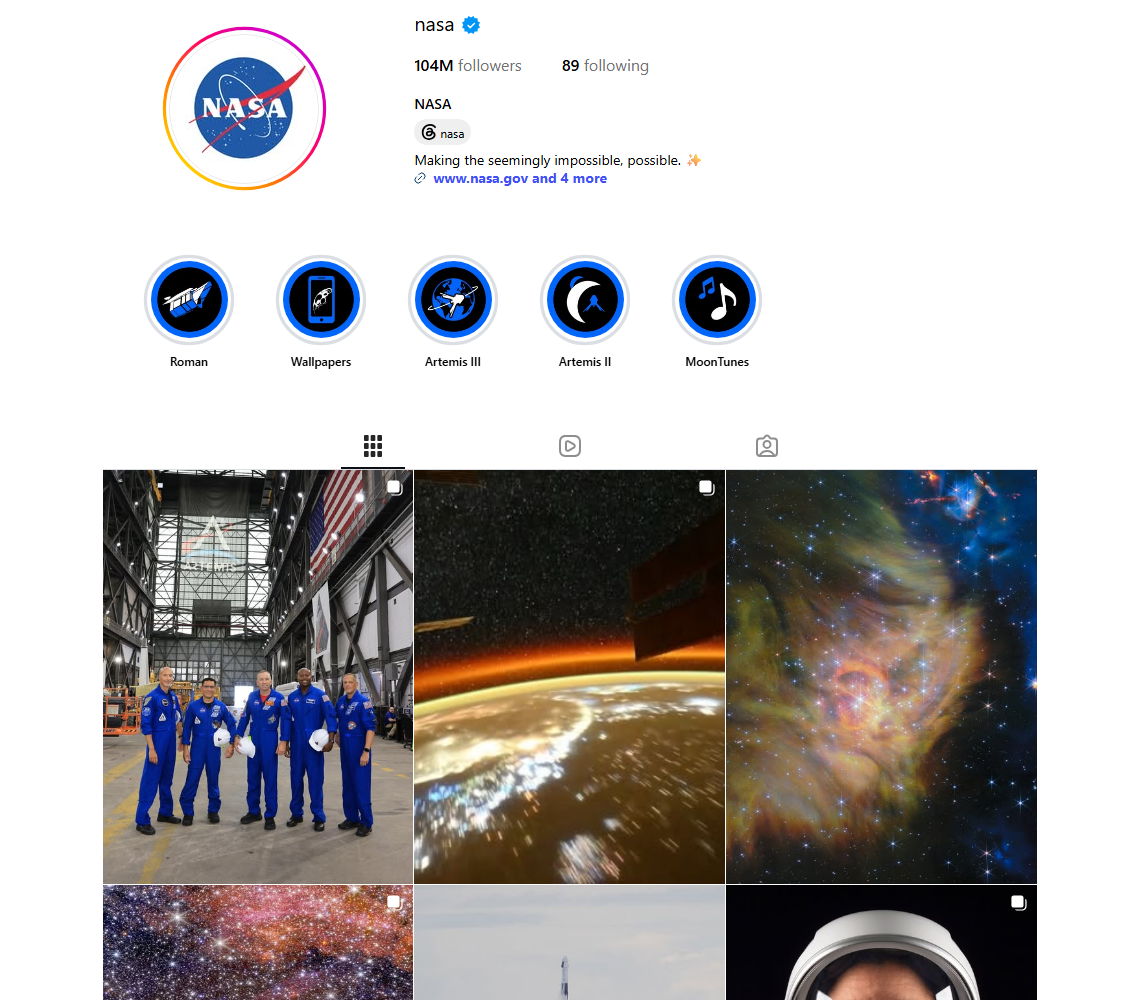
Every post becomes one dataset item. Here is the table view of a run for `nasa`, `travel` and one reel URL:
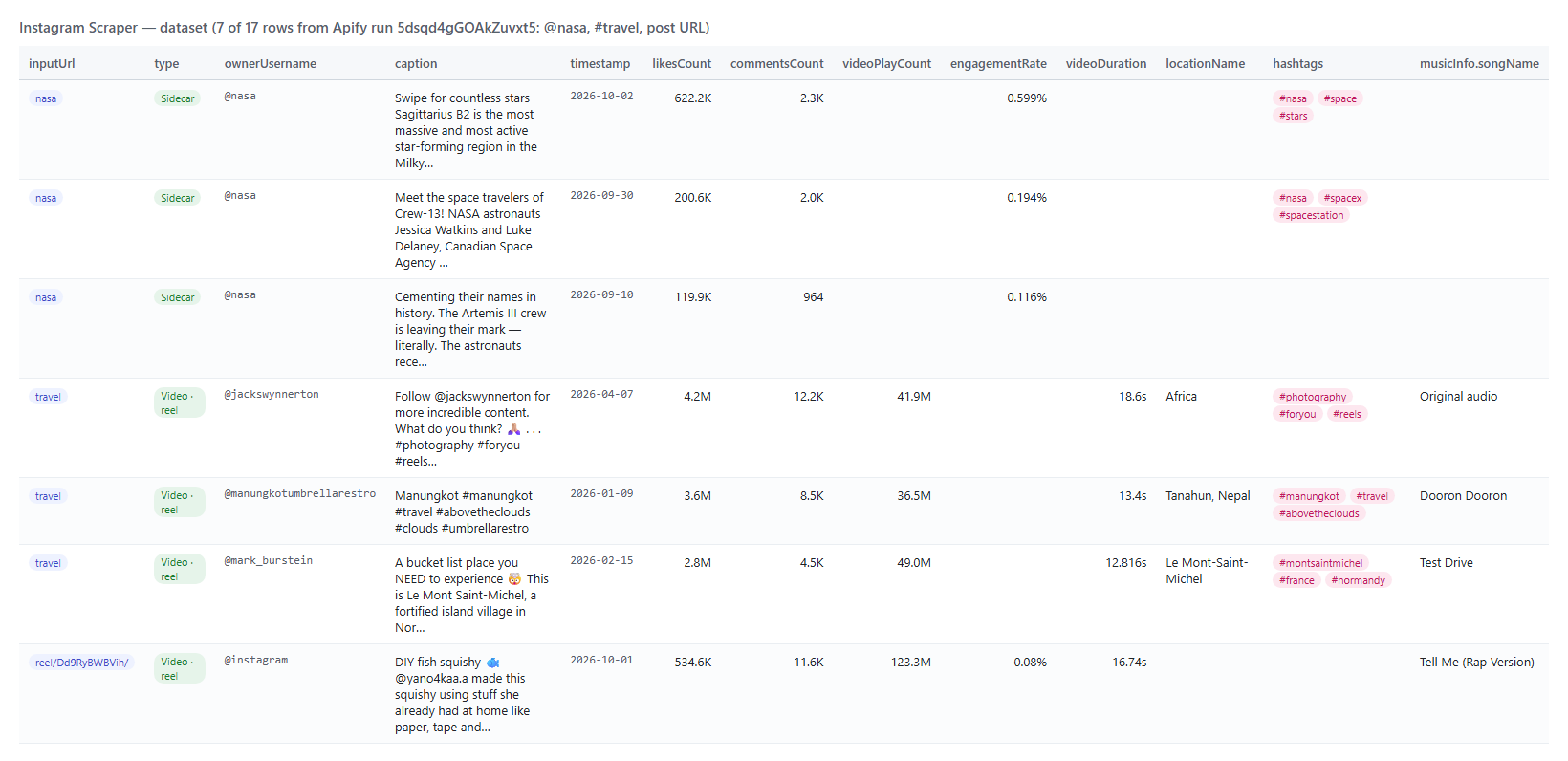 And one row as JSON (trimmed):
```json
{
"id": "3998430248382584993",
"type": "Video",
"shortCode": "Dd9RyBWBVih",
"url": "https://www.instagram.com/reel/Dd9RyBWBVih/",
"caption": "DIY fish squishy 🐟 @yano4kaa.a made this squishy using stuff she already had at home...",
"hashtags": [],
"mentions": ["yano4kaa.a", "stuckinreboot"],
"timestamp": "2026-10-01T09:59:45.000Z",
"likesCount": 534292,
"commentsCount": 11572,
"engagementCount": 545864,
"engagementRate": 0.08,
"videoPlayCount": 123170887,
"videoDuration": 16.74,
"videoUrl": "https://scontent-....cdninstagram.com/o1/v/t2/f2/m86/....mp4?...",
"displayUrl": "https://scontent-....cdninstagram.com/v/t51.82787-15/....jpg?...",
"productType": "clips",
"isPinned": false,
"paidPartnership": false,
"taggedUsers": [{ "id": "7198319588", "username": "yano4kaa.a", "fullName": "yano4kaa", "position": [0, 0] }],
"musicInfo": { "audioType": "licensed_music", "songName": "Tell Me (Rap Version)", "artistName": "Wonder Girls", "isTrendingInClips": true },
"ownerUsername": "instagram",
"ownerFollowersCount": 686588239
}
```
#### Fields
| Field | Type | What it is | Fill on the live run |
|---|---|---|---|
| `id`, `pk`, `shortCode`, `url` | string | Instagram media id, shortcode and canonical URL (`/reel/` for reels) | 100% |
| `type` | string | `Image`, `Video` or `Sidecar` (carousel) | 100% |
| `productType` | string | `feed`, `clips` (reel), `carousel_container`, `igtv` | 100% |
| `caption`, `hashtags`, `mentions` | string / arrays | Caption text with its hashtags and @mentions parsed | 100% / 65% / 59% |
| `timestamp`, `captionCreatedAt` | string (ISO 8601) | Publish time and caption time | 100% |
| `likesCount`, `commentsCount`, `engagementCount` | integer | Likes, comments and their sum; `likesCount` is null when the owner hides likes | 100% |
| `engagementRate` | number | (likes + comments) / owner followers, percent; filled for a profile's own posts and for post URLs | 35% |
| `videoPlayCount`, `videoViewCount` | integer | Reel plays from the profile's reels tab or the keyword page; `videoViewCount` when Instagram exposes it | 53% (every reel) / 0% |
| `likeAndViewCountsDisabled`, `isCommentsDisabled` | boolean | Owner-side visibility switches | 100% / 0% |
| `displayUrl`, `images`, `dimensionsWidth`, `dimensionsHeight` | string / array | Largest image and every rendition with sizes (signed CDN links, they expire) | 100% |
| `videoUrl`, `videoDuration`, `hasAudio` | string / number / boolean | Best video rendition, seconds, audio flag | 53% (every video) |
| `isPinned`, `isInProfileGrid` | boolean | Pinned to the profile grid; shown in the grid | 100% |
| `paidPartnership`, `sponsors` | boolean / array | Paid partnership label and its sponsor accounts | 100% / 6% |
| `taggedUsers`, `coauthorProducers` | array | Tagged accounts with positions; collaborators | 35% / 24% |
| `locationName`, `locationId`, `locationCity`, `locationLat`, `locationLng` | string / number | Tagged place | 24% |
| `musicInfo` | object | `audioType`, `songName`, `artistName`, `audioId`, `usesOriginalAudio`, `isExplicit`, `isTrendingInClips`, `originalAudioOwner` | 53% (every reel) |
| `childPosts` | array | Carousel items: id, type, displayUrl, dimensions, videoUrl, duration, alt, taggedUsers | 29% (every carousel) |
| `alt`, `aiLabel`, `latestComments` | string / array | Accessibility caption, AI label, preview comments when Instagram ships them | 3% / 0% / 0% |
| `ownerUsername`, `ownerFullName`, `ownerId`, `ownerIsVerified`, `ownerProfilePicUrl`, `ownerFollowersCount` | string / boolean / integer | The account that posted (the co-author on collab posts) | 100% (followers 35%) |
| `inputUrl`, `searchTerm`, `scrapedAt` | string | Where the row came from | 100% / 47% / 100% |
A `Profile` row (add-on) carries `username`, `fullName`, `biography`, `externalUrl`, `bioLinks[]`, `followersCount`, `followsCount`, `postsCount`, `isPrivate`, `isVerified`, `isBusinessAccount`, `isProfessionalAccount`, `businessCategoryName`, `businessAddress`, `profilePicUrl`, `profilePicUrlHD`, `hasActiveStory`, `highlightReelCount`, `hasClips`, `threadsBadge`, `fbid`.
### How can I use Instagram posts data?
- 🎯 **Influencer and creator vetting** - pull a creator's last 100 posts, read `engagementRate`, `paidPartnership` and `coauthorProducers` to see real engagement and how often they run sponsored content.
- 📊 **Competitor and brand monitoring** - schedule the competitor profiles daily with `monitorMode` and get every new post, its format and its first-day likes and comments.
- 🔎 **Trend and UGC research** - read the keyword page for `travel` or `street food`, rank reels by `videoPlayCount`, pick the sounds in `musicInfo` that trend.
- 📍 **Local marketing and venue research** - `withLocationOnly` keeps posts tagged with a place; group them by `locationName` and `locationCity`.
- 🤖 **AI and research teams** - feed `caption`, `hashtags`, `alt` and the counts to an LLM with `compact: true`; every row is one post, nothing nested you did not ask for.
- 📈 **Reporting** - run weekly and track `likesCount`, `commentsCount` and `videoPlayCount` of the same posts over time.
### How much does it cost to scrape Instagram?
Instagram Scraper is pay-per-result: **$0.40 per 1,000 posts**, no start fee. One result is one post written to the dataset. The optional profile row is $0.001 per profile.
| Rows | Cost |
|---:|---:|
| 10 | $0.004 |
| 100 | $0.04 |
| 1,000 | $0.40 |
| 10,000 | $4.00 |
There is nothing else to pay: Apify platform usage (compute, proxy) is included in these prices. The actor runs on 256 MB with no browser: a 50-post profile run read 5 pages in 3.6 seconds, a 17-post mixed run took 2.8 seconds over 20 requests.
### Integrations, API, scheduling & MCP
- **Schedules:** run Instagram Scraper hourly, daily or weekly from the **Schedules** tab; combine with `monitorMode` or `onlyPostsNewerThan` to get only new posts.
- **Webhooks:** fire a URL when a run finishes - push rows to your CRM, Slack or a sheet.
- **No-code:** Make, Zapier, n8n, Google Sheets, Airtable, Slack via [Apify integrations](https://docs.apify.com/integrations).
- **API:** call it from Node.js or Python with `apify-client` - code on the [API tab](https://apify.com/topapi/instagram-scraper/api/python) and the [Apify API reference](https://docs.apify.com/api/v2).
- **MCP / AI agents:** connect Claude, Cursor or any MCP client through the [MCP tab](https://apify.com/topapi/instagram-scraper/api/mcp) and ask for Instagram posts in plain language.
### More TopApi scrapers
And one row as JSON (trimmed):
```json
{
"id": "3998430248382584993",
"type": "Video",
"shortCode": "Dd9RyBWBVih",
"url": "https://www.instagram.com/reel/Dd9RyBWBVih/",
"caption": "DIY fish squishy 🐟 @yano4kaa.a made this squishy using stuff she already had at home...",
"hashtags": [],
"mentions": ["yano4kaa.a", "stuckinreboot"],
"timestamp": "2026-10-01T09:59:45.000Z",
"likesCount": 534292,
"commentsCount": 11572,
"engagementCount": 545864,
"engagementRate": 0.08,
"videoPlayCount": 123170887,
"videoDuration": 16.74,
"videoUrl": "https://scontent-....cdninstagram.com/o1/v/t2/f2/m86/....mp4?...",
"displayUrl": "https://scontent-....cdninstagram.com/v/t51.82787-15/....jpg?...",
"productType": "clips",
"isPinned": false,
"paidPartnership": false,
"taggedUsers": [{ "id": "7198319588", "username": "yano4kaa.a", "fullName": "yano4kaa", "position": [0, 0] }],
"musicInfo": { "audioType": "licensed_music", "songName": "Tell Me (Rap Version)", "artistName": "Wonder Girls", "isTrendingInClips": true },
"ownerUsername": "instagram",
"ownerFollowersCount": 686588239
}
```
#### Fields
| Field | Type | What it is | Fill on the live run |
|---|---|---|---|
| `id`, `pk`, `shortCode`, `url` | string | Instagram media id, shortcode and canonical URL (`/reel/` for reels) | 100% |
| `type` | string | `Image`, `Video` or `Sidecar` (carousel) | 100% |
| `productType` | string | `feed`, `clips` (reel), `carousel_container`, `igtv` | 100% |
| `caption`, `hashtags`, `mentions` | string / arrays | Caption text with its hashtags and @mentions parsed | 100% / 65% / 59% |
| `timestamp`, `captionCreatedAt` | string (ISO 8601) | Publish time and caption time | 100% |
| `likesCount`, `commentsCount`, `engagementCount` | integer | Likes, comments and their sum; `likesCount` is null when the owner hides likes | 100% |
| `engagementRate` | number | (likes + comments) / owner followers, percent; filled for a profile's own posts and for post URLs | 35% |
| `videoPlayCount`, `videoViewCount` | integer | Reel plays from the profile's reels tab or the keyword page; `videoViewCount` when Instagram exposes it | 53% (every reel) / 0% |
| `likeAndViewCountsDisabled`, `isCommentsDisabled` | boolean | Owner-side visibility switches | 100% / 0% |
| `displayUrl`, `images`, `dimensionsWidth`, `dimensionsHeight` | string / array | Largest image and every rendition with sizes (signed CDN links, they expire) | 100% |
| `videoUrl`, `videoDuration`, `hasAudio` | string / number / boolean | Best video rendition, seconds, audio flag | 53% (every video) |
| `isPinned`, `isInProfileGrid` | boolean | Pinned to the profile grid; shown in the grid | 100% |
| `paidPartnership`, `sponsors` | boolean / array | Paid partnership label and its sponsor accounts | 100% / 6% |
| `taggedUsers`, `coauthorProducers` | array | Tagged accounts with positions; collaborators | 35% / 24% |
| `locationName`, `locationId`, `locationCity`, `locationLat`, `locationLng` | string / number | Tagged place | 24% |
| `musicInfo` | object | `audioType`, `songName`, `artistName`, `audioId`, `usesOriginalAudio`, `isExplicit`, `isTrendingInClips`, `originalAudioOwner` | 53% (every reel) |
| `childPosts` | array | Carousel items: id, type, displayUrl, dimensions, videoUrl, duration, alt, taggedUsers | 29% (every carousel) |
| `alt`, `aiLabel`, `latestComments` | string / array | Accessibility caption, AI label, preview comments when Instagram ships them | 3% / 0% / 0% |
| `ownerUsername`, `ownerFullName`, `ownerId`, `ownerIsVerified`, `ownerProfilePicUrl`, `ownerFollowersCount` | string / boolean / integer | The account that posted (the co-author on collab posts) | 100% (followers 35%) |
| `inputUrl`, `searchTerm`, `scrapedAt` | string | Where the row came from | 100% / 47% / 100% |
A `Profile` row (add-on) carries `username`, `fullName`, `biography`, `externalUrl`, `bioLinks[]`, `followersCount`, `followsCount`, `postsCount`, `isPrivate`, `isVerified`, `isBusinessAccount`, `isProfessionalAccount`, `businessCategoryName`, `businessAddress`, `profilePicUrl`, `profilePicUrlHD`, `hasActiveStory`, `highlightReelCount`, `hasClips`, `threadsBadge`, `fbid`.
### How can I use Instagram posts data?
- 🎯 **Influencer and creator vetting** - pull a creator's last 100 posts, read `engagementRate`, `paidPartnership` and `coauthorProducers` to see real engagement and how often they run sponsored content.
- 📊 **Competitor and brand monitoring** - schedule the competitor profiles daily with `monitorMode` and get every new post, its format and its first-day likes and comments.
- 🔎 **Trend and UGC research** - read the keyword page for `travel` or `street food`, rank reels by `videoPlayCount`, pick the sounds in `musicInfo` that trend.
- 📍 **Local marketing and venue research** - `withLocationOnly` keeps posts tagged with a place; group them by `locationName` and `locationCity`.
- 🤖 **AI and research teams** - feed `caption`, `hashtags`, `alt` and the counts to an LLM with `compact: true`; every row is one post, nothing nested you did not ask for.
- 📈 **Reporting** - run weekly and track `likesCount`, `commentsCount` and `videoPlayCount` of the same posts over time.
### How much does it cost to scrape Instagram?
Instagram Scraper is pay-per-result: **$0.40 per 1,000 posts**, no start fee. One result is one post written to the dataset. The optional profile row is $0.001 per profile.
| Rows | Cost |
|---:|---:|
| 10 | $0.004 |
| 100 | $0.04 |
| 1,000 | $0.40 |
| 10,000 | $4.00 |
There is nothing else to pay: Apify platform usage (compute, proxy) is included in these prices. The actor runs on 256 MB with no browser: a 50-post profile run read 5 pages in 3.6 seconds, a 17-post mixed run took 2.8 seconds over 20 requests.
### Integrations, API, scheduling & MCP
- **Schedules:** run Instagram Scraper hourly, daily or weekly from the **Schedules** tab; combine with `monitorMode` or `onlyPostsNewerThan` to get only new posts.
- **Webhooks:** fire a URL when a run finishes - push rows to your CRM, Slack or a sheet.
- **No-code:** Make, Zapier, n8n, Google Sheets, Airtable, Slack via [Apify integrations](https://docs.apify.com/integrations).
- **API:** call it from Node.js or Python with `apify-client` - code on the [API tab](https://apify.com/topapi/instagram-scraper/api/python) and the [Apify API reference](https://docs.apify.com/api/v2).
- **MCP / AI agents:** connect Claude, Cursor or any MCP client through the [MCP tab](https://apify.com/topapi/instagram-scraper/api/mcp) and ask for Instagram posts in plain language.
### More TopApi scrapers