# Naver Shopping Scraper (네이버쇼핑) - Prices, Specs & Reviews (`zen-studio/naver-shopping-scraper`) Actor

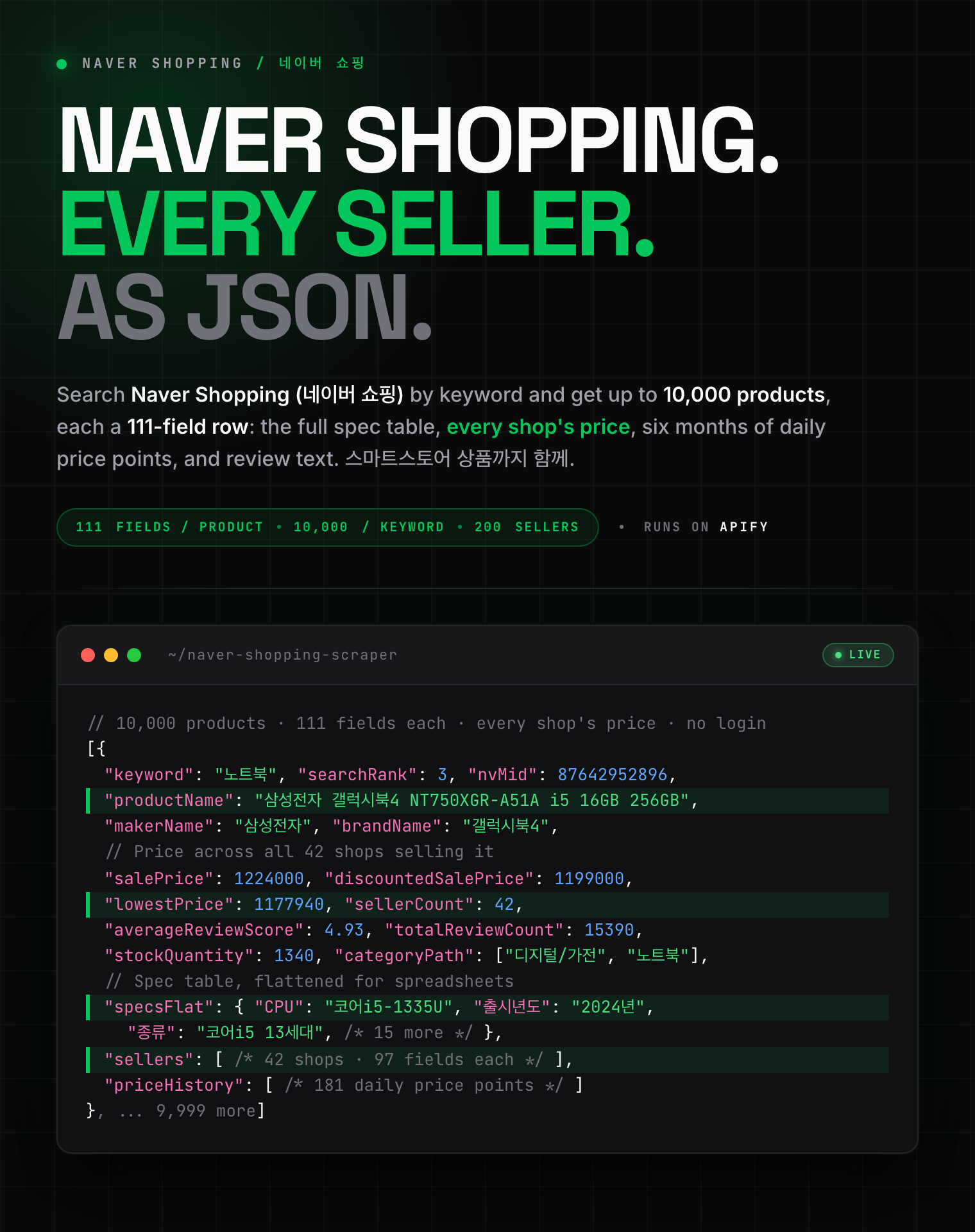
Extract Naver Shopping products by keyword, link or category: prices, discounts, stock, ratings, review counts, sellers and images. 111 fields per product, plus specification tables, every seller's price, six months of price history, and reviews with photos. Export to JSON, CSV or Excel.

- **URL**: https://apify.com/zen-studio/naver-shopping-scraper.md
- **Developed by:** [Zen Studio](https://apify.com/zen-studio) (community)
- **Categories:** E-commerce
- **Stats:** 3 total users, 2 monthly users, 100.0% runs succeeded, 0 bookmarks
- **User rating**: No ratings yet

## Pricing

from $3.99 / 1,000 products

This Actor is paid per event. You are not charged for the Apify platform usage, but only a fixed price for specific events.
Since this Actor supports Apify Store discounts, the price gets lower the higher subscription plan you have.

Learn more: https://docs.apify.com/platform/actors/running/actors-in-store#pay-per-event

## What's an Apify Actor?

Actors are web data automations that power AI and operations. They run on the Apify platform to scrape websites, process data, connect APIs, and automate workflows.
In Batch mode, an Actor accepts a well-defined JSON input, performs an action which can take anything from a few seconds to a few hours,
and optionally produces a well-defined JSON output, datasets with results, or files in key-value store.
In Standby mode, an Actor provides a web server which can be used as a website, API, or an MCP server.
Actors are written with capital "A".

## How to integrate an Actor?

If asked about integration, you help developers integrate Actors into their projects.
You adapt to their stack and deliver integrations that are safe, well-documented, and production-ready.
The best way to integrate Actors is as follows.

- **AI agents and MCP clients** — the [Apify MCP server](https://docs.apify.com/integrations/mcp.md) at `https://mcp.apify.com` (remote, streamable HTTP, OAuth on first use).
- **Agentic workflows and local Actor development** — [Agent Skills](https://apify.com/.well-known/agent-skills/index.json) with the [Apify CLI](https://docs.apify.com/cli/docs.md): `npm install -g apify-cli`, then `apify login`.
- **JavaScript/TypeScript projects** — the official [JS/TS client](https://docs.apify.com/api/client/js/docs.md): `npm install apify-client`.
- **Python projects** — the official [Python client](https://docs.apify.com/api/client/python/docs.md): `pip install apify-client`.
- **Any other language** — the [REST API](https://docs.apify.com/api/v2.md).

For usage examples, see the [API](#api) section below.

For more details, see Apify documentation as [Markdown index](https://docs.apify.com/llms.txt) and [Markdown full-text](https://docs.apify.com/llms-full.txt).

# README

## Naver Shopping Scraper (네이버쇼핑) | Korea Product Prices, Specs & Reviews (2026)

<blockquote style="border-left:4px solid #4C945E;background:#F0FDF4;padding:14px 18px;margin:14px 0">
<span style="font-size:20px;font-weight:800;color:#1C1917">111 fields per product, from keywords, links or whole categories.</span>
</blockquote>

<a href="https://console.apify.com/actors/DHVT6jhgablck1CTx/input"><img src="https://api.apify.com/v2/key-value-stores/pJ7iaZsTFhR3k9tjV/records/naver-shopping-scraper-hero.png" alt="Naver Shopping (네이버 쇼핑) product scraper: prices across every seller, specification tables, price history and reviews as structured JSON" style="max-width:100%"></a>

<blockquote style="border-left:4px solid #E7E5E4;padding:8px 14px;margin:12px 0">
<span style="font-size:14px">⚡ Specification tables, every seller's price, six months of price history, and reviews with photos. Detail is billed only when it actually arrives.</span>
</blockquote>

<table>
<tr>
<td colspan="3" style="padding:10px 14px;background:#4C945E;border:none;border-radius:4px 4px 0 0">
<span style="color:#FAFAF9;font-size:14px;font-weight:700;letter-spacing:0.5px">Zen Studio Korea Marketplace Scrapers</span>
<span style="color:#E8F5E9;font-size:13px">&nbsp;&nbsp;&bull;&nbsp;&nbsp;Product, price and review data from Korea's two biggest storefronts</span>
</td>
</tr>
<tr>
<td style="padding:14px 16px;border:1px solid #E7E5E4;background:#D3EDD9;border-right:none;border-top:none;vertical-align:top;width:33%">
<img src="https://apify-image-uploads-prod.s3.us-east-1.amazonaws.com/NWYsOG96fMDy8ycdf-actor-DHVT6jhgablck1CTx-kFq5oLPY2n-naver-shopping-scraper.png" width="22" height="22" alt="Naver Shopping scraper" style="vertical-align:middle;border-radius:4px">&nbsp;<a href="https://apify.com/zen-studio/naver-shopping-scraper" style="color:#4C945E;text-decoration:none;font-weight:700;font-size:15px">Naver Shopping</a><br>
<span style="color:#4C945E;font-size:14px;font-weight:700">&#10148; You are here</span>
</td>
<td style="padding:14px 16px;border:1px solid #E7E5E4;background:#E8F5E9;border-right:none;border-top:none;vertical-align:top;width:33%">
<img src="https://apify-image-uploads-prod.s3.us-east-1.amazonaws.com/NWYsOG96fMDy8ycdf-actor-DHVT6jhgablck1CTx-kFq5oLPY2n-naver-shopping-scraper.png" width="22" height="22" alt="Naver Detail scraper" style="vertical-align:middle;border-radius:4px">&nbsp;<a href="https://apify.com/zen-studio/naver-product-detail-scraper" style="color:#1C1917;text-decoration:none;font-weight:700;font-size:15px">Naver Detail</a><br>
<span style="color:#44403C;font-size:14px">Specs, sellers, history</span>
</td>
<td style="padding:14px 16px;border:1px solid #E7E5E4;background:#E8F5E9;border-top:none;vertical-align:top;width:33%">
<img src="https://apify-image-uploads-prod.s3.us-east-1.amazonaws.com/NWYsOG96fMDy8ycdf-actor-DHVT6jhgablck1CTx-kFq5oLPY2n-naver-shopping-scraper.png" width="22" height="22" alt="Naver Review scraper" style="vertical-align:middle;border-radius:4px">&nbsp;<a href="https://apify.com/zen-studio/naver-review-scraper" style="color:#1C1917;text-decoration:none;font-weight:700;font-size:15px">Naver Review</a><br>
<span style="color:#44403C;font-size:14px">Reviews, photos, ratings</span>
</td>
</tr>
<tr>
<td style="padding:14px 16px;border:1px solid #E7E5E4;border-radius:0 0 0 4px;background:#E8F5E9;border-right:none;border-top:none;vertical-align:top;width:33%">
<img src="https://apify-image-uploads-prod.s3.us-east-1.amazonaws.com/NWYsOG96fMDy8ycdf-actor-vmxh49iJNTXdWaAwE-5U1C2nq87Q-coupang-review-scraper-logo.png" width="22" height="22" alt="Coupang Search scraper" style="vertical-align:middle;border-radius:4px">&nbsp;<a href="https://apify.com/zen-studio/coupang-search-scraper" style="color:#1C1917;text-decoration:none;font-weight:700;font-size:15px">Coupang Search</a><br>
<span style="color:#44403C;font-size:14px">Keyword product search</span>
</td>
<td style="padding:14px 16px;border:1px solid #E7E5E4;background:#E8F5E9;border-right:none;border-top:none;vertical-align:top;width:33%">
<img src="https://apify-image-uploads-prod.s3.us-east-1.amazonaws.com/NWYsOG96fMDy8ycdf-actor-1rTROFmqS9xoIA87q-2lhFGw7gfO-coupang-review-scraper-logo.png" width="22" height="22" alt="Coupang Detail scraper" style="vertical-align:middle;border-radius:4px">&nbsp;<a href="https://apify.com/zen-studio/coupang-detail-scraper" style="color:#1C1917;text-decoration:none;font-weight:700;font-size:15px">Coupang Detail</a><br>
<span style="color:#44403C;font-size:14px">Specs, options, sellers</span>
</td>
<td style="padding:14px 16px;border:1px solid #E7E5E4;border-radius:0 0 4px 0;background:#E8F5E9;border-top:none;vertical-align:top;width:33%">
<img src="https://apify-image-uploads-prod.s3.us-east-1.amazonaws.com/NWYsOG96fMDy8ycdf-actor-0hS9yNh3RU8DC6puG-LozxRJkdHN-coupang-review-scraper-logo.png" width="22" height="22" alt="Coupang Review scraper" style="vertical-align:middle;border-radius:4px">&nbsp;<a href="https://apify.com/zen-studio/coupang-review-scraper" style="color:#1C1917;text-decoration:none;font-weight:700;font-size:15px">Coupang Review</a><br>
<span style="color:#44403C;font-size:14px">Reviews, photos, ratings</span>
</td>
</tr>
</table>

#### Copy to your AI assistant

```
zen-studio/naver-shopping-scraper on Apify. Scrapes Naver Shopping (Korea) products with specification tables, seller price tables, price history and reviews. Call ApifyClient("TOKEN").actor("zen-studio/naver-shopping-scraper").call(run_input={...}), then client.dataset(run["defaultDatasetId"]).list_items().items. Reviews go to a separate dataset opened with alias "reviews", joined to products by catalogId. Full spec: GET https://api.apify.com/v2/acts/zen-studio~naver-shopping-scraper/builds/default (Bearer TOKEN) → inputSchema, actorDefinition.storages.dataset, readme. Token: https://console.apify.com/account/integrations
```

### Key Features

- **111 fields per product**: price, discount, stock, rating, review count, images, delivery, seller, brand, manufacturer and the full category path, on every row.
- **Both kinds of listing, fully covered**: products Naver lists in its price comparison come back with the full comparison record; products sold by a single store come back with that seller's own detail. Two flags on every row, `hasCatalogData` and `hasStoreData`, say which kind a product is.
- **Reviews with photos, videos and the purchased option**: written to a separate `reviews` dataset and linked back to products by `catalogId`.
- **Every seller's price**: an optional per-shop table with card and coupon discounts, delivery cost and shop rating, plus a daily price history.
- **Four ways in**: search keywords, product links, product ID numbers, and category links.

### How to Scrape Naver Shopping Product Data

1. Open the Naver Shopping Scraper and go to the **Input** tab.
2. Type a search keyword in Korean or English, or paste a product or category link.
3. Set how many products you want per keyword, up to 10,000.
4. Turn on reviews, sellers or price history if you need them.
5. Click **Start** and download the results as JSON, CSV, Excel, XML or HTML.

#### Basic: one keyword

```json
{
    "keywords": ["노트북"]
}
```

#### Several keywords with a product cap

```json
{
    "keywords": ["노트북", "무선이어폰", "런닝화"],
    "maxProductsPerKeyword": 500
}
```

#### Cheapest sellers in a price band

```json
{
    "keywords": ["게이밍 노트북"],
    "sort": "LOW_PRICE",
    "minPrice": 800000,
    "maxPrice": 1500000,
    "includeSellers": true
}
```

#### Specific products by link

```json
{
    "productUrls": [
        "https://search.shopping.naver.com/catalog/52631236642",
        "https://smartstore.naver.com/main/products/6873474215"
    ],
    "includeReviews": true,
    "maxReviewsPerProduct": 50
}
```

Keywords work in Korean and in English. Korean terms return far more products, since that is what Korean shoppers type; `노트북` returns millions of results where `laptop` returns a fraction.

### Input Parameters

| Parameter | Type | Default | Description |
|-----------|------|---------|-------------|
| `keywords` | array | | Search terms, Korean or English. Each is searched separately. |
| `productUrls` | array | | Product links, category links, or bare product ID numbers. |
| `maxProductsPerKeyword` | integer | `100` | Products per keyword, up to 10,000. |
| `sort` | string | `REL` | `REL`, `LOW_PRICE`, `HIGH_PRICE`, `REVIEW`, `RECENT`, `PURCHASE`. |
| `minPrice` / `maxPrice` | integer | | Price band in Korean won. |
| `categories` | array | | Keep only products in these categories. Pick from the list or paste a category ID. |
| `makerName` | string | | One manufacturer, e.g. `삼성전자`. |
| `brandName` | string | | One brand or product line, e.g. `갤럭시북4`. |
| `includeDetail` | boolean | `true` | Specification table, brand, all images, lowest price, seller count. |
| `includeReviews` | boolean | `false` | Customer reviews into the separate `reviews` dataset, for catalogue and store products alike. |
| `maxReviewsPerProduct` | integer | `20` | Up to 500 per product. Set to `0` to switch reviews off. For deeper review work, use the [Naver Shopping Review Scraper](https://apify.com/zen-studio/naver-review-scraper). |
| `reviewSort` | string | `RANKING` | `RANKING` or `RECENT`. The two orders reach different reviews on price-comparison products. |
| `reviewType` | string | `ALL` | `ALL`, `PHOTO`, `VIDEO`, `QUALITY`. |
| `includeSellers` | boolean | `false` | Every shop selling the product, with its own price. |
| `maxSellersPerProduct` | integer | `30` | Up to 200 per product. |
| `includeSellerRecord` | boolean | `false` | The seller's own record: options with stock, the product disclosure table (상품정보제공고시), delivery speed statistics, after-sales terms. Brand official stores only. A heavier request than the rest, so it lengthens a brand-heavy run. |
| `includePriceHistory` | boolean | `false` | Daily price points over roughly the past six months. |

### What Data Can You Extract from Naver Shopping?

Every product row includes:

- **Identity**: product name, catalog ID, product ID, store product ID, direct link, search rank, the keyword that found it.
- **Price**: list price, discounted price, discount percentage, lowest price across all sellers, per-unit price.
- **Ratings and stock**: average score, total review count, six-month score and count, units in stock.
- **Seller**: shop name, shop grade, official certification type, number of competing sellers.
- **Delivery**: fee, free-delivery flag, arrival guarantee, fast-delivery type, dispatch address.
- **Catalogue**: brand, manufacturer, brand ID, manufacturer ID, model year and season, registration date, full four-level category path and IDs.
- **Media**: every product image, catalogue images, size-chart images, video.
- **Specifications**: the full spec table as `specs` (grouped) and `specsFlat` (one flat map for spreadsheets).
- **Optional**: `sellers[]` with 97 fields per shop, `priceHistory[]` as daily price points.
- **Optional, from the seller's own record**: `options[]` with the stock left for each variant, `productDisclosure` (상품정보제공고시: materials, sizes, country of origin, manufacturer, warranty terms), and `sellerRecord` with delivery-speed statistics for that seller, after-sales terms, certification, manufacture date and instalment availability.

Two flags tell you what a row got: `hasCatalogData` for products in Naver's price comparison, `hasStoreData` for the rest. Reviews are collected for both.

#### Output Example

One product from a keyword search. This is a complete row: every key and every value a real result carries, at every level of nesting. Only two things are shortened. Arrays are cut to their first item or two, since a 181-point price history or a 97-field seller teaches nothing after the first. And single values longer than 200 characters are middle-ellipsised, which in practice only affects click-tracking URLs. No key is omitted anywhere.

```json
{
  "nvMid": 90489494991,
  "channelProductId": "12944983981",
  "productName": "맥심 슈프림골드 커피믹스 130개입 (110+20T)",
  "productUrl": {
    "mobileUrl": "https://m.smartstore.naver.com/main/products/12944983981",
    "pcUrl": "https://smartstore.naver.com/main/products/12944983981"
  },
  "images": [
    {
      "imageUrl": "https://shopping-phinf.pstatic.net/main_9048949/90489494991.3.jpg"
    }
  ],
  "originalMallProductId": "12887352063",
  "mallSeq": "8779094",
  "mallName": "동서식품 공식 브랜드스토어",
  "mallUrl": {
    "mobileUrl": "https://m.smartstore.naver.com/inflow/outlink/url?url=https%3A%2F%2Fm.smartstore.naver.com%2Fdongsuhfoods",
    "pcUrl": "https://smartstore.naver.com/inflow/outlink/url?url=https%3A%2F%2Fsmartstore.naver.com%2Fdongsuhfoods"
  },
  "mallId": "ncp_1oo4ac_01",
  "officialCertifiedMallType": "OFFICIAL_BRAND_MALL",
  "salePrice": 37000,
  "salePricePer1": 37000,
  "discountedSalePrice": 29000,
  "discountedRatio": 21,
  "averageReviewScore": 4.91,
  "totalReviewCount": 6912,
  "averageReviewScore6Month": 4.91,
  "totalReviewCount6Month": 6875,
  "goodsType": "DEFAULT",
  "productType": "NORMAL",
  "saleType": "DEFAULT",
  "windowType": "DEFAULT",
  "deliveryFilters": [
    "EXCLUDING_CASH",
    "FREE_DLIVY"
  ],
  "productDeliveryInfo": {
    "baseFee": 0,
    "shipFromAddress": "",
    "deliveryMethodTypes": [
      "DELIVERY"
    ]
  },
  "fastDeliveryType": "ARRIVAL_GUARANTEE",
  "isNewProduct": false,
  "isGroupProduct": false,
  "isFreshProduct": false,
  "isLoungeProduct": false,
  "standardPurchaseOptionCount": 0,
  "standardProductName": "맥심 슈프림골드 커피믹스 130개입 (110+20T)",
  "standardGroupEpId": "90489494991",
  "isOverseaProduct": false,
  "standardPurchaseOptionValues": [
    ""
  ],
  "standardPurchaseOptionContents": [
    ""
  ],
  "promotionTypes": [
    "SALE"
  ],
  "promotionGroupIdMap": {
    "SALE": [
      "SALE_10761288",
      "SALE_10823927",
      "SALE_10904216"
    ]
  },
  "hasGift": false,
  "isBrandStore": true,
  "deliveryAdditionalInfo": {
    "orderClosedTime": ""
  },
  "isSuperPointProduct": false,
  "purchaseQuantityInfo": {
    "minPurchaseQuantity": 1
  },
  "lCatId": "50000006",
  "mCatId": "50000148",
  "sCatId": "50001081",
  "ssCatId": "50002606",
  "isMembershipFreeDelivery": false,
  "isCustomsDutySeparate": false,
  "isCustomsServiceFeeSeparate": false,
  "isIndividualSeller": false,
  "capacityUnit": {
    "totalCapacity": 1755,
    "unitCapacity": 10,
    "indicationUnit": "g"
  },
  "matchType": "WINNER",
  "catalogName": "동서식품 맥심 슈프림 골드 13.5g, 130개입, 1개",
  "catalogProductCount": 56,
  "catalogMatchingId": 59941820093,
  "catalogParentId": 59941820070,
  "catalogChildId": 59941820071,
  "catalogMatchType": "STANDARD_MANUAL",
  "catalogPurchaseOptions": [
    {
      "nvMid": 90489494991,
      "channelProductId": "12944983981",
      "optionName": "1개",
      "salePrice": 29000,
      "totalCapacity": 1820,
      "catalogMatchingId": 59941820093,
      "rentalTotalFee": 0,
      "deliveryFee": 0
    }
  ],
  "catalogNPlusPickCandidates": [
    90310020025,
    85119538474,
    85119653710
  ],
  "isBranchProduct": false,
  "isKurlyProduct": false,
  "isHighEndProduct": false,
  "isKnockitProduct": false,
  "exceptBenefitTypes": [],
  "mallGradeType": "PLATINUM",
  "fulfillment": {
    "rmids": [
      "H6",
      "H7",
      "H8"
    ],
    "rmidInfos": [],
    "nextRmidInfos": []
  },
  "isPS": false,
  "stockQuantity": 278,
  "authenticationType": "NORMAL",
  "channelNo": 102006080,
  "naverPaySellerNo": 511912156,
  "searchRank": 2,
  "keyword": "커피",
  "catalogId": 59941820093,
  "productPageUrl": "https://smartstore.naver.com/main/products/12944983981",
  "hasCatalogData": true,
  "hasStoreData": false,
  "reviewsFetched": 7,
  "brandName": "맥심",
  "brandId": "997",
  "makerName": "동서식품",
  "makerId": "15475",
  "lowestPrice": 23700,
  "lowestPriceWithFee": 25590,
  "sellerCount": 220,
  "catalogReviewCount": 35038,
  "catalogReviewScore": 4.89,
  "catalogImages": [
    {
      "imageVersion": "20260506111843",
      "imageSequence": "0",
      "imageUrl": "https://shopping-phinf.pstatic.net/main_5994182/59941820093.20260506111843.jpg",
      "imageHorizontalSize": 1000
    }
  ],
  "videoId": "",
  "videoThumbnailUrl": "",
  "registrationYearMonth": "2026-05-06",
  "modelYearSeason": "",
  "bannerAttributes": [],
  "sizeSpecImages": [],
  "isRentalCatalog": false,
  "isAdultItem": false,
  "catalogDeliveryFee": 3000,
  "specs": {},
  "specsFlat": {},
  "categoryPath": [
    "식품",
    "음료",
    "커피"
  ],
  "catalogDetail": {
    "nvMid": "59941820093",
    "cCatalogId": "59941820071",
    "nCatalogId": "59941820093",
    "categoryId": "50002606",
    "catalogCreateTypeCode": "M98001",
    "overseaTypeCode": "",
    "overseaTypeName": "",
    "itemTypeCode": "M01007",
    "saleTypeCode": "",
    "saleTypeName": "",
    "productName": "동서식품 맥심 슈프림 골드 13.5g 130개입, 1개",
    "differentialDeliveryFeeContent": "",
    "deliveryFeeWithFee": 0,
    "officialOrCertifiDeliveryFee": 0,
    "officialOrCertifiLowestPrice": 29000,
    "officialOrCertifiDeliveryFeeWithFee": 0,
    "officialOrCertifiLowestPriceWithFee": 25600,
    "standardCatalogType": "N",
    "parentCatalogId": "59941820071",
    "seriesSequence": "",
    "isCatalogSpecMobileExpose": false,
    "principalAdditionalAttributes": [
      {
        "groupSequence": "",
        "groupName": "",
        "valueTypeCode": null,
        "sequence": "10013918",
        "name": "타입",
        "glossarySequence": "",
        "value": "스틱(믹스)",
        "valueSequence": "10978205",
        "valueGlossarySequence": "",
        "valueList": [],
        "valueSequenceList": [],
        "valueGlossarySequenceList": []
      }
    ],
    "wholeAttributes": [
      {
        "sequence": "",
        "name": "",
        "attributes": [
          {
            "groupSequence": "",
            "groupName": "",
            "valueTypeCode": "M03001",
            "sequence": "10013918",
            "name": "타입",
            "glossarySequence": "",
            "value": "스틱(믹스)",
            "valueSequence": "10978205",
            "valueGlossarySequence": "",
            "valueList": [],
            "valueSequenceList": [],
            "valueGlossarySequenceList": []
          }
        ]
      }
    ],
    "isPurchaseConditionUse": false,
    "additionalImageCount": 0,
    "imageOwnMallSequence": "0",
    "imageProvenanceId": "ncp_1og6xy_01",
    "mallImageUseTypeCode": "M06007",
    "providerTypeCode": "P13001",
    "autoStandardOptionIdList": "",
    "autoStandardOptionNameList": "",
    "autoStandardOptionValueIdList": "",
    "autoStandardOptionValueNameList": "",
    "autoStandardOptionFilter": false,
    "rentalContent": "",
    "standardModelType": "N",
    "parentId": "59941820071",
    "isStandardCatalog": true,
    "isInstall": false,
    "hasInstallationCost": false,
    "hasCustomsDuty": false,
    "hasCustomsServiceFee": false,
    "categoryInfo": {
      "categoryId": "50002606",
      "categoryName": "커피믹스/인스턴트커피",
      "parentCategoryId": "50001081",
      "fullCategoryName": "식품>음료>커피>커피믹스/인스턴트커피",
      "fullCategoryId": "50000006>50000148>50001081>50002606",
      "isServiceUse": true,
      "isAdminUse": true,
      "exposeOrder": 3,
      "categoryLevel": 4,
      "isLastLevel": true,
      "categoryTypeCode": "C01001",
      "categoryExposeName": "커피믹스",
      "isMakerNameExposure": true,
      "isBrandNameExposure": true,
      "founderTypeCode": "C20003",
      "noticeExposureCode": null,
      "categoryGroupSequence": "1302",
      "linkBaseCategoryId": "",
      "recommendedModelTemplateType": "R05001",
      "attributeSequences": [
        "50002606",
        "50002606",
        "50002606"
      ],
      "topListExposureType": "R12001",
      "parsedFullCategoryName": [
        "식품",
        "음료",
        "커피"
      ],
      "parsedFullCategoryId": [
        "50000006",
        "50000148",
        "50001081"
      ],
      "cpcRatingTypeCode": "C21002",
      "isUnitQuantityUse": true,
      "unitPriceDisplayQuantity": "10",
      "unitPriceDisplayUnit": "g",
      "standardPurchaseOptionValueUi": "THUMBNAIL",
      "standardPurchaseOptionFilterTemplate": "DEFAULT",
      "isStandardPurchaseOptionAllExposure": false,
      "isStandardPurchaseOption1Exposure": true,
      "isStandardPurchaseOption2Exposure": true
    },
    "catalogType": "BRAND",
    "contentProvider": null
  },
  "storeDetail": null,
  "options": null,
  "optionCount": 0,
  "productDisclosure": null,
  "sellerRecord": null,
  "scrapedAt": "2026-08-20T10:15:09.604136+00:00"
}
```

#### Review Example

Reviews go to a separate `reviews` dataset in the same run, joined to products by `productId`, and by `catalogId` as well for catalogued products. `reviewSource` says which surface a review came from: catalogue reviews carry `content` and `starScore`, store reviews carry `reviewContent`, `reviewScore` and the option the buyer chose.

```json
{
  "id": "4703712429-hanloven-10098450194",
  "buyOption": "모델 선택: 실버+SSD256더블업",
  "content": "하나하나 다 따지고 봤는데 이게 가격이 제일 싸고 가성비 있어 보여서 선택하게 되었어요.<br><br>성능도 나쁘지 않았고 세일도 많이 하다보니 눈길이 갔구요.<br><br>주…기다니기에도 편할 것 같습니다.<br><br>삼성의 노예라서 모든 기기를 삼성으로 쓰고 있는 사람이라서.. 본인 핸드폰이 삼성이다 ?? 그러면 100퍼센트 추천드리는 바입니다.",
  "imageCount": 5,
  "isImage": true,
  "images": [
    "https://phinf.pstatic.net/checkout/20250416_271/1744730042745Rew7r_JPEG/1000024798.jpg",
    "https://phinf.pstatic.net/checkout/20250416_137/1744730042500Gvd16_JPEG/1000024799.jpg",
    "https://phinf.pstatic.net/checkout/20250416_67/1744730042479Jt13I_JPEG/1000024801.jpg"
  ],
  "mallName": "삼성mall 한사랑씨앤씨",
  "mallId": "hanloven",
  "mallProductId": "10098450194",
  "mallReviewId": "4703712429",
  "mallSequence": "376289",
  "mallLogoUrl": "https://shopping-phinf.pstatic.net/20241001_23/1c579383-f040-40aa-9b69-9143c78cfa8d.jpg",
  "matchNvMid": "52631236642",
  "modifyDate": "2025-04-16",
  "nvMid": "87642952896",
  "pageUrl": "https://smartstore.naver.com/main/products/10098450194",
  "qualityScore": 0.881631,
  "registerDate": "2025-04-16",
  "starScore": 5,
  "title": "하나하나 다 따지고 봤는데 이게 가격이 제일 싸고 가성비 있어 보여서 선택하게 되었어요.성능도 나쁘지 않았고 세일도 많이 하다보니 눈길이 갔구요.주말에 ssd 더블업 이벤트하길래 ",
  "topicCount": 10,
  "isTopic": true,
  "topics": [
    {
      "topicName": "가격",
      "topicCode": "price",
      "reputationScore": 550,
      "startPosition": 37,
      "endPosition": 66,
      "isPositive": true
    }
  ],
  "userId": "rmld****",
  "videoCount": 1,
  "isVideo": true,
  "videos": [
    {
      "videoId": "B43F2D1B59016C0190EF1ACB85409E055D8A",
      "videoThumbnailUrl": "https://phinf.pstatic.net/image.nmv/shopnbuyer_2025_04_16_917/qfzVQbj1ae_03.jpg"
    }
  ],
  "catalogId": "52631236642",
  "productId": null,
  "reviewSource": "catalog",
  "reviewId": "4703712429-hanloven-10098450194",
  "reviewText": "하나하나 다 따지고 봤는데 이게 가격이 제일 싸고 가성비 있어 보여서 선택하게 되었어요.<br><br>성능도 나쁘지 않았고 세일도 많이 하다보니 눈길이 갔구요.<br><br>주…기다니기에도 편할 것 같습니다.<br><br>삼성의 노예라서 모든 기기를 삼성으로 쓰고 있는 사람이라서.. 본인 핸드폰이 삼성이다 ?? 그러면 100퍼센트 추천드리는 바입니다.",
  "reviewRating": 5,
  "reviewDate": "2025-04-16",
  "reviewerId": "rmld****",
  "hasImages": true,
  "hasVideos": true,
  "scrapedAt": "2026-08-20T12:12:51.181787+00:00",
  "sourceUrl": "https://search.shopping.naver.com/catalog/52631236642"
}
```

### Advanced Usage

Ready-made configurations for competitor price monitoring, brand share tracking, category research, review mining, and building a product catalogue.

#### Track one brand across a category

```json
{
    "keywords": ["노트북"],
    "makerName": "삼성전자",
    "maxProductsPerKeyword": 1000,
    "includeSellers": true
}
```

#### Search within a category

```json
{
    "keywords": ["운동화"],
    "categories": ["50001466"],
    "maxProductsPerKeyword": 500
}
```

Category IDs appear on every row this Actor returns, as `lCatId`, `mCatId`, `sCatId` and `ssCatId`, so one run tells you what to filter on next time. A category link works too: paste it into `productUrls` and the Actor searches inside that category.

#### Mine reviews for one product line

```json
{
    "keywords": ["갤럭시북4"],
    "maxProductsPerKeyword": 50,
    "includeReviews": true,
    "maxReviewsPerProduct": 200,
    "reviewType": "PHOTO",
    "reviewSort": "RECENT"
}
```

#### Watch how prices moved

```json
{
    "productUrls": ["https://search.shopping.naver.com/catalog/52631236642"],
    "includePriceHistory": true,
    "includeSellers": true
}
```

#### Break past 10,000 products for one keyword

```json
{
    "keywords": ["노트북"],
    "maxProductsPerKeyword": 10000,
    "minPrice": 500000,
    "maxPrice": 1000000
}
```

Naver serves at most 10,000 products for any one keyword. Run the same keyword again in a different price band, or under a different sort order, to reach further into the catalogue.

### How Much Does It Cost to Scrape Naver Shopping?

**$3.99 per 1,000 products.** Detail and reviews are billed separately, so a listing-only run costs a fraction of a fully enriched one.

| Event | Per call | Per 1,000 |
|-------|----------|-----------|
| Product | $0.00399 | $3.99 |
| Product detail | $0.00199 | $1.99 |
| Review | $0.00099 | $0.99 |
| Seller record | $0.00099 | $0.99 |

What that works out to:

| What you run | Cost |
|---|---|
| 1,000 products, listing data only | $3.99 |
| 1,000 products with full details | $5.98 |
| 100 products with details and 20 reviews each | $2.58 |

Product detail is charged only when detail actually comes back. A product that returns listing data alone is billed as a product and nothing more. The seller record is the same: it is billed only for products that have one, so switching it on for a mixed run costs nothing on the rows without it.

### Scheduling and Integrations

Price and stock move daily on Naver, so most price-tracking setups run this Actor on a **daily schedule** and append each run to the same store. Weekly is enough for catalogue or specification research; hourly only pays off for a small watchlist of products during a sale period.

Results flow straight into Google Sheets, Make, Zapier, Slack, or your own endpoint through webhooks, all configured from the **Integrations** tab. No extra setup in the Actor itself.

### FAQ

**What is Naver Shopping (네이버쇼핑)?**
Naver Shopping is the shopping arm of Naver, Korea's dominant search portal, and the front door to online retail in Korea. It combines a price-comparison catalogue with SmartStore (스마트스토어), the storefront platform millions of Korean sellers run on. This Actor covers both: the price-comparison listings and the products sold directly by individual stores.

**How many products can I collect per keyword?**
Up to 10,000. That is Naver's own limit on how deep one keyword goes, not a limit of this Actor. To go further, run the keyword again in a different price band or under a different sort order, or add related keywords.

**What is the difference between `hasCatalogData` and `hasStoreData`?**
Naver lists some products in its price-comparison catalogue and some only as individual store products. `hasCatalogData: true` rows carry the full catalogue record: the specification table, every seller's price, price history and reviews. `hasStoreData: true` rows carry the seller's own detail instead: name, price, stock, review counts, all images, promotions, delivery and the category path, **plus review text, which is collected for these rows too**. Products sold in variants through a brand's official store also carry the option list with per-option stock when **Include product options and stock** is on. What these rows do not have is the price-comparison extras, which only exist for catalogued products: the specification table, the per-seller price list and price history.

**Do I need a Naver account or cookies?**
No. Enter a keyword or a link and run it. Nothing is exported from a browser and no sign-in is involved.

**Can I browse an entire category?**
Category input is a search within that category rather than a full listing of it, and it is bounded by the same 10,000-product window. Precise categories land almost entirely on target; broad umbrella categories such as 패션잡화 mix in neighbouring products, around half on target. Filter the output on `lCatId`, `mCatId`, `sCatId` and `ssCatId` if you need it exact.

**Does every product come back with full details?**
Listing data always comes back. The detail pass on top of it depends on how the product is listed and on live conditions in Korea while the run executes, so in a large run some rows arrive with listing data alone. You are charged for detail only on the rows that actually receive it, and `hasCatalogData` and `hasStoreData` mark exactly which rows got what, so there is nothing ambiguous to reconcile afterwards.

**How fresh is the data?**
Live. Every field is read at the moment the run executes, so prices, stock and review counts are current, not cached.

**What currency are prices in?**
Korean won (KRW), as integers with no decimals or separators.

**Where do reviews end up?**
In a separate `reviews` dataset in the same run's storage, not mixed into the product rows. Join them to products on `catalogId`. Each review carries the star rating, title, full text, photos, videos, the option the buyer actually purchased, the shop, and Naver's own topic sentiment tags.

**Can I get a star-rating breakdown per product?**
No. Naver publishes an average score and a review count, and this Actor returns both, plus a separate six-month average and count. A histogram of how many reviews sit at each star level is not published anywhere, so it cannot be collected. Pull the reviews themselves and count `starScore` if you need the distribution.

**Can I search in English?**
Yes, but Korean returns far more. Korean shoppers search in Korean, so product names and listings are indexed that way. Use Korean terms for volume and English only for international brand names.

**Does Naver have a shopping API I could use instead?**
Naver publishes a search API for developers, but it is built for showing a handful of results inside an app: it returns a small, fixed set of listing fields, caps how deep you can page, and requires a registered application. It does not give you the specification table, the per-seller price table, price history, or review text. This Actor returns all of those, plus the 111-field product row, with nothing to register.

**How do I export the data?**
JSON, CSV, Excel, XML or HTML from the run's Storage tab, or through the Apify API. JSON preserves the nested fields such as `specs`, `sellers` and `priceHistory`. CSV flattens them; `specsFlat` exists for exactly that case and drops into a spreadsheet cleanly.

**Is there a free tier?**
There is no separate free tier. Runs draw on your Apify platform credit like any other Actor, including the free credit every account gets each month.

**Can I also get Coupang data?**
Yes, from the sibling Actors: [Coupang Search Scraper](https://apify.com/zen-studio/coupang-search-scraper) for keyword search, [Coupang Detail Scraper](https://apify.com/zen-studio/coupang-detail-scraper) for specifications and sellers, and [Coupang Review Scraper](https://apify.com/zen-studio/coupang-review-scraper) for reviews. Naver Shopping and Coupang together cover most of Korean online retail.

**Is it legal to scrape Naver Shopping data?**
This Actor collects only publicly visible data, nothing behind a login. You are responsible for complying with Naver's terms of service and with applicable data protection law: GDPR, CCPA, and Korea's Personal Information Protection Act (PIPA). Review content includes personal data such as reviewer names and photos, so treat it accordingly.

### More Zen Studio scrapers for Asian platforms

**🛒 E-commerce**

- <img src="https://apify-image-uploads-prod.s3.us-east-1.amazonaws.com/NWYsOG96fMDy8ycdf-actor-OFZVXeeKVlKMMXsJk-wE33BzvwYy-aliexpress-scraper-logo.jpg" width="16" height="16" style="vertical-align:middle;border-radius:3px"> **AliExpress 全球速卖通**
  - [AliExpress Product Scraper](https://apify.com/zen-studio/aliexpress-scraper)
- <img src="https://apify-image-uploads-prod.s3.us-east-1.amazonaws.com/NWYsOG96fMDy8ycdf-actor-49Zb7Ewj7OXyRFnLp-kYOJCOdhrR-naver-cafe-scraper-logo.png" width="16" height="16" style="vertical-align:middle;border-radius:3px"> **Naver Blog & Cafe 네이버 블로그·카페**

  - [Naver Blog & Cafe Scraper](https://apify.com/zen-studio/naver-blog-cafe-scraper)
- <img src="https://apify-image-uploads-prod.s3.us-east-1.amazonaws.com/NWYsOG96fMDy8ycdf-actor-F5g6zADHgY9XgfKpv-uUDQtIEe9Q-naver-place-maps-scraper-logo.png" width="16" height="16" style="vertical-align:middle;border-radius:3px"> **Naver Place 네이버 플레이스**

  - [Naver Place Scraper](https://apify.com/zen-studio/naver-place-scraper)
- <img src="https://apify-image-uploads-prod.s3.us-east-1.amazonaws.com/NWYsOG96fMDy8ycdf-actor-DHVT6jhgablck1CTx-kFq5oLPY2n-naver-shopping-scraper.png" width="16" height="16" style="vertical-align:middle;border-radius:3px"> **Naver Shopping 네이버쇼핑**
  - [Naver Shopping Scraper](https://apify.com/zen-studio/naver-shopping-scraper)
  - [Naver Shopping Product Detail Scraper](https://apify.com/zen-studio/naver-product-detail-scraper)
  - [Naver Shopping Review Scraper](https://apify.com/zen-studio/naver-review-scraper)
- <img src="https://apify-image-uploads-prod.s3.us-east-1.amazonaws.com/NWYsOG96fMDy8ycdf-actor-0hS9yNh3RU8DC6puG-LozxRJkdHN-coupang-review-scraper-logo.png" width="16" height="16" style="vertical-align:middle;border-radius:3px"> **Coupang 쿠팡**
  - [Coupang Search Scraper](https://apify.com/zen-studio/coupang-search-scraper)
  - [Coupang Product Detail Scraper](https://apify.com/zen-studio/coupang-detail-scraper)
  - [Coupang Review Scraper](https://apify.com/zen-studio/coupang-review-scraper)
- <img src="https://apify-image-uploads-prod.s3.us-east-1.amazonaws.com/NWYsOG96fMDy8ycdf-actor-PsAKYWM55HG4AHXjK-ItywU7Bp0s-taobao-search-scraper-logo.png" width="16" height="16" style="vertical-align:middle;border-radius:3px"> **Taobao 淘宝**

  - [Taobao Search Scraper](https://apify.com/zen-studio/taobao-search-scraper)
  - [Taobao Product Detail Scraper](https://apify.com/zen-studio/taobao-detail-scraper)
  - [Taobao Seller Products Scraper](https://apify.com/zen-studio/taobao-seller-products-scraper)
- <img src="https://apify-image-uploads-prod.s3.us-east-1.amazonaws.com/NWYsOG96fMDy8ycdf-actor-uZy6tbKLKnSVtT4BN-emXnT123uR-jd-com-scraper-logo-square.png" width="16" height="16" style="vertical-align:middle;border-radius:3px"> **JD.com 京东**

  - [JD.com Search Scraper](https://apify.com/zen-studio/jd-com-search-scraper)
- <img src="https://apify-image-uploads-prod.s3.us-east-1.amazonaws.com/NWYsOG96fMDy8ycdf-actor-ghXSMZcW3GxsCrkiR-5hnvsKv4Yt-1688-wholesale-scraper-logo.png" width="16" height="16" style="vertical-align:middle;border-radius:3px"> **1688 阿里巴巴**

  - [1688 Wholesale Scraper](https://apify.com/zen-studio/1688-wholesale-scraper)
  - [Alibaba Scraper](https://apify.com/zen-studio/alibaba-scraper)
  - [1688 Reviews Scraper](https://apify.com/zen-studio/1688-reviews-scraper)
- <img src="https://apify-image-uploads-prod.s3.us-east-1.amazonaws.com/NWYsOG96fMDy8ycdf-actor-5QcLc4BHaLMBUKYs3-f3CWQ60Row-goofish-search-scraper-logo.png" width="16" height="16" style="vertical-align:middle;border-radius:3px"> **Goofish 闲鱼**

  - [Goofish (Xianyu) Search Scraper](https://apify.com/zen-studio/goofish-xianyu-search-scraper)
  - [Goofish (Xianyu) Seller Scraper](https://apify.com/zen-studio/goofish-xianyu-seller-scraper)
  - [Goofish (Xianyu) Item Detail Scraper](https://apify.com/zen-studio/goofish-xianyu-item-detail-scraper)
  - [Goofish (Xianyu) Item Comments & Q\&A Scraper](https://apify.com/zen-studio/goofish-xianyu-item-comments-scraper)
  - [Goofish (Xianyu) Reverse Image Search Scraper](https://apify.com/zen-studio/goofish-xianyu-visual-search-scraper)

**🎬 Short-video & social**

- <img src="https://apify-image-uploads-prod.s3.us-east-1.amazonaws.com/NWYsOG96fMDy8ycdf-actor-3TJaaOJDU1AMiOoJM-Vu2eVr0P6N-douyin-profile-scraper-logo.png" width="16" height="16" style="vertical-align:middle;border-radius:3px"> **Douyin 抖音**

  - [Douyin Search Scraper](https://apify.com/zen-studio/douyin-search-scraper)
  - [Douyin Profile Scraper](https://apify.com/zen-studio/douyin-profile-scraper)
  - [Douyin Video Scraper](https://apify.com/zen-studio/douyin-video-scraper)
  - [Douyin Comments Scraper](https://apify.com/zen-studio/douyin-comments-scraper)
  - [Douyin Transcripts Scraper](https://apify.com/zen-studio/douyin-transcripts-scraper)
  - [Douyin Creator Rankings Scraper](https://apify.com/zen-studio/douyin-xingtu-rankings-scraper)
  - [Douyin Live Recorder](https://apify.com/zen-studio/douyin-live-recorder)
  - [Douyin Hot Search Scraper](https://apify.com/zen-studio/douyin-hot-search-scraper)
  - [Douyin Product Search Scraper](https://apify.com/zen-studio/douyin-product-search-scraper)
- <img src="https://apify-image-uploads-prod.s3.us-east-1.amazonaws.com/NWYsOG96fMDy8ycdf-actor-mHKEEgoDqr6btQQer-fUs5ZquIeN-xiaohongshu-search-scraper-logo-square.png" width="16" height="16" style="vertical-align:middle;border-radius:3px"> **RedNote 小红书**

  - [RedNote User Profile Scraper](https://apify.com/zen-studio/rednote-user-profile-scraper)
  - [RedNote Search Scraper](https://apify.com/zen-studio/rednote-search-scraper)
  - [RedNote Comments Scraper](https://apify.com/zen-studio/rednote-comments-scraper)
  - [RedNote Product Search Scraper](https://apify.com/zen-studio/rednote-product-search-scraper)
  - [RedNote Note Detail Scraper](https://apify.com/zen-studio/rednote-note-detail-scraper)
  - [RedNote Product Reviews Scraper](https://apify.com/zen-studio/rednote-product-reviews-scraper)
  - [RedNote Live Recorder](https://apify.com/zen-studio/rednote-live-recorder)
- <img src="https://apify-image-uploads-prod.s3.us-east-1.amazonaws.com/NWYsOG96fMDy8ycdf-actor-dexCSKEZtKS8hg4fT-lD4weyiYga-shigua-____-scraper-logo.jpg" width="16" height="16" style="vertical-align:middle;border-radius:3px"> **Xigua 西瓜视频**

  - [Xigua Video Search Scraper](https://apify.com/zen-studio/xigua-video-search-scraper)
  - [Xigua Video Detail Scraper](https://apify.com/zen-studio/xigua-video-detail-scraper)
- <img src="https://apify-image-uploads-prod.s3.us-east-1.amazonaws.com/NWYsOG96fMDy8ycdf-actor-oSxuPDE1h3HAsHZSu-x3uV98mgTe-bilibili-scraper-logo.png" width="16" height="16" style="vertical-align:middle;border-radius:3px"> **Bilibili 哔哩哔哩**

  - [Bilibili Video Scraper](https://apify.com/zen-studio/bilibili-video-scraper)
  - [Bilibili Danmaku Scraper](https://apify.com/zen-studio/bilibili-danmaku-scraper)

**🏠 Real estate & autos**

- <img src="https://api.apify.com/v2/key-value-stores/pJ7iaZsTFhR3k9tjV/records/naver-land-scraper-hero.png" width="16" height="16" style="vertical-align:middle;border-radius:3px"> **Naver 부동산**
  - [Naver Real Estate Scraper](https://apify.com/zen-studio/naver-land-scraper)
- <img src="https://apify-image-uploads-prod.s3.us-east-1.amazonaws.com/NWYsOG96fMDy8ycdf-actor-1tAzNSf8Kz0v7Q2Lr-AINJ7FsZVU-anjuke-scraper-logo.jpg" width="16" height="16" style="vertical-align:middle;border-radius:3px"> **Anjuke 安居客**

  - [Anjuke For-Sale Listings Scraper](https://apify.com/zen-studio/anjuke-real-estate-scraper)
  - [Anjuke New-Home Scraper](https://apify.com/zen-studio/anjuke-new-home-scraper)
  - [Anjuke Rental Listings Scraper](https://apify.com/zen-studio/anjuke-rent-scraper)
  - [Anjuke Listing Detail Scraper](https://apify.com/zen-studio/anjuke-sale-detail-scraper)
- <img src="https://apify-image-uploads-prod.s3.us-east-1.amazonaws.com/NWYsOG96fMDy8ycdf-actor-32OkWqsiUywoq2ci3-7JhFlW1qg3-58__-real-estate-scraper-logo.jpg" width="16" height="16" style="vertical-align:middle;border-radius:3px"> **58.com 58同城**

  - [58.com Real Estate Scraper](https://apify.com/zen-studio/58-real-estate-scraper)
- <img src="https://apify-image-uploads-prod.s3.us-east-1.amazonaws.com/NWYsOG96fMDy8ycdf-actor-ytaE4YpSmjXDmibPv-L1UMPHa2bO-che168-autohome-scraper-logo.png" width="16" height="16" style="vertical-align:middle;border-radius:3px"> **Autohome 汽车之家**

  - [Autohome (Che168) Used-Car Scraper](https://apify.com/zen-studio/che168-car-scraper)

### Support

- **Bugs**: Issues tab
- **Features**: Issues tab

### Legal Compliance

Extracts publicly available data. Users must comply with Naver's terms and data protection regulations (GDPR, CCPA, and Korea's PIPA).

***

*Naver Shopping product data: prices, specifications, every seller, price history and customer reviews, from keywords, links or categories.*

# Actor input Schema

## `keywords` (type: `array`):

What to search for on Naver Shopping. Korean terms return the richest results (e.g. <b>노트북</b> for laptops), but English works too. Each keyword is searched separately.

## `productUrls` (type: `array`):

Scrape specific products instead of, or in addition to, searching. Paste any Naver Shopping product link (price-comparison or store page), or a <b>category link</b> to collect that category's products. Product ID numbers work too.

## `maxProductsPerKeyword` (type: `integer`):

How many products to collect for each keyword. Naver serves at most <b>10,000</b> products per keyword, so use several keywords, price ranges or sort orders to go beyond that.

## `sort` (type: `string`):

The order Naver returns products in. Each order reaches a different slice of the catalogue, so switching it is also a way to collect more than 10,000 products for one keyword.

## `minPrice` (type: `integer`):

Only products at or above this price, in Korean won.

## `maxPrice` (type: `integer`):

Only products at or below this price, in Korean won.

## `categories` (type: `array`):

Only keep products in these Naver categories. Pick from the list or paste any category ID. Every result this Actor returns carries its category IDs (<b>lCatId</b>, <b>mCatId</b>, <b>sCatId</b>, <b>ssCatId</b>), so you can run once and filter next time. A product matching at any level is kept.

## `makerName` (type: `string`):

Only products from one manufacturer, e.g. <b>삼성전자</b> (Samsung Electronics). Pick a suggestion or type any manufacturer name. This is the company that makes the product; for a specific product line use <b>Brand</b> below.

## `brandName` (type: `string`):

Only products from one brand or product line, e.g. <b>갤럭시북4</b> (Galaxy Book 4). On Naver a brand is usually narrower than a manufacturer: 삼성전자 is the manufacturer, 갤럭시북4 is the brand.

## `includeDetail` (type: `boolean`):

Adds the full specification table, brand and manufacturer, every product image, the lowest price across all sellers and the seller count. Products Naver lists in its price comparison come back with the complete comparison record; products sold by a single store come back with that seller's own detail (all images, promotions, delivery and category path), so every product is enriched.

## `includeReviews` (type: `boolean`):

Collects review text, star ratings, photos, videos and the purchased option. Reviews are written to a separate <b>reviews</b> dataset, linked to products by <b>productId</b> (and by <b>catalogId</b> where the product has a catalogue entry).

## `maxReviewsPerProduct` (type: `integer`):

How many reviews to collect for each product. Price-comparison products serve at most <b>10,000</b> per review order; store products have no such limit. Set <b>0</b> to skip reviews.

## `reviewSort` (type: `string`):

Which reviews to collect first. <b>Newest first</b> reaches a completely different set from <b>Top ranked</b>, so it is also the way to collect more than 10,000 reviews for one price-comparison product.

## `reviewType` (type: `string`):

Limit reviews to a particular kind. <b>Detailed reviews</b> returns the ones the source itself scores highest for usefulness.

## `includeSellers` (type: `boolean`):

For each product, every shop selling it with its own price, card and coupon discounts, delivery cost and shop rating. Useful for price comparison and for finding the cheapest seller.

## `maxSellersPerProduct` (type: `integer`):

How many sellers to list for each product.

## `includeSellerRecord` (type: `boolean`):

The seller's own record for a product: every option with the stock left for it, the mandated disclosure table (materials, country of origin, manufacturer, warranty), how fast this seller actually ships, and after-sales terms. Available for products sold through a brand's official store (브랜드 공식스토어). 옵션별 재고, 상품정보제공고시(소재·원산지·제조사·A/S), 배송 소요일 통계를 함께 수집합니다. It is a heavier request than the rest, so a run with many matching products takes somewhat longer. Off by default. 브랜드 공식스토어 상품이 많은 검색어의 경우 실행 시간이 다소 길어집니다.

## `includePriceHistory` (type: `boolean`):

Daily price points over roughly the past six months, for tracking how a product's price moved.

## Actor input object example

```json
{
  "keywords": [
    "노트북"
  ],
  "maxProductsPerKeyword": 100,
  "sort": "REL",
  "includeDetail": true,
  "includeReviews": false,
  "maxReviewsPerProduct": 20,
  "reviewSort": "RANKING",
  "reviewType": "ALL",
  "includeSellers": false,
  "maxSellersPerProduct": 30,
  "includeSellerRecord": false,
  "includePriceHistory": false
}
```

# Actor output Schema

## `results` (type: `string`):

Default dataset — one row per product, with price, discount, stock, ratings, delivery, seller and category data, plus the specification table for price-comparison products and store-page detail for the rest.

# API

You can run this Actor programmatically using our API. Below are code examples in JavaScript, Python, and CLI, as well as the OpenAPI specification and MCP server setup.

## JavaScript example

```javascript
import { ApifyClient } from 'apify-client';

// Initialize the ApifyClient with your Apify API token
// Replace the '<YOUR_API_TOKEN>' with your token
const client = new ApifyClient({
    token: '<YOUR_API_TOKEN>',
});

// Prepare Actor input
const input = {
    "keywords": [
        "노트북"
    ]
};

// Run the Actor and wait for it to finish
const run = await client.actor("zen-studio/naver-shopping-scraper").call(input);

// Fetch and print Actor results from the run's dataset (if any)
console.log('Results from dataset');
console.log(`💾 Check your data here: https://console.apify.com/storage/datasets/${run.defaultDatasetId}`);
const { items } = await client.dataset(run.defaultDatasetId).listItems();
items.forEach((item) => {
    console.dir(item);
});

// 📚 Want to learn more 📖? Go to → https://docs.apify.com/api/client/js/docs

```

## Python example

```python
from apify_client import ApifyClient

# Initialize the ApifyClient with your Apify API token
# Replace '<YOUR_API_TOKEN>' with your token.
client = ApifyClient("<YOUR_API_TOKEN>")

# Prepare the Actor input
run_input = { "keywords": ["노트북"] }

# Run the Actor and wait for it to finish
run = client.actor("zen-studio/naver-shopping-scraper").call(run_input=run_input)

# Fetch and print Actor results from the run's dataset (if there are any)
print(f"💾 Check your data here: https://console.apify.com/storage/datasets/{run.default_dataset_id}")
for item in client.dataset(run.default_dataset_id).iterate_items():
    print(item)

# 📚 Want to learn more 📖? Go to → https://docs.apify.com/api/client/python/docs/quick-start

```

## CLI example

```bash
echo '{
  "keywords": [
    "노트북"
  ]
}' |
apify call zen-studio/naver-shopping-scraper --silent --output-dataset

```

## MCP server setup

```json
{
    "mcpServers": {
        "apify": {
            "type": "http",
            "url": "https://mcp.apify.com/?tools=fetch-actor-details,zen-studio/naver-shopping-scraper"
        }
    }
}

```

The hosted server signs you in with OAuth on first connect, so no API token belongs in this config. Clients without OAuth support can send an `Authorization: Bearer <APIFY_API_TOKEN>` header instead, using a token from API & Integrations in Apify Console (https://console.apify.com/settings/integrations).

## OpenAPI specification

Download the OpenAPI definition: https://api.apify.com/v2/actors/DHVT6jhgablck1CTx/builds/frGjpebMsP0feYBkf/openapi.json