# Tencent Maps (腾讯地图) Scraper - QQ Maps, Contacts & Reviews (`zen-studio/tencent-maps-scraper`) Actor

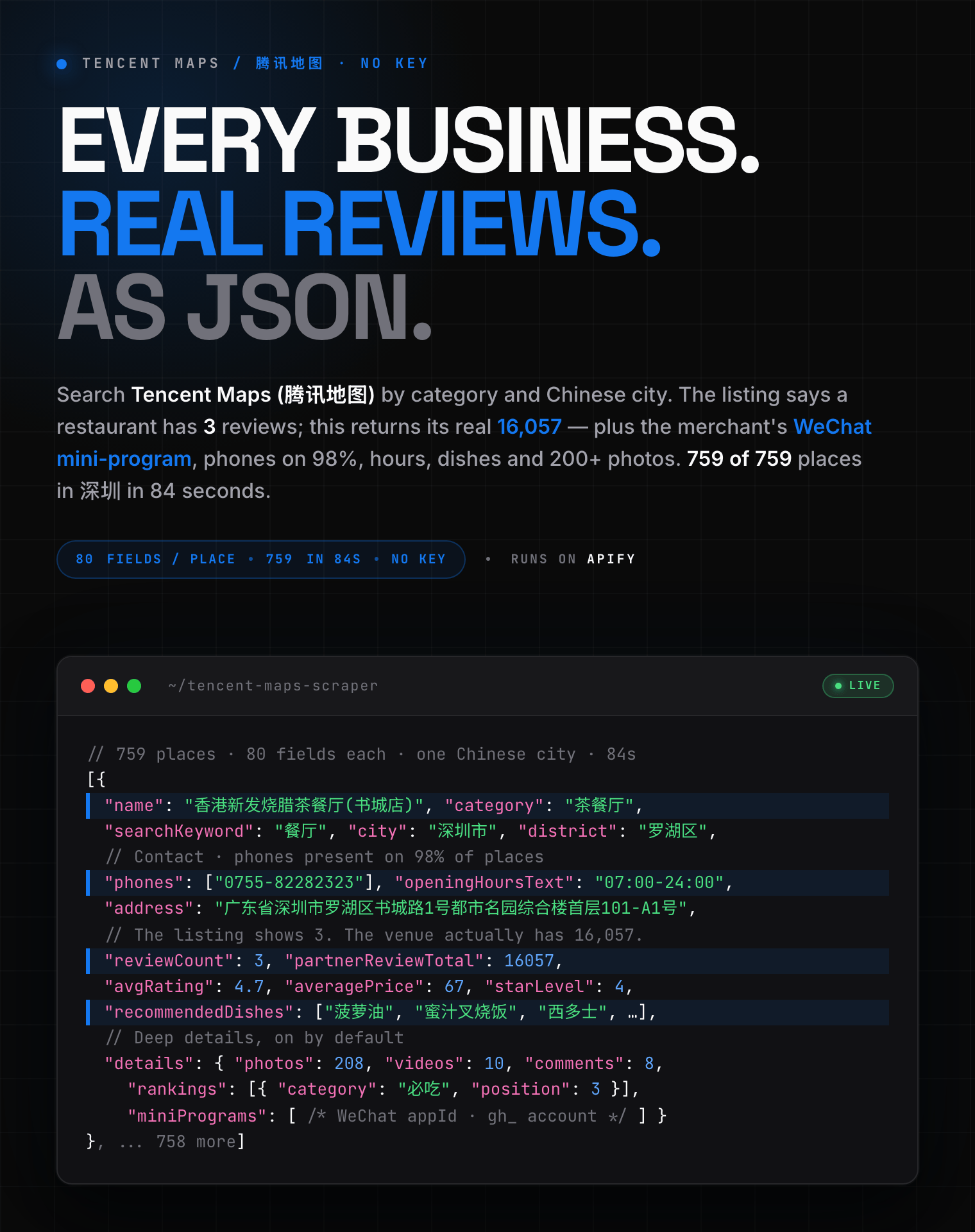
Extract businesses from Tencent Maps (腾讯地图): name, address, phone numbers, opening hours, ratings, prices and real review counts. 80 fields per place, plus WeChat mini-program contacts, 200 photos, review text and dishes. Enter a search term and a Chinese city. CSV, JSON or Excel. No key needed.

- **URL**: https://apify.com/zen-studio/tencent-maps-scraper.md
- **Developed by:** [Zen Studio](https://apify.com/zen-studio) (community)
- **Categories:** Lead generation, Travel
- **Stats:** 3 total users, 2 monthly users, 100.0% runs succeeded, 0 bookmarks
- **User rating**: No ratings yet

## Pricing

from $2.99 / 1,000 places

This Actor is paid per event. You are not charged for the Apify platform usage, but only a fixed price for specific events.
Since this Actor supports Apify Store discounts, the price gets lower the higher subscription plan you have.

Learn more: https://docs.apify.com/actors/running/actors-in-store.md#pay-per-event

## What's an Apify Actor?

Actors are web data automations that power AI and operations. They run on the Apify platform to scrape websites, process data, connect APIs, and automate workflows.
In Batch mode, an Actor accepts a well-defined JSON input, performs an action which can take anything from a few seconds to a few hours,
and optionally produces a well-defined JSON output, datasets with results, or files in key-value store.
In Standby mode, an Actor provides a web server which can be used as a website, API, or an MCP server.
Actors are written with capital "A".

## How to integrate an Actor?

If asked about integration, you help developers integrate Actors into their projects.
You adapt to their stack and deliver integrations that are safe, well-documented, and production-ready.
The best way to integrate Actors is as follows.

- **AI agents and MCP clients** — the [Apify MCP server](https://docs.apify.com/integrations/mcp.md) at `https://mcp.apify.com` (remote, streamable HTTP, OAuth on first use).
- **Agentic workflows and local Actor development** — [Agent Skills](https://apify.com/.well-known/agent-skills/index.json) with the [Apify CLI](https://docs.apify.com/cli/docs.md): `npm install -g apify-cli`, then `apify login`.
- **JavaScript/TypeScript projects** — the official [JS/TS client](https://docs.apify.com/api/client/js/docs.md): `npm install apify-client`.
- **Python projects** — the official [Python client](https://docs.apify.com/api/client/python/docs.md): `pip install apify-client`.
- **Any other language** — the [REST API](https://docs.apify.com/api/v2.md).

For usage examples, see the [API](#api) section below.

For more details, see Apify documentation as [Markdown index](https://docs.apify.com/llms.txt) and [Markdown full-text](https://docs.apify.com/llms-full.txt).

# README

## Tencent Maps Scraper | 腾讯地图 QQ Maps: China Business Data, Real Review Counts & WeChat Contacts (2026)

<blockquote style="margin:0 0 16px;border-left:5px solid #1478F0;background:#F5F9FF;padding:16px 20px">
<span style="font-size:19px;font-weight:700;color:#1C1917">A whole Chinese city in 84 seconds — with the review counts and WeChat contacts the listing hides.</span><br>
<span style="font-size:14px;color:#44403C">Measured, not estimated: <strong style="color:#1C1917">759 of the 759 restaurants</strong> Tencent publishes for 深圳, 80 fields each. No key, no account.</span>
</blockquote>

<a href="https://console.apify.com/actors/m6N528dGvfD6p2iLa/input"><img src="https://api.apify.com/v2/key-value-stores/pJ7iaZsTFhR3k9tjV/records/tencent-maps-scraper-hero.png" alt="Tencent Maps (腾讯地图 QQ Maps) business scraper: name, address, phone, real review totals, WeChat mini-program contact, opening hours and photos as structured JSON" style="max-width:100%"></a>

<table>
<tr><td colspan="2" style="padding:10px 14px;background:#1478F0;border:none;border-radius:4px 4px 0 0"><span style="color:#FFFFFF;font-size:14px;font-weight:700">What you get that a plain listing scrape misses</span></td></tr>
<tr>
<td style="padding:9px 12px;border:1px solid #E7E5E4;border-top:none;background:#F5F9FF;width:34%"><span style="color:#1C1917;font-weight:700">💬 The real review count</span></td>
<td style="padding:9px 12px;border:1px solid #E7E5E4;border-top:none;border-left:none;background:#F5F9FF"><span style="color:#44403C">One restaurant shows <strong style="color:#1C1917">3</strong> on the listing and <strong style="color:#1C1917">16,057</strong> here</span></td>
</tr>
<tr>
<td style="padding:9px 12px;border:1px solid #E7E5E4;border-top:none;background:#EAF2FE"><span style="color:#1C1917;font-weight:700">💚 WeChat mini-program</span></td>
<td style="padding:9px 12px;border:1px solid #E7E5E4;border-top:none;border-left:none;background:#EAF2FE"><span style="color:#44403C">The merchant's own account — in China, the direct line</span></td>
</tr>
<tr>
<td style="padding:9px 12px;border:1px solid #E7E5E4;border-top:none;background:#F5F9FF"><span style="color:#1C1917;font-weight:700">📞 Phones on 98%</span></td>
<td style="padding:9px 12px;border:1px solid #E7E5E4;border-top:none;border-left:none;background:#F5F9FF"><span style="color:#44403C">Plus opening hours as structured per-weekday data</span></td>
</tr>
<tr>
<td style="padding:9px 12px;border:1px solid #E7E5E4;border-top:none;background:#EAF2FE"><span style="color:#1C1917;font-weight:700">📸 200 photos & videos</span></td>
<td style="padding:9px 12px;border:1px solid #E7E5E4;border-top:none;border-left:none;background:#EAF2FE"><span style="color:#44403C">Review text with authors, ranked dishes with prices</span></td>
</tr>
<tr>
<td style="padding:9px 12px;border:1px solid #E7E5E4;border-top:none;background:#F5F9FF;border-radius:0 0 0 4px"><span style="color:#1C1917;font-weight:700">🏨 Per category</span></td>
<td style="padding:9px 12px;border:1px solid #E7E5E4;border-top:none;border-left:none;background:#F5F9FF;border-radius:0 0 4px 0"><span style="color:#44403C">Hotel rates from five booking sites · fuel prices · ticket prices</span></td>
</tr>
</table>

Tencent Maps is the map behind every WeChat location pin, and its listings come from a
different supplier than Baidu or Amap — so this **complements** your China data rather than
duplicating it. Deep details are **on by default**; switch them off for a fast, cheap list of
names, addresses and phones.

<table>
<tr>
<td colspan="5" style="padding:10px 14px;background:#1478F0;border:none;border-radius:4px 4px 0 0">
<span style="color:#FAFAF9;font-size:14px;font-weight:700;letter-spacing:0.5px">Zen Studio Maps &amp; Places</span>
<span style="color:#D6E6FC;font-size:13px">&nbsp;&nbsp;&bull;&nbsp;&nbsp;Local business data from every major regional map</span>
</td>
</tr>
<tr>
<td style="padding:12px 16px;border:1px solid #E7E5E4;border-radius:0 0 0 4px;background:#D6E6FC;border-right:none;border-top:none;vertical-align:top;width:20%">
<a href="https://apify.com/zen-studio/tencent-maps-scraper" style="color:#1478F0;text-decoration:none;font-weight:700;font-size:14px">Tencent Maps</a><br>
<span style="color:#1478F0;font-size:12px;font-weight:600">&#10148; You are here</span>
</td>
<td style="padding:12px 16px;border:1px solid #E7E5E4;background:#EAF2FE;border-right:none;border-top:none;vertical-align:top;width:20%">
<img src="https://apify-image-uploads-prod.s3.us-east-1.amazonaws.com/NWYsOG96fMDy8ycdf-actor-EgDf0I1X8lNhCes2E-kpZCa398Jg-baidu-maps-scraper-logo.png" width="24" height="24" style="vertical-align:middle"> &nbsp;<a href="https://apify.com/zen-studio/baidu-maps-scraper" style="color:#1C1917;text-decoration:none;font-weight:700;font-size:14px">Baidu Maps</a><br>
<span style="color:#78716C;font-size:12px">China, 百度地图</span>
</td>
<td style="padding:12px 16px;border:1px solid #E7E5E4;background:#EAF2FE;border-right:none;border-top:none;vertical-align:top;width:20%">
<img src="https://apify-image-uploads-prod.s3.us-east-1.amazonaws.com/NWYsOG96fMDy8ycdf-actor-3rGXyh4kWAdtrE9vG-bsQxzBhXPT-amap-scraper-logo.jpg" width="24" height="24" style="vertical-align:middle"> &nbsp;<a href="https://apify.com/zen-studio/amap-places-scraper" style="color:#1C1917;text-decoration:none;font-weight:700;font-size:14px">Amap Places</a><br>
<span style="color:#78716C;font-size:12px">China, Gaode 高德</span>
</td>
<td style="padding:12px 16px;border:1px solid #E7E5E4;background:#EAF2FE;border-right:none;border-top:none;vertical-align:top;width:20%">
<img src="https://apify-image-uploads-prod.s3.us-east-1.amazonaws.com/NWYsOG96fMDy8ycdf-actor-vBUd2ObzJUemitHHP-IYaavrd0t8-google-maps-directions-api-logo.png" width="24" height="24" style="vertical-align:middle"> &nbsp;<a href="https://apify.com/zen-studio/google-maps-scraper" style="color:#1C1917;text-decoration:none;font-weight:700;font-size:14px">Google Maps</a><br>
<span style="color:#78716C;font-size:12px">Global places</span>
</td>
<td style="padding:12px 16px;border:1px solid #E7E5E4;border-radius:0 0 4px 0;background:#EAF2FE;border-top:none;vertical-align:top;width:20%">
<img src="https://apify-image-uploads-prod.s3.us-east-1.amazonaws.com/NWYsOG96fMDy8ycdf-actor-05ZMu4ciljVfMpct7-5SbFiiNTep-mafengwo-scraper-logo.jpg" width="24" height="24" style="vertical-align:middle"> &nbsp;<a href="https://apify.com/zen-studio/mafengwo-poi-scraper" style="color:#1C1917;text-decoration:none;font-weight:700;font-size:14px">Mafengwo Places</a><br>
<span style="color:#78716C;font-size:12px">Attractions &amp; tickets</span>
</td>
</tr>
</table>

### How to scrape Tencent Maps

1. Open the **Input** tab of the Tencent Maps Scraper.
2. Enter one or more **search terms**, for example `餐厅`, `咖啡` or `酒店`.
3. Enter one or more **cities** in Chinese, for example `深圳`, `北京`, `上海`.
4. Optionally set **Maximum places**, or leave it empty to collect everything available.
5. **Include deep place details** is already on. Switch it off if you only need names,
   addresses and phone numbers.
6. Click **Start** and export the results as JSON, CSV, Excel or HTML.

#### What the deep details are actually for

Two things in there are hard to get anywhere else:

- **The real review numbers.** The listing itself shows how many reviews were *attached*,
  usually a handful. Deep details carry 大众点评 Dianping's own tally for the same venue —
  16,057 where the listing said 3 — along with its average price and opening hours.
- **A WeChat mini-program per business** (`appId` and `gh_` account) on roughly 4 in 10
  places, which is a direct channel to the merchant.

Plus ~200 photos, short videos, review text with authors, ranked dishes with prices,
leaderboard placements, group-buy vouchers, and category extras: live rates from five
booking sites plus a two-week nightly calendar for hotels, fuel prices for filling stations.

#### Example input

```json
{
  "keywords": ["咖啡"],
  "cities": ["深圳"],
  "maxResults": 100,
  "includeDeepDetails": false
}
```

#### Example output

```json
{
  "uid": "6057367236966835053",
  "name": "SAANCI山池咖啡(One Avenue卓悦中心店)",
  "category": "咖啡厅",
  "categoryPath": [
    "娱乐休闲",
    "咖啡厅"
  ],
  "categoryCode": "161300",
  "address": "广东省深圳市福田区深南大道2005号One Avenue卓悦中心F1",
  "latitude": 22.538312,
  "longitude": 114.064319,
  "navLatitude": null,
  "navLongitude": null,
  "phones": [
    "18148556922"
  ],
  "avgRating": 4.4,
  "starLevel": 88,
  "commentLevel": 90.0,
  "reviewCount": 3,
  "averagePrice": 44,
  "openingHoursText": "07:30-22:00",
  "openingHours": {
    "default": [
      {
        "open": "07:30",
        "close": "22:00"
      }
    ]
  },
  "recommendedDishes": [
    "手冲咖啡",
    "山姜",
    "白桃荔枝",
    "柚子白茶",
    "桃酥",
    "龟苓膏鸳鸯",
    "晚香梨",
    "佛手柑抹茶芝士",
    "冬瓜",
    "玫珑瓜茶Dirty"
  ],
  "businessStatus": "正常商户",
  "brandId": "2056439",
  "specialties": [
    "明厨亮灶"
  ],
  "heat": 13036,
  "district": "福田区",
  "districtCode": "440304",
  "city": "深圳市",
  "cityCode": "440300",
  "province": "广东省",
  "provinceCode": "440000",
  "districtCcode": "1992",
  "cityCcode": "1990",
  "provinceCcode": "1965",
  "floorName": "F1",
  "isIndoor": true,
  "indoorCategory": "咖啡厅",
  "buildingId": "4403001398438",
  "masterId": "13179460731305633188",
  "indoorId": "345867836991179551",
  "photoId": null,
  "logoUrl": null,
  "reliability": null,
  "hasGroupBuy": false,
  "tags": [],
  "tips": [],
  "distanceMeters": null,
  "clickCounts": {
    "all_click_180_nav": 130,
    "all_click_180_search": 167,
    "all_click_180_sg": 160,
    "all_click_180_wechat_friend": 426,
    "all_click_180_wechat_send": 7104,
    "all_click_90_nav": 81,
    "city_rank_id": 4386,
    "city_rank_id_90_nav": 15581,
    "rank_id": 107269,
    "top_rate": 0.2
  },
  "dataUpdatedAt": "2024-03-18T12:10:39+00:00",
  "regionName": "福田区",
  "introduction": null,
  "merchantName": "SAANCI山池咖啡(卓悦中心店)",
  "merchantAddress": "广东省深圳市福田区福田街道深南大道oneavenue卓悦中心北区L1层N130",
  "merchantLatitude": 22.538312,
  "merchantLongitude": 114.064319,
  "floorAreaSqm": 0.0,
  "venueBounds": null,
  "partnerReviewCount": 3,
  "partnerName": "大众点评网",
  "partnerKey": "dianping_hezuo",
  "mapCommentCount": null,
  "partnerUrls": [],
  "poiType": null,
  "categoryName": null,
  "postcode": null,
  "specialRecommendation": null,
  "contentScore": 49,
  "recallTags": [
    "test1",
    "test2"
  ],
  "searchInfo": {
    "recommend_food_tag": "白桃荔枝:茶杏子拿铁:玫珑瓜茶dirty:浅烘美式 茶杏子:熔岩蛋糕:山姜:野肉桂:dirty:萨拉米包萨:青李"
  },
  "partnerSources": [
    {
      "bid": "",
      "bname": "",
      "m_url": "",
      "name": "lbs_rich",
      "p_url": "",
      "rich_category": "",
      "rich_source": "lbs_rich"
    },
    {
      "bid": "",
      "bname": "",
      "m_url": "",
      "name": "user.pp",
      "p_url": "",
      "rich_category": "rich.miniapp_info",
      "rich_source": "user.pp"
    },
    {
      "bid": "",
      "bname": "",
      "m_url": "",
      "name": "user_xgc_auto",
      "p_url": "",
      "rich_category": "rich.miniapp_info",
      "rich_source": "user_xgc_auto"
    },
    {
      "bid": "wx8ec895c418805e8e+21963",
      "bname": "",
      "m_url": "",
      "name": "op_wx_app",
      "p_url": "",
      "rich_category": "",
      "rich_source": "op_wx_app"
    },
    {
      "bid": "bCF9_PLB9R4YeWStO5kBZA",
      "bname": "",
      "m_url": "",
      "name": "点评",
      "p_url": "",
      "rich_category": "",
      "rich_source": "dianping"
    },
    {
      "bid": "B0HRF92WJ2",
      "bname": "",
      "m_url": "",
      "name": "gambol",
      "p_url": "",
      "rich_category": "",
      "rich_source": "gambol"
    },
    {
      "bid": "",
      "bname": "",
      "m_url": "",
      "name": "ai_poi_question",
      "p_url": "",
      "rich_category": "",
      "rich_source": "ai_poi_question"
    },
    {
      "bid": "bCF9_PLB9R4YeWStO5kBZA",
      "bname": "",
      "m_url": "",
      "name": "meituan_groupbuy",
      "p_url": "",
      "rich_category": "rich.tuangou",
      "rich_source": "meituan_groupbuy"
    },
    {
      "bid": "",
      "bname": "",
      "m_url": "",
      "name": "indoor_info_dig",
      "p_url": "",
      "rich_category": "",
      "rich_source": "indoor_info_dig"
    },
    {
      "bid": "",
      "bname": "",
      "m_url": "",
      "name": "wechat_channels_digpic",
      "p_url": "",
      "rich_category": "",
      "rich_source": "wechat_channels_digpic"
    }
  ],
  "partnerCommon": {
    "rich_category1": "rich.restaurant",
    "rich_category2": "娱乐休闲:咖啡厅",
    "rich_source": "lbs_rich"
  },
  "rankingSignals": {
    "ranktp": 0.872574,
    "rankep": 0.0,
    "rankqp": 0.0,
    "popularityLevel": 99.0,
    "sourceHeat": 300.0,
    "crossRank": 200.0,
    "relevance": 0.200000003,
    "qqClicks": 0.0
  },
  "sourceExtras": {
    "detail": 1
  },
  "sourceCategory": "娱乐休闲:咖啡厅",
  "sourceName": "lbs_rich",
  "sourceReviewUrl": null,
  "sourceUrl": "https://map.qq.com/m/detail/poi/poid=6057367236966835053",
  "searchKeyword": "咖啡",
  "searchScope": "深圳市",
  "scrapedAt": "2026-08-26T15:34:22+00:00"
}
```

With **Include deep place details** switched on, each row also carries a `details` object:

```json
"details": {
  "photoCount": 334,
  "photos": [
    { "url": "https://multimedia.map.qq.com/...", "category": "菜品",
      "source": "dianping", "width": 4167, "height": 3125, "score": 5 }
  ],
  "headPhoto": { "url": "https://multimedia.map.qq.com/...", "category": "海报" },
  "videos": [ { "desc": "...", "cover_url": "...", "fav_count": 128 } ],
  "tags": [ { "name": "环境好", "count": 42, "type": "1" } ],
  "aiQuestions": ["有停车位吗?"],
  "comments": [
    { "id": "3096443994581904643", "author": "S***", "authorAvatar": "https://...",
      "rating": 5, "publishedAt": "2026-05-19T08:14:00+00:00", "text": "...",
      "photos": [ { "url": "https://..." } ], "likes": 7,
      "isHighQuality": true, "source": "dianping" }
  ],
  "partnerReviewTotal": 10462,
  "starLevel": 4, "qualityLevel": 1, "commercialCredibility": 3,
  "miniPrograms": [ { "appId": "wx71...", "name": "巴奴毛肚火锅", "services": ["在线点单"] } ],
  "verticals": { "restaurant": { "recommend": { "recommend_menu": [ ... ] } } }
}
```

`partnerReviewTotal` is the review platform's full tally, often in the thousands, while
only a handful of review texts are published. `verticals` carries category-specific data
untouched: ranked dishes with prices and photos for restaurants, live rates from five
booking sites for hotels, fuel prices and facilities for filling stations.

`navLatitude` and `navLongitude` are the entrance point, which is where a driver should be
sent. It differs from the centre point of the venue.

`openingHours` is structured. Places with identical hours every day use a `default` key.
Places that vary by day use Chinese weekday keys (`周一` through `周日`), each holding one
or more open and close spans.

**`reviewCount` is the number of reviews attached to the listing, not the venue's total.**
It is usually a handful. `partnerReviewTotal` is the real tally from the review platform, and
needs deep details switched on. `mapCommentCount` is a third number: comments left on the map
itself.

**Some columns are usually empty.** Every place ships the same field set, so a CSV keeps one
shape across runs, but the source publishes `logoUrl`, `postcode`, `tags`, `distanceMeters`,
`poiType` and a few others as blank for most listings — all of them were empty across a
100-place sample in 深圳. They are kept rather than dropped, because they do fill for some
places and silently discarding data is worse than a blank column.

### Which search terms work best?

**Category words return far more places than brand names.** Tencent groups chain brands and
publishes only a curated selection of each, so a brand search returns a small set however it
is run:

| Search term | Shenzhen | Beijing | Shanghai |
|---|---|---|---|
| 餐厅 (restaurants) | 760 | 926 | 525 |
| 酒店 (hotels) | 754 | 847 | 801 |
| 银行 (banks) | 243 | 59 | 48 |
| 咖啡 (coffee) | 62 | 40 | 62 |
| 星巴克 (Starbucks) | 27 | 7 | 13 |
| 肯德基 (KFC) | 10 | 8 | 1 |

For coffee shops, search `咖啡` rather than `星巴克`. To find one chain's branches, search the
category and filter the results by name.

### How do I get photos, reviews and menus?

Switch on **Include deep place details**. Each place then costs one extra request and
returns, typically:

| | typical | max seen |
|---|---|---|
| photos with URLs | 115 | 200 |
| short videos | 8 | 55 |
| visitor tags with counts | 10 | 10 |
| review texts | 5 | 8 |

It also carries, where the place has them: category leaderboard positions
(`"火锅, #12 of 78"`), live group-buy vouchers with price and conditions, the building
footprint as a GeoJSON polygon, a street view reference, and the mini-programs attached to
the business.

**Filling stations** return fuel prices per supplier: one row per channel per fuel grade,
with the supplier named explicitly and station, guiding and discount prices side by side,
plus the service fee. A single station commonly carries a dozen channels.

```json
{ "supplier": "lbs_tuanyou_gas", "brand": "中国石化", "brandType": "联营",
  "fuel": "92#", "stationPrice": 6.62, "guidingPrice": 8.12,
  "discountPrice": 6.40, "serviceFee": 0.15, "hasDiscount": true }
```

Named promotions come with them, on about 70% of stations, with dates, fuel grade,
spend thresholds and the supplier that offers them:

```json
{ "kind": "activity", "name": "超级星期五-八八折活动", "supplier": "lbs_tuanyou_gas",
  "fuel": "92#", "description": "满200元前10升8.3折", "price": 6.42,
  "minSpend": 200, "litreCap": 10, "endsOn": "2999-12-30 00:00:00" }
```

**Hotels** return live rates from five booking sites, plus a nightly rate calendar about
two weeks forward:

```json
"rateCalendar": [ { "date": "2026-08-27", "lowestRate": 474 },
                  { "date": "2026-08-28", "lowestRate": 467 } ]
```

**Attractions** return `ticketPrice` where the platform publishes one.

Review texts stay limited because the platform publishes a curated selection rather than
its full corpus. `partnerReviewTotal` tells you how many exist in total. Everything else
scales up considerably, and hotels, which publish no review text on the website at all,
return full details here.

Rows get large with this on: a hotel carrying live rates from five booking sites can reach
250 KB. It is billed separately, so leaving it off costs nothing extra.

### Which cities can I scrape?

Cities must be given in Chinese. `深圳` works, `Shenzhen` does not. Anything that is not a
recognised Chinese city is reported and skipped, so a typo never silently returns results for
the wrong place.

Provinces are not searchable. List the cities you want individually, for example `广州`,
`深圳`, `东莞`. Passing a province name tells you so rather than returning an empty result set.

### How much does it cost to scrape Tencent Maps?

Pay per result: **$3.99 per 1,000 places** on the free plan, dropping to $2.99 per 1,000 on
higher plans.

**Deep place details are on by default** and add **$2.00 per 1,000 places**, so a default run
costs $5.99 per 1,000 on the free plan. They are on because the real review totals and the
WeChat contact are most of what makes this data worth having. Switch them off in the input and
you are back to $3.99 for names, addresses, phones, hours and ratings.

A city-wide category search returns 500 to 900 places, so budget roughly $3 to $5 per city
with details on. You are charged for the places you receive, never for the ones that were
searched.

### Integrations and scheduling

Push results straight into Google Sheets, Make, Zapier, Slack or your own webhook from the
**Integrations** tab, or pull them through the Apify API in any language.

For tracking new openings and closures, a **weekly** schedule per city is the useful cadence.
Business listings change slowly, so anything more frequent mostly re-collects identical rows.

How to run the scraper and put it on a schedule (official Apify videos):

https://www.youtube.com/watch?v=1OW8gOqlZbY

https://www.youtube.com/watch?v=1jI7WcVQmwM

### Does Tencent Maps have an API?

Tencent publishes an official mapping API, but it requires a registered Chinese developer
account with real-name verification, applies a daily quota, and exposes a narrower field set
than the public listings do. This actor needs no key, no account and no quota, and returns
the richer public data including recommended dishes, indoor floor data and review text.

### FAQ

**Is the data complete for a city?**
For category searches, usually yes. The actor pages the whole city and, when that comes up
short of the published count, additionally sweeps every district and merges the two. Measured
on 餐厅 in 深圳: **759 of a published 759**, in 84 seconds. A repeat of the same search a day
earlier landed on 749, so expect the high nineties to all of it, with a little movement
between runs because the index itself shifts. For brand searches, no, and no scraper can be,
because the grouping happens before the data is published.

**Why do some places have no phone number or price?**
Not every listing carries every field. Banks and hotels in particular often have no price
level. Fields that are genuinely absent come back as `null` rather than as blanks or
placeholder text.

**Can I get places near a point, or inside a radius?**
Not currently. Searches are scoped to a city.

**Can I export to CSV or Excel?**
Yes. Every run's dataset downloads as JSON, CSV, Excel, XML or HTML, and is reachable through
the Apify API.

**Something looks wrong. Where do I report it?**
Open the **Issues** tab on this actor. For a custom variant or a different Chinese platform,
contact us through the Apify Store profile.

#### Copy to your AI assistant

```
Apify Actor zen-studio/tencent-maps-scraper extracts business listings from Tencent Maps (腾讯地图) across mainland China: name, address, coordinates, entrance point, phone numbers, structured opening hours, rating, review count, average price, recommended dishes, brand, indoor floor data and the full administrative path, plus optional review text. Input is a list of search terms (Chinese category words work best) and a list of Chinese city names. Call it with the Apify client: client.actor("zen-studio/tencent-maps-scraper").call(run_input={"keywords": ["咖啡"], "cities": ["深圳"], "maxResults": 100}). Full input schema and output fields: https://api.apify.com/v2/acts/zen-studio~tencent-maps-scraper/builds/default. Get a token at https://console.apify.com/settings/integrations.
```

### Is it legal to scrape Tencent Maps?

The actor collects only publicly visible business listings, the same information any visitor
to the site can see. It collects no personal data beyond the pseudonymised author initials
attached to public reviews. You are responsible for how you use the output, including
compliance with GDPR and PIPL where they apply to you.

### Related actors

Same team, same output shape, so results join on name and coordinates:

- [Baidu Maps Scraper](https://apify.com/zen-studio/baidu-maps-scraper) — the other big China
  map, 百度地图. Different data supplier, so running both widens coverage rather than repeating it.
- [Amap Places Scraper](https://apify.com/zen-studio/amap-places-scraper) — Gaode 高德地图,
  the third of China's big three.
- [Google Maps Scraper](https://apify.com/zen-studio/google-maps-scraper) — global places,
  for the markets outside mainland China.
- [Ctrip Hotel Prices](https://apify.com/zen-studio/ctrip-hotel-prices-scraper) and
  [Ctrip Hotel Reviews](https://apify.com/zen-studio/ctrip-hotel-reviews-scraper) — when the
  hotels here need rates and guest reviews rather than listings.
- [WeChat Official Account Scraper](https://apify.com/zen-studio/wechat-official-account-scraper)
  — follow the WeChat accounts this actor surfaces in `details.miniPrograms`.

***

*Tencent Maps scraper for China business data: extract listings, addresses, phone numbers,
opening hours, ratings, prices and reviews from 腾讯地图 without an API key.*

# Actor input Schema

## `keywords` (type: `array`):

What to look for. Category words such as <b>餐厅</b> (restaurants), <b>咖啡</b> (coffee) or <b>酒店</b> (hotels) return far more places than brand names, brands are grouped by the source and only a curated selection is shown.

## `cities` (type: `array`):

Chinese city names, for example <b>深圳</b>, <b>北京</b>, <b>上海</b>. English names are not recognised.

## `maxResults` (type: `integer`):

Stop after this many places in total. Leave empty to collect everything available, which is usually 500 to 900 for a category word in a large city.

## `includeDeepDetails` (type: `boolean`):

Leave on unless you only need names, addresses and phone numbers.

## Actor input object example

```json
{
  "keywords": [
    "咖啡"
  ],
  "cities": [
    "深圳"
  ],
  "maxResults": 100,
  "includeDeepDetails": true
}
```

# Actor output Schema

## `results` (type: `string`):

No description

# API

You can run this Actor programmatically using our API. Below are code examples in JavaScript, Python, and CLI, as well as the OpenAPI specification and MCP server setup.

## JavaScript example

```javascript
import { ApifyClient } from 'apify-client';

// Initialize the ApifyClient with your Apify API token
// Replace the '<YOUR_API_TOKEN>' with your token
const client = new ApifyClient({
    token: '<YOUR_API_TOKEN>',
});

// Prepare Actor input
const input = {
    "keywords": [
        "咖啡"
    ],
    "cities": [
        "深圳"
    ],
    "maxResults": 100
};

// Run the Actor and wait for it to finish
const run = await client.actor("zen-studio/tencent-maps-scraper").call(input);

// Fetch and print Actor results from the run's dataset (if any)
console.log('Results from dataset');
console.log(`💾 Check your data here: https://console.apify.com/storage/datasets/${run.defaultDatasetId}`);
const { items } = await client.dataset(run.defaultDatasetId).listItems();
items.forEach((item) => {
    console.dir(item);
});

// 📚 Want to learn more 📖? Go to → https://docs.apify.com/api/client/js/docs

```

## Python example

```python
from apify_client import ApifyClient

# Initialize the ApifyClient with your Apify API token
# Replace '<YOUR_API_TOKEN>' with your token.
client = ApifyClient("<YOUR_API_TOKEN>")

# Prepare the Actor input
run_input = {
    "keywords": ["咖啡"],
    "cities": ["深圳"],
    "maxResults": 100,
}

# Run the Actor and wait for it to finish
run = client.actor("zen-studio/tencent-maps-scraper").call(run_input=run_input)

# Fetch and print Actor results from the run's dataset (if there are any)
print(f"💾 Check your data here: https://console.apify.com/storage/datasets/{run.default_dataset_id}")
for item in client.dataset(run.default_dataset_id).iterate_items():
    print(item)

# 📚 Want to learn more 📖? Go to → https://docs.apify.com/api/client/python/docs/quick-start

```

## CLI example

```bash
echo '{
  "keywords": [
    "咖啡"
  ],
  "cities": [
    "深圳"
  ],
  "maxResults": 100
}' |
apify call zen-studio/tencent-maps-scraper --silent --output-dataset

```

## MCP server setup

```json
{
    "mcpServers": {
        "apify": {
            "type": "http",
            "url": "https://mcp.apify.com/?tools=fetch-actor-details,zen-studio/tencent-maps-scraper"
        }
    }
}

```

The hosted server signs you in with OAuth on first connect, so no API token belongs in this config. Clients without OAuth support can send an `Authorization: Bearer <APIFY_API_TOKEN>` header instead, using a token from API & Integrations in Apify Console (https://console.apify.com/settings/integrations).

## OpenAPI specification

Download the OpenAPI definition: https://api.apify.com/v2/actors/m6N528dGvfD6p2iLa/builds/SvB9dLqWRpu9jFKbR/openapi.json