

Tencent Maps (腾讯地图) Scraper - QQ Maps, Contacts & Reviews
Pricing
from $2.99 / 1,000 places
Tencent Maps (腾讯地图) Scraper - QQ Maps, Contacts & Reviews
Extract businesses from Tencent Maps (腾讯地图): name, address, phone numbers, opening hours, ratings, prices and real review counts. 80 fields per place, plus WeChat mini-program contacts, 200 photos, review text and dishes. Enter a search term and a Chinese city. CSV, JSON or Excel. No key needed.
Pricing
from $2.99 / 1,000 places
Rating
0.0
(0)
Developer

Zen Studio
Maintained by CommunityActor stats
0
Bookmarked
173
Total users
22
Monthly active users
25 days ago
Last modified
Categories
Share
Tencent Maps Scraper | 腾讯地图 QQ Maps: China Business Data, Real Review Counts & WeChat Contacts (2026)
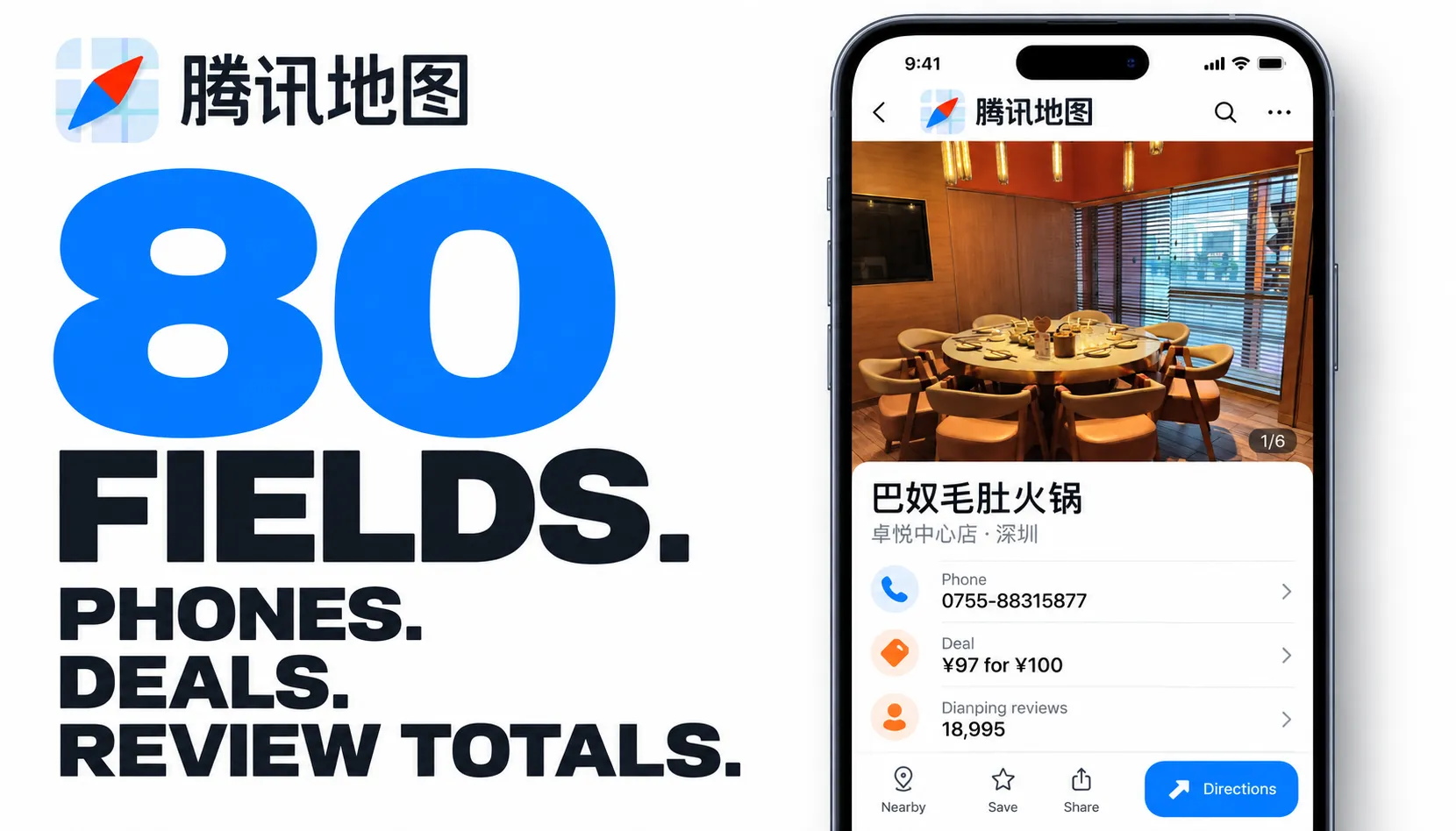
From Zen Studio, creators of Baidu Maps, Amap Places and Apple Maps. Established maps actors for business research and lead generation, from China's major map platforms to global places.
Why choose this actor?
80 fields for business research and outreach. Collect phone numbers, full addresses, opening hours, categories and coordinates. Deep details add priced deals, photos, review text and category-specific information, such as hotel rates or fuel prices. Build prospect lists and compare businesses using more than their names and locations.
See the review total, not just the handful shown in the listing. Get the venue's Dianping review total alongside its rating. For example, a saved restaurant record contains 18,995 total reviews, plus a ¥97 voucher worth ¥100. The actor returns the source's available review sample separately, so the total is not mistaken for the number of review texts collected.
Search across cities without duplicate businesses. Combine Chinese category terms and cities. The actor merges overlapping results and can search districts when city pagination falls short. Where available, attached WeChat mini-programs provide ordering and service links; they may belong to the merchant or a third-party provider.

Quick input
Free trial: Free Apify accounts receive 10 lifetime runs per account, with at most 20 places per run across all search terms and cities. The allowance does not reset. A trial slot is consumed when access is granted, including runs that return no places or are interrupted. Previously unrestricted runs are not counted retroactively. Upgrade your Apify plan for continued access and larger results. Paying accounts are not subject to these trial limits; requested result limits and run budgets still apply.
Try 20 restaurants in Shenzhen with deep details enabled:
Open actor input to choose your searches. City names must be in Chinese. Export JSON, CSV or Excel; JSON preserves nested deals, media and category details.
Deep details add $2.00 per 1,000 enriched places to the base place charge. They are enabled by default; see current pricing. Fields vary by place and category: the 80-field structure does not mean every field is populated. Email addresses and merchant websites are not provided.
| Zen Studio · Maps & Places | ||||
 Tencent Maps Tencent MapsYou are here |  Baidu Maps Baidu MapsChina businesses |  Amap Places Amap PlacesContacts & details |  Apple Maps Apple MapsGlobal businesses |  Google Maps Google MapsPlaces & reviews |
How to scrape Tencent Maps
- Open the Input tab of the Tencent Maps Scraper.
- Enter one or more search terms, for example
餐厅,咖啡or酒店. - Enter one or more cities in Chinese, for example
深圳,北京,上海. - Optionally set Maximum places. Free accounts are capped at 20; paying accounts may leave it empty to collect everything available within their run budget.
- Include deep place details is already on. Switch it off if you only need names, addresses and phone numbers.
- Click Start and export the results as JSON, CSV, Excel or HTML.
What the deep details are actually for
Two things in there are hard to get anywhere else:
- The real review numbers. The listing itself shows how many reviews were attached, usually a handful. Deep details carry 大众点评 Dianping's own tally for the same venue — 16,057 where the listing said 3 — along with its average price and opening hours.
- Attached WeChat mini-programs (
appIdandgh_account), where published. These may belong to the merchant or to a third-party ordering or payment provider.
Plus ~200 photos, short videos, review text with authors, ranked dishes with prices, leaderboard placements, group-buy vouchers, and category extras: live rates from five booking sites plus a two-week nightly calendar for hotels, fuel prices for filling stations.
Example input
Example output
With Include deep place details switched on, each row also carries a details object:
partnerReviewTotal is the review platform's full tally, often in the thousands, while
only a handful of review texts are published. verticals carries category-specific data
untouched: ranked dishes with prices and photos for restaurants, live rates from five
booking sites for hotels, fuel prices and facilities for filling stations.
navLatitude and navLongitude are the entrance point, which is where a driver should be
sent. It differs from the centre point of the venue.
openingHours is structured. Places with identical hours every day use a default key.
Places that vary by day use Chinese weekday keys (周一 through 周日), each holding one
or more open and close spans.
reviewCount is the number of reviews attached to the listing, not the venue's total.
It is usually a handful. partnerReviewTotal is the real tally from the review platform, and
needs deep details switched on. mapCommentCount is a third number: comments left on the map
itself.
Some columns are usually empty. Every place ships the same field set, so a CSV keeps one
shape across runs, but the source publishes logoUrl, postcode, tags, distanceMeters,
poiType and a few others as blank for most listings — all of them were empty across a
100-place sample in 深圳. They are kept rather than dropped, because they do fill for some
places and silently discarding data is worse than a blank column.
Which search terms work best?
Category words return far more places than brand names. Tencent groups chain brands and publishes only a curated selection of each, so a brand search returns a small set however it is run:
| Search term | Shenzhen | Beijing | Shanghai |
|---|---|---|---|
| 餐厅 (restaurants) | 760 | 926 | 525 |
| 酒店 (hotels) | 754 | 847 | 801 |
| 银行 (banks) | 243 | 59 | 48 |
| 咖啡 (coffee) | 62 | 40 | 62 |
| 星巴克 (Starbucks) | 27 | 7 | 13 |
| 肯德基 (KFC) | 10 | 8 | 1 |
For coffee shops, search 咖啡 rather than 星巴克. To find one chain's branches, search the
category and filter the results by name.
How do I get photos, reviews and menus?
Switch on Include deep place details. Each place then costs one extra request and returns, typically:
| typical | max seen | |
|---|---|---|
| photos with URLs | 115 | 200 |
| short videos | 8 | 55 |
| visitor tags with counts | 10 | 10 |
| review texts | 5 | 8 |
It also carries, where the place has them: category leaderboard positions
("火锅, #12 of 78"), live group-buy vouchers with price and conditions, the building
footprint as a GeoJSON polygon, a street view reference, and the mini-programs attached to
the business.
Filling stations return fuel prices per supplier: one row per channel per fuel grade, with the supplier named explicitly and station, guiding and discount prices side by side, plus the service fee. A single station commonly carries a dozen channels.
Named promotions come with them, on about 70% of stations, with dates, fuel grade, spend thresholds and the supplier that offers them:
Hotels return live rates from five booking sites, plus a nightly rate calendar about two weeks forward:
Attractions return ticketPrice where the platform publishes one.
Review texts stay limited because the platform publishes a curated selection rather than
its full corpus. partnerReviewTotal tells you how many exist in total. Everything else
scales up considerably, and hotels, which publish no review text on the website at all,
return full details here.
Rows get large with this on: a hotel carrying live rates from five booking sites can reach several hundred KB. It is billed separately, so leaving it off costs nothing extra.
Which cities can I scrape?
Cities must be given in Chinese. 深圳 works, Shenzhen does not. Anything that is not a
recognised Chinese city is reported and skipped, so a typo never silently returns results for
the wrong place.
Provinces are not searchable. List the cities you want individually, for example 广州,
深圳, 东莞. Passing a province name tells you so rather than returning an empty result set.
How much does it cost to scrape Tencent Maps?
Pay per result: $3.99 per 1,000 places on the free plan, dropping to $2.99 per 1,000 on higher plans.
Deep place details are on by default and add $2.00 per 1,000 places, so a default run costs $5.99 per 1,000 on the free plan. They are on because the real review totals and the attached mini-programs are useful additions to the place record. Switch them off in the input and you are back to $3.99 for names, addresses, phones, hours and ratings.
A city-wide category search returns 500 to 900 places, so budget roughly $3 to $5 per city with details on. You are charged for the places you receive, never for the ones that were searched.
Integrations and scheduling
Push results straight into Google Sheets, Make, Zapier, Slack or your own webhook from the Integrations tab, or pull them through the Apify API in any language.
For tracking new openings and closures, a weekly schedule per city is the useful cadence. Business listings change slowly, so anything more frequent mostly re-collects identical rows.
How to run the scraper and put it on a schedule (official Apify videos):
Does Tencent Maps have an API?
Tencent publishes an official mapping API, but it requires a registered Chinese developer account with real-name verification, applies a daily quota, and exposes a narrower field set than the public listings do. This actor needs no key, no account and no quota, and returns the richer public data including recommended dishes, indoor floor data and review text.
FAQ
Is the data complete for a city? For category searches, usually yes. The actor pages the whole city and, when that comes up short of the published count, additionally sweeps every district and merges the two. Measured on 餐厅 in 深圳: 759 of a published 759, in 84 seconds. A repeat of the same search a day earlier landed on 749, so expect the high nineties to all of it, with a little movement between runs because the index itself shifts. For brand searches, no, and no scraper can be, because the grouping happens before the data is published.
Why do some places have no phone number or price?
Not every listing carries every field. Banks and hotels in particular often have no price
level. Fields that are genuinely absent come back as null rather than as blanks or
placeholder text.
Can I get places near a point, or inside a radius? Not currently. Searches are scoped to a city.
Can I export to CSV or Excel? Yes. Every run's dataset downloads as JSON, CSV, Excel, XML or HTML, and is reachable through the Apify API.
Something looks wrong. Where do I report it? Open the Issues tab on this actor. For a custom variant or a different Chinese platform, contact us through the Apify Store profile.
Copy to your AI assistant
Is it legal to scrape Tencent Maps?
The actor collects only publicly visible business listings, the same information any visitor to the site can see. It collects no personal data beyond the pseudonymised author initials attached to public reviews. You are responsible for how you use the output, including compliance with GDPR and PIPL where they apply to you.
Related actors
More maps and travel actors from the same team:
- Baidu Maps Scraper — the other big China map, 百度地图. Different data supplier, so running both widens coverage rather than repeating it.
- Amap Places Scraper — Gaode 高德地图, the third of China's big three.
- Google Maps Scraper — global places, for the markets outside mainland China.
- Ctrip Hotel Prices and Ctrip Hotel Reviews — when the hotels here need rates and guest reviews rather than listings.
- WeChat Official Account Scraper — collect articles from WeChat Official Accounts. These differ from the mini-programs attached to map listings.
Tencent Maps scraper for China business data: extract listings, addresses, phone numbers, opening hours, ratings, prices and reviews from 腾讯地图 without an API key.


![Douyin Scraper 抖音 [Only $3] Search, Videos, Comments & Profiles avatar](https://images.apifyusercontent.com/1im1_sLERdEvEfOujukYQc5gCJ24WN_ZIt7yM-MIwBc/rs:fill:76:76/cb:1/aHR0cHM6Ly9hcGlmeS1pbWFnZS11cGxvYWRzLXByb2QuczMudXMtZWFzdC0xLmFtYXpvbmF3cy5jb20vbmduOHZSRVNUa3NleVdFNnAtYWN0b3ItcmhHencwcVBEcnFyZkVicXAtSzNlVmhJczRtaS1Eb3V5aW4tX18tTG9nby5wbmc.webp)

