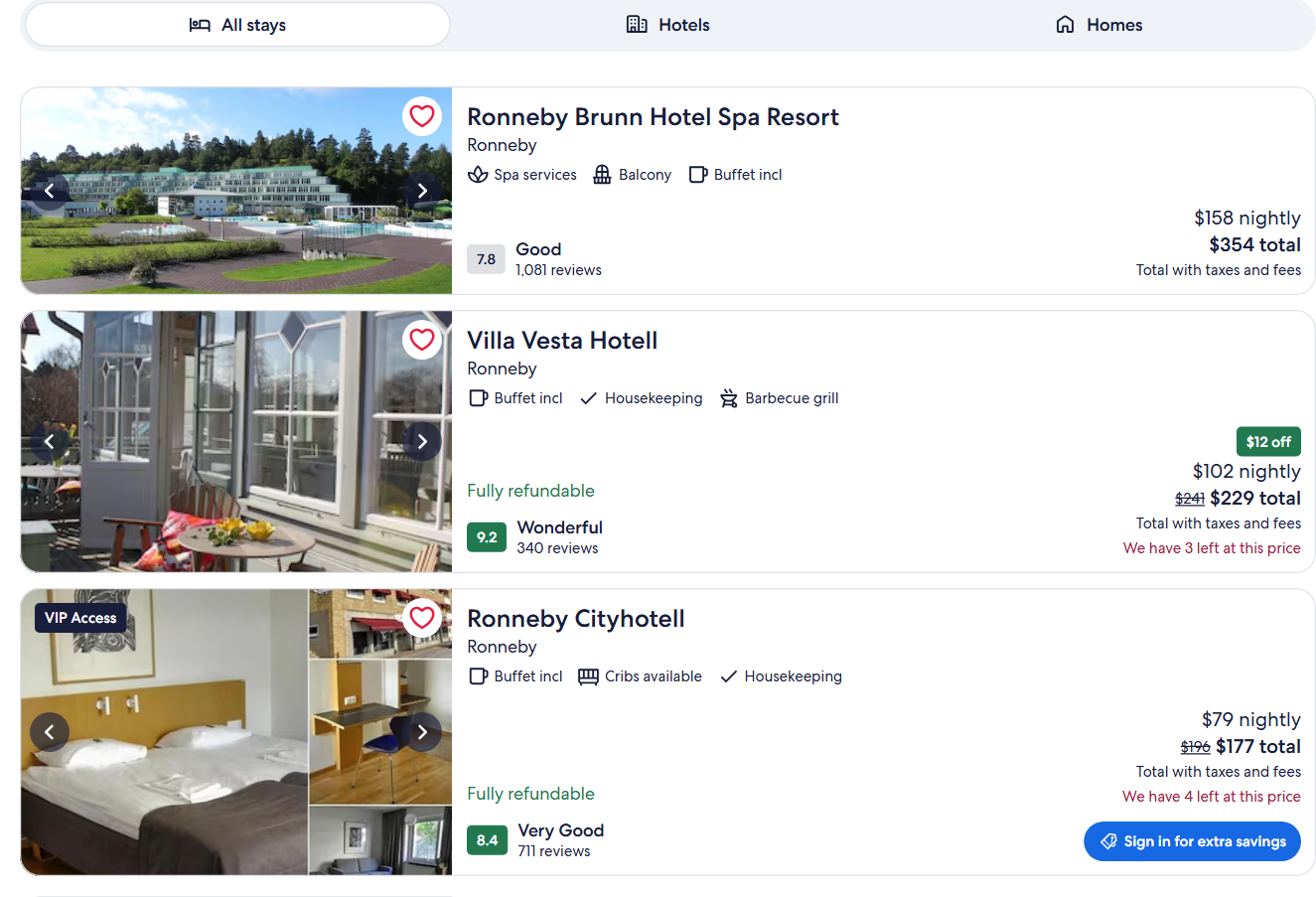
🏨 Hotel name, id (hotelId) and link |
⭐ Star class (starRating) |
💯 Guest score + label (guestRating) |
| 🗣️ Review count |
💲 Price per night (pricePerNight) |
🧾 Stay total, was-price, taxes included |
| 🏷️ Deal badge, member price, VIP Access |
✅ Free cancellation, pay later, rooms left |
📍 Address, postal code, latitude / longitude |
| 🏙️ Neighborhood and search position |
🛎️ Amenities |
🖼️ Photos |
| 💬 Review text, title and score 1-10 |
📅 Review date, stay month, nights |
🧳 Traveled with (partner, family, solo, group, business) |
| 👍 Liked / 👎 disliked topics |
🏢 Hotel response and its date |
🌐 Review language (Expedia's mark) |
| 📊 Category scores + rating histogram |
🤖 Expedia's AI review summary |
🛏️ Rooms and rates for your dates |
On a 100-hotel Lisbon run every row had the name, link, star class, guest score, review count, nightly price, stay total, neighborhood, amenities, photos, address and coordinates; 62% had a was-price, 51% a deal badge and 23% free cancellation. On a 500-hotel London run 99.2% had a price. On 1,000 reviews every row had the score, date, stay month and nights; 71% had review text, 58% a traveled-with and 86% a hotel response.
### How to scrape Expedia with Expedia & Hotels.com Scraper
1. [Create a free Apify account](https://console.apify.com/sign-up) - $5 of monthly credit, no card needed.
2. Open [Expedia & Hotels.com Scraper](https://apify.com/topapi/expedia-hotels-scraper) and click **Try for free**.
3. Type destinations into **Destinations** (for hotel rows) or paste hotel links, ids or names (for their reviews).
4. Set your dates, guests and filters, and **Max hotels per destination** / **Max reviews per hotel**.
5. Click **Start**. Rows stream into the dataset as each page is read.
6. Open the **Storage** tab and **Export** as JSON, CSV or Excel - or let a schedule run it for you.
### ⬇️ Input
| Parameter | Type | Description |
|---|---|---|
| **🔍 What to scrape** | | |
| `mode` | Select | `auto` (default): destinations give hotel rows, hotels give their reviews. `hotels`, `reviews`, `hotelsAndReviews` force one or both. |
| `locations` | List | Destinations as you would type them on Expedia: `"Lisbon"`, `"Times Square, New York"`, an airport (`"Heathrow Airport"` or its code `"JFK"`). For a name several places share, add the state or country (`"Dublin, Ireland"`, `"Dublin, Ohio"`); without it the place with its own major airport is used (Dublin -> Dublin, Ireland), and RUN_SUMMARY `notes` list the others with their region ids. |
| `startUrls` | List | Expedia / Hotels.com hotel links (any regional site, also Travelocity, Orbitz, Wotif, CheapTickets, ebookers), Hotel-Search links, `expe.app.link` share links or bare Expedia ids such as `179` (Hotels.com links need the hotel name in them). |
| `hotelNames` | List | Hotel names with their city: `"Four Seasons Hotel Ritz Lisbon"`. |
| `regionIds` | List | Expedia region ids (`regionId=` of a search link). |
| `googleMapsInputs` | List | Google Maps links of hotels; matched by name and position. |
| `site` | Select | Which Expedia site prices the stay. Default `expedia.com` (USD). |
| **🎯 Search filters** (applied by Expedia) | | |
| `checkIn` / `checkOut` | Text | `"2026-12-20"` or relative (`"30 days"`). Default: 30 days out, 2 nights. |
| `adults`, `rooms`, `childrenAges` | Numbers | Guests per room. Default 2 adults, 1 room. |
| `sortBy` | Select | Recommended, price low/high, distance, guest rating, property class. |
| `minPrice` / `maxPrice` | Integer | Nightly price range in the site's currency. |
| `starRatings`, `minGuestRating`, `propertyTypes`, `stayType`, `amenities`, `mealPlans`, `deals` | Select | Expedia's own filter values. |
| `freeCancellation`, `payLater`, `showAvailableOnly` | Boolean | Expedia's refundable / pay-later / availability switches. |
| `propertyName`, `neighborhoodId`, `customFilters` | Text / JSON | Name search, one neighborhood, and more Expedia filters by their id: `accessibility`, `travelerType`, `bedroomFilter`, `hotel_brand`, `neighborhood`, `room_views_group`, `room_amenities_group`, `beach_access_group`, `nearby_activities_group`, `amenities_facilities_group`, or Expedia's ids for the filters above (`star`, `guestRating`, `amenities`, `lodging`, `categorySearch`, `mealPlan`, `paymentType`, `rewards`, `availableFilter`); any other id is ignored with a note in RUN_SUMMARY. |
| **✂️ Refine results** | | |
| `minReviews`, `onlyWithPrice` | | Drop hotels with few reviews or no price. |
| `reviewsFrom` / `reviewsTo`, `minRating` / `maxRating`, `onlyWithText`, `reviewLanguages` | | Review date window (`"2026-01-01"`, or how far back: `"30 days"` = the last 30 days), score band, text-only, languages (matched on `language`; score-only reviews have none, so a language filter drops them). |
| **💬 Reviews** | | |
| `maxReviewsPerHotel` | Integer | Default `50`; `0` = every review Expedia serves. |
| `reviewSort`, `travelerType`, `reviewKeyword` | | Expedia's review order, traveler-type filter and review search. |
| `maxHotelsPerSearch` | Integer | In `reviews` mode, how many top hotels of each destination are read. Default `10`. |
| `includeReviewPhotos`, `includeOwnerResponses`, `includeReviewMarkdown`, `stripPersonalData` | Boolean | Photos and responses on by default; markdown copy for LLM pipelines. `stripPersonalData` (on by default) empties `authorName`, `reviewerName` and `hotelResponseAuthor`, and takes the greeting name, the reviewer's name and the staff name in the sign-off out of `hotelResponse`; a name staff write elsewhere in a reply can remain (turn off `includeOwnerResponses` to leave replies out). |
| **➕ Extra data** | | |
| `includeDetails` | Boolean | Hotel details on each hotel row, charged as **hotel-details** at $0.00095 per hotel. `includeRooms` and `maxPropertyImages` shape it. |
| `ratePositionReport`, `ratePositionSubject` | Boolean / Text | One report row per destination (up to 5 per run), charged as **rate-position-report** at $0.14. |
| **🔁 Monitoring** | | |
| `monitorMode`, `monitorPriceChanges`, `monitorStoreName` | | Only hotel and review rows not delivered by earlier runs; price changes re-delivered. Hotels are remembered per search (destination, dates, guests, filters, sort) and, for hotels you list, per list and stay (dates and guests). Reviews are remembered per hotel, shared by every search and list that uses the same store, so give each schedule its own `monitorStoreName`. The rate-position report is rebuilt and charged on every run. |
| **📦 Output** | | |
| `maxResults` | Integer | Hotels per destination. Default `100`; `0` = all Expedia serves (about 500). Hotels you list (links, ids, names) are not capped: each gets its row. |
| `compact` | Boolean | Core fields only, for AI agents and MCP. |
#### Input JSON
```json
{
"locations": ["Lisbon"],
"checkIn": "2026-12-20",
"checkOut": "2026-12-22",
"adults": 2,
"starRatings": ["4", "5"],
"maxResults": 100
}
```
Reviews of specific hotels:
```json
{
"startUrls": ["https://www.expedia.com/London-Hotels-Strand-Palace-Hotel.h179.Hotel-Information"],
"maxReviewsPerHotel": 500,
"reviewSort": "newest"
}
```
#### Put hotels in the hotel fields, places in Destinations
A destination gives up to **Max hotels per destination** hotel rows; a hotel link, id or name gives that hotel's reviews (or its own row in `hotels` mode, every hotel you list). **Do:** `"locations": ["Lisbon"]` · **Don't:** paste a city into `startUrls` expecting reviews of every hotel - use `mode: "reviews"` with `maxHotelsPerSearch` for that.
For a city name several places share (Dublin, Vienna, Portland), write the state or country: `"Dublin, Ireland"`, `"Portland, Maine"`. Without it the actor takes, every run, the place with its own major airport (Dublin -> Dublin, Ireland; Athens -> Athens, Greece), then the one with the lowest Expedia region id, and names the other places with their region ids in RUN_SUMMARY `notes`. A destination whose matched name does not contain your text gets a note too.
#### Prices follow the site you pick
Each Expedia site prices in its own currency: `expedia.co.uk` gives GBP, `expedia.de` EUR. Setting `currency` on the default site switches to the matching site (EUR uses expedia.ie).
### ⬆️ Output
Every hotel, review and report becomes one dataset item, told apart by `type`. Here is the table view of a run for `Lisbon`:
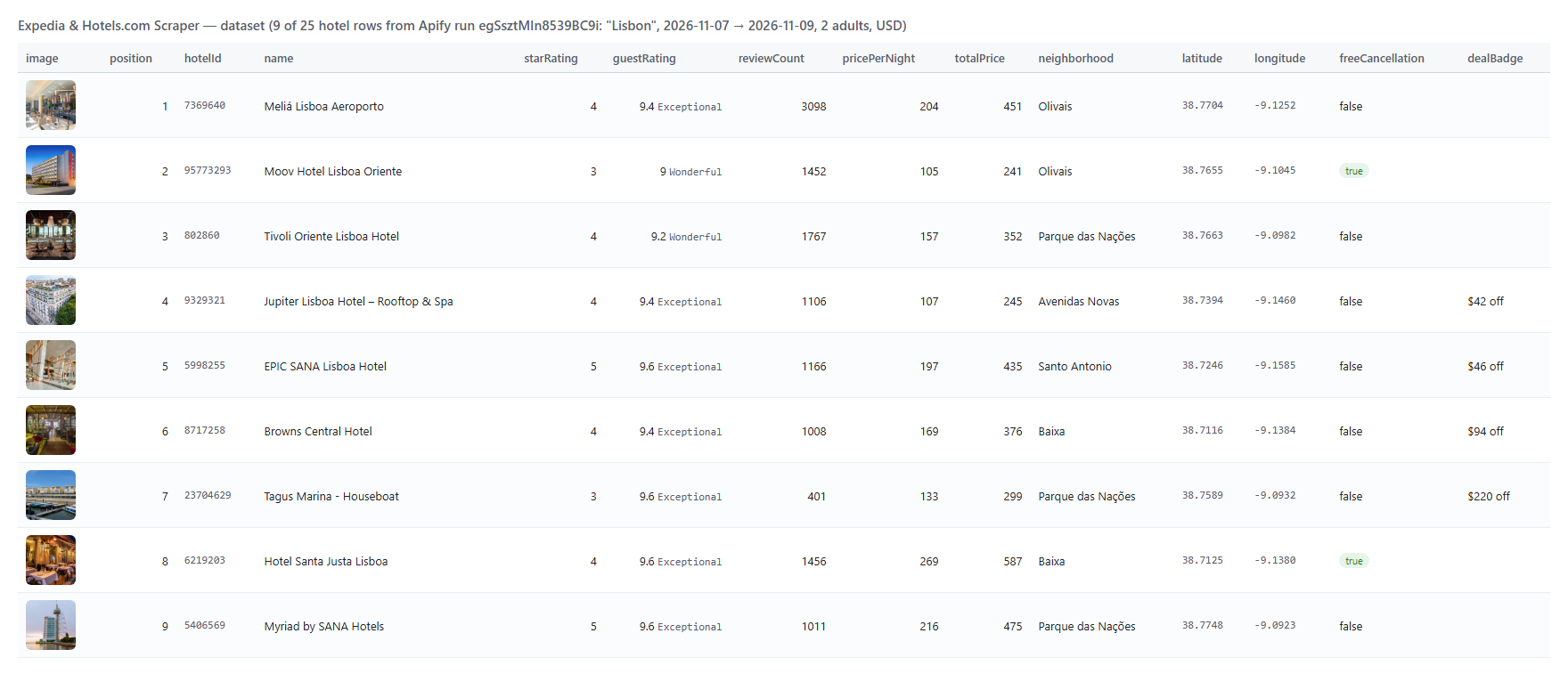 A hotel row as JSON (trimmed):
```json
{
"type": "hotel",
"hotelId": "7369640",
"name": "Meliá Lisboa Aeroporto",
"url": "https://www.expedia.com/Lisbon-District-Hotels-Melia-Lisboa-Aeroporto.h7369640.Hotel-Information?chkin=2026-11-07&chkout=2026-11-09&rm1=a2",
"position": 1,
"starRating": 4,
"guestRating": 9.4,
"guestRatingLabel": "Exceptional",
"reviewCount": 3097,
"pricePerNight": 204,
"totalPrice": 451,
"currency": "USD",
"taxesIncluded": true,
"neighborhood": "Olivais",
"amenities": ["Spa", "Hot tub on site", "Bar and lounge"],
"latitude": 38.770382,
"longitude": -9.125218,
"address": "Aeroporto Internacional de Lisboa, Rua C, Lisbon, 1700-008, PRT",
"checkIn": "2026-11-07",
"checkOut": "2026-11-09"
}
```
A review row (trimmed):
```json
{
"type": "review",
"hotelId": "179",
"hotelName": "Strand Palace Hotel",
"reviewId": "6ac3a2e59a328577543026e2",
"reviewRating": 4,
"reviewRatingLabel": "Poor",
"reviewDate": "2026-10-05T00:00:00.000Z",
"stayDate": "2026-10-01T00:00:00.000Z",
"stayDuration": 2,
"traveledWith": "Traveled with partner",
"reviewText": "Poor Maintenance, Bad Management, Great Location. We arrived around 1 a.m. ...",
"hotelResponse": "Dear Guest, Thank you for sharing your feedback ...",
"hotelResponseDate": "2026-10-06T00:00:00.000Z",
"language": "en",
"hotelOverallRating": 9,
"hotelTotalReviews": 5759
}
```
#### Fields
| Field | Type | What it is | Fill on test run |
|---|---|---|---|
| `hotelId`, `name`, `url`, `position` | string / number | Expedia property id (same on Hotels.com), name, link with your dates, rank in the results | 100% |
| `starRating` | number | Property class | 100% (100 hotels), 99.8% (500) |
| `guestRating`, `guestRatingLabel`, `reviewCount` | number / string | Guest score out of 10, its label, review count | 100% |
| `pricePerNight`, `totalPrice`, `priceText` | number / string | Nightly price and stay total in `currency` | 100% (100), 99.2% (500) |
| `strikeOutPrice`, `dealBadge` | number / string | Was-price and deal badge | 62%, 51% |
| `memberPrice`, `vipAccess`, `freeCancellation`, `payLater`, `roomsLeft` | boolean / number | Expedia's flags on the card | when Expedia shows them |
| `neighborhood`, `amenities`, `image`, `images` | string / array | Card location label, three top amenities, photos | 100% |
| `latitude`, `longitude`, `address`, `street`, `city`, `postalCode`, `countryCode` | number / string | Where the property is | 100% |
| `reviewRating`, `reviewRatingLabel`, `reviewDate`, `stayDate`, `stayDuration` | number / string | Review score, label, dates, nights | 100% (1,000 reviews) |
| `reviewText`, `reviewTitle` | string | What the guest wrote | 71%, rare titles |
| `traveledWith`, `liked`, `disliked` | string / array | Traveler type and topics | 58%, 80%, 4% |
| `hotelResponse`, `hotelResponseDate` | string | The property's reply; with `stripPersonalData` (default) without the greeting name, the reviewer's name or the staff name in the sign-off | 86% (one hotel), 59% (10 hotels) |
| `language`, `photos` | string / array | Language: the one Expedia marks on a review written in another language than the site's (`de`, `fr`, `ja`...), otherwise `en`, the site's language (a few untranslated non-English reviews read `en` too); empty on score-only reviews. Guest photos | 71%, 3-8% |
| `hotelOverallRating`, `hotelTotalReviews`, `hotelCategoryRatings` | number / array | The hotel's score, review count, category scores on every review | 100% |
### How can I use Expedia hotel data?
- 💹 **Revenue managers** - track your hotel's nightly rate and rank against the market every day with monitor mode and the rate-position report.
- 🧭 **OTA and meta-search teams** - compare Expedia prices, deals and refundable rates with other channels for the same dates.
- 🗺️ **Travel analysts** - map supply, star mix and price bands by neighborhood with coordinates on every row.
- ⭐ **Reputation teams** - collect every review and the hotel's responses; filter by traveler type, score band or keyword.
- 🤖 **AI and research teams** - feed review text, liked/disliked topics and markdown copies into an LLM or a RAG index.
- 📈 **Investors and consultants** - benchmark a property's guest score, category scores and pricing before a deal.
### How much does it cost to scrape Expedia?
Expedia & Hotels.com Scraper is pay-per-result with no start fee:
| What | Price |
|---|---:|
| Hotel row (`hotel`) | **$2.30 per 1,000** ($0.0023 each) |
| Review row (`review`) | **$2.00 per 1,000** ($0.002 each) |
| Hotel details add-on (`hotel-details`) | $0.95 per 1,000 hotels |
| Rate-position report (`rate-position-report`) | $0.14 per report |
| Run | Cost |
|---|---:|
| 25 hotels | $0.06 |
| 100 hotels | $0.23 |
| 500 hotels (all of London) | $1.15 |
| 100 hotels with details | $0.33 |
| 1,000 reviews | $2.00 |
| 10 hotels x 100 reviews | $2.00 |
There is nothing else to pay: Apify platform usage is included in these prices. You are charged only for rows written to the dataset. On the default 256 MB a 100-hotel run took 6-9 seconds and 150 reviews of one hotel 4-5 seconds (two runs each).
### Integrations, API, scheduling & MCP
- **Schedules:** run Expedia & Hotels.com Scraper daily from the **Schedules** tab; turn on `monitorMode` to get only new hotels, price changes and new reviews of the hotels you follow.
- **Webhooks:** fire a URL when a run finishes - push rows to your database, Slack or a sheet.
- **No-code:** Make, Zapier, n8n, Google Sheets, Airtable, Slack via [Apify integrations](https://docs.apify.com/integrations).
- **API:** call it from Node.js or Python with `apify-client` - code on the [API tab](https://apify.com/topapi/expedia-hotels-scraper/api/python) and the [Apify API reference](https://docs.apify.com/api/v2).
- **MCP / AI agents:** connect Claude, Cursor or any MCP client through the [MCP tab](https://apify.com/topapi/expedia-hotels-scraper/api/mcp) and ask for Expedia hotels or reviews in plain language.
### More hotel and review scrapers
A hotel row as JSON (trimmed):
```json
{
"type": "hotel",
"hotelId": "7369640",
"name": "Meliá Lisboa Aeroporto",
"url": "https://www.expedia.com/Lisbon-District-Hotels-Melia-Lisboa-Aeroporto.h7369640.Hotel-Information?chkin=2026-11-07&chkout=2026-11-09&rm1=a2",
"position": 1,
"starRating": 4,
"guestRating": 9.4,
"guestRatingLabel": "Exceptional",
"reviewCount": 3097,
"pricePerNight": 204,
"totalPrice": 451,
"currency": "USD",
"taxesIncluded": true,
"neighborhood": "Olivais",
"amenities": ["Spa", "Hot tub on site", "Bar and lounge"],
"latitude": 38.770382,
"longitude": -9.125218,
"address": "Aeroporto Internacional de Lisboa, Rua C, Lisbon, 1700-008, PRT",
"checkIn": "2026-11-07",
"checkOut": "2026-11-09"
}
```
A review row (trimmed):
```json
{
"type": "review",
"hotelId": "179",
"hotelName": "Strand Palace Hotel",
"reviewId": "6ac3a2e59a328577543026e2",
"reviewRating": 4,
"reviewRatingLabel": "Poor",
"reviewDate": "2026-10-05T00:00:00.000Z",
"stayDate": "2026-10-01T00:00:00.000Z",
"stayDuration": 2,
"traveledWith": "Traveled with partner",
"reviewText": "Poor Maintenance, Bad Management, Great Location. We arrived around 1 a.m. ...",
"hotelResponse": "Dear Guest, Thank you for sharing your feedback ...",
"hotelResponseDate": "2026-10-06T00:00:00.000Z",
"language": "en",
"hotelOverallRating": 9,
"hotelTotalReviews": 5759
}
```
#### Fields
| Field | Type | What it is | Fill on test run |
|---|---|---|---|
| `hotelId`, `name`, `url`, `position` | string / number | Expedia property id (same on Hotels.com), name, link with your dates, rank in the results | 100% |
| `starRating` | number | Property class | 100% (100 hotels), 99.8% (500) |
| `guestRating`, `guestRatingLabel`, `reviewCount` | number / string | Guest score out of 10, its label, review count | 100% |
| `pricePerNight`, `totalPrice`, `priceText` | number / string | Nightly price and stay total in `currency` | 100% (100), 99.2% (500) |
| `strikeOutPrice`, `dealBadge` | number / string | Was-price and deal badge | 62%, 51% |
| `memberPrice`, `vipAccess`, `freeCancellation`, `payLater`, `roomsLeft` | boolean / number | Expedia's flags on the card | when Expedia shows them |
| `neighborhood`, `amenities`, `image`, `images` | string / array | Card location label, three top amenities, photos | 100% |
| `latitude`, `longitude`, `address`, `street`, `city`, `postalCode`, `countryCode` | number / string | Where the property is | 100% |
| `reviewRating`, `reviewRatingLabel`, `reviewDate`, `stayDate`, `stayDuration` | number / string | Review score, label, dates, nights | 100% (1,000 reviews) |
| `reviewText`, `reviewTitle` | string | What the guest wrote | 71%, rare titles |
| `traveledWith`, `liked`, `disliked` | string / array | Traveler type and topics | 58%, 80%, 4% |
| `hotelResponse`, `hotelResponseDate` | string | The property's reply; with `stripPersonalData` (default) without the greeting name, the reviewer's name or the staff name in the sign-off | 86% (one hotel), 59% (10 hotels) |
| `language`, `photos` | string / array | Language: the one Expedia marks on a review written in another language than the site's (`de`, `fr`, `ja`...), otherwise `en`, the site's language (a few untranslated non-English reviews read `en` too); empty on score-only reviews. Guest photos | 71%, 3-8% |
| `hotelOverallRating`, `hotelTotalReviews`, `hotelCategoryRatings` | number / array | The hotel's score, review count, category scores on every review | 100% |
### How can I use Expedia hotel data?
- 💹 **Revenue managers** - track your hotel's nightly rate and rank against the market every day with monitor mode and the rate-position report.
- 🧭 **OTA and meta-search teams** - compare Expedia prices, deals and refundable rates with other channels for the same dates.
- 🗺️ **Travel analysts** - map supply, star mix and price bands by neighborhood with coordinates on every row.
- ⭐ **Reputation teams** - collect every review and the hotel's responses; filter by traveler type, score band or keyword.
- 🤖 **AI and research teams** - feed review text, liked/disliked topics and markdown copies into an LLM or a RAG index.
- 📈 **Investors and consultants** - benchmark a property's guest score, category scores and pricing before a deal.
### How much does it cost to scrape Expedia?
Expedia & Hotels.com Scraper is pay-per-result with no start fee:
| What | Price |
|---|---:|
| Hotel row (`hotel`) | **$2.30 per 1,000** ($0.0023 each) |
| Review row (`review`) | **$2.00 per 1,000** ($0.002 each) |
| Hotel details add-on (`hotel-details`) | $0.95 per 1,000 hotels |
| Rate-position report (`rate-position-report`) | $0.14 per report |
| Run | Cost |
|---|---:|
| 25 hotels | $0.06 |
| 100 hotels | $0.23 |
| 500 hotels (all of London) | $1.15 |
| 100 hotels with details | $0.33 |
| 1,000 reviews | $2.00 |
| 10 hotels x 100 reviews | $2.00 |
There is nothing else to pay: Apify platform usage is included in these prices. You are charged only for rows written to the dataset. On the default 256 MB a 100-hotel run took 6-9 seconds and 150 reviews of one hotel 4-5 seconds (two runs each).
### Integrations, API, scheduling & MCP
- **Schedules:** run Expedia & Hotels.com Scraper daily from the **Schedules** tab; turn on `monitorMode` to get only new hotels, price changes and new reviews of the hotels you follow.
- **Webhooks:** fire a URL when a run finishes - push rows to your database, Slack or a sheet.
- **No-code:** Make, Zapier, n8n, Google Sheets, Airtable, Slack via [Apify integrations](https://docs.apify.com/integrations).
- **API:** call it from Node.js or Python with `apify-client` - code on the [API tab](https://apify.com/topapi/expedia-hotels-scraper/api/python) and the [Apify API reference](https://docs.apify.com/api/v2).
- **MCP / AI agents:** connect Claude, Cursor or any MCP client through the [MCP tab](https://apify.com/topapi/expedia-hotels-scraper/api/mcp) and ask for Expedia hotels or reviews in plain language.
### More hotel and review scrapers