
Google Geocoding Scraper - Address to Lat Long & Reverse
Pricing
from $0.10 / 1,000 geocoded addresses
Google Geocoding Scraper - Address to Lat Long & Reverse
Geocode addresses to latitude/longitude and coordinates to addresses with Google Maps, in bulk. Place ID, formatted address, street/city/postcode/state/country, plus code, time zone, match score. No Google API key. Monitor mode for growing lists.
Pricing
from $0.10 / 1,000 geocoded addresses
Rating
0.0
(0)
Developer

Top Api
Maintained by CommunityActor stats
0
Bookmarked
10
Total users
8
Monthly active users
19 days ago
Last modified
Categories
Share
What does Google Geocoding Scraper do?
Google Geocoding Scraper geocodes addresses with Google Maps: paste a list of addresses, place names or postal codes and get latitude and longitude back, or paste coordinates and get the address at that spot. One row per input with the formatted address, Google Place ID, street, city, postal code, state and country, plus code and time zone. Built for data teams, logistics planners and real-estate analysts who need a whole list geocoded at once, without a Google Cloud API key.
Google Geocoding Scraper - Google Maps Geocoder - Address to Lat Long - Reverse Geocoding - Google Geocoding API alternative
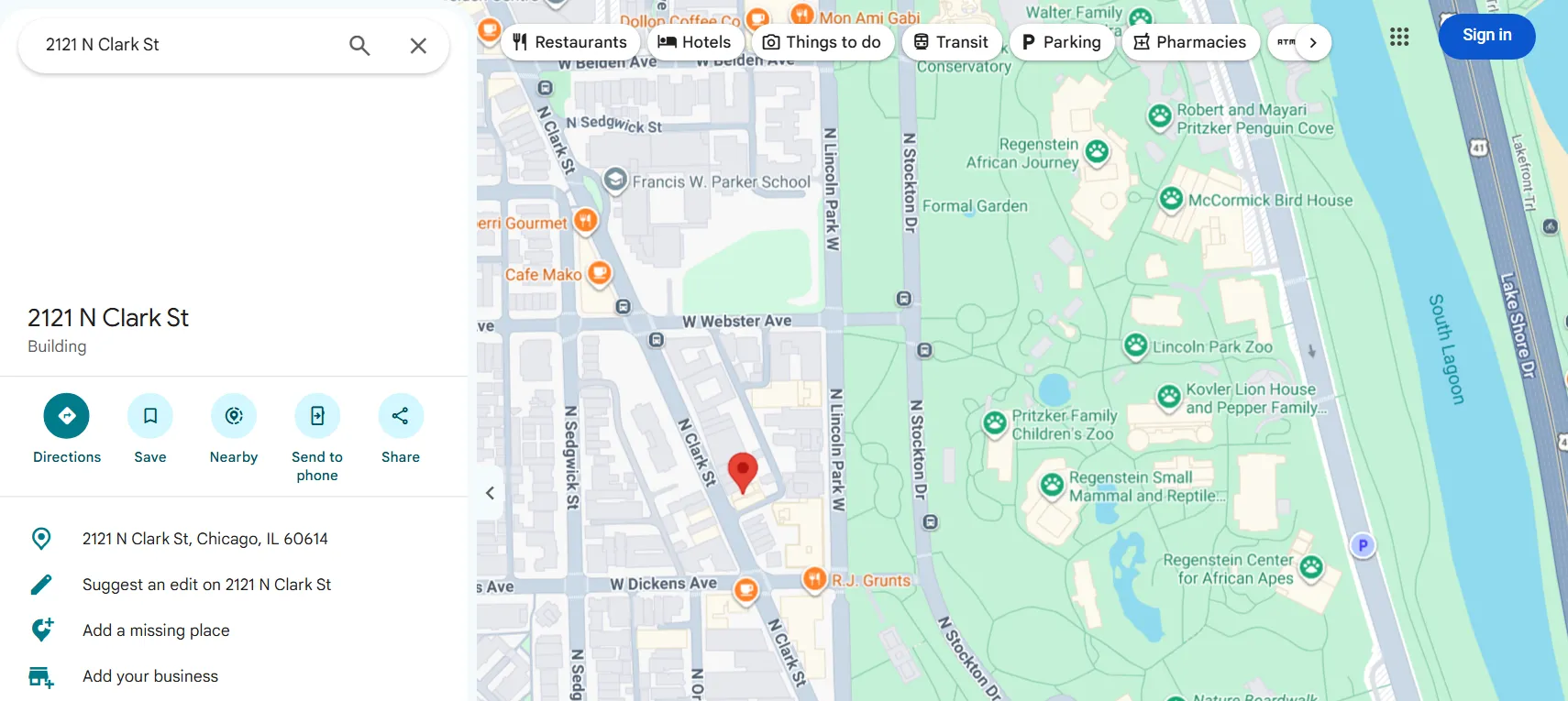
- Forward and reverse geocoding in one run: addresses to coordinates and coordinates to addresses, side by side in one dataset.
- Google's own answer: the same place Google Maps shows for the address, with its Place ID (the
ChIJ…ID other Google tools accept), plus code and time zone. - Address parts ready for a spreadsheet: street number, street, neighborhood, city, postal code, state, state code, country and country code as separate columns.
- A match score on every row:
matchScore(0-100) andpartialMatchshow when Google corrected a typo or could not find the house number, so you can review the doubtful ones. - No Google API key, no login, no cookies: paste the list and click Start.
- Repeated inputs merged: the same address twice in a list is geocoded once and returned as one row listing both input IDs.
- Monitor mode for growing lists: a scheduled run geocodes only the addresses it has not geocoded before.
- Export anywhere: JSON, CSV, Excel, XML; schedules, webhooks, Make, Zapier, n8n, Google Sheets, and the Apify API or MCP server for AI agents.
What data can you get from Google Maps geocoding?
| 📍 Latitude and longitude (`latitude`, `longitude`) | 🏠 Formatted address (`formattedAddress`) | 🆔 Google Place ID (`placeId`) |
| 🔢 Street number (`streetNumber`) | 🛣️ Street (`route`, `streetAddress`) | 🏘️ Neighborhood (`neighborhood`) |
| 🏙️ City (`city`) | 📮 Postal code (`postalCode`) | 🗺️ State and state code (`state`, `stateCode`) |
| 🌍 Country and ISO code (`country`, `countryCode`) | ➕ Plus code (`plusCode`, `plusCodeCompound`) | 🕒 Time zone and current UTC offset (`timezone`, `utcOffset`) |
| 🏷️ Google place type and categories (`placeType`, `categories`) | 🎯 Result level (`resultLevel`: address, street, postal code, area, place) | ✅ Match score and partial-match flag (`matchScore`, `partialMatch`) |
| 📏 Distance from your coordinate (`distanceMeters`, reverse) | 🔗 Google Maps link, feature ID and CID | ☎️ Phone, website, rating, review count (Business details add-on) |
How to geocode addresses with Google Geocoding Scraper
- Create a free Apify account - $5 of monthly credit, no card needed.
- Open Google Geocoding Scraper and click Try for free.
- Paste addresses into Addresses (forward geocoding), one per line, and/or coordinates into Coordinates (reverse geocoding) as
lat,lng. - Optional: set Region bias to the country most of your addresses are in.
- Click Start. About 9 inputs are geocoded per second at the default concurrency.
- Open the Storage tab and Export as CSV, Excel or JSON.
⬇️ Google Geocoding Scraper input
| Parameter | Type | Description |
|---|---|---|
addresses | Array of strings | Addresses, place names or postal codes to turn into coordinates. A lat,lng line here is reverse geocoded. Prefill: 2 addresses. |
latlngs | Array of strings | Coordinates to turn into addresses, as lat,lng (decimal degrees, WGS84). Prefill: 1 coordinate. |
records | Array of objects | For APIs: {"id": "...", "address": "..."} or {"id": "...", "lat": 0, "lng": 0}; your id comes back as inputId. |
language | Select | Language of addresses, names and country names. Default en. |
region | Select | Country to favour for ambiguous inputs (a bias, not a filter). Default us. |
bounds | String | Favour results inside a box: swLat,swLng|neLat,neLng. |
countryCodes | Multi-select | Keep only results in these countries; Google's next candidate inside them is used if the first is outside. |
resultTypes | Multi-select | Keep only address, street, postal_code, area and/or place results. |
minMatchScore | Integer 0-100 | Drop results scoring lower. Default 0. |
includePlaceDetails | Boolean | Add phone, website, rating and review count when the result is a business or landmark (add-on event). Default false. |
monitorMode | Boolean | Skip inputs geocoded in earlier runs. Default false. |
monitorStoreName | String | Named store that remembers them. Default google-geocoding-monitor. |
recheckAfterDays | Integer | In monitor mode, geocode an input again after this many days. 0 = never. |
maxResults | Integer | Stop after this many delivered rows; 0 = every input. Form prefill 100. |
maxAlternatives | Integer 0-10 | Also list other candidates in an alternatives array. Default 0. |
includeUnavailable | Boolean | Also write status rows for no-match, invalid, filtered or failed inputs. Default false. |
compact | Boolean | Core fields only, for AI agents and spreadsheets. Default false. |
proxyConfiguration | Proxy | Default: direct requests, switching to Apify Proxy automatically if Google refuses them. |
maxConcurrency | Integer 1-50 | Lookups in parallel. Default 10. |
Input JSON
Put one complete address per line to geocode
Google answers best when the line carries the street, the city and the region or postal code: 2121 N Clark St, Chicago, IL 60614 rather than 2121 Clark. Place names (Sydney Opera House), postal codes (11968, SW1A 1AA) and cities (Toledo) work too; resultLevel tells you which kind of place came back.
Use Region bias or Viewport bias for ambiguous names
Toledo resolves to Toledo, Ohio with region us and to Toledo, Spain with region es. For a smaller area, set bounds: 39.70,-89.80|40.10,-89.40 turns Springfield into Springfield, Illinois. Both are biases. To exclude other countries, use countryCodes.
Send coordinates as lat,lng
Latitude first, then longitude, in decimal degrees: 40.6782,-73.9442. (40.6782, -73.9442) and 40.6782 -73.9442 are read too. A line that is not a coordinate is reported as INVALID_REQUEST (visible with includeUnavailable).
⬆️ Geocoding output
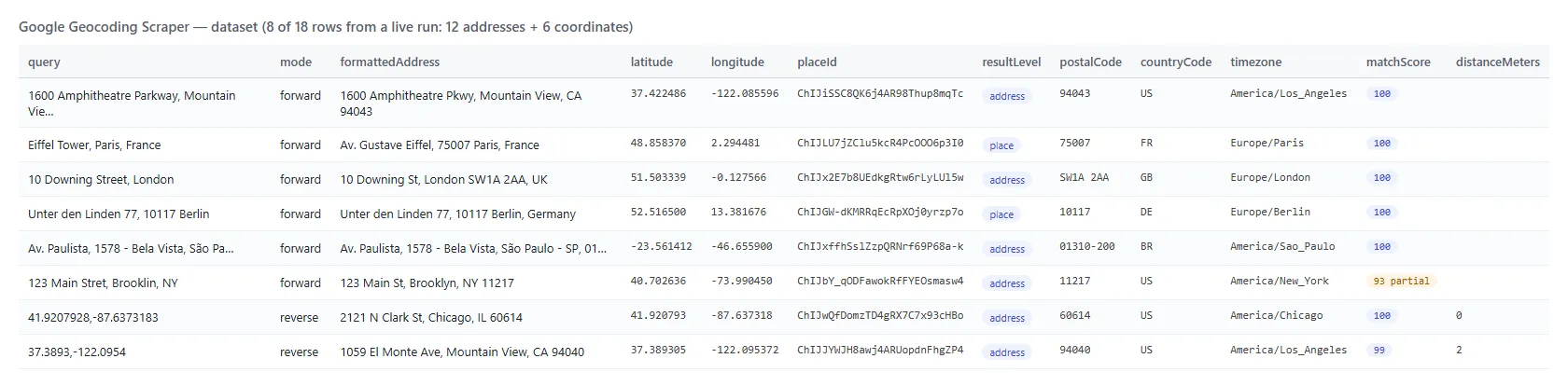
A forward row (real output, trimmed):
A reverse row adds inputLatitude, inputLongitude, inputPlusCode and distanceMeters (how far the returned address is from your coordinate):
Geocoding fields
Fill measured on a 90-input run on the Apify platform (70 forward inputs in 18 countries incl. 40 made-up house numbers, 20 coordinates in 13 countries; 89 rows).
| Field | Meaning | Filled |
|---|---|---|
formattedAddress, latitude, longitude, placeId | Google's address line, coordinates and Place ID | 100% |
plusCode, timezone, utcOffset | Plus code of the result, IANA time zone, current offset | 100% |
resultLevel, matchScore, partialMatch | Kind of result and how much of the input it accounts for | 100% |
placeType | Google's type (premise, locality, postal_code, museum…) | 94% |
city / country, countryCode | City / country | 97% / 99% |
postalCode | Postal code | 88% |
state / stateCode | State or region / short code (US, CA, AU, BR, MX) | 79% / 72% |
streetAddress / streetNumber / route | Street line / house number / street | 72% / 60% / 67% |
neighborhood | Neighborhood | 69% |
categories | Google Maps labels (businesses, landmarks) | 31% |
plusCodeCompound | Google's local plus code, when Google prints one | 13% |
distanceMeters, inputPlusCode | Reverse rows only | 100% of reverse |
phone, website, rating, reviewsCount | Business details add-on, businesses only | 12% / 20% / 13% / 8% |
Street fields are empty when the result is a city, region, postal code or a landmark without a street number, which is what Google returns for those inputs.
Use cases for geocoded addresses
- 🚚 Logistics and delivery planning: turn order addresses into coordinates for routing and territory maps.
- 🏠 Real estate and insurance: geocode property lists, then add distance, flood-zone or school-district data by coordinate.
- 🧹 CRM and data cleaning: normalise free-text addresses into street, city, postal code and country columns; review rows with
partialMatch: true. - 📱 Location analytics: reverse geocode GPS pings into street, neighborhood, city and time zone.
- 🗺️ Store locators and lead lists: get the Place ID and plus code of every branch for Google Maps links and other Google tools.
- 🤖 AI agents: call it through MCP with
compact: trueto resolve "where is…" questions.
How much does it cost to geocode addresses with Google Geocoding Scraper?
Google Geocoding Scraper is pay-per-event (the Pricing tab always shows the live rates):
| Event | Price | When it is charged |
|---|---|---|
address-geocoded | $0.000095 per row ($0.095 per 1,000) | Each geocoded input written to the dataset |
place-details | $0.0005 per row | Only with Business details on, on rows that carry a phone, website or rating |
There is no start fee. Inputs Google cannot place, invalid coordinates, filtered results and repeated inputs do not produce a geocoded row.
| Inputs geocoded | Price |
|---|---|
| 10 | $0.00095 |
| 1,000 | $0.095 |
| 10,000 | $0.95 |
| 100,000 | $9.50 |
Speed measured on the platform: 90 inputs (70 addresses, 20 coordinates) in 10.6 seconds end to end at the default concurrency of 10; a single address in about 3 seconds.
Integrations, API, scheduling & MCP
- Schedules: run Google Geocoding Scraper daily over a growing address list with
monitorModeon, so only new addresses are geocoded. - Webhooks: call a URL when a run finishes and load the rows into your database or CRM.
- No-code: Make, Zapier, n8n, Google Sheets, Airtable and Slack via Apify integrations.
- API: start runs and read datasets with
apify-clientfor Python or JavaScript; therecordsinput echoes your own IDs back asinputId. - MCP / AI agents: connect Claude, Cursor or any MCP client through the MCP tab.
More TopApi scrapers
Geocoding limits & empty runs
- One row per unique input: the best match; up to 10 more candidates with
maxAlternatives. - Reverse geocoding returns what Google Maps shows at that spot: a building, a street or a business, with its address and its distance from your coordinate. On 20 test coordinates, 18 came back within 10 m and all 20 within 31 m; squares, parks and landmarks return the place or street, not a house number.
- Not available from Google Maps' web answers: Google's
location_type, viewport and bounds boxes,postcode_localitiesand the raw component list come from Google's paid Geocoding API (which needs your own key) and are not in the rows. - Ambiguous inputs: Google picks one answer; use
region,boundsorcountryCodes, and checkpartialMatch. - Empty dataset: every input was a no-match, invalid, filtered or seen before in monitor mode. The run status message gives the counts; turn on
includeUnavailableto get a status row per input.
FAQ
How many addresses can Google Geocoding Scraper geocode in one run?
Up to 100,000 inputs per run. At the default concurrency a run geocodes about 9 inputs a second; raise maxConcurrency for large lists, or split very large lists into several runs.
Do I need a Google Maps API key to use Google Geocoding Scraper?
No. Google Geocoding Scraper reads the answers Google Maps gives any visitor; there is no Google Cloud project, key or billing account to set up.
Can Google Geocoding Scraper reverse geocode coordinates?
Yes. Put lat,lng lines into latlngs (or into addresses) and each row returns the address at that point, its address parts, the plus code of your coordinate and distanceMeters.
How accurate is Google Geocoding Scraper?
The coordinates, Place ID and address are Google's own: on test addresses they matched the Place IDs and coordinates Google's Geocoding API returns (for example the Eiffel Tower and postal code 11968). matchScore and partialMatch flag answers that do not account for your whole input, such as a missing house number or a corrected street name.
Can I schedule Google Geocoding Scraper for a growing address list?
Yes. Save a task with monitorMode: true, add it to Schedules, and each run geocodes only inputs it has not delivered before; recheckAfterDays refreshes old ones.
Can I use Google Geocoding Scraper with the Apify API?
Yes. Start runs and fetch datasets with apify-client for Python or JavaScript. Send records with your own IDs and match rows on inputId.
Can I use Google Geocoding Scraper through an MCP server?
Yes. Open the MCP tab, connect your MCP client, and ask for coordinates or addresses in plain language; compact: true keeps answers small.
Can I integrate Google Geocoding Scraper with Google Sheets, Make or Zapier?
Yes, through Apify integrations or a webhook when a run finishes.
Why did Google Geocoding Scraper return no row for some of my addresses?
Google Maps found no place for the text, the coordinate was invalid, a filter removed the result, or the input was a repeat. Turn on includeUnavailable to see a ZERO_RESULTS, INVALID_REQUEST, FILTERED or ERROR row for each.
Your feedback
We keep improving Google Geocoding Scraper. Missing a field or found a wrong answer? Open an issue on the Issues tab.


