| 🔗 Post URL and id (`url`, `post_id`) |
📝 Full text (`message`), hashtags, mentions |
📅 Publish date (`timestamp`, `published_at`) |
| 👤 Author id, name, URL, avatar, type |
🏢 Business Page flag (`author.is_business_page`) |
👍 Reactions total and by type (`reactions`) |
| 💬 Comments and shares (`comments_count`, `reshare_count`) |
▶️ Video views, duration, thumbnail, captions URL |
🖼️ Photos and albums (`image`, `images`, `album_count`) |
| 🌐 Outbound link with title, source, preview (`external_link`) |
🔁 Shared post URL and author (`attached_post`) |
👥 Public group id, name, URL (`group`) |
| 📍 Tagged place (`location`) |
🎯 Contains your keyword? (`matches_query`) |
💬 Top comments, video files (details add-on) |
On a 100-post test run for "coffee" every row had text, author, date, reactions, comments and shares; 73% carried an image, 47% came from public groups, 11% were videos (views on 10 of 11), 52% had hashtags and 91% contained the word "coffee".
### How to scrape Facebook posts by keyword with Facebook Search Posts Scraper
1. [Create a free Apify account](https://console.apify.com/sign-up) - $5 of monthly credit, no card needed.
2. Open [Facebook Search Posts Scraper](https://apify.com/topapi/facebook-search-posts-scraper) and click **Try for free**.
3. Paste your keywords into **Search queries** (one per line) and set **Max posts per query**.
4. Pick **Sort by** (Facebook's top posts or most recent first), optionally a date window and a location.
5. Click **Start**. Rows stream into the dataset as each page of results arrives.
6. Open the **Storage** tab and **Export** as JSON, CSV or Excel - or let a schedule run it for you.
### ⬇️ Input
| Parameter | Type | Description |
|---|---|---|
| **🔍 What to scrape** | | |
| `searchQueries` | List | **Required** (defaults to the sample "coffee"). Keywords, phrases or hashtags, e.g. `coffee`, `#blackfriday`, `iPhone 17 battery`; a Facebook search URL also works. |
| **🎯 Filters** (applied by Facebook inside the search) | | |
| `sortBy` | Select | `top` = Facebook's relevance ranking (default), `recent` = most recent first. |
| `startDate` / `endDate` | String | `2026-09-01`, `7 days`, `3 weeks`, or a day count. Sent to Facebook as its date filter and re-checked on every post. |
| `locationUid` | String | Facebook's numeric place id, e.g. `108424279189115` (New York, NY). |
| **✂️ Refine results** | | |
| `mustContainQuery` | Boolean | Keep only posts whose text contains the query. Default `false`. |
| `keywordFilter` | String | Keep only posts whose text, author, link title or group name contain a word (`discount, sale` = any). |
| `postType` | Select | `all`, `photo`, `video`, `link` or `text`. |
| `postSource` | Select | `all`, `groups`, `pages_and_profiles` or `business_pages`. |
| `minReactions` | Integer | Keep only posts with at least this many reactions. Default `0`. |
| **➕ Extra data** | | |
| `includePostDetails` | Boolean | Adds `top_comments`, `video_files` (SD/HD) and the view count from each post's public page - charged as **post-details** at $0.001 per post that gets details. |
| **🔁 Monitoring** | | |
| `monitorMode` | Boolean | Return only posts not delivered by previous runs with the same memory. Pair with a schedule. |
| `monitorStoreName` | String | Key-value store that keeps the per-query memory. Default `facebook-search-posts-monitor`. |
| **📦 Output** | | |
| `maxPostsPerQuery` | Integer | Default `50`; `0` = as many as Facebook serves, up to 1,000 per query (11-12 per page). |
| `maxItems` | Integer | Hard cap for the whole run. `0` = none. |
| `compact` | Boolean | Core fields only, sized for AI agents and MCP. |
| **⚙️ Advanced** | | |
| `proxyConfiguration` | Object | Apify datacenter proxies by default; they serve every request this actor makes. |
| `maxConcurrency` | Integer | Parallel queries and detail pages. Default `2`, max `6`. |
#### Input JSON
```json
{
"searchQueries": ["coffee", "cold brew"],
"sortBy": "recent",
"startDate": "7 days",
"mustContainQuery": true,
"maxPostsPerQuery": 50,
"monitorMode": true
}
```
#### Put one keyword per line, not one long phrase
Facebook matches the query against the post text and ranks loosely related posts too. Single words match almost always (94% of "coffee" and "pizza" results contained the word on a 307-post test); long phrases rarely ("hiring now apply" matched 0 of 10). **Do:** `cold brew` and `pumpkin spice latte` as two lines. **Don't:** `coffee shop hiring barista downtown`. Turn on `mustContainQuery` when every row must contain the exact words.
#### Use "Most recent first" for monitoring, "Top" for research
`top` is Facebook's relevance ranking: popular posts of any age, right for research and content discovery. `recent` returns the newest public posts first; with `monitorMode` the run stops as soon as it reaches a page it already delivered, so a scheduled check costs one or two pages.
#### Find a location id before you use the location filter
`locationUid` wants Facebook's numeric id of a city or region, not its name. On facebook.com, run the search, apply the city filter, open a result's About tab and click the city: the number at the end of that page's URL is the id. Tested: `108424279189115` (New York) returned pizza posts tagged "New York, NY, United States". Leave it empty for a global search.
### ⬆️ Output
Every post becomes one dataset item. Here is the table view of a run for `Tesla` and `plumber near me` (most recent first, last 7 days):
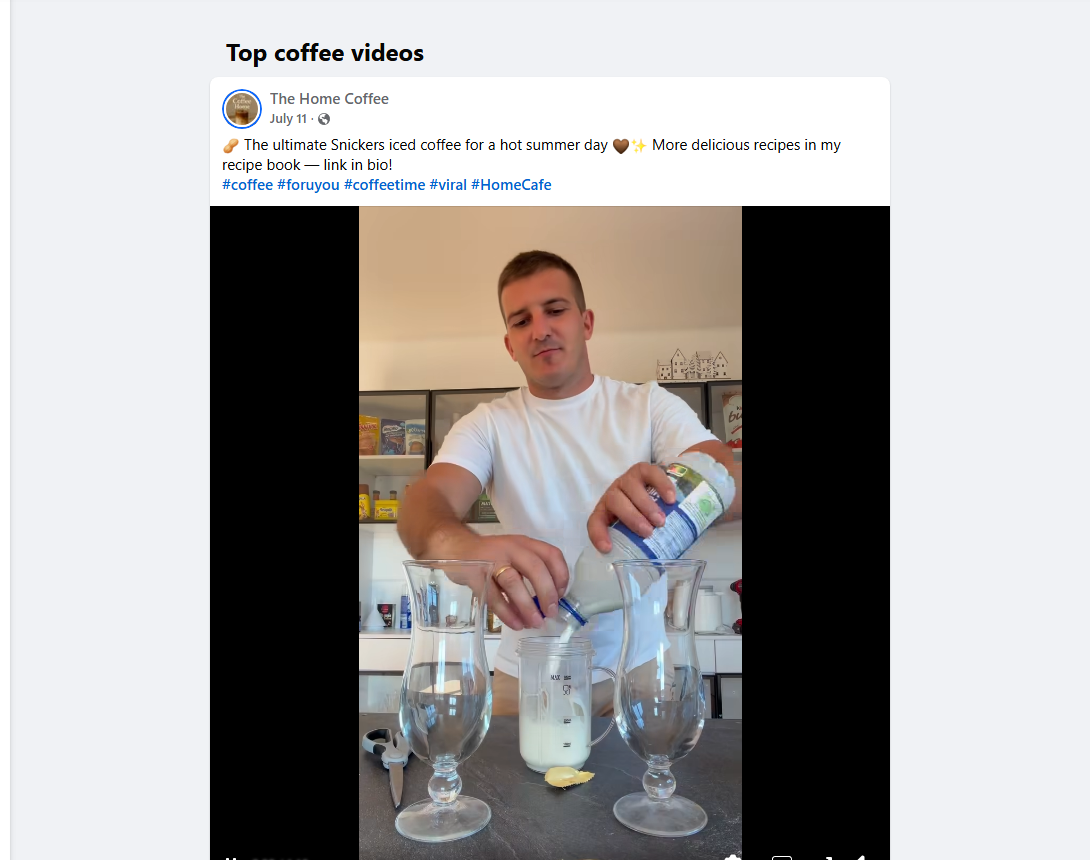
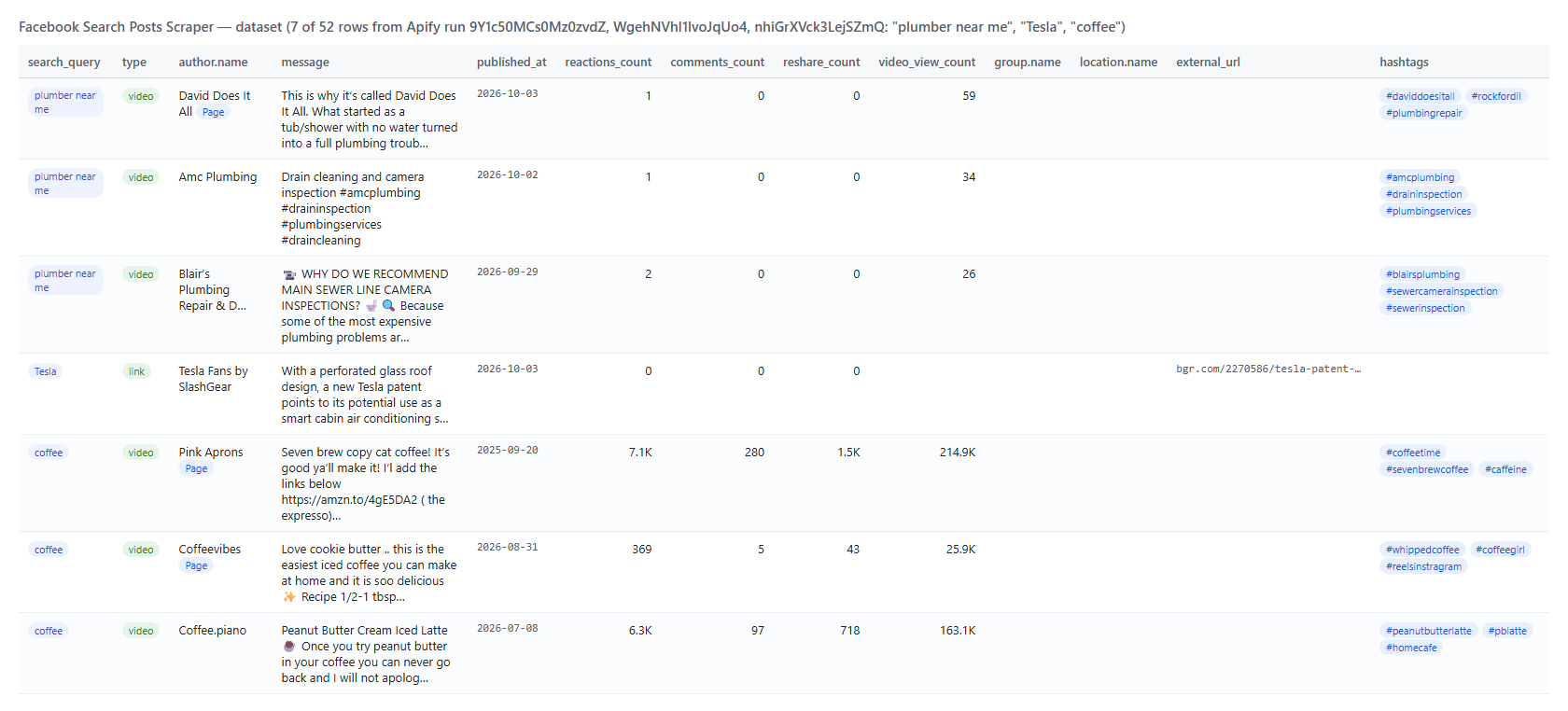 And one real row from the 100-post "coffee" run (trimmed):
```json
{
"post_id": "1113407151220671",
"type": "photo",
"url": "https://www.facebook.com/greenhousecoffeebar21/posts/pfbid034DHRsirpdQQZBg84SYp3rXU1mD6xu1tMc8CsJ4gcgjiuWGeS2JMQnwV6eV81wfCBl",
"message": "As we reflect on the last 4.5 years of Greenhouse we are filled with so much gratitude ...",
"published_at": "2026-09-28T20:20:22.000Z",
"author": { "id": "100076541894287", "name": "Greenhouse Coffee Bar", "url": "https://www.facebook.com/greenhousecoffeebar21", "type": "user", "is_business_page": false },
"reactions_count": 48,
"comments_count": 56,
"reshare_count": 5,
"reactions": { "like": 22, "love": 24, "care": 1, "haha": 0, "wow": 1, "sad": 0, "angry": 0 },
"image": { "uri": "https://scontent-mia3-3.xx.fbcdn.net/v/t39.99422-6/...", "width": 526, "height": 701 },
"is_group_post": false,
"privacy": "Public",
"hashtags": ["nationalcoffeeday"],
"matches_query": true,
"search_query": "coffee"
}
```
#### Facebook post fields
| Field | Type | What it is | Fill on the 100-post run |
|---|---|---|---|
| `post_id`, `url`, `story_id`, `comments_id` | string | Post id, permalink, story id, feedback id | 100% |
| `type` | string | `photo`, `album`, `video`, `link`, `marketplace`, `event`, `share` or `status` | 100% |
| `message` | string | Full text, never truncated (longest seen 3,160 characters) | 100% |
| `timestamp`, `published_at` | integer, ISO 8601 | Publish time | 100% |
| `author` | object | `id`, `name`, `url`, `profile_picture_url`, `type` (`page`, `user`, `anonymous`), `is_business_page` | 100% |
| `author_title` | string | Facebook's header line, e.g. "Iron Bloom Coffee Bar is in Elyria, OH." | 9% |
| `reactions_count`, `comments_count`, `reshare_count`, `engagement_count` | integer | Totals; engagement = reactions + comments + shares | 100% |
| `reactions` | object | `like`, `love`, `care`, `haha`, `wow`, `sad`, `angry`; an unlisted type is `0` when the listed ones add up to the total, else `null` | 97% |
| `video_view_count`, `video`, `video_id`, `video_thumbnail`, `video_duration_ms`, `video_captions_url` | mixed | Video posts only | 10-11% (every video post) |
| `video_files` | object | `video_sd_file`, `video_hd_file` - details add-on | 3 of 3 videos on the details run |
| `image`, `images`, `album_count`, `image_alt` | object, array | First image, every image of the post or album, accessibility caption | 73% / 81% |
| `external_url`, `external_link` | string, object | Outbound link (unwrapped) with title, description, source, preview image | 1% on "coffee", 7% across 307 mixed posts |
| `attached_post_url`, `attached_post` | string, object | The original post when this one is a share | 1% |
| `attachments` | array | Every attachment: kind, url, title, image, id | 92% |
| `is_group_post`, `group` | boolean, object | Public group `id`, `name`, `url` | 47% |
| `location` | object | Tagged place `id`, `name`, `url` | 2% on "coffee", 5% across 307 posts |
| `privacy` | string | `Public` or `Public group` | 100% |
| `hashtags`, `mentions` | array | Parsed from the text | 52% / 2% |
| `top_comments` | array | Up to ~10 public top comments: id, text, date, author, reactions - details add-on | 10 of 16 posts had one on the details run |
| `matches_query`, `search_query`, `sort`, `search_source`, `scraped_at` | mixed | Exact-match flag, the query and sort that produced the row, `facebook_posts_search` | 100% |
### How can I use Facebook posts search data?
- 🎯 **Brand and competitor monitoring** - schedule `recent` + `monitorMode` for your brand names and get every new public mention with its reach.
- 📊 **Market and sentiment research** - pull the top posts for a topic and read `message`, `reactions` by type and `comments_count`.
- 🔎 **Lead generation** - search "looking for a plumber" or "recommend a dentist" with `postSource: groups`; `group`, `author` and `url` point you to the conversation.
- 🏢 **Local business discovery** - `locationUid` plus `postSource: business_pages` lists Pages posting about a topic in one city.
- 📰 **Content and creator discovery** - `postType: video` with `minReactions` finds the videos that work; `video_view_count` and `video_files` make them comparable.
- 🤖 **AI and research teams** - feed `compact` rows to an LLM for summaries or classification; `matches_query` and `hashtags` are ready-made labels.
- 📈 **Trend tracking** - run the same keywords weekly and compare `reactions_count` and the number of posts per week.
### How much does it cost to scrape Facebook posts search?
Facebook Search Posts Scraper is pay-per-result: **$2.40 per 1,000 posts**, no start fee. You only pay for the results you get. The optional post details are **$1.00 per 1,000 posts** that receive them.
| Posts | Cost | With post details |
|---:|---:|---:|
| 10 | $0.024 | $0.034 |
| 100 | $0.24 | $0.34 |
| 1,000 | $2.40 | $3.40 |
| 10,000 | $24.00 | $34.00 |
There is nothing else to pay: Apify platform usage (compute, proxy) is included in these prices. Measured on the platform: a 12-post run took 13 seconds, a 100-post run 34 seconds (including a forced restart), a 16-post run with details 29 seconds, all on 512 MB with a peak of 49-63 MB of memory.
### Facebook posts in your tools: integrations, API, scheduling & MCP
- **Schedules:** run it hourly, daily or weekly from the **Schedules** tab; combine with `monitorMode` and `sortBy: recent` to get only new posts each time.
- **Webhooks:** fire a URL when a run finishes - push new mentions to your CRM, Slack or a sheet.
- **No-code:** Make, Zapier, n8n, Google Sheets, Airtable, Slack via [Apify integrations](https://docs.apify.com/integrations).
- **API:** call it from Node.js or Python with `apify-client` - code on the [API tab](https://apify.com/topapi/facebook-search-posts-scraper/api/python) and the [Apify API reference](https://docs.apify.com/api/v2).
- **MCP / AI agents:** connect Claude, Cursor or any MCP client through the [MCP tab](https://apify.com/topapi/facebook-search-posts-scraper/api/mcp) and ask for Facebook posts about a topic in plain language; set `compact: true` to keep rows small.
### More social media scrapers by TopApi
And one real row from the 100-post "coffee" run (trimmed):
```json
{
"post_id": "1113407151220671",
"type": "photo",
"url": "https://www.facebook.com/greenhousecoffeebar21/posts/pfbid034DHRsirpdQQZBg84SYp3rXU1mD6xu1tMc8CsJ4gcgjiuWGeS2JMQnwV6eV81wfCBl",
"message": "As we reflect on the last 4.5 years of Greenhouse we are filled with so much gratitude ...",
"published_at": "2026-09-28T20:20:22.000Z",
"author": { "id": "100076541894287", "name": "Greenhouse Coffee Bar", "url": "https://www.facebook.com/greenhousecoffeebar21", "type": "user", "is_business_page": false },
"reactions_count": 48,
"comments_count": 56,
"reshare_count": 5,
"reactions": { "like": 22, "love": 24, "care": 1, "haha": 0, "wow": 1, "sad": 0, "angry": 0 },
"image": { "uri": "https://scontent-mia3-3.xx.fbcdn.net/v/t39.99422-6/...", "width": 526, "height": 701 },
"is_group_post": false,
"privacy": "Public",
"hashtags": ["nationalcoffeeday"],
"matches_query": true,
"search_query": "coffee"
}
```
#### Facebook post fields
| Field | Type | What it is | Fill on the 100-post run |
|---|---|---|---|
| `post_id`, `url`, `story_id`, `comments_id` | string | Post id, permalink, story id, feedback id | 100% |
| `type` | string | `photo`, `album`, `video`, `link`, `marketplace`, `event`, `share` or `status` | 100% |
| `message` | string | Full text, never truncated (longest seen 3,160 characters) | 100% |
| `timestamp`, `published_at` | integer, ISO 8601 | Publish time | 100% |
| `author` | object | `id`, `name`, `url`, `profile_picture_url`, `type` (`page`, `user`, `anonymous`), `is_business_page` | 100% |
| `author_title` | string | Facebook's header line, e.g. "Iron Bloom Coffee Bar is in Elyria, OH." | 9% |
| `reactions_count`, `comments_count`, `reshare_count`, `engagement_count` | integer | Totals; engagement = reactions + comments + shares | 100% |
| `reactions` | object | `like`, `love`, `care`, `haha`, `wow`, `sad`, `angry`; an unlisted type is `0` when the listed ones add up to the total, else `null` | 97% |
| `video_view_count`, `video`, `video_id`, `video_thumbnail`, `video_duration_ms`, `video_captions_url` | mixed | Video posts only | 10-11% (every video post) |
| `video_files` | object | `video_sd_file`, `video_hd_file` - details add-on | 3 of 3 videos on the details run |
| `image`, `images`, `album_count`, `image_alt` | object, array | First image, every image of the post or album, accessibility caption | 73% / 81% |
| `external_url`, `external_link` | string, object | Outbound link (unwrapped) with title, description, source, preview image | 1% on "coffee", 7% across 307 mixed posts |
| `attached_post_url`, `attached_post` | string, object | The original post when this one is a share | 1% |
| `attachments` | array | Every attachment: kind, url, title, image, id | 92% |
| `is_group_post`, `group` | boolean, object | Public group `id`, `name`, `url` | 47% |
| `location` | object | Tagged place `id`, `name`, `url` | 2% on "coffee", 5% across 307 posts |
| `privacy` | string | `Public` or `Public group` | 100% |
| `hashtags`, `mentions` | array | Parsed from the text | 52% / 2% |
| `top_comments` | array | Up to ~10 public top comments: id, text, date, author, reactions - details add-on | 10 of 16 posts had one on the details run |
| `matches_query`, `search_query`, `sort`, `search_source`, `scraped_at` | mixed | Exact-match flag, the query and sort that produced the row, `facebook_posts_search` | 100% |
### How can I use Facebook posts search data?
- 🎯 **Brand and competitor monitoring** - schedule `recent` + `monitorMode` for your brand names and get every new public mention with its reach.
- 📊 **Market and sentiment research** - pull the top posts for a topic and read `message`, `reactions` by type and `comments_count`.
- 🔎 **Lead generation** - search "looking for a plumber" or "recommend a dentist" with `postSource: groups`; `group`, `author` and `url` point you to the conversation.
- 🏢 **Local business discovery** - `locationUid` plus `postSource: business_pages` lists Pages posting about a topic in one city.
- 📰 **Content and creator discovery** - `postType: video` with `minReactions` finds the videos that work; `video_view_count` and `video_files` make them comparable.
- 🤖 **AI and research teams** - feed `compact` rows to an LLM for summaries or classification; `matches_query` and `hashtags` are ready-made labels.
- 📈 **Trend tracking** - run the same keywords weekly and compare `reactions_count` and the number of posts per week.
### How much does it cost to scrape Facebook posts search?
Facebook Search Posts Scraper is pay-per-result: **$2.40 per 1,000 posts**, no start fee. You only pay for the results you get. The optional post details are **$1.00 per 1,000 posts** that receive them.
| Posts | Cost | With post details |
|---:|---:|---:|
| 10 | $0.024 | $0.034 |
| 100 | $0.24 | $0.34 |
| 1,000 | $2.40 | $3.40 |
| 10,000 | $24.00 | $34.00 |
There is nothing else to pay: Apify platform usage (compute, proxy) is included in these prices. Measured on the platform: a 12-post run took 13 seconds, a 100-post run 34 seconds (including a forced restart), a 16-post run with details 29 seconds, all on 512 MB with a peak of 49-63 MB of memory.
### Facebook posts in your tools: integrations, API, scheduling & MCP
- **Schedules:** run it hourly, daily or weekly from the **Schedules** tab; combine with `monitorMode` and `sortBy: recent` to get only new posts each time.
- **Webhooks:** fire a URL when a run finishes - push new mentions to your CRM, Slack or a sheet.
- **No-code:** Make, Zapier, n8n, Google Sheets, Airtable, Slack via [Apify integrations](https://docs.apify.com/integrations).
- **API:** call it from Node.js or Python with `apify-client` - code on the [API tab](https://apify.com/topapi/facebook-search-posts-scraper/api/python) and the [Apify API reference](https://docs.apify.com/api/v2).
- **MCP / AI agents:** connect Claude, Cursor or any MCP client through the [MCP tab](https://apify.com/topapi/facebook-search-posts-scraper/api/mcp) and ask for Facebook posts about a topic in plain language; set `compact: true` to keep rows small.
### More social media scrapers by TopApi