

Instagram Scraper - Posts, Reels, Hashtags & Profiles
Pricing
from $0.40 / 1,000 post scrapeds
Instagram Scraper - Posts, Reels, Hashtags & Profiles
Scrape Instagram posts and reels by profile, hashtag or URL: caption, likes, comments, plays and views on every reel, engagement rate, date, media URLs, music, tagged users, location, latest comments. Reels tab mode, date and type filters, monitor mode with play-count deltas. No login.
Pricing
from $0.40 / 1,000 post scrapeds
Rating
0.0
(0)
Developer

Top Api
Maintained by CommunityActor stats
1
Bookmarked
141
Total users
78
Monthly active users
6.3 hours
Issues response
6 days ago
Last modified
Categories
Share
What does Instagram Scraper do?
Instagram Scraper extracts Instagram posts and reels from instagram.com and turns profile names, hashtags or post URLs into structured rows: one row per post, reel or carousel with caption, likes, comments, plays, views, publish date, media URLs, music, tagged users and the owner. Built for marketing teams, influencer and brand researchers, and data pipelines that need Instagram posts and reels data without a login, cookies or an API key.
Instagram Posts Scraper - Instagram Reels Scraper - Instagram Hashtag Scraper - Instagram Profile Posts API
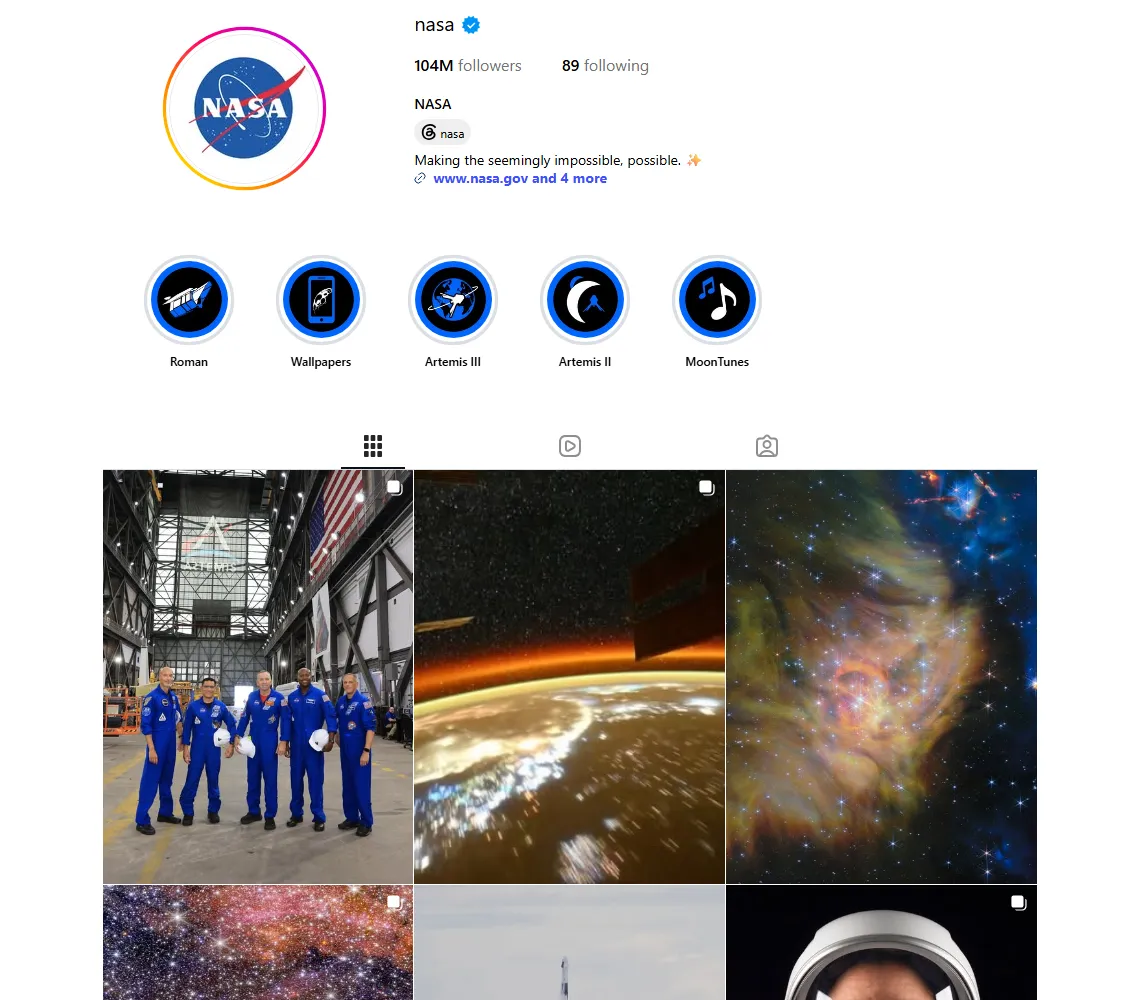
- Every reel of a profile, with plays on every row: set Content to Reels and the actor reads the profile's Reels tab (also reels that are not in the grid), with play, like and comment counts on each reel.
- Posts, reels and carousels from any public profile (newest first, pinned flagged), hashtags and keywords (Instagram's public keyword page) and single posts or reels by URL.
- Views and plays, both:
videoViewCountnext tovideoPlayCounton every video and reel, plusplaysPerFollowerandengagementRate. - Reel growth tracking: with
monitorDelivery: "changes"a scheduled run returns only the reels whose plays, likes or comments moved, with the deltas. - Latest comments with one switch, the audio-only
audioUrlof each reel, every image rendition, carousel items with their own tagged users. - No login, cookies or Instagram API key: the actor reads only what Instagram shows a signed-out visitor.
- Filters: date window, content type, minimum likes or plays, keyword, tagged place, pinned posts; pay-per-result with no start fee.
- Export anywhere: JSON, CSV, Excel; schedules, webhooks, Make, Zapier, n8n, Google Sheets; the API and MCP for AI agents, with
compactrows.
What data can you get from Instagram?
| 🔗 Post URL and shortcode (`url`, `shortCode`) | 📝 Caption, hashtags, mentions | 📅 Publish date (`timestamp`) |
| ❤️ Likes (`likesCount`) | 💬 Comments count and latest comments | ▶️ Reel plays (`videoPlayCount`) |
| 👁️ Video views (`videoViewCount`) | 📈 Engagement rate, plays per follower | 📊 Play, like and comment deltas between runs |
| 🖼️ Image URLs in every size (`displayUrl`, `images`) | 🎬 Video URL, audio-only URL, duration | 🎵 Sound: song, artist, original audio, trending |
| 🏷️ Tagged users with positions | 🤝 Co-authors and paid-partnership sponsors | 📍 Location name, id, city, coordinates |
| 🧩 Carousel items (`childPosts`) | 📌 Pinned, type, product type (reel / feed / carousel) | 👤 Owner username, name, id, verified, avatar, followers |
On a live run of 4 profiles × 25 reels (2026-10-20) every one of the 100 reels had a caption, date, plays, views, likes, comments, video URL and duration; 98% had the audio-only URL and the sound, 71% tagged users, 42% co-authors and 18% a location.
How to scrape Instagram with Instagram Scraper
- Create a free Apify account - $5 of monthly credit, no card needed.
- Open Instagram Scraper and click Try for free.
- Paste usernames into Profiles, hashtags into Hashtags or keywords, or links into Post or reel URLs. For a creator's reels set Content to Reels.
- Set Max posts per profile or hashtag and click Start. Rows stream into the dataset as pages are read.
- Open the Storage tab and Export as JSON, CSV or Excel - or let a schedule run it for you.
⬇️ Input
| Parameter | Type | Description |
|---|---|---|
| 🔍 What to scrape | ||
usernames | List | Usernames or profile URLs: nasa, @natgeo, https://www.instagram.com/instagram/. Default: ["nasa"] when nothing else is given |
hashtags | List | Hashtags or keywords: travel, #foodie, https://www.instagram.com/explore/tags/travel/. Read from Instagram's public keyword page |
postUrls | List | Post or reel URLs or shortcodes: https://www.instagram.com/p/Dd9RyBWBVih/, Dd9RyBWBVih |
postType (Content) | Select | all, reel, video, image, carousel. reel reads each profile's Reels tab; on hashtags and URLs it keeps reels only. Default: all |
dataDetailLevel | Select | detailedData (caption, date, media, sound, tags + counts) or basicData (counts, cover and URL only, about 30× less data). Applies to Reels-tab and hashtag rows. Default: detailedData |
| 🎯 Filters (decide how far back a profile is read) | ||
onlyPostsNewerThan | String | 2026-09-01, 7 days, 3 weeks, or a day count. Paging stops when a whole page is older |
onlyPostsOlderThan | String | Upper bound of the window, same formats |
skipPinnedPosts | Boolean | Leave out posts and reels pinned to the top of the grid or Reels tab. Default: false |
| ✂️ Refine results | ||
minLikes | Integer | Keep only posts with at least this many likes. Default: 0 |
minPlays | Integer | Keep only reels with at least this many plays. Default: 0 |
keywordFilter | String | Keep only posts whose caption, hashtags, tagged users, place, sound or owner contain the word(s); comma = any. Needs detailed data |
withLocationOnly | Boolean | Keep only posts tagged with a place. Default: false |
| ➕ Extra data | ||
includeVideoViewCount | Boolean | Adds videoViewCount to every video and reel (one extra page per video, free). Default: true |
includeLatestComments | Boolean | Adds latestComments (newest 12-15) and firstComment to every row with comments (one extra request per row, free). Default: false |
includeProfileSummary | Boolean | Adds one Profile row per scraped profile - charged as profile-summary at $0.001 per profile |
| 🔁 Monitoring | ||
monitorMode | Boolean | Return only posts not delivered by previous runs; pair with a daily schedule |
monitorDelivery | Select | new (new posts only) or changes (new posts + posts whose plays, likes or comments moved, with deltas). Default: new |
monitorStoreName | String | Name of the key-value store holding the monitor memory. Default: instagram-posts-monitor |
| 📦 Output | ||
resultsLimit | Integer | Max posts per profile or hashtag after filters. Default 50; 0 = everything Instagram serves |
maxItems | Integer | Hard cap for the whole run. Default 0 = no total cap |
compact | Boolean | Core fields only, sized for AI agents and MCP |
| ⚙️ Advanced | ||
proxyConfiguration | Object | Apify proxy settings. Default: Apify datacenter proxies, which serve every request this actor makes |
maxConcurrency | Integer | Parallel per-post requests (details, views, comments, URLs). Default 4 |
Input JSON
A creator's reels from the last 30 days with plays, views and comments, plus a keyword and one reel URL:
Use Content = Reels when you want a creator's reels
The profile timeline mixes photos, carousels and the reels that are in the grid. Reels reads the profile's Reels tab instead: only reels, newest first (pinned reels first), including reels that are not shown in the grid, and the play count comes on every row from the same request. Do: natgeo in Profiles + Content Reels · Don't: Content All posts with a reels-only filter in mind (you would pay for reading photos you then drop).
Basic reel data for counting, detailed for everything else
basicData delivers each reel from the Reels tab or keyword page as it is: plays, likes, comments, cover, URL and owner id. It needs no extra request per reel, so 1,000 reels of a profile took 84 seconds and 85 requests in testing. It has no caption, date, media links or sound; use detailedData (the default) for those, and for keywordFilter.
Schedule it: new posts once, or reel growth with deltas
onlyPostsNewerThan: "1 day" on a profile reads one page and stops; with monitorMode on, a daily schedule delivers each post exactly once. With monitorDelivery: "changes" each run re-reads the newest reels (up to resultsLimit) and delivers only those whose plays, likes or comments moved, with playCountDelta, likesDelta, commentsDelta. In testing a run one minute after the first delivered 11 of 24 reels; the 13 that had not moved cost nothing. Pair it with basicData for the cheapest hourly tracker.
Hashtags are Instagram's public keyword page, not the signed-in hashtag feed
Signed-out visitors get a keyword page of popular reels for a term, 12 per page, in Instagram's ranking. It exists for many terms (travel, foodie, street food) and not for others (sunset, coffee, nasa returned no posts in testing); an empty term delivers nothing and says so in the run status.
⬆️ Output
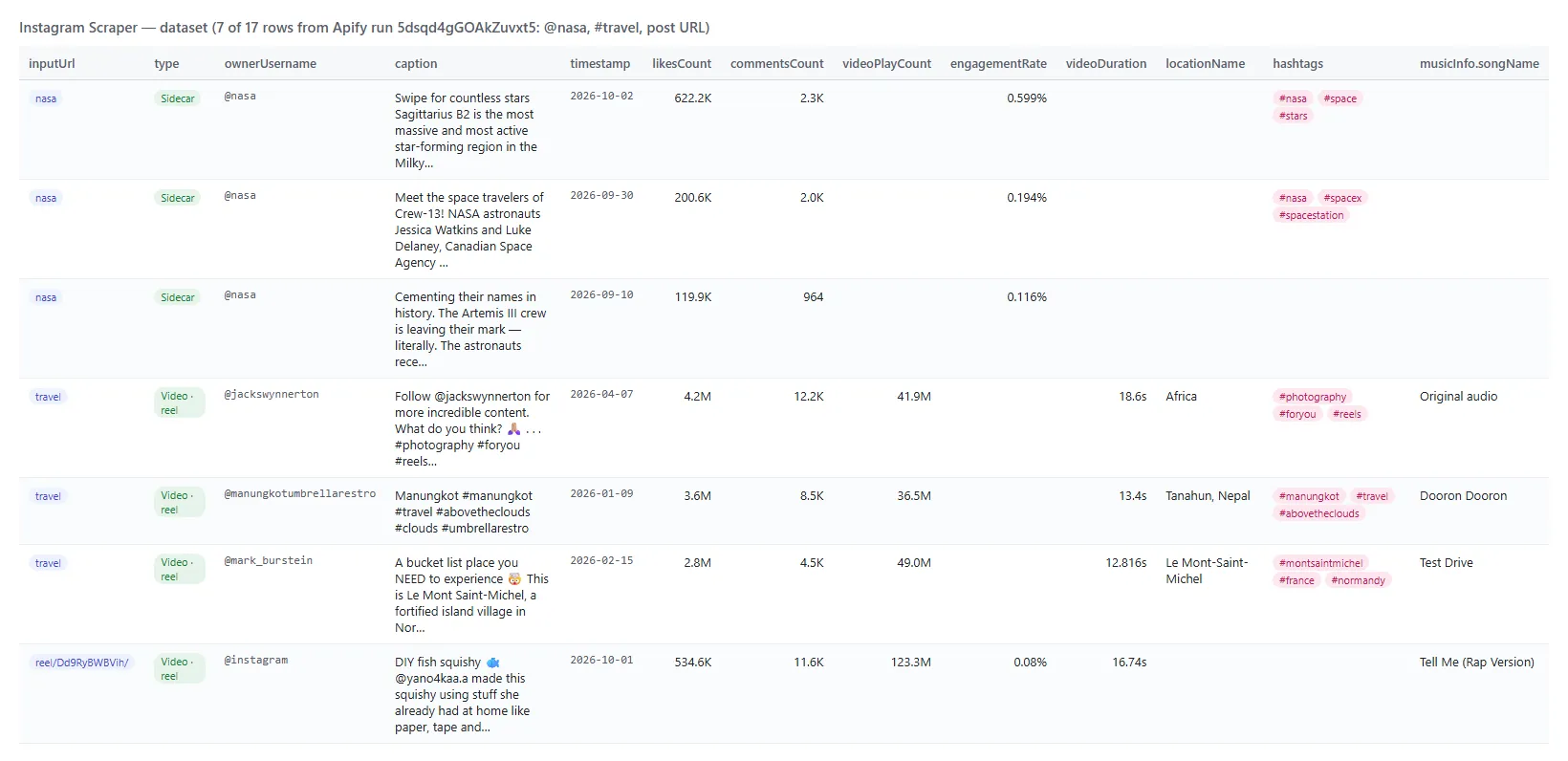
Every post or reel becomes one dataset item. Here is the table view of a run for nasa, travel and one reel URL:
One reel from the 2026-10-20 Reels-tab run, as JSON (long text and media links shortened):
A changes monitor row (basic data) adds what moved since the last delivery:
Fields
Fill is measured on live runs: Reels = 100 detailed reels from 4 profiles; Posts = a 12-post timeline (6 images, 3 carousels, 3 reels).
| Field | What it is | Reels | Posts |
|---|---|---|---|
id, pk, shortCode, url, type, productType | Media id, shortcode, URL (/reel/ for reels); Image / Video / Sidecar; feed / clips / carousel_container | 100% | 100% |
caption, hashtags, mentions | Caption with hashtags and @mentions parsed | 100% / 69% / 77% | 100% / 58% / 58% |
timestamp, captionCreatedAt | Publish time and caption time (ISO 8601) | 100% | 100% |
likesCount, commentsCount, engagementCount | Likes (null when hidden), comments, their sum | 100% | 100% |
engagementRate, playsPerFollower | (likes + comments) / followers, percent; plays / followers (the profile's own posts; collab posts belong to the co-author) | 75% | 75% / 17% |
videoPlayCount (= igPlayCount), videoViewCount | Reel plays; video views, Instagram's separate counter (median 30% of plays here) | 100% | 25% (every video) |
videoUrl, audioUrl, videoDuration, hasAudio | Video and audio-only (m4a) links, seconds, audio flag | 100% / 98% / 100% / 98% | 25% |
musicInfo | audioType, songName, artistName, audioId, usesOriginalAudio, isExplicit, isTrendingInClips, shouldMuteAudio, originalAudioOwner | 98% | 25% |
displayUrl, images, dimensionsWidth, dimensionsHeight (= originalWidth, originalHeight) | Largest image and every rendition (signed links, they expire) | 100% | 100% |
isPinned, isInProfileGrid, paidPartnership, sponsors | Pinned, shown in grid, paid partnership and its sponsors | 100% (sponsors 2%) | 100% (sponsors 0%) |
taggedUsers, coauthorProducers | Tagged accounts with positions; collaborators | 71% / 42% | 42% / 42% |
locationName, locationId, locationCity, locationLat, locationLng | Tagged place | 18% | 0% |
childPosts | Carousel items with their own media and tags | - | 25% (every carousel) |
latestComments, firstComment | Newest comments with author, verified flag, time, likes, replies (includeLatestComments) | 100% / 88% (26 reels) | - |
playCountDelta, likesDelta, commentsDelta, previousScrapedAt | Change since the last delivery (monitorDelivery: "changes") | 100% (11 reels) | - |
ownerUsername, ownerFullName, ownerId, ownerIsVerified, ownerProfilePicUrl, ownerFollowersCount | The account that posted | 100% (followers 75%) | 100% (followers 75%) |
inputUrl, searchTerm, searchSource, scrapedAt, dataDetailLevel | Where the row came from (profile, reels, hashtag, url); basicData on rows from the Reels tab or keyword page alone | 100% | 100% |
Basic rows (1,000 reels): ids, URL, plays, likes, comments, cover and owner id 100%; owner username, followers, engagementRate, playsPerFollower 88% (the profile's own reels).
A Profile row (add-on) carries username, fullName, biography, externalUrl, bioLinks[], followersCount, followsCount, postsCount, isPrivate, isVerified, isBusinessAccount, isProfessionalAccount, businessCategoryName, businessAddress, profilePicUrl, profilePicUrlHD, hasActiveStory, highlightReelCount, hasClips, threadsBadge, fbid.
How can I use Instagram posts and reels data?
- 🎯 Influencer and creator vetting - pull a creator's last 100 reels, read
videoPlayCount,playsPerFollower,engagementRate,paidPartnershipandcoauthorProducersto see real reach and how often they run sponsored content. - 📈 Reel performance tracking - schedule a profile hourly with
monitorDelivery: "changes"andbasicData; each run returns the reels that moved with their play, like and comment deltas. - 📊 Competitor and brand monitoring - schedule the competitor profiles daily with
monitorModeand get every new post, its format and its first-day likes and comments. - 🔎 Trend and sound research - read the keyword page for
travelorstreet food, rank reels byvideoPlayCount, pick the sounds inmusicInfothat trend. - 📍 Local marketing and venue research -
withLocationOnlykeeps posts tagged with a place; group them bylocationNameandlocationCity. - 🤖 AI and research teams - feed
caption,hashtags,alt,latestCommentsand the counts to an LLM withcompact: true.
How much does it cost to scrape Instagram?
Instagram Scraper is pay-per-result: $0.40 per 1,000 posts or reels, no start fee. One result is one post or reel written to the dataset; views, latest comments and change deltas are included. The optional profile row is $0.001 per profile.
| Rows | Cost |
|---|---|
| 10 | $0.004 |
| 100 | $0.04 |
| 1,000 | $0.40 |
| 10,000 | $4.00 |
There is nothing else to pay: Apify platform usage (compute, proxy) is included in these prices. Runs measured on 2026-10-20 (256 MB, no browser): 12 posts from a profile in 7-30 seconds depending on the proxy exit; 100 detailed reels from 4 profiles with views in 80-250 seconds depending on the proxy exit; 1,000 basic reels from one profile in 84 seconds; a monitor run with nothing new delivers nothing and costs nothing.
Integrations, API, scheduling & MCP
- Schedules: run Instagram Scraper hourly, daily or weekly from the Schedules tab; combine with
monitorModeoronlyPostsNewerThanto get only new or changed posts. - Webhooks: fire a URL when a run finishes - push rows to your CRM, Slack or a sheet.
- No-code: Make, Zapier, n8n, Google Sheets, Airtable, Slack via Apify integrations.
- API: call it from Node.js or Python with
apify-client- code on the API tab and the Apify API reference. - MCP / AI agents: connect Claude, Cursor or any MCP client through the MCP tab and ask for Instagram posts in plain language.
More TopApi scrapers
| 🎵 TikTok Scraper - videos by profile, hashtag or URL with stats, sound and transcript | ⭐ Google Maps Reviews Scraper - every review of a place with owner replies and dates | 🧭 All TopApi actors - social media, reviews and lead-gen scrapers built for scheduled runs |
Limits & empty runs
- Per page: 10 timeline posts, 12 Reels-tab or keyword-page reels;
resultsLimitand the date window are the cost controls. - Speed: each
videoViewCountis one ~210 KB page (about 3 s, 8 in parallel); switch it off or usebasicDatafor the fastest runs. - Not available signed-out: share counts, reels by sound,
postsCount, followers of accounts seen only on a keyword page. Keyword pages exist for some terms only. - Basic rows have no caption, date, media links or sound; their date window uses the upload time in the reel id.
- Media links expire within hours. Private accounts give no posts.
- Empty dataset: private or unknown profiles, a keyword without a public page, or filters removed everything; the run status names which. Nothing is charged for any of these.
FAQ
How many Instagram posts can Instagram Scraper collect in one run?
As many as the cap allows: 10 per timeline page, 12 per Reels-tab or keyword page, one request per post URL. A run reads pages until resultsLimit, maxItems, the date window or the end of the profile is reached. The default 50 per profile is 5 pages; set 0 to read a whole profile.
Can I scrape Instagram reels with Instagram Scraper?
Yes. Set Content (postType) to reel: profiles are read from their Reels tab with plays, likes and comments on every reel, keyword pages and /reel/ URLs keep reels only. basicData returns counts only, fastest; detailedData adds caption, date, video and audio links, sound, tags and location.
How do I track reel views over time?
Schedule the profiles with monitorMode: true and monitorDelivery: "changes". Each run delivers the reels whose plays, likes or comments changed since the last delivery, with the deltas, so a dataset of runs is a time series of each reel.
Can I run Instagram Scraper on a schedule to get new Instagram posts automatically?
Yes. Save your input as a task, open Schedules, pick the cadence and turn on monitorMode: each run remembers the posts it delivered per profile or keyword. On a profile it stops at the last run's newest post; on a keyword page it walks past the posts it already delivered and returns the next ones up to your cap. A run with nothing new delivers nothing.
Does it return share counts?
No. Instagram shows share counts only to signed-in users, and this actor never logs in. Plays, views, likes and comments are all there.
Can I use Instagram Scraper with the API, other apps or an MCP server?
Yes. Use apify-client for Node.js or Python, connect Make, Zapier, n8n or Google Sheets via Apify integrations, or connect Claude, Cursor or any MCP client through the MCP tab and turn on compact.
Do I need an Instagram account, cookies or an API key?
No. Instagram Scraper reads only what Instagram shows publicly to a signed-out visitor; you pass usernames, hashtags or URLs and nothing else.
Why did my Instagram Scraper run return no results?
In order of frequency seen in testing: the keyword has no public page (try a broader term), the account is private or misspelled, or the date window and filters removed every post. The run status message names the cause.
How is Instagram Scraper different from other Instagram scrapers?
It runs without a browser on 256 MB; it reads a profile's whole Reels tab with plays on every row, ships views and plays side by side, playsPerFollower, engagementRate, trending-sound flags, the audio-only link and every image rendition; it tracks reel growth with change deltas; and it filters by date window, content type, likes, plays, keyword, place and pinned posts.
Is it legal to scrape Instagram data?
Instagram Scraper extracts only publicly available Instagram posts; it does not log in or collect private data. Results may still contain personal data, which is regulated (for example by GDPR). Make sure you have a legitimate purpose before you use it.
Your feedback
We keep improving Instagram Scraper. Found a bug or missing a field? Open an issue on the Issues tab - we answer within one business day.


