# SimilarWeb Scraper - Website Traffic, Rank & Competitors (`topapi/similarweb-scraper`) Actor

Scrape SimilarWeb traffic data for any website: global, country and category rank, monthly visits with trend, bounce rate, pages per visit, the full traffic-source split, top countries, organic keywords, AI-assistant traffic and competitors. Monitor mode re-checks domains and returns only changes.

- **URL**: https://apify.com/topapi/similarweb-scraper.md
- **Developed by:** [Top Api](https://apify.com/topapi) (community)
- **Categories:** SEO tools, Business, Marketing
- **Stats:** 2 total users, 1 monthly users, 100.0% runs succeeded, 0 bookmarks
- **User rating**: No ratings yet

## Pricing

from $2.80 / 1,000 website profiles

This Actor is paid per event. You are not charged for the Apify platform usage, but only a fixed price for specific events.

Learn more: https://docs.apify.com/actors/running/actors-in-store.md#pay-per-event

## What's an Apify Actor?

An Actor is a serverless cloud program that runs on the Apify platform. It has two run modes.
In Batch mode, an Actor accepts a well-defined JSON input, performs an action which can take anything from a few seconds to a few hours,
and optionally produces a well-defined JSON output, datasets with results, or files in key-value store.
In Standby mode, an Actor provides a web server which can be used as a website, API, or an MCP server.

Apify vocabulary and the platform model are defined once, in the agent quickstart at https://apify.com/agents.md.

## How to integrate an Actor?

If asked about integration, you help developers integrate Actors into their projects.
You adapt to their stack and deliver integrations that are safe, well-documented, and production-ready.

Do not guess an integration path. Every one of them is in the agent quickstart at https://apify.com/agents.md: the Apify MCP server, Agent Skills with the Apify CLI, the JavaScript and Python clients, the REST API, and the account-free path for an agent with no human to sign in. It also carries the rule on stating cost before the first paid run.

For examples already wired to this Actor's own input schema, see the [API](#api) section below.

Each client library has reference documentation the quickstart does not restate: [JavaScript/TypeScript](https://docs.apify.com/api/client/js/docs.md) (`npm install apify-client`) and [Python](https://docs.apify.com/api/client/python/docs.md) (`pip install apify-client`).

# README

### What does SimilarWeb Scraper do?

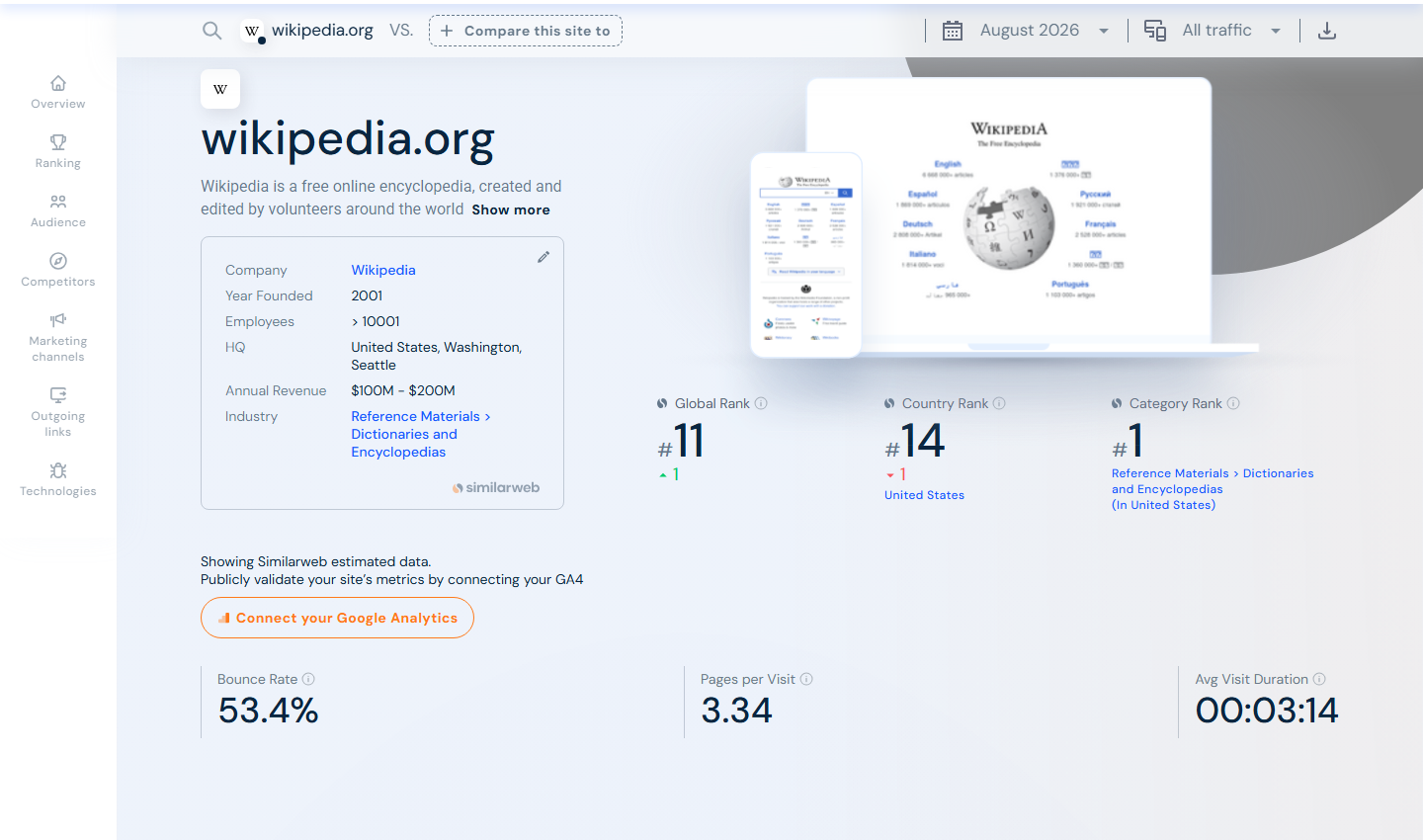
**SimilarWeb Scraper** turns a list of domains into structured [SimilarWeb](https://www.similarweb.com) website traffic, rank and competitor data: one row per website with its global, country and category rank, monthly visits and trend, engagement, the full traffic-source split, top countries and keywords and the AI-assistant traffic share, plus up to 20 ranked competitors per site as an add-on. Built for SEO teams, growth marketers, sales and lead-scoring teams, investors and researchers who need website traffic data in bulk without a paid SimilarWeb seat.

<a href="https://console.apify.com/actors/SQHzZfHC5c4Jlh0sX"><img src="https://api.apify.com/v2/key-value-stores/qNQ9zP0xaj2yxGeMY/records/similarweb-scraper-source.png" alt="SimilarWeb website traffic page that SimilarWeb Scraper turns into rows" style="width:70%"></a>

- **Every number on the overview page:** rank, visits, bounce rate, pages per visit, visit duration, channel mix, top countries and keywords
- **Bulk by design:** paste thousands of domains, bare or as full URLs; one run returns one clean row per site
- **AI-assistant traffic, broken out:** the share of visits from ChatGPT, Gemini, Perplexity, Claude and Copilot, with month-by-month history and the actual AI-search prompts — the field most scrapers miss
- **Competitors on demand:** up to 20 ranked similar sites per domain with category, estimated visits and a similarity score
- **No login, no cookies, no SimilarWeb API key:** you pass domains and nothing else
- **Pay only for delivered sites:** no start fee, and domains SimilarWeb has no data for cost nothing
- **Monitor mode:** re-check the same domains on a schedule and get only the ones whose numbers moved
- **Export and automate:** JSON, CSV, Excel, XML; schedules, webhooks, Make, Zapier, n8n, Google Sheets, Slack, the API and MCP

### What website traffic, rank and competitor data can you get from SimilarWeb?

<table>
<tr>
<td>🏆 Global rank (`globalRank`)</td>
<td>🌍 Country rank (`countryRank`)</td>
<td>🏷️ Category rank (`categoryRank`)</td>
</tr>
<tr>
<td>📈 Monthly visits (`totalVisits`)</td>
<td>📊 3-month trend (`monthlyVisitsTrendPct`)</td>
<td>↩️ Bounce rate (`bounceRate`)</td>
</tr>
<tr>
<td>📄 Pages per visit (`pagesPerVisit`)</td>
<td>⏱️ Visit duration (`avgVisitDuration`)</td>
<td>🧭 Traffic sources (`trafficSources`)</td>
</tr>
<tr>
<td>🔗 Direct / referral share</td>
<td>🔎 Search share (organic + paid)</td>
<td>📣 Social & display share</td>
</tr>
<tr>
<td>🤖 AI-assistant share (`aiShare`)</td>
<td>💬 Per-assistant split (`aiShareChatgpt`…)</td>
<td>❓ AI-search prompts (`aiTopPrompts`)</td>
</tr>
<tr>
<td>🌐 Top countries (`topCountries`)</td>
<td>🔑 Top keywords + CPC (`topKeywords`)</td>
<td>🥊 Competitors (`competitors`)</td>
</tr>
</table>

On a 21-site test run every row had its rank, visits, engagement, traffic-source split, top countries and keywords (100% fill), 21 of 21 had the AI-assistant share, and with `includeCompetitors` on, competitors returned 20 similar sites per site.

### How to scrape SimilarWeb with SimilarWeb Scraper

1. [Create a free Apify account](https://console.apify.com/sign-up) — $5 of monthly credit, no card needed.
2. Open [SimilarWeb Scraper](https://apify.com/topapi/similarweb-scraper) and click **Try for free**.
3. Paste your domains into **Websites** (bare domains or full URLs both work) and set **Max sites to deliver**.
4. Click **Start**. Rows stream into the dataset as each site is fetched.
5. Open the **Storage** tab and **Export** as JSON, CSV or Excel — or let a schedule run it for you.

### ⬇️ Input

| Parameter | Type | Description |
|---|---|---|
| **🔍 What to scrape** | | |
| `domains` | List | **Required.** Domains or URLs, one per line: `wikipedia.org`, `https://www.bbc.com/news`, `apify.com`. The registrable domain is extracted and duplicates merged. |
| **✂️ Refine results** | | |
| `minMonthlyVisits` | Integer | Keep only sites with at least this many visits last month. Default `0` (no minimum). |
| `maxGlobalRank` | Integer | Keep only sites at or above this global rank. Default `0` (no limit). |
| `countries` | List | Two-letter codes (`US`, `GB`). Keep only sites whose largest audience country is in the list. |
| `categoryFilter` | List | Keep only sites whose category contains one of these words (`news`, `finance`). |
| **➕ Extra data** | | |
| `includeCompetitors` | Boolean | Add up to 20 ranked similar sites per domain — charged as **competitors** only for sites that return at least one. Default `false`. |
| `includeUnavailable` | Boolean | Write a row for domains with no data or invalid inputs, so a bulk list is complete. Default `false`. |
| **🔁 Monitoring** | | |
| `monitorMode` | Boolean | Deliver a domain only if it is new or its rank/visits/bounce/AI-share changed. Pair with a daily schedule. |
| `monitorStoreName` | String | Name of the key-value store that holds the per-domain memory. |
| **📦 Output** | | |
| `maxResults` | Integer | Stop after this many delivered sites (your cost cap). Default `0` = every domain. |
| `compact` | Boolean | Core fields only, sized for AI agents and MCP. |
| **⚙️ Advanced** | | |
| `proxyConfiguration` | Object | Residential proxy (the default); SimilarWeb rate-limits a single IP, so the scraper uses a fresh session per domain. |
| `maxConcurrency` | Integer | Domains fetched in parallel. Default `8`. |

#### Input JSON

```json
{
  "domains": ["wikipedia.org", "bbc.com", "apify.com"],
  "includeCompetitors": true,
  "minMonthlyVisits": 1000000,
  "maxResults": 100
}
```

#### Paste domains any way you have them

The **Websites** field accepts bare domains, `www.` addresses and full URLs — `wikipedia.org`, `https://www.bbc.com/news` and `BBC.COM` all resolve to the same site. A subdomain such as `en.wikipedia.org` is looked up as its own property.

#### Filter SimilarWeb sites by visits, rank, country and category

`minMonthlyVisits`, `maxGlobalRank`, `countries` and `categoryFilter` are applied after the data is fetched. Use them to keep only the sites that matter — say every domain over a million visits whose top audience is in the US.

### ⬆️ Output

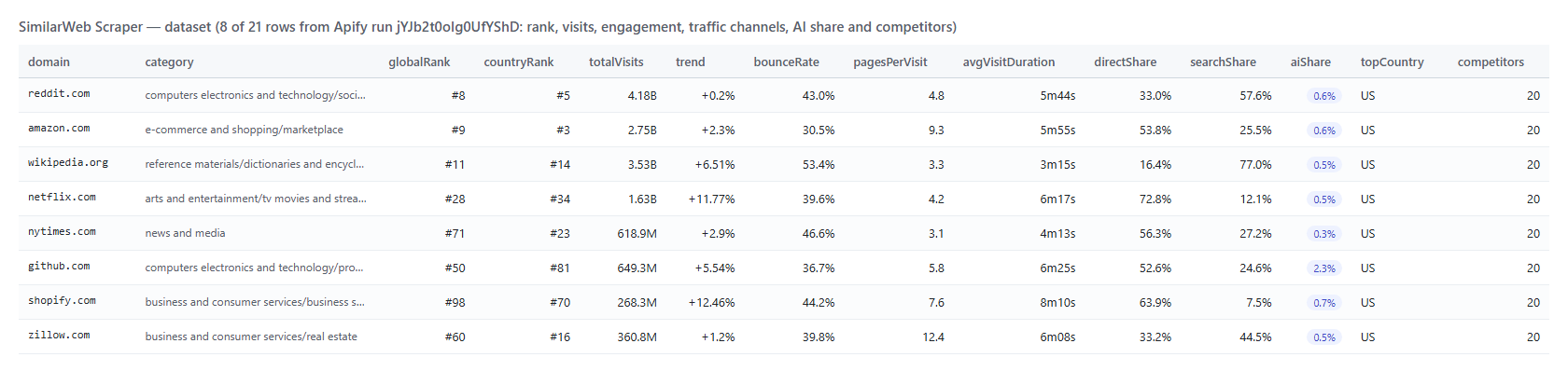
Every website becomes one dataset item. Here is the table view of a run for a mix of domains:
<a href="https://console.apify.com/actors/SQHzZfHC5c4Jlh0sX"><img src="https://api.apify.com/v2/key-value-stores/qNQ9zP0xaj2yxGeMY/records/similarweb-scraper-output.png" alt="SimilarWeb Scraper output — website traffic, rank and AI share per domain" style="width:70%"></a>

And the same row as JSON (trimmed):

```json
{
  "domain": "apify.com",
  "status": "ok",
  "url": "https://www.similarweb.com/website/apify.com/",
  "category": "computers_electronics_and_technology",
  "globalRank": 9646,
  "countryRank": 9313,
  "countryRankCode": "US",
  "categoryRank": 259,
  "totalVisits": 4201537,
  "monthlyVisits": { "2026-06-01": 4414475, "2026-07-01": 4490242, "2026-08-01": 4201537 },
  "monthlyVisitsTrendPct": -4.82,
  "bounceRate": 0.37,
  "pagesPerVisit": 7.43,
  "avgVisitDuration": 299.74,
  "directShare": 0.4357,
  "searchShare": 0.4,
  "aiShare": 0.0363,
  "aiShareChatgpt": 61.2,
  "topCountryCode": "US",
  "topKeywords": [{ "keyword": "apify", "volume": 60500, "cpc": 2.14 }],
  "snapshotDate": "2026-08-01T00:00:00+00:00"
}
```

#### Fields

| Field | Type | What it is | Fill on test run |
|---|---|---|---|
| `globalRank` | number | Global traffic rank (1 = most visited) | 100% |
| `totalVisits` | number | Estimated visits last month | 100% |
| `monthlyVisitsTrendPct` | number | Percent change across 3 months | 100% |
| `bounceRate` / `pagesPerVisit` / `avgVisitDuration` | number | Engagement metrics | 100% |
| `trafficSources` | object | 10-channel share split, 0–1 | 100% |
| `aiShare` / `aiShareChatgpt`… | number | AI-assistant traffic share | 100% (AI columns on sites with AI traffic) |
| `topKeywords` | array | Organic keywords with volume and CPC | 100% |
| `competitors` | array | Up to 20 ranked similar sites | 20 per site with `includeCompetitors` |

### How can I use SimilarWeb traffic data?

- 🎯 **SEO & content teams** — benchmark a market: pull rank, visits, bounce and the keyword list for every competitor in one run.
- 📊 **Growth marketers** — read each site's channel mix to see who leans on search, social, referral or paid, and where the gaps are.
- 🤖 **GEO / AI-search teams** — track the `aiShare` and per-assistant split to see which sites ChatGPT, Gemini and Perplexity send traffic to.
- 💼 **Sales & lead scoring** — enrich a list of prospect domains with traffic size and trend to prioritise the accounts worth a call.
- 📈 **Investors & analysts** — verify a company's traffic claims and watch month-over-month trend direction across a portfolio.
- 🔁 **Anyone on a schedule** — run it weekly in monitor mode and get only the domains whose rank or visits moved.

### How much does it cost to scrape SimilarWeb?

SimilarWeb Scraper is pay-per-result: **$0.0028 per website** ($2.80 per 1,000 domains), no start fee. Competitors are an optional add-on at **$0.0009 per site** that receives them.

| Sites | Cost | With competitors |
|---:|---:|---:|
| 10 | $0.028 | $0.037 |
| 100 | $0.28 | $0.37 |
| 1,000 | $2.80 | $3.70 |
| 10,000 | $28.00 | $37.00 |

There is nothing else to pay: Apify platform usage (compute, proxy) is included in these prices. A 21-site run with competitors took about one minute on 256 MB.

### Integrations, API, scheduling & MCP

- **Schedules:** run SimilarWeb Scraper daily or weekly from the **Schedules** tab; combine with monitor mode to collect only changed sites.
- **Webhooks:** fire a URL when a run finishes — push rows to your CRM, a sheet or Slack.
- **No-code:** Make, Zapier, n8n, Google Sheets, Airtable and Slack via [Apify integrations](https://docs.apify.com/integrations).
- **API:** call it from Node.js or Python with `apify-client` — code on the [API tab](https://apify.com/topapi/similarweb-scraper/api/python) and the [Apify API reference](https://docs.apify.com/api/v2).
- **MCP / AI agents:** connect Claude, Cursor or any MCP client through the [MCP tab](https://apify.com/topapi/similarweb-scraper/api/mcp) and ask for website traffic in plain language; turn on `compact` to keep the payload small.

### More SimilarWeb and web-data scrapers

<table>
<tr>
<td>📍 <a href="https://apify.com/topapi/google-maps-reviews-scraper">Google Maps Reviews Scraper</a></td>
<td>🎬 <a href="https://apify.com/topapi/tiktok-video-scraper">TikTok Video Scraper</a></td>
<td>👤 <a href="https://apify.com/topapi/instagram-scraper">Instagram Scraper</a></td>
</tr>
<tr>
<td>💼 <a href="https://apify.com/topapi/indeed-jobs-scraper">Indeed Jobs Scraper</a></td>
<td>📣 <a href="https://apify.com/topapi/facebook-search-posts-scraper">Facebook Search Posts Scraper</a></td>
<td>🧭 <a href="https://apify.com/topapi">All our scrapers</a></td>
</tr>
</table>

### SimilarWeb data limits & empty runs

- **One row per domain:** SimilarWeb publishes one traffic profile per site; there is no per-run ceiling because each domain is its own lookup.
- **Estimates, dated:** the numbers are SimilarWeb's monthly estimate; `snapshotDate` says which month, and `isDataFromGoogleAnalytics` is true only when the site owner connected GA.
- **No data:** small or brand-new sites that SimilarWeb has no measurement for come back as `status: no_data` with every metric null (never a fake zero).
- **Competitors:** some sites have no similar-sites data; those rows carry an empty `competitors` array.
- **Proxy:** SimilarWeb rate-limits a single IP, so Residential proxy is on by default with a fresh session per domain. An empty dataset means the inputs were not valid domains or every site was filtered out — the run log says which.

### FAQ

#### How many websites can SimilarWeb Scraper collect in one run?

As many as you paste. One run handles thousands of domains; use `maxResults` as a cost cap and `maxConcurrency` to control speed.

#### Can I run SimilarWeb Scraper on a schedule to track traffic over time?

Yes. Save your domains as a task, open **Schedules**, pick the cadence, and turn on `monitorMode` so each run returns only the sites whose rank or visits changed.

#### Does SimilarWeb Scraper return AI-assistant traffic?

Yes — it is a headline field. Every site with AI referral data carries `aiShare` (the GenAI share of visits), per-assistant columns (`aiShareChatgpt`, `aiShareGemini`, `aiSharePerplexity`, `aiShareClaude`, `aiShareCopilot`), the month-by-month history, and example AI-search prompts.

#### Can I get competitors and similar sites with SimilarWeb Scraper?

Yes. Turn on `includeCompetitors` and each site gets up to 20 ranked similar sites with category, estimated visits and a similarity score. It is charged only for sites that return competitors.

#### Can I integrate SimilarWeb Scraper with other apps?

Yes — Make, Zapier, n8n, Google Sheets and Slack via [Apify integrations](https://docs.apify.com/integrations), or use [webhooks](https://docs.apify.com/integrations/webhooks) to trigger an action when a run finishes.

#### Can I use SimilarWeb Scraper with the Apify API?

Yes. Start runs and fetch datasets with `apify-client` for [Node.js](https://apify.com/topapi/similarweb-scraper/api/javascript) or [Python](https://apify.com/topapi/similarweb-scraper/api/python); the API tab has ready-to-paste code.

#### Can I use SimilarWeb Scraper through an MCP server?

Yes. Open the [MCP tab](https://apify.com/topapi/similarweb-scraper/api/mcp), connect your MCP client, and ask for website traffic in plain language. Turn on `compact` for a smaller payload.

#### Do I need a SimilarWeb account, cookies or an API key?

No. SimilarWeb Scraper reads only SimilarWeb's publicly available data; you pass domains and nothing else.

#### Why did my SimilarWeb Scraper run return no results?

Either the inputs were not valid domains, or every site was removed by your filters, or the sites are too small for SimilarWeb to have data. Turn on `includeUnavailable` to see a row for each, and check the run log.

#### How accurate is the SimilarWeb Scraper traffic data?

It is SimilarWeb's own published estimate — the same figure their public page shows — so expect it to differ from a site owner's internal analytics. Sites with a connected GA integration are flagged with `isDataFromGoogleAnalytics: true`.

#### Your feedback

We keep improving SimilarWeb Scraper. Found a bug or missing a field? Open an issue on the [Issues tab](https://apify.com/topapi/similarweb-scraper/issues/open) and we will take a look.

# Actor input Schema

## `domains` (type: `array`):

Domains or URLs to look up on SimilarWeb, one per line, e.g. "wikipedia.org", "https://www.bbc.com/news", "apify.com". A subdomain ("en.wikipedia.org") is looked up as its own site.

## `minMonthlyVisits` (type: `integer`):

Keep only sites with at least this many estimated visits last month, e.g. 1000000. 0 = no minimum.

## `maxGlobalRank` (type: `integer`):

Keep only sites ranked at or above this global rank (1 = most visited). e.g. 100000 keeps the top 100k sites. 0 = no limit. Sites with no rank are removed by this filter.

## `countries` (type: `array`):

Two-letter country codes, e.g. US, GB, DE. Keep only sites whose single largest audience country is in this list. Empty = any country.

## `categoryFilter` (type: `array`):

Keep only sites whose SimilarWeb category contains one of these words, e.g. "news", "e-commerce", "finance". Matched against the category path like "news_and_media". Empty = any category.

## `includeCompetitors` (type: `boolean`):

Adds up to 20 ranked similar sites per domain (competitor, category, estimated visits, similarity score) plus the site's tags and related apps. One extra request per domain. Charged as the competitors event only for domains that return at least one competitor.

## `includeUnavailable` (type: `boolean`):

Write a row (status, input) for domains SimilarWeb has no traffic data for, or inputs that are not valid domains, so a bulk list comes back complete. Off: they appear only in the run summary.

## `monitorMode` (type: `boolean`):

Remembers each domain's rank, visits, bounce rate and AI-traffic share in the named key-value store below. A re-run delivers a domain only if it is new or any of those changed, with previousStats, statsDelta and isNew on the row.

## `monitorStoreName` (type: `string`):

Name of the key-value store that keeps the per-domain memory for monitor mode. Give each campaign or client its own name. Letters, digits and hyphens.

## `maxResults` (type: `integer`):

Stop after this many delivered sites (your cost cap; you pay per delivered site). 0 = every domain in the list. One run handles thousands of domains.

## `compact` (type: `boolean`):

Core fields only (domain, rank, visits, engagement, the main channel shares, AI share and top country): about a tenth of the bytes, sized for AI agents and MCP clients.

## `proxyConfiguration` (type: `object`):

SimilarWeb rate-limits a single IP after a handful of requests, so Residential proxy is required for bulk runs; the scraper uses a fresh session per domain. The default works out of the box.

## `maxConcurrency` (type: `integer`):

How many domains to look up at the same time. 8 is the tested sweet spot; higher is not faster because the source throttles.

## Actor input object example

```json
{
  "domains": [
    "wikipedia.org",
    "bbc.com",
    "apify.com"
  ],
  "minMonthlyVisits": 0,
  "maxGlobalRank": 0,
  "countries": [],
  "categoryFilter": [],
  "includeCompetitors": false,
  "includeUnavailable": false,
  "monitorMode": false,
  "monitorStoreName": "similarweb-monitor",
  "maxResults": 0,
  "compact": false,
  "proxyConfiguration": {
    "useApifyProxy": true,
    "apifyProxyGroups": [
      "RESIDENTIAL"
    ]
  },
  "maxConcurrency": 8
}
```

# Actor output Schema

## `sites` (type: `string`):

The dataset of website traffic profiles (one item per domain).

## `summary` (type: `string`):

Per-domain outcome (delivered, filtered, unchanged, no data, invalid, blocked), competitors fetched and bytes moved.

# API

You can run this Actor programmatically using our API. Below are code examples in JavaScript, Python, and CLI, as well as the OpenAPI specification and MCP server setup.

## JavaScript example

```javascript
import { ApifyClient } from 'apify-client';

// Initialize the ApifyClient with your Apify API token
// Replace the '<YOUR_API_TOKEN>' with your token
const client = new ApifyClient({
    token: '<YOUR_API_TOKEN>',
});

// Prepare Actor input
const input = {
    "domains": [
        "wikipedia.org",
        "bbc.com",
        "apify.com"
    ],
    "countries": [],
    "categoryFilter": []
};

// Run the Actor and wait for it to finish
const run = await client.actor("topapi/similarweb-scraper").call(input);

// Fetch and print Actor results from the run's dataset (if any)
console.log('Results from dataset');
console.log(`💾 Check your data here: https://console.apify.com/storage/datasets/${run.defaultDatasetId}`);
const { items } = await client.dataset(run.defaultDatasetId).listItems();
items.forEach((item) => {
    console.dir(item);
});

// 📚 Want to learn more 📖? Go to → https://docs.apify.com/api/client/js/docs

```

## Python example

```python
from apify_client import ApifyClient

# Initialize the ApifyClient with your Apify API token
# Replace '<YOUR_API_TOKEN>' with your token.
client = ApifyClient("<YOUR_API_TOKEN>")

# Prepare the Actor input
run_input = {
    "domains": [
        "wikipedia.org",
        "bbc.com",
        "apify.com",
    ],
    "countries": [],
    "categoryFilter": [],
}

# Run the Actor and wait for it to finish
run = client.actor("topapi/similarweb-scraper").call(run_input=run_input)

# Fetch and print Actor results from the run's dataset (if there are any)
print(f"💾 Check your data here: https://console.apify.com/storage/datasets/{run.default_dataset_id}")
for item in client.dataset(run.default_dataset_id).iterate_items():
    print(item)

# 📚 Want to learn more 📖? Go to → https://docs.apify.com/api/client/python/docs/quick-start

```

## CLI example

```bash
echo '{
  "domains": [
    "wikipedia.org",
    "bbc.com",
    "apify.com"
  ],
  "countries": [],
  "categoryFilter": []
}' |
apify call topapi/similarweb-scraper --silent --output-dataset

```

## MCP server setup

```json
{
    "mcpServers": {
        "apify": {
            "type": "http",
            "url": "https://mcp.apify.com/?tools=fetch-actor-details,topapi/similarweb-scraper"
        }
    }
}
```

The hosted server signs you in with OAuth on first connect, so no API token belongs in this config. Clients without OAuth support can send an `Authorization: Bearer <APIFY_API_TOKEN>` header instead, using a token from API & Integrations in Apify Console (https://console.apify.com/settings/integrations).

## OpenAPI specification

Download the OpenAPI definition: https://api.apify.com/v2/actors/SQHzZfHC5c4Jlh0sX/builds/EfbmyIq7cwzs7Cj1P/openapi.json