

Facebook Search Posts Scraper - Keyword, Date & Location
Pricing
from $2.40 / 1,000 post scrapeds
Facebook Search Posts Scraper - Keyword, Date & Location
Search public Facebook posts by keyword and get one row per post: text, author Page or profile, date, reactions by type, comments, shares, video views, photos, video and link attachments, group and place. Recent-first, date and location filters, monitor mode. No login or cookies.
Pricing
from $2.40 / 1,000 post scrapeds
Rating
0.0
(0)
Developer

Top Api
Maintained by CommunityActor stats
1
Bookmarked
315
Total users
201
Monthly active users
14 hours ago
Last modified
Categories
Share
What does Facebook Search Posts Scraper do?
Facebook Search Posts Scraper searches public Facebook posts by keyword and turns every hit into a structured row: one row per post with the full text, the author Page or profile, the publish date, reactions by type, comments, shares, video views, photos, video and link attachments, and the group or place the post belongs to. Built for brand monitoring, market research and lead-generation teams that need Facebook posts data without a login, cookies or an API key.
Facebook Posts Search - Facebook Keyword Search Scraper - Facebook Post Search API - Facebook Mentions Monitor
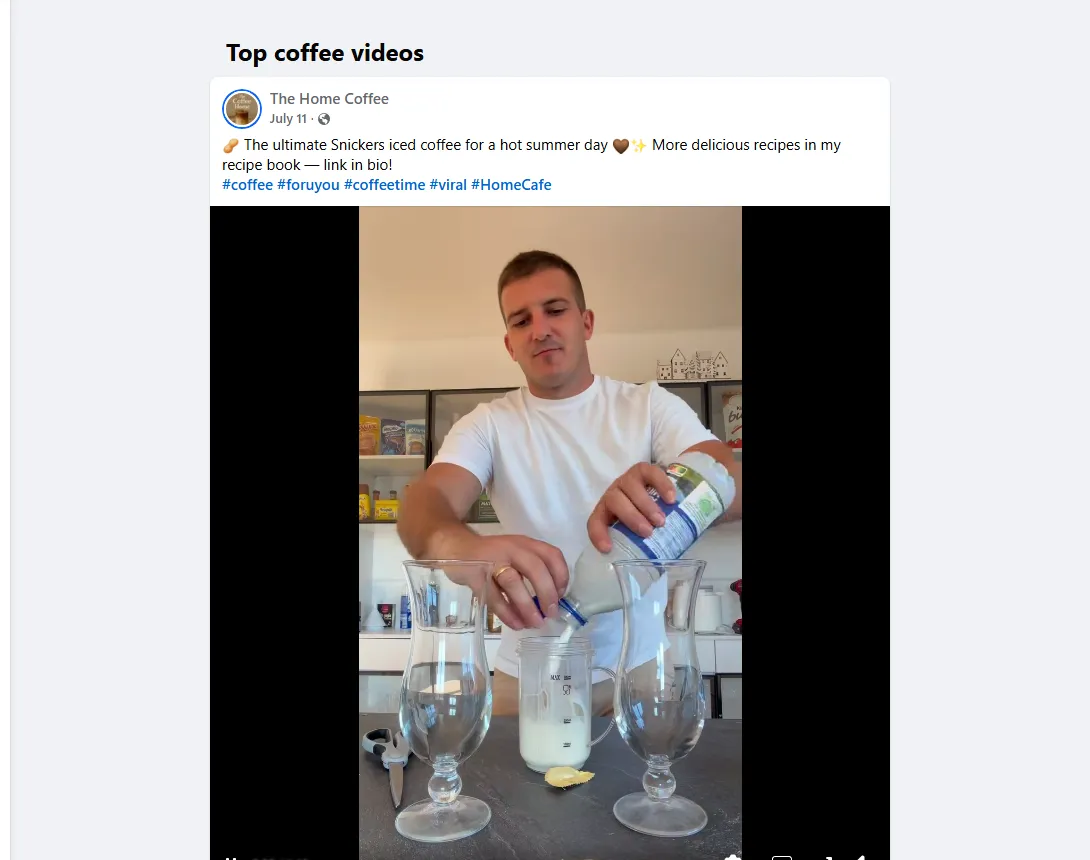
- Facebook's own search, not a page crawl: the public posts search Facebook runs for your keyword, ranked by relevance or newest first, 11-12 posts per page, deep pagination (100 posts in 34 seconds on a test run).
- Every engagement number: reactions with the like / love / care / haha / wow / sad / angry breakdown, comments, shares and video views - filled on 100% of a 100-post test run (breakdown on 97%).
- One better than the rest:
matches_querysays whether the text really contains your keyword;group,location,author.is_business_pageandengagement_countcome on every row; the details add-on adds top comments and video SD/HD files. - Filters: date window, strict keyword match, post type, source (groups, Pages, profiles) and minimum reactions.
- Monitor mode: remembers what it delivered per keyword and returns only new posts - pair it with a schedule for a feed of fresh mentions.
- No login, cookies or Facebook API key: the actor reads only what Facebook shows a signed-out visitor.
- Export anywhere: JSON, CSV, Excel, XML, RSS; schedules, webhooks, Make, Zapier, n8n, Google Sheets, Slack.
- Works with AI agents: call it through the Apify API or the MCP server;
compacttrims rows for LLM context windows.
What data can you get from Facebook posts search?
| 🔗 Post URL and id (`url`, `post_id`) | 📝 Full text (`message`), hashtags, mentions | 📅 Publish date (`timestamp`, `published_at`) |
| 👤 Author id, name, URL, avatar, type | 🏢 Business Page flag (`author.is_business_page`) | 👍 Reactions total and by type (`reactions`) |
| 💬 Comments and shares (`comments_count`, `reshare_count`) | ▶️ Video views, duration, thumbnail, captions URL | 🖼️ Photos and albums (`image`, `images`, `album_count`) |
| 🌐 Outbound link with title, source, preview (`external_link`) | 🔁 Shared post URL and author (`attached_post`) | 👥 Public group id, name, URL (`group`) |
| 📍 Tagged place (`location`) | 🎯 Contains your keyword? (`matches_query`) | 💬 Top comments, video files (details add-on) |
On a 100-post test run for "coffee" every row had text, author, date, reactions, comments and shares; 73% carried an image, 47% came from public groups, 11% were videos (views on 10 of 11), 52% had hashtags and 91% contained the word "coffee".
How to scrape Facebook posts by keyword with Facebook Search Posts Scraper
- Create a free Apify account - $5 of monthly credit, no card needed.
- Open Facebook Search Posts Scraper and click Try for free.
- Paste your keywords into Search queries (one per line) and set Max posts per query.
- Pick Sort by (Facebook's top posts or most recent first), optionally a date window and a location.
- Click Start. Rows stream into the dataset as each page of results arrives.
- Open the Storage tab and Export as JSON, CSV or Excel - or let a schedule run it for you.
⬇️ Input
| Parameter | Type | Description |
|---|---|---|
| 🔍 What to scrape | ||
searchQueries | List | Required (defaults to the sample "coffee"). Keywords, phrases or hashtags, e.g. coffee, #blackfriday, iPhone 17 battery; a Facebook search URL also works. |
| 🎯 Filters (applied by Facebook inside the search) | ||
sortBy | Select | top = Facebook's relevance ranking (default), recent = most recent first. |
startDate / endDate | String | 2026-09-01, 7 days, 3 weeks, or a day count. Sent to Facebook as its date filter and re-checked on every post. |
locationUid | String | Facebook's numeric place id, e.g. 108424279189115 (New York, NY). |
| ✂️ Refine results | ||
mustContainQuery | Boolean | Keep only posts whose text contains the query. Default false. |
keywordFilter | String | Keep only posts whose text, author, link title or group name contain a word (discount, sale = any). |
postType | Select | all, photo, video, link or text. |
postSource | Select | all, groups, pages_and_profiles or business_pages. |
minReactions | Integer | Keep only posts with at least this many reactions. Default 0. |
| ➕ Extra data | ||
includePostDetails | Boolean | Adds top_comments, video_files (SD/HD) and the view count from each post's public page - charged as post-details at $0.001 per post that gets details. |
| 🔁 Monitoring | ||
monitorMode | Boolean | Return only posts not delivered by previous runs with the same memory. Pair with a schedule. On frequent schedules a feed is read in full at most every 30 minutes, with quick checks in between. |
monitorStoreName | String | Key-value store that keeps the per-query memory. Default facebook-search-posts-monitor. |
| 📦 Output | ||
maxPostsPerQuery | Integer | Default 50; 0 = as many as Facebook serves, up to 1,000 per query (11-12 per page). |
maxItems | Integer | Hard cap for the whole run. 0 = none. |
compact | Boolean | Core fields only, sized for AI agents and MCP. |
| ⚙️ Advanced | ||
proxyConfiguration | Object | Apify datacenter proxies by default; they serve every request this actor makes. If you pick RESIDENTIAL, datacenter is still tried first and RESIDENTIAL is used only when Facebook refuses a datacenter session. |
maxConcurrency | Integer | Parallel queries and detail pages. Default 2, max 6. |
Input JSON
Put one keyword per line, not one long phrase
Facebook matches the query against the post text and ranks loosely related posts too. Single words match almost always (94% of "coffee" and "pizza" results contained the word on a 307-post test); long phrases rarely ("hiring now apply" matched 0 of 10). Do: cold brew and pumpkin spice latte as two lines. Don't: coffee shop hiring barista downtown. Turn on mustContainQuery when every row must contain the exact words.
Use "Most recent first" for monitoring, "Top" for research
top is Facebook's relevance ranking: popular posts of any age, right for research and content discovery. recent returns the newest public posts first; with monitorMode the run stops as soon as it reaches a page it already delivered, so a scheduled check costs one or two pages. On a frequent schedule (every few minutes), a feed is read in full at most every 30 minutes; the checks in between read its first 2 pages and go further only while pages bring new posts, so a new post deeper in the results arrives with the next full check. Hourly or slower schedules get the full check every run.
Find a location id before you use the location filter
locationUid wants Facebook's numeric id of a city or region, not its name. On facebook.com, run the search, apply the city filter, open a result's About tab and click the city: the number at the end of that page's URL is the id. Tested: 108424279189115 (New York) returned pizza posts tagged "New York, NY, United States". Leave it empty for a global search.
⬆️ Output
Every post becomes one dataset item. Here is the table view of a run for Tesla and plumber near me (most recent first, last 7 days):
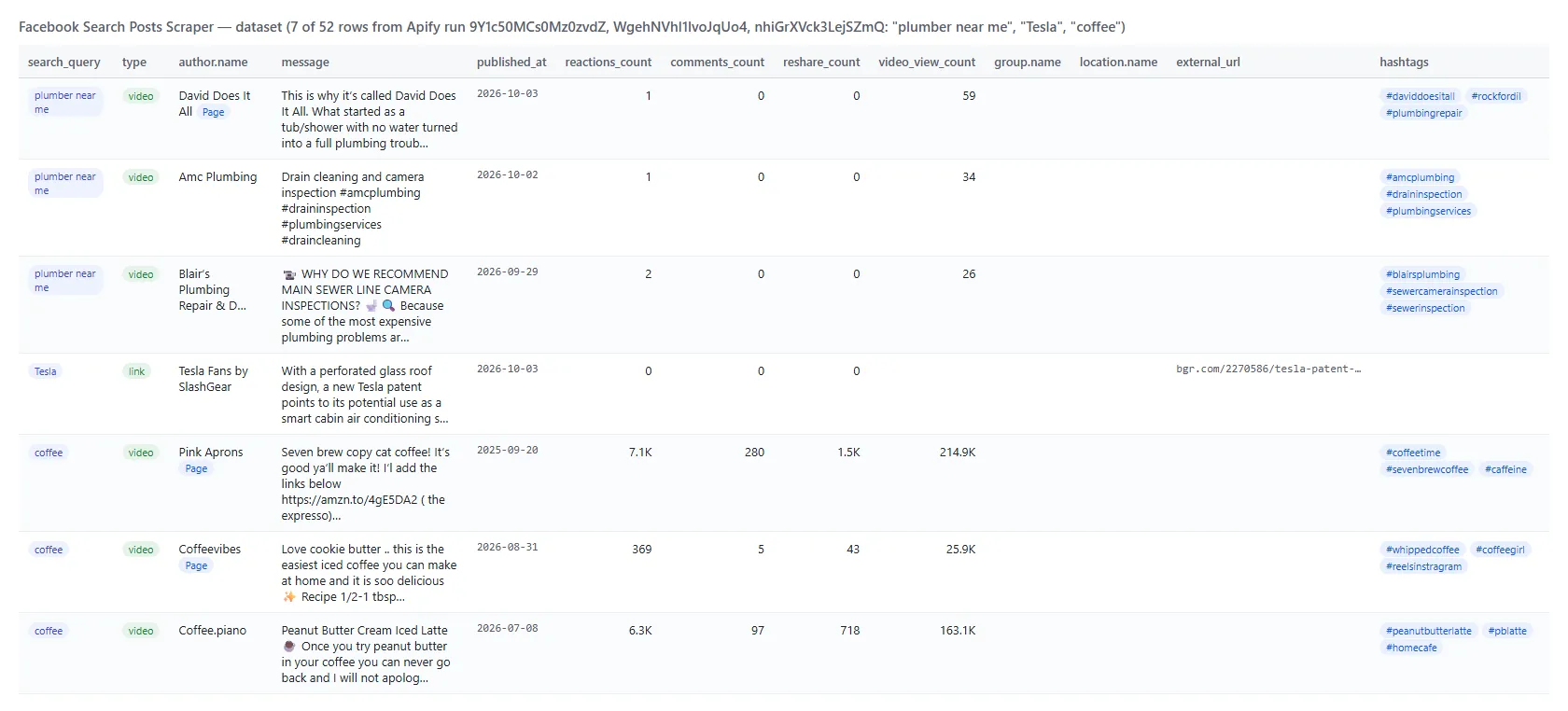
And one real row from the 100-post "coffee" run (trimmed):
Facebook post fields
| Field | Type | What it is | Fill on the 100-post run |
|---|---|---|---|
post_id, url, story_id, comments_id | string | Post id, permalink, story id, feedback id | 100% |
type | string | photo, album, video, link, marketplace, event, share or status | 100% |
message | string | Full text, never truncated (longest seen 3,160 characters) | 100% |
timestamp, published_at | integer, ISO 8601 | Publish time | 100% |
author | object | id, name, url, profile_picture_url, type (page, user, anonymous), is_business_page | 100% |
author_title | string | Facebook's header line, e.g. "Iron Bloom Coffee Bar is in Elyria, OH." | 9% |
reactions_count, comments_count, reshare_count, engagement_count | integer | Totals; engagement = reactions + comments + shares | 100% |
reactions | object | like, love, care, haha, wow, sad, angry; an unlisted type is 0 when the listed ones add up to the total, else null | 97% |
video_view_count, video, video_id, video_thumbnail, video_duration_ms, video_captions_url | mixed | Video posts only | 10-11% (every video post) |
video_files | object | video_sd_file, video_hd_file - details add-on | 3 of 3 videos on the details run |
image, images, album_count, image_alt | object, array | First image, every image of the post or album, accessibility caption | 73% / 81% |
external_url, external_link | string, object | Outbound link (unwrapped) with title, description, source, preview image | 1% on "coffee", 7% across 307 mixed posts |
attached_post_url, attached_post | string, object | The original post when this one is a share | 1% |
attachments | array | Every attachment: kind, url, title, image, id | 92% |
is_group_post, group | boolean, object | Public group id, name, url | 47% |
location | object | Tagged place id, name, url | 2% on "coffee", 5% across 307 posts |
privacy | string | Public or Public group | 100% |
hashtags, mentions | array | Parsed from the text | 52% / 2% |
top_comments | array | Up to ~10 public top comments: id, text, date, author, reactions - details add-on | 10 of 16 posts had one on the details run |
matches_query, search_query, sort, search_source, scraped_at | mixed | Exact-match flag, the query and sort that produced the row, facebook_posts_search | 100% |
How can I use Facebook posts search data?
- 🎯 Brand and competitor monitoring - schedule
recent+monitorModefor your brand names and get every new public mention with its reach. - 📊 Market and sentiment research - pull the top posts for a topic and read
message,reactionsby type andcomments_count. - 🔎 Lead generation - search "looking for a plumber" or "recommend a dentist" with
postSource: groups;group,authorandurlpoint you to the conversation. - 🏢 Local business discovery -
locationUidpluspostSource: business_pageslists Pages posting about a topic in one city. - 📰 Content and creator discovery -
postType: videowithminReactionsfinds the videos that work;video_view_countandvideo_filesmake them comparable. - 🤖 AI and research teams - feed
compactrows to an LLM for summaries or classification;matches_queryandhashtagsare ready-made labels. - 📈 Trend tracking - run the same keywords weekly and compare
reactions_countand the number of posts per week.
How much does it cost to scrape Facebook posts search?
Facebook Search Posts Scraper is pay-per-result: $2.40 per 1,000 posts, no start fee. You only pay for the results you get. The optional post details are $1.00 per 1,000 posts that receive them.
| Posts | Cost | With post details |
|---|---|---|
| 10 | $0.024 | $0.034 |
| 100 | $0.24 | $0.34 |
| 1,000 | $2.40 | $3.40 |
| 10,000 | $24.00 | $34.00 |
There is nothing else to pay: Apify platform usage (compute, proxy) is included in these prices. A run stops taking new pages once its own platform cost has passed what it has earned (after an allowance for a normal start); it then delivers what it has and says so in its status. Measured on the platform (256 MB): a 12-post run took 5-9 seconds, a 100-post run 63 seconds including a forced restart, a 24-post run with details at concurrency 6 took 36 seconds with a peak of 78 MB of memory; a monitor check that finds nothing new took 4 seconds.
Facebook posts in your tools: integrations, API, scheduling & MCP
- Schedules: run it hourly, daily or weekly from the Schedules tab; combine with
monitorModeandsortBy: recentto get only new posts each time. - Webhooks: fire a URL when a run finishes - push new mentions to your CRM, Slack or a sheet.
- No-code: Make, Zapier, n8n, Google Sheets, Airtable, Slack via Apify integrations.
- API: call it from Node.js or Python with
apify-client- code on the API tab and the Apify API reference. - MCP / AI agents: connect Claude, Cursor or any MCP client through the MCP tab and ask for Facebook posts about a topic in plain language; set
compact: trueto keep rows small.
More social media scrapers by TopApi
| 📍 Google Maps Reviews Scraper - reviews, ratings, owner replies and dates for any place | 🎵 TikTok Scraper - videos, hashtags, profiles and search with transcripts | 📸 Instagram Scraper - posts, reels, hashtags and profiles without login |
| 🔎 All TopApi actors - monitor-ready scrapers built for schedules, APIs and AI agents |
Limits & empty runs
- Results per query: 11-12 posts per page, up to 1,000 per query; 8 consecutive pages (86 unique posts) measured without a duplicate. Split a broad topic into several keywords to go wider.
- Relevance is Facebook's: the search also returns loosely related posts, and even a nonsense term returns posts.
matches_querymarks the exact matches;mustContainQuerykeeps only those. - Reactions by type are the types Facebook lists on the post; when they do not add up to the total, the unlisted types are
null, not zero. - Business Page flag comes from Facebook's "additional profile" marker, so creator pages can appear as
user. - Post details open each post's public page (about 0.8 MB each); comments are the top-level ones Facebook shows a visitor (0-10 per post), not the full thread.
- Empty dataset: Facebook returned no posts, every post was removed by your filters, or monitor mode found nothing new - the status message says which.
- Not available signed-out: full comment threads, reactor lists, private groups, restricted-audience posts. Media and avatar URLs are signed CDN links that expire after a few hours.
FAQ
How many Facebook posts can Facebook Search Posts Scraper collect in one run?
Up to 1,000 posts per search query (maxPostsPerQuery: 0) and as many queries as you list, within the run's time limit. A 100-post run took 34 seconds on the platform.
Can I run Facebook Search Posts Scraper on a schedule to get new posts automatically?
Yes. Save your input as a task with sortBy: recent and monitorMode: true, open Schedules, pick the cadence, and each run delivers only posts it has not delivered before. A run that finds nothing new bills nothing. Give each feed its own monitorStoreName.
Can I filter Facebook posts by date with Facebook Search Posts Scraper?
Yes. startDate and endDate accept absolute dates or relative values such as 7 days. The window is sent to Facebook and re-checked on every post; on a test run the 7-day window removed 12 older posts Facebook had still ranked.
Does Facebook Search Posts Scraper return comments?
Post rows carry the comment count. With includePostDetails the actor adds top_comments (the top-level comments Facebook shows signed-out, up to about 10, with text, date, author and reactions) plus video_files and the view count for videos. Full threads need a dedicated comments scraper.
Can I integrate Facebook Search Posts Scraper with other apps?
Yes - Make, Zapier, n8n, Google Sheets, Slack and more via Apify integrations, or use webhooks to trigger an action when a run finishes.
Can I use Facebook Search Posts Scraper with the Apify API?
Yes. Use apify-client for Node.js or Python; the API tab has ready-to-paste code for starting runs and fetching datasets.
Can I use Facebook Search Posts Scraper through an MCP server?
Yes. Open the MCP tab, connect your MCP client (Claude Desktop, Cursor, LibreChat and others) and ask for Facebook posts about a topic in plain language. compact: true returns a fifth of the bytes per row.
Do I need a Facebook account, cookies or an API key for Facebook Search Posts Scraper?
No. The actor reads only what Facebook shows a signed-out visitor; you pass keywords and nothing else. It never asks for your cookies or session.
Why did my Facebook Search Posts Scraper run return no results?
Most often every post was removed by mustContainQuery or another refine filter (the status message lists the counts), the date window was too narrow for a rare keyword, or monitor mode had already delivered everything new. The run log names the cause.
How is Facebook Search Posts Scraper different from other Facebook post search scrapers?
It runs Facebook's own public posts search without a login, returns reactions by type, comments, shares and video views on every row (100% on a 100-post test), adds matches_query, group, location, author.is_business_page and engagement_count, filters by date, keyword match, post type, source and reactions, and has monitor mode and a details add-on with top comments and video files.
Is it legal to scrape Facebook posts data?
Facebook Search Posts Scraper extracts only publicly available posts; it does not log in or collect private data. Results may still contain personal data, which is regulated (for example by GDPR). Make sure you have a legitimate purpose before you use it, and consult a lawyer if you are unsure.
Your feedback
We keep improving Facebook Search Posts Scraper. Found a bug or missing a field? Open an issue on the Issues tab - we answer within one business day.


