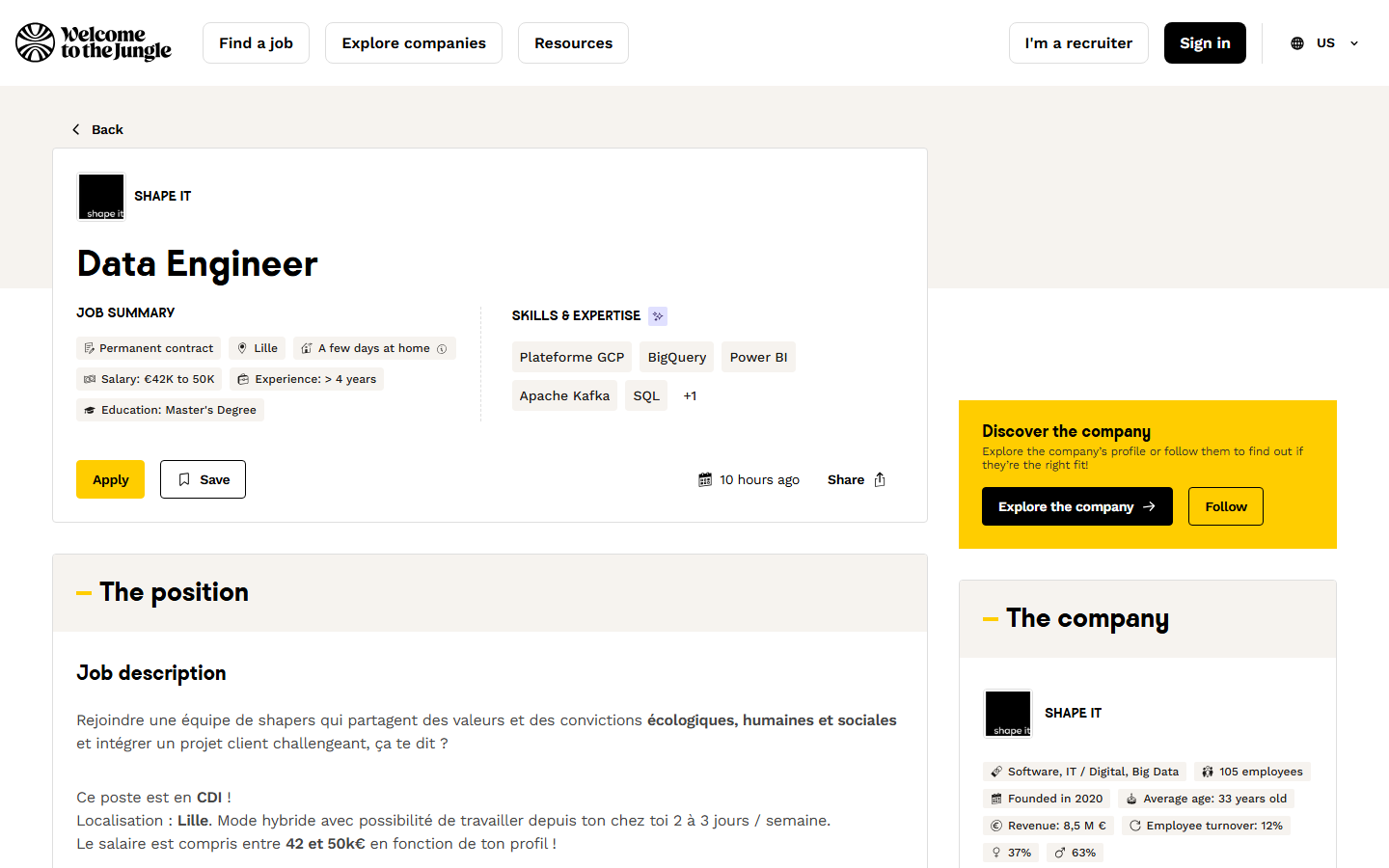
💼 Job title (name) |
🏢 Company (organizationName) |
📍 City, region, country, address, zip, GPS |
| 💶 Salary from / to, currency, period |
📄 Contract type and length |
🏠 Remote policy |
| 🎓 Experience (years) and education |
📝 Description, profile, recruitment process |
🎯 Key missions and WTTJ summary |
| 🛠️ Skills and tools |
🔗 Apply link + ATS (applyUrl, ats) |
❓ Screening questions |
| 🎁 Benefits by category |
🏷️ Category, sub-category, profession, sectors |
📅 Published, updated, start date |
| 👥 Headcount, founding year, revenue |
⚖️ Women/men split, equality index, turnover, average age |
🌐 Website, LinkedIn, X, Facebook, Instagram |
On a 1,000-job platform run (search `commercial`, run `XYP8cGJjkQlybqKm2`): description 100.0%, external apply link 96.8%, skills 90.8%, office address 98.8%, employer website 99.3%, LinkedIn 99.8%, average age 71.6%, revenue 25.7%, salary 15.0%. Fields WTTJ does not publish for a job are `null`, never a placeholder.
### How to scrape Welcome to the Jungle with Welcome to the Jungle Jobs Scraper
1. [Create a free Apify account](https://console.apify.com/sign-up): $5 of monthly credit, no card needed.
2. Open [Welcome to the Jungle Jobs Scraper](https://apify.com/topapi/welcome-to-the-jungle-jobs-scraper) and click **Try for free**.
3. Type one or more **Search terms** (e.g. `data engineer`), pick a **Country** or **Location**, and add filters if you want them.
4. Set **Maximum results** and click **Start**. Rows stream into the dataset as they are read.
5. Open the **Storage** tab and **Export** as JSON, CSV or Excel, or let a schedule run it for you.
### ⬇️ Input
All filters are optional. Every filter applies to every search term, link and company in the run.
| Parameter | Type | Description |
|---|---|---|
| **🔍 What to scrape** | | |
| `mode` | Select | `jobs` (default), `companies`, `articles`, or `jobsAndCompanies` (each job plus one row per employer) |
| `searchQueries` | List | Search terms, one per line, matched like the site's search box. Empty = the newest jobs |
| `query` | String | One search term (same as one line above) |
| `startUrls` | List | WTTJ links: jobs, companies, searches (filters in the link are kept) or articles; or a file of links |
| `companies` | List | Company slugs or links, e.g. `doctolib`; jobs mode returns their open jobs |
| **🎯 Filters** (applied by WTTJ's search) | | |
| `websiteCountry` | Select | Site edition `en` / `fr` / `es` / `cs` / `sk`: translates labels and links. Default `en` |
| `location`, `locationRadius`, `radiusKm` | String / Select / Integer | A place resolved by WTTJ's own location search + radius (default 20 miles) |
| `latitude`, `longitude` | String | Search around exact coordinates |
| `countryCode` | String | One or more ISO codes (`FR`, `FR,BE`); overrides location |
| `cities`, `regions` | List | Exact office cities / regions or départements |
| `sortBy`, `datePosted`, `postedAfter`, `postedBefore` | Select / Date | Relevance or newest first; last 24 h to 30 days; fixed dates |
| `contractType`, `remote` | Multi-select | Permanent, fixed-term, internship, work-study, freelance, VIE…; fully / partial / occasional / no remote |
| `experienceLevel`, `experienceMin`, `experienceMax` | Select / Integer | Years of experience asked |
| `educationLevel` | Multi-select | No diploma to PhD |
| `salaryMin`, `salaryMax`, `salaryCurrency`, `onlyWithSalary` | Integer / Multi-select / Boolean | Yearly salary range, currency, only jobs that publish a salary |
| `companySize`, `companySizeMin`, `companySizeMax` | Select / Integer | Employer headcount |
| `language`, `sector`, `occupation`, `jobSubCategory` | Select / Multi-select | Job language, 20 sectors + 99 sub-sectors, 20 job categories + 179 sub-categories |
| `companyLabels`, `companyCommitments`, `benefits` | Multi-select / List | Employer labels and commitments; benefits every job must offer |
| `onlyPromoted`, `searchOnlyInJobTitle`, `onlyHiring` | Boolean | Promoted jobs; match the title only; companies with open jobs |
| **✂️ Refine results** (applied before any charge) | | |
| `excludeKeywords`, `excludeCompanies` | List | Drop jobs by words in the title/company, or by company |
| `onlyWithApplyUrl`, `onlyWithApplicationQuestions`, `skipReposts` | Boolean | External apply link only; screening questions only; drop reposts |
| **➕ Extra data** | | |
| `includeDetails` | Boolean | The full job page. Default `true`, charged as `job-details` |
| `enrichCompanyRegistry` | Boolean | French register record per employer, charged as `company-registry` when matched |
| `enrichEmails` | Boolean | The employer's public email from its own website, charged as `email-found` when found |
| `includeArticleBody` | Boolean | Articles mode: the full article text. Default `true` |
| **🔁 Monitoring** | | |
| `monitorMode`, `monitorStoreName`, `monitorIncludeUpdated`, `resetMonitor` | Boolean / String | Only jobs not delivered by earlier runs; memory name; also edited jobs; start over |
| **🔔 Alerts** | | |
| `webhookUrl`, `webhookHeaders`, `slackWebhookUrl`, `discordWebhookUrl`, `telegramToken` + `telegramChatId`, `whatsappPhoneNumberId` + `whatsappAccessToken` + `whatsappTo`, `notificationLimit`, `notifyOnlyChanges` | String / Object / Integer / Boolean | Send the new rows after each run |
| **📦 Output** | | |
| `maxItems` | Integer | Default `100`; `0` = everything that matches (no 1,000 cap) |
| `maxItemsPerQuery`, `maxCompanies` | Integer | Per search / company cap; company rows in jobs + companies mode |
| `descriptionFormat`, `descriptionMaxLength` | Select / Integer | HTML + text + Markdown (default), HTML, text or Markdown; cut long texts |
| `compact`, `excludeEmptyFields` | Boolean | Core fields only (for AI agents and MCP); drop empty fields |
| `outputMode`, `chunkSize`, `chunkOverlap` | Select / Integer | `rag` adds `ragChunks` (overlapping word chunks) for vector databases |
| **⚙️ Advanced** | | |
| `proxyConfiguration`, `maxConcurrency` | Proxy / Integer | Not needed (direct connection, datacenter fallback); job pages read in parallel (default 20) |
#### Input JSON
```json
{
"searchQueries": ["data engineer", "product manager"],
"countryCode": "FR",
"contractType": ["full_time"],
"remote": ["fulltime", "partial"],
"datePosted": "7",
"maxItems": 200
}
```
#### Paste a search link to reuse filters you set on the site
A link such as `https://www.welcometothejungle.com/fr/jobs?query=python&refinementList[contract_type][]=internship&aroundLatLng=48.85,2.35&aroundRadius=20` keeps its query, its filters, its location and its sort. Company links (`…/companies/doctolib`) return that company's open jobs; job links return that one job.
#### Leave the search empty for the newest jobs
With no search term the actor returns the newest jobs that match your filters, newest first. `{"countryCode": "DE", "maxItems": 0}` exports every job with an office in Germany.
#### Monitor mode wants a fixed search
The memory is kept per search and per set of filters. Change a filter and the actor treats it as a new search. A relative window such as **Last 7 days** keeps the same memory from day to day.
### ⬆️ Output
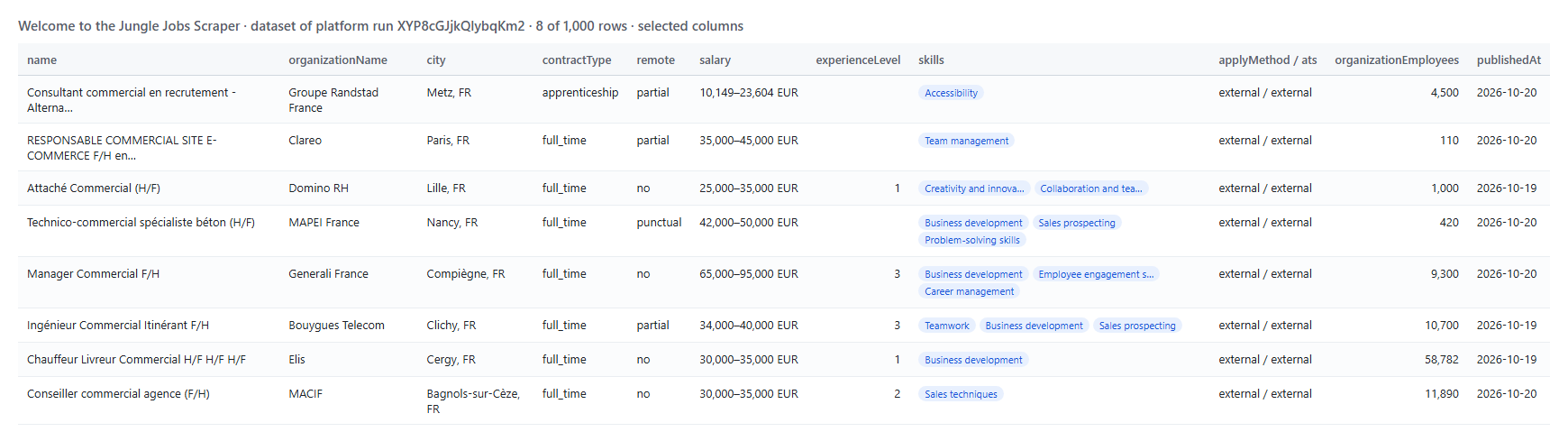 Every job becomes one dataset item. A row from a real run (long texts shortened):
```json
{
"id": "ef041186-2f0e-4448-bfaa-8b2e3963e47a",
"reference": "GRF_5bkYMMM",
"name": "Consultant commercial en recrutement -Alternance",
"url": "https://www.welcometothejungle.com/en/companies/groupe-randstad/jobs/consultant-commercial-en-recrutement-alternance_metz_GRF_5bkYMMM",
"contractType": "apprenticeship",
"remote": "partial",
"salaryMin": 10149,
"salaryMax": 23604,
"salaryCurrency": "EUR",
"publishedAt": "2026-10-20T22:01:45Z",
"category": "HR / People",
"city": "Metz",
"zipCode": "57000",
"skills": [
"Accessibility"
],
"applyUrl": "http://ris.my.salesforce-sites.com/RecrutmentRIR/RIR_NouveauCandidatur…",
"ats": "external",
"descriptionText": "Dépasser nos objectifs en faisant le bonheur de nos clients,\n\nÇa nous booste, et vous ?\n\nS…",
"organizationName": "Groupe Randstad France",
"organizationEmployees": 4500,
"organizationRevenue": "3,6 M€",
"organizationParityWomen": 78
}
```
#### Fields
Fill measured on the 1,000 rows of platform run `XYP8cGJjkQlybqKm2`.
| Field | Type | What it is | Fill |
|---|---|---|---:|
| `name` | string | Job title (also as `title`) | 100.0% |
| `url` | string | Job page on welcometothejungle.com, in the chosen site language | 100.0% |
| `contractType` | string | `full_time`, `temporary`, `internship`, `apprenticeship`, `freelance`, `vie`… | 100.0% |
| `remote` | string | `fulltime`, `partial`, `punctual`, `no`, `unknown` | 100.0% |
| `salaryMin` / `salaryMax` / `salaryCurrency` | number / string | Published salary range (currency and period only when an amount is published) | 15.0% |
| `experienceLevel` | number | Minimum years of experience asked | 86.6% |
| `educationLevel` | string | French diploma scale (`bac_5` = master) | 72.5% |
| `publishedAt` | string (ISO 8601) | Publication date | 100.0% |
| `category` / `subcategory` | string | WTTJ job category and sub-category | 100.0% |
| `sectors` | array | Employer sectors | 99.9% |
| `summary` / `keyMissions` | string / array | WTTJ's summary and key missions of the job | 100.0% |
| `city` / `address` / `zipCode` | string | Office of the job | 98.8% |
| `latitude` / `longitude` | number | Office coordinates | 97.0% |
| `description` | string | Full description (HTML; `descriptionText` and `descriptionMarkdown` too) | 100.0% |
| `profile` | string | Candidate profile | 82.1% |
| `recruitmentProcess` | string | Recruitment process | 4.1% |
| `skills` | array | Skills, in the site language | 90.8% |
| `tools` | array | Tools / tech stack of the job | 9.2% |
| `applyUrl` | string | The employer's own application page (`applyMethod`: `external`; `wttj` = apply on WTTJ) | 96.8% |
| `ats` | string | Applicant tracking system behind the job | 100.0% |
| `applicationFields` | array | Application form fields and whether each is mandatory | 96.7% |
| `atsQuestions` | array | Screening questions | 1.8% |
| `benefits` / `benefitCategories` | array | Benefits, flat and by category | 31.8% |
| `startDate` | string | Start date | 11.1% |
| `organizationName` | string | Company | 100.0% |
| `organizationEmployees` | number | Headcount | 100.0% |
| `organizationCreationYear` | number | Founded | 96.8% |
| `organizationIndustry` | string | Industry | 99.9% |
| `organizationRevenue` | string | Revenue as the company states it | 25.7% |
| `organizationAverageAge` | number | Average employee age | 71.6% |
| `organizationParityWomen` / `organizationParityMen` | number | Share of women / men (%) | 20.8% |
| `organizationTurnover` | number | Staff turnover (%) | 1.7% |
| `organizationEqualityIndex` | number | French gender equality index (+ breakdown) | 27.6% |
| `organizationLabels` | array | Labels (B Corp, Great Place to Work, EcoVadis…) | 66.3% |
| `organizationWebsite` | string | Company website | 99.3% |
| `organizationLinkedin` / `organizationTwitter` | string | Social profiles (also Facebook, Instagram, YouTube) | 99.8% |
| `organizationHeadquarter` | object | Head office address and coordinates | 100.0% |
| `searchRanking` | object | WTTJ's own ranking signals for the job (profile ranking, organization score, rank groups) | every search row |
| `socialImage` | string | The job's share image | every job page |
| `companyRegistry` | object | French register record (add-on): SIREN, SIRET, legal name and form, NAF code, headcount band, PME/ETI/GE, creation date, head office, register link | add-on |
| `contactEmail` / `contactEmails` / `contactWebsite` | string / array | Public email(s) on the employer's own website (add-on) and the page it was on | add-on |
| `contentHash` / `isRepost` / `repostOfId` / `changeType` | string / boolean | Repost detection and monitor state (`new`, `updated`) | every row |
Company rows (`mode: companies`) carry `name`, `url`, `description`, `size`, `employees`, `sectors`, `techStack` (tools by category), `jobsCount`, `website`, `offices`, `headquarterCity`, `labels`, `equalityIndex`, the dossier fields above when the company has an open job, and the add-ons. Article rows carry `name`, `url`, `language`, `kind`, `lead`, `body`, `bodyText`, `wordCount`, `categories`, `authors`, `organizations` and `publishedAt`.
### How can I use Welcome to the Jungle jobs data?
- 🎯 **Recruitment and staffing agencies:** find employers hiring for the roles you place, with the hiring company's size, sector and website.
- 💼 **B2B sales and account-based marketing:** hiring is a buying signal; a company opening five data roles needs data tools. Pair it with the register and email add-ons.
- 📊 **HR, compensation and labour-market analysts:** salary ranges by role, city, contract and experience across France, the US and Europe.
- 🧑💻 **Job boards and aggregators:** a structured feed with descriptions, apply links and ATS, refreshed by a daily monitor.
- 🏢 **Employer-branding and HR-tech vendors:** spot employers without an external ATS, with low parity scores or with screening questions.
- 🤖 **AI and research teams:** RAG chunks and compact rows for vector databases and agents.
### How much does it cost to scrape Welcome to the Jungle?
Welcome to the Jungle Jobs Scraper is pay-per-result: **$0.06 per 1,000 jobs** plus **$0.03 per 1,000 jobs that carry the full job page** (on by default, so **$0.09 per 1,000 jobs** with the job page), no start fee. Company profiles and articles are $0.36 per 1,000. A run is charged only for the rows written to the dataset after your filters.
| Jobs | With the job page (default) | Listing only |
|---:|---:|---:|
| 100 | $0.009 | $0.006 |
| 1,000 | $0.09 | $0.06 |
| 10,000 | $0.90 | $0.60 |
| 90,000 (the whole board) | $8.10 | $5.40 |
| Add-on | Price |
|---|---|
| French company register match (`company-registry`) | $0.0018 per employer matched, once per run |
| Employer email found (`email-found`) | $0.045 per employer with an email on its website, once per run; no email, no charge |
There is nothing else to pay: Apify platform usage (compute, proxy) is included in these prices. On the test runs, 1,000 jobs with their job pages took 11.6 seconds on 256 MB, 100 jobs 4 seconds.
### Integrations, API, scheduling & MCP
- **Schedules:** run it hourly, daily or weekly from the **Schedules** tab; with **Only new jobs** each run returns only jobs you have not received.
- **Alerts:** Slack, Discord, Telegram, WhatsApp or any webhook, straight from the input.
- **No-code:** Make, Zapier, n8n, Google Sheets, Airtable via [Apify integrations](https://docs.apify.com/integrations).
- **API:** call it from Node.js or Python with `apify-client`; code on the [API tab](https://apify.com/topapi/welcome-to-the-jungle-jobs-scraper/api/python) and the [Apify API reference](https://docs.apify.com/api/v2).
- **MCP / AI agents:** connect Claude, Cursor or any MCP client through the [MCP tab](https://apify.com/topapi/welcome-to-the-jungle-jobs-scraper/api/mcp) and ask for WTTJ jobs in plain language; **Compact rows** keeps the answers small.
### More TopApi scrapers
Every job becomes one dataset item. A row from a real run (long texts shortened):
```json
{
"id": "ef041186-2f0e-4448-bfaa-8b2e3963e47a",
"reference": "GRF_5bkYMMM",
"name": "Consultant commercial en recrutement -Alternance",
"url": "https://www.welcometothejungle.com/en/companies/groupe-randstad/jobs/consultant-commercial-en-recrutement-alternance_metz_GRF_5bkYMMM",
"contractType": "apprenticeship",
"remote": "partial",
"salaryMin": 10149,
"salaryMax": 23604,
"salaryCurrency": "EUR",
"publishedAt": "2026-10-20T22:01:45Z",
"category": "HR / People",
"city": "Metz",
"zipCode": "57000",
"skills": [
"Accessibility"
],
"applyUrl": "http://ris.my.salesforce-sites.com/RecrutmentRIR/RIR_NouveauCandidatur…",
"ats": "external",
"descriptionText": "Dépasser nos objectifs en faisant le bonheur de nos clients,\n\nÇa nous booste, et vous ?\n\nS…",
"organizationName": "Groupe Randstad France",
"organizationEmployees": 4500,
"organizationRevenue": "3,6 M€",
"organizationParityWomen": 78
}
```
#### Fields
Fill measured on the 1,000 rows of platform run `XYP8cGJjkQlybqKm2`.
| Field | Type | What it is | Fill |
|---|---|---|---:|
| `name` | string | Job title (also as `title`) | 100.0% |
| `url` | string | Job page on welcometothejungle.com, in the chosen site language | 100.0% |
| `contractType` | string | `full_time`, `temporary`, `internship`, `apprenticeship`, `freelance`, `vie`… | 100.0% |
| `remote` | string | `fulltime`, `partial`, `punctual`, `no`, `unknown` | 100.0% |
| `salaryMin` / `salaryMax` / `salaryCurrency` | number / string | Published salary range (currency and period only when an amount is published) | 15.0% |
| `experienceLevel` | number | Minimum years of experience asked | 86.6% |
| `educationLevel` | string | French diploma scale (`bac_5` = master) | 72.5% |
| `publishedAt` | string (ISO 8601) | Publication date | 100.0% |
| `category` / `subcategory` | string | WTTJ job category and sub-category | 100.0% |
| `sectors` | array | Employer sectors | 99.9% |
| `summary` / `keyMissions` | string / array | WTTJ's summary and key missions of the job | 100.0% |
| `city` / `address` / `zipCode` | string | Office of the job | 98.8% |
| `latitude` / `longitude` | number | Office coordinates | 97.0% |
| `description` | string | Full description (HTML; `descriptionText` and `descriptionMarkdown` too) | 100.0% |
| `profile` | string | Candidate profile | 82.1% |
| `recruitmentProcess` | string | Recruitment process | 4.1% |
| `skills` | array | Skills, in the site language | 90.8% |
| `tools` | array | Tools / tech stack of the job | 9.2% |
| `applyUrl` | string | The employer's own application page (`applyMethod`: `external`; `wttj` = apply on WTTJ) | 96.8% |
| `ats` | string | Applicant tracking system behind the job | 100.0% |
| `applicationFields` | array | Application form fields and whether each is mandatory | 96.7% |
| `atsQuestions` | array | Screening questions | 1.8% |
| `benefits` / `benefitCategories` | array | Benefits, flat and by category | 31.8% |
| `startDate` | string | Start date | 11.1% |
| `organizationName` | string | Company | 100.0% |
| `organizationEmployees` | number | Headcount | 100.0% |
| `organizationCreationYear` | number | Founded | 96.8% |
| `organizationIndustry` | string | Industry | 99.9% |
| `organizationRevenue` | string | Revenue as the company states it | 25.7% |
| `organizationAverageAge` | number | Average employee age | 71.6% |
| `organizationParityWomen` / `organizationParityMen` | number | Share of women / men (%) | 20.8% |
| `organizationTurnover` | number | Staff turnover (%) | 1.7% |
| `organizationEqualityIndex` | number | French gender equality index (+ breakdown) | 27.6% |
| `organizationLabels` | array | Labels (B Corp, Great Place to Work, EcoVadis…) | 66.3% |
| `organizationWebsite` | string | Company website | 99.3% |
| `organizationLinkedin` / `organizationTwitter` | string | Social profiles (also Facebook, Instagram, YouTube) | 99.8% |
| `organizationHeadquarter` | object | Head office address and coordinates | 100.0% |
| `searchRanking` | object | WTTJ's own ranking signals for the job (profile ranking, organization score, rank groups) | every search row |
| `socialImage` | string | The job's share image | every job page |
| `companyRegistry` | object | French register record (add-on): SIREN, SIRET, legal name and form, NAF code, headcount band, PME/ETI/GE, creation date, head office, register link | add-on |
| `contactEmail` / `contactEmails` / `contactWebsite` | string / array | Public email(s) on the employer's own website (add-on) and the page it was on | add-on |
| `contentHash` / `isRepost` / `repostOfId` / `changeType` | string / boolean | Repost detection and monitor state (`new`, `updated`) | every row |
Company rows (`mode: companies`) carry `name`, `url`, `description`, `size`, `employees`, `sectors`, `techStack` (tools by category), `jobsCount`, `website`, `offices`, `headquarterCity`, `labels`, `equalityIndex`, the dossier fields above when the company has an open job, and the add-ons. Article rows carry `name`, `url`, `language`, `kind`, `lead`, `body`, `bodyText`, `wordCount`, `categories`, `authors`, `organizations` and `publishedAt`.
### How can I use Welcome to the Jungle jobs data?
- 🎯 **Recruitment and staffing agencies:** find employers hiring for the roles you place, with the hiring company's size, sector and website.
- 💼 **B2B sales and account-based marketing:** hiring is a buying signal; a company opening five data roles needs data tools. Pair it with the register and email add-ons.
- 📊 **HR, compensation and labour-market analysts:** salary ranges by role, city, contract and experience across France, the US and Europe.
- 🧑💻 **Job boards and aggregators:** a structured feed with descriptions, apply links and ATS, refreshed by a daily monitor.
- 🏢 **Employer-branding and HR-tech vendors:** spot employers without an external ATS, with low parity scores or with screening questions.
- 🤖 **AI and research teams:** RAG chunks and compact rows for vector databases and agents.
### How much does it cost to scrape Welcome to the Jungle?
Welcome to the Jungle Jobs Scraper is pay-per-result: **$0.06 per 1,000 jobs** plus **$0.03 per 1,000 jobs that carry the full job page** (on by default, so **$0.09 per 1,000 jobs** with the job page), no start fee. Company profiles and articles are $0.36 per 1,000. A run is charged only for the rows written to the dataset after your filters.
| Jobs | With the job page (default) | Listing only |
|---:|---:|---:|
| 100 | $0.009 | $0.006 |
| 1,000 | $0.09 | $0.06 |
| 10,000 | $0.90 | $0.60 |
| 90,000 (the whole board) | $8.10 | $5.40 |
| Add-on | Price |
|---|---|
| French company register match (`company-registry`) | $0.0018 per employer matched, once per run |
| Employer email found (`email-found`) | $0.045 per employer with an email on its website, once per run; no email, no charge |
There is nothing else to pay: Apify platform usage (compute, proxy) is included in these prices. On the test runs, 1,000 jobs with their job pages took 11.6 seconds on 256 MB, 100 jobs 4 seconds.
### Integrations, API, scheduling & MCP
- **Schedules:** run it hourly, daily or weekly from the **Schedules** tab; with **Only new jobs** each run returns only jobs you have not received.
- **Alerts:** Slack, Discord, Telegram, WhatsApp or any webhook, straight from the input.
- **No-code:** Make, Zapier, n8n, Google Sheets, Airtable via [Apify integrations](https://docs.apify.com/integrations).
- **API:** call it from Node.js or Python with `apify-client`; code on the [API tab](https://apify.com/topapi/welcome-to-the-jungle-jobs-scraper/api/python) and the [Apify API reference](https://docs.apify.com/api/v2).
- **MCP / AI agents:** connect Claude, Cursor or any MCP client through the [MCP tab](https://apify.com/topapi/welcome-to-the-jungle-jobs-scraper/api/mcp) and ask for WTTJ jobs in plain language; **Compact rows** keeps the answers small.
### More TopApi scrapers