

Website Technology Scraper - Tech Stack, CMS & Analytics Lookup
Pricing
from $1.90 / 1,000 website analyzeds
Website Technology Scraper - Tech Stack, CMS & Analytics Lookup
Detect any website's technology stack for $1.90 per 1,000 sites: CMS, ecommerce, analytics, ads, tag managers, frameworks, CDN, hosting, payments and email services, with versions, confidence and evidence. 7,600+ fingerprints, real browser render, DNS and TLS signals, change monitor.
Pricing
from $1.90 / 1,000 website analyzeds
Rating
0.0
(0)
Developer

Top Api
Maintained by CommunityActor stats
0
Bookmarked
2
Total users
1
Monthly active users
7 days ago
Last modified
Categories
Share
What does Website Technology Scraper do?
Website Technology Scraper detects the technology stack of any website. Paste a list of domains and get one row per website with every technology found: CMS, ecommerce platform, analytics, advertising pixels, tag managers, JavaScript frameworks, CDN, hosting, payment processors, live chat, cookie consent and email services, each with its category, confidence, version where the site exposes one, and the evidence that matched. Built for sales and marketing teams, agencies, investors and researchers who need a tech stack lookup in bulk without checking sites one by one.
Tech stack lookup - website technology checker - BuiltWith alternative - Wappalyzer alternative - what CMS is this site using

- 7,600+ technology fingerprints: the open Wappalyzer-format fingerprint set plus DNS-based checks, across 109 categories
- Live detection: every website is fetched when you run the actor, so the stack is today's, not a cached crawl
- Versions, confidence and evidence: each technology says how it was detected (header, script URL, page markup, cookie, global variable, DNS record type) and what matched
- DNS and TLS signals: email, DNS and SaaS services that only show up in a domain's DNS records (Google Workspace, Microsoft 365, SendGrid, Zendesk, HubSpot, Salesforce...), plus the TLS certificate authority
- Headless Chrome when a page needs it: pages built by JavaScript are rendered in a real browser to see the scripts and tags they load
- Change monitor: schedule it and get only the websites whose stack changed, with the technologies added and removed and the versions that changed
- No login, cookies or API key: you pass domains, nothing else
- Export anywhere: JSON, CSV, Excel, XML; schedules, webhooks, Make, Zapier, n8n, Google Sheets; Apify API and MCP
What data can you get from a website?
| 🧩 Technologies (`technologies`) | 🏷️ Categories (`categories`) | 🔢 Versions (`version`) |
| 🎯 Confidence 0-100 (`confidence`) | 🔍 Evidence per detection (`evidence`) | ⭐ Primary stack (`primaryStack`) |
| 📝 CMS and site builder | 🛒 Ecommerce platform | 📊 Analytics and tag managers |
| 📣 Advertising and retargeting pixels | ⚛️ JavaScript and web frameworks | ☁️ Hosting, PaaS and CDN |
| ✉️ Email and SaaS services from DNS (`dnsDetected`) | 🔒 TLS issuer and expiry (`tls`) | 🛡️ Security headers (`securityHeaders`) |
| 🖥️ Server and X-Powered-By | 🌐 Third-party domains loaded | 🔁 Added / removed since the last run |
On a 100-domain test run of B2B company websites, the 89 websites that answered had 32 technologies on average (median 34, range 11-46) across 22 categories; 19 of them on average came from DNS records.
How to look up a website's technology stack with Website Technology Scraper
- Create a free Apify account - it comes with monthly free credit.
- Open Website Technology Scraper and click Try for free.
- Paste your domains into Websites, one per line (
hubspot.com,www.example.comor a full URL), or link a text file under Website URLs (or a file). - Leave Browser render on Auto, or set it to Never for the fastest HTTP + DNS lookup.
- Click Start. Rows appear in the dataset as websites finish.
- Open Storage and Export as JSON, CSV or Excel - or schedule the actor and turn on Monitor mode.
⬇️ Input
| Parameter | Type | Description |
|---|---|---|
| 🔍 What to analyze | ||
domains | List | Domains or URLs, e.g. shopify.com, www.example.com, https://example.com/pricing. A domain is analyzed at its homepage. An empty list (and no startUrls) runs the 3-site demo: shopify.com, wordpress.org, notion.so. A list that gives no website (a file link that fails, an empty file, no valid domain) ends the run as FAILED with nothing charged. |
startUrls | URL list | Same as domains in URL form, or a link to a text/CSV file with one domain per line. |
| 🎯 Detection | ||
renderJavaScript | Select | auto renders JavaScript-built pages in headless Chrome, always renders every page (slower), never is HTTP + DNS only. On long lists of heavy pages a cost limit can skip some renders; those rows say renderedWith: http. Default: auto |
maxPagesPerDomain | Integer | Homepage plus up to N-1 same-site pages (pricing, checkout, blog, careers). Contact pages are never picked, in English or other common languages (Kontakt, Contactez-nous, Contacto, Contatti...), and neither are imprint (Impressum, mentions légales) or directions (Anfahrt) pages. Default: 1 |
includeDns | Boolean | DNS records (MX, TXT, NS, SOA, CNAME) as detection signals. Default: true |
includeTls | Boolean | TLS certificate issuer and validity. Default: true |
renderWaitSecs | Integer | Seconds the browser waits after load for tag managers. Default: 3 |
| ✂️ Refine results | ||
categories | List | Keep only these categories, e.g. CMS, Analytics, Ecommerce, Tag managers. |
onlyTechnologies | List | "Does it use X?" mode: rows get matches and matchedTechnologies, e.g. Shopify, HubSpot. |
onlyMatchingSites | Boolean | With onlyTechnologies: return only websites that use one of them. Default: false |
minConfidence | Integer | Drop detections under this confidence (0-100). Default: 0 |
| ➕ Extra data | ||
includeEvidence | Boolean | The signals behind each detection. Default: true |
includeSecurityHeaders | Boolean | HSTS, CSP, X-Frame-Options and 6 more headers. Default: true |
includeRawSignals | Boolean | Script URLs, XHR hosts, response headers and cookie names. Store ids (such as a Shopify shop id) are removed. Default: false |
| 🔁 Monitoring | ||
monitorMode | Boolean | Return only websites whose stack changed since the last run: technologies added or removed, or a version changed. categories and minConfidence only choose which changes a row shows: each run is compared on the whole stack, so changing or clearing a filter between runs is never a change. Default: false |
monitorStoreName | String | One name per list you monitor. Default: website-technology-monitor |
| 📦 Output | ||
maxResults | Integer | Stop after this many websites; 0 = the whole list. Default: 0 |
compact | Boolean | Core fields only, sized for AI agents and MCP. Default: false |
compareMode | Boolean | Save a COMPARISON record: technologies common to all websites and unique to each. |
includeFailedSites | Boolean | Free rows for websites that could not be analyzed, so every valid, distinct website gets a row (invalid entries and duplicates are skipped; the log and RUN_SUMMARY.inputsSkipped count them). Default: true |
| ⚙️ Advanced | ||
proxyConfiguration | Proxy | Default: direct first, Apify proxy for hosts that refuse. |
maxConcurrency | Integer | Websites analyzed in parallel (1-50), capped at 8 per GB of run memory (16 at the default 2 GB). Default: 10 |
requestTimeoutSecs | Integer | Per-request time limit. Default: 20 |
respectRobotsTxt | Boolean | Follow the robots.txt rules for all user agents (User-agent: *). A website whose address, or the page it redirects to, is disallowed gets a free robotsDisallowed row. Extra pages that robots.txt disallows are never fetched or billed, and the next allowed page is taken instead; an extra page that redirects to a disallowed address is dropped and not billed. A missing or unreadable robots.txt allows every page. RUN_SUMMARY counts the skipped extra pages (robotsSkippedPages). Default: false |
ignoreHttpsErrors | Boolean | Analyze websites with invalid certificates. Default: false |
The actor also accepts the input names other technology lookups use (startDomains, urls, websites, url, maxItems, maxUrls, render_js, max_pages_per_site, deep_scan, categories_filter, verify_ssl, enableDns, enableTls, enableSecurityScore, include_details, include_scripts, respect_robots_txt, timeout_seconds), so an existing integration keeps working. Such a name is used while the matching field above is left at its default; render_js: true means Always (false means Auto) and deep_scan: true means 5 pages. The run log and RUN_SUMMARY.inputAliases list the names used.
Input JSON
Pass domains, not deep links
The homepage carries the site-wide tags (tag manager, analytics, consent, chat). Do: hubspot.com · Don't: hubspot.com/products/crm/some-landing-page unless that page is what you want to check. Use Pages per website to add pricing, checkout and blog pages automatically.
Pick the render mode by list size
Auto renders only pages that need JavaScript and is the best default. Never is the fastest for very large lists (HTTP, DNS and TLS still run). Always renders every homepage in Chrome: on a 10-site test it found 51 technologies per website instead of 32, at roughly 12-16 seconds per site. A render costs more compute than a plain lookup, so on long lists of heavy pages a cost limit can skip some renders; those rows say renderedWith: http (two runs of the 10-site test rendered 9 and 10 of the 10 websites).
⬆️ Output
Each website becomes one dataset item. Here is the table view of a 100-domain run:
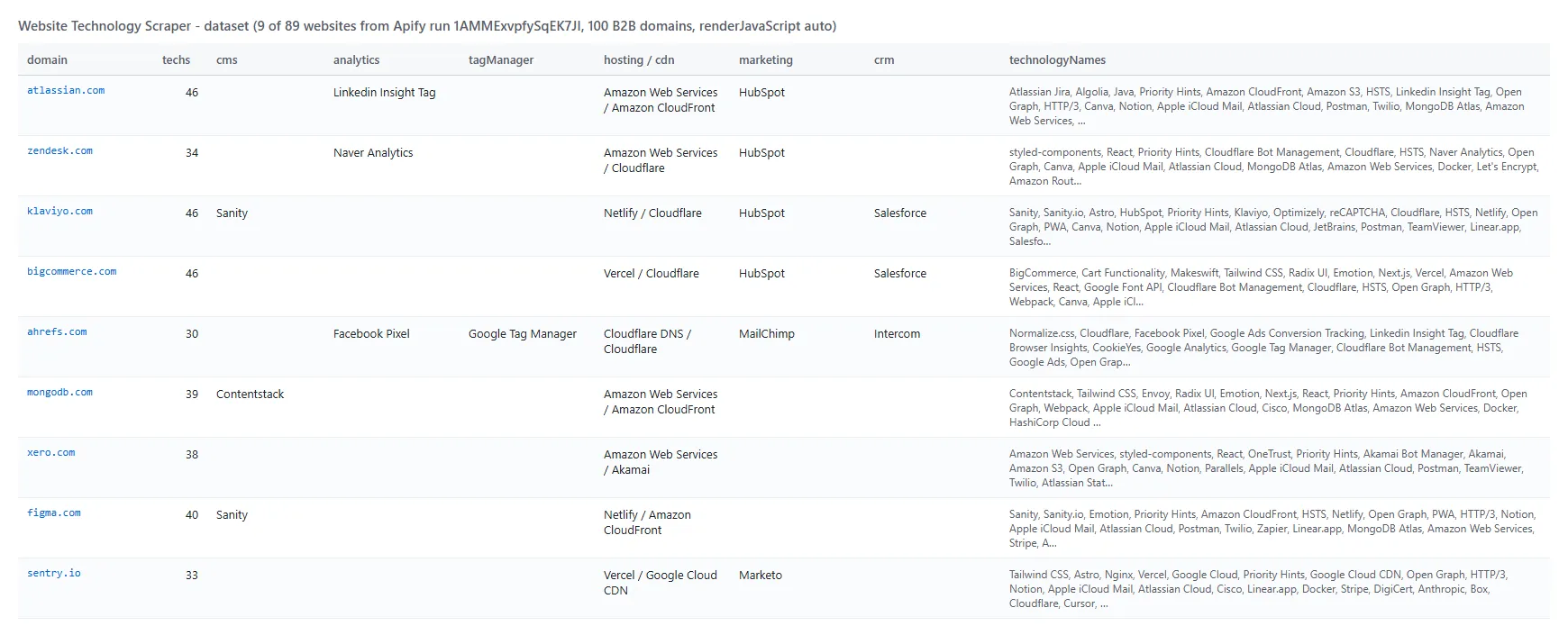
A row, shortened (real data from the test run):
Fields
| Field | Type | What it is | Fill on test run |
|---|---|---|---|
domain, finalUrl, statusCode | string / int | Website, URL after redirects, HTTP status | 100% |
technologies | array | name, slug, version, confidence, categories, tag, website, link, description, icon, iconUrl, cpe, saas, oss, pricing, detectedVia, evidence | 100% |
technologyNames, categories | array | Flat lists of names | 100% |
techs | array | Same list in the name, tag, categories, link shape other lookups use | 100% |
primaryStack | object | Leading technology per group (cms, ecommerce, analytics, tagManager, hosting, cdn, crm, paymentProcessor...) | 100% (cms 60%, analytics 46%, hosting 93%) |
byCategory | object | Technology names grouped by category | 100% |
dnsDetected | array | Technologies found only through DNS | 100% |
title, metaDescription | string | Page title and meta description | 100%, 97% |
metaGenerator | string | The page's generator meta tag | 17% |
server, poweredBy | string | Server and X-Powered-By headers | 85%, 26% |
tls | object | issuer, issuerCn, protocol, validFrom, validTo | 100% |
securityHeaders, securityHeadersPresent | object, int | 9 security headers (null when absent) and how many are set | 100% (3.2 set on average) |
thirdPartyDomains | array | Other domains the homepage loads scripts, stylesheets, images, media, frames or XHR from (http and https addresses only) | 99% |
pagesAnalyzed, pageCount | array, int | Pages analyzed for the website. With Compact output, rows with more than one page keep pageCount and the page URLs | 100% |
matches, matchedTechnologies | boolean, array | With onlyTechnologies | when used |
isNew, added, removed, versionChanged, previousTechCount, previousAnalyzedAt | Monitor mode (see the FAQ) | when used | |
version (in technologies) | string | Version, when the site exposes it | 1% of detections over HTTP, 4% with the browser |
How can I use website technology data?
- 🎯 Sales teams - find companies on a given platform (Shopify, HubSpot, Salesforce, Zendesk) and target accounts by the tools they already pay for
- 🧭 Agencies - check a prospect's CMS, analytics and ad pixels before a pitch or an audit
- 📈 SaaS marketers - size the install base of a competitor and track sites that add or drop it
- 💼 Investors and analysts - map technology adoption across a portfolio or a market
- 🔒 Security and IT teams - list TLS issuers, certificate expiry and security headers across many domains
- 🤖 AI agents and data teams - enrich account records with a structured stack through the API or MCP
How much does it cost to look up website technologies?
Website Technology Scraper is pay-per-result: $1.90 per 1,000 websites ($0.0019 per website), no start fee. Extra same-site pages (when Pages per website is above 1) are $1.00 per 1,000 pages ($0.001 each). Websites that could not be analyzed (blocked, unreachable, no technology found) come back as free rows.
| Websites | Cost |
|---|---|
| 10 | $0.019 |
| 100 | $0.19 |
| 1,000 | $1.90 |
| 10,000 | $19.00 |
Apify platform usage is included. On the test runs, 100 B2B domains took 86-138 seconds and the 3-site demo about 5 seconds.
Integrations, API, scheduling & MCP
- Schedules: run it daily or weekly from Schedules; with Monitor mode on, each run returns only the websites whose stack changed.
- Webhooks: call a URL when a run finishes to push rows to a CRM, a sheet or Slack.
- No-code: Make, Zapier, n8n, Google Sheets, Airtable and Slack via Apify integrations.
- API: run it from Node.js or Python with
apify-client- code on the API tab and in the Apify API reference. - MCP / AI agents: connect Claude, Cursor or any MCP client through the MCP tab and ask what a website is built with.
More data tools by TopApi
Limits & empty runs
- Bot protection: some websites answer automated visits with a bot challenge (Cloudflare, Akamai, Imperva, DataDome). The row comes back free with
status: blockedand names only what answered (the bot protection, CDN or host) as technologies; the challenge is not solved. On the 100-domain test, 9 websites did this from Apify's datacenter IPs and 2 did not answer - set Proxy to RESIDENTIAL for such lists. - Single-page apps and consent walls: technologies loaded only after a cookie consent click, a login or a user action are not seen.
- Versions: most marketing sites hide library versions; a version appears only when the site exposes it.
- Speed: HTTP + DNS lookups run 10 websites in parallel (about 1 website per second on 2 GB); a browser render takes about 12-16 seconds on a heavy homepage (a light one, such as notion.so, about 6).
- Free rows, failed runs and empty datasets: a website that could not be analyzed comes back as a free row whose
status(blocked,unreachable,notFound,notHtml,error,noTechnologies,robotsDisallowed) anderrorsay why. If no website at all could be analyzed (every one blocked, unreachable, not found, not HTML or answering with an error), the run ends as FAILED after writing those free rows; Monitor mode and the filters (Only websites that match, Only these categories, Minimum confidence) never fail a run this way. If the input gives no website at all (a list file that cannot be read or holds no domain, or no valid domain or URL), the run ends as FAILED in every mode, without rows or charges, and the status message says why. The dataset is empty without a failure when a Monitor mode run finds no website changed (unchanged websites are not written), when Only websites that match finds no website using the technologies, or when the maximum charge is below the price of one website. With Rows for failed websites switched off, failed websites leave no row at all. The last line of the run log and theRUN_SUMMARYrecord count the websites not delivered per reason.
FAQ
How many websites can Website Technology Scraper check in one run?
As many as you paste or link in a file. The 100-domain test took 86-138 seconds; Max websites (maxResults) stops a run early, and Apify's run timeout (one hour by default) can be raised for very large lists.
Can I schedule Website Technology Scraper to track technology changes?
Yes. Save your list as a task, add a schedule, and turn on Monitor mode. The first run returns every website; later runs return only websites whose stack changed, with added, removed and versionChanged. A version change alone counts as a change when the version saved last time is no longer detected and the new one was not detected last time (a page that loads two copies of a library shows either version, and that is not reported). Each run is compared only with the checks that can see a technology:
- A technology is removed when every check that found it ran and missed it on 2 runs in a row (3 renders in a row for a technology only the browser sees, because a script can set its marker too late for one render). Until then it stays in the row, with a
previousRunevidence entry. - A technology only the browser sees is added once 2 renders in a row find it. A technology that a check finds the first time that check runs for the website (for example the first browser render of a page checked over HTTP so far) is recorded, not reported.
- When a run skips a check, the technologies that check found are kept from the last run that did it (
previousRunevidence). This happens when the page as served is unchanged since the last render (the browser render is skipped and the row saysrenderedWith: http), when the cost limit skips a render, or when a DNS answer comes back incomplete. - In Auto mode, a website the browser rendered once is rendered again whenever its page changes, so every run compares the same checks.
- Only these categories and Minimum confidence do not change what counts as a change. Each run is compared on the website's whole stack, and the filters only choose which changes the row shows (
added,removed,versionChangedandpreviousTechCountcover the technologies the filters keep). So adding, changing or clearing a filter between runs reports nothing by itself. A change outside your filters is saved in the monitor store but not returned or billed. If the last technology your filters keep is removed, the row comes back with an empty technology list and that technology inremoved.
Unchanged websites are not written and not billed.
Does Website Technology Scraper detect technologies loaded by JavaScript?
Yes. In Auto mode, pages built by JavaScript are rendered in headless Chrome, which sees window globals, tag-manager tags and dynamically added scripts. Set Browser render to Always to render every homepage. On long lists of heavy pages a cost limit can skip some renders; those rows say renderedWith: http.
How does Website Technology Scraper detect email services and other SaaS tools?
From the domain's public DNS records: SPF includes and domain-verification records reveal services such as Google Workspace, Microsoft 365, SendGrid, Mailgun, Zendesk, HubSpot or Salesforce. They are listed as technologies with detectedVia: ["dns"].
Can I check whether websites use one specific technology?
Yes. Put the names in Check for technologies (onlyTechnologies, e.g. Shopify, HubSpot). Each row gets matches and matchedTechnologies; turn on Only websites that match to keep just those.
Can I use Website Technology Scraper with the Apify API?
Yes. Start runs and read datasets with apify-client for Node.js or Python; the API tab has ready-to-paste code.
Can I use Website Technology Scraper through an MCP server?
Yes. Open the MCP tab, connect your MCP client and ask what a website runs on. Turn on Compact output for smaller rows.
Do I need an API key or an account on another service?
No. Website Technology Scraper reads what any visitor's browser and DNS lookup can see; you only pass domains.
Is this the official BuiltWith or Wappalyzer product?
No. It is an independent Apify actor that detects technologies live with the open Wappalyzer-format fingerprint set and its own DNS checks. The techs field uses the same name, tag, categories, link shape as BuiltWith-style lookups so existing integrations can switch easily.
Why did a website come back as blocked or unreachable?
blocked means the website answered with a bot challenge or refused the request; unreachable means the domain does not resolve or did not answer. Both rows are free. Try a RESIDENTIAL proxy for websites that block datacenter IPs.
Is it legal to check which technologies a website uses?
Website Technology Scraper only reads publicly visible information - response headers, page markup, scripts and public DNS records - the same as any browser visit. It does not log in or collect personal data.
Your feedback
Missing a technology or a field? Open an issue on the Issues tab with the domain and what you expected.


