

Website Content Crawler - Clean Text, Markdown & RAG Chunks
Pricing
from $1.20 / 1,000 page crawleds
Website Content Crawler - Clean Text, Markdown & RAG Chunks
Crawl any website or URL list for $1.20 per 1,000 pages: one row per page with clean text, Markdown, HTML, metadata, links, headings, tables and RAG chunks. Plain HTTP first, headless Chrome only for JavaScript pages. Sitemaps, llms.txt, PDF/DOCX text, Bing/DuckDuckGo search, change monitor.
Pricing
from $1.20 / 1,000 page crawleds
Rating
0.0
(0)
Developer

Top Api
Maintained by CommunityActor stats
0
Bookmarked
7
Total users
5
Monthly active users
18 days ago
Last modified
Categories
Share
What does Website Content Crawler do?
Website Content Crawler crawls any website, or a list of URLs, and turns every page into one clean dataset row: the main content as Markdown and plain text, plus metadata, links, headings, tables and optional RAG chunks. Built for teams that feed documentation, knowledge bases, help centers and blogs into LLMs, vector databases, chatbots and search, without writing a crawler or cleaning HTML by hand.
Website Content Crawler - website to Markdown - web crawler for RAG - LLM-ready text extractor
- Clean content, not page chrome: navigation, footers, cookie banners, dialogs and scripts are removed; Mozilla Readability (or Extractus / Defuddle) picks the main content
- Markdown, text, HTML: headings, lists, links and GFM tables survive the conversion; links are made absolute
- Fast plain HTTP, browser only when needed: pages that are empty without JavaScript are rendered in headless Chrome automatically; every row says how it was read (
renderedWith) - Crawl a whole site or just a list: sub-pages under the start URL by default, or the whole hostname, the whole domain, every link, or only your URLs; sitemaps and
/llms.txtas extra seeds - RAG chunks with heading paths: set a chunk size and every page arrives split, each chunk carrying the headings above it
- Search, then crawl: give a query and the top Bing or DuckDuckGo results are crawled like start URLs
- PDF and DOCX text: linked documents (or document URLs you paste) come back as text rows
- Monitor mode: on a schedule, get only pages that are new or whose text changed since the last run
- Export anywhere: JSON, CSV, Excel, XML; LangChain, LlamaIndex, Pinecone, Qdrant, Make, Zapier, n8n; Apify API and MCP
What data can you get from a website?
| 🔗 Page URL and final URL (`crawl.loadedUrl`) | 📝 Main content as Markdown (`markdown`) | 📄 Main content as plain text (`text`) |
| 🏷️ Title and meta description | 👤 Author, publisher, copyright | 📅 Published and modified dates |
| 🌐 Language code and canonical URL | 🖼️ Open Graph tags, image and favicon | 🧩 JSON-LD structured data (`metadata.jsonLd`) |
| 🔗 Every link with its text (`links`) | 📑 Heading outline (`headings`) | 📊 Tables as Markdown (`tables`) |
| 🎞️ Images and embedded videos | 🔢 Word count and reading time | 🧮 Content hash for change tracking |
| ✂️ RAG chunks with heading paths (`chunks`) | 📎 PDF / DOCX text and file link (`file`) | 📸 Screenshot link (`screenshotUrl`) |
On a 100-page crawl of docs.apify.com every row had a title, description, language, canonical URL, Markdown, text, links and word count (100%); headings 99%, images 59%. Pages from nine search results also carried author (56%), published date (56%), modified date (78%), publisher (89%) and JSON-LD (78%), because those sites publish them.
How to crawl a website with Website Content Crawler
- Create a free Apify account - the free plan includes monthly credit, no card needed.
- Open Website Content Crawler and click Try for free.
- Paste the address of the docs, blog or site section into Start URLs and set Max pages.
- Click Start. Pages stream into the dataset as they are crawled.
- Open the Storage tab and Export as JSON, CSV or Excel, or send the dataset to LangChain, LlamaIndex or a vector database.
⬇️ Input
The only setting you need is Start URLs; everything else has a working default. Settings are grouped the same way in the form.
| Parameter | Type | Description |
|---|---|---|
| 🔍 What to crawl | ||
startUrls | List | Pages where the crawl starts. Sub-pages under the same path are crawled too. A linked text file of URLs also works. |
searchQueries | List | Optional search queries; the top results of each are crawled. |
searchEngine | Select | bing (default) or duckduckgo. When it returns fewer results than asked, the other engine tops up the list. |
maxResultsPerSearch | Integer | Results crawled per query (1-50). Default 3. |
useSitemaps / sitemapUrls | Boolean / List | Seed the crawl from robots.txt sitemaps, /sitemap.xml, indexes and .gz files, or from sitemap files you name. |
useLlmsTxt | Boolean | Also crawl /llms.txt, /llms-full.txt and the Markdown links in them. |
| 🎯 Crawl scope | ||
crawlMode | Select | Pages under the start URL path (default), whole hostname, whole domain, every link, or only the start URLs. |
includeUrlGlobs / excludeUrlGlobs | Globs | Crawl or skip links matching patterns such as https://example.com/blog/**. |
maxCrawlDepth | Integer | Links followed from the start URLs. Default 20; 0 = start URLs only. |
maxCrawlPages | Integer | Pages crawled per run. Default 200; 0 = no limit. |
maxPagesPerStartUrl, linkSelector | Integer / Text | Per-start-URL cap; CSS selector of links to follow (default a[href]). |
| ✂️ Refine results | ||
onlyCrawlPagesModifiedSince | Text | 2026-09-01 or 7 days: only pages changed since then (304 answers, sitemap lastmod, page dates). |
minWords, articlesOnly, mustHaveDate | Skip short pages, non-article pages, or pages without a publish date. | |
respectRobotsTxtFile | Boolean | Skip URLs disallowed by robots.txt. Default false. |
keepUrlFragments, ignoreCanonicalUrl | Boolean | Treat #fragments as pages; keep pages whose canonical URL was already delivered. |
| 🖥️ JavaScript rendering | ||
renderJavaScript | Select | auto (default: browser only for pages that are empty over HTTP), never, always. |
maxBrowserPages | Integer | Cap on browser-rendered pages. 0 = 20% of Max pages (5 to 500). |
dynamicContentWaitSecs, waitForSelector, softWaitForSelector, maxScrollHeightPixels, clickElementsCssSelector, removeCookieWarnings, blockMedia, expandIframes | Browser behaviour, same names as Apify's Website Content Crawler. | |
| 📄 Content extraction | ||
htmlTransformer | Select | readableTextIfPossible (default), readableText, extractus, defuddle, none. |
removeElementsCssSelector / keepElementsCssSelector | Text | Elements removed before extraction, or the only elements kept. |
aggressivePrune | Boolean | Drop text lines already seen on earlier pages (menus, footers). |
| 📦 Output | ||
outputFormats | Multi-select | markdown, text (default), html, raw. |
chunkSize / chunkOverlap | Integer | RAG chunk size in characters (0 = off) and overlap (default 200). |
saveHtmlAsFile, saveFiles, saveScreenshots | Boolean | Store cleaned HTML, linked documents, screenshots in the key-value store. |
maxResults, compact, customMapFunction | Delivered-page cap; core fields only; a JavaScript function that reshapes each row. | |
| 🔁 Monitoring | ||
monitorMode, monitorStoreName | Boolean / Text | Only pages that are new or changed since the last run. Pair with a schedule. |
| ⚙️ Advanced | ||
proxyConfiguration | Proxy | Default: direct, with Apify Proxy for any site that refuses. Pick a group to proxy everything. |
customHttpHeaders, device, maxConcurrency, requestTimeoutSecs, maxRequestRetries, minFileDownloadSpeedKBps, ignoreHttpsErrors, storeSkippedUrls, debugMode | Network and debugging. |
Input JSON
Start at the section you want, not the homepage
The crawler follows links that sit under the start URL's path. Do: https://example.com/docs/ to get the docs. Don't: https://example.com/ when you only want the docs - it crawls marketing pages first. For a whole site, set Which links to follow to Whole hostname.
Use search queries for questions, start URLs for sites
A search query crawls only its top results (3 by default) and does not follow their links. Use it to collect fresh pages about a topic; use start URLs to index a known site.
Leave rendering on Auto
Most sites serve their content in the HTML, which is read in a fraction of a second. Auto sends only pages that come back empty to the browser. Choose Always for sites whose text appears only after their scripts run, on every page.
⬆️ Output
Every crawled page becomes one dataset item. Here is the table view of a real run on docs.apify.com:
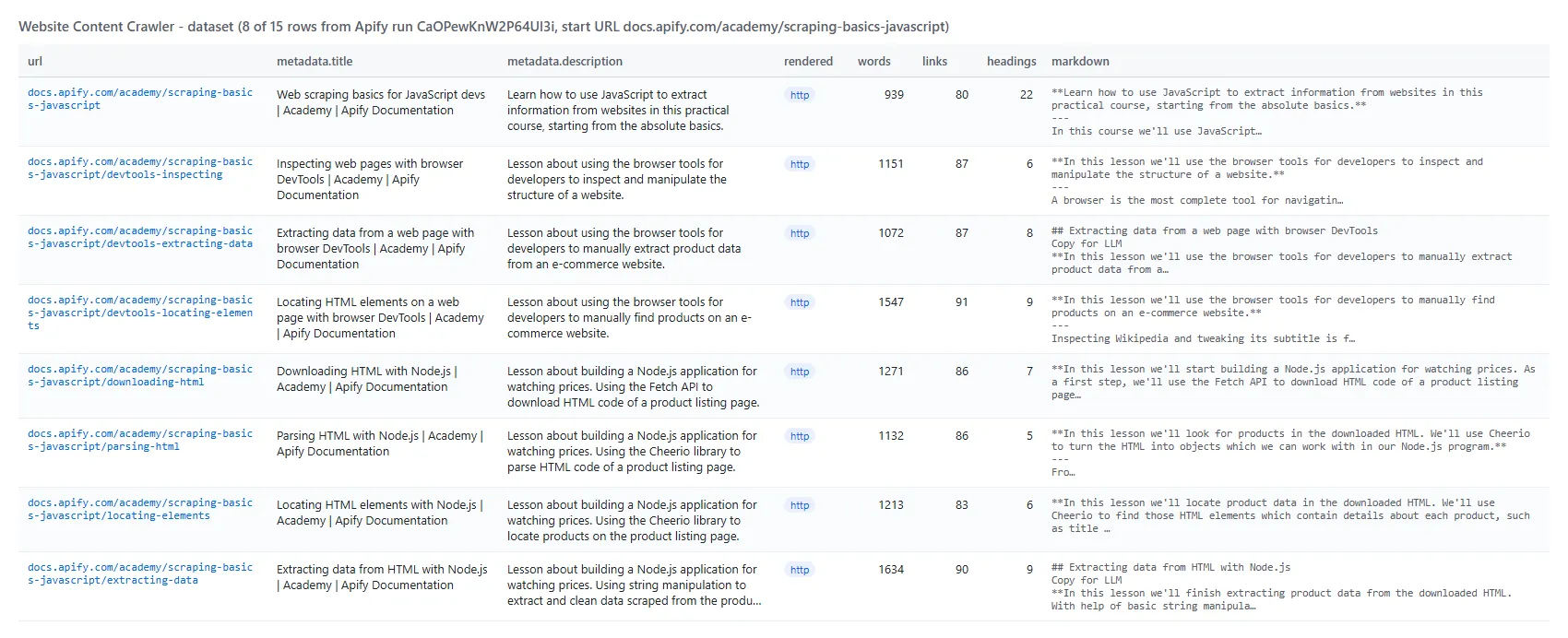
And one row as JSON (shortened):
Fields
| Field | Type | What it is | Fill (100-page run) |
|---|---|---|---|
url | string | URL as queued | 100% |
crawl | object | loadedUrl, loadedTime, referrerUrl, depth, httpStatusCode, contentType, contentLengthBytes, renderedWith, durationMs, transformer | 100% |
metadata | object | title, description, author, keywords, languageCode, canonicalUrl, publishedAt, modifiedAt, publisher, copyright, favicon, image, type, tags, openGraph, jsonLd, headers | title/description 100% |
markdown / text | string | Main content | 100% |
html / htmlUrl / rawHtml | string | Cleaned or original HTML, when requested | on request |
links | array | url, text, rel, isInternal | 100% |
headings / tables | array | Outline; tables as GFM Markdown | 99% / 3% |
images / videos | array | Content images (url, alt); embedded videos | 59% / 1% |
wordCount, readingTimeSec, contentHash | number / string | Size, reading time, change hash | 100% |
chunks | array | index, text, startChar, endChar, headingPath | when chunkSize > 0 |
searchResult | object | query, title, description, url, rank, engine | search results only |
file | object | type, pages, bytes, kvUrl for PDF / DOCX | documents only |
isNew, changed, previousHash, previousCrawledAt | Monitor mode | monitor runs |
How can I use website content data?
- 🤖 AI and RAG teams - index product docs, help centers and wikis into a vector database; read
markdownorchunkswithheadingPathfor citations - 💬 Chatbot builders - keep a support bot's knowledge current with a weekly monitor run that returns only changed pages
- 🔎 SEO and content teams - audit titles, descriptions, canonical URLs, headings and word counts across a site
- 📚 Researchers - collect articles on a topic with search queries and keep their publish dates and authors
- 🧾 Compliance and legal teams - archive terms, policies and PDFs and detect when their text changes (
contentHash) - 🛠️ Developers - get any page as Markdown in one API call for an agent or tool
How much does it cost to crawl a website?
Website Content Crawler uses pay-per-event pricing; Apify platform usage is included in the event prices. There is no start fee.
| Event | Price | When it is charged |
|---|---|---|
| Page crawled | $0.0012 ($1.20 per 1,000 pages) | Once per page or document written to the dataset, read over HTTP or in the browser |
| Search query | $0.0033 | Once per search query that returns results |
| Screenshot | $0.001 | Once per stored screenshot (only with Save screenshots) |
| Pages | Cost |
|---|---|
| 10 | $0.012 |
| 100 | $0.12 |
| 1,000 | $1.20 |
| 10,000 | $12.00 |
Pages that fail to load, are blocked, redirect to a page already delivered, or have no text are not written to the dataset and are not charged. A search that returns nothing is not charged. Set Max pages (or a maximum cost per run in the run options) to cap a run's cost.
Measured runs on the default 1,024 MB: 10 pages in 6 s, 100 pages in 34 s, 975 pages in 15 minutes (a docs site with heavy API-reference pages); JavaScript pages rendered in the browser took about 2 seconds each.
Integrations, API, scheduling & MCP
- Schedules: run Website Content Crawler daily or weekly from Schedules; turn on Monitor mode to get only new and changed pages.
- AI frameworks: load the dataset with the Apify integrations for LangChain, LlamaIndex, Pinecone and Qdrant.
- No-code: Make, Zapier, n8n, Google Sheets, Slack and webhooks via Apify integrations.
- API: call it from Node.js or Python with
apify-client- code on the API tab. - MCP / AI agents: connect Claude, Cursor or any MCP client through the MCP tab and ask for a site's content in plain language; use
compactfor small rows.
More data tools by TopApi
| 📈 SimilarWeb Scraper - traffic, rank and competitors of any website | 🎬 YouTube Shorts Scraper - views, channels and transcripts | 🎵 TikTok Video Scraper - stats and transcript by URL |
| ⭐ Google Maps Reviews Scraper - ratings and owner replies | 💼 Indeed Jobs Scraper - salary, company and description | 🔎 Facebook Search Posts Scraper - posts by keyword and date |
| ™️ USPTO Trademark Scraper - status, owners and new filings | 🐦 Twitter Profile Scraper - X followers, bio and badge | 🧭 All TopApi actors |
Limits & empty runs
- Pages per run: Max pages (default 200) stops the crawl; the run log says how many URLs were left in the queue. Pages skipped as duplicates still count toward it.
- Blocked sites: a page that answers with a bot challenge or CAPTCHA is reported as blocked and skipped, not solved. Sites that block datacenter IPs may work with a RESIDENTIAL proxy group.
- JavaScript pages: at most 20% of Max pages are rendered in the browser by default (
maxBrowserPages); the rest of an app-only site needs Render JavaScript: Always. - Large pages: pages over 5 MB are read up to 5 MB; documents up to 50 MB. A page too large for one dataset item is trimmed and its full Markdown is linked in
fullContentUrl. - Empty dataset: every start URL failed (wrong URL, site down, blocked) or every page was filtered out.
RUN_SUMMARYin the key-value store lists pages by reason; turn on Store skipped URLs for the URLs. - Not supported: pages behind a login (no cookie input), AI summaries.
FAQ
How many pages can Website Content Crawler crawl in one run?
As many as Max pages allows (set 0 for no limit). A 975-page crawl of docs.apify.com took 15 minutes on 1,024 MB; give the run more memory for big sites, it gets more CPU and finishes faster.
Can I run Website Content Crawler on a schedule and get only changed pages?
Yes. Save your input as a task, add a schedule and turn on Monitor mode. Each run delivers only pages that are new or whose text changed (isNew, changed, previousHash); unchanged pages are not delivered. Use one Monitor store name per site or task.
Does Website Content Crawler handle JavaScript-heavy websites?
Yes. With Render JavaScript: Auto, a page that comes back empty over HTTP (an app shell) is rendered in headless Chrome; crawl.renderedWith shows browser for those rows. Always renders every page.
Can Website Content Crawler split pages into chunks for RAG?
Yes. Set RAG chunk size (e.g. 1500 characters) and each row gets chunks, each with its text, character offsets and the heading path above it.
Can Website Content Crawler extract text from PDF and DOCX files?
Yes. Paste a PDF or DOCX URL as a start URL, or turn on Crawl linked documents to follow document links; the text comes back like a page and the file is stored when requested.
Can I use Website Content Crawler with LangChain or LlamaIndex?
Yes. Apify's LangChain and LlamaIndex integrations load the dataset directly; map markdown (or text) to the document content and url / metadata.title to metadata.
Can I use Website Content Crawler with the Apify API?
Yes. Start runs and read datasets with apify-client for Node.js or Python; the API tab has ready code.
Can I use Website Content Crawler through an MCP server?
Yes. Open the MCP tab, connect your MCP client and ask for a page or a site; compact keeps rows small for agents.
Do I need an API key or a login to crawl a site with Website Content Crawler?
No. It reads pages the way a visitor's browser does. Search queries need no search API key either.
Why did my Website Content Crawler run return no pages?
Most often the start URL redirected to another domain or path, so its links fell outside the default scope - widen Which links to follow. Otherwise the site blocked the request (blocked in RUN_SUMMARY) or the filters removed every page.
Is it legal to crawl websites with Website Content Crawler?
Crawling publicly available, non-personal content is generally legal; what you do with it matters. Documentation, articles and blogs are usually protected by copyright, so do not republish content without the owner's permission. See Apify's post on the legality of web scraping.
Your feedback
We keep improving Website Content Crawler. Found a bug or missing a field? Open an issue on the Issues tab.


