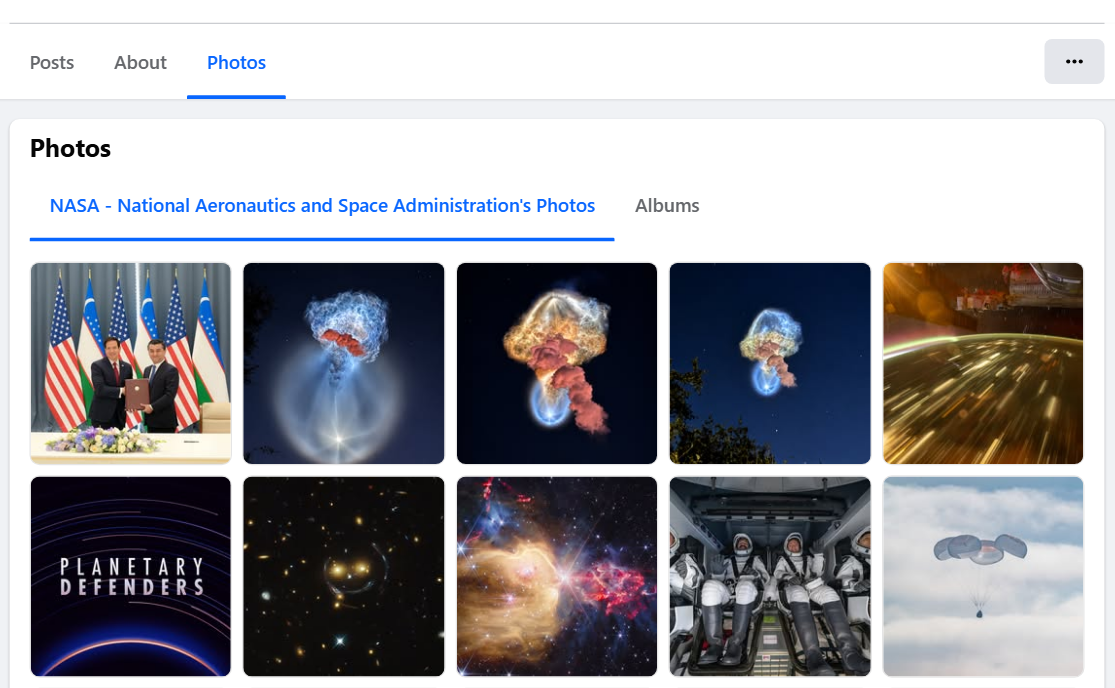
 - **Every photo of a Page, newest first:** the Page's own photos, the photos others tagged it in, or both, plus each album's photos and a list of its albums.
- **Full-size images:** the image Facebook shows in its photo viewer (up to 2048 px wide) and the grid thumbnail, with the true width and height.
- **Photo details on request:** upload date, caption, reactions by type, comments, shares, post link, album, tagged people, uploader and privacy.
- **Facebook's own date window:** a year, a month or any date range; Facebook filters the photos itself, so a narrow window costs no extra requests.
- **Monitor mode:** a scheduled run returns only photos no earlier run delivered.
- **Save image files:** optionally download each image into your key-value store and get a permanent link (Facebook's own image links expire after a few days).
- **No login, cookies or Facebook API key:** paste Page, album, group or photo links, or just usernames.
- **Export anywhere:** JSON, CSV, Excel, XML; schedules, webhooks, Make, Zapier, n8n, Google Sheets and the Apify MCP server.
### What data can you get from Facebook photos?
- **Every photo of a Page, newest first:** the Page's own photos, the photos others tagged it in, or both, plus each album's photos and a list of its albums.
- **Full-size images:** the image Facebook shows in its photo viewer (up to 2048 px wide) and the grid thumbnail, with the true width and height.
- **Photo details on request:** upload date, caption, reactions by type, comments, shares, post link, album, tagged people, uploader and privacy.
- **Facebook's own date window:** a year, a month or any date range; Facebook filters the photos itself, so a narrow window costs no extra requests.
- **Monitor mode:** a scheduled run returns only photos no earlier run delivered.
- **Save image files:** optionally download each image into your key-value store and get a permanent link (Facebook's own image links expire after a few days).
- **No login, cookies or Facebook API key:** paste Page, album, group or photo links, or just usernames.
- **Export anywhere:** JSON, CSV, Excel, XML; schedules, webhooks, Make, Zapier, n8n, Google Sheets and the Apify MCP server.
### What data can you get from Facebook photos?
| 🖼️ Full-size image URL (`image`) | 📐 Width × height | 🔗 Photo link and id |
| 🦯 Facebook's alt text (`ocrText`) | 🏷️ Source: own / tagged / album / group | 🔢 Position, newest first |
| 📅 Upload date (`createdTime`) | 📝 Caption | ❤️ Reactions, total and by type |
| 💬 Comment count | 🔁 Share count | 📰 Post id and link |
| 📚 Album id and title | 👥 Tagged people | 👤 Uploader, verified badge |
| 🏢 Page name, id, followers | 📣 Page's Ad Library id | 💾 Saved image link (`imageStoredUrl`) |
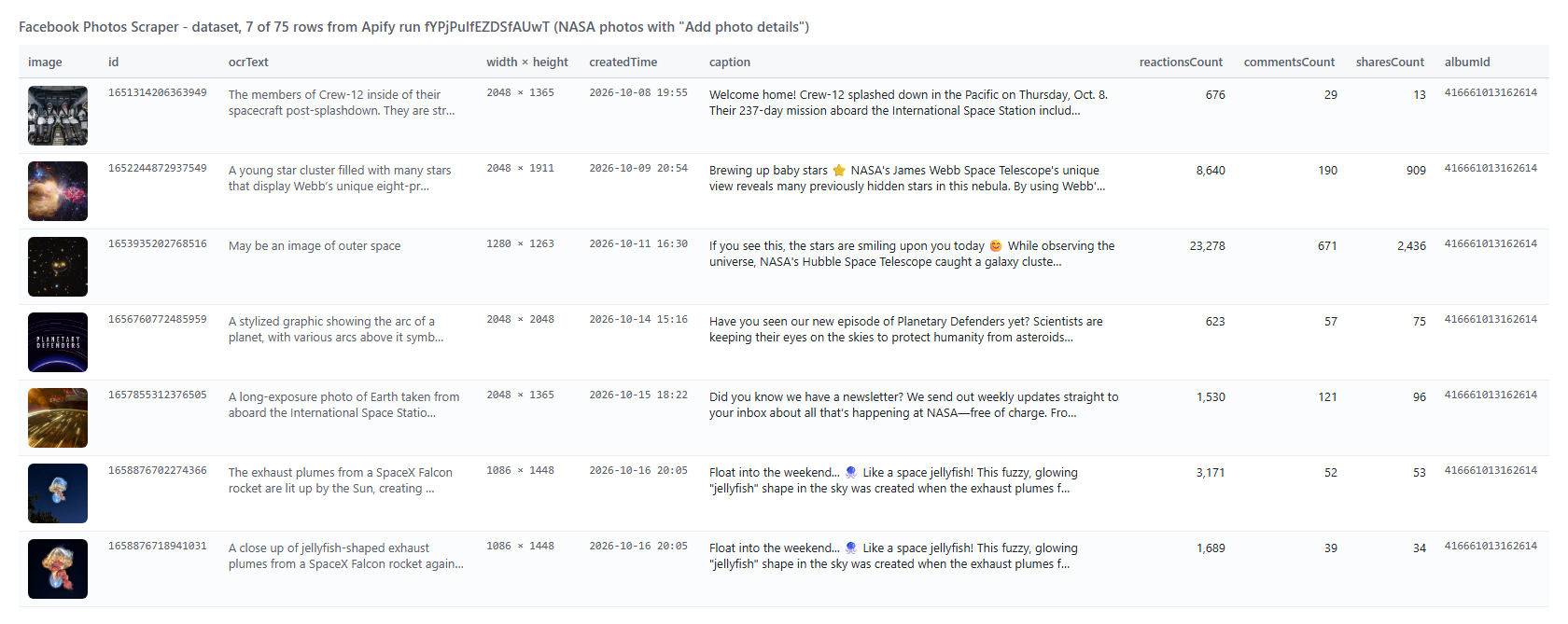 The same row as JSON (long values trimmed here):
```json
{
"dataType": "photo",
"id": "1652244872937549",
"url": "https://www.facebook.com/photo.php?fbid=1652244872937549&set=pb.100044561550831.-2207520000&type=3",
"image": "https://scontent-iad6-1.xx.fbcdn.net/v/t39.99422-6/841844892…",
"width": 2048,
"height": 1911,
"ocrText": "A young star cluster filled with many stars that display Webb's unique eight-pronged diffraction pattern…",
"photoType": "photos_by",
"position": 2,
"albumId": "416661013162614",
"pageName": "NASA - National Aeronautics and Space Administration",
"pageFollowers": 28746231,
"createdTime": "2026-10-09T20:54:33.000Z",
"caption": "Brewing up baby stars ⭐ NASA's James Webb Space Telescope's unique view reveals…",
"reactionsCount": 8640,
"reactions": { "like": 5199, "love": 3102, "care": 188, "wow": 122, "haha": 22, "angry": 5, "sad": 2 },
"commentsCount": 190,
"sharesCount": 909,
"postUrl": "https://www.facebook.com/NASA/posts/pfbid02hL3YCLokPkZbLhPqz…",
"privacy": "Public"
}
```
#### Facebook photo fields
| Field | Type | What it is | Fill on test runs |
|---|---|---|---|
| `id`, `url` | string | Photo id and link | 100% |
| `image` | string | Image URL; full size on Page / profile rows and on every row with details | 100% |
| `thumbnail` | string | The grid thumbnail | 100% |
| `width`, `height` | number | Size of the photo in pixels | 100% |
| `imageIsFullSize` | boolean | `false` on album / group rows without details (their grids print a 168-417 px image) | 100% |
| `ocrText` | string | Facebook's alt text ("May be an image of…") | 100% |
| `photoType` | string | `photos_by`, `photos_of`, `album`, `group` or `photo` | 100% |
| `position` | number | Position in its source, newest first | 100% |
| `collectionItemId` | string | Facebook's id of the photo in the photos tab | 100% on Page rows |
| `facebookId`, `pageName`, `pageUrl`, `pageUsername` | string | The Page or profile | 100% on Page rows |
| `pageFollowers`, `pageTalkingAbout` | number | As printed on the Page | 100% on Page rows |
| `pageIsVerified`, `pageAdLibrary`, `navSections` | mixed | Verified badge, Ad Library id, photo sections | 100% on Page rows |
| `albumId`, `albumTitle` | string | Album (album walks; any row with details) | 100% with details |
| `groupId`, `groupTitle`, `ownerId` | string | Group rows: the group and the uploader's id | 100% on group rows |
| `createdTime`, `timestamp` | string, number | Details: upload time | 100% |
| `caption` | string | Details: text of the post | 93% |
| `reactionsCount`, `reactions` | number, object | Details: reactions, total and by type | 100%, 92% |
| `commentsCount`, `sharesCount` | number | Details: comment and share counts | 100% |
| `postId`, `postUrl`, `creation_story` | mixed | Details: the post the photo was published in | 100% |
| `ownerName`, `ownerUrl`, `ownerIsVerified`, `ownerProfilePicture` | mixed | Details: the uploader | 100% |
| `tags` | array | Details: tagged people {id, name, type, isProductTag} | 100% on tagged photos |
| `previousPhotoId`, `nextPhotoId`, `privacy` | string | Details: neighbours in the album, audience | 92-100% |
| `imageStoredUrl`, `imageStoreKey` | string | Saved image files | 100% when on |
| `pageCategory` | string | Page category | when `includePageContext` |
| `inputUrl`, `scrapedAt` | string | The input line and the read time | 100% |
Album rows (`dataType: "album"`) carry `id`, `url`, `albumTitle`, `itemCount`, `itemCountText` ("10,975 Items"), `coverImage` and the Page columns.
### How can I use Facebook photo data?
- 🎯 **Brand and agency teams:** collect every photo a competitor posts and its engagement, then rank creatives by shares or reactions.
- 📊 **Social media analysts:** track posting cadence and engagement per month with the date window and `createdTime`.
- 🔎 **Brand protection:** watch the tagged-photos tab of your own Page for photos other people post about you.
- 🤖 **AI and research teams:** build labelled image sets from `image` + `ocrText` + `caption`, with permanent copies via **Save image files**.
- 🗂️ **Archivists and journalists:** export a Page's or a group's whole photo library, album by album.
- 📈 **Monitoring:** schedule monitor mode daily and receive only the new photos.
### How much does it cost to scrape Facebook photos?
Facebook Photos Scraper is pay-per-result with no start fee: **$0.90 per 1,000 photos**. The add-ons are charged only for the rows that carry them: **Photo details** $0.90 per 1,000 photos, **Album** rows $0.90 per 1,000 albums, **Image stored** $0.90 per 1,000 saved images. Photos removed by your filters, photos delivered by an earlier monitor run, and sources Facebook does not show cost nothing.
| Photos | Photos only | With details |
|---:|---:|---:|
| 20 | $0.018 | $0.036 |
| 100 | $0.09 | $0.18 |
| 1,000 | $0.90 | $1.80 |
| 10,000 | $9.00 | $18.00 |
There is nothing else to pay: Apify platform usage is included in these prices. On test runs 100 photos took 4 seconds (13 seconds with details) and 1,000 photos 47 seconds (3.6 minutes with details).
### Integrations, API, scheduling & MCP
- **Schedules:** run Facebook Photos Scraper hourly, daily or weekly from the **Schedules** tab; with `monitorMode` on, each run returns only new photos.
- **Webhooks:** call a URL when a run finishes and push the photos to your CRM, Slack or a sheet.
- **No-code:** Make, Zapier, n8n, Google Sheets, Airtable and Slack via [Apify integrations](https://docs.apify.com/integrations).
- **API:** start runs and read the dataset with `apify-client` for [Python](https://apify.com/topapi/facebook-photos-scraper/api/python) or [JavaScript](https://apify.com/topapi/facebook-photos-scraper/api/javascript).
- **MCP / AI agents:** connect Claude, Cursor or any MCP client through the [MCP tab](https://apify.com/topapi/facebook-photos-scraper/api/mcp); `compact` keeps the rows small.
### More Facebook scrapers by TopApi
The same row as JSON (long values trimmed here):
```json
{
"dataType": "photo",
"id": "1652244872937549",
"url": "https://www.facebook.com/photo.php?fbid=1652244872937549&set=pb.100044561550831.-2207520000&type=3",
"image": "https://scontent-iad6-1.xx.fbcdn.net/v/t39.99422-6/841844892…",
"width": 2048,
"height": 1911,
"ocrText": "A young star cluster filled with many stars that display Webb's unique eight-pronged diffraction pattern…",
"photoType": "photos_by",
"position": 2,
"albumId": "416661013162614",
"pageName": "NASA - National Aeronautics and Space Administration",
"pageFollowers": 28746231,
"createdTime": "2026-10-09T20:54:33.000Z",
"caption": "Brewing up baby stars ⭐ NASA's James Webb Space Telescope's unique view reveals…",
"reactionsCount": 8640,
"reactions": { "like": 5199, "love": 3102, "care": 188, "wow": 122, "haha": 22, "angry": 5, "sad": 2 },
"commentsCount": 190,
"sharesCount": 909,
"postUrl": "https://www.facebook.com/NASA/posts/pfbid02hL3YCLokPkZbLhPqz…",
"privacy": "Public"
}
```
#### Facebook photo fields
| Field | Type | What it is | Fill on test runs |
|---|---|---|---|
| `id`, `url` | string | Photo id and link | 100% |
| `image` | string | Image URL; full size on Page / profile rows and on every row with details | 100% |
| `thumbnail` | string | The grid thumbnail | 100% |
| `width`, `height` | number | Size of the photo in pixels | 100% |
| `imageIsFullSize` | boolean | `false` on album / group rows without details (their grids print a 168-417 px image) | 100% |
| `ocrText` | string | Facebook's alt text ("May be an image of…") | 100% |
| `photoType` | string | `photos_by`, `photos_of`, `album`, `group` or `photo` | 100% |
| `position` | number | Position in its source, newest first | 100% |
| `collectionItemId` | string | Facebook's id of the photo in the photos tab | 100% on Page rows |
| `facebookId`, `pageName`, `pageUrl`, `pageUsername` | string | The Page or profile | 100% on Page rows |
| `pageFollowers`, `pageTalkingAbout` | number | As printed on the Page | 100% on Page rows |
| `pageIsVerified`, `pageAdLibrary`, `navSections` | mixed | Verified badge, Ad Library id, photo sections | 100% on Page rows |
| `albumId`, `albumTitle` | string | Album (album walks; any row with details) | 100% with details |
| `groupId`, `groupTitle`, `ownerId` | string | Group rows: the group and the uploader's id | 100% on group rows |
| `createdTime`, `timestamp` | string, number | Details: upload time | 100% |
| `caption` | string | Details: text of the post | 93% |
| `reactionsCount`, `reactions` | number, object | Details: reactions, total and by type | 100%, 92% |
| `commentsCount`, `sharesCount` | number | Details: comment and share counts | 100% |
| `postId`, `postUrl`, `creation_story` | mixed | Details: the post the photo was published in | 100% |
| `ownerName`, `ownerUrl`, `ownerIsVerified`, `ownerProfilePicture` | mixed | Details: the uploader | 100% |
| `tags` | array | Details: tagged people {id, name, type, isProductTag} | 100% on tagged photos |
| `previousPhotoId`, `nextPhotoId`, `privacy` | string | Details: neighbours in the album, audience | 92-100% |
| `imageStoredUrl`, `imageStoreKey` | string | Saved image files | 100% when on |
| `pageCategory` | string | Page category | when `includePageContext` |
| `inputUrl`, `scrapedAt` | string | The input line and the read time | 100% |
Album rows (`dataType: "album"`) carry `id`, `url`, `albumTitle`, `itemCount`, `itemCountText` ("10,975 Items"), `coverImage` and the Page columns.
### How can I use Facebook photo data?
- 🎯 **Brand and agency teams:** collect every photo a competitor posts and its engagement, then rank creatives by shares or reactions.
- 📊 **Social media analysts:** track posting cadence and engagement per month with the date window and `createdTime`.
- 🔎 **Brand protection:** watch the tagged-photos tab of your own Page for photos other people post about you.
- 🤖 **AI and research teams:** build labelled image sets from `image` + `ocrText` + `caption`, with permanent copies via **Save image files**.
- 🗂️ **Archivists and journalists:** export a Page's or a group's whole photo library, album by album.
- 📈 **Monitoring:** schedule monitor mode daily and receive only the new photos.
### How much does it cost to scrape Facebook photos?
Facebook Photos Scraper is pay-per-result with no start fee: **$0.90 per 1,000 photos**. The add-ons are charged only for the rows that carry them: **Photo details** $0.90 per 1,000 photos, **Album** rows $0.90 per 1,000 albums, **Image stored** $0.90 per 1,000 saved images. Photos removed by your filters, photos delivered by an earlier monitor run, and sources Facebook does not show cost nothing.
| Photos | Photos only | With details |
|---:|---:|---:|
| 20 | $0.018 | $0.036 |
| 100 | $0.09 | $0.18 |
| 1,000 | $0.90 | $1.80 |
| 10,000 | $9.00 | $18.00 |
There is nothing else to pay: Apify platform usage is included in these prices. On test runs 100 photos took 4 seconds (13 seconds with details) and 1,000 photos 47 seconds (3.6 minutes with details).
### Integrations, API, scheduling & MCP
- **Schedules:** run Facebook Photos Scraper hourly, daily or weekly from the **Schedules** tab; with `monitorMode` on, each run returns only new photos.
- **Webhooks:** call a URL when a run finishes and push the photos to your CRM, Slack or a sheet.
- **No-code:** Make, Zapier, n8n, Google Sheets, Airtable and Slack via [Apify integrations](https://docs.apify.com/integrations).
- **API:** start runs and read the dataset with `apify-client` for [Python](https://apify.com/topapi/facebook-photos-scraper/api/python) or [JavaScript](https://apify.com/topapi/facebook-photos-scraper/api/javascript).
- **MCP / AI agents:** connect Claude, Cursor or any MCP client through the [MCP tab](https://apify.com/topapi/facebook-photos-scraper/api/mcp); `compact` keeps the rows small.
### More Facebook scrapers by TopApi