

Facebook Posts Scraper - Page Posts, Reactions & Transcripts
Pricing
from $1.20 / 1,000 post scrapeds
Facebook Posts Scraper - Page Posts, Reactions & Transcripts
Scrape public Facebook Page and profile posts for $1.20 per 1,000, no start fee: text, date, reactions by type, comments, shares, views, free video transcripts, media and Page followers. Date window, monitor mode, comments add-on. Takes the input names of popular Facebook posts scrapers. No login.
Pricing
from $1.20 / 1,000 post scrapeds
Rating
0.0
(0)
Developer

Top Api
Maintained by CommunityActor stats
0
Bookmarked
39
Total users
20
Monthly active users
9 days ago
Last modified
Categories
Share
What does Facebook Page Posts Scraper do?
Facebook Page Posts Scraper collects the public posts of any Facebook Page or public profile, newest first, and turns each one into a structured row: the full text and its links, the publish date, reactions by type, comments, shares, video views and plays, photos and videos, video transcripts, a top comment, and the Page's own name, id and follower count. Give it a list of Pages and it reads each timeline the way a signed-out visitor sees it - no login, no cookies, no API key.
Facebook Posts Scraper - Facebook Page Scraper - Facebook Page Timeline API - Facebook Page Monitor
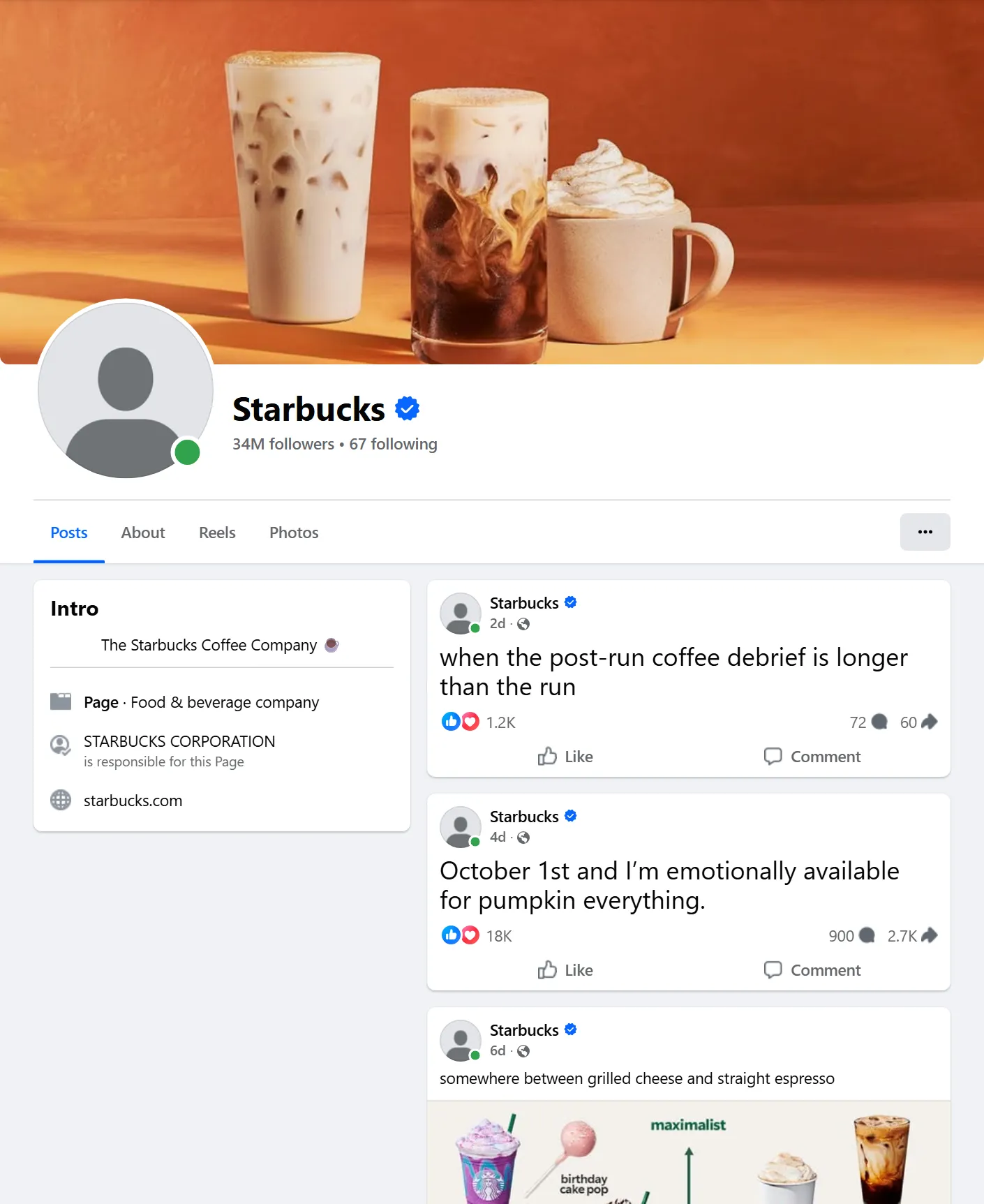
- Any public Page or profile, many per run: paste Page URLs, usernames or numeric ids; each Page is read newest post first, with Facebook's own date window - as far back as you ask (January 2024 on NASA's Page took 4 requests).
- Every engagement number: reactions with the like / love / care / haha / wow / sad / angry breakdown, comments, shares, video views (also the 3-second count) and plays - filled on every row of a 102-post test run.
- Video transcripts, free: the captions Facebook has for a video, as plain text, with every caption language it lists.
- Comments with the details add-on: each post's own top comments, 1-50 per post, most relevant, newest first or all - reels included - plus the video SD/HD files.
- Page context on every row: Page id, name, URL, followers, "talking about this" and the Page's Ad Library id, so posts from different Pages compare directly (
engagement_rate). - Drop-in for other Facebook posts scrapers: it accepts the input names of apify/facebook-posts-scraper (
resultsLimit,onlyPostsNewerThan,captionText...), danek and scrapeforge, and can write its rows under apify's field names (outputFormat: "apify"). - Monitor mode: remembers each Page's newest post and returns only newer ones - pair it with a schedule for a feed of new posts; a check with nothing new is not charged.
- Export anywhere: JSON, CSV, Excel, XML, RSS; schedules, webhooks, Make, Zapier, n8n, Google Sheets, Slack, the Apify API and MCP.
What data can you get from a Facebook Page?
| 🔗 Post URL and id (`url`, `post_id`, `top_level_url`) | 📝 Full text (`message`) and `message_rich` | 📅 Publish date (`timestamp`, `published_at`) |
| 📄 Page id, name, URL (`source_id`, `source_name`, `source_url`) | 👥 Page followers, talking about, were here | 📣 Page Ad Library id (`page_ad_library_id`) |
| 👍 Reactions total and by type (`reactions`) | 💬 Comments and shares (`comments_count`, `reshare_count`) | 📈 Engagement and engagement rate |
| ▶️ Video views, 3-second views, plays, duration, thumbnail | 📝 Video transcript and caption tracks (`video_transcript`) | 🖼️ Photos and albums (`image`, `images`, `image_alt`) |
| 🌐 Outbound link and preview (`external_url`, `external_link`) | 🔁 Shared post URL and author (`attached_post`) | 🏷️ Hashtags, mentioned Pages, collaborators |
| 💬 A top comment on every row | 💬 1-50 top comments per post (details add-on) | 🎞️ Video SD/HD files (details add-on) |
On a 102-post test run (NASA, NBA, Starbucks; 34 each) every row had the date, Page followers, reactions by type, comments and shares; 47% were videos (views on 47 of 48), 13 videos carried a caption track, 83% of rows came with a top comment.
How to scrape Facebook Page posts with Facebook Page Posts Scraper
- Create a free Apify account - $5 of monthly credit, no card needed.
- Open Facebook Page Posts Scraper and click Try for free.
- Paste your Pages into Facebook Pages (one per line) and set Max posts per Page.
- Optionally set Posted after / Posted before, a post type, minimum reactions, or switch on Video transcripts.
- Click Start. Rows stream into the dataset as each part of each timeline arrives.
- Open the Storage tab and Export as JSON, CSV or Excel - or let a schedule run it for you.
⬇️ Input
| Parameter | Type | Description |
|---|---|---|
| 🔍 What to scrape | ||
startUrls | List | Required (defaults to the sample Page NASA). Page URLs, usernames or numeric ids, e.g. https://www.facebook.com/NASA, starbucks, 100044561550831; public profiles (zuck), profile.php?id= and /people/<name>/<id> links work too. |
| 🎯 Filters (sent to Facebook as its timeline window) | ||
startDate | String | 2026-09-01, 2026-09-01T12:00:00Z, 24 hours, 7 days, 3 weeks, 2 months. Facebook starts the timeline there; every post is re-checked. |
endDate | String | 2026-06-30 (the whole day included) or relative, e.g. 30 days. |
| ✂️ Refine results (before you are charged) | ||
postType | Select | all, photo, video, link, text, event or share. |
minReactions / minComments / minShares | Integer | Keep only posts with at least this many. Default 0. |
keywordFilter | String | Keep only posts whose text, link title or event name contain a word (sale, discount = any). |
skipPostIds | List | Post ids or URLs you already have - never delivered or charged. |
| ➕ Extra data | ||
captionText | Boolean | Free. Adds video_transcript (the captions file as plain text) and video_captions (every track) to video posts that have captions. |
includePostDetails | Boolean | Adds the post's own top_comments and, for videos, video_files (SD/HD) from each post's public page - charged as post-details only per post that gets its own comments or files. |
commentsLimit | Integer | Comments per post with details, 1-50. Default 10. |
commentsSort | Select | most_relevant (default), newest or all - Facebook's own comment orders. |
| 🔁 Monitoring | ||
monitorMode | Boolean | Return only posts newer than the newest one already read, per Page. Pair with a schedule. |
monitorStoreName | String | Key-value store that keeps the per-Page memory. Default facebook-page-posts-monitor. |
resetMonitor | Boolean | Read the Pages as on a first run once, then the memory continues. |
| 📦 Output | ||
maxPostsPerPage | Integer | Default 20; 0 = the whole public timeline, up to 2,000 per Page. |
maxItems | Integer | Hard cap for the whole run. 0 = none. |
outputFormat | Select | default (all fields), apify (apify/facebook-posts-scraper field names) or compact (core fields for AI agents and MCP). |
| ⚙️ Advanced | ||
proxyConfiguration | Object | Residential US by default (see below). |
maxConcurrency | Integer | Pages read in parallel. Default 3, max 8. |
cacheSession | Boolean | Default on: the signed-out session is kept for up to 6 hours in the named store facebook-page-posts-session, so the next run skips a ~70 KB page load. |
Input JSON
Coming from another Facebook posts scraper?
Send the input you already have. These names are read as ours (when both are set, ours win unless they are left at their default):
| Their input | Read as |
|---|---|
startUrls: [{ "url": ... }], urls, pageUrls, page_url, page_id | startUrls |
resultsLimit, max_posts, postsToScrape | maxPostsPerPage |
onlyPostsNewerThan, start_date, postsNewerThan | startDate |
onlyPostsOlderThan, end_date | endDate |
captionText, includeTranscripts, includeTranscript | captionText |
With outputFormat: "apify" each row carries apify/facebook-posts-scraper's names - postId, facebookUrl, pageName, time, text, likes, comments, shares, topReactionsCount, reaction<Type>Count, media[] (with ocrText), isVideo, viewsCount, videoPostViewCount, captionText, feedbackId, sharedPost, topComments, topLevelUrl, facebookId, pageAdLibrary, inputUrl - plus pageFollowers, engagementRate, postType and videoFiles. A real row (trimmed):
Give the Page itself, not a post or a group
Any address that leads to a Page or public profile works: the Page URL, its username (redbull), its numeric id, or a post URL of that Page (its timeline is read). For single posts by URL use Facebook Post Details Scraper. Group URLs are not Pages and are reported as invalid input, as are search, event and Watch links. A Page that does not exist or is shown only to signed-in users (some age-restricted brands) ends as not_found or login_required in the run summary and costs nothing.
Use the date window instead of a big cap
startDate and endDate go to Facebook as its own timeline window, so the run reads only the posts inside it: 1-31 January 2024 on NASA's Page took 4 requests to deliver 10 posts. A large maxPostsPerPage without a window reads the timeline from today backwards until the cap.
Keep the residential proxy for timelines
Facebook rate-limits Page timelines on Apify's datacenter IPs (8 of 9 requests refused on 2026-10-20), and it hides news Pages from visitors in some countries (Canada). The default residential US proxy served every timeline tested; the actor rotates to a fresh session when Facebook refuses one. Post pages for the details add-on and caption files need no residential proxy.
⬆️ Output
Every post becomes one dataset item. Here is the table view of a run for Starbucks, The New York Times and Red Bull:
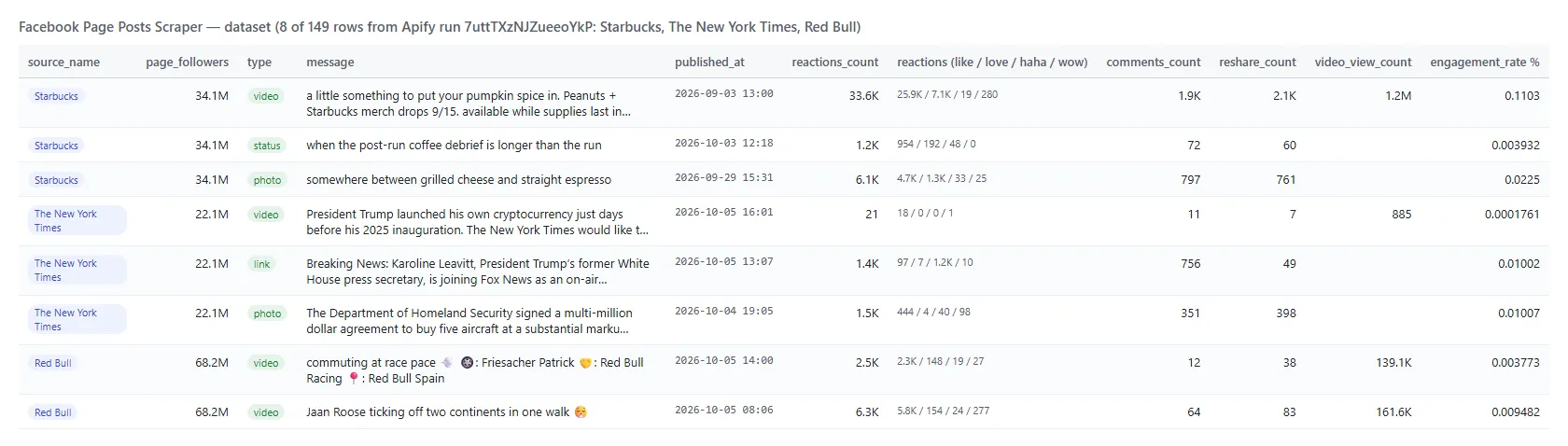
And one real row (trimmed):
A video row with captionText on (trimmed):
Facebook Page post fields
Fill is measured on a 102-post run (NASA, NBA, Starbucks, 2026-10-20) and, for the details add-on, on a 24-post run (NASA, NBA, The New York Times).
| Field | Type | What it is | Fill |
|---|---|---|---|
post_id, url, story_id, comments_id, top_level_url | string | Post id, permalink, story id, feedback id, /<page id>/posts/<post id> link | 100% |
type, is_video | string, boolean | video, link, photo, album, event, share, marketplace or status | 100% |
message, message_rich | string | Full text; the same text as HTML with its links (message_rich only when the text has links) | 94% / 48% |
timestamp, published_at | integer, ISO 8601 | Publish time | 100% |
source_type, source_id, source_name, source_url, input_url | string | The Page the post came from and your input line | 100% |
page_followers, page_talking_about, page_were_here | integer | The Page's counters (were here = places only) | 100% / 100% / 33% |
page_ad_library_id, page_ad_library_active | string, boolean | The Page id Meta's Ad Library uses and Facebook's business-active flag | 99% |
author | object | id, name, url, profile_picture_url, type, is_verified | 100% |
reactions_count, comments_count, reshare_count, engagement_count | integer | Totals; engagement = reactions + comments + shares | 100% |
reactions, top_reactions_count | object, integer | like, love, care, haha, wow, sad, angry (an unlisted type is 0 when the listed ones add up to the total, else null); how many types the post shows | 100% |
engagement_rate | number | Engagement as a % of the Page's followers | 100% |
video_view_count, video_post_view_count, video_play_count | integer | Views, views of 3 seconds or more, plays | 47 / 45 / 45 of 48 videos |
video, video_id, video_thumbnail, video_duration_ms, video_is_live | mixed | Video posts | every video post |
video_captions_url, video_captions, video_transcript | string, array, string | Caption tracks and, with captionText, the transcript | 13 of 48 videos have captions; transcript on 2 of 2 on the details run |
image, images, album_count, image_alt | object, array | First image, every image of an album, accessibility caption | 77% / 29% |
external_url, external_link, links | string, object, array | Outbound link (unwrapped), its preview card, every link in the text | 32% / link posts / 32% |
attached_post_url, attached_post | string, object | The original post when this one is a share | 2% |
event, location, collaborators | object, array | Event posts, tagged place, co-authors | as published |
hashtags, mentions | array | Hashtags and the Pages or profiles mentioned in the text | as published / 29% |
top_comment | object | The top comment Facebook prints with the post: text, date, author, reactions | 83% |
top_comments, video_files, details_status | array, object, string | The post's own comments (1-50) and its video's SD/HD files - details add-on | 24 of 24 posts: comments on 24 (reels 11 of 11), files on 11 of 11 videos |
How can I use Facebook Page posts data?
- 📊 Competitor benchmarking - run your competitors' Pages weekly and compare
engagement_rate,reactionsby type and posting frequency. - 📰 Media and news monitoring - follow publishers' Pages with
monitorModeand get every new post, its link and its engagement. - 🎯 Social media reporting - pull a client's Page for last month with
startDate/endDateand chart reactions, comments, shares and views. - 📣 Ad and creative research -
page_ad_library_idtakes you to the Page's ads in Meta's Ad Library;postType: videowithminReactionsfinds the creatives that work. - 🎙️ Video content analysis -
captionTextgives the spoken words of a Page's videos as text for search, summaries and topic tagging. - 🤖 AI and research teams - feed
compactrows to an LLM for summaries, topic tagging or sentiment;top_commentandtop_commentsadd the audience's voice.
How much does it cost to scrape Facebook Page posts?
Facebook Page Posts Scraper is pay-per-result: $1.20 per 1,000 posts, no start fee. You only pay for the posts you get. Video transcripts are free. The optional post details are $1.00 per 1,000 posts that receive their own comments or video files.
| Posts | Cost | With post details |
|---|---|---|
| 10 | $0.012 | $0.022 |
| 100 | $0.12 | $0.22 |
| 1,000 | $1.20 | $2.20 |
| 10,000 | $12.00 | $22.00 |
Apify platform usage (compute and residential proxy) is included in these prices. Measured on the platform (256 MB, the default): 10 posts in about 6 seconds, 102 posts from three Pages in 25 seconds, 24 posts with details and transcripts in 47 seconds, with a peak of 43-65 MB of memory. A monitor check that finds nothing new is not charged.
Facebook Page posts in your tools: integrations, API, scheduling & MCP
- Schedules: run it hourly, daily or weekly from the Schedules tab; with
monitorModeeach run returns only the posts published since the previous one. - Webhooks: fire a URL when a run finishes - push new posts to your CRM, Slack or a sheet.
- No-code: Make, Zapier, n8n, Google Sheets, Airtable, Slack via Apify integrations.
- API: call it from Node.js or Python with
apify-client- code on the API tab and the Apify API reference. - MCP / AI agents: connect Claude, Cursor or any MCP client through the MCP tab and ask for a Page's latest posts in plain language; set
outputFormat: "compact"to keep rows small.
More social media scrapers by TopApi
| 🔎 Facebook Search Posts Scraper - public posts found by keyword, any Page or group | 📰 Facebook Post Details Scraper - single posts by URL with views, shares and comments | 💬 Facebook Comments Scraper - every comment and reply of a post |
| 🛒 Facebook Marketplace Scraper - listings, prices and sellers by city and keyword | 📸 Instagram Scraper - posts, reels, hashtags and profiles | 🎵 TikTok Scraper - videos, hashtags, profiles and search |
| 🐦 X Profile Scraper - X (Twitter) profiles and counters | ▶️ YouTube Shorts Scraper - Shorts by channel, hashtag or search | 📍 Google Maps Reviews Scraper - reviews, ratings and owner replies |
| 💼 Indeed Jobs Scraper - job listings with descriptions | 🌐 Similarweb Scraper - website traffic and competitors | 🔎 All TopApi actors - monitor-ready scrapers for schedules, APIs and AI agents |
Limits & empty runs
- Speed: Facebook serves a Page timeline 3 posts per request after a first page of about 10, so a deep run takes time; several Pages run in parallel (
maxConcurrency). - Depth: up to 2,000 posts per Page per run. How far back that reaches depends on the Page: 300 NBA posts covered one week, 3 Coca-Cola posts went back to 2022. The date window is the cheaper way to reach older posts.
- Pinned posts: the timeline Facebook shows a signed-out visitor leaves out the Page's pinned post, so there is no pinned flag.
- Reactions by type are the types Facebook lists on the post; when they do not add up to the total, the unlisted types are
null, not zero. - Comments: each row carries one top comment; the details add-on adds the post's own top-level comments (1-50), not the full thread with replies - Facebook Comments Scraper does that. Facebook's comment total can lag by a few new comments. A post with no comments that is not a video gets
details_status: nothing_to_addand the add-on is not charged; event posts have no post page (unavailable, not charged). - Transcripts exist only for videos Facebook has captions for (13 of 48 videos on the 102-post run).
- Not in a signed-out timeline: paid-partnership labels, backdated original dates, call-to-action buttons and live viewer counts, so those fields are not offered.
- Empty dataset: the Page has no public posts in your window, every post was removed by your filters, or monitor mode found nothing new - the status message says which, and nothing is charged.
- Not available signed-out: private profiles, restricted-audience posts, reactor lists. Media and avatar URLs are signed CDN links that expire after a few hours.
FAQ
How many posts can Facebook Page Posts Scraper collect from one Page?
Up to 2,000 per Page per run (maxPostsPerPage: 0), for as many Pages as you list, within the run's time limit.
Can I run Facebook Page Posts Scraper on a schedule to get new posts automatically?
Yes. Save your input as a task with monitorMode: true, open Schedules and pick the cadence. Each run asks Facebook only for posts newer than the newest one it already read, so a check with nothing new reads a few hundred bytes per Page, delivers nothing and is not charged. Each Page is checked at most every 20 minutes (every 30 once it has posted nothing for a day), so a schedule faster than that skips Pages checked recently - new posts arrive with the next check, never lost. Give each feed its own monitorStoreName.
Can I scrape Facebook Page posts from a date range?
Yes. startDate and endDate accept absolute dates, timestamps or relative values such as 30 days. The window is sent to Facebook, which starts the timeline inside it, and every post is re-checked before delivery.
Does Facebook Page Posts Scraper return comments?
Every row has comments_count and one top_comment. With includePostDetails the actor adds top_comments - the post's own top-level comments, 1-50 per post (commentsLimit), in Facebook's most relevant, newest or all order (commentsSort), reels included - plus video_files for videos.
Can I get video transcripts?
Yes, free: switch on captionText. Video posts that have captions on Facebook get video_transcript as plain text and video_captions with every caption track.
Can I switch from apify/facebook-posts-scraper without changing my code?
Yes. Send the same input (startUrls, resultsLimit, onlyPostsNewerThan, onlyPostsOlderThan, captionText) and set outputFormat: "apify" to get rows under the same field names.
Can I scrape several Facebook Pages in one run?
Yes. Put one Page per line in startUrls; maxPostsPerPage caps each Page and maxItems the whole run. Every row carries source_name, source_url and input_url, so the Pages stay apart in one dataset.
Can I integrate Facebook Page Posts Scraper with other apps?
Yes - Make, Zapier, n8n, Google Sheets, Slack and more via Apify integrations, or use webhooks to trigger an action when a run finishes.
Can I use Facebook Page Posts Scraper with the Apify API?
Yes. Use apify-client for Node.js or Python; the API tab has ready-to-paste code for starting runs and fetching datasets.
Can I use Facebook Page Posts Scraper through an MCP server?
Yes. Open the MCP tab, connect your MCP client (Claude Desktop, Cursor and others) and ask for a Page's recent posts in plain language. outputFormat: "compact" keeps each row to the core fields.
Do I need a Facebook account, cookies or an API key for Facebook Page Posts Scraper?
No. The actor reads only what Facebook shows a signed-out visitor; you pass Page addresses and nothing else. It never asks for your cookies or session.
Why did my Facebook Page Posts Scraper run return no results?
Most often the date window held no posts, every post was removed by a filter (the status message lists the counts), or monitor mode had nothing new. A Page that does not exist or needs a login is listed as not_found / login_required in the run summary. Changing the proxy away from residential makes Facebook refuse the timeline.
Is it legal to scrape Facebook Page posts?
Facebook Page Posts Scraper extracts only publicly available posts; it does not log in or collect private data. Results may still contain personal data (for example in comments and transcripts), which is regulated by laws such as GDPR. Make sure you have a legitimate purpose before you use it, and consult a lawyer if you are unsure.
Your feedback
We keep improving Facebook Page Posts Scraper. Found a bug or missing a field? Open an issue on the Issues tab.


