

Instagram Profile Scraper - Followers, Bio & Engagement
Pricing
from $0.95 / 1,000 profile scrapeds
Instagram Profile Scraper - Followers, Bio & Engagement
Scrape public Instagram profiles in bulk by username, URL or user id: followers, following and posts count, bio and bio links, category, business flags, related profiles, emails and phones in the bio. Optional latest posts with engagement rate. Monitor mode tracks follower and post deltas. No login.
Pricing
from $0.95 / 1,000 profile scrapeds
Rating
0.0
(0)
Developer

Top Api
Maintained by CommunityActor stats
1
Bookmarked
42
Total users
18
Monthly active users
15 days ago
Last modified
Categories
Share
What does Instagram Profile Scraper do?
Instagram Profile Scraper looks up public Instagram profiles in bulk and returns one structured row per account: exact follower, following and post counts, full name, bio, every link in bio with its label, category, business or creator status, verified and private flags, related accounts, and the emails and phone numbers an account writes in its bio. Built for influencer marketers, agencies, lead-generation teams and analysts who need Instagram account data for a list of handles without a login, cookies or an API key.
Instagram Profile API - Instagram Followers Count Scraper - Instagram Bio Scraper - Instagram Account Lookup
- Bulk lookup: paste usernames, @handles, profile URLs or numeric user ids, mixed; duplicates are read once and every row says which input line it answers.
- Exact counts:
followersCount,followsCountandpostsCountas plain numbers, not "104M", plus IGTV and highlight counts. - Who the account is: business, creator or personal (
accountType), category, verified badge, private flag, related accounts Instagram suggests next to it. - Contact signals: website and every bio link with its label, emails and phone numbers written in the bio or in WhatsApp /
tel:/mailto:links, business address when published. - One better: optional latest posts with
engagementRate, average likes, comments and video views andpostsPerWeek; a tracking mode that adds follower, following and post deltas since the last run. - Filters before delivery: follower range, account type, verified only, public only, must have a website / email / phone, bio keywords, posted within N days.
- No login, cookies or Instagram API key: the actor reads only what Instagram serves a signed-out visitor.
- Export anywhere: JSON, CSV, Excel, XML; schedules, webhooks, Make, Zapier, n8n, Google Sheets, Slack, the Apify API and MCP.
What data can you get from Instagram profiles?
| 🆔 User id, username, profile URL | 👤 Full name and bio | 👥 Followers (`followersCount`) |
| ➡️ Following (`followsCount`) | 🖼️ Posts count (`postsCount`) | 🎬 IGTV and highlight counts |
| 🔗 Link in bio + every bio link with its label (`externalUrls`) | 📧 Emails in the bio (`emails`) | 📞 Phones in the bio or WhatsApp link (`phones`) |
| 🏢 Business / creator / personal (`accountType`) | 🏷️ Category and category code | 📍 Business address, contact method |
| ✅ Verified, 🔒 private flags | 🧑🤝🧑 Related accounts (`relatedProfiles`) | 📷 Profile picture, standard and HD |
| 📅 Date of the newest post (`lastPostAt`) | 📈 Add-on: latest posts + engagement rate | 🔁 Tracking: follower and post deltas, what changed |
On the first live run (20 input lines: brands, restaurants, creators, a private account, a handle that does not exist and a numeric id) all 18 delivered profiles had followers, following and posts counts, 94% a bio, 83% a website, 83% a category, 56% related accounts, 22% an email in the bio and 6% a phone; the not-found handle came back as a free status row and the numeric id was recognised as a duplicate of a username already in the list.
How to scrape Instagram profiles with Instagram Profile Scraper
- Create a free Apify account - $5 of monthly credit, no card needed.
- Open Instagram Profile Scraper and click Try for free.
- Paste your handles into Profiles (one per line) or upload a file under Profile URLs from a file, and set Max profiles.
- Optionally set filters, turn on Latest posts + engagement rate, or turn on Track changes between runs for a watchlist.
- Click Start. Rows stream into the dataset; the 20-line test list finished in 33 seconds.
- Open the Storage tab and Export as JSON, CSV or Excel, or let a schedule run it for you.
⬇️ Instagram Profile Scraper input
| Parameter | Type | Description |
|---|---|---|
| 🔍 What to scrape | ||
usernames | List | Required (or startUrls). Usernames, @handles, profile URLs or user ids, e.g. nasa, @natgeo, https://www.instagram.com/nike/, 528817151. With nothing given, the actor runs the sample profile nasa. |
startUrls | File / URL list | Profile URLs from an uploaded file or a remote list, merged with usernames. |
| ✂️ Refine results | ||
minFollowers / maxFollowers | Integer | Follower range, e.g. 10,000-100,000 for micro-influencers. Default: no limit. |
accountType | Select | Any, professional (business or creator), business, creator or personal. Default: any. |
verifiedOnly | Boolean | Only accounts with the verified badge. Default: false |
excludePrivate | Boolean | Leave out private accounts. Default: false |
requireContact | Select | Must have a website, an email, a phone, an email or phone, or any of the three. Default: no requirement. |
bioKeywords | Text | Keep accounts whose bio, name, category or bio links contain one of these words, e.g. bakery, cafe. |
activeWithinDays | Integer | Keep accounts whose newest post is at most N days old. Default: 0 (off). |
| ➕ Extra data | ||
includeLatestPosts | Boolean | Adds up to 12 latest posts plus engagement metrics, charged as latest-posts per profile that gets posts. Default: false |
| 🔁 Monitoring | ||
monitorMode | Boolean | Adds changeType, followersDelta, followsDelta, postsDelta, followersGrowthPct and changedFields against the last run. Pair with a daily schedule. |
monitorStoreName | Text | Named key-value store holding the snapshots. Default: instagram-profiles-monitor |
monitorOnlyChanges | Boolean | With tracking on, deliver only new or changed profiles. Default: false |
| 📦 Output | ||
maxResults | Integer | Cap on delivered profiles; 0 = the whole list. Default: 0 (the form suggests 100). |
includeUnavailable | Boolean | Add a free status row for each input that returned no profile (not found, unreadable, invalid). |
compact | Boolean | Core fields only, sized for AI agents and MCP clients. |
| ⚙️ Advanced | ||
proxyConfiguration | Proxy | Default: Apify proxy (datacenter first, residential only as a fallback). |
maxConcurrency | Integer | Profiles read at once, 1-10. Default: 4 |
Input JSON
Paste usernames, profile URLs or user ids in the same list
Every form of a handle is read once. Do: nasa, @nasa, https://www.instagram.com/nasa/, instagram.com/nasa/reels/. Don't: a post or reel link such as https://www.instagram.com/p/DNQuxufAih9/ - it is not a profile, so it is skipped and named in the log (and as a status row with includeUnavailable).
Use the filters to keep only the profiles you can work with
Filters run on each profile after it is read and before it is written: a list of 1,000 handles with minFollowers: 10000 and requireContact: "email" returns only the accounts that pass. The run summary (RUN_SUMMARY in the key-value store) counts how many each filter removed.
Turn on tracking for a daily watchlist
With monitorMode on, the first run stores a snapshot of every profile and marks it NEW; each later run of the same list adds the change since then (followersDelta, postsDelta, changedFields such as biography, links, verified). Give each watchlist its own monitorStoreName. Add monitorOnlyChanges when you only want the accounts that moved: new posts, an edited bio or links, a new category, or followers up or down by 1% or more since the profile was last delivered.
⬆️ Instagram Profile Scraper output
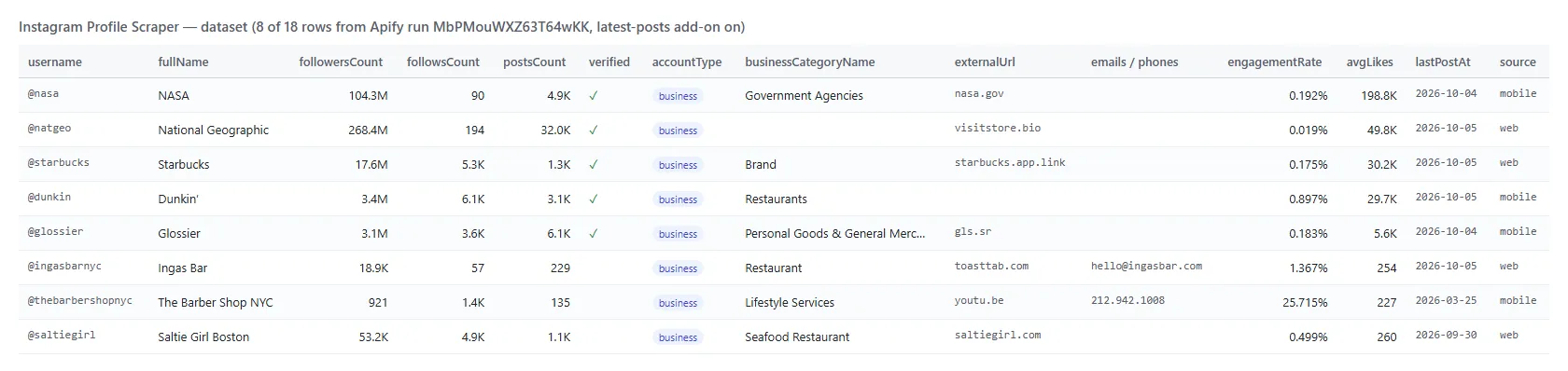
Every profile becomes one dataset item. Here is the table view of the first live run (latest-posts add-on on):
And one row as JSON (shortened; relatedProfiles, externalUrls and latestPosts are arrays of objects):
Instagram profile fields
Fill measured on the 18 profiles of the first live run.
| Field | Type | What it is | Fill |
|---|---|---|---|
id, username, url, fullName | string | Who the account is | 100%, name 94% |
followersCount, followsCount, postsCount | number | Exact counts | 100% |
biography | string | Bio text | 94% |
externalUrl, externalUrls | string, array | Link in bio and every bio link with its label | 83% |
businessCategoryName | string | Category shown under the name | 83% |
accountType, isBusinessAccount, isProfessionalAccount | string, boolean | business / creator / personal | 100% |
verified, private | boolean | Badges | 100% |
highlightReelCount | number | Story highlights | 94% |
igtvVideoCount, categoryEnum, businessContactMethod | number, string | From Instagram's app answer (see Limits) | 67%, 44%, 44% |
relatedProfiles | array | Accounts Instagram suggests next to this one | 56% |
emails, phones | array | Written in the bio or bio links | 22%, 6% |
businessAddress | object | Street, city, zip, coordinates when published | 11% |
profilePicUrl, profilePicUrlHD, fbid | string | Avatar and Meta account id | 100% |
lastPostAt | ISO date | Newest visible post | 94% |
latestPosts, engagementRate, avgLikes, avgComments, postsPerWeek | add-on | Latest posts and engagement | 94% |
changeType, followersDelta, postsDelta, changedFields | tracking | Change since the last run | every row in tracking mode |
status, source, inputUrl, scrapedAt | string | ok / private; which Instagram surface served it; the input line | 100% |
How can I use Instagram profile data?
- 🎯 Influencer marketers - size a creator list by followers, engagement rate and posting frequency before outreach.
- 📇 Lead-generation teams - turn a list of business handles into rows with website, category, address and any email or phone they publish.
- 🏷️ Agencies - check a client's competitors weekly: follower growth, new posts, bio and link changes.
- 🧑🤝🧑 Researchers - expand a seed list through
relatedProfilesand classify accounts by type and category. - 🤖 AI and data teams - feed
compactrows to an LLM or a warehouse; counts are numbers, never "1.2M". - 📈 Brand monitoring - schedule tracking mode daily and alert on accounts whose
changedFieldsis not empty.
How much does it cost to scrape Instagram profiles?
Instagram Profile Scraper is pay-per-result: $0.95 per 1,000 profiles, no start fee. One result is one profile written to the dataset. The optional latest posts + engagement block is $1.00 per 1,000 profiles that get it.
| Profiles | Profiles only | With latest posts + engagement |
|---|---|---|
| 10 | $0.0095 | $0.0195 |
| 100 | $0.095 | $0.195 |
| 1,000 | $0.95 | $1.95 |
| 10,000 | $9.50 | $19.50 |
Status rows for unavailable profiles (includeUnavailable) are free. Apify platform usage is included in these prices. The actor runs on 256 MB with no browser: 18 profiles took 33 seconds and peaked at 59 MB; 100 profiles took 157 seconds.
Integrations, API, scheduling & MCP
- Schedules: run the same list hourly, daily or weekly from the Schedules tab; with
monitorModeeach run carries the change since the previous one. - Webhooks: call a URL when a run finishes and push the rows to your CRM, Slack or a sheet.
- No-code: Make, Zapier, n8n, Google Sheets, Airtable and Slack through Apify integrations.
- API: start runs and read datasets from Node.js or Python with
apify-client; code is on the API tab. - MCP / AI agents: connect Claude, Cursor or any MCP client through the MCP tab and ask for profiles in plain language;
compactkeeps rows small.
More TopApi scrapers
| 📸 Instagram Scraper - posts, reels and carousels by profile, hashtag or URL | 𝕏 X Profile Scraper - X (Twitter) accounts with followers and bio | 🎵 TikTok Scraper - videos by profile, hashtag or URL |
| 🎬 TikTok Video Scraper - single TikTok videos by URL | ▶️ YouTube Shorts Scraper - Shorts with views and channel data | 🔎 Facebook Search Posts Scraper - public posts by keyword |
| ⭐ Google Maps Reviews Scraper - reviews with owner replies | 📊 Similarweb Scraper - website traffic and rank | 🧭 All TopApi actors - social, reviews and lead-gen scrapers built for scheduled runs |
Instagram profile limits & empty runs
- Results per run: no Instagram-side cap on how many profiles one run looks up;
maxResultscaps what you pay for. About one profile per second at the default 4 at a time. - Two Instagram surfaces: most profiles come from the answer Instagram's own apps use (
source: "mobile"). For some business accounts Instagram returns an error on that surface, and those are read from the web profile and its embed page instead (source: "web"): same counts, bio, links, category and related accounts, but no IGTV count, category code or contact method, and the add-on carries the 6 latest posts instead of 12. On the first live run 6 of 18 profiles came from the web surface; on a 40-account list of small food brands and restaurants it was 29 of 40. - Business email and phone: Instagram withholds the business contact block from signed-out visitors (null on every one of 44 profiles checked), so
emailsandphonescome from what the account writes in its bio and bio links. - Private accounts: the public header only (counts, name, bio),
status: "private", no posts. - Empty dataset: every handle was not found, invalid, filtered out, or (with
monitorOnlyChanges) unchanged - the status message andRUN_SUMMARYsay which.
FAQ
How much does Instagram Profile Scraper cost?
$0.95 per 1,000 profiles delivered, plus $1.00 per 1,000 for the optional latest posts + engagement block. No start fee, and status rows for unavailable handles are free.
How many Instagram profiles can Instagram Profile Scraper look up in one run?
As many as you paste; the 100-profile test took 157 seconds at the default settings. Raise Parallel profiles to 6-8 for lists of thousands, and split very large lists into several runs if you want results sooner.
Can I track Instagram follower growth with Instagram Profile Scraper?
Yes. Turn on Track changes between runs, save the input as a task and schedule it daily. Each row then carries followersDelta, followsDelta, postsDelta, followersGrowthPct and changedFields against the previous run of the same list.
Does Instagram Profile Scraper return the posts count?
Yes, postsCount is an exact number for every public profile, on both Instagram surfaces the actor reads. The latest posts themselves are the optional add-on.
Can I get emails and phone numbers from Instagram profiles?
The actor returns emails and phone numbers that an account writes in its bio or puts in WhatsApp, tel: or mailto: bio links. Instagram does not show the business contact button's email or phone to signed-out visitors, so those are not available.
Do I need an Instagram account, cookies or an API key?
No. Instagram Profile Scraper reads only what Instagram serves a signed-out visitor; you pass usernames, URLs or ids and nothing else.
Can I use Instagram Profile Scraper with the Apify API?
Yes. Start runs, fetch datasets and manage schedules with apify-client for Node.js or Python; the API tab has ready-to-paste code.
Can I use Instagram Profile Scraper through an MCP server?
Yes. Open the MCP tab, connect your MCP client (Claude Desktop, Cursor, LibreChat) and ask for profiles in plain language; turn on compact to keep rows small.
Can I integrate Instagram Profile Scraper with other apps?
Yes - Make, Zapier, n8n, Google Sheets, Slack and more through Apify integrations, or webhooks that fire when a run finishes.
Why did my Instagram Profile Scraper run return no results?
In testing the causes were: handles that do not exist (turn on includeUnavailable to see them as rows), post links pasted instead of profile links, filters that removed everything (the status message lists how many each filter removed), and tracking runs where nothing changed with monitorOnlyChanges on.
Is it legal to scrape Instagram profiles?
Instagram Profile Scraper extracts only publicly available profile data; it does not log in or collect private data. Results can still contain personal data, which is protected by regulations such as the GDPR, so make sure you have a legitimate reason to process it.
Your feedback
Found a bug or missing a field? Open an issue on the Issues tab and we will look at it.


